Quantum Prime Pro EA
- エキスパート
- バージョン: 5.0
- アップデート済み: 17 9月 2026
- アクティベーション: 10

https://www.mql5.com/tr/users/bilisimprofesoru/seller
Quantum Prime Pro EA is an Expert Advisor for XAUUSD / Gold trading on MetaTrader 5. It is designed for traders who prefer a gold EA with no grid, no martingale, real Stop Loss and Take Profit logic, and controlled risk management.
Recommended brokers: VT MArkets,VantageMarkets.
Recommended maximum spread: 10–11
Recommended VPS latency: 0–3 ms
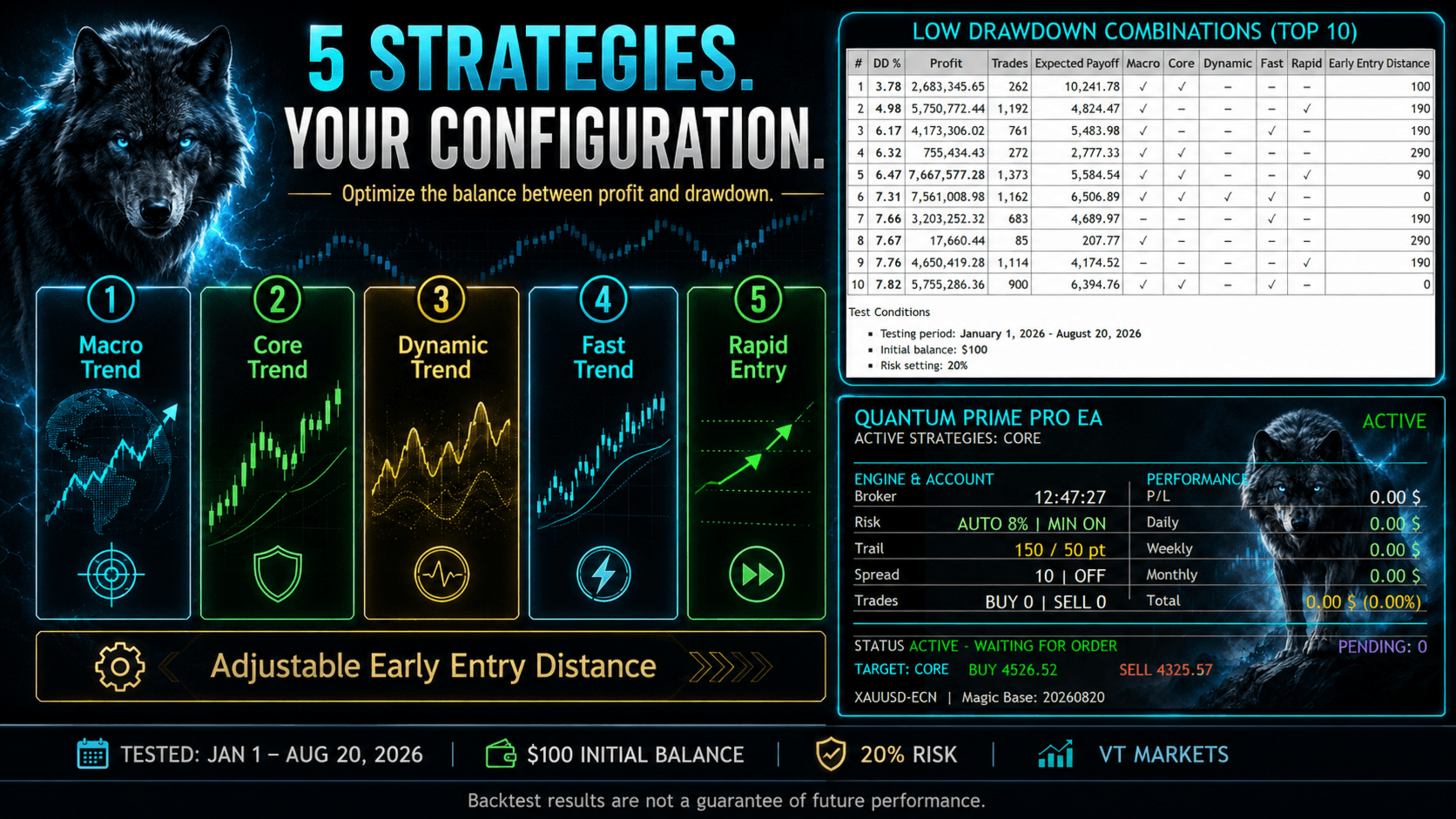
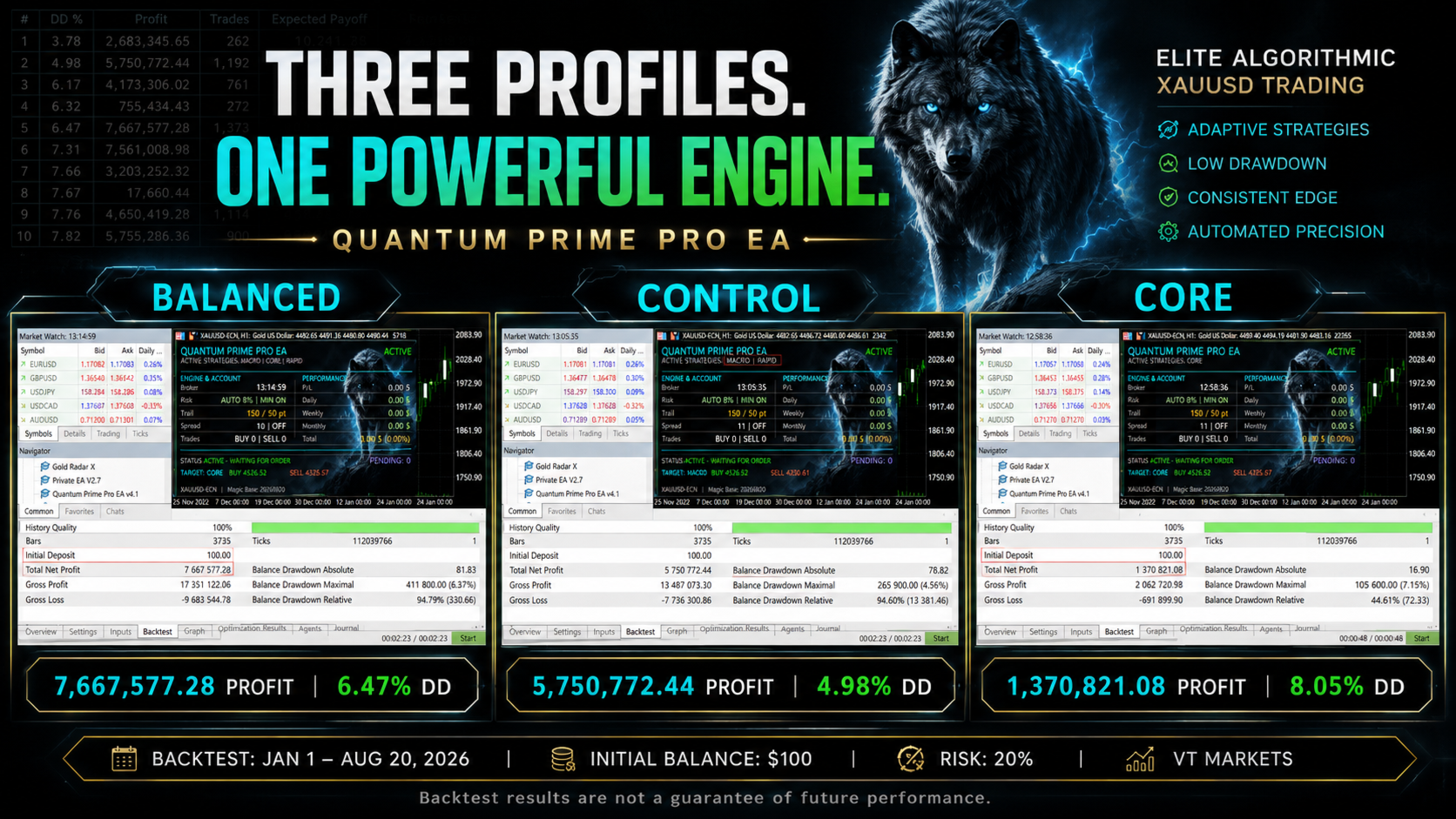
| # | DD % | Profit | Trades | Macro | Core | Dynamic | Fast | Rapid | Early Entry Distance |
|---|---|---|---|---|---|---|---|---|---|
| 1 | 3.78 | 2,683,345.65 | 262 | ✓ | ✓ | — | — | — | 100 |
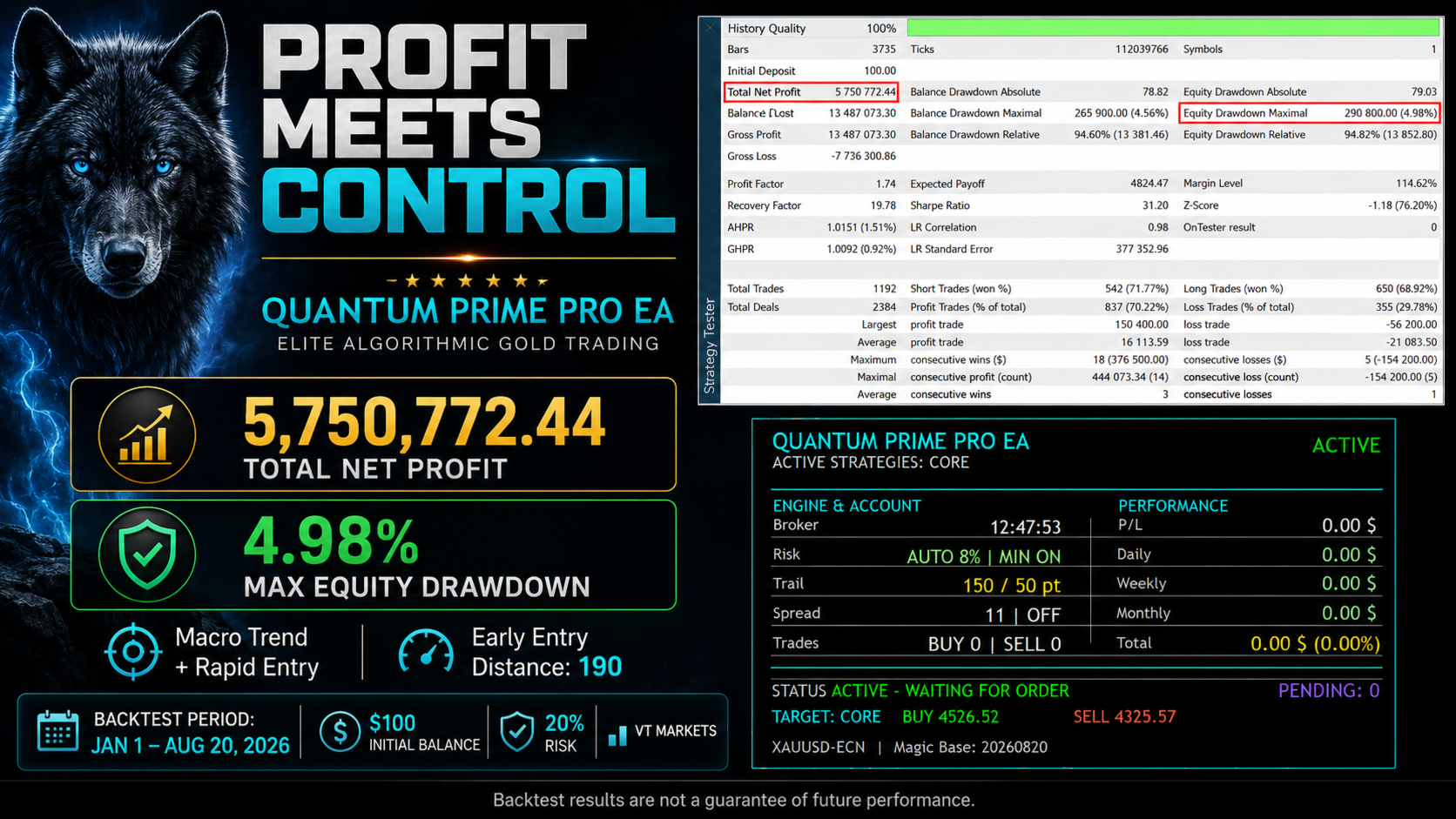
| 2 | 4.98 | 5,750,772.44 | 1,192 | ✓ | — | — | — | ✓ | 190 |
| 3 | 6.17 | 4,173,306.02 | 761 | ✓ | — | — | ✓ | — | 190 |
| 4 | 6.32 | 755,434.43 | 272 | ✓ | ✓ | — | — | — | 290 |
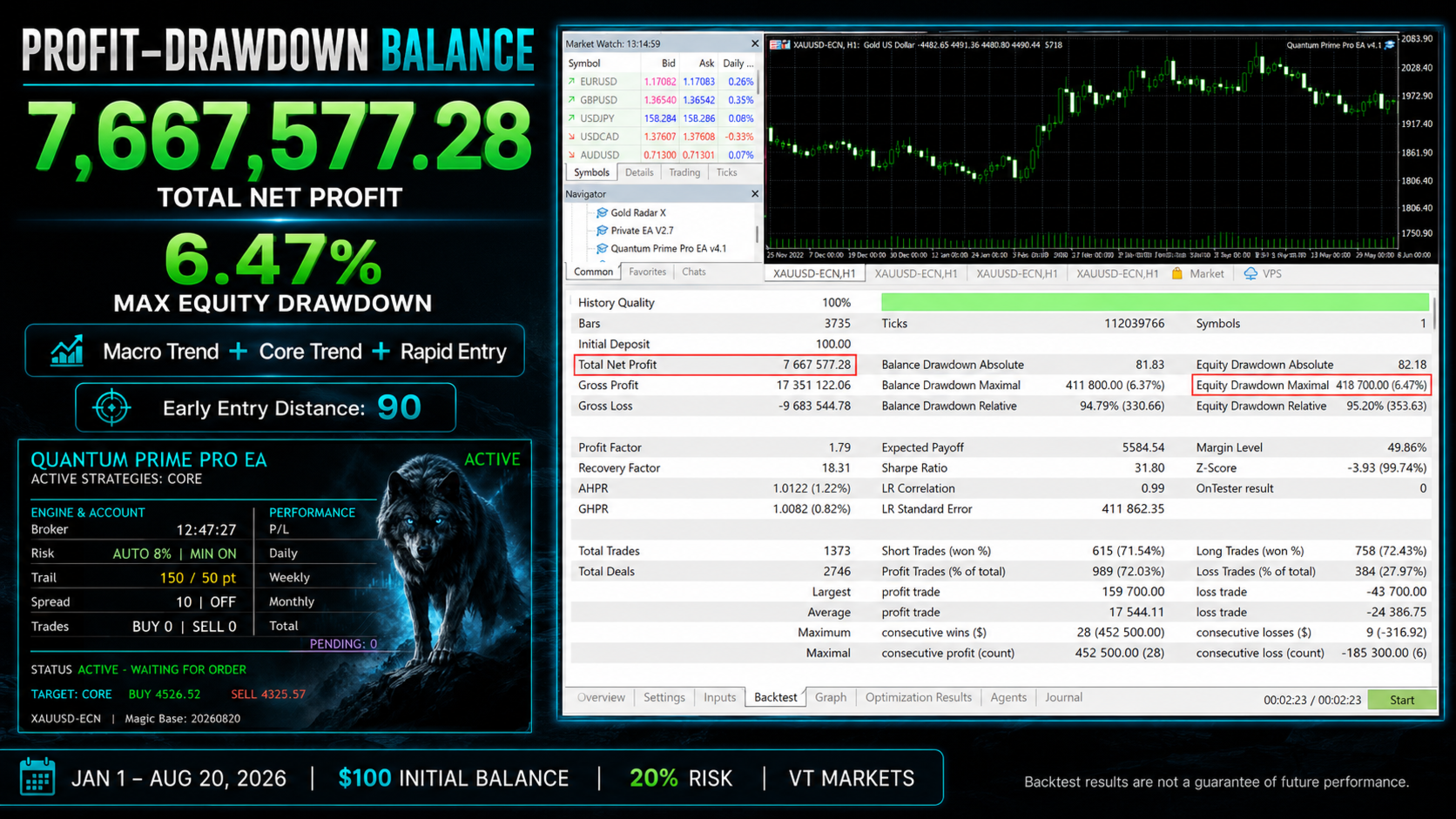
| 5 | 6.47 | 7,667,577.28 | 1,373 | ✓ | ✓ | — | — | ✓ | 90 |
| 6 | 7.31 | 7,561,008.98 | 1,162 | ✓ | ✓ | ✓ | ✓ | — | 0 |
| 7 | 7.66 | 3,203,252.32 | 683 | — | — | — | ✓ | — | 190 |
| 8 | 7.67 | 17,660.44 | 85 | ✓ | — | — | — | — | 290 |
| 9 | 7.76 | 4,650,419.28 | 1,114 | — | — | — | — | ✓ | 190 |
| 10 | 7.82 | 5,755,286.36 | 900 | ✓ | ✓ | — | ✓ | — | 0 |
Test Conditions
- Testing period: January 1, 2026 – August 20, 2026
- Initial balance: $100
- Risk setting: 20%
- Broker: VT Markets
- Recommended maximum spread: 10–11
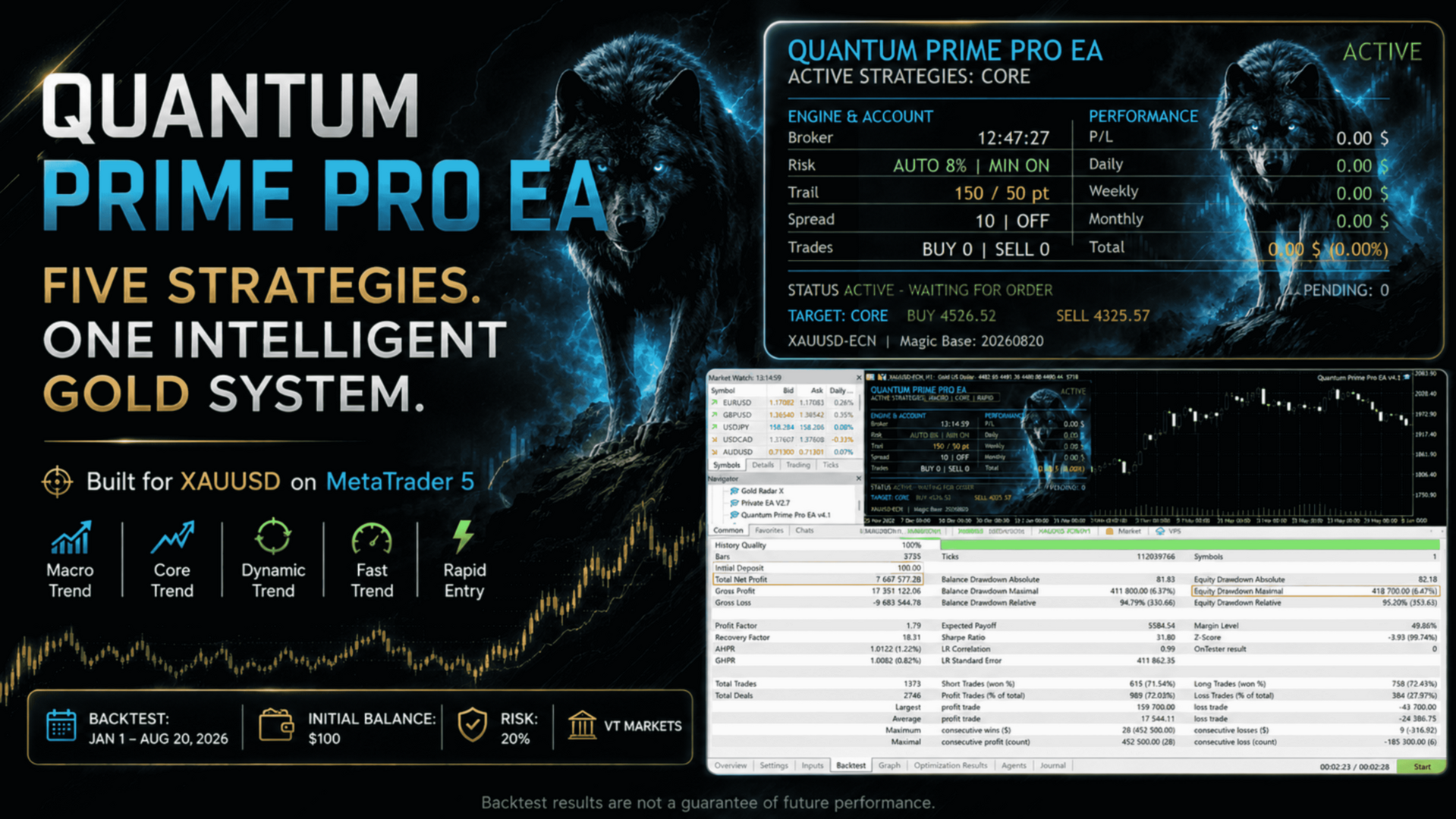
The standout combination in terms of profit-to-drawdown balance is Macro Trend + Core Trend + Rapid Entry enabled, with Early Entry Distance set to 90. It generated a profit of 7,667,577.28 with a maximum drawdown of only 6.47%. But the decision is yours.
...............................................................................................................................................................................................................................................................................
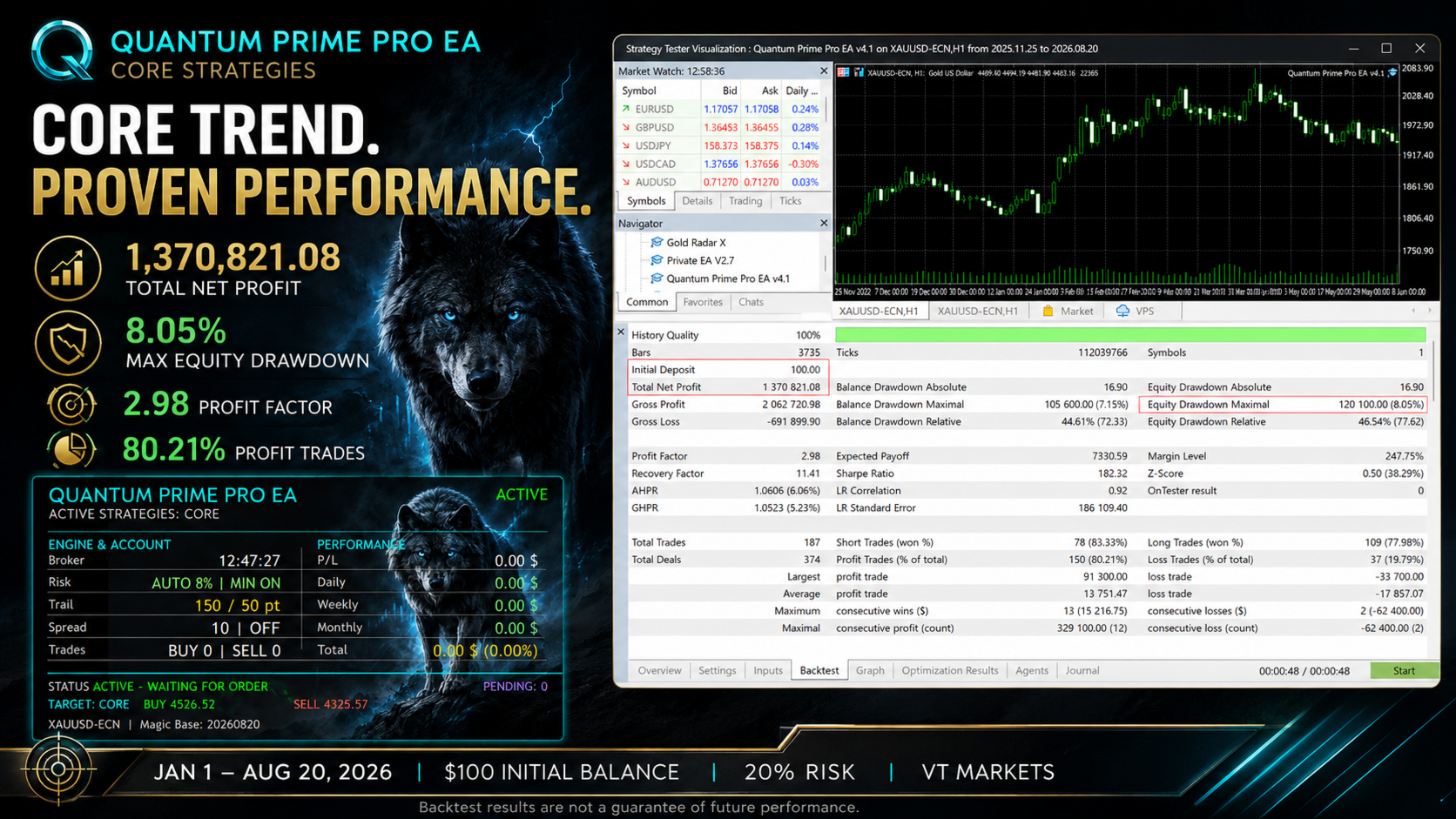
Backtests can help users understand how the EA behaves; however, live trading results may differ due to broker spreads, slippage, commissions, execution speed, VPS quality, and market conditions................................................................................................................................................................................................................................................................................
Quantum Prime Pro EA
is an automated trading Expert Advisor developed for MetaTrader 5, combining multiple strategy profiles, automatic risk management, a pending-order system, and active position management in a single EA.
The robot includes five different trading profiles that can operate independently:
-
Macro Trend
-
Core Trend
-
Dynamic Trend
-
Fast Trend
-
Rapid Entry
The user can activate only one strategy or multiple strategies at the same time.
By default, the Core Trend strategy is enabled.
Each strategy has its own independent market analysis and trade-control structure. The main calculation timeframes and internal parameters of the strategies are fixed inside the robot and do not need to be configured separately by the user.
1. Trading LogicQuantum Prime Pro EA analyzes historical price movements and creates dynamic support and resistance zones.
Depending on the market structure of the active strategy, the robot can place:
-
BUY STOP orders in the upper price zone,
-
SELL STOP orders in the lower price zone.
Order levels are calculated dynamically according to market movement.
When a pending order is triggered, the robot:
-
checks the actual execution price,
-
manages Stop Loss and Take Profit levels,
-
recalculates protective levels from the actual execution price when necessary,
-
continues monitoring the position if the trailing system is active.
Macro Trend
A strategy profile designed to follow broader market movements.
It considers price structure on a higher timeframe and is intended to filter longer-term market movements.
Core Trend
The default strategy of Quantum Prime Pro EA.
When the robot is installed for the first time, only Core Trend is enabled.
It is the main trading profile, designed to provide a balanced combination of market monitoring and entry frequency.
New users are advised to begin their first tests using only Core Trend.
Dynamic Trend
A strategy profile that reacts to market movements faster than Core Trend.
It follows shorter-term price movements while using a broader confirmation structure.
Fast Trend
Designed to react to shorter-term market movements.
It performs trade-condition checks faster than Dynamic Trend.
Rapid Entry
The fastest market-monitoring profile among the five strategies.
It follows price changes on shorter timeframes and may generate entry opportunities more frequently.
3. Using Multiple Strategies at the Same TimeOne of the key features of Quantum Prime Pro EA is that all five strategies can operate independently.
For example, the user can enable:
-
Core Trend
-
Fast Trend
-
Rapid Entry
at the same time.
Each strategy:
-
checks its own market conditions,
-
manages its own pending orders,
-
tracks its own trade status,
-
uses a separate internal trade identity.
Therefore, the existence of a BUY STOP order from one strategy does not prevent another strategy from creating its own BUY STOP order.
However, enabling multiple strategies can increase the total exposure of the account.
4. Risk ManagementQuantum Prime Pro EA supports two different lot-management methods.
Fixed Lot
When:
Auto Lot Calculation = false
the robot uses the:
Initial Lot
value.
Example:
Initial Lot = 0.01
means trades are opened using a 0.01 lot size.
Automatic Risk Calculation
When:
Auto Lot Calculation = true
the lot size is calculated automatically.
The robot considers:
-
account balance,
-
selected risk percentage,
-
Stop Loss distance,
-
symbol tick value,
-
broker minimum lot size,
-
lot step,
-
maximum allowed volume,
-
available margin.
The risk level can be selected between:
1% and 20%
Example:
Risk Percentage = 3
means the robot uses approximately a 3% target risk when calculating the lot size.
5. Minimum Lot ProtectionOn some smaller accounts, the calculated lot size may be below the broker's minimum allowed volume.
In this case, if:
Use Minimum Lot at Low Risk = true
the robot may use the broker's minimum lot size.
For example, if the broker's minimum volume is:
0.01 lot
and the calculated value is 0.004 lot, the robot may still use 0.01 lot.
In such cases, the actual risk may be higher than the selected target risk.
6. Stop Loss and Take ProfitThe robot uses a fixed Stop Loss and Take Profit system for each trade.
Default values:
| Setting | Default |
|---|---|
| Stop Loss | 300 points |
| Take Profit | 1500 points |
The user can change these values from the Inputs section.
7. Execution Price ProtectionThere may be a difference between the trigger price of a pending order and the actual execution price.
This can occur especially during:
-
high volatility,
-
news periods,
-
spread expansion,
-
rapid price movements.
After a trade is executed, Quantum Prime Pro EA checks the actual position opening price and, when necessary, rebuilds the SL/TP levels based on the real execution price.
This system helps manage the difference between the requested pending-order price and the actual execution price.
8. Secondary Trailing Stop SystemThe robot includes a separate trailing-stop system.
Default values:
| Setting | Value |
| Secondary Trailing | Enabled |
| Start | 150 points |
| Trailing Distance | 50 points |
Example:
Start = 150
Step = 50
When the position reaches the required profit distance, the Stop Loss begins to follow the price at the specified distance.
The robot also considers the broker's:
-
Stops Level
-
Freeze Level
rules.
9. Spread ControlThe maximum allowed spread can be configured using:
Maximum Spread
Example:
Maximum Spread = 50
If the spread exceeds 50 points, the robot does not create new orders.
When:
Maximum Spread = 0
the spread filter is disabled.
The spread filter affects new trade entries.
Management of existing open positions continues.
10. Automatic Pending Order ManagementThe robot manages pending orders automatically.
The internal system controls:
-
pending-order lifetime,
-
order cancellation time,
-
order-resume time,
-
weekend protection,
-
broker trading sessions.
These settings are managed internally to keep the user interface simple.
11. Weekend ProtectionQuantum Prime Pro EA includes an automatic weekend-protection system.
When protection is active, the robot does not initiate new trades during the defined protection period.
Unnecessary pending orders may be removed during the weekend-protection period.
After the market reopens, the robot automatically returns to its normal operating mode.
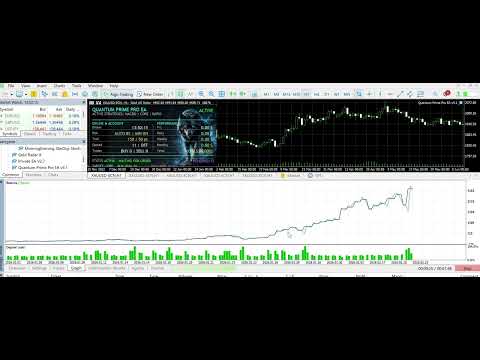
12. Information PanelQuantum Prime Pro EA displays an advanced information panel on the chart.
The panel can display:
-
Active strategies
-
Robot status
-
Broker time
-
Risk mode
-
Trailing values
-
Spread
-
Open BUY count
-
Open SELL count
-
Current profit/loss
-
Daily result
-
Weekly result
-
Monthly result
-
Total result
-
Pending-order count
-
BUY target level
-
SELL target level
-
Magic Number information
A custom wolf image embedded directly inside the robot can be used as the panel background.
No external image file is required.
13. Panel Status MessagesDifferent operating states can be displayed on the panel.
ACTIVE
The robot is active and waiting for new trade conditions.
IN TRADE
At least one position opened by the robot is active and position management is running.
WEEKEND PAUSE
Weekend protection is active.
No new trades are initiated.
ORDERS PAUSED
New orders are temporarily paused due to the internal order-time management system.
NO STRATEGY
All five strategies are disabled.
The robot does not create new trades.
14. Displaying Active Strategies on the PanelActive strategies are also shown on the information panel.
For example, if only Core Trend is enabled:
ACTIVE STRATEGIES: CORE
If Core Trend and Fast Trend are enabled:
ACTIVE STRATEGIES: CORE | FAST
If all five strategies are enabled:
ACTIVE STRATEGIES: MACRO | CORE | DYNAMIC | FAST | RAPID
15. Recommended Settings for First UseWhen using the robot for the first time, it is recommended to begin testing with only Core Trend enabled.
Initial configuration:
Macro Trend = false Core Trend = true Dynamic Trend = false Fast Trend = false Rapid Entry = false
This makes it easier to observe and understand the robot's basic trading behavior.
Other strategies can then be enabled and tested one by one.
16. Multiple Strategies and RiskThis section is important.
For example, if:
Risk Percentage = 10
and all five strategies are enabled, the robot does not automatically divide the 10% risk between the five strategies.
Each strategy can perform its own lot calculation when its individual trade conditions are met.
Therefore, total account exposure can be higher when multiple strategies are enabled compared with using only one strategy.
For this reason:
The risk level should be reviewed whenever the number of active strategies is increased.
17. Using the Strategy TesterThe robot should be tested in the MetaTrader 5 Strategy Tester before being used on a live account.
Whenever possible, the following test model can be used:
Every tick based on real ticks
For more meaningful comparisons, use:
-
the same broker,
-
the same symbol,
-
the same account type,
-
the same leverage,
-
similar spread conditions.
Historical test results are not guaranteed to match live-account results exactly.
In live markets, results can be affected by:
-
spread changes,
-
slippage,
-
connection latency,
-
broker trading rules,
-
liquidity,
-
Stops Level,
-
Freeze Level.
For uninterrupted operation, the MetaTrader terminal must remain open continuously.
For this reason, using a suitable VPS may be beneficial for live-account operation.
When selecting a VPS, a location with low latency to the broker's trading server may provide more stable execution conditions.
19. Magic NumberQuantum Prime Pro EA uses a Magic Number to separate its trades from those of other Expert Advisors.
The user defines the base Magic Number.
The five strategy profiles internally use separate trade identities derived from this base number.
If more than one copy of Quantum Prime Pro EA is used on the same symbol, different Magic Numbers are recommended.
20. Inputs Description| Setting | Description |
| Magic Number | Trade identifier used by the robot |
| Trade Comment | Order comment |
| Initial Lot | Fixed lot size |
| Auto Lot Calculation | Automatic risk-based lot calculation |
| Risk Percentage | Risk selection from 1% to 20% |
| Use Minimum Lot at Low Risk | Allows use of the broker's minimum lot size |
| Maximum Spread | Maximum spread filter |
| Macro Trend | Enable/disable Macro Trend |
| Core Trend | Enable/disable Core Trend |
| Dynamic Trend | Enable/disable Dynamic Trend |
| Fast Trend | Enable/disable Fast Trend |
| Rapid Entry | Enable/disable Rapid Entry |
| Fixed Stop Loss Points | Stop Loss distance |
| Fixed Take Profit Points | Take Profit distance |
| Secondary Trailing Enabled | Enable/disable the trailing system |
| Secondary Trail Start Points | Trailing activation distance |
| Secondary Trail Step Points | Trailing follow distance |
| Panel Active | Enable/disable the information panel |
| Panel X | Horizontal panel position |
| Panel Y | Vertical panel position |
| Panel Width | Panel width |
| Panel Height | Panel height |
| Embedded Wolf Background | Enable/disable the wolf background |
| Background Color | Panel background color |
| Border Color | Panel border color |
| Text Color | Panel text color |
| Font Size | Panel font size |
Risk Warning
Trading in financial markets involves significant risk.
Historical test results, past performance, or previous market behavior do not guarantee the same results in the future.
Lot size, risk percentage, and the number of active strategies should be selected according to the user's account size and individual risk tolerance.
It is recommended to test the robot on a demo account and in the Strategy Tester before using it on a live account.