Session Map Visual Trading Sessions
- インディケータ
- バージョン: 1.0

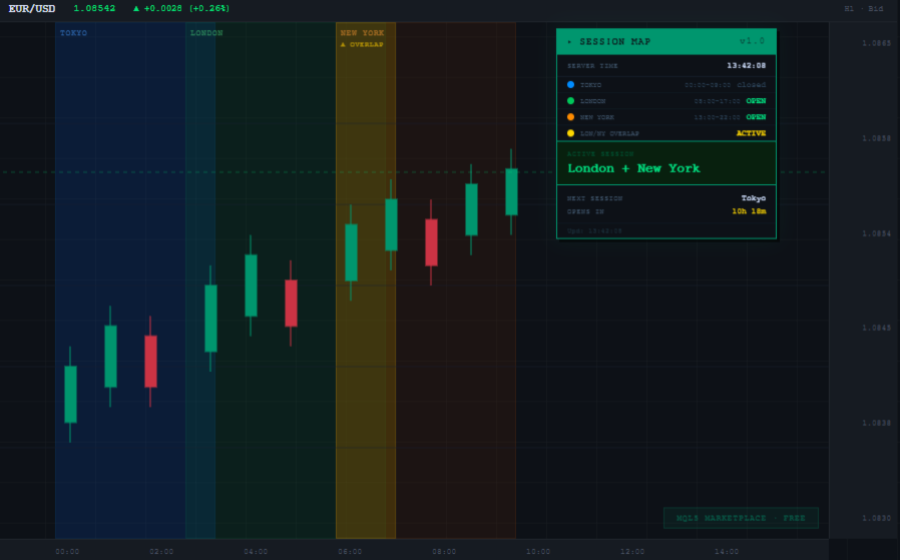
Know exactly when the market is active. Session Map displays the major Forex trading sessions directly on your chart and in a live panel.
WHAT IT SHOWS ON THE CHART:
- Colored background boxes for each session: Tokyo (blue), London (green), New York (orange)
- London and New York overlap highlighted in yellow — the most volatile period of the day
- Draws the last 3 days automatically so you can compare session behavior
WHAT THE PANEL SHOWS:
- Live server time clock updated every second
- Status of each session: OPEN or closed in real time
- Active session name highlighted
- Countdown timer to the next session open
WHY THIS MATTERS:
Each session has different volatility and movement characteristics. Trading during the London and New York overlap gives you the highest liquidity and tightest spreads. Session Map makes all of this visible at a glance without leaving your chart.
SETTINGS:
- Session open and close hours fully adjustable to match your broker server time
- Show or hide boxes, panel and overlap independently
- Choose how many days back to draw session boxes
- All colors customizable
- Panel position adjustable with X and Y coordinates
COMPATIBLE WITH:
- All Forex pairs
- Gold (XAUUSD) and other CFDs
- Any timeframe
- MetaTrader 5 build 3800 and above
No DLL required. No external connections. Lightweight and fast.