 MetaTrader 5
 エキスパート
 インディケータ
 ライブラリ
ライブラリ
 ユーティリティ
 ウィジェット
 ルール
ルール
YouTubeにあるマーケットチュートリアルビデオをご覧ください
ロボットや指標を購入する
仮想ホスティングで
EAを実行
EAを実行
ロボットや指標を購入前にテストする
マーケットで収入を得る
販売のためにプロダクトをプレゼンテーションする方法
MetaTrader 4用取引ユーティリティ - 30
 以下はMetaTrader4での外国替取引を簡素化する取引プログラムです。以下のリストのユーティリティにカーソルを合わせて、説明と目的をご覧ください。
Excellent dashboard for analytics. The panel helps to analyze the values of the Momentum indicator and its signals.
With this panel you can: watch the current signal from Momentum on all timeframes; watch the current signal from Momentum for different symbols; watch the current Momentum value; several types of signals for analytics.
Values in a table cell: value of Momentum
Signal type: Momentum crosses "100" line Momentum upper/lower "100" line Momentum direction
Work option: all

BlueDigitsFx公式エコシステムへのアクセス インフラ更新情報、トレーディングリソース、製品リリース情報、およびBlueDigitsFx公式エコシステムへのアクセスを取得できます。 Telegramエコシステム
ウェブサイト
BlueDigitsFx Command Center — MT4向けトレード実行・リスク管理・市場分析ダッシュボード BlueDigitsFx Command Centerは、エントリー管理、リスク管理、市場方向、モメンタム分析、およびセッション全体の把握を1つの集中環境で行うために設計された、MT4向けのプロフェッショナルな実行・ワークフローダッシュボードです。 BlueDigitsFxトレーディングインフラエコシステムの一部として、Command Centerは注文実行ツール、高度なロットサイズ計算、ブレークイーブン管理、トレーリングストップ制御、ローソク足方向、モメンタム分析、マルチタイムフレームトレンド表示、および通貨強弱分析を統合しています。 さまざまな銘柄、時間足、トレードスタイルにおいて、より効率的な執行、迅速なポジション管理、そして

No Nonsense Forex History News Tool
Please do not download Demo here, There is no demo version and it will not work.
Pros: Ability to adapt any GMT timezone broker News Event precision up to M5 time-frame Extremely easy to use
NNFX History News Tool is a tool dedicated to NNFX followers, it is designed to ease up the process of incorporating NNFX News Event during back-testing. History News provided by this tool starts from 2015/01/01 - 2020/08/09. The news event history provided by this t

このEAを使用することにより様々な条件で自動で決済することが可能になります。
詳細な情報はこちらにサイトがあります。
https://toushika.top/ea-takeaprofit/
条件: 条件1:利確か損切で決済 条件2:利確か損切または反転MAで決済 (ディフォルトでは20MA反転で利確) 条件3:利確か損切またはゴールデンクロス、デットクロスで決済 条件4:利確か損切またはボリンジャーバンドにタッチで決済 条件5:利確か損切またはパラボリックで決済 条件6:利確か損切または設定した水平線で決済 <- 他の通貨で設定した水平線でも決済可能
重要:水平線で決済の際、買いポジションと売りポジションは同時に持てません。 買いポジションがある時に売りポジションを持つとすぐに決済されてしまいます。 反対に売りポジションがる時に買いポジションを持つとすぐに決済されてしまいます のでご注意ください。

アシスタント取引保留中の注文MT4 貿易アシスタントは、手動取引のために設計された取引パネルです。 パネルでは、リスクの計算、制限注文を使用したポジションの管理、 その他の便利な機能。
パネルの主な機能 通貨ペア、CFD、株式、インデックス、先物、暗号通貨 - それは、任意の取引手段で動作します。 2. ストップロスを設定し、ポイント単位で距離として利益を取ります. 3. 潜在的損失対利益率を設定し、表示します。 4. パネルは、保留中の注文をサポートしています。 5. 開く前に、計算されたポジションのボリュームと利益をチャートに表示します。 6. 機能制限命令。
Trade Assistant is a trading panel designed for manual trading. The panel allows you to calculate risk, manage positions using Limit orders, And other useful features.
Key features of the panel It works with
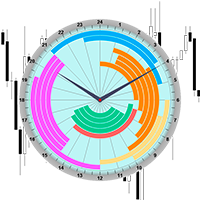
The professional indicator of Trading Sessions is now available in MetaTrader4.
Also the professional BROWSER of the NEWS and Trading Sessions is now available in MetaTrader5.
One dial shows the time of the 18 largest stock exchanges in the world. This makes it possible to trace the characteristic movement of the market at the appropriate time of day.
Thanks to sound and Push notifications, you will never miss the start of trading on the next exchange!
The operating time of each exchange

専門家のアドバイザーマニュアル工事の傾向線に伴う損益は、受益となりました。 ビルド後、EAはレベル、方向、およびロットを記憶します。 計算された価格で現在の価格をタッチすると、事前に選択されたパラメータを持つ注文が開かれます。 異なる時間枠から最大10の多方向レベルを構築して保存することができます。 あなたは、任意の取引商品でそれを使用することができ これは、4桁と5桁の価格で正しく動作します。 あなたは、取引チャネルの内訳とそれからのリバウンドの両方のいくつかの取引ラインから取引戦略を作成することができます。 市場価格がそれに触れていない場合は、取引ラインのすべての設定が削除される期間を設定することができます。 トレンド目標の計算の便宜のために、設定レベルを備えた組み込みのFiboルーラーがありますが、イベント処理の特殊性のために、この関数はテスト中に

This application exports all finished operations to a text file delimited by <TAB>, comma, semicolon or any character defined by the user, also including the comments and magic number of the operations, which can be easily exported to EXCEL or Google Spreadsheets.
The files are generated in the "files" folder, individually separated by month with the name in the format: 999999-AAAA BBBB- [9-9999] where:
999999 = MT4 Trading Account Number
AAAA BBBB = Trading Account User Name
[9-9999] - Mon

MagicExcel will allow you to extrapolate, from your trades, reports split down by Expert Advisor. The generated reports allow you to quickly compare statistics of trades data from different Expert Advisors, different symbols and also the behavior of an Expert Advisor against different symbols. Additionally, if selected, a report will be created that shows the behavior of the Expert Advisor over time. This is a very useful tool for a trader who works with many Expert Advisors at the same time. R
Public Signals using this EA:
https://www.mql5.com/en/signals/1016250 https://www.mql5.com/en/signals/1018964 The EA waits for the first executed order available and then opens a grid of pending stop-type orders in the same direction of the first one The first order that we usually call the master trade can be opened manually, on specified day and or via any other EA, indipendent from this one There is a dedicated Telegram Group with use cases and best settings, feel free to join and ask for

The LMBFPositionSize indicator is a simple way to quickly determine the position size appropriate for your prospective trade interactively on your Metatrader 4 charts. When you first add the indicator to your chart, you will be given the option to set parameters including: the account balance to use in the calculation and a percentage of the balance you are prepared to risk. Once attached to your chart, the indicator is available for you to use whenever you want and will continue to use these p

Completely change the way you use Metatrader 4 forever and give new meaning to using profiles and templates. Just attach the indicator to your open charts (e.g. include in your default template) and customised templates so you can do the following: Switch between different templates effortlessly without fear of losing any of the graphical objects (horizontal S&R, areas of supply and demand, text annotations) drawn on your charts Close a chart and then watch it remember all the graphical objects

If you like to see different time frames for the same symbol side by side on your terminal, then this is the indicator for you. Attach the indicator to all chart instances for the symbol of interest. Then see any additions, edits or deletions made on graphical objects instantly replicated to all other open charts for the same symbol. Object types replicated include: trend lines, horizontal lines, vertical lines, rectangles, triangles, ellipses, arrows, text boxes and labels.

This is a script in the entire application that records your trading logs that I created myself to practice trading skills.
The whole set includes: script, and web app: https://myfxjournal.cloud
It is very simple with only two options: Type (select dropdown) and Ticket (input).
If you choose to record open positions, please choose Type = Opening_Trade, otherwise choose Type = Closed_Trading (this is under the Account History tab)
***********This is the part used on the website**************
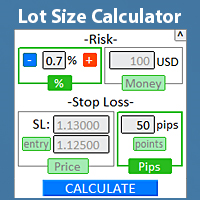
リスク管理を遵守するために、ロットサイズを ターミナル内で直接 すばやく見つけます。 私の #1 トレードマネージャー をチェックしてください: 66以上の機能、PROリスク管理を含む | 質問がある場合はお問い合わせください すべての取引ツールで動作します: 外国為替、株式、先物、指数、CFD、債券、暗号通貨; インターフェース最小化機能; 使用の柔軟性; 資金管理; 短期トレーダーにとって特に有用で、 迅速に 行動する必要がある場合に便利です。 計算には2つのパラメータを指定する必要があります:
リスクサイズ(2つのオプションのうち1つ): リスクパーセンテージ : 手動で設定するか、+/-ボタンを使用; リスク金額 (アカウントの通貨は自動的に決定されます); ストップロスレベル(3つのオプションのうち1つ): SLサイズ: ピップ、または ポイント ( ポイント トグル); SL価格: 現在の価格でのマーケット実行の計算; SL価格 + エントリー価格: 保留注文の計算; "CALCULATE"ボタンをクリックすると、ロットサイズが計算されま

Pro MT4 To Telegram sends text messages to a Telegram group or channel of your choice immediately when (No DLL files Needed):
+ new order + closed order + placing pending order + modified order + Delete Pending order and more in the next update... I have tested this EA with forex symbols but it should work fine with any MT4 symbol (e.g. indexes, commodities, stocks, cryptocurrencies)
How To get your Bot Token or Api Token : Before running the Telegram EA you must create your own Telegram bot

このインジケーターは世界の取引所の営業時間を表示します。現在どの市場が最も活発かを確認するのに役立ちます 私の #1 Pro Utility : 66+ 機能、このツールを含む | お問い合わせ ご質問があれば 現在最もボラティリティの高い銘柄を選択するのに役立ちます; デイトレーダーに特に有用です; 1) 1H以下の時間足 で使用する場合:線はチャート上のバーの実際の位置に対応し、チャートを移動すると、取引セッションの線 はチャートと一緒に移動します 。 2) 4H以上の時間足 で使用する場合:取引セッションの 静的なチャート が表示され、垂直線 は一日中移動し 、現在どの市場が活発かを示します。(スケールのため)。
インジケーターをインストールした後、グリッドを無効にし(CTRL+G)、オブジェクトの説明を無効にする(F8>共通>オブジェクトの説明を表示)ことをお勧めします。 入力設定: 重要: インジケーターを正しく動作させるには、初期設定で ブローカー時間とグリニッジ標準時との時差を設定する必要があります:
ブローカー時間は「MarketWatch」セ
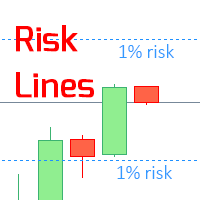
このインジケーターは、 指定されたリスクレベル をチャート上に表示します(ロングとショートのポジション用)。 私の #1 トレードマネージャー をチェックしてください:66+ の機能、このツールを含む | 質問があれば連絡してください ストップロスレベルの設定時に便利で、その値は右側の価格軸に表示されます。 リスクレベルの計算には、 固定 / または 最後に使用された ロットサイズが使用されます。 入力設定: 最後に取引されたロット: " true " に設定すると、 最後に使用された 取引ロットに基づいて計算されます; ロットサイズ: 取引ロットの値を設定: 最初のパラメータが ' false" の場合に使用されます; 現在の口座の 残高 / 利用可能な 証拠金 に対するリスク; リスクレベル (0.1% から 100%): 小数値には、区切り文字としてピリオド (.) を使用; 線とラベルの色 は調整可能; 背景の線: もし ( true ):背景に線を描画; フォントサイズ: ラベル用; プロフェッショナルアシスタン

未決済トレードの結果を計算するためのインフォーマー 私の #1 Trade Manager : 66+ の機能、このツールを含む | ご質問があればお問い合わせください 情報パネルは未決済注文を2つのカテゴリに分類します: 買い 売り 各カテゴリについて、シンボルと現在のピップ数が表示されます。 すべての未決済トレードの合計結果が下に表示されます。 通知はボタンをクリックするだけで有効または無効にできます: 通知が有効になっている場合、どのシンボルでも利益が指定値を超えたときに知ることができます。 通知を受けるピップ数は手動で設定するか、+ と - ボタンを使用して設定します(ステップは設定で調整)。通知はターミナル、メール、モバイルアプリで利用可能です。 通知オプションは損失ポジションにも利用可能:損失が指定値を超えたとき。 インターフェースを折りたたむ機能があります(右上隅):折りたたまれたパネルは不要なときにワークスペースを占有しません。 必要に応じて、表示色を設定で変更できます。
設定可能: 1) 通知:
通知を受けるデフォルトのピップ数(後でインターフェースで
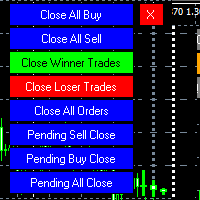
MT4 To Telegram it is available now! This Panel Allows you to : Close all buy orders. Close all sell orders. Close all winning orders. Close all losing orders. Close all orders. Close all Pending BUY orders. Close all Pending SELL orders.
Close all Pending orders.
Bonus : Grid Manager : Set the number of levels (trades). Lot size and you can do Martingale to raise the lot size for each level. Set distance between levels, and you can manage the distance for each level using Distance Q. St

AntiMartingale-Execution is a pyramidal Money Management system capable of increasing positions as equity increases using the positive margin of the transaction. It is possible to set the capital for each operation, the operating and maximum margins and the target level to be reached. Once the general trade settings have been made, it is possible to preview the grid of operations that will be activated by pressing the BUY / SELL button. If necessary, it is also possible to close all operations

Product Overview
This tool is discretionary trading aid that executes a one-time entry when the conditions are set.
Action after the newest bar is fixed (opening action)
For example, there is no need to worry about being pruned by the shadow of the same price before that if you set it in the condition of when the closing price was broken.
It is not possible to set complicated conditions, and it is not designed for continuous automatic trading, but since it works after the time period is fix
FREE

デイリートレード結果を追跡するためのインフォーマー 私の #1 トレードアシスタント をチェック: 66+ 機能、このツールを含む | 質問があれば連絡 してください パネルの上部で、デイリー利益目標(ピップ単位)を設定します: 手動で値を入力; [+] と [-] ボタンを使用(変更ステップは設定で調整可能); ダッシュボードは取引を2つのカテゴリに分類します: 現在のフローティング結果; クローズドトレードの合計; 最終結果は下部に表示されます:デイリー目標の達成または未達成、および超過または不足ピップ数。
インターフェースの折りたたみ 機能(左上隅):折りたたまれたパネルは不要時にワークスペースを占有しません。
設定可能(3スクリーンショット):
1) デフォルトの デイリー目標 (後でインターフェースから迅速に変更可能);
2) 通知設定: デイリー目標達成時の通知を有効/無効; デイリー目標未達成時の通知を有効/無効; 目標チェック時間(デフォルトは23:50); ターミナル通知を有効/無効; メール通知を有効/無効; モバイルデバイス通知を有効/無効;
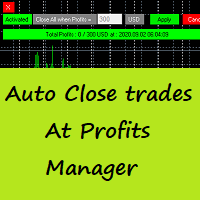
Auto Close Trades At Profits Manager is a tool that closes orders at a defined profit, very simple to use ( Panel with buttons...).
You can enable or disable the tool using buttons and edit the profit amount from the panel too.
INPUTS:
You can customize Panel graphics, Font and colors.
You can check also the The Grid Manager, closing trades Manager https://www.mql5.com/en/market/product/46365

Hello Traders, This is a new Upgraded version. Money management is the key! The multiplier tells you the position of the stop loss. Additionaly do not forget to use exit indicators!
Based on this and your risk in percent (max 2%) you get the position size Calculated. You can drag the Panel on your chart by pressing the off button than press it again and hold+drag.
Enjoy=)
FREE

This script allows traders to easily close positions if their profit/loss reaches or exceeds a value specified in pips.
The script allows users to easily close positions if their profit/loss reaches or exceeds a value specified in pips.
Please set slippage value first. Sometimes some positions do not close due to high volatility of the market. Please set larger slippage or restart the script.
...................................................................................................

It is a truly useful multifunctional tool. I did it thinking about my needs as a trader some years ago although I have been modifying it for my partners to use it.
This tool allows: Directly send buy or sell orders with one click and shows where you should place the stop loss based on an algorithm using ATR and comparison with previous significant levels.
Close all profits by clicking a button.
Close all losses by clicking a button.
Close all operations by clicking a button.
Shows the

Dear Traders,
With this order system you can place Pending Orders amazingly quick. Quick Pending Order has the following features: The system automatically recognizes the type of order (sell stop, sell limit, buy stop, buy limit), by detecting the current price and your stop loss position. You can use its build in Money management. So you do not need to calculate the lot size. 2 Take profit targets Break even (with different pip amount) Custom button assignment Comission per Lot (default set t

Alerts to Telegram The utility sends Alerts of all your indicators or advisers to a telegram channel (group or personal message). Benefits:
1. There is no need to be at the terminal waiting for an alert from your indicator or advisor; 2. Simple setup.
Currently works with terminal languages:
1.Russian; 2.English. If it is necessary to add your language please let me know. The utility works together with the AlertToFile indicator (put the indicator in the Indicators folder) Indicator: Alert

A bot for trading in binary options for mql4.
He can do send message in mobile of phone.
He can do work in several long time-frame.
He can modify main analize.
He do displey panel of the bot and modify her you can.
He have do display of tick grafic in 15 min and more(time of timeframe).
He can modify a small main analize.
He can modify a dimension of smal main analize.
He can modify the advanced analize.
He can modify a small advanced analize.
He can modify a dimension of smal advanc

Features: fast opening / closing deals automatic closing of trades by profit / loss the number of deals and the total profit for the Symbol
Fast open deals: set the Lot volume set StopLoss / TakeProfit in points (if you set "0", then it is not used) set slippage set Magic (if necessary) set comment (if necessary)
Fast open features: fast open Buy fast open Sell fast close ALL open orders for the current Symbol
Auto close deals by profit / loss (analogue of virtual StopLoss / TakeProfit): mo

What this tool does Assistant AutoClose monitors open trades and closes them when selected conditions are met. You can automatically close trades by: Profit in points Loss in points Profit in deposit currency Loss in deposit currency
It can work: On Buy and Sell trades Only Buy trades Only Sell trades
You can also: Limit by number of deals Control total profit per symbol Close trades per-trade or based on overall result Typical use cases Closing trades after fixed profit without using br
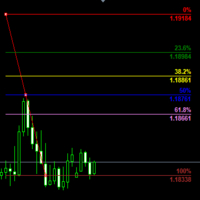
Customizable Fibonacci Lines Up to 9 Fibonacci levels Customize line color, line style and line width for each Fibonacci line Easily adjustable Fibo object is created in background so you can use with indicators and EAs How to use: Load the indicator to the chart and press "f" on keyboard and click anywhere on the chart to start drawing You can customize each line after its drawn as well as input window of the indicator

Introduction Utility informer 'Know Your Symbols' quickly and easy let you know important information about your symbol. This utility covers any symbol i guess, attach it to one chart (time frame and symbol does not matter) and select what symbols you need information about and voila...Equipped with inputs for symbol prefix/suffix if they have such. Informs about; Current price Day high price Day low price Spread points Point size Money required for 1 lot Pip value in quote currency Swap for a b
FREE

The Visual Order Tracking (VOT) indicator makes trade history and performance metrics visible on the chart in three ways: 1) Draw History of closed and open trades with arrows, lines and trade result numbers (pips, $ profit, % profit, % change); 2) Summary Trade Panel to show open and closed trade summaries by symbol, lots, pips, profit and advanced stats; and 3) Open Trades Panel to show open trades by Symbol Ticket, Type, Lots, Profit, pips, SL pips, StopLoss, TakeProfit, Spread, Magic, Comme

MT4 Alert to Telegram MT4 Alert to Telegram is tool, which sends selected trades to telegram channel. Tool sends trades when open and close with chart to telegram channel. Tool can send multiple charts and pairs from a single chart. Send information of all type of orders: Opened (including Pending Orders), and closed triggered.
functions - user can custom self-sending message text even in their native language - user can send own advertisement text periodically - attach expert in one chart an

DataGrabber The database creator
DataGrabber store selected instrument history to .csv files. It's purpose is to automatically create extensive history database.
DataGrabber is added to the selected instrument chart window as an indicator. It periodically check presence of bar data on the server and presence of .csv files on client PC (local database). If missing files detected in local database, it's created, filled with data and added to the database.
Range of bar history in days beeing ch

市場情報と詳細な統計:ボラティリティと価格バーの分析。 私の # 1 Trade Assistant : 66+ の機能、このツールを含む | ご質問はこちら まで 情報を取得するために任意の通貨ペア/取引商品を指定してください: 市場情報:
現在のスプレッド; ロングポジション(買い)のスワップ; ショートポジション(売り)のスワップ; 価格変動を分析するための時間枠と期間数を選択してください: 平均ボラティリティ; 最大ボラティリティ; 最小ボラティリティ; 最高価格; 最安価格; 上昇バー数(終値 > 始値); 下降バー数(終値 < 始値); 中立バー数(始値 = 終値); インターフェースの利点:
パネルを 折りたたむ ことができ、チャート上のスペースを解放します: ((^) ボタン ); パネルを 移動 してチャート上の任意の場所に配置できます: (< MOVE > ボタン ); ダークまたはライトのインターフェーステーマ : (" Dark " スイッチ ); TP / RR 計算 の有効化/無効化: (" TP " スイッチ ); 高
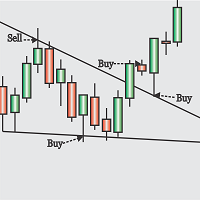
Obaforex TrendLine Trader is a tool developed to improve trading with trend lines. This tool is highly functional and yet extremely simple and safe to use. Simply draw trendlines and make them active for trading by renaming them based on what purpose you want them to serve. buy (to open a long trade based on the named line) sell (to open a short trade based on the named line) buytp (to close a buy trade at a price higher than current market price) buysl (to close a buy trade at a price lower t

This experts helps you with increasing your signal volume. Everytime the signal opens a trade, the experts creats a specific amount of copies of this trade. Evertime the signal closes a trade, the expert closes all the copies of the singal trade.
Input parameters: - amount_of_copies: The amount of copies the expert should create - interval_in_seconds: How often the expert should look for new orders to copy or closed orders, to close copies - lot_size_of_copies: The lot size of the new copies

This Expert Advisor is to assist you on Impulse's Titan method.
The expert : * Placement of SL/PE and TP in automatic mode * Automatic order taking * Automatic calculation of the Lots according to your Money management * Automatic calculation of Fibonacci levels * Tracking and closing of orders automatically * Detection of signal cancellations * Manual customisation of the PE is possible * Manual pause possible in case of event
To make the best use of the Expert you should : * follow the Impu
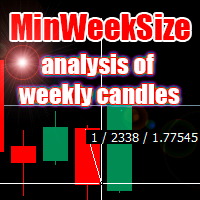
The script analyzes the size of the extreme closed candles of the selected timeframe (by default - W1).
If the candlestick size is higher than in the settings, the script opens the chart of this trading instrument.
In addition, the script calculates the average candle size for the number of candles specified in the settings.
An example of using the script: On Monday morning, activate the script on any trading instrument; Determine which instrument's weekly candle is above average; This week,

Hello Guys! I want to share with you a very useful tools. Anyone of us who has used MT4 for some time knows how impractical this platform can be for discretionary trading. That's why I created this graphical interface! Interface is very simple, all the info that you need are in the video and in the screenshot.
NB: Before to run the EA Interface, remember to copy the file in the comment in your MT4 folder "Controls". PATH: .../MQL4/INCLUDE/CONTROLS
NB: unfortunately the interface can't be test

The Visual Order Tracking (VOT) EA makes trade history and performance metrics visible on the chart in four ways: 1) Draw History of closed and open trades with arrows, lines and trade result numbers (pips, $ profit, % profit, % change); 2) Trade Manager to show Open, SL and TP levels as vivid horizontal lines with dynamic specs and partial closing options; 3) Summary Trade Panel to show sortable table of open and closed trade summaries by symbol, lots, pips, profit and advanced stats; and 4)

Time Closer can help you closing all the open position at the specified time "Everyday". Mainly for Day trader that don't want to hold position overnight, or over different session, or over a specific time. Simple Parameter to use. Usage Download and drag Time Closer on the chart (Chart Symbol should be the same Chart Symbol as you want the position close) Check Allow AutoTrading is "On" Set parameters
Input Parameters Turnon True - Turnon the utility
False - Turnoff the utility Close All Open

Flat è una utility pensata per chi ama operare con take profit e stop loss virtuali ed ordini di copertura come sistema di protezione del capitale, ma a volte ad esempio la notte non è possibile operare quindi si è costretti ad intervenire nel momento e nel modo sbagliato Facciamo un esempio, dopo aver ricevuto un segnale ti posizioni sul mercato con una posizione Long ma il mercato a bassi volumi e comprendi che il tuo posizionamento è valido ma bisogna attendere più di quanto pensavi fosse ne

Profit X invia notifiche sul tuo dispositivo mobile mantenendoti aggiornato sul profitto dei tuoi investimenti anche nei momenti in cui non puoi fisicamente controllare i mercati, ad esempio quando sei alla guida, sul posto di lavoro, in una riunione o con amici, con parenti e non puoi distrarti Può essere disattivata e attivata ed è possibile scegliere la frequenza del aggiornamenti in minuti, ore, giorni, settimanale o mensile La configurazione e personalizzazione è molto semplice, di default

Equity X è una utility che chiude tutte le posizioni ed eventuali ordini pendenti ad un importo prestabilito, è possibile fissare il bilancio del tuo conto quando il netto e uguale o superiore oppure uguale inferiore all'importo desiderato Ha integrato un sistema per la notifica mobile instantanea che genera il messaggio ad operazione avvenuta Uno strumento che permette di ottimizzare al massimo il rendimento del tuo investimento, è possibile utilizzarlo anche come gestore virtuale di take prof
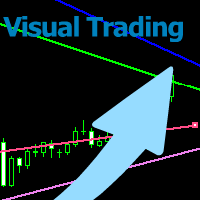
With this tool you can easily draw lines on the chart and the trade is done easily. The steps are as follows: First: Draw the buy and sell lines on the chart. Second: Draw the profit and loss lines on the chart. Third: Specify the volume of the transaction you want to trade. Fourth: Activate the lines. Warning When moving lines, be careful not to make a wrong trade.
Expert easily trades you.

This utility allows you to easily close profit or loss positions.
You can close profit or loss positions by clicking each buttons. If profit or loss positions reaches or exceed value specified as pips, they would be closed.
This panel would be placed left bottom corner of the chart. If the users want to change the placement and functions contact me.
Important : -Check allow live trading. -Enable Auto Trade trading.

The arkdc module derives its name from the Ark data collector statement. The main purpose of this module is to instantly save incoming tick data to a csv file. How does this csv file differ from any ready-made csv file found in metatrader or imported from other sites? The data obtained with this module is each tick data that comes to the metatrader program. A lot of tick data can come in per second.But does the module only record tick data raw? The arkdc module saves not only incoming tick data,
これは、グリッドシステムを取引する半自動のエキスパートアドバイザーです。アイデアは、市場で徐々にさまざまなポジションを取り、次にそれらの損益分岐点を計算することです。価格がこの損益分岐点を所定の距離だけ通過すると、すべての未決済注文がクローズされます。
重要な情報
ユーザーガイドは次のとおりです。 https://www.mql5.com/en/blogs/post/730567
このEAは、他のどの製品でも試すことができ ます。https://www.mql5.com/en/users/bermaui314/seller
重要な機能 EAには、予期しない結果から取引資本を保護するためのストップロスメカニズムがあります。
EURUSD-XAUUSD-Oil-BitcoinのようなMT4シンボルを取引することができます。
MT4の時間枠をトレードすることができます。
VPSからEAを実行することをお勧めします。
パラメータとデフォルト設定
1)お金の管理設定
ロットを開始します。 レバレッジが1:400以上の場合、デフォルト設定で500ドルごとに0.01にすることをお勧めし

MultiStopOrder Tis Script will help us to put multiple stop order with single one click. This is a script not an EA Will place BUYSTOP and SELLSTOP with single click
Main Feature 1. Put Multiple Stop Order 2. Specify how much stop orders will make 3. Set distance from current price 4. Set distance for each stop order 5. Set Take Profit dan Stop Loss 6. Use it on MT4 7. Set lot size with minmum 0.01 lots 8. Use with single one clicks
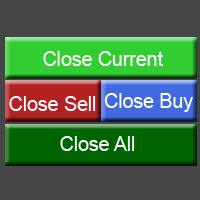
This utility allows you to easily close positions.
You can close buy or sell positions by clicking each buttons. And also you can close whole positions by clicking one buttons.
This panel would be placed left bottom corner of the chart.
If the users want to change the placement and functions contact me.
Important: -Check allow live trading. -Enable Auto Trade trading.
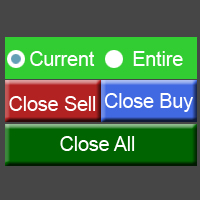
This utility allows you to easily close positions.
You can close buy or sell positions by clicking each buttons. And also you can close whole positions by clicking one buttons.
This is advanced tool of "ClosePanelA". This panel would be placed left bottom corner of the chart. To get upgraded version, please visit https://github.com/johanfriso87/profile
Important: -Check allow live trading. -Enable Auto Trade trading.

Protect your EA from unauthorized use. With EA Locker you can generate individual licenses for your EA to your customers.
Product blog page You can download MT5 version here
Protection consists of three parts: 1. Your Unique EA identifier 2. User Identifier 3. Expiration date
Description of parts: 1. EA ID is your internal EA identifier. Itcan be the short name of the EA. (MyGridEA, TradeCopierEA...) 2. User identifier can be anything user specific data (Mt4 account number, Account number + U

お気に入りのシンボルを監視 多機能ユーティリティ: 66+ の機能を含むこのツール | 質問があればご連絡ください | MT5 バージョン このツールは別ウィンドウで開きます:移動可能(どこでもドラッグ可能)で最小化 [v] できます。 パネルでウォッチリストを調整できます: [edit list] をクリックしてウォッチリストからシンボルを追加 / 削除します。 計算値:最新の [閉じたバー] または現在の [浮動バー] のいずれかです。 [時間枠] を選択して計算します。 値のソートには 2 つのタイプがあります:[Symbol] 名または価格 [change] によるソートです。 値は昇順 [^] または降順 [v] でソートできます。 計算方法は 4 つあり、[v] をクリックして変更します:
[bar size, pips]: バーのサイズ(ピップ単位);
[bar size, points]: バーのサイズ(市場ポイント単位);
[bar size, % price]: バーのサイズ(価格変動の百分率);
[bar, price value]: バーの最大

選択した期間における詳細な取引統計 私の #1 トレードマネージャー をご覧ください:66+ の機能、拡張統計を含む | ご質問はこちら まで 統計表示モード: 選択した 通貨ペア/取引商品 すべての取引 の統計 (" ALL ") 統計を取得したい期間を選択できます: 1 日 1 週間 1 ヶ月 2 ヶ月 3 ヶ月 6 ヶ月 1 年 2 年 すべての取引履歴 表示される情報: 総利益 総損失 総利益/損失 取引数 買い取引の利益率 売り取引の利益率 総利益取引率 平均保有時間 利益取引の平均保有時間 損失取引の平均 保有時間 インターフェースの利点: パネルを 折りたたむ ことができ、チャート上のスペースを解放します:(ボタン (^)); パネルを 移動 して、チャート上の任意の場所に配置できます:(ボタン < MOVE >); ダーク / ライトインターフェーステーマ :(スイッチ " Dark ");
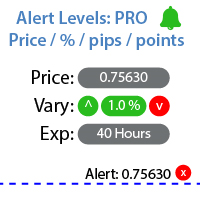
指定した価格レベルに達したときに通知を設定するユーティリティ 私の #1 トレードマネージャー をチェックしてください: 66以上の機能、アラートやトレンドラインアラートを含む | ご質問があればお問い合わせください アラートは3つの方法で設定できます: 価格レベルの手動入力; 価格変動の設定: パーセント / ピップ / マーケットポイント; マウスでレベルを移動: 磁石機能もあり、有効にするとレベルが最も近いOHLC値にスナップします; オプションで、各タイプのアラートを有効/無効にできます: ターミナル内の通知; メール通知; モバイルデバイスへのプッシュ通知; ユーティリティの追加機能: アラートの有効期間を設定するオプション: 有効にすると、指定した時間後に通知が自動的にキャンセルされます (分 / 時間 / 日); チャート上にアラートレベルを表示するオプション; 既存のすべてのアラートをすばやく削除、または個別に削除; インターフェースの利点: パネルを 折りたたむ ことができ、チャート上のスペースを解放します: ([^] ボタン ); パネルを 移動

アクティブ注文と保留中の注文の管理:自動ブレイクイーブン、TP/SL変更、部分/完全決済、チャート上のレベルの視覚的表示 私の #1 Utility :66以上の機能、PROトレード管理を含む | ご質問はこちら まで 1) メインウィンドウ:注文を管理するには、特定のシンボル [Symbol] を設定するか、すべてのシンボル [ALL] を選択できます すべてのアクティブポジションを閉じる [ALL] すべての利益のあるトレードを閉じる [profits] すべての損失のあるトレードを閉じる [losses] すべての買いトレードを閉じる [longs] すべての売りトレードを閉じる [shorts] すべての指値注文を削除 [Delete limit orders] すべての逆指値注文を削除 [Delete stop order] 右側には、各注文カテゴリの現在のフローティング損益(口座通貨および現在の残高のパーセンテージ)が表示され、各カテゴリの注文数が計算されます。 2) 手動でトレードをブレイクイーブンに変更 [- Move SL to BE now -]:SL

選択期間における詳細な取引統計 私の #1 トレードアシスタント をチェックしてください:66以上の機能、このツールを含む | 質問がある場合はお問い合わせください このユーティリティには2つの独立したツールが含まれます: 取引統計 曜日分析ツール 統計表示モード: 選択した 通貨ペア/取引商品 すべての取引 の統計 (" ALL ") 統計を取得したい期間を選択できます: 1日 1週間 1ヶ月 2 ヶ月 3 ヶ月 6 ヶ月 1年 2年 全取引履歴 1. 取引統計: 総利益 総損失 総損益 取引数 買いの利益取引率 売りの利益取引率 総利益取引率 平均保有時間 利益取引の平均保有時間 損失 取引の平均 保有時間 2. 曜日分析ツール: 最適な市場参入日を見つける 曜日ごとの統計が表示されます:利益/損失数、各日の勝率。 赤と緑のセクターにより、取引に最適な日と取引を控えた方が良い日を視覚的に確認できます。 インターフェースの利点: パネルを 折りたたむ ことができ、チャート上のスペースを解放します:([^] ボタン ); パネルを 移動 してチャート上の任意の場所に配置できます:(

For the trader, trading sessions represent a clear time frame for increasing market volatility. The Trend Session indicator of trading sessions is a tool that will undoubtedly be useful not only for novice traders, but also for experienced traders. If you're looking for a simple indicator of Forex trading sessions, you've come to the right place. This indicator draws vertical bars that indicate the start and end times of the main trading sessions.

This utility sends notification to trader’s MT4 (for MT5 version, checkout this link ) mobile app, to remind traders about their open positions. Super useful for part time traders to keep track and not forget any positions. To turn on notification, please visit this link (https://www.metatrader4.com/en/trading-platform/help/setup/settings_notifications) Features Keep track on open orders (pending orders, running orders) Customize time to send notification Customize notification interval (send ev

あなたはついに心配することなく取引を続けることができます! Auto Trade Manager とは何ですか? これは、取引を行わないがアクティブな取引を管理するEAです。これは、ユーザーの仕様に従ってストップロスを自動的に移動することによって行われます。 特徴! -損益分岐点にストップロスを自動的に配置します(設定:利益のピップ、TPの%、SLの%) -ストップロスを自動的に追跡します(設定:利益のピップ、利益のお金、移動平均のストップロス) 注:EAを無数の取引スタイルと戦略にさらに適応させるための将来のアップデートがあります (まもなく、ATRインジケーターに従ってストップを追跡するオプションを追加します)

The Multiple Order Opener does Exactly what it says. It can open any number of orders of any type with just one click. (Sell, Buy, Sell Limit, Sell Stop, Buy Limit, Buy Stop). You only have to specify the number of orders you want to open, specify your lot size for the orders, take profit and stop loss pip points (optional), and just click once the button with the type of order/orders you want to open. It is simple as a click.
Note : Unfortunately the 'try demo' does not work fo

Asa Manual Grid Buy Sell with UI is made for Grid trading when orders are placed above and below a set price, creating a grid of orders at incrementally increasing and decreasing prices.
Main Features Ability to set buy grid with 200 maximum orders. Ability to set sell grid with 200 maximum orders.
Easy to use with simple interface. Have 2 mode of Take Profit and 1 for Stop Loss.
Real time information for the current open positions and calculate average sum of order price. How to use
STEP 1

This Expert Advisor give you an alert to your Metatrader Mobile and on Metatrader Screen Chart You can put your Moving average setting You can freely add custom message to it. How to Setup Notification please read this https://www.metatrader4.com/en/trading-platform/help/setup/settings_notifications Input default on this Expert Advisor. You can change to it parameters. fastMAPeriode =3; slowMAPeriode =8; MAMethodType ="0=SMA 1=EMA 2=SMMA 3=LWMA"; fastMAMethod =1; slowMAMeth
FREE

Use this tool to plan your trades directly on your charts and get instant feedback on account risk, trade risk to reward and required position size. Plus, purchase LMBF Executor separately to easily convert planned trades into orders and manage them from your charts. Features include: Plan multiple trades for one or more symbols visually on your charts at one time, either on the same of different time frames. Use your mouse to drag levels to change entry, stop loss and take profit levels. See
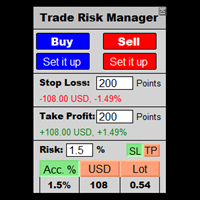
This is a calculator that allows you to manage your trade risk in every trade. Decide in advance the risk you want to assume using Stop Loss or Take Profit; account percentage or specific amount of your currency.
You can also use this tool to can test faster your manual strategies, because Trade Risk Management can be perfectly used on backtesting
For new traders, this may become your favorite tool; allowing you to easily control the risk of your trades, and train your skills trading on Bac

**IMPORTANT** THIS TOOL REQUIRES YOU TO FIRST PURCHASE "Graphical Trade Planner" https://www.mql5.com/en/market/product/56702. Without it, this tool will do nothing of any use. -------------------------- Use "Graphical Trade Planner" to plan your trades directly on your charts and get instant feedback on account risk, trade risk to reward and required position size. Plus, purchase LMBF Executor separately to easily convert planned trades into orders and manage them from your charts. Features i
MetaTraderマーケットはトレーダーのための自動売買ロボットやテクニカル指標を備えており、 ターミナルから直接利用することができます。
MQL5.community支払いシステムはMetaTraderサービス上のトランザクションのためにMQL5.comサイトに登録したすべてのユーザーに利用可能です。WebMoney、PayPal または銀行カードを使っての入金や出金が可能です。

取引の機会を逃しています。
- 無料取引アプリ
- 8千を超えるシグナルをコピー
- 金融ニュースで金融マーケットを探索