 MetaTrader 5
 エキスパート
 インディケータ
 ライブラリ
ライブラリ
 ユーティリティ
 ウィジェット
 ルール
ルール
YouTubeにあるマーケットチュートリアルビデオをご覧ください
ロボットや指標を購入する
仮想ホスティングで
EAを実行
EAを実行
ロボットや指標を購入前にテストする
マーケットで収入を得る
販売のためにプロダクトをプレゼンテーションする方法
MetaTrader 4用取引ユーティリティ - 31
 以下はMetaTrader4での外国替取引を簡素化する取引プログラムです。以下のリストのユーティリティにカーソルを合わせて、説明と目的をご覧ください。
This script is used to quickly place an order. Stop Loss = 100 points and Take Profit = 20 points are already automatically set in it under the five-digit system, the order size is 0.1. Working with the script: in the terminal window, click the "Auto-trade" button, then open the "Navigator"> "Scripts" panel and drag your script onto the chart. If you drag the script below the market price, then a sell position will open, if it is above the market price, then a buy position will open. You can ch
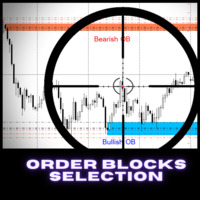
SOLO 4 COPIAS DE 10 A $47 PRÓXIMO PRECIO $85 Los bloques de órdenes son utilizados principalmente por comerciantes institucionales a quien les gusta tener entradas de alta precision. También es una forma diferente de ver el soporte y la resistencia, estos niveles se utilizan en diferentes marcos de tiempo. Hay diferentes tipos de bloques de pedidos, pero la mayoría están adaptados a : - Bloques de órdenes alcistas: (es específicamente una vela bajista antes de un movimiento alcista) - Bloque
A "simple design" trading panel, which is characterized by small byte size, low CPU usage, simple steps, and quick operation, 1 to 2 clicks to complete a functional operation,
saving time and increasing efficiency . The panel is easy to use, and it is not complicated to set parameters, which is in line with traders' habits. At the same time, its compact-
design, clear at a glance, and comprehensive functions are a powerful tool for manual trading! Key features of the panel: Click "Bid Price
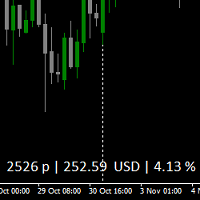
The information indicator shows profit in points, in the Deposit currency,
and as a % of the balance, for all transactions on the instrument.
The calculation takes into account the following parameters:: Commission and Swap for all orders.
Points are counted in total for all orders, starting from the point without loss.
Settings:
Corner-anchor angle of the indicator
Offset-text Offset vertically
Offset-text Offset horizontally
Text color-text color Selection
The color of profit - choos
Harmonics detector is a precise tool for identifying harmonics patterns. Allows you to trade with reliable information, making your analysis fast and easy. Pattern detected: Gartley Bat Crab Butterfly Features: Working timeframes: M5, M15, H1, H4; Working symbols: any; Automatic settings; Upcoming patterns: Three dives; Deep Crab AB = CD Elliot Wave's motive wave

Tax Buddy creates a simple, sortable trading report which you can send to your local tax authorities alongside your annual declaration. I've been using this kind of report for the German Finanzamt in order to declare my capital gains ("Kapitalerträge") in a readily comprehensible manner. For testing purposes, the Demo version places random trades in the Strategy Tester on the symbol of your choice and creates a demo report for them.
Conveniently, all reports are stored in the common path for al

Various Trailing Manager EA
Various Trailing Manager EA is a professional trader's tool that provides protection of floating profit on open trades. This EA Utility allows you to manage (with advanced filtering) unlimited open orders (manual or EA) with trailing stops based on 7 methods: percent, ATR, Moving Average, Candle, Parabolic, Fractal. The trailing stop can be either real or virtual, and you can exit fully or with a partial close percent on touch or bar close. Visualize all orders and t
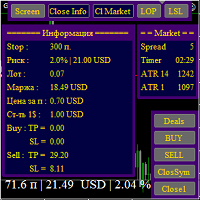
Expert Advisor "SK Smart традинг",は、スカルパーと中期トレーダーの両方にとって、手動取引におけるかけがえのないアシスタントです。
戦略テスターで動作し、履歴で手動取引戦略をテストできます。
ボタンを使用すると、「情報」パネルと「マーケット」パネルを表示/非表示にしたり、キーボードのキーを使用してすべてのパネルとボタンを表示/非表示にしたりできます。
MM関数は、いくつかの方法で、市場注文と保留中の注文の残高の%でロットを計算します。指定されたStopLossから、トレンドライン間のポイントの差から、注文を開始するためのトレンドラインと作業オーダーのStopLossの間のポイントの差から および成行注文の場合です。現在の価格から3つのパラメータの1つ(設定されたStopLoss、一般的なStopLossの水平線、およびトレンド線)まで。 キーボードキー: (ストラテジーテスターでは機能しません) キーG-押すと、すべてのパネルがチャートから削除されます。 キーT-押すと、すべてのパネルがチャートに戻ります。 上部コントロールパネル: 画面ボタン-

"Cooperative QQ:556024" "Cooperation wechat:556024" "Cooperative email:556024@qq.com"
This is an EA that assists manual trading.
The functions are as follows:
1. Manually place a benchmark order, EA automatically calculates the number of lots that need to be placed according to the account balance, and opens the second order. Example: The benchmark A order is free to open 0.01 lots, and the number of lots is calculated based on the account balance. If it is less than or equal to 0.02 lots,

トレーディングアドバイザーを購入したり、シグナルをサブスクライブしたり、手動でトレードしたりしましたか?!リスク管理を忘れないでください。
EA Hedger は、ヘッジを使用してリスクを管理できるようにする多くの設定を備えたプロのトレーディングユーティリティです。
ヘッジは、すでに開いているポジションとは反対のポジションを開くことを含む取引手法です。ヘッジの助けを借りて、ポジションを完全にまたは部分的にブロック(ロック)することができます。 この製品を購入することが有益なのはなぜですか。
信頼性 -アドバイザーは徹底的にチェックされ、テストされています 有用性 -Expert Advisorは実際の取引で使用され、その作業に効果的です パフォ ーマンス-ヘッジを使用した取引の結果は、ヘッジなしの取引の結果よりも大幅に優れています 可用性 -アドバイザーのコストは1か月あたりわずか4.91ドルまたは1日あたり0.17ドルです-これは1〜2スプレッドです サポート –ディスカッションでは、販売者に質問したり、アドバイスを受けたりすることができます 開発 -製品への希望を書くことができ、

Scalping One の MT4バージョンです。 1ポジションを1つのボタンで表示します。リアルタイムで損益、 Lot、 Pointを表示。チャート通貨のみと全通貨ペアのポジションの表示を切り替え可能。 日本語、英語に自動識別対応(設定タブは英語のみですが http://www.emkyuradias.shop/emkyuradias.shop/instruction.html にて日本語Helpを用意) 口座通貨表記はドル、ユーロ、ポンド、円に対応(自動識別) ロット、テイクプロフィット、ストップロスは変更可能なプリセットボタンより素早く設定可能です。 タイムラインの描画機能は、ローカルタイム(PC時間)、カレントタイム、東京、ニューヨーク、ロンドン、シドニー時間を選択可能な時計表示と連動可能、サマータイム対応。 ラウンドナンバー、日、週、月、年の安値、高値ライン表示、非表示がワンクリックで可能、高値安値は時間表示上のデータ表示部分にて個別に表示も可能です。 トレンドラインによるLimit Buy Sell 、Stop Buy Sell および ポジションのクローズが可能です
The stocks that make up the index are one of the drivers of the movement. Analyzing the financial performance of all elements of the index, we can assume further development of the situation. The program (script) displays corporate reports of shares that are part of the index selected in the settings.
"Indexes" cannot be tested in the tester (since there is no way to get information from the Internet).
Information is downloaded from the site investing.com: Report Date Earnings per share (E

Super Copier G&G Super Copier G&G FREE Here
Expert Advisor copies orders to several trading accounts (regardless of a broker) if their respective MetaTrader 4 terminals are opened on a single PC/VPS. The EA may copy from multiple (unlimited) initial accounts to a single target one or from a single initial account to multiple (unlimited) target ones. The work of other EAs and manual trading on initial and target accounts are not affected by the copier. Support for four methods of managing the c

FXC Trade AssistanT MT4
This trading software will help you in manual trading. You can use it for open and close positions in many forms. The EA offers you lot sizeing, stop management methods and other usefull tools using with its control panel.
New in v1.13: Ultra-Fast CLOSE operation can close over 100 trades/second (Only MT5) New SETUP panels: Control, Chart, Msg., SFX, Advanced Added SFX sound profiles
Zero-Point Calculation with Swap & Commission Can handle foreign trades
New Info data: St

This is the Equity Protector you've been looking for!! I couldn't find what I needed so I created this. Protecting your capital should be your #1 goal, this tool is an amazingly flexible way of doing exactly that! Stand out! Features: (all completely customisable and work independent to each other) (1) Temporarily Remove SL & TP - This game changing function will temporarily remove your SL & TP levels and then re-apply them when the specified time period is up e.g. Set the time between 11:0

Утилита для полуавтоматической торговли, управления ордерами, может быть использована так-же и для восстановления убыточных позиций на счете. Имеет функцию уменьшения просадки на счете путем перекрытия убыточных ордеров. Может работать с ручными ордерами, ордерами открытыми с панели или ордерами открытыми другим советником. Имеет минимум параметров, легко настраивается, работает с любым количеством ордеров. Для тестирования используйте визуальный режим в тестере стратегий. ДЛЯ ТОГО ЧТОБЫ НЕ БЛУ

THIS PRODUCT CAN NOT BE TEST IN STRATEGY TESTER. PLEASE TRY DEMO VERSION: https: //www.mql5.com/en/market/product/58082 FIRST 10 COPIES AT 30 USD, NEXT PRICE WOULD BE 50 USD RISK AND TRADE MANAGER RISK AND TRADE MANAGER is an advanced trading panel designed for manual trading. Utility helps to manage trades effectively and efficiently with a single click. MAIN FEATURES Convert and display Stop Loss (SL) Pips into % and amount to view the clear picture of the trades if SL hits. Fund alloca
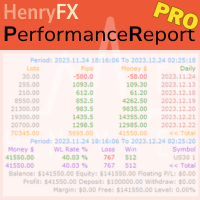
This Performance Report indicator is special design for some trader to analyst his/her performance.
Key Features of the "Performance Report" Indicator
Multi-language support: Choose between English and Chinese as the display language, catering to traders from different regions. Flexible report configuration: Customize the report title and group data based on trading symbols, time periods (daily , weekly , monthly ), meeting individual preferences. Date range selection: Specify the st
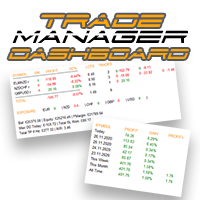
あなたの外国為替ポートフォリオを管理してください。あなたが立っている場所、何が働いているのか、そして何があなたに痛みを引き起こしているのかを即座に見てください! ここで利用可能なMT5バージョン:https:// www.mql5.com/en/market/product/58658
Trade Managerダッシュボードは、外国為替市場での現在の各ポジションが一目でわかるように設計されており、リスク管理と通貨へのエクスポージャーを理解しやすくします。 複数のポジションで徐々に市場に参入するトレーダー、またはそれらのトレーディンググリッドとバスケット戦略にとって、これは重要な情報です。ターミナル内の複数の位置を監視することは、管理が難しいことがよくあります。
不十分なリスクの活用と使用:報酬は、新しいトレーダーや一部の経験豊富なトレーダーが直面する主要な問題です。トレードマネージャーは、各通貨へのエクスポージャーを個別に示し、一度に両方向に取引しないようにします。
特徴: オープントレード-通貨ペアでソートされた現在のオープントレードをすべて表示します。ペアだけでなく、その
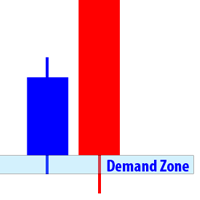
Supply and Demand Dashboard
Supply and Demand Dashboard is a forex system that can help you generate lucrative profits from forex easily without having to work hard to learn forex knowledge because this Dashboard is complete with all the needs and functions that are sophisticated and effective for a forex trader.
This system is made based on Supply and Demand techniques to measure Market Direction (trend) more accurately than using indicators such as Moving Average, MACD, trendline and so on.

Closes a losing position. Due to the previous continuous, profitable series. SymbolsWork: Currency instruments (pairs) for the EA to work with. There may be variations when setting a pair. If set simply as EURUSD , GBPUSD: or AUDUSD:ALL , the EA opens both buy and sell orders. If a specific order type is set after a colon USDJPY:BUY , then the EA opens only buy orders and in case of eurjpy:sell , it performs only sell orders. The pairs are separated by commas. For example, the following entry "E
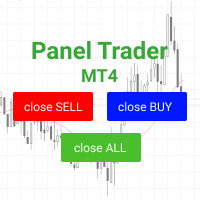
Торговая панель для быстрой и удобной торговли. Панель позволяет быстро открывать и закрывать ордера. Отдельное закрытие ордеров по позиции Sell и Buy. Так же есть возможность закрыть полностью все ордера. Торговая панель выводит информацию о прибыли, общего объема и количестве ордеров по позициям Sell и Buy. Иногда некоторые позиции могут не закрыться это связанно из-за волатильности рынка. В таком случае повторно нажмите закрыть позицию. Для работы панели необходимо разрешить автоторговлю.

Dear Friends, Market Inforamtion Downloader is a simple utilities program to download the market informations in a separate excel file with the name of the current chart you are using with same time frame. You needed to enter the number of periods. example. I'm in EURUSD, Day time frame. I choose to download the data last 50 candles(50 days) then I will enter 50 in the periods. After you getting the data, you use it for various analysis. Regards, Sankar Ganesh
FREE
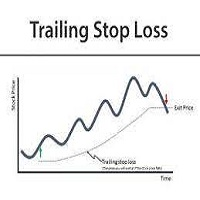
TrailingStopLoss
This tool applies trailingstoploss to orders opened manually or opened by an expert. * For testing on demo it will be open only one buy order so you can see how trailing stop works. It doesnt open orders itself in real or demo accounts but manage your opened orders .
It is simple to use.
Input Parameters
Stoploss calculation level : default is 5, stoploss will be calculation after 5 pips from opening price.
Stoploss movement step : default is 5, Once stop loss is activated,
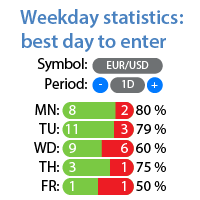
曜日ごとの損益統計 私の #1 ユーティリティ をチェックしてください: 66+ 機能、拡張統計を含む | ご質問はこちら まで 統計表示モード: 選択された 通貨ペア/取引ツール すべての取引 の統計 (" ALL ") 統計を取得する期間を選択できます: 1 日 1 週間 1 ヶ月 2 ヶ月 3 ヶ月 6 ヶ月 1 年 2 年 全取引履歴 表示情報: 曜日ごとの統計が表示されます: 各日の利益/損失数と勝率。
赤と緑のセクターにより、取引に最適な日と取引を避けた方が良い日を視覚的に確認できます。 インターフェースの利点: パネルを 折りたたむ ことができ、チャート上のスペースを解放します: (ボタン [^]); パネルをチャート上の任意の場所に 移動 できます: (ボタン [MOVE]); ダーク/ライトインターフェーステーマ : (スイッチ [Dark]);
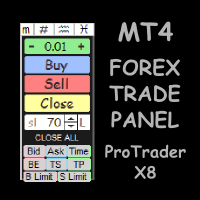
ProTrader X8 is a multifunctional trading utility for FOREX, MT4
Interactive and compact panel, it doesn't take up space on the screen, making it difficult to see the graph!
Developed exclusively for Forex traders, ideal for people who trade manually.
Note:
1 - This utility does not work in the strategy tester
2 - Try the demo version before buying unlimited ProTrader X8
Demo version → https://www.mql5.com/en/market/product/59012
ProTrader X8 functions:
• Buttons for buy, sell and close to
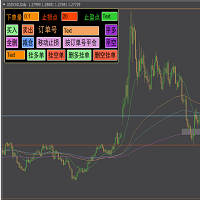
快捷下单控件EA,可以实现很多实用功能,不仅可以实盘中操作,也可以在复盘中使用,大家知道一般情况下复盘只能使用复盘软件,占用多达10个G的内存呢,而且贵的让人难以接受,如今这个EA控件可以让你直接在MT4里实现复盘,实时下单,占用内存几乎可以忽略不计,对于交易者来说,复盘的重要性不用多说了吧,很多时候,盘感都来自于一次次的复盘,那是经验积累的必经之路,如果你需要提升自身的交易能力,需要快速累积盘感,需要快速实现稳定盈利,那么这个复盘EA工具将是你的不二选择,你也可以直接加VX:EURNZD,它集诸多功能于一身,如果你想试用它,不要犹豫,联系我,我会让你高兴而来,满意而归,如果你不想复盘,那么还是花更多的时间来积累经验吧

What is it?
Think about it, you can send all the orders/positions info to your telegram channel or group to create your community or VIP signals on telegram. Position info means this EA forward all of your new positions open details (Open price, Open time, Position Type, position Symbol and volume), positions changes ( SL or TP modifying or pending price changes) and position close (Close price, profit or loss, position duration time) and also EA Send NEWS alert (Economic calendar event) on you

Account Risk Analyser, allows you to keep track of your account risk, risk exposure to individual pairs and risk on base currency pairs. Get notified when your risk on a base currency pair exceed a predetermined risk level. Get notified when your account exceed a predetermined risk level. Risk Analyser based on the NNFX methodology of not over leveraging on any base pairs. Parameter inputs Percentage risk trigger for Trade instruments Percentage risk trigger for Account Alerts Chart Alert Mail A
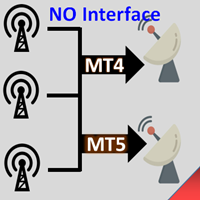
Interfaceless documentary EA. It has been operating stably and efficiently for more than 5 years, and has accumulated many customers. Copier Advanced Version (On sale) Copier-MT4-FULL(click to download) Copier-MT5-FULL(click to download) MT4->DEMO Try(click to download) MT5->DEMO Try(click to download) Copier Interface Version Copier-MT4-FULL(click to download) Copier-MT5-FULL(click to download) MT4->DEMO Try(click to download) MT5->DEMO Try(click to download) Copier No Interface Version Copier

MetaTrader 4用リアルタイム練行足チャート KT Renko Live Chartは、適用した銘柄からMetaTrader 4上にリアルタイムの練行足(Renko)チャートを作成します。ブロックはオフラインチャートに書き込まれ、新しいティックで更新され、カスタムインジケーターやエキスパートアドバイザーを使用できます。 準備 変換したい銘柄のチャートにユーティリティを適用し、そのチャートを開いたままにします。M1チャートを使うと最も細かい履歴になります。 「ファイル」の「オフラインチャート」からRenkoチャートを開き、設定したOffline Time-Frameの銘柄(例:EURUSD,M2)を選択します。 RenkoチャートでEAを動かす場合は、チャートのプロパティ(F8)を開き「オフラインチャート」のチェックを外して、EAが新しいティックを受け取れるようにします。 パラメーター Renko Box Size in Pips: ブロックサイズです。5桁表示と3桁表示のJPYでは、1pipsは10ポイントです。 Offline Time-Frame for Renko Cha

Скрипт собирает статистику по размерам свечей и сохраняет данные в файл CSV. Каждая строка таблицы - это отдельная свеча с ее характеристиками: время, направление (1 - бычья/доджи, -1 - медвежья), размер верхней и нижней тени, размер тела и полный размер свечи.
Индикатор, который отбражает размеры свечей, а также построенные по этим размерам скользящие средние, можно скачать здесь .
ПАРАМЕТРЫ FileName: имя файла, в который экспортируются данные. Если оставить поле пустым, то имя файла - "Cand
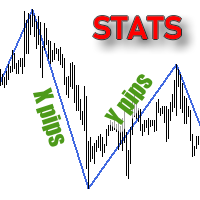
Скрипт собирает размеры всех ценовых волн на текущем графике, которые не меньше заданной величины, и сохраняет их в CSV файл. Каждая строка таблицы будет содержать дату/время окончания волны и ее размер.
Если вам нужно знать размеры волн в реальном времени, то воспользуйтесь индикатором Wave Size into ZigZag , Wave Size Histogram или ZZ Histogram .
ПАРАМЕТРЫ MinWaveSize: минимальный размер дял волн, которые попадут в статистику PositiveValues: true - в файл сохраняется только размер волны

HEDGE 120 is an EA that opens an order if the market moves an adverse will make a safe zone . Hedging with Forex is a strategy used to protect one's position in a currency pair from an adverse move. It is typically a form of short-term protection when a trader is concerned about news or an event triggering volatility in currency markets. The main reason that you want to use hedging on your trades is to limit risk. Hedging can be a bigger part of your trading plan if done carefully. I

Скрипт используется для сбора статистики по переходам цены между уровнями сетки, размер которой задается в настройках (смотрите индикатор Transitions between levels ). Данные записываются в CSV файл. Есть два режима сбора статистики: SeparateTransition - учитывается каждый отдельный переход (смотрите скриншот 2). Время перехода - время, когда цена коснулась нового уровня. Accumulation - в файл записывается количество однонаправленных переходов (смотрите скриншот 4). Например, -7 - семь пеерех
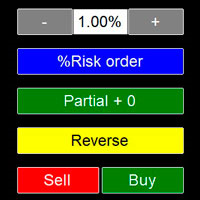
Ok, let's go :) Never again open a trade exceeding your risk with this ea. Settings: Corner Boton: Here you can chose where to place the panel. Position X Position Y: Both are to fine the position Width buttons: Here you can chose the width of the buttons. Heigt buttons: To chose the high of the buttons. Font Size: Changes the font size. Border color: to change the border color of the buttons. Reverse color: to change color of the Reverse button. Partial color: to change color of the Partial but

Скрипт вычисляет коды свечей на текущем графике и сохраняет их в CSV файл. Таблица в файле состоит из двух колонок: дата/время свечи и ее код. Подробнее о коде свечи и об алгоритме его расчета читайте в описании к индикатору Candle Code .
ПАРАМЕТРЫ FileName: имя файла, в который экспортируются данные. Если оставить поле пустым, то имя файла - "Candle Code. ' ВАЛЮТНАЯ ПАРА' 'ТАЙМФРЕЙМ' "

Comprehensive on chart trade panel with the unique ability to be controllable from mobile as well. Plus has a library of downloadable configuration, e.g. exit rules, extra panel buttons, pending order setup and more. Please see our product video. Works with all symbols not just currency pairs. Features On chart panel plus controllable from free app for Windows, iPhone and Android Built-in script engine with library of downloadable configuration, e.g. add 'Close All Trades in Profit' button, exit
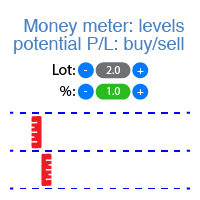
このインジケーターは、各方向(買いと売り)の潜在的な利益/損失レベルを表示します。 #1 Trade Assistant をチェック: このツールを含む66以上の機能 | 質問がある場合は連絡してください 設定可能: ロットサイズ (最後に使用したロットを自動設定するオプションあり); グリッドステップ : パーセンテージ / 金額(緑のスイッチ); 各方向のレベル数 ; 現在の 口座残高 または フリーマージン に基づくリスク計算; インジケーターの初期設定で選択可能: チャート上のラインとテキストの色; インターフェースのテーマ: ダークまたはライト; インターフェースの利点: パネルを 折りたたむ ことでチャートのスペースを解放: ((^) ボタン ); パネルをチャート上の任意の場所に 移動 可能: (< move > ボタン ); レベルの表示を迅速に有効/無効化: ( "On" ボタン );

This utility is very useful for trader to get an alert when there is interrupt connection (lost connection) to MT4 server and if there your computer is no internet connection. You will get an alert by sound, email and push notification at the moment your MT4 platform lost it connection. Several function available to alert you. 1- Sound notification 2- Email notification 3- Push notification 4- Blinking red background on your MT4 platform chart. If you lost connection to your broker but your inte

PO-Plus Readme
機能: 3つのロジックでの買いサイン、売りサインを表示します。 各ロジックでの勝率を表示します。
サイン表示後、勝率を確認して高い勝率でBOやFXでエントリーすることが出来ます。
勝率の判定本数を変更できます。
Indicator Noを変えることによるこのインジケータを複数適用することができます。 これによりRCIの数値を変更して勝率を複数表示が可能になります。 その際は、ラベルの表示位置も変更してください。 ボタンを押すことによりラベルや買いサイン、売りサインを表示、非表示すことが出来ます。
注意:こちらのロジックはZigZag+ロジックでの勝率になりますので 勝率は実際のものより高めに表示されます。 エントリーする際は勝率60%以上のものを推奨します。 ZigZagベースなので価格が動く日本、欧州、NY時間の前半でのエントリしない ことを推奨します。
各パラメータの説明: ----------Basic Setting---------- Indicator No:インジケータNoを設定します。もし同じチャートに複数適用し

Object replicator is an indicator that allows you to replicate an object in one or as many charts as you like. This indicator is the solution to replicate part of your analysis in exactly the same position and price of a trend line, Fibonacci, vertical line, horizontal line, etc. Download the MT5 version here
Install the indicator on the source chart and follow the steps below: To activate the indicator, simply press the (Activate) button. Once the (Activate) button is pressed, a (Receive obj

Savage Trades M.T.A. is a Manual Trade Assistant expert advisor. This EA contains self-adaptive market algorithm, which uses price action patterns and standard trading indicators. 1.) Quickly Execute trade entries with the click of a button with your own predetermined Stop Loss and Take Profit. 2.) Non-Repainting retracement and reversal warnings indicated by arrows and system alert. 3.) Auto adjusting Support and Resistance levels with strength indicated by color shade. 4.) Auto adjusting Fibo
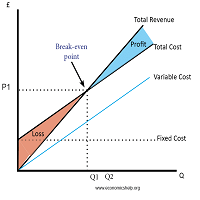
Breakeven Utility MT4 automatically setting breakeven levels, transfers trades to breakeven when passing a given distance . Allows you to minimize risks. Created by a professional trader for traders. Utility works with any market orders opened manually by a trader or using advisors. Can filter trades by magic number. The utility can work with any number of orders simultaneously.
WHAT THE UTILITY CAN DO: Install virtulnoe levels bezubytka from 1 pip I nstall real levels of

Risk Control Utility MT4 designed for manual trading. It helps to calculate and control your risks, transfer transactions to breakeven and accompany positions with trailing stop. Easy to set up and use. It can be used for calculating a trading lot, calculating stop loss and take profit levels. Works with currency pairs, CFDs, stocks, indices, futures, cryptocurrencies Displays volume, potential loss and profit before placing an order Ability to set the expiration time of a pending order

StopLoss and TakeProfit Utility MT4 for automatic setting of stop loss and take profit levels. Created by a professional trader for traders. The utility works with any market orders opened by a trader manually or using advisors. Can filter trades by magic number. The utility can work with any number of orders simultaneously.
WHAT THE UTILITY CAN DO: Set virtual stop loss and take profit from 1 pip Real stop loss and take profit W ork with each order separately ( stop loss and take prof

Trailing Stop Utility MT4 for automatic closing of deals by trailing stop levels. Allows you to take the maximum from the profit. Created by a professional trader for traders. Utility works with any market orders opened manually by a trader or using advisors. Can filter trades by magic number. The utility can work with any number of orders simultaneously.
WHAT THE UTILITY CAN DO: Set virtual trailing stop levels from 1 pip Set real trailing stop levels W ork with each order separat

STRATEGY - We use risk and reward ratio of 1:5 to maximize the profit - We use trailing stop to lock profit and minimize loss
ALERT User will get notified with alert with the following condition: - Max Spread - Max Orders
UPDATE - Free Update and Support
COMPATIBILITY - MT4 and MT5 - M1 Timeframe - All Currency Pair
WHAT YOU GET 1) Free Online Forex Training (Normal Price: USD 299) 2) Free Expert Advisor (EA) (Normal Price: USD 288) 3) Free Copy Trading (CT) (Normal Service Fee: 20%) *Aft

EasyTrade is a dashboard that make trading easier. EasyTrade can help you to calculate and send command. EasyTrade have 3 tabs. Tab 1 Display data about information and orders in the current symbol Show all order Profit/Loss. Show all buy order Profit/Loss. Show all sell order Profit/Loss. Show average price of all opened order(buy and sell). Show average price of all buy order. Show average price of all sell order. Show total lot buy order. Show total lot sell order. Show total order buy. Show
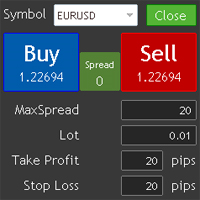
このツールは様々な商品を容易に取引するツールです。 日本の取引所で多く使われる形式を模倣しました。 任意のチャートに適用可能です。 他の通貨を選択可能です。 取引が容易で複数のポジションを同時に決済できます。 利用者が希望する場合、必要な機能を更新·追加することができます。 幸運をお祈りします。
ご注意 MT4の自動取引ツールバーボタンを有効にしてください。 ユーティリティ実行時に、自動取引機能を有効化してください。 このツールは今後も更新を続ける予定です。 広くお使いください。 連絡先は下記になります。
Contact Info skype: jupiter0105_01 mail: jupiter010592@hotmail.com

VICTOR SCALPER 1.0 MANAGER
Funciones del Robot: Gestionar ordenes realizadas Manualmente desde el metatrader del celular o del ordenador por medio de ordenes pendientes para hacer cobertura incrementando el lotaje y la cantidad de ordenes y a la distancia de separación que se desee. Cerrar las ordenes apenas se tiene el valor en dinero ganado positivamente. O Cerrar las ordenes apenas llegue a un valor negativo indicado por seguridad. Ventajas: La ventaja principal es que el robot no es cont

We found the solution for you. It is a script that allows you to automatically close all your positions that you have improved. To close a position, you must type "Close position" from its context menu in the "Trade" tab. In the window that appears, you must also type "Ask". Then the "Close" button appears in the window. When you press this button, the position is fully closed at the asking price. Please note that the Close button will also remain displayed for a few seconds, while the trader n

The S & D Zones Reminder - Never miss a Zone you identified!
If you trade Supply and Demand Zones and don’t want to spend time setting multiple alerts manually, simply use the S & D Reminder Indicator, which will ensure you never miss a trade. Steps to use: 1. Manually identify the zones using below colors: a) DBD Supply Zone – Gold b) RBD Supply Zone - LightCoral c) RBR Demand Zone - StealBlue d) DBR Demand Zone - SeaGreen 2. Add the indicator to a chosen chart, decide if you need phone alerts
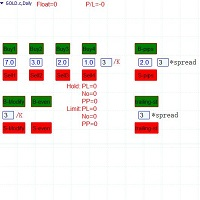
Semi-automatic visual trading panel , place orders or modify them with stop loss and target added automatically only by one click, orders can also be modified manually. 1.Green buttons are long orders,red buttons are short orders, ' /K ' means choosing the highest or the lowest point of the previous chosen K-line as the stoploss level 。 The textbox below “Buy1 , Buy2 , Buy3 , Buy4” are the maximum stoploss you can afford. Calculated arounded off. Click button 'Buy Or Sell' to place an order. 2.

-------------------------------------------------------------------------------------------------------------------------------------------------- First free version of this product is here : https://www.mql5.com/en/market/product/46855?source=Site+Profile+Seller -------------------------------------------------------------------------------------------------------------------------------------------------- This product is an EA that can be used either to practice to educate yourself on Tester

1. Money Printing Robot is a wave trading expert, so please copy it into the 'expert' folder. 2. Please run it in H4 timeframe in order to make the best score of it, the shorter the timeframe you choose ,the worse score you get. 3. the 'Variable' of BuyStopLossPercentage and SellStopLossPercentage is defaulted 0.02,which means 2% of the freemargin ,that is the maximum loss one trade may bring. or you can change it according to your risk management policy. Order lot changes according to the st

Pro Indicator Trader is a professional trading tool with which you can automate/create a trading strategy using the 31 classical Metatrader 4 indicators. An elegant and intuitive interface allows you to customize your strategy down to the smallest detail and choose whenever the EA should open a buy or sell position. For each entry-trade rule, you can use up to 14 different indicators.
The EA is designed for professional traders, therefore it has many advanced functions. The EA records the order
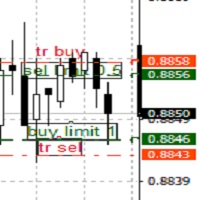

LEFORT is a multi-currency, fully automatic, high-frequency trading robot. The robot works with any instruments in MT4 on any timeframe. The algorithm of the expert Advisor is as follows Single-scalping trades will. Using the analytical signals module, the robot analyzes the market dynamics, and then makes single trades in the direction of the dominant trend with a profit of several pips. A series of open orders. The robot makes a series of trades on a pullback in the direction of the dominant t
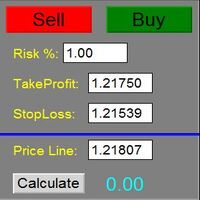
The Panel does not work in the tester. You can test it live with demo version. Demo version link: https://www.mql5.com/en/market/product/61344?source=Site+Market+MT4+Utility+Rating004
Easy Order Panel is a easy panel that can help you to place your orders quickly and easily. Works on all currencies. Configure the Risk and automatically when you press Sell/Buy button an operation with the right lot will be opened. in this way you lose at most the percentage entered.
- just double click on the
The utility for manual trading to manage open positions.The built-in trailing stop has three modes and seven instruments: by pips, by bar extremes, by fractals, by volumes, by MA, by Parabolic SAR and by ATR. With the help of the built-in trading simulator, you can check how the EA works in the strategy tester. Guide to UTrailingMini can be found in the "Comments" section. Benefits 3 trailing stop modes: normal, total and mobile stop loss; 7 options: by points, by bar extremes, by fractals, by v
APIPS Expert Advisor puts a Take Profit on all positions at the total breakeven distance or at the distance of the specified take Profit value .
If several orders are opened, the Expert Advisor puts a Take Profit on all positions at the total breakeven distance + the specified Take Profit value. You can specify to close all positions only on the excess without profit. If there are no open orders and you open a trade on the market, the APIPS Expert Advisor automatically sets the Take Profit by t

The Trading Control Panel EA let you: - Calculated lot size based on the (% or $ risk) - Place multiple (Market/Limit/Stop) trades at same time - Manage all open trades (move SL to BE, take partial profit, close all trades) This is a handy tool for those who wont to open multiple orders without spending time on lot calculations. When opening multiple orders the first order has the first TP and all other orders get the second TP.

Lines Resource is an technical indicator that dysplay lines in the chart giving some notion of supports and resistance levels for the correct functionallity of Optimal Investor EA an multicurrency EA that gives an 52% return monthly. Please install it, to run Optimal Investor EA correctly. Next to it, install Profitnator Resources Indicator FREE , to Run Optimal Investor EA.the second and last one resource.
FREE

This script jumps your chart to a random point in time/random bar. Very useful for back testing, particularly NNFX method.
How To Use: 1. Double click the script in the Navigator 2. Drag script onto chart 3. (Recommended) Right click script in navigator and "Set Hotkey". Use Hotkey instead of having to have navigator open 24/7
Installation: 1. Open MT4 2. Click File -> Open Data Folder 3. Double Click MQL4 -> Scripts 4. Copy Script into this folder 5. Restart MT4
#nononsenseforex #nnfx #bac
FREE

このアプリケーションを使用すると、アカウントで選択した取引活動をテレグラム チャネルにブロードキャストできます。 選択: ブロードキャストする場所 (アカウントでロボットの複数のコピーを同時に実行することで、複数のチャネルに同時にブロードキャストできます) ロボットまたは人間、あるいはその両方による注文とポジション どの文字から (すべてまたはスペースを入れて入力 EURUSD.i EURGBP.i ...) 送信するアクションに関する情報 (アカウントに複数のロボットをインストールすることで、チャンネルやキャラクターごとに異なる放送条件を設定できます) メッセージに含まれる情報 追加のコントロール パネルを表示する 各取引日の終わりに利益レポートを提出する 設定の説明: 。 th>タイトル: 値: 説明: 主な設定:
主な設定: ボットトークン: ボット トークン Telegram ボットの作成時に生成されます。 シャネルID: チャンネル ID https://api.telegram.org/bot BOT_TOKEN /getUpdates
魔法のリスト -1 0 444

Note: MT4 Backtest cannot test EAs that trades with several symbols simultaneously. For backtest use MT5 versions download here . Note : Limited version can trade with the volume less than 0.05 lots.
Important :
This is Arbitrage EA and may not work on all accounts. It is recommended to follow the testing process described on product screenshots. If you are not familiar with arbitrage trading, It is recommended to use our other trading robots .
Strategy :
EA will place trades based on Tria

Avenger Expert Advisor The Avenger Expert Advisor (EA) is a sophisticated trading tool designed to help traders automate their trading strategies with precision and efficiency. This EA leverages advanced trend indicators and customizable settings to optimize trading performance. Key Features: Trend Indicator Settings: Main Trend Indicator: Utilizes the primary trend indicator for position openings. First and Second Trend Filters: Additional filters to refine trend signals and enhance accura
Advanced Trade Simulator
It is an indicator you can attach to any chart and then buy and sell the given symbol virtually. No actual trading takes place. You can attach it to multiple charts. Then you can buy multiple symbols.
A more detailed description here: https://www.mql5.com/en/blogs/post/750336 Features:
- buy and sell immediately on the given time frame - market , limit and stop orders - generalized OCO, more than 2 orders can cancel each other. - OSO, one sends another.. - set lot ba

Chart State Saver for MT4 is utility which helps to save states of all your charts even if they will be closed. And then all saved charts' states can be easily loaded back to charts.
It stores templates for each particular currency pair and automatically applies them to charts once they will be opened at next time. Also they can be applied to the charts by your own needs. Thus you can close any chart at your MT4 without scaring to lose chart's data like drawls, messages, chart styling and so on
MetaTraderマーケットが取引戦略とテクニカル指標を販売するための最適な場所である理由をご存じですか?宣伝もソフトウェア保護も必要なく、支払いのトラブルもないことです。これらはすべて、MetaTraderマーケットで提供されます。

取引の機会を逃しています。
- 無料取引アプリ
- 8千を超えるシグナルをコピー
- 金融ニュースで金融マーケットを探索