 MetaTrader 5
 Experts
 Indicatori
 librerie
 Utilità
 Widget
 Regole
Guarda i video tutorial del Market su YouTube
Come acquistare un Robot di Trading o un indicatore
Esegui il tuo EA
hosting virtuale
hosting virtuale
Prova un indicatore/robot di trading prima di acquistarlo
Vuoi guadagnare nel Market?
Come presentare un prodotto per venderlo con successo
Utilità di trading per MetaTrader 4 - 30
 Di seguito sono riportati i programmi di trading che semplificano il trading in MetaTrader 4. Passa il mouse su un'utilità nella lista qui sotto per leggerne la descrizione e la sua funzione.
Completely change the way you use Metatrader 4 forever and give new meaning to using profiles and templates. Just attach the indicator to your open charts (e.g. include in your default template) and customised templates so you can do the following: Switch between different templates effortlessly without fear of losing any of the graphical objects (horizontal S&R, areas of supply and demand, text annotations) drawn on your charts Close a chart and then watch it remember all the graphical objects

If you like to see different time frames for the same symbol side by side on your terminal, then this is the indicator for you. Attach the indicator to all chart instances for the symbol of interest. Then see any additions, edits or deletions made on graphical objects instantly replicated to all other open charts for the same symbol. Object types replicated include: trend lines, horizontal lines, vertical lines, rectangles, triangles, ellipses, arrows, text boxes and labels.

This is a script in the entire application that records your trading logs that I created myself to practice trading skills.
The whole set includes: script, and web app: https://myfxjournal.cloud
It is very simple with only two options: Type (select dropdown) and Ticket (input).
If you choose to record open positions, please choose Type = Opening_Trade, otherwise choose Type = Closed_Trading (this is under the Account History tab)
***********This is the part used on the website**************
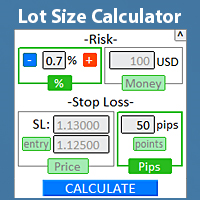
Trova rapidamente la dimensione del lotto direttamente nel terminale , per rispettare la gestione del rischio. Guarda il mio #1 Gestore di Trading : 66+ funzioni, inclusa la gestione del rischio PRO | Contattami se hai domande funziona con qualsiasi strumento di trading: Forex, Azioni, Futures, Indici, CFD, Obbligazioni, Criptovalute; funzione di minimizzazione dell'interfaccia; flessibilità d'uso; gestione del denaro; Particolarmente utile per i trader a breve termine, quando hanno bisogn

Pro MT4 To Telegram sends text messages to a Telegram group or channel of your choice immediately when (No DLL files Needed):
+ new order + closed order + placing pending order + modified order + Delete Pending order and more in the next update... I have tested this EA with forex symbols but it should work fine with any MT4 symbol (e.g. indexes, commodities, stocks, cryptocurrencies)
How To get your Bot Token or Api Token : Before running the Telegram EA you must create your own Telegram bot

L'indicateur montre les heures d'ouverture des bourses mondiales. Vous aide à voir quels marchés sont actuellement les plus actifs Découvrez mon #1 Pro Utility : 66+ fonctionnalités, incluant cet outil | Contactez-moi si vous avez des questions Aide à sélectionner les instruments les plus volatils en ce moment; Particulièrement utile pour les traders intraday; 1) Lors de l'utilisation sur des délais 1H et inférieurs: les lignes correspondront à la position réelle des barres sur le graphiq
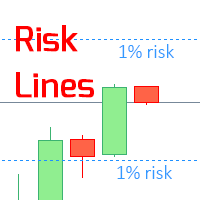
L'indicatore mostra il livello di rischio specificato sul grafico, per posizioni lunghe e corte. Guarda il mio #1 Gestore di trading : 66+ funzionalità, inclusa questo strumento | Contattami se hai domande Può essere utile quando si imposta il livello Stop Loss, il cui valore è visibile sull'asse dei prezzi a destra. Per calcolare il livello di rischio, viene utilizzata una dimensione del lotto Fissa / o Ultima utilizzata . Impostazioni di input: Ultimo lotto negoziato: imposta

Informatore per calcolare i risultati delle operazioni aperte Guarda il mio #1 Trade Manager : 66+ funzioni, incluso questo strumento | Contattami se hai domande Il pannello informativo raggruppa gli ordini aperti in 2 categorie: Acquisti Vendite Per ogni categoria, vengono visualizzati il simbolo e il numero corrente di pip. Il risultato totale per tutte le operazioni aperte è mostrato di seguito. Le notifiche possono essere abilitate o disabilitate semplicemente cliccando sul pulsante: Q
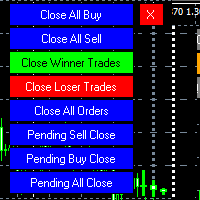
MT4 To Telegram it is available now! This Panel Allows you to : Close all buy orders. Close all sell orders. Close all winning orders. Close all losing orders. Close all orders. Close all Pending BUY orders. Close all Pending SELL orders.
Close all Pending orders.
Bonus : Grid Manager : Set the number of levels (trades). Lot size and you can do Martingale to raise the lot size for each level. Set distance between levels, and you can manage the distance for each level using Distance Q. St

AntiMartingale-Execution is a pyramidal Money Management system capable of increasing positions as equity increases using the positive margin of the transaction. It is possible to set the capital for each operation, the operating and maximum margins and the target level to be reached. Once the general trade settings have been made, it is possible to preview the grid of operations that will be activated by pressing the BUY / SELL button. If necessary, it is also possible to close all operations

Informatore per monitorare i tuoi risultati di trading giornalieri Scopri il mio #1 Assistente di Trading : 66+ funzionalità, incluso questo strumento | Contattami se hai domande Nella parte superiore del pannello, imposti l'obiettivo di profitto giornaliero (in pip): Inserimento manuale di un valore; Uso dei pulsanti [+] e [-] (il passo di modifica può essere configurato nelle impostazioni); La dashboard raggruppa quindi le operazioni in 2 categorie: Risultato fluttuante corrente; Somma d
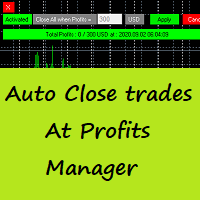
Auto Close Trades At Profits Manager is a tool that closes orders at a defined profit, very simple to use ( Panel with buttons...).
You can enable or disable the tool using buttons and edit the profit amount from the panel too.
INPUTS:
You can customize Panel graphics, Font and colors.
You can check also the The Grid Manager, closing trades Manager https://www.mql5.com/en/market/product/46365

Hello Traders, This is a new Upgraded version. Money management is the key! The multiplier tells you the position of the stop loss. Additionaly do not forget to use exit indicators!
Based on this and your risk in percent (max 2%) you get the position size Calculated. You can drag the Panel on your chart by pressing the off button than press it again and hold+drag.
Enjoy=)
FREE

This script allows traders to easily close positions if their profit/loss reaches or exceeds a value specified in pips.
The script allows users to easily close positions if their profit/loss reaches or exceeds a value specified in pips.
Please set slippage value first. Sometimes some positions do not close due to high volatility of the market. Please set larger slippage or restart the script.
...................................................................................................

It is a truly useful multifunctional tool. I did it thinking about my needs as a trader some years ago although I have been modifying it for my partners to use it.
This tool allows: Directly send buy or sell orders with one click and shows where you should place the stop loss based on an algorithm using ATR and comparison with previous significant levels.
Close all profits by clicking a button.
Close all losses by clicking a button.
Close all operations by clicking a button.
Shows the

Dear Traders,
With this order system you can place Pending Orders amazingly quick. Quick Pending Order has the following features: The system automatically recognizes the type of order (sell stop, sell limit, buy stop, buy limit), by detecting the current price and your stop loss position. You can use its build in Money management. So you do not need to calculate the lot size. 2 Take profit targets Break even (with different pip amount) Custom button assignment Comission per Lot (default set t

Alerts to Telegram The utility sends Alerts of all your indicators or advisers to a telegram channel (group or personal message). Benefits:
1. There is no need to be at the terminal waiting for an alert from your indicator or advisor; 2. Simple setup.
Currently works with terminal languages:
1.Russian; 2.English. If it is necessary to add your language please let me know. The utility works together with the AlertToFile indicator (put the indicator in the Indicators folder) Indicator: Alert

A bot for trading in binary options for mql4.
He can do send message in mobile of phone.
He can do work in several long time-frame.
He can modify main analize.
He do displey panel of the bot and modify her you can.
He have do display of tick grafic in 15 min and more(time of timeframe).
He can modify a small main analize.
He can modify a dimension of smal main analize.
He can modify the advanced analize.
He can modify a small advanced analize.
He can modify a dimension of smal advanc

Features: fast opening / closing deals automatic closing of trades by profit / loss the number of deals and the total profit for the Symbol
Fast open deals: set the Lot volume set StopLoss / TakeProfit in points (if you set "0", then it is not used) set slippage set Magic (if necessary) set comment (if necessary)
Fast open features: fast open Buy fast open Sell fast close ALL open orders for the current Symbol
Auto close deals by profit / loss (analogue of virtual StopLoss / TakeProfit): mo

What this tool does Assistant AutoClose monitors open trades and closes them when selected conditions are met. You can automatically close trades by: Profit in points Loss in points Profit in deposit currency Loss in deposit currency
It can work: On Buy and Sell trades Only Buy trades Only Sell trades
You can also: Limit by number of deals Control total profit per symbol Close trades per-trade or based on overall result Typical use cases Closing trades after fixed profit without using br
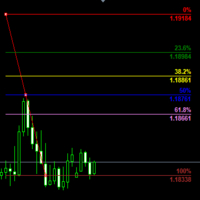
Customizable Fibonacci Lines Up to 9 Fibonacci levels Customize line color, line style and line width for each Fibonacci line Easily adjustable Fibo object is created in background so you can use with indicators and EAs How to use: Load the indicator to the chart and press "f" on keyboard and click anywhere on the chart to start drawing You can customize each line after its drawn as well as input window of the indicator

Introduction Utility informer 'Know Your Symbols' quickly and easy let you know important information about your symbol. This utility covers any symbol i guess, attach it to one chart (time frame and symbol does not matter) and select what symbols you need information about and voila...Equipped with inputs for symbol prefix/suffix if they have such. Informs about; Current price Day high price Day low price Spread points Point size Money required for 1 lot Pip value in quote currency Swap for a b
FREE

The Visual Order Tracking (VOT) indicator makes trade history and performance metrics visible on the chart in three ways: 1) Draw History of closed and open trades with arrows, lines and trade result numbers (pips, $ profit, % profit, % change); 2) Summary Trade Panel to show open and closed trade summaries by symbol, lots, pips, profit and advanced stats; and 3) Open Trades Panel to show open trades by Symbol Ticket, Type, Lots, Profit, pips, SL pips, StopLoss, TakeProfit, Spread, Magic, Comme

MT4 Alert to Telegram MT4 Alert to Telegram is tool, which sends selected trades to telegram channel. Tool sends trades when open and close with chart to telegram channel. Tool can send multiple charts and pairs from a single chart. Send information of all type of orders: Opened (including Pending Orders), and closed triggered.
functions - user can custom self-sending message text even in their native language - user can send own advertisement text periodically - attach expert in one chart an

DataGrabber The database creator
DataGrabber store selected instrument history to .csv files. It's purpose is to automatically create extensive history database.
DataGrabber is added to the selected instrument chart window as an indicator. It periodically check presence of bar data on the server and presence of .csv files on client PC (local database). If missing files detected in local database, it's created, filled with data and added to the database.
Range of bar history in days beeing ch

Informazioni di mercato e statistiche dettagliate: analisi della volatilità e delle barre dei prezzi. Scopri il mio # 1 Trade Assistant : 66+ funzionalità, incluso questo strumento | Contattami se hai domande Specifica qualsiasi coppia di valute/strumento di trading per ottenere informazioni: Informazioni di mercato:
Spread attuale; Swap per posizioni lunghe (acquisti); Swap per posizioni corte (vendite); Seleziona un timeframe e un numero di periodi per analizzare le variazioni di prezzo:
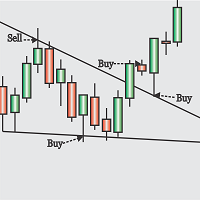
Obaforex TrendLine Trader is a tool developed to improve trading with trend lines. This tool is highly functional and yet extremely simple and safe to use. Simply draw trendlines and make them active for trading by renaming them based on what purpose you want them to serve. buy (to open a long trade based on the named line) sell (to open a short trade based on the named line) buytp (to close a buy trade at a price higher than current market price) buysl (to close a buy trade at a price lower t

This experts helps you with increasing your signal volume. Everytime the signal opens a trade, the experts creats a specific amount of copies of this trade. Evertime the signal closes a trade, the expert closes all the copies of the singal trade.
Input parameters: - amount_of_copies: The amount of copies the expert should create - interval_in_seconds: How often the expert should look for new orders to copy or closed orders, to close copies - lot_size_of_copies: The lot size of the new copies

This Expert Advisor is to assist you on Impulse's Titan method.
The expert : * Placement of SL/PE and TP in automatic mode * Automatic order taking * Automatic calculation of the Lots according to your Money management * Automatic calculation of Fibonacci levels * Tracking and closing of orders automatically * Detection of signal cancellations * Manual customisation of the PE is possible * Manual pause possible in case of event
To make the best use of the Expert you should : * follow the Impu
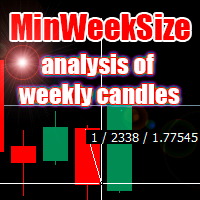
The script analyzes the size of the extreme closed candles of the selected timeframe (by default - W1).
If the candlestick size is higher than in the settings, the script opens the chart of this trading instrument.
In addition, the script calculates the average candle size for the number of candles specified in the settings.
An example of using the script: On Monday morning, activate the script on any trading instrument; Determine which instrument's weekly candle is above average; This week,

Hello Guys! I want to share with you a very useful tools. Anyone of us who has used MT4 for some time knows how impractical this platform can be for discretionary trading. That's why I created this graphical interface! Interface is very simple, all the info that you need are in the video and in the screenshot.
NB: Before to run the EA Interface, remember to copy the file in the comment in your MT4 folder "Controls". PATH: .../MQL4/INCLUDE/CONTROLS
NB: unfortunately the interface can't be test

The Visual Order Tracking (VOT) EA makes trade history and performance metrics visible on the chart in four ways: 1) Draw History of closed and open trades with arrows, lines and trade result numbers (pips, $ profit, % profit, % change); 2) Trade Manager to show Open, SL and TP levels as vivid horizontal lines with dynamic specs and partial closing options; 3) Summary Trade Panel to show sortable table of open and closed trade summaries by symbol, lots, pips, profit and advanced stats; and 4)

Time Closer can help you closing all the open position at the specified time "Everyday". Mainly for Day trader that don't want to hold position overnight, or over different session, or over a specific time. Simple Parameter to use. Usage Download and drag Time Closer on the chart (Chart Symbol should be the same Chart Symbol as you want the position close) Check Allow AutoTrading is "On" Set parameters
Input Parameters Turnon True - Turnon the utility
False - Turnoff the utility Close All Open

Flat è una utility pensata per chi ama operare con take profit e stop loss virtuali ed ordini di copertura come sistema di protezione del capitale, ma a volte ad esempio la notte non è possibile operare quindi si è costretti ad intervenire nel momento e nel modo sbagliato Facciamo un esempio, dopo aver ricevuto un segnale ti posizioni sul mercato con una posizione Long ma il mercato a bassi volumi e comprendi che il tuo posizionamento è valido ma bisogna attendere più di quanto pensavi fosse ne

Profit X invia notifiche sul tuo dispositivo mobile mantenendoti aggiornato sul profitto dei tuoi investimenti anche nei momenti in cui non puoi fisicamente controllare i mercati, ad esempio quando sei alla guida, sul posto di lavoro, in una riunione o con amici, con parenti e non puoi distrarti Può essere disattivata e attivata ed è possibile scegliere la frequenza del aggiornamenti in minuti, ore, giorni, settimanale o mensile La configurazione e personalizzazione è molto semplice, di default

Equity X è una utility che chiude tutte le posizioni ed eventuali ordini pendenti ad un importo prestabilito, è possibile fissare il bilancio del tuo conto quando il netto e uguale o superiore oppure uguale inferiore all'importo desiderato Ha integrato un sistema per la notifica mobile instantanea che genera il messaggio ad operazione avvenuta Uno strumento che permette di ottimizzare al massimo il rendimento del tuo investimento, è possibile utilizzarlo anche come gestore virtuale di take prof
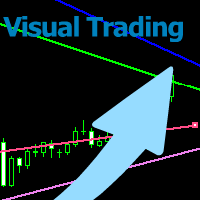
With this tool you can easily draw lines on the chart and the trade is done easily. The steps are as follows: First: Draw the buy and sell lines on the chart. Second: Draw the profit and loss lines on the chart. Third: Specify the volume of the transaction you want to trade. Fourth: Activate the lines. Warning When moving lines, be careful not to make a wrong trade.
Expert easily trades you.

This utility allows you to easily close profit or loss positions.
You can close profit or loss positions by clicking each buttons. If profit or loss positions reaches or exceed value specified as pips, they would be closed.
This panel would be placed left bottom corner of the chart. If the users want to change the placement and functions contact me.
Important : -Check allow live trading. -Enable Auto Trade trading.

The arkdc module derives its name from the Ark data collector statement. The main purpose of this module is to instantly save incoming tick data to a csv file. How does this csv file differ from any ready-made csv file found in metatrader or imported from other sites? The data obtained with this module is each tick data that comes to the metatrader program. A lot of tick data can come in per second.But does the module only record tick data raw? The arkdc module saves not only incoming tick data,
Questo è un consulente esperto semiautomatico che scambia il sistema di rete. L'idea è quella di prendere gradualmente posizioni diverse nel mercato, quindi calcolare il livello di pareggio per loro. Quando i prezzi superano questo punto di pareggio di una distanza predeterminata, tutti gli ordini aperti vengono chiusi.
Informazioni importanti
Ecco la guida per l'utente: https://www.mql5.com/en/blogs/post/730567
Puoi provare questo EA con uno qualsiasi dei miei altri prodotti, qui: https://ww

MultiStopOrder Tis Script will help us to put multiple stop order with single one click. This is a script not an EA Will place BUYSTOP and SELLSTOP with single click
Main Feature 1. Put Multiple Stop Order 2. Specify how much stop orders will make 3. Set distance from current price 4. Set distance for each stop order 5. Set Take Profit dan Stop Loss 6. Use it on MT4 7. Set lot size with minmum 0.01 lots 8. Use with single one clicks
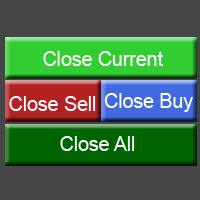
This utility allows you to easily close positions.
You can close buy or sell positions by clicking each buttons. And also you can close whole positions by clicking one buttons.
This panel would be placed left bottom corner of the chart.
If the users want to change the placement and functions contact me.
Important: -Check allow live trading. -Enable Auto Trade trading.
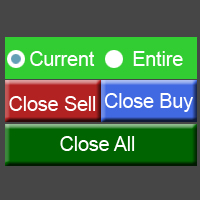
This utility allows you to easily close positions.
You can close buy or sell positions by clicking each buttons. And also you can close whole positions by clicking one buttons.
This is advanced tool of "ClosePanelA". This panel would be placed left bottom corner of the chart. To get upgraded version, please visit https://github.com/johanfriso87/profile
Important: -Check allow live trading. -Enable Auto Trade trading.

AW Workpad è un pannello di controllo del trading multifunzionale progettato per il trading manuale e semiautomatico. Ti consente di gestire ordini pendenti, posizioni di mercato, fornisce un'ampia gamma di dati statistici, nonché un'analisi multiperiodale di un gruppo di indicatori classici. L'utilità è rappresentata da cinque schede: POSITIONS, PENDING, CLOSE, INDICATORS, INFO . Ogni scheda ha il proprio gruppo di funzioni per l'elaborazione degli ordini o informazioni sulla situazione attual

Monitora i tuoi simboli preferiti Utilità multifunzionale: 66+ funzioni, incluso questo strumento | Contattami se hai domande | Versione MT5 Questo strumento si apre in una finestra separata: può essere spostato (trascinato ovunque) e minimizzato [v]. Puoi regolare la lista di osservazione sul pannello: Clicca su [edit list] per aggiungere / rimuovere simboli dalla lista di osservazione. Valore calcolato: può essere l’ultimo [bar chiuso] o l’attuale [bar fluttuante]. Seleziona il [time

Statistiche dettagliate del tuo trading per il periodo di tempo selezionato Scopri il mio #1 Trade Manager : 66+ funzioni, incluse statistiche estese | Contattami se hai domande Modalità di visualizzazione delle statistiche: Per la coppia di valute/strumento di trading selezionato Statistiche per tutte le operazioni (" ALL ") Puoi selezionare il periodo per cui desideri ottenere statistiche: 1 giorno 1 settimana 1 mese 2 mesi 3 mesi 6 mesi 1 anno 2 anni Intera cronologia di trading In
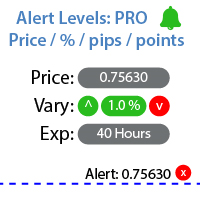
Utilità per impostare notifiche quando viene raggiunto un determinato livello di prezzo Guarda il mio #1 Trade Manager : 66+ funzioni, inclusi Avvisi e Avvisi di Linea di Tendenza | Contattami se hai domande L'avviso può essere impostato in tre modi: Inserimento manuale del livello di prezzo; Impostazione della variazione di prezzo: in percentuale / in pips / in punti di mercato; Spostamento del livello con il mouse: c'è anche una funzione magnete, quando attivata, il livello si aggancia a

Gestione degli ordini attivi e in sospeso: breakeven automatico, modifiche TP/SL, chiusura parziale/totale, visualizzazione visiva dei livelli sul grafico Scopri il mio #1 Utility : 66+ funzioni, inclusa la gestione PRO dei trade | Contattami se hai domande 1) Finestra principale: per gestire gli ordini, puoi impostare un simbolo specifico [Symbol] o selezionare tutti i simboli [ALL] Chiudi tutte le posizioni attive [ALL] Chiudi tutti i trade in profitto [profits] Chiudi tutti i trade in

Statistiche dettagliate del tuo trading per il periodo selezionato Dai un'occhiata al mio #1 Assistente di Trading : 66+ funzionalità, incluso questo strumento | Contattami se hai domande L'utility include 2 strumenti separati: Statistiche di Trading Analizzatore dei Giorni della Settimana Modalità di visualizzazione delle statistiche: Per la coppia di valute/strumento di trading selezionato Statistiche per tutti i trade (" ALL ") Puoi selezionare il periodo per il quale desideri ottenere le sta

For the trader, trading sessions represent a clear time frame for increasing market volatility. The Trend Session indicator of trading sessions is a tool that will undoubtedly be useful not only for novice traders, but also for experienced traders. If you're looking for a simple indicator of Forex trading sessions, you've come to the right place. This indicator draws vertical bars that indicate the start and end times of the main trading sessions.

This utility sends notification to trader’s MT4 (for MT5 version, checkout this link ) mobile app, to remind traders about their open positions. Super useful for part time traders to keep track and not forget any positions. To turn on notification, please visit this link (https://www.metatrader4.com/en/trading-platform/help/setup/settings_notifications) Features Keep track on open orders (pending orders, running orders) Customize time to send notification Customize notification interval (send ev

You can finally leave a trade running without any worry!
What is Auto Trade Manager MT4 ? It is an EA that does not take trades (unless on 'Strategy Tester Mode') but manages an active trade; this is done by automatically moving the stop loss by the user's specifications.
Features! - Automatically places stop loss at break-even (Settings: Pips in profit, % of TP, % of SL) - Automatically trails your stop loss (Settings: Pips in profit, Money in profit, Stop loss on Moving Average)
Can I tes

The Multiple Order Opener does Exactly what it says. It can open any number of orders of any type with just one click. (Sell, Buy, Sell Limit, Sell Stop, Buy Limit, Buy Stop). You only have to specify the number of orders you want to open, specify your lot size for the orders, take profit and stop loss pip points (optional), and just click once the button with the type of order/orders you want to open. It is simple as a click.
Note : Unfortunately the 'try demo' does not work fo

Asa Manual Grid Buy Sell with UI is made for Grid trading when orders are placed above and below a set price, creating a grid of orders at incrementally increasing and decreasing prices.
Main Features Ability to set buy grid with 200 maximum orders. Ability to set sell grid with 200 maximum orders.
Easy to use with simple interface. Have 2 mode of Take Profit and 1 for Stop Loss.
Real time information for the current open positions and calculate average sum of order price. How to use
STEP 1

This Expert Advisor give you an alert to your Metatrader Mobile and on Metatrader Screen Chart You can put your Moving average setting You can freely add custom message to it. How to Setup Notification please read this https://www.metatrader4.com/en/trading-platform/help/setup/settings_notifications Input default on this Expert Advisor. You can change to it parameters. fastMAPeriode =3; slowMAPeriode =8; MAMethodType ="0=SMA 1=EMA 2=SMMA 3=LWMA"; fastMAMethod =1; slowMAMeth
FREE

Use this tool to plan your trades directly on your charts and get instant feedback on account risk, trade risk to reward and required position size. Plus, purchase LMBF Executor separately to easily convert planned trades into orders and manage them from your charts. Features include: Plan multiple trades for one or more symbols visually on your charts at one time, either on the same of different time frames. Use your mouse to drag levels to change entry, stop loss and take profit levels. See
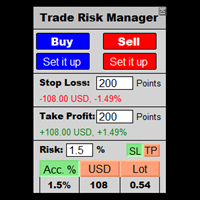
This is a calculator that allows you to manage your trade risk in every trade. Decide in advance the risk you want to assume using Stop Loss or Take Profit; account percentage or specific amount of your currency.
You can also use this tool to can test faster your manual strategies, because Trade Risk Management can be perfectly used on backtesting
For new traders, this may become your favorite tool; allowing you to easily control the risk of your trades, and train your skills trading on Bac

**IMPORTANT** THIS TOOL REQUIRES YOU TO FIRST PURCHASE "Graphical Trade Planner" https://www.mql5.com/en/market/product/56702. Without it, this tool will do nothing of any use. -------------------------- Use "Graphical Trade Planner" to plan your trades directly on your charts and get instant feedback on account risk, trade risk to reward and required position size. Plus, purchase LMBF Executor separately to easily convert planned trades into orders and manage them from your charts. Features i

HEDGE Decreasing is an EA that opens an order if the market moves an adverse will make a safe zone and make it smaller every each trade with lower risk than the usually hedge strategy. Hedging with Forex is a strategy used to protect one's position in a currency pair from an adverse move. It is typically a form of short-term protection when a trader is concerned about news or an event triggering volatility in currency markets. if you want to try the EA for free just message me
i am alwa

Every trader is watching over his account over and over.... trying to anlayse every system he or she has. With this tool you are able to export your complete history of every account
export withdrawls / deposits / rebates to a separate file
export account status with balance / equity / current drawdown
recalculate micro to standard lots / profits ...
export decimal by "." or ","
combine a series of Magic Numbers to one unique Magic Number
filter to ignore OrderComments.
Expert Advisor will manage all transactions you make using Expert Advisor, or manually from all platforms (Web Trade, MT4 Windows, MT4 Mac, MT4 Mobile phone) Multi Currency In one chart, the Tool will manage transactions of all currencies or according to the available list.
Currency Selection All Transactions of All Pairs Based on the Pairs List
Auto Manage, with setup parameters on one chart Auto Close Profit Average Auto Close Profit only Auto SL / TP Auto Trailing
Button Function to : Clos

Hello Traders! Version 3.0 of the script has been released!
What's new? Thanks to your suggestions I have inserted these changes to the tool: 1 - Data input are now date picker, it will be easier and faster to set the data export period; 2 - A message box will check that there is not a file with the same name in your folder; 3 - Error message to check that data insert are correct. If you like this product, take a look to the FULL INTERFACE! MT4 To Excel Interface
This script is a very usefu

With this Expert Advisor you will never miss an indicator event, you will receive notifications on your mobile phone when the chart matches the conditions you have set.
Indicators in the Expert Advisor
Moving Average(MA) Bollinger Bands(Bands)
Stochastic Oscillator(Stochastic)
MACD
Relative Strength Index(RSI)
Before use the Expert Advisor
Install "MetaTrader 4" on your mobile phone. Enable Push Notifications in "MetaTrader 4" on your PC, go to menu bar Tools -> Options -> Notifica
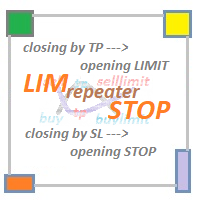
LIM_STOP_REPEATER Программа не открывает сделки сама. Она повторяет сделки открытые вручную. Программа повторяет закрытые по TP или SL ордера: Выставляет Limit ордер при закрытии по TP. Выставляет Stop ордер при закрытии по SL. Программа не имеет ограничений по количеству повторов сделок. В программе отсутствуют внешние параметры. Если сделку закрыть вручную, отменить отложенный ордер - программа не будет повторять эту сделку.

WOLSELEY's Trading Panel - BASIC - - Feel free to contact me at instagram @walter_robos or whatsapp/telegram +5592981173937 View your history in a structured and detailed manner, with efficiency rate and profit rate separated by day, week, month and total, as well as asset details, server time and positions&orders in progress. This panel was created looking on HEDGE-type accounts, but it can be used on NETTING-type accounts without any problems. In the PREMIUM version of this Panel you have
CheatcodeFX Trade Manager
Your profit management companion. Especially perfect when you have a VPS or a dedicated machine setup. Apply it on the pairs that you care about and walk away. I personally applied it to the 28 main pairs that I often watch on a dedicated mini pc and do the trade execution on another device. With this supporting you in the background, trade with confidence know this will help move you to breakeven and take the best out of your trade. CheatcodeFX Trade Managers works on
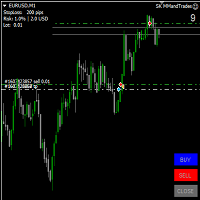
The EA was created for scalpers and traders who need to quickly open and close trades with a calculated lot.
You can also use the expert Advisor to train your skills on history in the strategy tester.
Buttons and informers take up little space on the chart, and do not interfere, even if 8 charts are open.
The expert Advisor calculates the Lot from the specified StopLoss as a % of the Deposit, and opens the corresponding orders using the "BUY" and "SELL"buttons.
It modifies TakeProfit and St

Trade24 for MT4 Trade24 is arguably the most powerful expert advisor in manual trading. With our tool, open your orders in record time (50 times faster). This is why our users call it the "scalper tool". Key features of the panel
It works perfectly on all trading asset Trade24 calculate the exact lot size for your trade according to the stop loss size and your available account equity Trade24 has the ability to schedule your future trades with the "Scedulled" function Set Stop Loss
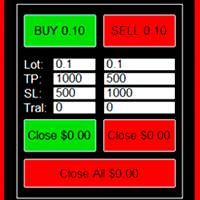
Convenient trading panel for quick trading. Suitable for any trading instrument.
Capabilities Data entry is possible both in the corresponding fields of the panel and in the properties of the utility; Implemented the ability to enable trailing stop (if 0 - it does not work); Buttons for quickly opening buy or sell trades; Buttons for closing buy and sell separately; Button to close all deals at the current price. Settings: Buy Lot - Trading lot for a buy deal; Sell Lot - Trading lot for a se
Telegram BreakOut Ichimoku Telegram BrealOut Ichimoku PRO The Expert Advisor will help you forward all alert from MetaTrader 4 to Telegram channel
Parameters Channel Name - Name of your channel Token - create bot on Telegram and get token. AlertonTelegram - true to activate AlertonMobile - true to activate AlertonEmail - true to activate Customize moku Setting (Pro Version) Customize Comment (Pro Version) Add Customizable Signal Name(Pro Version)
FOR TRY YOU CAN DOWNLOAD LITE VERSION
Sai perché MetaTrader Market è il posto migliore per vendere strategie di trading e indicatori tecnici? Non c'è bisogno di pubblicità o di protezione del software, nessun problema di pagamento. Tutto ciò è fornito da MetaTrader Market.

Ti stai perdendo delle opportunità di trading:
- App di trading gratuite
- Oltre 8.000 segnali per il copy trading
- Notizie economiche per esplorare i mercati finanziari
Registrazione
Accedi
Accetti la politica del sito e le condizioni d’uso
Se non hai un account, registrati