SendEmail

Si tratta di uno strumento che consente di conoscere le informazioni sul conto in tempo reale inviando avvisi via e-mail.

Gli avvisi funzionano come segue:

1. Avvisi di profitto e perdita fluttuanti: una volta raggiunti gli importi di profitto e perdita impostati, l'EA invierà automaticamente un'e-mail con i dettagli dell'avviso.

2. Avvisi di apertura e chiusura degli ordini: una volta che il conto ha una posizione aperta e chiusa, EA invierà automaticamente avvisi dettagliati via e-mail.

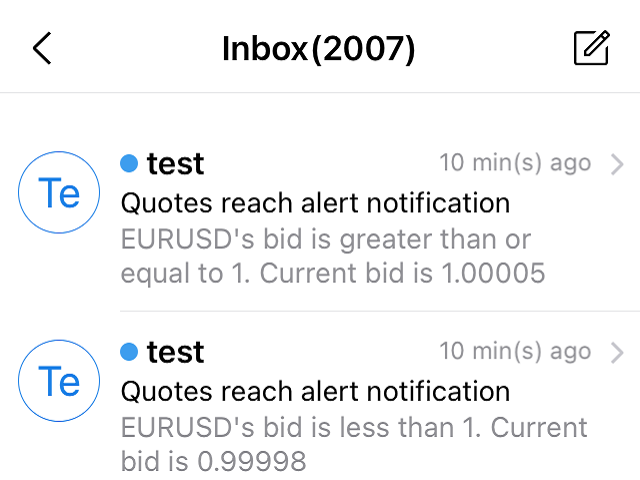
3. Avvisi di quotazione di più simboli, una volta che la quotazione è salita o scesa secondo quanto impostato dall'utente, EA invierà automaticamente un'e-mail con i dettagli dell'avviso.


È possibile personalizzare il numero di avvisi per tutte le opzioni sopra descritte.

Come si usa:

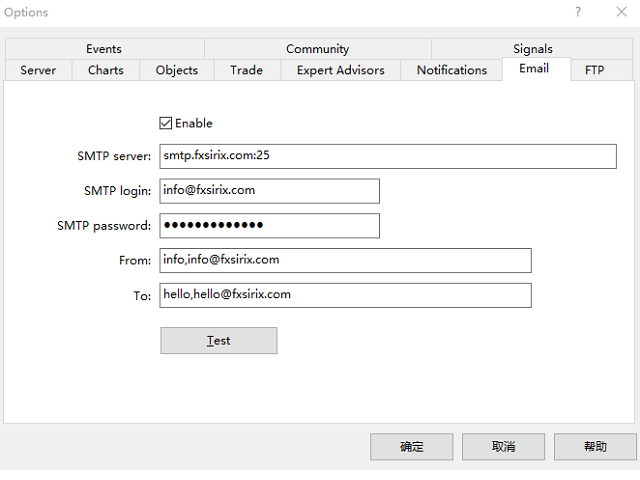
1. Nel client MT5 - Strumenti - Opzioni - Email, completare le impostazioni dell'email e attivarle.

2. Caricare l'EA nel client MT5 e attivare il trading automatico.


Descrizione delle impostazioni dei parametri dell'EA.

I parametri degli avvisi di profitto e perdita sono descritti di seguito.

1. Il parametro TP imposta l'importo del profitto, SL imposta l'importo della perdita, l'importo è il P/L fluttuante, altrimenti TP e SL sono impostati su -1.

2. Il parametro INMintes imposta l'intervallo di allarme. Intervallo di tempo per ricevere una nuova notifica dopo il raggiungimento del punto di allarme.
    Se la condizione è soddisfatta dopo l'intervallo, l'e-mail di allarme verrà inviata di nuovo, altrimenti non verrà inviata di nuovo.

TPSLComment=Invia avvisi via email quando si raggiunge l'importo di profitto/perdita impostato, se non è necessario, impostare TP/SL a -1
TP=10.0
SL=80.0
INComment=Intervallo di tempo per essere nuovamente avvisati dopo il raggiungimento del punto di allarme.Tempo in minuti
INMintes=15

Introduzione ai parametri dell'allarme preventivo.

1. Il parametro Symbol1 imposta il simbolo, GTBid1 imposta il valore maggiore o uguale all'offerta, LTBid1 imposta il valore minore dell'offerta,

NGTimes1 imposta il numero di volte in cui viene inviata un'e-mail di avviso quando è maggiore o uguale all'offerta e NLTimes1 imposta il numero di volte in cui viene inviata un'e-mail di avviso quando è inferiore all'offerta.

È possibile impostare 8 avvisi di simbolo. 

2. Qui le quotazioni vengono confrontate con l'offerta.

QuotesComment=Impostare gli avvisi e-mail per le quotazioni in rialzo o in ribasso.

DLine1=-----------

Simbolo1=GBPUSD

GTBid1=1.0

LTBid1=1.0

NGTimes1=1

NLTempi1=1

DLine2=-----------

Simbolo2=EURUSD

GTBid2=1.0

LTBid2=1.0

NGTimes2=1

NLTimes2=1

DLine3=-----------

Simbolo3=AUDUSD

GTBid3=1.0

LTBid3=1.0

NGTimes3=1

NLTimes3=1

DLine4=-----------

Simbolo4=XAUUSD

GTBid4=1.0

LTBid4=1.0

NGTimes4=0

NLTimes4=0

DLine5=-----------

Simbolo5=UKOIL

GTBid5=1.0

LTBid5=1.0

NGTimes5=1

NLTimes5=1

DLine6=-----------

Simbolo6=GBPUSD

GTBid6=1.0

LTBid6=1.0

NGTimes6=0

NLTempi6=0

DLine7=-----------

Simbolo7=GBPUSD

GTBid7=1.0

LTBid7=1.0

NGTimes7=0

NLTempi7=0

DLine8=-----------

Simbolo8=GBPUSD

GTBid8=1.0

LTBid8=1.0

NGTimes8=0

NLTempi8=0

Avvisi di apertura e chiusura ordini Descrizione

Non ci sono parametri da impostare, non appena una posizione, un ordine viene aperto o chiuso, l'EA invierà automaticamente un'email.

L'e-mail contiene il numero dell'ordine, l'ora di apertura, la dimensione del lotto, il tipo, il prezzo di apertura, i livelli di stop loss e take profit, l'ora di chiusura, il prezzo di chiusura e il profitto/perdita.
Prodotti consigliati
Wolseley Panel MT5 FREE
Walter Wolseley Pessoa Batista De Lima
WOLSELEY's Trading Panel - BASIC - - Feel free to contact me at instagram   @walter_robos  or whatsapp/telegram +5592981173937 View your history in a structured and detailed manner, with efficiency rate and profit rate separated by day, week, month and total, as well as asset details, server time and positions&orders in progress. This panel was created looking on HEDGE-type accounts, but it can be used on NETTING-type accounts without any problems. In the PREMIUM version of this Panel you have
Comprehensive on chart trade panel with the unique ability to be controllable from mobile as well. Plus has a library of downloadable configuration, e.g. exit rules, extra panel buttons, pending order setup and more. Please see our product video. Works with all symbols not just currency pairs. Features On chart panel plus controllable from free app for Windows, iPhone and Android Built-in script engine with library of downloadable configuration, e.g. add 'Close All Trades in Profit' button, exit
Lock Bot
Artem Alekseev
This utility is designed to automatically maintain a "locking" position and reopen it when necessary, which is suitable for position maintenance and protection strategies. A simple utility (hereinafter referred to as the bot) that implements a locking strategy with an infinitely reloadable locking trade. How the bot works: - When launched, select a buy or sell order with a specified TP - Set the SL parameter for the locking trade - The bot monitors the distance between the opening price of the f
Sfrutta strategie istituzionali con Institutional VWAP Reversal EA: cattura inversioni tramite bande di deviazione VWAP, picchi di volume e filtro trend 200 EMA. Punta a un profitto mensile del 5% con un DD massimo giornaliero del 5%, inclusi limiti di profitto, SL a breakeven e opzioni di inversione segnale—ideale per sfide di prop-trading. Personalizza TP/SL in percentuali, RR o candele; opera con il trend o su entrambi i lati. Ottimizzato per forex majors e oro, con esecuzione limitata nel te
AW Close By Profitables MT5
AW Trading Software Limited
The algorithm finds the most unprofitable position in your account, then the program determines the profitable positions that can cover the loss. This profit is used to close       unprofitable order in automated mode. The system is able to work on the most distant unprofitable orders or select them according to certain tickets with manual selection. That is, the utility closes a losing order using one or a group of winning orders. Opportunities: Closing orders for the current symbol or for all
Global Market Sessions – Visual Analyzer for MT5 A lightweight MT5 indicator that visually maps Tokyo, London and New York sessions, auto-detects broker timezone & DST, and highlights the best liquidity windows for smarter trading. See the market’s rhythm at a glance. Trade with clarity, precision, and confidence. Overview Global Market Sessions is a powerful yet easy-to-use MT5 indicator that visually displays the world’s major trading sessions (Tokyo, London, New York) directly on your chart
FREE
Product Name: Sentinel Pro - The Ultimate Trend Scanner & Stealth Panel   Redefine Manual Trading: From Trend Detection to Stealth Risk Management Sentinel Pro   is not just a trading panel; it's your intelligent trading co-pilot. Combining   Linear Regression Trend Scanning ,   Institutional-Grade Stealth Stop Loss ,   Multi-Chart Synchronization , and an   Automated Daily Risk Guard , it is engineered for professional traders who demand efficiency and security. Stop calculating manually an
Jvh Protection MT5
Jeremy Nicolaj Van Hoorn
JVH Protection – Universal Prop Firm Risk Manager (MT5) Broker-Time Reset | Daily Max Loss | Overall Drawdown | Trailing Lock | Full Account Guard JVH Protection is a professional-grade equity protection tool for MetaTrader 5, built for prop firm traders, EA users, and anyone who wants strict automated risk control. This EA acts as a real-time risk firewall for your entire MT5 trading account. Key Features Full Account Protection Monitors all symbols Covers all magic numbers Works with m
FREE
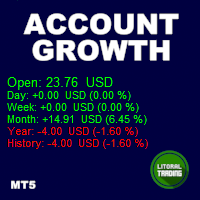
Tired of calculate every weekend and the end of the month to know how much you've earned and how much your capital has grown? Then this indicator will help you! It informs you how much your capital has grown in money and percentage in the day, week, month, year and in history, plus show how much volume ou used, how much trades you did and how much comission and swap you paid. Alo the open positions result are showed in money and percentage. Note: The amount of trades displayed may differ from
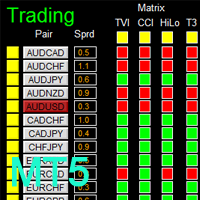
如果产品有任何问题或者您需要在此产品上添加功能,请联系我 Contact/message me if you encounter any issue using the product or need extra feature to add on the base version. There is Demo version of this panel Dashboard Genesis Matrix Trading MT5 Demo in my product list, please try it out to get familiar with all functionalities for free. Free version: LINK MT4 version: LINK This system basically utilizes Genesis Indi Set (TVI, CCI, GannHilo, and T3) as the core indicators to generate trading signal mainly on time-frame M15.
Auto Breakeven levels
Makarii Gubaydullin
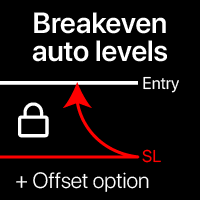
Livelli automatici di break-even Utilizzando questa utility, puoi attivare lo spostamento automatico dello SL, quando il trade raggiunge un profitto desiderato. Particolarmente importante per i trader a breve termine. È disponibile anche l'opzione offset: parte del profitto può essere protetta. Utility multifunzione : 66+ funzioni, inclusi questo strumento | Contattami per qualsiasi domanda | Versione MT4 Processo di attivazione della funzione automatica di break-even: 1. Seleziona il Simbolo o
Imagine flying a real aircraft without ever stepping into a flight simulator. That's what trading is like. You have to simulate your strategy before you can take it to a live market. It is good if you can simulate things speedily before even stepping into any live market, or before coming up with an automated system.  People don't have all day to stare at a higher timeframe chart until the entry signal finally arrives. That's why I built this so that you can simulate your strategy with speed. Th
FREE
Recovery Grid Fragmentation EA
AL MOOSAWI ABDULLAH JAFFER BAQER
A sophisticated recovery system designed to systematically dismantle large, losing hedged positions and "fragment" them into small, profitable exits. Unlike standard grid EAs, this system uses a Bank-per-Closure model and an Integrated Hedge Commander to ensure your account remains 100% balanced while it works to reclaim your equity. How the EA Works (The Logic) The Recovery Grid Fragmentation EA operates on three core pillars: 1. The Integrated Hedge Commander The EA continuously monitors your
News Hedging Pro  is a unique robot that allows you to trade during the most critical news announcement periods by your predefined strategy. You can preset the strategy to trade, and then it will trade that news automatically when the news comes. News release gives opportunity to have pips since the price usually has big move at that time. Now with this tool, trading news become easier, more flexible and more exciting than ever. No waiting, no confusing anymore. Product Links Fully  Description
IShift Lite
Yury Kulikov
5 (7)
Attention: You can view the program operation in the free version IShift Lite  DEMO .  IShift Lite is utility for trading directly from the depth of market. IShift Lite allows: -  perform trade operations directly from the DoM with a "single touch"; -  easily move your orders in the DoM: -  automatically place Stop Loss and Take Profit; -  Place limit order as Take Profit; -  move position to breakeven; -  automatically move Stop Loss along the price; -  calculate the volume of an order dependi
VectorPrime EA MT5
Maxim Kurochkin
4.2 (15)
VectorPrime — Sistema algoritmico con logica vettoriale multilivello VectorPrime è un sistema di trading autonomo progettato per un’esecuzione strutturata in condizioni di mercato multi–timeframe. Il suo nucleo si basa sul concetto di analisi vettoriale , in cui la dinamica dei prezzi viene scomposta in impulsi direzionali e strutture matriciali. Il sistema interpreta il flusso del mercato non come segnali isolati, ma come vettori interconnessi che formano una mappa coerente. Moduli principali d
Introducing the  Precision Data Extractor: RSI , an MQL5 utility crafted for traders, analysts and quants who need accurate historical data to build robust datasets. This tool lets you selectively pull historical price and indicator data—  Relative Strength Index  ( RSI )—from  multiple applied prices, timeframes, and  periods , then stores it in a  CSV  format, making it easy to feed into  machine learning models, trading algorithms, or in-depth market analyses . Compatible with  Forex, Stocks
Breakout Boxes with Volume Pressure This indicator automates the identification of key consolidation zones (Supply and Demand) based on Market Pivots and Volatility (ATR). Unlike standard support/resistance tools, this indicator provides a unique   Volume Pressure Analysis   inside every box, giving you insight into the battle between Buyers and Sellers before a breakout occurs. Key Features Automated Supply & Demand Zones:   Automatically detects significant Pivot Highs and Lows to draw dyna
Salve commercianti! Sono il tuo assistente commerciale. Permettetemi di dirvi la mia competenza: 1. Sono bravo nella gestione delle tue posizioni, indipendentemente da quale estremità hai posto un ordine, posso aiutarti per la prima volta ad aggiungere una linea di stop loss ragionevole e lo stop loss mobile. 2. Posso aiutarti a evitare l’ascesa e la caduta e a sradicare le debolezze umane dalle radici dei principi. 3. Ti invierò un messaggio di notifica al tuo client MT5 mobile al miglior punt
Quick deals EA
Aleksandr Slavskii
Горячие клавиши плюс клик левой кнопки мыши на графике. Советник открывает сделки, выставляет лимитные и стоповые ордера, удаляет ордера и закрывает позиции, также  делает реверс  открытых позиций, выставляет прописанные в настройках стоп лосс и тейк профит. (реверс только на неттинговых счетах) При запуске советника можно посмотреть подсказку как действует советник при нажатии клавиши + клик на графике. Правее последнего бара, ниже цены Ctrl+ЛКМ  - OpenSell Правее последнего бара, выше цены C
VMS Oscillator
Vincent Jose Proenca
Volume & Move Strength (VMS) Indicator for MT5 The VMS Indicator displays the relationship between trading volume and price movement strength, helping traders assess how well market activity supports price action. How It Works: Measures tick volume as trading activity. Calculates move strength using a normalized True Range (%). Both values can be smoothed (default: 5) and optionally normalized (0–100) for consistency across markets. Plots two lines in a separate window: Blue (Volume) – trading a
FREE
Smart Charts
Fyodor Korotkov
Hello, boys and girls! Script allows you either to quickly save opened charts and then close all charts opened by visual tester mode or just faster close all charts. Feel free to take a look at video manual about how to use this script on my YouTube channel. Also, feel free to join my telegram channel , where time to time I publish some exclusive stuffs. Feel free to leave feedback and thoughts how to improve this script - I'd highly appreciate that. All the best.
EA Dashboard MT5
Teerathad Booranawisedkul
FREE 7-DAY TRIAL After your trial ends, continue using this essential trading tool for only $30 one-time payment. This utility is designed to assist traders in monitoring account status, open positions, and trading performance in real time. It provides consolidated information related to account metrics, risk exposure, and statistical performance to support trading analysis and decision-making. The product does not execute trades automatically and does not provide trading signals. It is intend
Before installing the HeatMap indicator make sure you are using a broker that gives you access to the Depth of market (DOM) !! This indicator creates a heatmap on your chart allowing you to see the buy or sell limit orders easily and in real time. You have the possibility to change the setting and the colors of the HeatMap in order to adapt to all markets and all charts. Here is an example of a setting you can use with the NASDAQ100 on the AMPGlobal broker :  https://www.youtube.com/watch?v=x0Y
Was: $249  Now: $99   Market Profile defines a number of day types that can help the trader to determine market behaviour. A key feature is the Value Area, representing the range of price action where 70% of trading took place. Understanding the Value Area can give traders valuable insight into market direction and establish the higher odds trade. It is an excellent addition to any system you may be using. Inspired by Jim Dalton’s book “Mind Over Markets”, this indicator is designed to suit the
如果产品有任何问题或者您需要在此产品上添加功能,请联系我 Contact/message me if you encounter any issue using the product or need extra feature to add on the base version. There is a Demo version of this panel Dashboard Currency Strength Advanced MT5 Demo in my product list, please try it out to get familiar with all functionalities for free, Free version: LINK . MT4 version: LINK The Dashboard Currency Strength Meter Advanced gives you a quick visual guide to which currencies are strong, and which ones are weak over the
Midas AI MT5
Dmitriq Evgenoeviz Ko
MIDAS AI is the guardian of your capital. It doesn't dive headfirst into trading, but rather weighs every decision with mathematical precision. Its stop-losses and take-profits aren't random numbers, but the result of painstaking calculations designed to minimize risks and maximize profits. MIDAS AI is a symphony of analytics and algorithms. Like an experienced chess player, it calculates its moves ahead by analyzing charts and economic indicators. It doesn't give in to emotions or make impulsi
Take a Break MT5
Eric Emmrich
4.75 (24)
One tool to protect all your EAs — news filter, equity protection, time filter and more — free demo available Take a Break has evolved from a basic news filter into a comprehensive account protection solution. It pauses your other Expert Advisors during news events or based on custom filters. When trading resumes, it automatically restores your entire chart setup , including all EA settings. Typical use cases: One news filter for all your EAs. Pause trading during news or high volatility — and c
Fixed Range Volume Profile MT5
Abdelkhabir Yassine Alaoui
Profilo del volume a intervallo fisso automatico con avvisi per MT5 Questo indicatore mostra dove il prezzo ha trascorso più tempo, evidenziando livelli importanti che possono essere utilizzati nel trading. e può mostrare la densità dei prezzi nel tempo, delineando i livelli di prezzo più importanti, l'area di valore e il valore di controllo di una determinata sessione di negoziazione. Questo indicatore può essere collegato a intervalli di tempo tra M1 e D1 e mostrerà il profilo di mercato pe
Versione MT4: https://www.mql5.com/en/market/product/166784 Versione MT5: https://www.mql5.com/en/market/product/166785 PROFILO DI LIQUIDITÀ IL PROFILO DI LIQUIDITÀ è uno strumento visivo per la struttura del mercato che mappa le potenziali zone di liquidità sul grafico utilizzando un profilo dinamico in stile heatmap. Questo indicatore analizza l'andamento storico dei prezzi e il volume dei tick, evidenziando quindi le aree di prezzo in cui è probabile che la liquidità sia concentrata. Trac

Gli utenti di questo prodotto hanno anche acquistato
Trade Assistant MT5
Evgeniy Kravchenko
4.42 (208)
It helps to calculate the risk per trade, the easy installation of a new order, order management with partial closing functions, trailing stop of 7 types and other useful functions. Additional materials and instructions Installation instructions - Application instructions - Trial version of the application for a demo account Line function -   shows on the chart the Opening line, Stop Loss, Take Profit. With this function it is easy to set a new order and see its additional characteristics bef
Forex Trade Manager MT5
InvestSoft
4.96 (621)
Benvenuto a Trade Manager EA, lo strumento definitivo per la gestione del rischio , progettato per rendere il trading più intuitivo, preciso ed efficiente. Non è solo uno strumento per l'esecuzione degli ordini, ma una soluzione completa per la pianificazione delle operazioni, la gestione delle posizioni e il controllo del rischio. Che tu sia un principiante, un trader avanzato o uno scalper che necessita di esecuzioni rapide, Trade Manager EA si adatta alle tue esigenze, offrendo flessibilità s
TradePanel MT5
Alfiya Fazylova
4.86 (148)
Trade Panel è un assistente commerciale multifunzionale. L'applicazione contiene più di 50 funzioni di trading per il trading manuale e consente di automatizzare la maggior parte delle operazioni di trading. Attenzione, l'applicazione non funziona nel tester di strategia. Prima dell'acquisto, puoi testare la versione demo su un conto demo. Versione demo qui . Istruzioni complete qui . Commercio. Ti consente di eseguire operazioni di trading con un clic: Apri ordini e posizioni pendenti con calco
Versione Beta Telegram to MT5 Signal Trader è quasi pronto per il rilascio ufficiale in versione alpha. Alcune funzionalità sono ancora in fase di sviluppo e potresti riscontrare piccoli bug. Se riscontri problemi, ti preghiamo di segnalarli, il tuo feedback aiuta a migliorare il software per tutti. Telegram to MT5 Signal Trader è uno strumento potente che copia automaticamente segnali di trading da canali o gruppi Telegram al tuo account MetaTrader 5 . Supporta canali pubblici e privati e cons
FarmedHedge Pair Trading Dashboard
Tanapisit Tepawarapruek
5 (1)
Farmed Hedge Yield Farming - Professional Pair Trading Dashboard (Manual - Hybrid - Semi/Automated EA) VERSION 3 - WILD HARVEST UPDATE Trading Approach: - Manual Trading: Primary focus - Auto Pilot: Optional supplementary feature - Full Automation: Not the main purpose Recommended Timeframe: H1-H4 DEMO VERSION Download the free demo to test functionality. Use Strategy Tester with Visual Mode to see how it works. VERSION 3 - NEW FEATURES Summary Dashboard (SRA Panel) - Quick pair selection w
Copy Cat More Trade Copier MT5 (Gatto Copiatore MT5) è un copiatore di trade locale e un framework completo di gestione del rischio ed esecuzione progettato per le sfide di trading odierne. Dalle sfide delle prop firm alla gestione di portafogli personali, si adatta a ogni situazione con una combinazione di esecuzione robusta, protezione del capitale, configurazione flessibile e gestione avanzata dei trade. Il copiatore funziona sia in modalità Master (mittente) che Slave (ricevente), con sincro
Exp COPYLOT CLIENT for MT5
Vladislav Andruschenko
3.82 (34)
Trade copyr per MT5 è un trade copyr per la piattaforma МetaТrader 5   . Copia le negoziazioni forex   tra       eventuali conti   MT5   -   MT5, MT4   -   MT5 per la versione COPYLOT MT5 (o MT4   -   MT4 MT5   -   MT4 per la versione COPYLOT MT4) Fotocopiatrice affidabile! Versione MT4 Descrizione completa   +DEMO +PDF Come comprare Come installare     Come ottenere i file di registro     Come testare e ottimizzare     Tutti i prodotti di Expforex Puoi anche copiare le operazioni nel termina
Ultimate Extractor
Clifton Creath
5 (9)
Ultimate Extractor - Professional Trading Analytics for MT5 *****this is the local HTML version of Ultimate Extractor. Check out Ultimate Extractor Cloud on mql5 for the Cloud version****** Ultimate Extractor transforms your MetaTrader 5 trading history into actionable insights with comprehensive analytics, interactive charts, and real-time performance tracking. What It Does Automatically analyzes your MT5 trading history across all Expert Advisors and generates detailed HTML reports with inte
Trade Manager DaneTrades
Levi Dane Benjamin
4.36 (28)
Trade Manager per aiutarti a entrare e uscire rapidamente dalle operazioni calcolando automaticamente il tuo rischio. Incluse funzionalità che ti aiutano a prevenire l'eccessivo trading, il vendetta trading e il trading emotivo. Le operazioni possono essere gestite automaticamente e i parametri di performance del conto possono essere visualizzati in un grafico. Queste caratteristiche rendono questo pannello ideale per tutti i trader manuali e aiuta a migliorare la piattaforma MetaTrader 5. Suppo
MT5 to Telegram Signal Provider è un'utilità facile da usare e completamente personalizzabile che consente l'invio di segnali specificati a una chat, canale o gruppo Telegram, rendendo il tuo account un fornitore di segnali. A differenza della maggior parte dei prodotti concorrenti, non utilizza importazioni DLL. [ Dimostrativo ] [ Manuale ] [ Versione MT4 ] [ Versione Discord ] [ Canale Telegram ]  New: [ Telegram To MT5 ] Configurazione Una guida utente passo-passo è disponibile. Nessuna cono
Smart Stop Manager MT5
Daniel Stein
4.33 (3)
Smart Stop Manager – Esecuzione automatica dello stop-loss con precisione professionale Panoramica Smart Stop Manager è il livello di esecuzione della linea Smart Stop, progettato per i trader che richiedono una gestione dello stop-loss strutturata, affidabile e completamente automatizzata su più posizioni aperte. Monitora continuamente tutte le operazioni attive, calcola il livello di stop ottimale utilizzando la logica di struttura di mercato Smart Stop e aggiorna gli stop automaticamente se
Smart Stop Scanner – Analisi multi-asset degli stop-loss basata sulla reale struttura di mercato Panoramica Smart Stop Scanner offre un monitoraggio professionale dei livelli di stop-loss su più mercati. Il sistema identifica automaticamente le zone di stop più rilevanti basandosi sulla reale struttura di mercato, sulle rotture significative e sulla logica del price action, presentando tutte le informazioni in un pannello chiaro, coerente e ottimizzato per schermi ad alta risoluzione (DPI-awar
Pulsar Terminal MT5
Astralys LLC
5 (2)
Pulsar Terminal è un prodotto di Pulsar Technologies, un marchio di Astralys LLC . Pulsar Terminal è un componente aggiuntivo per MetaTrader 5. È un' interfaccia visiva combinata con strumenti di esecuzione in un' applicazione companion collegata al tuo account MetaTrader 5 tramite un Expert Advisor . Utilizziamo un'applicazione companion per massimizzare le capacità dello strumento e fornire un'interfaccia visiva e un flusso di lavoro più avanzati rispetto ai pannelli standard di MT5. Pulsar T
Trade Manager DashPlus
Henry Lyubomir Wallace
5 (13)
DashPlus è uno strumento avanzato di gestione delle operazioni progettato per migliorare l'efficienza e l'efficacia del trading sulla piattaforma MetaTrader 5. Offre una suite completa di funzionalità, tra cui calcolo del rischio, gestione degli ordini, sistemi di griglia avanzati, strumenti basati su grafici e analisi delle prestazioni. Caratteristiche Principali 1. Griglia di Recupero Implementa un sistema di griglia flessibile e di media per gestire le operazioni in condizioni di mercato avve
The product will copy all telegram signal to MT5 ( which you are member) , also it can work as remote copier.  Easy to set up, copy order instant, can work with almost signal formats, image signal,  s upport to translate other language to English Work with all type of channel or group, even channel have "Restrict Saving Content", work with  multi channel, multi MT5 Work as remote copier: with signal have ticket number, it will copy exactly via ticket number. Support to backtest signal. How to s
Telegram to MT5 Coppy
Sergey Batudayev
5 (8)
Da Telegram a MT5:   la soluzione definitiva per la copia del segnale Semplifica il tuo trading con Telegram su MT5, il moderno strumento che copia i segnali di trading direttamente dai canali e dalle chat di Telegram sulla tua piattaforma MetaTrader 5, senza bisogno di DLL. Questa potente soluzione garantisce un'esecuzione precisa dei segnali, ampie opzioni di personalizzazione, fa risparmiare tempo e aumenta la tua efficienza. [ Instructions and DEMO ] Caratteristiche principali Integrazione d
Custom Alerts AIO: Monitora tutti i mercati — senza alcuna configurazione Panoramica Custom Alerts AIO è una soluzione di monitoraggio dei mercati pronta all’uso che non richiede alcuna configurazione. Tutti gli indicatori necessari — FX Power, FX Volume, FX Dynamic, FX Levels, IX Power — sono integrati internamente. Non vengono mostrati grafici, rendendolo ideale per generare alert in tempo reale in modo discreto ed efficiente. Supporta tutte le classi di asset offerte dal tuo broker: Forex,
Anchor: The EA Manager A coordination system for traders running multiple EAs. Anchor ensures only one EA can trade at a time, preventing conflicting positions and keeping your portfolio safer. Attach Anchor to any chart. Configure your EAs and their magic numbers. Anchor handles the rest. Built for portfolios. Built for discipline. Built for prop firms. The Problem Running multiple EAs on the same account creates risk. Two gold EAs can open opposite positions on the same candle. Three EA
YuClusters
Yury Kulikov
4.93 (43)
Attention: You can view the program operation in the free version  YuClusters DEMO .  YuClusters is a professional market analysis system. The trader has unique opportunities to analyze the flow of orders, trade volumes, price movements using various charts, profiles, indicators, and graphical objects. YuClusters operates on data based on Time&Sales or ticks information, depending on what is available in the quotes of a financial instrument. YuClusters allows you to build graphs by combining da
The News Filter MT5
Leolouiski Gan
4.74 (19)
Questo prodotto filtra tutti gli esperti consulenti e i grafici manuali durante il periodo delle notizie, così non dovrai preoccuparti di improvvisi picchi di prezzo che potrebbero distruggere le tue impostazioni di trading manuali o le negoziazioni effettuate da altri esperti consulenti. Questo prodotto viene fornito anche con un sistema completo di gestione degli ordini che può gestire le tue posizioni aperte e gli ordini in sospeso prima della pubblicazione di qualsiasi notizia. Una volta che
Telegram To MT5 Receiver
Levi Dane Benjamin
4.53 (15)
Copia i segnali da qualsiasi canale di cui sei membro (compresi quelli privati e ristretti) direttamente sul tuo MT5.  Questo strumento è stato progettato con l'utente in mente offrendo molte funzionalità necessarie per gestire e monitorare gli scambi. Questo prodotto è presentato in un'interfaccia grafica facile da usare e visivamente accattivante. Personalizza le tue impostazioni e inizia ad utilizzare il prodotto in pochi minuti! Guida per l'utente + Demo  | Versione MT4 | Versione Discord
VirtualTradePad One Click Trading Panel
Vladislav Andruschenko
4.59 (73)
Pannello di trading per il trading in 1 clic.   Lavorare con posizioni e ordini!   Trading dal grafico o dalla tastiera. Con il nostro pannello di trading, puoi eseguire operazioni con un solo clic direttamente dal grafico ed eseguire operazioni di trading 30 volte più velocemente rispetto al controllo MetaTrader standard. I calcoli automatici di parametri e funzioni rendono il trading più veloce e conveniente per i trader. Suggerimenti grafici, etichette informative e informazioni complete sugl
Copiatrice->Interazione dell'interfaccia comoda e veloce, gli utenti possono utilizzarla subito       ->>>> Si consiglia di utilizzarlo su computer Windows o VPS Windows Caratteristiche: Impostazioni di copy trading diversificate e personalizzate: 1. È possibile impostare diverse modalità di lotto per diverse fonti di segnale 2. È possibile impostare diverse fonti di segnale per il copy trading forward e reverse 3. I segnali possono essere impostati con commenti 4. Se calibrare il lotto in base
Il Local Trade Copier EA è una soluzione per i singoli trader o account manager che devono eseguire segnali commerciali da fonti esterne o che devono gestire più account contemporaneamente, senza la necessità di un account MAM o PAMM. Copia da un massimo di 8 account master su account slave illimitati [ Guida all'installazione | Guida all'aggiornamento | Risoluzione dei problemi | Domande frequenti | Tutti i prodotti ] 100% self-hosted Facile da installare e utilizzare Nessun programma di insta
Telegram Broadcast MT5
Volodymyr Hrybachov
3.67 (3)
The TELEGRAM BROADCAST utility helps you instantly publish your trade to the Telegram channel. If you have long wanted to create your own Telegram channel with FOREX signals, then this is what you need. TELEGRAM BROADCAST can send messages: Opening and closing deals; Placing and deleting pending orders; Modification of stop loss and take provision (last order); Stop loss and take prov triggered; Activation and deletion of a pending order: Sending trading reports; Sending a message for deposits
Auto Trade Copier for MT5
Vu Trung Kien
4.41 (27)
Auto Trade Copier is designed to copy trades to multiple MT4, MT5 and cTrader accounts/terminals with 100% accuracy. The provider and receiver accounts must be on the same PC/VPS. With this tool, you can copy trades to receiver accounts on the same PC/VPS. All trading actions will be copied from provider to receiver perfectly. This version can be used on MT5 accounts only. For MT4 accounts, you must use Auto Trade Copier (for MT4). Reference: - For MT4 receiver, please download Trade Receiver Fr
Active Lines
Yury Kulikov
5 (2)
Attention: Demo version for review and testing can be downloaded here . It does not allow trading and can only be run on one chart. Active Lines - a powerful professional tool for operations with lines on charts. Active Lines provides a wide range of actions for events when the price crosses lines. For example: notify, open/modify/close a position, place/remove pending orders. With Active Lines you can assign several tasks to one line, for each of which you can set individual trigger conditions
Risk Manager Pro MT5
Roman Zhitnik
5 (8)
The Expert Advisor is a comprehensive risk manager helping users to control their trading activities. With this tool being a safeguard you can easily configure various risk parameters. When any limit is exceeded, the risk manager can force close opened positions, close other EAs, and even close the terminal to prevent emotional trading that doesn't correspond to your trading strategy. Risk Manager Settings Account Protection Check min equity limit to close all (account currency) - check the min
Tick Charts
Vasily Kravtsov
4 (1)
**** New version - 1.66 **** Bug fixes, small improvements. A Tick Chart app. It lets you create real-time tick charts, based on number of ticks per candle. You can choose the amount of ticks per candle, and the amount of ticks to load. Supports showing trade history and trade levels.   When you add this EA to an instrument it automatically generates a custom symbol with the _Tick added to the name. The tick chart should open automatically. Make sure the timeframe of the tick chart is set to M
Footprint Chart Pro — Professional Order Flow EA for MetaTrader 5 Version 6.34 | Professional tool for real traders | Institutional-Grade Visualization DEMO USERS - PLEASE SELECT EVERY TICK / REAL TICK WHEN TESTING AND YOU HAVE DOWNLOADED HISTORICAL DATA. IF YOU SEE A WAITING SCREEN AND IT IS NOT DOWNLOADING, IT MEANS YOU HAVE LOW HISTORICAL DATA. TRY 1 MIN AND 5 MIN FIRST ON 1 DAY DATA. ONE DAY DATA SHOULD BE THE NEWEST AND MOST CURRENT DATE. PLEASE WAIT UNTIL THE MARKET HAS ROLLED OVER PERIOD
Altri dall’autore
Si tratta di uno strumento che consente di conoscere le informazioni sul conto in tempo reale inviando avvisi via e-mail. Gli avvisi funzionano come segue: 1. Avvisi di profitto e perdita fluttuanti: una volta raggiunti gli importi di profitto e perdita impostati, l'EA invierà automaticamente un'e-mail con i dettagli dell'avviso. 2. Avvisi di apertura e chiusura degli ordini: una volta che il conto ha una posizione aperta e chiusa, EA invierà automaticamente avvisi dettagliati via e-mail. 3
Filtro:
Nessuna recensione
Rispondi alla recensione