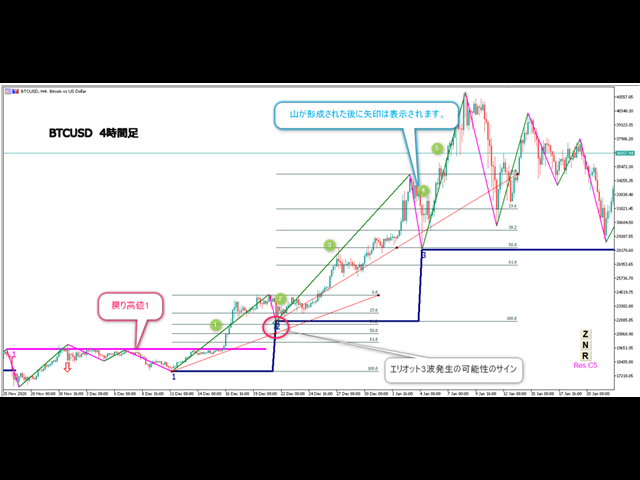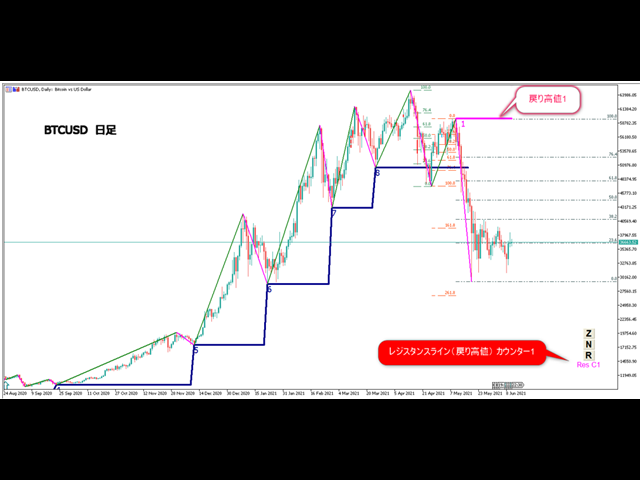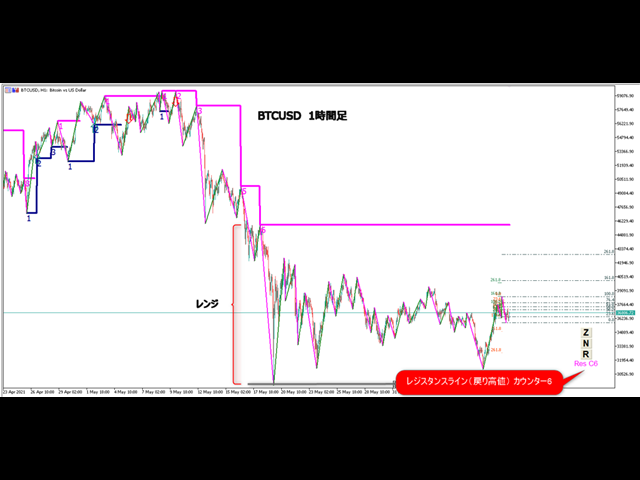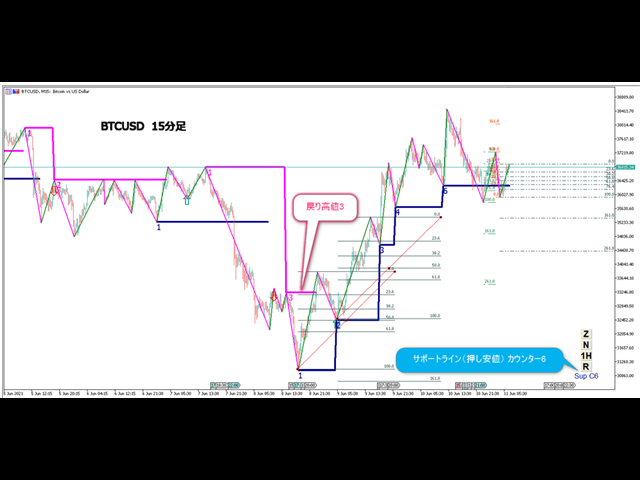
Traders Club ZigZag2 for MT5

機能&特徴:

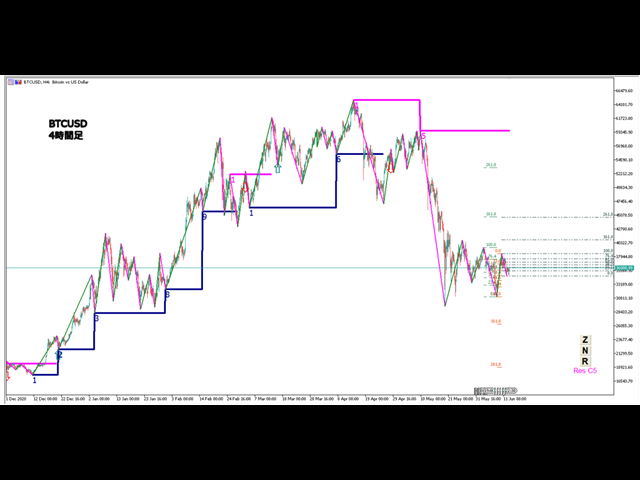
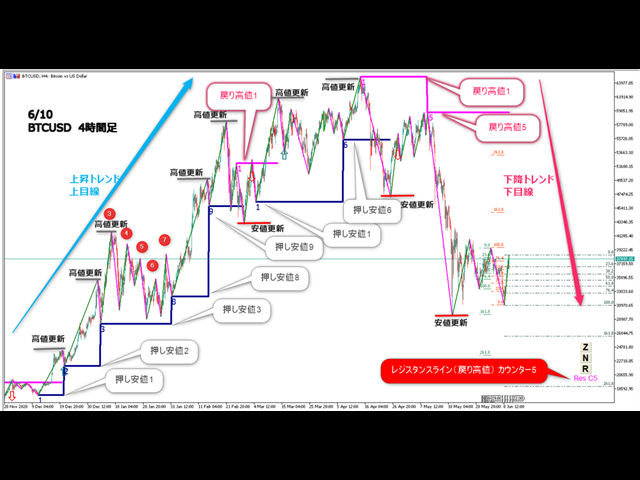
■ZigZagをもとに主要なレジスタンスとサポートラインを引きます。

各時間足で押し安値、戻り高値を簡単に把握できます。

現在何波目なのか簡単に把握できます。
トレンド転換時はカウンターは1、継続時は2,3,4..となります。
※ちなみにこちらはZigZagの谷山を数えています。エリオット波動数ではありません。
現在買い目線でいるべきなのか売り目線なのか簡把握できます。

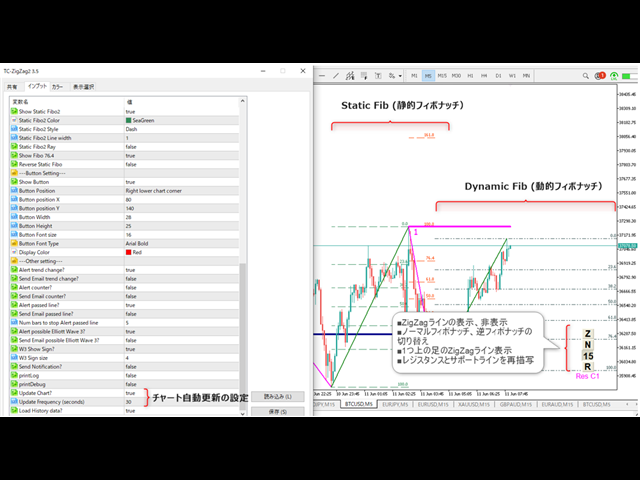
過去2つのZigZagラインで静的にフィボナッチを引きます。

今の値動きで動的にフィボナッチを引きます。

逆フィボナッチ(静的なフィボナッチのみ)に変更することも可能になります。

ボタンにより以下の操作が可能になります。

1.ZigZagラインの表示、非表示
2.ノーマルフィボナッチ、逆フィボナッチの切り替え
※環境により表示に時間が掛かる場合があります。
3.1分足、5分足、15分足で1つ上のZigZagラインが引けるようになりました。

4.レジスタンスとサポートラインを再描写します。 

トレンド継続や変換をアラートで通知します。

エリオット3波発生の可能性でアラートとサインでお知らせします。 

トレンド継続や変換をE-mailやSNSで通知します。

※表示がおかしいときは時間足を変更するかRボタン押して対応お願いします。


各パラメータの説明:
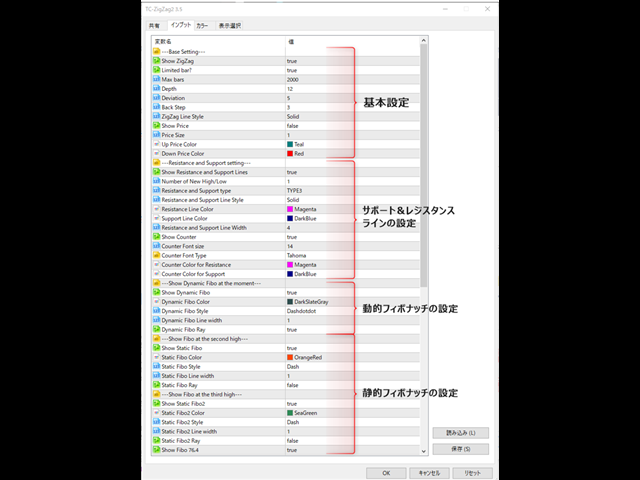
---Base Setting---
■Show ZigZag:ZigZagを表示するかを設定します。
■Limited bar?:使用するバーを制限するかどうか
■Max bars:使用するバーの本数を設定します。
※過去検証をする場合にはここの値を増やしてください。
■Depth:ZigZagで使用するDepthを設定します。
■Deviation:ZigZagで使用するDeviationを設定します。
■Back Step:ZigZagで使用するBack Stepを設定します。
■ZigZag Line Style:ZigZagで使用しているラインのタイプを設定します。
■Show Price:価格を表示するかを設定します。
■Price Size:表示する価格の大きさを設定します。
■Up Price Color:高値の色を設定します。
■Down Price Color:安値の色を設定します。
---Resistance and Support setting---
■Show Resistance and Support Lines:レジスタンスとサポートラインを表示するかを設定します。
■Number of New High/Low:レジスタンスとサポートラインを表示するための高値安値の回数を設定します。
■Resistance and Support type :レジスタンスとサポートラインでタイプを設定します。
TYPE1:レジスタンスー前回高値を更新した際にもラインを引きます。
サポートー前回安値を更新した際にもラインを引きます。
TYPE2:レジスタンスー前回高値を更新した時もラインを引きません。
サポートー前回安値を更新した時もラインを引きません。
TYPE3:押し安値、戻り安値にラインを引きます。
■Resistance and Support Line Style:使用しているラインのスタイルを設定します。
■Resistance Line Color:レジスタンスラインの色を設定します。
■Support Line Color:サポートラインの色を設定します。
■Resistance and Support Line Width:ラインの太さを設定します。
■Show Counter:カウンターを表示するかを設定します。
■Counter Font size :カウンターのフォントサイズを設定します。
■Counter Font Type:カウンターのフォントの種類を設定します。
■Counter Color for Resistance:レジスタンスカウンターの色を設定します。
■Counter Color for Support:サポートカウンターの色を設定します。
---Show Dynamic Fibo at the moment---
■Show Dynamic Fibo:動的フィボナッチを表示するかを設定します。
■Dynamic Fibo Color :ラインの色を設定します。
■Dynamic Fibo Style:使用しているラインのタイプを設定します。
■Dynamic Fibo Line width:ラインの太さを設定します。
■Dynamic Fibo Ray:線を左に延長して表示するかを設定します。
---Show Fibo at the second high---
■Show Static Fibo:静的フィボナッチを表示するかを設定します。
■Static Fibo Color:ラインの色を設定します。
■Static Fibo Style:使用しているラインのタイプを設定します。
■Static Fibo Line width:ラインの太さを設定します。
■Static Fibo Ray:線を左に延長して表示するかを設定します。
---Show Fibo at the third high---
■Show Static Fibo2:2つめの静的フィボナッチを表示するかを設定します。
■Static Fibo2 Color:ラインの色を設定します。
■Static Fibo2 Style:使用しているラインのタイプを設定します。
■Static Fibo2 Line width:ラインの太さを設定します。
■Static Fibo2 Ray:線を左に延長して表示するかを設定します。
■Show Fibo 76.4:フィボナッチで76.4のラインを引くか設定します。
■Reverse Static Fibo:静的な逆フィボナッチラインを引くか設定します。
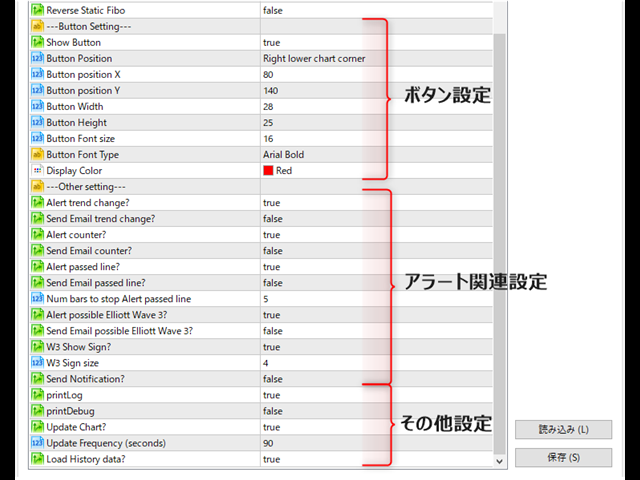
---Button Setting---
■Show Button:ボタンを表示するかを設定します。
■Button position X:ボタンの位置Xを設定します。
■Button position Y:ボタンの位置Yを設定します。
■Button Width:ボタンの幅を設定します。
■Button Height:ボタンの高さを設定します。
■Button Font size:ボタンで使用しているフォントサイズを設定します。
■Button Font Type:ボタンで使用しているフォントタイプを設定します。
■Display Color:表示の色を設定します。
---Other setting---
■Alert trend change?:トレンド変換時にアラート表示するかを設定します。
例:
Alert: C1 TC Buy Chance
Alert: C1 TC Sell Chance
※Cはカウンター トレンド転換時はカウンターは1になります。
■Send Email trend change?:トレンド転換時にメールを送信するかを設定します。
■Alert counter?:トレンド継続時にアラート表示するかを設定します。
Alert: C3 Buy Chance
Alert: C4 Sell Chance
※Cはカウンター ZigZag谷と山の数と考えてください。
■Send Email counter?:トレンド継続時にメールを送信するかを設定します。
■Alert passed line?:押し安値、戻り安値にラインを価格がクロスしたときにアラート表示するかを設定します。
例:
Alert: C2 Resistance line was crossed
Alert: C3 Support line was crossed
■Num bars to stop Alert passed line:クロスした後、ローソク足何本アラート表示しないかを設定します。
■Alert possible Elliott Wave 3?:エリオット3波発生の可能性でアラート表示するかを設定します。
Alert: C2 W3 Buy Chance
Alert: C2 W3 Sell Chance
※こちらはあくまで後出しのサインになりますのでエントリー候補の参考としてください。
■Send Email possible Elliott Wave 3?:エリオット3波発生の可能性でメールを送信するかを設定します。
■W3 Show Sign?:エリオット3波発生の可能性でサインを表示するかを設定します。
■W3 Sign size:サインのサイズを設定します。
■Send Notification?:SNSに送信するかを設定します。
Prodotti consigliati
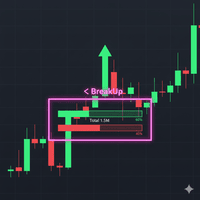
Boom 900 Precision Spike Detector The Boom 900 Precision Spike Detector is a powerful tool designed to help traders accurately identify spike opportunities in the Boom 900 market. With advanced features and precise alerts, this indicator takes the guesswork out of trading, enabling you to maximize your profits with confidence. Key Features: Non-Repainting Signals: Get reliable signals without repainting, ensuring your trading decisions are based on accurate, real-time data. Audible Alerts: Stay
FibExtender
Syed Oarasul Islam
This Indicator draws Fibonacci Extension levels in two different ways. You can select whether to draw Fibonacci Extension levels based on your favourite ZigZag settings or you can let the indicator to draw Fibonacci Extension  level based on given number of Bars or Candles.  You can also set Mobile and Email notification for your favourite Extension  levels individually. With this indicator you will not have to feel lonely as the it can generate Voice alerts, which will keep you focused on your
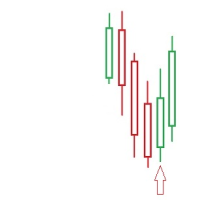
FIRST: I am NOT a coder ! I am a TRADER that was forced to code, because i needed some special tools! So i am sorry for minor graphic-bugs and so on... ############################################################################# - simple Price Action Indicator - we   recommend   it for   CURRENCY   and GOLD Trades - NON Lagging ! the Alert shows instantly whats happening --> thats why the ARROW   appears   at the MOMENT the REVERSAL-Candle gets   EXCEEDED SETUP: -   recommended   SETUP is: 3 C
"Hunttern harmonic pattern finder" base on the dynamic zigzag with the notification and prediction mode This version of the indicator identifies 11 harmonic patterns and predicts them in real-time before they are completely formed. It offers the ability to calculate the error rate of Zigzag patterns depending on a risk threshold. It moreover sends out a notification once the pattern is complete. The supported patterns: ABCD BAT ALT BAT BUTTERFLY GARTLEY CRAB DEEP CRAB CYPHER SHARK THREE DRIV
Beauty Trend
Nikolay Kositsin
Простой индикатор тренда в NRTR виде с отрисовкой линий стоплосса и тейпрофита, цвет и направление движения которых определяются действующим трендом. Индикатор имеет возможность подавать алерты, отправлять почтовые сообщения и push-сигналы при смене направления тренда. Следует учесть что значение входного параметра индикатора Deviation of the take profit line in points для каждого финансового актива на каждом таймфрейме   необходимо подбирать индивидуально!
Fibonacci Retracement Auto Drawer MT5
AL MOOSAWI ABDULLAH JAFFER BAQER
Fibonacci Retracement Auto Drawer – The Ultimate Tool for Precision Trading! Are you tired of manually drawing Fibonacci retracement levels every time you analyze the market? Fibonacci Retracement Auto Drawer is here to automate the process and enhance your trading accuracy! Key Features: Auto-Detection of Swing Points – No need to manually identify swing highs and lows! The tool scans the market and pinpoints the most significant reversal zones automatically. Precision Fibonacci Levels – Insta
Description The base of this indicator is an ZigZag algorithm based on ATR and Fibo retracement. The ZigZag can be drawn like a classic ZigZag or like Arrows or needn't be drawn at all. This indicator is not redrawing in sense that the ZigZag's last shoulder is formed right after the appropriate conditions occur on the market. The shoulder doesn't change its direction afterwards (can only continue). There are some other possibilities to show advanced information in this indicator: Auto Fibo on
Cumulative Volume Delta MAX MTF Pro v4.4 — Il vantaggio definitivo nel trading basato sui volumi Un solo indicatore per dominarli tutti: scopri cosa pensa DAVVERO il mercato Smetti di tirare a indovinare e inizia a capire cosa stanno facendo gli operatori istituzionali prima che il prezzo lo mostri. Il CVD MAX MTF Pro v4.4 rappresenta l'apice della tecnologia di analisi dei volumi, trasformando dati complessi in segnali chiari e operativi. Questa versione introduce la rilevazione chirurgica dell
Prop Firm Lot Size Calculator
Christian Paul Anasco
5 (1)
Now, you have your very own  PROP FIRM LOT SIZE CALCULATOR ! It now has BREAKEVEN and PARTIAL CLOSURE features! There's no need to go to other websites just to compute for the exact lot size. It also opens the trade with a click of a button. All inputs on the calculator can be edited. So if you want to change the SL or TP or the lot size, you can do so before placing an order. ========================================== INPUTS (Please see screenshot for reference): 1. SL PRICE TEXT . This is clic
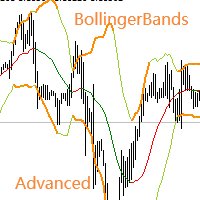
Necessary for traders: tools and indicators Waves automatically calculate indicators, channel trend trading Perfect trend-wave automatic calculation channel calculation , MT4 Perfect trend-wave automatic calculation channel calculation , MT5 Local Trading copying Easy And Fast Copy , MT4 Easy And Fast Copy , MT5 Local Trading copying For DEMO Easy And Fast Copy , MT4 DEMO Easy And Fast Copy , MT5 DEMO Advanced Bollinger Bands: 1. The Bollinger rail will change color with the direction" 2. The
FREE
Unlock the power of Fibonacci with our advanced indicator! This tool precisely plots Fibonacci levels based on the previous day's high and low, identifying the next day's key support and resistance levels. Perfect for day trading and swing trading, it has consistently generated weekly profits for me. Elevate your trading strategy and seize profitable opportunities with ease. NOTE: In the Input section make sure the draw labels are set to "True" so you can see each levels.
ADR Levels Plus
Dustin Ricardo Pierenz
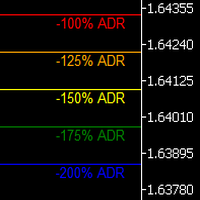
Uncover the market’s secret zones with the ADR Levels+ Indicator. This dynamic tool plots ADR extension levels at 100%, 125%, 150%, and 200% right on your chart. In most cases, price dances between these boundaries—but when it breaks out, it often signals a prime opportunity for a mean reversion trade or the start of an evolving trend. Plus, an integrated alarm system triggers as soon as these key levels are reached, ensuring you never miss a lucrative trading opportunity. Elevate your strategy
Historical Pivot Zones - Fibonacci Indicator MT5 Automatically draws Fibonacci retracement and projection zones based on historical price pivots. This MT5 indicator intelligently selects pivot points from different timeframes (weekly, monthly, or 6-month ranges) and creates visual Fibonacci zones around key levels. Features include: Smart Mode Selection - Auto-adjusts based on your chart timeframe Clean Visual Zones - Highlighted areas instead of just lines Essential Fib Levels - 9 retrace
ArcTracer
Syed Oarasul Islam
This Indicator draws Fibonacci Arc levels in two different ways. You can select whether to draw Fibonacci Arc levels based on your favourite ZigZag settings or you can let the indicator to draw Arc levels based on given number of bars or candles.  You can also set Mobile and Email notification for your favourite Arc levels individually. With this indicator you will not have to feel lonely as the it can generate Voice alerts, which will keep you focused on your trading and remove boredom.  Produc
L'indicateur SMC Venom Model BPR est un outil professionnel pour les traders travaillant dans le concept Smart Money (SMC). Il identifie automatiquement deux modèles clés sur le graphique des prix: FVG   (Fair Value Gap) est une combinaison de trois bougies, dans laquelle il y a un écart entre la première et la troisième bougie. Forme une zone entre les niveaux où il n'y a pas de support de volume, ce qui conduit souvent à une correction des prix. BPR   (Balanced Price Range) est une combinaiso
Live Forex Trading EA
Aryaman Shah
3.67 (3)
In trading, the Sell or Buy decision is not easy. You need to perform extensive analysis and wait for a suitable entry. Despite this, the majority of traders struggle to maintain consistency. Here comes my EAI, a bot designed to automatically evaluate and execute trades using its artificial intelligence. It is built to work effectively with or without news trading. The AI-powered bot is designed to learn from its trades, optimizing its strategy daily to enhance accuracy and target profitability
Quickly helper
Shi Xuan Liang
Quickly Helper is a tool to help us deal with multiple orders quickly. It has five function keys. They are: The "清空" button to quickly level out all orders;  Quick flat out the long position "平多单" button;  Quick flat out the short position "平空单" button;  The "买多" button to quickly buy at the current price;  The "买空" button to sell quickly at the current price;  It has seven display information items. They are: bp: the total income of multiple orders; (  profit of  buy/long position ) avgb: avera
Auto Optimized RSI   è un indicatore a freccia intelligente e facile da usare, progettato per fornire segnali di acquisto e vendita precisi. Utilizza simulazioni di trading su dati storici per individuare automaticamente i livelli RSI più efficaci per ogni strumento e timeframe. Questo indicatore può essere utilizzato come sistema di trading autonomo o integrato nella tua strategia esistente, ed è particolarmente utile per i trader a breve termine. A differenza dei livelli fissi tradizionali del
Quick deals EA
Aleksandr Slavskii
Горячие клавиши плюс клик левой кнопки мыши на графике. Советник открывает сделки, выставляет лимитные и стоповые ордера, удаляет ордера и закрывает позиции, также  делает реверс  открытых позиций, выставляет прописанные в настройках стоп лосс и тейк профит. (реверс только на неттинговых счетах) При запуске советника можно посмотреть подсказку как действует советник при нажатии клавиши + клик на графике. Правее последнего бара, ниже цены Ctrl+ЛКМ  - OpenSell Правее последнего бара, выше цены C
Tma Poc Gold
Ignacio Agustin Mene Franco
POC + TMA SCALPER GOLD - Expert Advisor Professional DESCRIPTION: Automated trading system designed specifically for XAU/USD, combining Point of Control (POC) with Triangular Moving Average (TMA) to identify high-volume and trending zones. It uses advanced risk management with dynamic trailing stops and an intelligent grid system. TECHNICA
Product Name: Anchor auto TP and SL Trade Manager Pro MT5 The ultimate manual assistant. Turns trades into auto-grids with Hedging, Zero-Loss Breakeven & Spread Detection. Your manual trade will be managed automatically. Anchor Auto TP and SL Trade Manager MT5 Pro is the advanced edition of our popular trade assistant. It transforms simple manual trades into sophisticated, professional-grade recovery grids. Unlike the free version, this PRO edition fully supports Hedging (simultaneous Buy & Sell
This Automatic support/resistance indicator calculates various peaks and troughs of the price action, identifies relevant levels and draws support and resistance automatically. It uses the built-in "ZigZag" indicator in Metatrader as a data source hence, very much accurate indicator.  The support and resistance lines are contineusely updated as new levels and formed. The indicator has only 5 parameters to set, and mostly it can be used with the default values:  The description of the settings is
The Swing High Low and Fibonacci Retracement Indicator is a powerful technical analysis tool designed to identify key price levels and potential reversal zones in the market. It automatically detects recent swing highs and swing lows on the chart and overlays Fibonacci retracement levels based on these points. This indicator helps traders: Visualize market structure by highlighting recent swing points. Identify support and resistance zones using Fibonacci ratios (e.g., 38.2%, 50%, 61.8%). Adapt
Marker Elliott Wave
Vladimir Korotkikh
MarkerElliottWave is a panel for rapid and user-friendly manual markup of Elliott waves. One can select a color and a font of marks. There are also functions for removing the last markup and the entire markup made by the indicator. Markup is made in one click. Click five times - have five waves! MarkerElliottWave will be a great instrument both for beginners and professional analysts of Elliott waves.
ZLMA Trend Candles indicator uses an enhanced Zero-Lag Moving Average to highlight key trend shifts, repainting candles in real time. It reacts faster than traditional moving averages, helping you spot potential market turns earlier. Gain clear entry and exit signals and filter out market noise with ease! This product is also available for MetaTrader 4 =>  https://www.mql5.com/en/market/product/129279 1. What Is ZLMA Trend Candles? ZLMA Trend Candles is a MetaTrader 4/5 indicator based on the Z
Price Magnet — Price Density and Attraction Levels Indicator Price Magnet is a professional analytical tool designed to identify key support and resistance levels based on statistical Price Density. The indicator analyzes a specified historical period and detects price levels where the market spent the most time. These zones act as “magnets,” attracting price action or forming a structural base for potential reversals. Unlike traditional Volume Profile tools, Price Magnet focuses on price-time d
Ultra Charts
Tinashe Ndarimani
Ultra Charts - Advanced Custom Chart Types for MT5 Get Manual Here! Get The Free Ultra Charts Trader Here! Ultra Charts is a comprehensive charting solution that brings professional-grade alternative chart types to MetaTrader 5. This Expert Advisor provides traders with multiple custom chart formats beyond standard time-based candlesticks, enabling enhanced technical analysis and pattern recognition. Chart Types Included The product includes six distinct chart types, each designed to filter mark
FREE
SmartLot MT5
Nikita Chernyshov
Versione gratuita per account demo | Versione MT4 SmartLot   MT5   è un pannello interattivo e semplice per il calcolo rapido del lotto, il piazzamento di ordini in sospeso e di mercato direttamente dal grafico. Non funziona nello Strategy Tester.   Per testare l'utility, scarica la versione gratuita per account demo. Le istruzioni e il file si trovano nell'intestazione della descrizione. Funzionalità: Interfaccia Grafica:   Linee interattive di Entrata, SL, TP con zone di profitto e perdi
Indicatore Forex psychological Oscillator MT5-questa è una grande modifica del classico oscillatore che vi aiuterà nel trading per MetaTrader 5. INFORMAZIONI SULL'INDICATORE Indicatore Forex psychological Oscillator MT5 è presentato sotto forma di un grafico a barre a colori e ha tutte le qualità degli oscillatori Forex. Sono presenti anche zone quando e in quali zone si trova il mercato. Tutto è fatto in modo semplice e il più chiaro possibile in modo che tutti i trader possano capirlo se
Bullhouse WavePrice
Luiz Vinicius Pereira Rocha -
Wave Price Indicator The Wave Price indicator is an advanced technical analysis tool that visualizes price movements in wave formations using a ZigZag approach. It helps traders identify significant price patterns, trends, and potential reversals by breaking down price action into meaningful waves. Price Wave Analysis : Visualizes price movements in clear wave patterns ZigZag-based Calculation : Filters out market noise and focuses on significant price moves Color-Coded Waves : Aqua: Bullish wa
Gli utenti di questo prodotto hanno anche acquistato
Trade Assistant MT5
Evgeniy Kravchenko
4.42 (207)
It helps to calculate the risk per trade, the easy installation of a new order, order management with partial closing functions, trailing stop of 7 types and other useful functions. Additional materials and instructions Installation instructions - Application instructions - Trial version of the application for a demo account Line function -   shows on the chart the Opening line, Stop Loss, Take Profit. With this function it is easy to set a new order and see its additional characteristics bef
Forex Trade Manager MT5
InvestSoft
4.97 (639)
Benvenuto a Trade Manager EA, lo strumento definitivo per la gestione del rischio , progettato per rendere il trading più intuitivo, preciso ed efficiente. Non è solo uno strumento per l'esecuzione degli ordini, ma una soluzione completa per la pianificazione delle operazioni, la gestione delle posizioni e il controllo del rischio. Che tu sia un principiante, un trader avanzato o uno scalper che necessita di esecuzioni rapide, Trade Manager EA si adatta alle tue esigenze, offrendo flessibilità s
TradePanel MT5
Alfiya Fazylova
4.87 (149)
Trade Panel è un assistente commerciale multifunzionale. L'applicazione contiene più di 50 funzioni di trading per il trading manuale e permette di automatizzare la maggior parte delle attività commerciali. Prima dell'acquisto, è possibile testare la versione dimostrativa su un conto demo. Scaricare la versione di prova dell'applicazione per un account dimostrativo: https://www.mql5.com/it/blogs/post/762419 . Istruzioni complete qui . Commercio. Consente di effettuare operazioni di trading con u
Versione Beta Telegram to MT5 Signal Trader è quasi pronto per il rilascio ufficiale in versione alpha. Alcune funzionalità sono ancora in fase di sviluppo e potresti riscontrare piccoli bug. Se riscontri problemi, ti preghiamo di segnalarli, il tuo feedback aiuta a migliorare il software per tutti. Telegram to MT5 Signal Trader è uno strumento potente che copia automaticamente segnali di trading da canali o gruppi Telegram al tuo account MetaTrader 5 . Supporta canali pubblici e privati e cons
HINN Lazy Trader
ALGOFLOW OÜ
5 (2)
The core idea: using the user interface, you configure the parameters the chart must meet before entering a position (or positions), choose which entry models to use, and set the rules for when trading and planning should end. Lazy Trader  handles the rest: it  takes over all the routine chart watching and execution! full description  :: 3 key videos [1] ->  [2]   ->  [3] What can it do? - Understands Larry Williams market structure - Understands swing market structure by Michael Huddleston
FarmedHedge Pair Trading Dashboard
Tanapisit Tepawarapruek
5 (3)
VERIFIED TRADING RESULTS - Farmed Hedge Yield Axi Copy:  https://www.mql5.com/en/signals/2356376 - Farmed Hedge Yield Exn Copy:   https://www.mql5.com/en/signals/2356404 - Farmed Hedge Yield V Copy:  https://www.mql5.com/en/signals/2357156 Contact me via private message to receive the User Manual and Setup. * Thai Lauguage Support Available Farmed Hedge Yield Farming - Professional Pair Trading Dashboard (Manual - Hybrid - Semi/Automated EA) VERSION 3 - WILD HARVEST UPDATE Trading Approac
Trade Dashboard MT5
Fatemeh Ameri
4.94 (118)
Tired of complex order placement and manual calculations? Trade Dashboard is your solution. With its user-friendly interface, placing orders becomes effortless, by a single click, you can open trades, set stop loss and take profit levels, manage trade lot size, and calculate risk to reward ratios, allowing you to only focus on your strategy. Say goodbye to manual calculations and streamline your trading experience with Trade Dashboard. Download  Demo Version  right now. You can find  Details of
Exp COPYLOT CLIENT for MT5
Vladislav Andruschenko
3.82 (34)
Trade copyr per MT5 è un trade copyr per la piattaforma МetaТrader 5   . Copia le negoziazioni forex   tra       eventuali conti   MT5   -   MT5, MT4   -   MT5 per la versione COPYLOT MT5 (o MT4   -   MT4 MT5   -   MT4 per la versione COPYLOT MT4) Fotocopiatrice affidabile! Versione MT4 Descrizione completa   +DEMO +PDF Come comprare Come installare     Come ottenere i file di registro     Come testare e ottimizzare     Tutti i prodotti di Expforex Puoi anche copiare le operazioni nel termina
MT5 to Telegram Signal Provider è un'utilità facile da usare e completamente personalizzabile che consente l'invio di segnali specificati a una chat, canale o gruppo Telegram, rendendo il tuo account un fornitore di segnali. A differenza della maggior parte dei prodotti concorrenti, non utilizza importazioni DLL. [ Dimostrativo ] [ Manuale ] [ Versione MT4 ] [ Versione Discord ] [ Canale Telegram ]  New: [ Telegram To MT5 ] Configurazione Una guida utente passo-passo è disponibile. Nessuna cono
Copy Cat More Trade Copier MT5 (Gatto Copiatore MT5) è un copiatore di trade locale e un framework completo di gestione del rischio ed esecuzione progettato per le sfide di trading odierne. Dalle sfide delle prop firm alla gestione di portafogli personali, si adatta a ogni situazione con una combinazione di esecuzione robusta, protezione del capitale, configurazione flessibile e gestione avanzata dei trade. Il copiatore funziona sia in modalità Master (mittente) che Slave (ricevente), con sincro
The News Filter MT5
Leolouiski Gan
4.74 (19)
Questo prodotto filtra tutti gli esperti consulenti e i grafici manuali durante il periodo delle notizie, così non dovrai preoccuparti di improvvisi picchi di prezzo che potrebbero distruggere le tue impostazioni di trading manuali o le negoziazioni effettuate da altri esperti consulenti. Questo prodotto viene fornito anche con un sistema completo di gestione degli ordini che può gestire le tue posizioni aperte e gli ordini in sospeso prima della pubblicazione di qualsiasi notizia. Una volta che
The product will copy all telegram signal to MT5 ( which you are member) , also it can work as remote copier.  Easy to set up, copy order instant, can work with almost signal formats, image signal,  s upport to translate other language to English Work with all type of channel or group, even channel have "Restrict Saving Content", work with  multi channel, multi MT5 Work as remote copier: with signal have ticket number, it will copy exactly via ticket number. Support to backtest signal. How to s
Smart Stop Scanner – Analisi multi-asset degli stop-loss basata sulla reale struttura di mercato Panoramica Smart Stop Scanner offre un monitoraggio professionale dei livelli di stop-loss su più mercati. Il sistema identifica automaticamente le zone di stop più rilevanti basandosi sulla reale struttura di mercato, sulle rotture significative e sulla logica del price action, presentando tutte le informazioni in un pannello chiaro, coerente e ottimizzato per schermi ad alta risoluzione (DPI-awar
Telegram To MT5 Receiver
Levi Dane Benjamin
4.31 (16)
Copia i segnali da qualsiasi canale di cui sei membro (compresi quelli privati e ristretti) direttamente sul tuo MT5.  Questo strumento è stato progettato con l'utente in mente offrendo molte funzionalità necessarie per gestire e monitorare gli scambi. Questo prodotto è presentato in un'interfaccia grafica facile da usare e visivamente accattivante. Personalizza le tue impostazioni e inizia ad utilizzare il prodotto in pochi minuti! Guida per l'utente + Demo  | Versione MT4 | Versione Discord
VirtualTradePad One Click Trading Panel
Vladislav Andruschenko
4.59 (73)
Pannello di trading per il trading in 1 clic.   Lavorare con posizioni e ordini!   Trading dal grafico o dalla tastiera. Con il nostro pannello di trading, puoi eseguire operazioni con un solo clic direttamente dal grafico ed eseguire operazioni di trading 30 volte più velocemente rispetto al controllo MetaTrader standard. I calcoli automatici di parametri e funzioni rendono il trading più veloce e conveniente per i trader. Suggerimenti grafici, etichette informative e informazioni complete sugl
Pulsar Terminal MT5
Astralys LLC
5 (4)
Pulsar Terminal è un prodotto di Pulsar Technologies, un marchio di Astralys LLC . Pulsar Terminal è un componente aggiuntivo per MetaTrader 5. È un' interfaccia visiva combinata con strumenti di esecuzione in un' applicazione companion collegata al tuo account MetaTrader 5 tramite un Expert Advisor . Utilizziamo un'applicazione companion per massimizzare le capacità dello strumento e fornire un'interfaccia visiva e un flusso di lavoro più avanzati rispetto ai pannelli standard di MT5. Pulsar T
Smart Stop Manager MT5
Daniel Stein
4.33 (3)
Smart Stop Manager – Esecuzione automatica dello stop-loss con precisione professionale Panoramica Smart Stop Manager è il livello di esecuzione della linea Smart Stop, progettato per i trader che richiedono una gestione dello stop-loss strutturata, affidabile e completamente automatizzata su più posizioni aperte. Monitora continuamente tutte le operazioni attive, calcola il livello di stop ottimale utilizzando la logica di struttura di mercato Smart Stop e aggiorna gli stop automaticamente se
Trade Manager DaneTrades
Levi Dane Benjamin
4.36 (28)
Trade Manager per aiutarti a entrare e uscire rapidamente dalle operazioni calcolando automaticamente il tuo rischio. Incluse funzionalità che ti aiutano a prevenire l'eccessivo trading, il vendetta trading e il trading emotivo. Le operazioni possono essere gestite automaticamente e i parametri di performance del conto possono essere visualizzati in un grafico. Queste caratteristiche rendono questo pannello ideale per tutti i trader manuali e aiuta a migliorare la piattaforma MetaTrader 5. Suppo
AntiOverfit PRO MT5
Enrique Enguix
5 (2)
L’errore silenzioso nel Market che ti sta costando denaro (e che molti sviluppatori nemmeno vedono) Un backtest bello da vedere può costarti centinaia o perfino migliaia di dollari. La maggior parte dei trader perde denaro ancora prima di aprire la prima posizione in reale: lo perde nel momento in cui acquista un Expert Advisor basandosi unicamente su una curva verde. Siamo onesti: la maggior parte degli sviluppatori del Market non cerca di ingannarti di proposito. Passano mesi a programmare u
ManHedger MT5
Peter Mueller
4.83 (6)
THIS EA IS A SEMI-AUTO EA, IT NEEDS USER INPUT. Manual & Test Version Please TEST this product before BUYING  and watch my video about it. The price of the ManHedger will increase to 250$ after 20 copies sold. Contact me for user support or bug reports or if you want the MT4 version! MT4 Version  I do not guarantee any profits or financial success using this EA. With this Expert Advisor, you can: Implement your own Zone Recovery strategy to capitalize on trending markets. Create Grid trading s
Ultimate Extractor
Clifton Creath
5 (9)
Ultimate Extractor - Professional Trading Analytics for MT5 *****this is the local HTML version of Ultimate Extractor. For the online version please reach out to me directly****** Ultimate Extractor transforms your MetaTrader 5 trading history into actionable insights with comprehensive analytics, interactive charts, and real-time performance tracking. What It Does Automatically analyzes your MT5 trading history across all Expert Advisors and generates detailed HTML reports with interactive vi
Entry In The Zone with SMC Multi Timeframe is a real-time market analysis tool developed based on Smart Money Concepts (SMC). It is designed to analyze market structure, price direction, reversal points, and key zones across multiple timeframes in a systematic way. The system displays Points of Interest (POI) and real-time No Repaint signals, with instant alerts when price reaches key zones or when signals occur within those zones. It functions as both an Indicator and a Signal System (2-in-1),
Risk Manager Pro MT5
Roman Zhitnik
5 (8)
The Expert Advisor is a comprehensive risk manager helping users to control their trading activities. With this tool being a safeguard you can easily configure various risk parameters. When any limit is exceeded, the risk manager can force close opened positions, close other EAs, and even close the terminal to prevent emotional trading that doesn't correspond to your trading strategy. Risk Manager Settings Account Protection Check min equity limit to close all (account currency) - check the min
YuClusters
Yury Kulikov
4.93 (43)
Attention: You can view the program operation in the free version  YuClusters DEMO .  YuClusters is a professional market analysis system. The trader has unique opportunities to analyze the flow of orders, trade volumes, price movements using various charts, profiles, indicators, and graphical objects. YuClusters operates on data based on Time&Sales or ticks information, depending on what is available in the quotes of a financial instrument. YuClusters allows you to build graphs by combining da
Order Ticket, Pannello di trading, Gestione del rischio, Trading manuale, Trailing Stop, Gestione ordini, Esecuzione veloce — JoOrderTrade Pro — pannello di esecuzione per MetaTrader 5 Sommario JoOrderTrade Pro è un ticket grafico e un pannello di esecuzione progettato per la gestione manuale degli ordini in MetaTrader 5. Facilita l’invio di ordini market e pending, la configurazione di Stop Loss/Take Profit e fornisce strumenti di gestione del rischio (Trailing Stop, Breakeven, sistema SP), o
Telegram to MT5 Coppy
Sergey Batudayev
5 (8)
Da Telegram a MT5:   la soluzione definitiva per la copia del segnale Semplifica il tuo trading con Telegram su MT5, il moderno strumento che copia i segnali di trading direttamente dai canali e dalle chat di Telegram sulla tua piattaforma MetaTrader 5, senza bisogno di DLL. Questa potente soluzione garantisce un'esecuzione precisa dei segnali, ampie opzioni di personalizzazione, fa risparmiare tempo e aumenta la tua efficienza. [ Instructions and DEMO ] Caratteristiche principali Integrazione d
TradeMirror è uno strumento locale di copia degli ordini progettato per le piattaforme MT4/MT5, con supporto alla sincronizzazione delle operazioni in tempo reale. Vantaggi del Prodotto In linea con gli elevati standard di sicurezza, stabilità e privacy per i software finanziari, abbiamo ottimizzato tre aspetti fondamentali: Interfaccia grafica intuitiva per un utilizzo semplificato Protezione rafforzata della privacy per l'isolamento di dati sensibili negli scenari finanziari Sincronizzazione d
Anchor Trade Manager
Kalinskie Gilliam
5 (1)
Anchor: The EA Manager A coordination system for traders running multiple EAs. Anchor ensures only one EA can trade at a time, preventing conflicting positions and keeping your portfolio safer. Attach Anchor to any chart. Configure your EAs and their magic numbers. Anchor handles the rest. Built for portfolios. Built for discipline. Built for prop firms. The Problem Running multiple EAs on the same account creates risk. Two gold EAs can open opposite positions on the same candle. Three EA
Trade Manager DashPlus
Henry Lyubomir Wallace
5 (13)
DashPlus è uno strumento avanzato di gestione delle operazioni progettato per migliorare l'efficienza e l'efficacia del trading sulla piattaforma MetaTrader 5. Offre una suite completa di funzionalità, tra cui calcolo del rischio, gestione degli ordini, sistemi di griglia avanzati, strumenti basati su grafici e analisi delle prestazioni. Caratteristiche Principali 1. Griglia di Recupero Implementa un sistema di griglia flessibile e di media per gestire le operazioni in condizioni di mercato avve
MT5 Professional Copy Trading System (Edizione MT5) Il MT5 Professional Copy Trading System è un copiador di trading LOCAL di livello industriale e ultra veloce, progettato per trader professionisti, fornitori di segnali e gestione multi-account in stile istituzionale. A differenza dei normali copier retail o basati su cloud, questo sistema è costruito su un’architettura LOCAL, ottimizzata per ambienti in cui più terminali operano nello stesso sistema Windows. Architettura LOCAL industriale Il
Altri dall’autore
Traders Club Clock for MT5 Readme ローソク足のすぐ横にその時間足での 残り時間とスプレッドを表示します。 ※残り時間はサーバ時間から計算しています。 月足、週足、日足、4時間足、1時間足、30分足、15分足、5分足、1分足 で表示可能となっております。 ※スプレッド値ポイント単位での表示になります。 ※時間の更新はティック毎ではなく1秒 毎 に更新するようにしています。   一目で残り時間とスプレッドを確認できます。 機能: 使用しているフォント種類を変更できます。 使用しているフォントサイズを変更できます。 表示しているテキストの色を変更できます。 スプレッド表示を非表示にすることができます。 表示する位置を変更することが出来ます。
FREE
エントリー前に確認できるチェックリストを作成しました。 以下のコードを参照してMT5用に作成しました。 Strategy Checklist - indicator for MetaTrader 4 https://www.mql5.com/en/code/18877 機能: チェックリスト20個まで入力できます。 表示位置 (左上 、 右上 、 左下 、 右下) の 指定 が可能 になります。 フォントサイズ の 変更が可能 になります。 チェックリストの幅を変更できます。 ドラッグ&ドロップでチェックリストを移動できます。 インストール方法: ファイル->データフォルダーを開く->MQL5フォルダー->Indicatorsフォルダー 配下にex5ファイルを置いてMT5を再起動してください。 チェックリストはマニュアルで入力が必要になります。入力後 保存しておいてください。 テンプレートで保存しておくと容易にチャートに適用できます。
FREE
TrendBar
Koji Kobayashi
5 (3)
パラボリックのデータをもとにトレンドの方向性を1分足から月足まで表示します。 1分足から 月足 まで表示されているので今どの方向に価格が動いているのかがすぐに分かります。 更新はティク毎ではなくディフォルトでは1秒毎、もちろん変更も可能なのでチャートの表示が遅くなるようなことはありません。 機能: どの通貨でも表示可能になります。 アイコンの色を指定することが可能になります。 表示位置(X軸、Y軸)が変更可能 になります。 表示位置 (左上 、 右上 、 左下 、 右下) が 指定 が可能 になります。 フォント を指定することが可能になります。 フォントサイズ が 変更可能 になります。 アイコンのサイズ が 変更可能 になります。 週足、 月足  の非表示 が 可能 になります。
FREE
RoundNum Readme (Traders Club) 特徴: このツールはDOWやNIKKEIなど500や1000ポイントがラウンドナンバーの 指数を取引する際に表示するように開発しました。 もちろんメジャー通貨でも表示はされます。 更新頻度を制限しているのでチャート表示が遅くなるということは ありません。 XMでDOWを取引される場合、Main Levelsを10000 Sub Levelsを5000にしてください。 各パラメータの説明: Number to display lines:表示するライン数を設定します。 Main Levels:メインレベルをポイントで指定します。 Main Line Color:メインラインの色を設定します。 Main Line Style:メインラインで使用されるラインを設定します。 Show Sub Lines:サブラインを表示するか設定します。 Sub Levels:サブレベルをポイントで指定します。 Sub Line Color:サブラインの色を設定します。 Sub Line Style:サブラインで使用され
FREE
特徴: このツールはDOWやNIKKEIなど500や1000ポイントがラウンドナンバーの 指数を取引する際に表示するように開発しました。 もちろんメジャー通貨でも表示はされます。 更新頻度を制限しているのでチャート表示が遅くなるということは ありません。 XMでDOWを取引される場合、Main Levelsを10000 Sub Levelsを5000にしてください。 各パラメータの説明: Number to display lines:表示するライン数を設定します。 Main Levels:メインレベルをポイントで指定します。 Main Line Color:メインラインの色を設定します。 Main Line Style:メインラインで使用されるラインを設定します。 Show Sub Lines:サブラインを表示するか設定します。 Sub Levels:サブレベルをポイントで指定します。 Sub Line Color:サブラインの色を設定します。 Sub Line Style:サブラインで使用されるラインを設定します。 Update Frequency(600
FREE
パラボリックのデータをもとにトレンドの方向性を1分足から月足まで表示します。 1分足から 月足 まで表示されているので今どの方向に価格が動いているのかがすぐに分かります。 更新はティク毎ではなくディフォルトでは1秒毎、もちろん変更も可能なのでチャートの表示が遅くなるようなことはありません。 機能: どの通貨でも表示可能になります。 パラボリックの数値を変更することは可能になります。 上昇時と下降時のアイコンの色を指定することが可能になります。 表示位置(Y軸)が変更可能 になります。   表示位置 (左上 、 右上 、 左下 、 右下) が 指定 が可能 になります。 フォント を指定することが可能になります。 フォントサイズ が 変更可能 になります。 アイコンのサイズ が 変更可能 になります。 週足、 月足  の非表示 が 可能 になります。
FREE
多数の通貨を取引している場合、画面をカチャカチャ切り替えの際にどの通貨を見ているか 迷ったことはありませんか。 表示している通貨が大きく表示されるMT4用のインジケーターは あるのですがMT5用がなかったので作成しました。 機能: どの通貨でも表示可能になります。 表示位置 (左上 、 右上 、 左下 、 右下) の 指定 が可能 になります。 表示位置(X軸、Y軸)が変更可能 になります。 フォントの色を 変更可能 になります。 使用するフォント を指定することが可能になります。 フォントサイズ の 変更が可能 になります。 インストール方法: ファイル->データフォルダーを開く->MQL5フォルダー->Indicatorsフォルダー 配下にex5ファイルを置いてMT5を再起動してください。
FREE
Time Line (Traders Club)  機能: 昨日高値、安値、本日始値、高値、安値の時間から線を引きます。 時間足により表示する時間が変わります。 1分、5分足では1時間ごとの表示 15分、30分足では4時間ごとの表示 1時間、4時間は12時間ごとの表示 日足以降は時間は表示されません。 高値安値は週足より下位足で表示されます。 各ラベルを変更可能になります。 更新頻度を変更できるのでチャート表示が 重くなることはありません。 各パラメータの説明: Difference hours form Server Time: サーバとの時間差を入力します。 Yesterday High Label:昨日高値のラベルを設定します。 Yesterday Low Label:昨日安値のラベルを設定します。 Show open line:true 始値の線を表示するかどうか Today Open Label:本日始値のラベルを設定します。 Today High Label:本日高値のラベルを設定します。 Today Low Label:本日安値のラベルを設定します。 Lim
特徴: MTF Moving Averageを8本一気に表示してくれるインジケータになります。 8本も必要ない場合にももちろん非表示にできます。 どの通貨でも使用可能になります。 それぞれのMTF Moving Averageの色や太さを変更できます。 各パラメータの説明: Method:MAの種類設定をします。 Applied price:MAで使用する価格を設定をします。 TimeFrame M5:使用するMAの時間足を設定します。 Period M5:使用するMAの期間を設定します。 ※ラベルに関係なく8本のMTF MAはどの時間足でも期間設定可能になります。 Update Frequency(seconds):MTF Moving Averageの再作成更新頻度を入力します。
MA cross AKT (Traders Club)  機能: MAゴールデンクロスで買いサイン、デットクロスで売りサインを表示します。 MAの期間は入力できます。 MAの種類を選択できます。(SMA、EMA、SMMA、LWMA) 適用する価格を選べます。(CLOSE,OPEN,LOW,HIGH,MEDIAN,TYPICAL,WEIGHTED) サインをアラートで通知します。 サイン発生をE-mailやSNSで通知します。 MAクロスの勝率を表示します。 ローソク足の本数を変更することにより過去何か月かの MAクロスの勝率をすぐに確認することができます。 これは各時間足、各通貨で確認することが出来ます。 判定するローソク足を3か所選ぶことが出来ます。 ディフォルトでは5本目、9本目、14本目となっています。 サインの表示をボタンで表示したり消したりできます。 表示するサインを変更することが出来ます。
このEAを使用することにより様々な条件で自動で決済することが可能になります。 詳細な情報はこちらにサイトがあります。 https://toushika.top/ea-takeaprofit/ 条件: 条件1:利確か損切で決済 条件2:利確か損切または反転MAで決済 (ディフォルトでは20MA反転で利確) 条件3:利確か損切またはゴールデンクロス、デットクロスで決済 条件4:利確か損切またはボリンジャーバンドにタッチで決済 条件5:利確か損切またはパラボリックで決済 条件6:利確か損切または設定した水平線で決済 <- 他の通貨で設定した水平線でも決済可能 重要:水平線で決済の際、買いポジションと売りポジションは同時に持てません。 買いポジションがある時に売りポジションを持つとすぐに決済されてしまいます。 反対に売りポジションがる時に買いポジションを持つとすぐに決済されてしまいます のでご注意ください。
PO-Plus Readme 機能: 3つのロジックでの買いサイン、売りサインを表示します。 各ロジックでの勝率を表示します。 サイン表示後、勝率を確認して高い勝率でBOやFXでエントリーすることが出来ます。 勝率の判定本数を変更できます。 Indicator Noを変えることによるこのインジケータを複数適用することができます。 これによりRCIの数値を変更して勝率を複数表示が可能になります。 その際は、ラベルの表示位置も変更してください。 ボタンを押すことによりラベルや買いサイン、売りサインを表示、非表示すことが出来ます。   注意:こちらのロジックはZigZag+ロジックでの勝率になりますので 勝率は実際のものより高めに表示されます。 エントリーする際は勝率60%以上のものを推奨します。 ZigZagベースなので価格が動く日本、欧州、NY時間の前半でのエントリしない ことを推奨します。 各パラメータの説明: ----------Basic Setting---------- Indicator No:インジケータNoを設定します。もし同じチャートに複数適用し
移動平均線クロス、ボリンジャーと移動平均線のクロス、移動平均線の角度でサイン表示 MT5インジケータ こちらに サイト とがあります。 このインジケータは3つのパターンでサインを表示(切り替え可能)します。 ①   移動平均線のクロス ②   ボリンジャーバンドと短期移動平均線とのクロス ③   ボリンジャーバンドと短期移動平均線とのクロスと、中期移動平均線と長期移動平均線の角度 移動平均線のクロス 指定した短期移動平均線と長期移動平均線のゴールデンクロスでは買いサイン、デットクロスでは売りサインを表示します。 ディフォルトでは短期は5,長期は20となっています。 もちろん変更可能になります。 移動平均線の種類をEMA(指数平滑移動平均線)やSMMA(平滑化移動平均)などに変更可能で適する価格も変更可能になります。 ボリンジャーバンドと短期移動平均線のクロス ボリンジャーバンド(以降BB)と短期移動平均線のクロスでサインを表示します。 ディフォルトではBB+1σと5MAのゴールデンクロスで買いサイン、BB-1σと5MAのデットクロスで売りサインでサインを表示します。 BBの期間や、B
このEAを使用することによりワンクリックによる決済、 決済したい通貨のチャートに適用しておけば様々な条件で自動で 決済することが可能になります。 パフォーマンスを考慮しているので動作が非常に軽いです。 新機能:Ver2.3 設定した利益以上になるとSLが建値(BE)に設定 新機能:Ver2.0 資金管理による買いや売りエントリ トレード毎に自動スクリーンショット取得 詳細な情報はこちらにサイトがあります。 https://toushika.top/tc-panel-for-mt5/ 機能: ワンクリックによる全通貨決済 ワンクリックによる表示上の通貨決済 分かりやすいPips表示 移動可能 全通貨での合計Pips表示 自動利確、損切り設定 設定以上のスプレッドになった場合には画面の色が変化 Break Evenラインの表示 チャート画像の保存 決済の通知機能(Email,SNS) パネル位置指定 Pips表示消去 他の通貨で設定した水平線で決済 下記に示した条件での利確 条件による決済: 条件1:利確か損切で決済 条件2:利確か損切また
Time Line for MT5 機能: 昨日高値、安値、本日始値、高値、安値の時間から線を引きます。 時間足により表示する時間が変わります。 1分、5分足では1時間ごとの表示 15分、30分足では4時間ごとの表示 1時間、4時間は12時間ごとの表示 日足以降は時間は表示されません。 高値安値は週足より下位足で表示されます。 各ラベルを変更可能になります。 更新頻度を変更できるのでチャート表示が 重くなることはありません。 各パラメータの説明: Server_Time:6 サーバとの時間差を入力 Yesterday_High_Label:昨日高値 Yesterday_Low_Label:昨日安値 Show_Open:true 始値の線を表示するかどうか Today_Open_Label:本日始値 Today_High_Label:本日高値 Today_Low_Label:本日安値 max_bar:true 使用するバーを制限するかどうか Maxbars:1500 制限を使用した場合に1分では5日分 UpdateFrequency:60 更新頻度、ディフォルトは60秒ご
MTF MA2 for MT5
Koji Kobayashi
3 (1)
MTF-MA2 for MT5 特徴: MTF Moving Averageを8本一気に表示してくれるインジケータになります。 8本も必要ない場合にももちろん非表示にできます。 パフォーマンスを考慮しているのでチャートが重くなるようなことは 無いはずになります。どの通貨でも使用可能になります。 それぞれのMTF Moving Averageの色や太さを変更できます。 各パラメータの説明: Method:MAの種類設定をします。 Applied price:MAで使用する価格を設定をします。 TimeFrame M5:使用するMAの時間足を設定します。 Period M5:使用するMAの期間を設定します。 ※ラベルに関係なく8本のMTF MAはどの時間足でも期間設定可能になります。 Limited bar?:表示に使用するバーを制限するかどうかを設定します。 ※ここをFalseにするとすべてのバーを読み込むことになるのでチャートが重く なるかもしれません。ご注意ください。 Max bars:使用するバーの本数を設定します。過去検証をする場合にはここの値を増やしてくだ

MTF-Candlestick (Traders Club) 特徴: このインジケータは上位足のローソク足を表示します。 この上位足のローソク足を表示のインジケータは特に1分足や 5分足トレーダ用に開発されたものになります。 現在のローソク足で上位足のローソク足を作成する部分 と過去の上位足のローソク足を作成する部分を 分けています。また、更新はティックごとではなく 指定した時間ごとになるので急な価格変動があった場合でも チャートがフリーズした状態には非常になりにくいということになります。 陽線や陰線の色を変更出来たり髭の太さを変更できるので非常に 見やすと思います。 各パラメータの説明: Indicator No:インジケータNoを設定します。もし同じチャートに複数適用したい場合には個々の数字を変更してください。 TimeFrame:表示する時間足を設定します。 Bullish candlestick color:陽線のローソク足の色の指定します。 Bearish candlestick color:陰線のローソク足の色の指定します。 Doji candles

AKT for MT5 (Traders Club)  機能: MAゴールデンクロスで買いサイン、デットクロスで売りサインを表示します。 MAの期間は短期足と長期足を入力できます。 MAの種類を選択できます。(SMA、EMA、SMMA、LWMA) 適用する価格を選べます。(CLOSE,OPEN,LOW,HIGH,MEDIAN,TYPICAL,WEIGHTED) サインをアラートで通知します。 サイン発生をE-mailやSNSで通知します。 表示するサインを変更することが出来ます。 サインの色を変更することが出来ます。 サインの表示された時間と価格が表示されます。 ※価格は終値になります。 Indicator Noを変えることによるこのインジケータを複数適用することができます。 これにより違う MAの期間による ゴールデンクロスと  デットクロスのサインを 表示できます。

ResiSupo (Traders Club)  このインジケータは直近の高値と安値を抜いたときに何ら方法で 知る方法はないかと思い開発されました。 機能: 指定したローソク足の本数で終値をベースに最高値と最安値の ラインを自動で引きます。 最高値と最安値のラインにタッチするとアラートで通知します。 通知はE-mailやSNSにも送信することができます。 最高値と最安値のラインを終値か高値または安値ベースにするかを選択できます。 Indicator Noを変えることによるこのインジケータを複数適用することができます。 これにより過去80本と20本などでの最高値と最安値のラインを引くことが可能になります。 現在のATRの値を画面に表示します。 これにより現在のボラリティーの状況が一目で分かります。 表示されているSLはディフォルトではATR値の1.5倍になっています。 この数値は現時点でのボラリティーの状況からの損切り幅の目安となります。 ATRのレベルにより表示の色が変わります。 ボタンを押すことによりアラートの通知を無効にできます。 ※ネットワークの不安定な環
新機能:Ver3.5 28通貨ペアの強弱も表示するようにしました。 監視ペアで最強、最弱の通貨ペアとなった場合、四つ葉のマークが出るように変更しました。 15分足、1時間足、4時間足単位での通貨ペアの強弱を表示するようにしました。 詳細な情報はこちらにサイトがあります。 https://toushika.top/tc-cs-plus-cfd/ 注:こちらはTitanのデモ口座で動作します。 XMで使用したい場合は こちらのでセットファイル を使用してください。 機能: 一目で現在の通貨の方向性と強弱が確認できます。 15M,1H,4Hでの方向性を表示します。 15M,1H,4Hでの方向が揃った場合にドットが表示されます。 通貨の相関が揃った場合にドットが表示されます。 ※相関はピアソン相関係数を使用しています。 より詳しい情報につきましてはこちらを参照してください。 https://www.mql5.com/ja/articles/5481 通貨の強弱を表示します。 現時点でのボラリティーの状況を表示します。 過去20日/過去5日/今日のボラリティーを表示しま
移動平均線クロス、ボリンジャーと移動平均線のクロス、移動平均線の角度でサイン表示 MT5インジケータ こちらに サイト があります。 このインジケータは3つのパターンでサインを表示(切り替え可能)します。 ① 移動平均線のクロス ② ボリンジャーバンドと短期移動平均線とのクロス ③ ボリンジャーバンドと短期移動平均線とのクロスと、中期移動平均線と長期移動平均線の角度 ⓸ ボリンジャーバンドと短期移動平均線とのクロス(サインを交互に表示) 移動平均線のクロス 指定した短期移動平均線と長期移動平均線のゴールデンクロスでは買いサイン、デットクロスでは売りサインを表示します。 ディフォルトでは短期は5,長期は20となっています。 もちろん変更可能になります。 移動平均線の種類をEMA(指数平滑移動平均線)やSMMA(平滑化移動平均)などに変更可能で適する価格も変更可能になります。 ボリンジャーバンドと短期移動平均線のクロス ボリンジャーバンド(以降BB)と短期移動平均線のクロスでサインを表示します。 ディフォルトではBB+1σと5MAのゴールデンクロスで買いサイン、BB-1σと5MAのデット
MT5インジケータ TC-Alerts 開発経緯: 実はFXで簡単に勝てる手法があるんです。 それは。。。 主要な(4時間足以上、4時間足、日足、週足)のレジスタンスとサポートラインの反発を狙う FXは一方向には進まず90%以上で 必ず、必ずと言っていいほど、 どこかで反発します 。そこは大抵主要なレジスタンスとサポートラインまたは主要なフィボナッチラインなのです。 なのでそこに水平線を引いて ただ待つ のです。そこに到達したら、1分足や5分足に落として 長いヒゲ、ダブルボトム、ダブルヘッド、トリプルボトム、トリプルヘッド、三尊、逆三尊などの反転の形成を確認してエントリーする。 または、こちらを使用して https://www.mql5.com/ja/market/product/53987 強弱が弱くなってきたのを確認してエントリーすればいいのです。 これだけです。シンプルです!! うまく行くと、長期足レベルでレジスタンスとサポートライン間、つまり頭から尻尾まで取れる可能性もありますし、リスクリワードが異常にいいです。 そのためには、チャートに主要なレジスタンスとサポートラインに
ボリンジャーバンドは、価格変動を分析するためのテクニカル分析の1つのツールになります。 ボリンジャーバンドには、中心線と2つのバンドがあります。 中心線は、一般的には移動平均線(通常は20日間の単純移動平均)として計算されます。この中心線は、一定期間の価格の平均値を表しています。 ボリンジャーバンドのバンドは、中心線の上と下に等間隔で配置されます。通常は中心線から2つの標準偏差分だけ離れた位置に設定されます。 拡大(Expansion)とは、ボリンジャーバンドが広がる状態を指します。 つまり、上下のバンドが中心線から離れ、価格の変動範囲が広がっていることを示します。拡大は、相場が活発になり、価格の大幅な変動が起こりやすいことを示すことがあります。 収縮(Contraction)とは、ボリンジャーバンドが狭くなる状態を指します。 つまり、上下のバンドが中心線に近づき、価格の変動範囲が狭まっていることを示し、相場が方向感を失い、一時的に価格変動が鈍化していることを示すことがあります。 ボリンジャーバンドの収縮と拡大は、価格変動のパターンや相場の特徴を捉えるために重要な指標になり
TC-Supportは手動取引とEA運用のために開発されたパネルになります。 このパネルでは、リスクリワード、リスク計算、リスク管理など資金管理、 トレーリングストップ機能、ブレークイーブンなどポジション管理が可能になります。 その他、便利な機能があります。 詳細な情報はこちらにサイトがあります。 デモ口座で動作するEAはこちらに置いてあります。   https://toushika.top/ mt5-tc-support / Disable Auto Trading  の 機能はMQL5では外部のDLLの利用は許可されませんので使用できません。 おもな機能一覧 資金管理 リスクリワード計算 ロット計算 損失金額計算 最大ロット数の設定 設定したリスクパーセンテージでヘッジポジション EA運用 最大損失金額またはパーセンテージによる強制クローズ EA運用 資金破綻回避  ポジション管理 成行、指値、Stop Limit注文に対応 ポジションを部分的にクローズ トレーリングストップ機能 一定の距離を超えてたらSLを移動 利確条件設定
Filtro:
Nessuna recensione
Rispondi alla recensione