Filled Area Chart

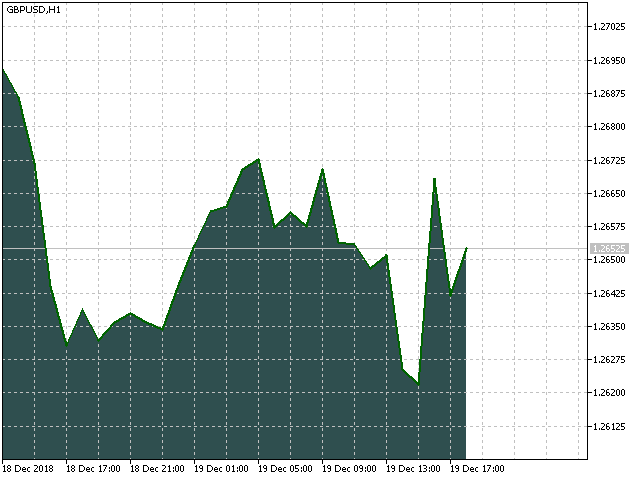
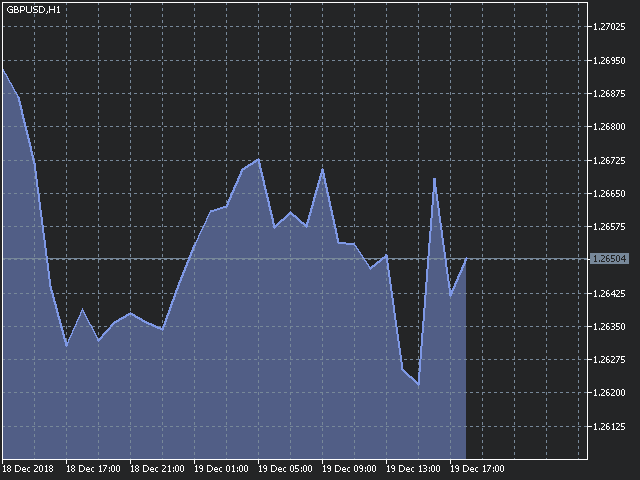
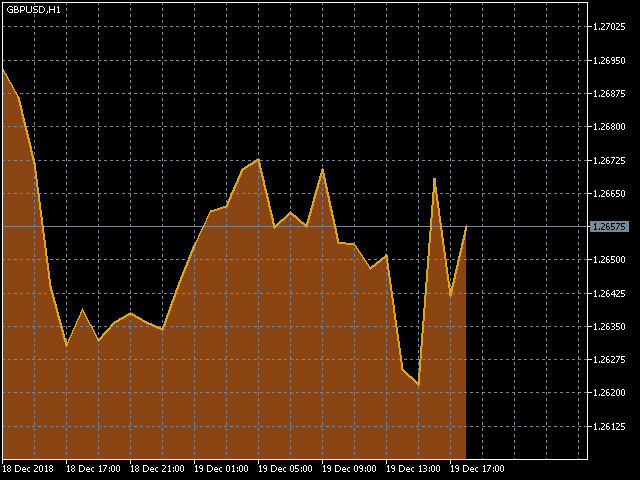
The utility Filled Area Chart adds to the standard set of price presentations. It is a brand new, nice price chart. You will certainly like it if you want to feel yourself a trader born under the Bloomber lucky star.


The Properties allow to set the colors and other things:

Color preset - choose a preset or set to "Custom" and set your own colors using the properties below.

Custom area color - color of the area below the price line. Works only with Color preset = Custom.

Custom chart color - color of the chart background. Works only with Color preset = Custom.

Custom line color - color of the price line. Works only with Color preset = Custom.

Custom text color - color of the text. Works only with Color preset = Custom.

Number of scroll windows - this is the number of scrollable windows to be filled by the indicator. If you set more than 5, it may slow down a resource-demanding computer.

Update rate - set "I_Like_It_Slow" if you experience a slowdown on a resource-demanding computer. With this value, the indicator draws an area skipping the current bar (which changes constantly) and starting with the first bar.


You can change other chart colors via the context menu of MetaTrader, which you can open by clicking the right mouse button in the chart.

If your computer is somewhat slow, you may experience a short slowdown upon the first start of the indicator. It is because the indicator first draws all of its objects. Subsequently, the indicator draws only the last 2-3 bars and the computer should work as usual.
Prodotti consigliati
Position Selective Close MT4
Francisco Manuel Vicente Berardo
The Position Selective Close is a multi-symbol multi-timeframe script used to close simultaneously various positions.  General Description   The Position Selective Close   possesses   three operation modes (Intersection,   Union   and All) that control the way   as   four position features (symbol, magic number,   type   and profit) are used. The modes, available through the Selection Mode input parameter, relate to the features, available through the “Select by Feature” and “Feature” input pa
FREE
Constructor
Aleksey Semenov
Constructor is a convenient tool for creating, (building strategies) testing and applying trading strategies and ideas, as well as testing and using separate indicators and their groups. Constructor includes opening, closing, deal tracking, averaging and recovery modules, as well as various trading options with and without averaging and martingale. You are able to connect up to 10 different external indicators. Find the detailed instructions in the attached pdf file. Trading settings averaging
FREE
Free automatic Fibonacci is an indicator that automatically plots a Fibonacci retracement based on the number of bars you select on the BarsToScan setting in the indicator. The Fibonacci is automatically updated in real time as new highest and lowest values appears amongst the selected bars. You can select which level values to be displayed in the indicator settings. You can also select the color of the levels thus enabling the trader to be able to attach the indicator several times with differe
FREE
Show Pips
Roman Podpora
4.26 (58)
Questo indicatore informativo sarà utile per coloro che vogliono essere sempre informati sulla situazione attuale del conto. L'indicatore mostra dati come profitto in punti, percentuale e valuta, nonché lo spread per la coppia corrente e il tempo fino alla chiusura della barra nell'intervallo di tempo corrente. VERSIONE MT5 -   Indicatori più utili Esistono diverse opzioni per posizionare la linea delle informazioni sulla carta: A destra del prezzo (corre dietro al prezzo); Come commento (nell'
FREE
Safety
Sergey Ermolov
5 (2)
Penso che tutti conoscano una regola di gestione del denaro come "Sicuro". Per coloro che non lo sanno, safe comporta la chiusura di metà della posizione dopo che i profitti dell'operazione sono stati livellati alla dimensione del piede. Quindi, anche se il prezzo si gira e si blocca, non perderai più denaro, perché esattamente lo stesso margine di profitto è stato ottenuto quando una parte della posizione è stata chiusa in precedenza. Safety Advisor ha solo un'impostazione: il lotto di chiusu
FREE
This indicator help to mark the high and low of the session Asian,London,Newyork , with custom hour setting This indicator is set to count from minute candle so it will move with the current market and stop at the designated hour and create a accurate line for the day. below is the customization that you can adjust : Input Descriptions EnableAsian Enables or disables the display of Asian session high and low levels. EnableLondon Enables or disables the display of London session high and
FREE
TradeKeeper Lite
Evgeniy Scherbina
The utility TradeKeeper Lite can show your profits for different periods and bip a sound when you reach a profit target value. Click the tachometer to quickly switch to the next profit period. There are 5 of them: This Day, This Week, This Month, Last 90 Days and All I Made. With the utility TradeKeeper Pro , available at this link , you can also open trades with a magic number and volume of your choice, trail any orders with a simple trail or iSAR-based trail, as well as close any open trades a
FREE
Real-time spread tracking and monitoring software Displays spread values in form of histograms on current timeframe of chart Convenient for analyzing spread changes, as well as for comparing trading conditions of different brokers By placing on desired chart, the spread changes at different trading times are displayed Additionally Fully customizable Works on any instrument Works with any broker
FREE
PZ Order History MT4
PZ TRADING SLU
4.25 (4)
Indicatore di uso generale che mostra la cronologia degli scambi/ordini di qualsiasi grafico in tempo reale, molto simile alla modalità visiva del tester di strategia. Ti consente di esaminare la vera storia di trading di qualsiasi simbolo particolare per scopi educativi, di miglioramento, di reverse engineering o diagnostici. Può essere utilizzato con successo sia con la password principale che con quella dell'investitore. [ Guida all'installazione | Guida all'aggiornamento | Risoluzione dei p
FREE
#property copyright "小天" #property link      " https://www.mql5.com " #property version   "2.01" #property strict #property description "test" input int hlength=85; input int vlength=25; input int DX=-340; input int DY=-80; input string InpDirectoryName="Data"; // directory name input double lots_default=1; input int    pc_times_default=2; input double deposit_minimal=1; input double floating_loss_percent=0.1; input double margin_occupied=0.2;   input int    tradingnumber=1;//控制买卖交易数量  input
FREE
You can check out comment #1 how does it work This is a very useful tool, enter the currency charts you need to open, use the symbol "/" to distinguish them, and select the periodicity /TF of the chart, press the button and they will open the charts for you in batches without you having to manually open them each! Because some EA use multiple currency pairs strategy, but do not support one chart to support all currency pairs, so I developed this tool, hope you like it, if you are satisfied with
FREE
Session Shade
Shunsuke Kanaya
Session Shade (MT4) – Non-Trading Hours Background Shading Overview Session Shade is a lightweight MT4 chart utility indicator that visually highlights non-trading hours by shading the chart background. It is designed to help you confirm your daily time-filter window at a glance. This is a visualization tool only. It does not generate trading signals and it does not place, modify, or close any orders. Key features Shades non-trading hours (NG) on the chart background Keeps trading hours (OK) cl
FREE
FFx Fractals
Eric Venturi-Bloxs
4.5 (2)
The purpose of this new version of the MT4 standard indicator provided in your platform is to display in a sub-window multiple timeframes of the same indicator. See the example shown in the picture below. But the display isn’t like a simple MTF indicator. This is the real display of the indicator on its timeframe. Here's the options available in the FFx indicator: Select the timeframes to be displayed (M1 to Monthly) Define the width (number of bars) for each timeframe box Alert pop up/sound/ema
FREE
Wise Men Indicator demo
Bohdan Kasyanenko
3 (2)
The indicator displays signals according to the strategy of Bill Williams on the chart. Demo version of the indicator has the same features as the paid, except that it can work only on a demo account . Signal "First Wise Man" is formed when there is a divergent bar with angulation.  Bullish divergent bar - with lower minimum and closing price in the upper half. Bearish divergent bar - higher maximum and the closing price at the bottom half. Angulation is formed when all three lines of Alligator
FREE
Lot Calculate
Maksim Neimerik
This simple but useful script calculates the lot in % of the deposit. It is indispensable for risk management. There is only one customizable parameter: MaxRisk - risk in % for lot calculation. The product works as a standard script. Launch it once on an appropriate chart and start trading using the calculated lot value. Genious is simplicity! Happy trading!
FREE
ZoomIN
Maxim Polishchuk
4.5 (2)
The ZoomIN indicator is designed for quickly viewing the selected bar on the smaller timeframes in a pop-up window. Once launched, the indicator works in the background, does not take up space on the chart and does not consume system resources. When the indicator is activated by the Shift + i combination (can be changed in the settings), a pop-up window with a chart of a smaller timeframe is created. The displayed timeframe can be changed by a left-click on the magnifying glass icon. To hide the
FREE
Smart Trade Monitor — Real-Time Position Tracking, P&L Analysis & Alert System   Real-Time Monitoring : Auto-tracks open/closed positions, displays yesterday’s & previous day’s P&L—no manual calculations!   Smart Alerts (Premium Only) : Instant push notifications + sound alerts for position changes—never miss a trading opportunity!   User-Friendly : One-click setup, key data displayed directly on charts for faster decisions.   Cross-Platform : Supports both MT4 & MT5, compatible with
FREE
Chart Buddy MT4
Sajiro Yoshizaki
Chart Buddy è uno strumento di intrattenimento progettato per aggiungere divertimento ai tuoi grafici di trading. Un personaggio si muove lungo il lato destro del grafico, dando l'impressione che stia incoraggiando il movimento dei prezzi, aggiungendo un tocco unico e piacevole alla tua esperienza di trading. Sebbene non influisca direttamente sulle tue operazioni, le animazioni offrono una leggera distrazione, facendoti sentire come se avessi un sostenitore personale. Caratteristiche principali
FREE
Adattandosi alla volatilità, il rischio potenziale per premiare le posizioni di trading viene mostrato in base al Range reale medio. Le caselle Rischio-Rendimento vengono visualizzate quando si fa clic sul pulsante "Acquista o vendi"! Un'utilità del calcolo ATR, gioire con una questione che non fa parte di una decisione difficile per quando chiudere un commercio. Questo problema aiuterebbe la tua decisione di gestione del rischio.  Specifica L'Average True Range è un indicatore comunemente usat
FREE
Follow The Line
Oliver Gideon Amofa Appiah
3.94 (16)
FOLLOW THE LINE GET THE FULL VERSION HERE: https://www.mql5.com/en/market/product/36024 This indicator obeys the popular maxim that: "THE TREND IS YOUR FRIEND" It paints a GREEN line for BUY and also paints a RED line for SELL.  It gives alarms and alerts of all kinds. IT DOES NOT REPAINT and can be used for all currency pairs and timeframes. Yes, as easy and simple as that. Even a newbie can use it to make great and reliable trades. NB: For best results, get my other premium indicators for more
FREE
ReplicatorDemo
Aleksej Shcherbak
This is a free demo version of the Replicator utility ( https://www.mql5.com/en/market/product/23028 ), which trades the minimum lot and only on EURUSD. The program is designed for copying your successful orders. The price is often fluctuates within a channel. But there is no time to place the next orders, especially if it happens at night. Place an order, when it closed with profit, the program repeats your order as a pending limit order. This will continue until the order closes with a loss, o
FREE
Double Fibonacci
Fabio Mazzotta
5 (1)
Fibonacci will be designed by default based on the monthly candle but you can simultaneously view Fibonacci on a weekly candle or you can choose your two favorite timeframes. When you run this script, an input prompt will appear and the following input parameters can be configured: Input Parameters: Name Example Default Timeframe1 Monthly 43200 Timeframe2 Weekly 10080 TF1status 1 on 1 TF2status 0 off 0 candleID you can choose which candle to apply 1 Prefix1 It's is the prefix of the first object
FREE
This MQL4 code is a custom indicator that draws multiple colored rectangles on a chart, spaced apart by a defined pip distance, and projected into the future. Here's a brief breakdown: Purpose: Draws several horizontal rectangles (zones) starting from a specified price. Rectangles are spaced apart vertically by a pip distance. Colors alternate between FirstColor and SecondColor . Rectangles can be drawn behind candles and optionally filled. Each rectangle extends into the future for a specified
FREE
GS spread
Aleksander Gladkov
The indicator calculates the current spread for each tick using the formula Spread=(ASK-BID)/Point. Schedule of changes in the boundaries spread over the timeframe displayed in a separate window from the date of accession of the indicator. Two lines corresponding to the minimum and maximum spread values are displayed. The indicator window is self-adjusted according to the minimum and maximum values from the moment of launch. The minimum and maximum values for the entire period of the indicator o
FREE
FFx Momentum
Eric Venturi-Bloxs
4 (1)
The purpose of this new version of the MT4 standard indicator provided in your platform is to display in a sub-window multiple timeframes of the same indicator. See the example shown in the picture below. But the display isn’t like a simple MTF indicator. This is the real display of the indicator on its timeframe. Here's the options available in the FFx indicator: Select the timeframes to be displayed (M1 to Monthly) Define the width (number of bars) for each timeframe box Alert pop up/sound/ema
FREE
SG InfoBox
Hleb Smoliar
The "InfoBox" utility is designed to display the presence of open orders, the number of lots, current profit and much more in one window. The version for the MT5 platform   is here . You've probably encountered a situation where you have an advisor that works on a currency pair, but information about its operation: - orders and their number, the size of the spread for the instrument, the volume of lots on the market, drawdown and much more - are scattered in different places of the terminal and
FREE
一键平仓小工具,可以针对买单、卖单和挂单进行批量操作,可以操作当前图表订单和所有订单,简单高效。 第一行第一个按钮是关闭当前图表 品种 所有买单,第二个按钮是关闭当前图表品种的所有卖单,第三个按钮是关闭当前图表 品种 的所有订单; 第二行 第一个按钮是删除当前图表 品种 所有买单挂单,第二个按钮是 删除 当前图表品种的所有卖单 挂单 ,第三个按钮是 删除 当前图表 品种 的所有 挂单 ; 第三行第一个按钮是关闭所有 品种的全部买单,第二个按钮是关闭所有 品种的全 卖单,第三个按钮是关闭所有 品种的全部订单; 第四行第一个按钮是删除所有 品种全部买单挂单 ,第二个按钮是 删除 全部品种 的全部卖单挂单 ,第三个按钮是删除 全部品种 的全部挂单 。 希望此程序能对您有用
FREE
This Expert Advisor works as a slave in a trade copier system. It reads trading instructions from a CSV file and replicates the orders in the MetaTrader 4 terminal. It is designed to work with a master EA that writes trades to the same file. The EA continuously monitors the file for updates and synchronizes the local terminal by opening, modifying, or closing trades accordingly. What it does: Reads trade data from a CSV file located in the Common Files directory Parses order ID, symbol, order ty

FREE
MASi Three Screens
Aleksey Terentev
5 (2)
MASi Three Screens is based on the trading strategy by Dr. Alexander Elder. This indicator is a collection of algorithms. Algorithms are based on the analysis of charts of several timeframes. You can apply any of the provided algorithms. List of versions of algorithms:     ThreeScreens v1.0 - A simple implementation, with analysis of the MACD line;     ThreeScreens v1.1 - A simple implementation, with analysis of the MACD histogram;     ThreeScreens v1.2 - Combines the first two algorithms in
FREE
AQ RiskOptimizer
HIT HYPERTECH INNOVATIONS LTD
5 (1)
Risk Optimizer is the absolute solution for applying risk management on your account. Bad risk management is the main reason that causes traders to lose money. Risk Optimizer calculates and suggests the correct lot size for each position according to your personal, customized risk profile. You can give directly your preferred risk as percentage (%) for each position or you can trust our algorithms to calculate and optimize according to your risk category selection. But it is not only that! Selec
FREE
Gli utenti di questo prodotto hanno anche acquistato
Local Trade Copier EA MT4
Juvenille Emperor Limited
4.96 (108)
Sperimenta una copia di trading eccezionalmente veloce con il Local Trade Copier EA MT4 . Con la sua facile configurazione in 1 minuto, questo copiatore di trading ti consente di copiare i trades tra diversi terminali di MetaTrader sullo stesso computer Windows o su Windows VPS con velocità di copia ultra veloci inferiori a 0.5 secondi. Che tu sia un trader principiante o professionista, Local Trade Copier EA MT4 offre una vasta gamma di opzioni per personalizzarlo alle tue esigenze specifiche.
Trade Assistant MT4
Evgeniy Kravchenko
4.42 (193)
It helps to calculate the risk per trade, the easy installation of a new order, order management with partial closing functions, trailing stop of 7 types and other useful functions. Additional materials and instructions Installation instructions   -   Application instructions   -   Trial version of the application for a demo account Line function -   shows on the chart the Opening line, Stop Loss, Take Profit. With this function it is easy to set a new order and see its additional characteris
Forex Trade Manager MT4
InvestSoft
4.98 (433)
Benvenuto a Trade Manager EA, lo strumento definitivo per la gestione del rischio , progettato per rendere il trading più intuitivo, preciso ed efficiente. Non è solo uno strumento per l'esecuzione degli ordini, ma una soluzione completa per la pianificazione delle operazioni, la gestione delle posizioni e il controllo del rischio. Che tu sia un principiante, un trader avanzato o uno scalper che necessita di esecuzioni rapide, Trade Manager EA si adatta alle tue esigenze, offrendo flessibilità s
Copy Cat More Trade Copier MT4 (Copia Gatto MT4) non è solo un semplice copiatore locale di operazioni; è un quadro completo di gestione del rischio ed esecuzione, progettato per le sfide del trading moderno. Dai challenge delle prop firm alla gestione dei conti personali, si adatta a ogni situazione grazie a una combinazione di esecuzione robusta, protezione del capitale, configurazione flessibile e gestione avanzata delle operazioni. Il copiatore funziona sia in modalità Master (mittente) che
Exp COPYLOT CLIENT for MT4
Vladislav Andruschenko
4.65 (66)
Copiatore commerciale per MetaTrader 4.       Copia le operazioni, le posizioni e gli ordini forex da qualsiasi conto. È uno dei migliori copiatori commerciali       MT4 - MT4, MT5 - MT4       per il       COPYLOT MT4       versione (o       MT4 - MT5 MT5 - MT5       per il       COPYLOT MT5       versione). Versione MT5 Descrizione completa   +DEMO +PDF Come comprare Come installare     Come ottenere i file di registro     Come testare e ottimizzare     Tutti i prodotti di Expforex Versione
Trade copier MT4
Alfiya Fazylova
4.58 (33)
Trade Copier è un'utilità professionale progettata per copiare e sincronizzare le transazioni tra conti di trading. La copiatura avviene dal conto/terminale del fornitore al conto/terminale del destinatario, che sono installati sullo stesso computer o vps. Prima di acquistare, puoi testare la versione demo su un account demo. Versione demo qui . Istruzioni complete qui . Funzionalità e vantaggi principali: Supporta la copia degli ordini: MT4> MT4, MT4> MT5, MT5> MT4, inclusi i conti di compensaz
TradePanel MT4
Alfiya Fazylova
4.85 (92)
Trade Panel è un assistente commerciale multifunzionale. L'applicazione contiene più di 50 funzioni di trading per il trading manuale e consente di automatizzare la maggior parte delle operazioni di trading. Prima dell'acquisto, è possibile testare la versione dimostrativa su un conto demo. Scaricare la versione di prova dell'applicazione per un account dimostrativo: https://www.mql5.com/it/blogs/post/762419 . Istruzioni complete qui . Commercio. Ti consente di eseguire operazioni di trading con
ManHedger MT4
Peter Mueller
5 (1)
THIS EA IS A SEMI-AUTO EA, IT NEEDS USER INPUT. Manual & Test Version Please TEST this product before   BUYING  and watch my video about it. Contact me for user support or bug reports, or if you want the MT5 version! MT5 Version I do not guarantee any profits or financial success using this EA. With this Expert Advisor, you can: Implement your own   Zone Recovery   strategy to capitalize on trending markets. Create   Grid   trading strategies, to profit from ranging markets. Place orders easil
Speciale Trading – SCONTO DEL 40% Advanced Trade Manager – La soluzione completa definitiva per un trading manuale più veloce, intelligente e sicuro. Trasforma il tuo trading manuale con NextGen Trade Manager AI, il pannello professionale su grafico che combina esecuzione istantanea, pianificazione visiva delle operazioni e una potente gestione del rischio in un unico strumento intuitivo. Esegui ordini, gestisci il rischio e proteggi i profitti più velocemente che mai, il tutto senza uscire d
The product will copy all telegram signal to MT4   ( which you are member  ) , also it can work as remote copier.  Easy to set up, copy order instant, can work with almost signal formats, image signal, s upport to translate other language to English Work with all type of channel or group, even channel have "Restrict Saving Content", work with  multi channel, multi MT5 Work as remote copier: with signal have ticket number, it will copy exactly via ticket number. Support to backtest signal. How to
Trade Dashboard MT4
Fatemeh Ameri
4.96 (53)
Tired of complex order placement and manual calculations? Trade Dashboard is your solution. With its user-friendly interface, placing orders becomes effortless, by a single click, you can open trades, set stop loss and take profit levels, manage trade lot size, and calculate risk to reward ratios, allowing you to only focus on your strategy. Say goodbye to manual calculations and streamline your trading experience with Trade Dashboard. Download  Demo Version  right now. You can find  Details of
The News Filter
Leolouiski Gan
5 (25)
Questo prodotto filtra tutti gli esperti consulenti e i grafici manuali durante il periodo delle notizie, così non dovrai preoccuparti di improvvisi picchi di prezzo che potrebbero distruggere le tue impostazioni di trading manuali o le negoziazioni effettuate da altri esperti consulenti. Questo prodotto viene fornito anche con un sistema completo di gestione degli ordini che può gestire le tue posizioni aperte e gli ordini in sospeso prima della pubblicazione di qualsiasi notizia. Una volta che
Equity Protect Pro: Il tuo esperto di protezione del conto completo per un trading senza preoccupazioni Se stai cercando funzionalità come protezione del conto, protezione del capitale proprio, protezione del portafoglio, protezione multi-strategia, protezione dei profitti, raccolta dei profitti, sicurezza del trading, programmi di controllo del rischio, controllo automatico del rischio, liquidazione automatica, liquidazione condizionale, liquidazione programmata, liquidazione dinamica, trailin
Seconds Chart — uno strumento unico per creare grafici in secondi su MetaTrader 4 . Con Seconds Chart , puoi generare grafici con timeframe definiti in secondi, ottenendo una flessibilità e una precisione d'analisi ideali, non disponibili nei grafici standard in minuti o ore. Ad esempio, il timeframe S15 indica un grafico con candele di 15 secondi. Puoi utilizzare qualsiasi indicatore, expert advisor e script. È facile utilizzarli proprio come nei grafici standard. A differenza degli strumenti s
Il MT4 to Telegram Signal Provider è uno strumento facile da usare e completamente personalizzabile che consente l'invio di segnali a Telegram, trasformando il tuo account in un fornitore di segnali. Il formato dei messaggi è completamente personalizzabile! Tuttavia, per un uso semplice, puoi anche optare per un modello predefinito e abilitare o disabilitare parti specifiche del messaggio. [ Dimostrativo ]  [ Manuale ] [ Versione MT5 ] [ Versione Discord ] [ Canale Telegram ]  New: [ Telegram To
DrawDown Limiter MT4
Haidar Lionel Haj Ali
5 (8)
Drawdown Limiter EA You are in the right place if you were searching for Drawdown control, Drawdown limiter, Balance protection, Equity Protection or Daily Drawdown Limit related to Prop Firm, FTMO, or Funded account trading, or if you want to protect your trading account. Have you suffered from controlling your drawdown when trading funded accounts? This EA is meant for you. Prop firms usually set a rule called “Trader Daily Drawdown”, and if it is not respected, you are disqualified.  I am an
MicroScalp Signal Finder Scanner di Segnali di Scalping Smart Money Multi-Simbolo e Multi-Timeframe per MetaTrader 5 Lo scalping richiede un timing preciso e un'analisi multilivello su diversi strumenti — un compito quasi impossibile da svolgere manualmente in tempo reale. Monitorare simultaneamente struttura di mercato, order block, fair value gap, sweep di liquidità e conferme di momentum su più simboli richiede automazione. MicroScalp Signal Finder (MSF) scansiona fino a 20 simboli contempora
Auto Grid trades
Makarii Gubaydullin
Auto Grid:  creazione automatizzata di ordini a griglia basata sulle tue operazioni esistenti. Automatizza strategie di trading complesse   con sistemi a griglia sofisticati che rilevano nuove posizioni e creano automaticamente array di ordini ottimizzati. Utilità multifunzionale : 66+ funzionalità, incluso lo strumento Auto Grid  |   contattami  per qualsiasi domanda  |   Versione MT5 A. Rilevamento e Monitoraggio Intelligente delle Operazioni: Scansione di simbolo specifico o portafoglio comp
Trade Assistant Pro 36 in 1
Makarii Gubaydullin
4.76 (21)
Strumento Multifunzionale: Calcolatore di Lotti, Ordini Grid, Rapporto R/R, Gestore Trade, Zone di Domanda e Offerta, Price Action e molto altro Versione Demo   |   Manuale utente L'Assistente di Trading non funziona nel tester di strategie: puoi scaricare la Versione Demo QUI per testare l' utilità . Contattami per qualsiasi domanda / idee di miglioramento / in caso di bug trovato Se hai bisogno di una versione MT5, è disponibile qui Semplifica, accelera e automatizza il tuo processo di tradin
Copy Master mt4
Evgenii Aksenov
5 (5)
Questa utility ti permetterà di copiare qualsiasi transazione da un terminale con L'impostazione Master ad altri terminali con L'impostazione Slave Allo stesso tempo, puoi scegliere quali coppie copiare, impostare la dimensione dell'ordine copiato su più parametri. Impostare il limite di perdita di prelievo o copiare solo le operazioni redditizie È possibile copiare le transazioni da MT4 o MT5 a MT4 o MT5 di altri broker Ora non sarà difficile copiare i segnali di qualsiasi esperto che lavor
Crystal Trade Manager PRO – Sistema Avanzato di Gestione del Rischio e Controllo delle Operazioni per MT4 Versione Gratuita: https://www.mql5.com/en/market/product/150632 Panoramica Crystal Trade Manager PRO (CTM) è uno strumento professionale progettato per la gestione del rischio, il controllo delle operazioni e l’automazione avanzata su MetaTrader 4. È ideato per i trader che richiedono un'esecuzione disciplinata, una forte protezione del capitale e un sistema di controllo affidabile. Il sist
Basket EA MT4
Juvenille Emperor Limited
5 (5)
Basket EA MT4 è un potente strumento per la presa di profitto e un sistema completo di protezione del conto, tutto in una soluzione semplice e intuitiva. Il suo scopo principale è quello di offrire un controllo totale sul profitto e la perdita complessiva del conto, gestendo tutte le posizioni aperte a livello di "cestino" (basket) e non singolarmente. L’EA offre una serie completa di funzionalità a livello di basket, come take profit, stop loss, break even e trailing stop. Questi possono essere
Take a Break
Eric Emmrich
5 (31)
News filter, equity guard & session control for all your EAs — one tool, full protection Take a Break has evolved from a basic news filter into a comprehensive account protection solution . It pauses your other Expert Advisors during news events or based on custom filters. When trading resumes, it automatically restores your entire chart setup , including all EA settings. Why traders choose Take a Break One news filter for all your EAs — no more relying on individual built-in filters that may o
OrderManager MT4
Lukas Roth
4.73 (26)
Presentazione del OrderManager : un rivoluzionario strumento per MT4 Gestisci le tue operazioni come un professionista con il nuovissimo utility Order Manager per MetaTrader 4. Progettato pensando alla semplicità e alla facilità d'uso, Order Manager ti permette di definire e visualizzare senza sforzo il rischio associato a ogni operazione, consentendoti di prendere decisioni informate e ottimizzare la tua strategia di trading. Per ulteriori informazioni sull'OrderManager, si prega di consultare
VR Alert
Vladimir Pastushak
5 (1)
The VR Alert indicator utility is designed to inform the trader when the price reaches the given level. The signal levels can be set not only horizontally but also inclined. Thus, the trader gets the opportunity to receive notifications from the inclined trend levels. Thanks to the VR Alert utility, you will no longer need to sit near the monitor for a long time. You can calmly do about your household chores, perform your work duties and spend time with your family. Your task is simply to set th
Alert Msg to Market Order
Nguyen Quoc Hung
5 (4)
This EA is fully automated , it is built based on  the method of catching the pop-up Alert event and Open Market Orders (BUY/SELL) . Download trial version here:  https://www.mql5.com/en/blogs/post/751340 ***NOTE:   It is recommended to remove the available filter settings, only install the filter for your indicator. Parameters of the EA: -------- <EA Settings> -------- Magic Number:   The identifying (magic) number of the currently selected order. Allow Open trade:   Enable/ Disable Open Trade
If you are hiring the signal at website mql5.com to earn investment profits, the lot size on your MT4 software received from the signal will be limited to reduce risk. Because the lot size is too small, investment profits will be very small. This is a tool to increase the lot size of the order. This tool will automatically copy the order from the original order. The copied order will have the lot multiplier according to the parameters you declare. All the process of opening and closing the order
Il Risk/Reward Tool è un Expert Advisor di livello professionale progettato per rivoluzionare il modo in cui pianifichi, visualizzi ed esegui le operazioni in MetaTrader 4. Che tu sia un trader discrezionale che apprezza una gestione precisa del rischio o uno sviluppatore di strategie che ha bisogno di testare visivamente le configurazioni di trading, questo strumento fornisce tutto ciò di cui hai bisogno in un'interfaccia elegante e intuitiva. A differenza dei calcolatori di posizione di base,
Copiatrice->Interazione dell'interfaccia comoda e veloce, gli utenti possono utilizzarla subito       ->>>> Si consiglia di utilizzarlo su computer Windows o VPS Windows Caratteristiche: Impostazioni di copy trading diversificate e personalizzate: 1. È possibile impostare diverse modalità di lotto per diverse fonti di segnale 2. È possibile impostare diverse fonti di segnale per il copy trading forward e reverse 3. I segnali possono essere impostati con commenti 4. Se calibrare il lotto in base
VirtualTradePad mt4 Extra
Vladislav Andruschenko
4.86 (59)
Pannello di trading per il trading in 1 clic.   Lavorare con posizioni e ordini!   Trading dal grafico o dalla tastiera. Utilizzando il nostro pannello di trading, puoi fare trading con un clic dal grafico ed eseguire operazioni di trading 30 volte più velocemente rispetto al controllo MetaTrader standard. Calcoli automatici di parametri e funzioni che semplificano la vita di un trader e lo aiutano a condurre le proprie attività di trading in modo molto più rapido e conveniente. Suggerimenti gra
Altri dall’autore
Edge Ensemble
Evgeniy Scherbina
5 (1)
Edge Ensemble is a professional trading advisor built on an ensemble of 10 independent neural networks of three different architectures: LSTM, TCN and Transformer. Each network in the ensemble acts as a standalone trading strategy, while the final trading signal is formed based on the collective decision of the entire model set. Instead of searching for a single universal model trained using the classical 80/20 scheme, Edge Ensemble employs an ensemble specifically designed to work with non-sta
LSTM Ensemble
Evgeniy Scherbina
3.67 (3)
LSTM Ensemble is a professional trading expert built on an ensemble of 10 independent LSTM models, each of which represents a separate trading strategy. Instead of a single “ideal” model trained using the classic 80/20 scheme, the expert uses a collective decision approach, where the final trading signal is formed based on the consensus of multiple neural networks Key idea: an ensemble instead of a single model The traditional approach to training neural networks in trading is: one model → one
Gold Chaser
Evgeniy Scherbina
5 (3)
The "Gold Chaser" expert advisor trades in fully automated mode these 4 symbols: XAUUSD (Gold), XAGUSD (Silver), US30, US500, and BTCUSD (Bitcoin) Possibilities of the "non-major" symbols really differ from what you are accustomed to with the usual set of symbols. First of all, gold moves very quickly. Like major symbols, gold reacts to political events, important economic events and speeches of VIP geeks. However, gold moves in a much more swaying manner. The same is applicable to silver, oil a
Your False Hope
Evgeniy Scherbina
3.94 (18)
The advisor "Your False Hope" is a fully automated strategy which trades major symbols. The set of symbols may change while the strategy is improved. I created this strategy as a parody of pipe dreams of Internet users about magical possibilities of machine learning for financial markets. The objective is to show that normalized inputs of any set of symbols can be learned by a neural network. This strategy has two trading modes: "False_hope" and "Reality". Start the advisor on one chart of any s
FREE
Latte
Evgeniy Scherbina
5 (9)
The "Latte" EA is ready to trade several symbols in the fully automated mode from 1 chart. The EA uses a "Transformer" neural network to forecast price movements. The main advantage of the Transformer over an LSTM network is its ability to find patterns even across very long sequences of data. While LSTMs often lose information when dealing with sequences longer than 2–3 months, Transformers handle sequences as long as a year with ease. The Transformer architecture was first introduced by Googl
Chanlun Master
Evgeniy Scherbina
5 (1)
Chanlun Master: A Fusion of Eastern Market Philosophy and Neural Networks Chanlun Master is a professional trading robot that combines the legendary Chinese theory of price movement with modern Deep Learning technologies. History: What is Chanlun? In 2006, a mysterious trader appeared in the Chinese segment of the internet under the pseudonym Chan Shi ("Zen Master"). He published a series of articles describing a unique mathematical structure of the market, which he called "Chanlun" . Unlike
IQuantum
Evgeniy Scherbina
The indicator IQuantum shows trading signals for 10 symbols in the daily chart: AUDCAD, AUDUSD, EURUSD, GBPCAD, GBPCHF, GBPUSD, NZDUSD, USDCAD, USDCHF, and USDJPY. Signals of the indicator are produced by 2 neural models which were trained independently from one another. The inputs for the neural models are normalised prices of the symbols, as well as prices of Gold, Silver and markers of the current day. Each neural model was trained in 2 ways. The Ultimate mode is an overfitted neural model
FREE
NewsCatcher Pro opens both pending and market orders based on data from the mql5.com calendar. In live mode, NewsCatcher Pro automatically downloads the calendar, opens orders, trails and closes orders. NewsCatcher Pro can trade any event from the calendar with any symbol available in MetaTrader, including Gold, Oil and cross-rates. To change the default symbol, go to the event view you want to change it for. NewsCatcher Pro uses two strategies: Strategy 1 (pending orders): the advisor opens two
IRush
Evgeniy Scherbina
5 (1)
Indicator IRush uses a modified version of a popular indicator RSI (Relative Strength Index) to look for entries on a daily chart or lower. The indicator has been set up and tested with the major symbols: AUDUSD, EURUSD, GBPUSD, USDCAD, USDCHF, and USDJPY. An automated trading with this indicator is implemented in the expert advisor Intraday Rush . This expert advisor can open, trail and close its trades. Check it out, it may be exactly what you are looking for! A Correct Reading of IRush The c
FREE
IDixie
Evgeniy Scherbina
IDixie is an indicator which shows open and close values of the American dollar index, DXY or "Dixie". The indicator is calculated from weighted values of 6 major symbols: EURUSD, USDJPY, GBPUSD, USDCAD, USDSEK, and USDCHF. In addition to "Dixie" values, the indicator also shows a moving average. You can set the period of the moving average. When bars of the indicator break through the moving average, this creates good opportunities to enter the market. As a rule, signals from this indicator are
FREE
My Big Bars MT5
Evgeniy Scherbina
4.58 (12)
The indicator My Big Bars can show bars (candles) of a higher timeframe. If you open an H1 (1 hour) chart, the indicator puts underneath a chart of H3, H4, H6 and so on. The following higher timeframes can be applied: M3, M5, M10, M15, M30, H1, H3, H4, H6, H8, H12, D1, W1 and MN. The indicator chooses only those higher timeframes which are multiple of the current timeframe. If you open an M2 chart (2 minutes), the higher timeframes exclude M3, M5 and M15. There are 2 handy buttons in the lower r
FREE
NewsCatcher Free MT5
Evgeniy Scherbina
4.5 (2)
The advisor NewsCatcher Free opens trades when the price makes a reversal move from support and resistance levels. Market entries should be confirmed by the Relative Strength Index (RSI). The RSI is implemented as a tachometer. It is recommended to use this advisor in a highly volatile market after a political event or a release of major economic data. You can use this advisor in the semi-automated mode (the RSI performs an information role) or in the fully automated mode (the RSI decides when t
FREE
High Trend Lite MT5
Evgeniy Scherbina
5 (1)
The indicator High Trend Lite monitors 5 symbols in up to 3 timeframes simultaneously and calculates the strength of their signals. The indicator notifies you when a signal is the same in different timeframes. The indicator can do this from just one chart. Therefore, High Trend Lite is a multicurrency and multitimeframe indicator. With the High Trend Pro , available at this link , you will have an unlimited number of symbols, 4 timeframes, a colourful chart of the primary MACD indicator, several
FREE
Filled Area Chart MT5
Evgeniy Scherbina
5 (1)
The utility Filled Area Chart adds to the standard set of price presentations. It is a brand new, nice price chart. You will certainly like it if you want to feel yourself a trader born under the Bloomber lucky star. The Properties allow to set the colors and other things: Color preset - choose a preset or set to "Custom" and set your own colors using the properties below. Custom area color - color of the area below the price line. Works only with Color preset = Custom. Custom chart color - col
FREE
NewsCatcher Free
Evgeniy Scherbina
4.67 (3)
The advisor NewsCatcher Free opens trades when the price makes a reversal move from support and resistance levels. Market entries should be confirmed by the Relative Strength Index (RSI). The RSI is implemented as a tachometer. It is recommended to use this advisor in a highly volatile market after a political event or a release of major economic data. You can use this advisor in the semi-automated mode (the RSI performs an information role) or in the fully automated mode (the RSI decides when t
FREE
The utility TradeKeeper Lite can show your profits for different periods and bip a sound when you reach a profit target value. Click the tachometer to quickly switch to the next profit period. There are 5 of them: This Day, This Week, This Month, Last 90 Days and All I Made. With the utility TradeKeeper Pro , available at this link , you can also open trades with a magic number and volume of your choice, trail any orders with a simple trail or iSAR-based trail, as well as close any open trades a
FREE
My Big Bars
Evgeniy Scherbina
4.75 (4)
The indicator My Big Bars can show bars (candles) of a higher timeframe. If you open an H1 (1 hour) chart, the indicator puts underneath a chart of H4, D1 and so on. The following higher timeframes can be applied: M3, M5, M10, M15, M30, H1, H3, H4, H6, H8, H12, D1, W1 and MN. The indicator chooses only those higher timeframes which are higher than the current timeframe and are multiple of it. If you open an M30 chart (30 minutes), the higher timeframes exclude M5, M15 and M30. There are 2 handy
FREE
High Trend Lite
Evgeniy Scherbina
1 (1)
The indicator High Trend Lite monitors 5 symbols in up to 3 timeframes simultaneously and calculates the strength of their signals. The indicator notifies you when a signal is the same in different timeframes. The indicator can do this from just one chart. Therefore, High Trend Lite is a multicurrency and multitimeframe indicator. With the High Trend Pro , available at this link , you will have an unlimited number of symbols, 4 timeframes, a colourful chart of the primary MACD indicator, several
FREE
TradeKeeper Lite
Evgeniy Scherbina
The utility TradeKeeper Lite can show your profits for different periods and bip a sound when you reach a profit target value. Click the tachometer to quickly switch to the next profit period. There are 5 of them: This Day, This Week, This Month, Last 90 Days and All I Made. With the utility TradeKeeper Pro , available at this link , you can also open trades with a magic number and volume of your choice, trail any orders with a simple trail or iSAR-based trail, as well as close any open trades a
FREE
NewsCatcher Pro
Evgeniy Scherbina
4.71 (14)
NewsCatcher Pro opens both pending and market orders based on data from the mql5.com calendar. In live mode, NewsCatcher Pro automatically downloads the calendar, opens orders, trails and closes orders. NewsCatcher Pro can trade any event from the calendar with any symbol available in MetaTrader, including Gold, Oil and cross-rates. To change the default symbol, go to the event view you want to change it for. NewsCatcher Pro uses two strategies: Strategy 1 (pending orders): the advisor opens two
TradeKeeper Pro
Evgeniy Scherbina
The utility TradeKeeper Pro allows you to open a trade manually with a magic and a volume of your choice. It does not open its own trades, it can only open a trade by your command. TradeKeeper Pro can trail any open trades by the iSAR (parabolic) indicator, and a simple trail. It can set the stoploss level at the open price as soon as possible. To trail any open trades for any instruments, it suffices to launch the utility in one chart. TradeKeeper Pro can close any trades or pending orders of a
High Trend
Evgeniy Scherbina
The indicator High Trend Pro monitors a big number of symbols in up to 4 timeframes simultaneously and calculates the strength of their signals. The indicator notifies you when a signal is the same in different timeframes. The indicator can do this from just one chart. Therefore, High Trend Pro is a multicurrency and multitimeframe indicator. High Trend Pro uses emproved versions of popular and highly demanded indicators for calculating its signals. High Trend Pro calculates the signal strength
NewsCatcher Visual
Evgeniy Scherbina
The advisor NewsCatcher Visual automatically downloads actual data from 2 economic calendars: investing.com or mql5.com . The advisor can work in the "autoclick" mode, that is it can open trades automatically by comparing actual and forecast values. It also allows to manually open both instant and pending orders with a set volume. Recommendations By default the advisor NewsCatcher Visual applies the "autoclick" strategy to all events of high volatility. This allows the advisor to work in the fu
QuantumPip MT4
Evgeniy Scherbina
5 (1)
The expert "QuantumPip" is a fully automated expert which can trade several symbols from one chart. The expert also uses prices of Gold, Oil, Dixie, DAX or FTSE to calculate inputs for the symbols. The expert uses 2 types of recurrent neural model - 1 network (decisions "buy" or "sell") and 2 networks (decisions "buy" or "uncertainty" and "sell" or "uncertainty"). QuantumPip can, therefore, trade 20 strategies as one, because it is 2 models per each of the 10 symbols. This can help diversify ri
The utility TradeKeeper Pro allows you to open a trade manually with a magic and a volume of your choice. It does not open its own trades, it can only open a trade by your command. TradeKeeper Pro can trail any open trades by the iSAR (parabolic) indicator, and a simple trail. It can set the stoploss level at the open price as soon as possible. To trail any open trades for any instruments, it suffices to launch the utility in one chart. TradeKeeper Pro can close any trades or pending orders of a
High Trend MT5
Evgeniy Scherbina
The indicator High Trend Pro monitors a big number of symbols in up to 4 timeframes simultaneously and calculates the strength of their signals. The indicator notifies you when a signal is the same in different timeframes. The indicator can do this from just one chart. Therefore, High Trend Pro is a multicurrency and multitimeframe indicator. High Trend Pro uses emproved versions of popular and highly demanded indicators for calculating its signals. High Trend Pro calculates the signal strength
The advisor NewsCatcher Visual automatically downloads actual data from the mql5.com calendar. The advisor can work in the "autoclick" mode, that is it can open trades automatically by comparing actual and forecast values. It also allows to manually open both instant and pending orders with a set volume. Recommendations By default the advisor NewsCatcher Visual applies the "autoclick" strategy to all events of high volatility. This allows the advisor to work in the fully automatic mode. However
Intraday Rush
Evgeniy Scherbina
4 (4)
The "Intraday Rush" Expert Advisor trades several symbols simultaneously in automatic mode: AUDUSD, EURUSD, GBPUSD, USDCAD, USDCHF, and USDJPY. The advisor uses a modified version of the popular indicator RSI (Relative Strength Index) to make open and close trading decisions. You can download a free indicator IRush , used by this advisor, to visualize trading. The one major difference of this advisor is that it can check its trading decisions several times during the day. If the market condition
QuantumPip
Evgeniy Scherbina
4.36 (11)
The expert "QuantumPip" is a fully automated expert which can trade several symbols from one chart. The expert also uses prices of Gold, Oil, "Schmuksie" (my adaptation of the "Dixie" indicator), DAX or FTSE to calculate inputs for the symbols. The expert uses 2 types of recurrent neural model - 1 network (decisions "buy" or "sell") and 2 networks (decisions "buy" or "uncertainty" and "sell" or "uncertainty"). QuantumPip can, therefore, trade 16 strategies as one, because it is 2 models per each
LuminaFX
Evgeniy Scherbina
4.33 (9)
LuminaFX is a fully automated expert which trades 8 symbols from one chart. The expert implements a popular version of the recurrent neural model. Values of the "Schmuksie" indicator (my adaptation of the American Dollar Index DXY, or "Dixie"), are used as inputs to the neural model. You can download a free indicator IDixie and put it on one chart with the expert LuminaFX. IDixie calculates close prices of the American Dollar Index, which is used in the expert, and it also shows a moving average
Filtro:
Nessuna recensione
Rispondi alla recensione