Propolice
- Utilità
- Versione: 1.13
- Aggiornato: 23 novembre 2026

A panel for prop account limits with protection against breaking the daily and max loss rules. For prop firm traders; it never opens trades.
THE PROBLEM
Prop accounts are lost not only on bad trades but on arithmetic. The daily limit is measured from balance at one firm and from equity at another, the firm's day does not start at your midnight, and the room left to the limit lives in your head. One extra entry and the account is gone.
WHAT PROPOLICE DOES
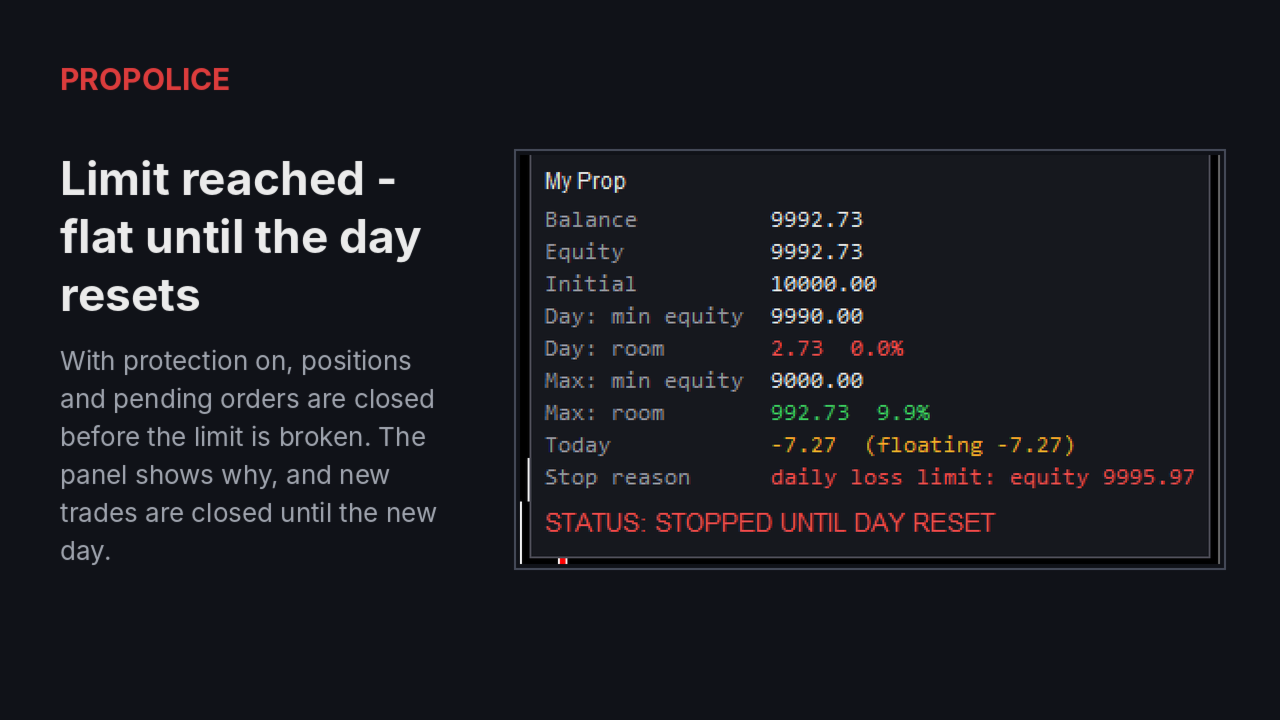
Attach it to one chart and it watches the whole account. The panel shows the room to the daily and max loss limits, the distance to the target and the progress of day-based rules. With protection switched on, it closes all positions and deletes pending orders when the account gets close to a limit, and keeps closing new positions until the trading day resets.
Propolice helps you follow the rules but does not guarantee it: a gap, slippage or a closed market can produce a loss larger than the limit.
KEY FEATURES
- Daily limit from day-start equity, balance or the higher of the two; percent of initial balance or of the day base.
- Max loss limit: static, or trailing peak equity or balance.
- Profit target, minimum trading days, profitable days, consistency rule (best day not above X% of total profit).
- Room to each limit in money and percent, colour coded: green, orange, red.
- Protection: close everything near a limit with an adjustable buffer; optionally on target, at the consistency cap, or on Friday at a set hour.
- Lock until the day resets: new positions are closed.
- Built-in rule presets: Spice Prop (2 Step, 2 Step Pro), Upscale 2 Phase, FundedNext Stellar 2 Phase, TheFundedWay PRO WAY 2 Step, FundingPips 2 Step, Audacity Capital 2 Phase, The5ers High Stakes, FTMO 2-Step.
- Deposits and withdrawals are not counted as a loss.
- Two colour themes, English and Russian panel, alerts and push notifications.
Presets are not official firm data. The rules were checked against public sources on 12 Nov 2026 and may change; verify them on your firm's website before use. The product is not affiliated with the firms listed.
START IN 3 STEPS
1. Drag Propolice onto any chart of the account (one chart per account).
2. Choose your program and phase in "Rules preset", or enter the rules manually. Check the trading day reset hour.
3. Watch the panel for a day or two. When the numbers match your firm's dashboard, switch on "Protection ON" and the Algo Trading button.
INPUTS
Prop firm and account:
- Rules preset — A ready rule set or "Custom"
- Initial balance — Starting balance; 0 = first deposit in history
- Trading day reset: hour, minute — When the firm's new day starts, server time
Daily limit:
- Daily loss limit, % — Daily loss limit
- Daily limit is measured from — Day-start equity, balance or the higher of the two
Max loss limit:
- Max loss limit, % — Overall limit
- Max loss limit type — Static or trailing
Target and payout rules:
- Profit target, % — Phase target
- Consistency, Profitable days, Minimum trading days — Passing and payout conditions
Protection:
- Protection ON — Allows closing positions and deleting orders. Off by default
- Close everything when room to a limit is below, % — Buffer that triggers the close
- Close on target, Consistency cap, Friday hour — Extra reasons to close
- After a limit close, also close new positions — Lock until the day resets
Panel:
- Language, Color theme, offsets, font size — Panel look
LIMITATIONS AND REQUIREMENTS
- MetaTrader 5, one copy per account. The terminal must be running: no terminal, no protection.
- The utility cannot prevent a trade from opening; it closes it after the fact (within a second).
- Positions are closed at market; with a gap or a closed market the loss can exceed the limit.
- If Propolice starts mid-day with open positions, day-start equity is estimated from balance; the row is marked with an asterisk until the next reset.
- The panel works in the Strategy Tester, but test protection on a demo account.
TROUBLESHOOTING
- "WATCH ONLY" status: protection is off in "Protection ON".
- "ALGO TRADING OFF" status: enable the Algo Trading button and allow trading in the EA properties.
- Numbers differ from the firm's dashboard: check the initial balance and the day reset hour.
- "Set Initial balance in the inputs": no first deposit in history, enter the initial balance manually.
READY SETS AND USER GUIDE
Ready rule sets for 57 prop firm programs (FTMO, FundedNext, The5ers, Alpha Capital, BrightFunded and more) and a detailed user guide — in my blog.
EXTENDED VERSION
Propolice Pro — everything the free version does, plus news windows, a risk manager (auto stop loss, volume cuts) and Telegram reports.