ATR Risk Manager One Click Trade
- Utilità
-
Shuai Wu
 MT5zone | Structural Trading Indicator Suite
✅ A low-latency, non-repainting decision filter designed for manual and semi-automated trading.
Key Features:
🔹 No Martingale / No Grid strategies
🔹Based on verifiable, real liquidity logic - Versione: 1.0
- Attivazioni: 5
Risk sizing and automatic SL/TP for manual trading on MetaTrader 5
Short description
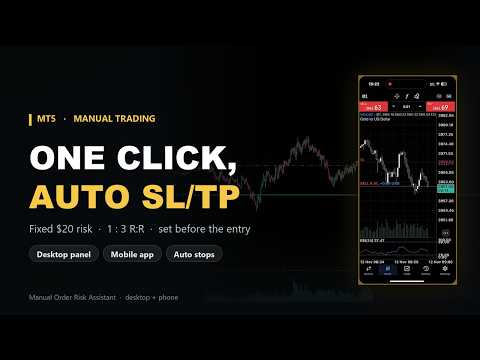
Calculate the risk before you click: lot size, stop loss and take profit derived from a fixed amount, per-symbol daily limits, and bare-order protection for mobile trades.
Overview
Manual Order Risk Assistant is not an automated strategy. It never opens a trade on its own.
It does one thing: the moment you press BUY or SELL, it works out the most that trade can lose, derives the lot size from that amount, and attaches the stop loss and take profit.
The hard part of manual trading is rarely the direction. It is consistency — lots sized by feel, stops dragged wider than planned, size increased after a losing run to win it back.
The tool turns those habits into fixed rules: risk per trade decided in advance, stops derived from ATR, and no new trades once the day's limit is reached. You still make the call. The tool enforces the risk.
Features
One-click orders with a calculated lot BUY, CLOSE and SELL on the chart are the entire interface. The lot comes from your risk amount and the stop distance — you never type it in.
Fixed amount or percentage of balance A fixed amount per trade (for example 20 USD), or a percentage of the account. Both are expressed in account currency, so nothing depends on tick value or on the symbol you trade.
ATR-based stop loss and take profit Distances come from ATR with configurable period and multipliers. The defaults are 1×ATR for the stop and 3×ATR for the target (1:3). After an order is placed you can drag either line and the panel recalculates the risk live.
Pending orders are sized the same way Limit and stop orders are sized at submission, and the stop and target are drawn on the chart as dashed lines.
Several symbols at once On a netting account you can hold positions in different symbols at the same time. The panel and all counters are per symbol: each symbol has its own risk amount, daily profit target and losing-trade count, independent of the others.
Per-symbol daily guard When a symbol reaches its daily profit target, or its losing-trade limit, no new trades are opened on that symbol for the rest of the day. Other symbols are unaffected.
Protection for bare orders If you open a market order from the MT5 mobile app or from the chart's one-click trading panel without a stop loss or take profit, the EA attaches both using your current risk settings and brings the position under the panel. Orders that already carry SL/TP are left untouched, and pending orders are not covered.
Optional chandelier trailing stop ATR-based trailing with a minimum step, so the stop is not modified on every tick.
Live panel Position, floating P/L, progress toward the day's target, stop-out count and risk per trade — in the lower-left corner of the chart.
Symbol agnostic Forex, metals, indices, crypto. Risk is defined in money rather than in points, so switching symbols needs no recalibration.
Reading the panel
| Field | Meaning |
|---|---|
| Source | Where the position came from: Flat (no position), PANEL (opened from the panel), EXT (mobile app or one-click trading) |
| Large number | Floating P/L of the current symbol, in account currency |
| Today target | The symbol's daily profit target and the percentage completed |
| SL | Stop-outs hit on this symbol today |
| SL amount | Risk of the open trade |
| BUY / CLOSE / SELL | Open long, close, open short |
Inputs
| Input | Default | Description |
|---|---|---|
| Default risk mode | Fixed USD risk | How risk is calculated: fixed amount or percentage of balance |
| Fixed risk (USD) | 20.0 | Risk per trade in fixed-amount mode |
| Risk % of balance | 2.0 | Risk per trade as a share of the balance in percentage mode |
| Default manual lot | 0.05 | Fallback lot when the size cannot be calculated (for example a zero stop distance) |
| ATR timeframe | 15 Minutes | Timeframe used for ATR, independent of the chart timeframe |
| ATR period | 14 | ATR averaging period |
| SL ATR multiplier | 1.0 | Stop distance = multiplier × ATR |
| TP ATR multiplier | 3.0 | Target distance = multiplier × ATR |
| Enable chandelier trailing | false | Enables the chandelier trailing stop |
| Chandelier ATR multiplier | 3.5 | Retracement multiple for the trailing stop |
| Chandelier high/low period | 20 | Lookback period for the high/low |
| Min trailing step (points) | 10.0 | Minimum step before the trailing stop is moved again |
| Daily profit target | 200.0 | Daily profit target for the symbol |
| Max daily losing trades | 3 | Maximum losing trades for the symbol in one day |
| Auto-manage external naked positions | true | Attaches SL/TP to external market orders that have none |
| Max slippage (points) | 20 | Maximum allowed slippage on order execution |
| Show chart panel | true | Shows the panel on the chart |
Installation
- In MT5, open Tools → Options → Expert Advisors and enable Allow algorithmic trading.
- Install the product from the Market. The EA appears under Navigator → Expert Advisors.
- Attach it to any chart, on any symbol and timeframe, and confirm the inputs.
- The EA name in the top-right corner of the chart should appear in black, not grey.
- Use BUY or SELL on the panel. The panel shows the resulting lot, the risk and where the stop and target sit.
Run it on a demo account first: open a trade, drag the stop, hit the daily limit, and confirm the behaviour matches what you expect before using it on a live account.
Recommendations
| Account type | Netting accounts. On hedging accounts, please verify in a demo environment first |
| Symbols | Major FX pairs, metals, indices, crypto — several at once if you wish |
| Timeframe | Any. ATR is taken from the 15-minute timeframe by default; M5 or higher is recommended for the chart |
| Connection | A stable connection is required — orders are sent from the local terminal |
| Risk | Keep risk per trade at 1–2% of the balance or less |
Important
- This is a risk management tool, not a profit guarantee. It does not improve your win rate or tell you which direction to trade. It only makes sure the risk on each trade is the amount you set in advance.
- External protection covers bare market orders only. Orders opened from the MT5 mobile app or the chart's one-click trading panel are picked up only if they have no stop loss and no take profit. Orders that already carry SL/TP are left alone, and pending orders are not covered.
- External protection requires the desktop terminal to stay online. It works only while the MT5 terminal running this EA is open, algorithmic trading is allowed, and the EA is attached to a chart of that symbol. If the computer is shut down, the connection drops, the EA is removed, or algorithmic trading is disabled, those orders will not be managed.
- Daily targets and losing-trade counts are per symbol. Keep each symbol on a single chart that runs continuously; moving the EA to another chart or restarting the terminal may affect that symbol's count for the day.
- Slippage and fills are decided by the broker. In fast markets or thin liquidity, stop loss and take profit may be executed at a worse price.
- The defaults are a starting point. The 20 USD fixed risk, the 1:3 ratio and the 200 USD daily target should all be adjusted to your account size and to the symbol you trade.
- Past performance does not indicate future results. Test thoroughly on a demo account before trading live.
Version
1.06 — current version. For questions about the inputs or to suggest a feature, use the Messages section on the product page.