QCL Trade Assistant

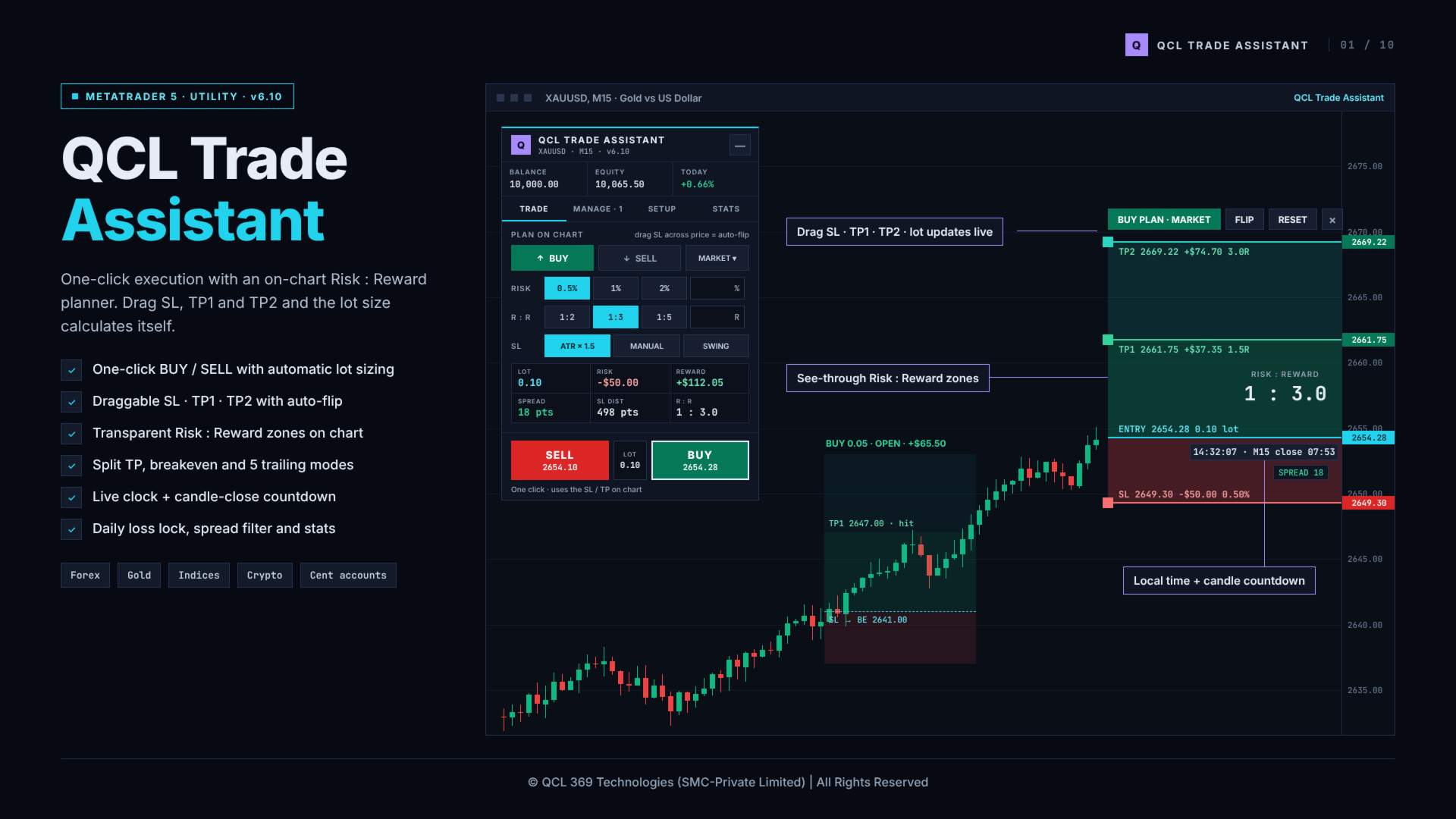
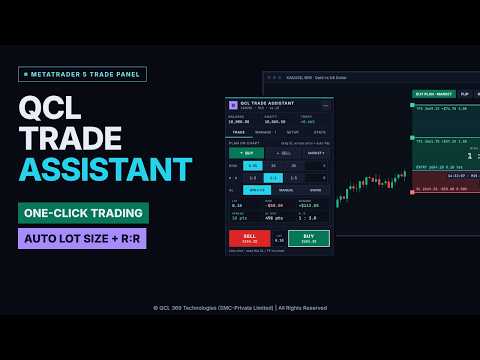
QCL Trade Assistant is a trade panel and risk manager for MetaTrader 5. It lets you plan every trade directly on the chart with a visual Risk : Reward box, calculates the correct lot size from your risk percentage, and opens the trade with one click. After entry, it manages the position for you with split take-profit, automatic breakeven and five trailing stop modes.

The utility does not open trades on its own. You decide every entry; the assistant handles the calculations and the management.


ON-CHART RISK : REWARD PLANNER

- A clear Risk : Reward box is drawn on the chart: red zone from entry to stop loss, green zones to TP1 and TP2.
- Drag the SL, TP1 and TP2 lines with the mouse. Lot size, money at risk, reward and R:R update instantly.
- Every line shows its price, the amount in account currency and the R-multiple.
- Transparent zones: several trades on the same area blend together and stay readable.
- Executed trades stay on the chart as a faded box showing live profit, "SL to breakeven" and "TP1 hit", and are removed automatically when the trade closes.
- Local time with seconds and a countdown to the candle close are pinned next to the current price.
- Live spread monitor, colour-coded against your stop loss distance.


ONE-CLICK EXECUTION AND AUTO-FLIP

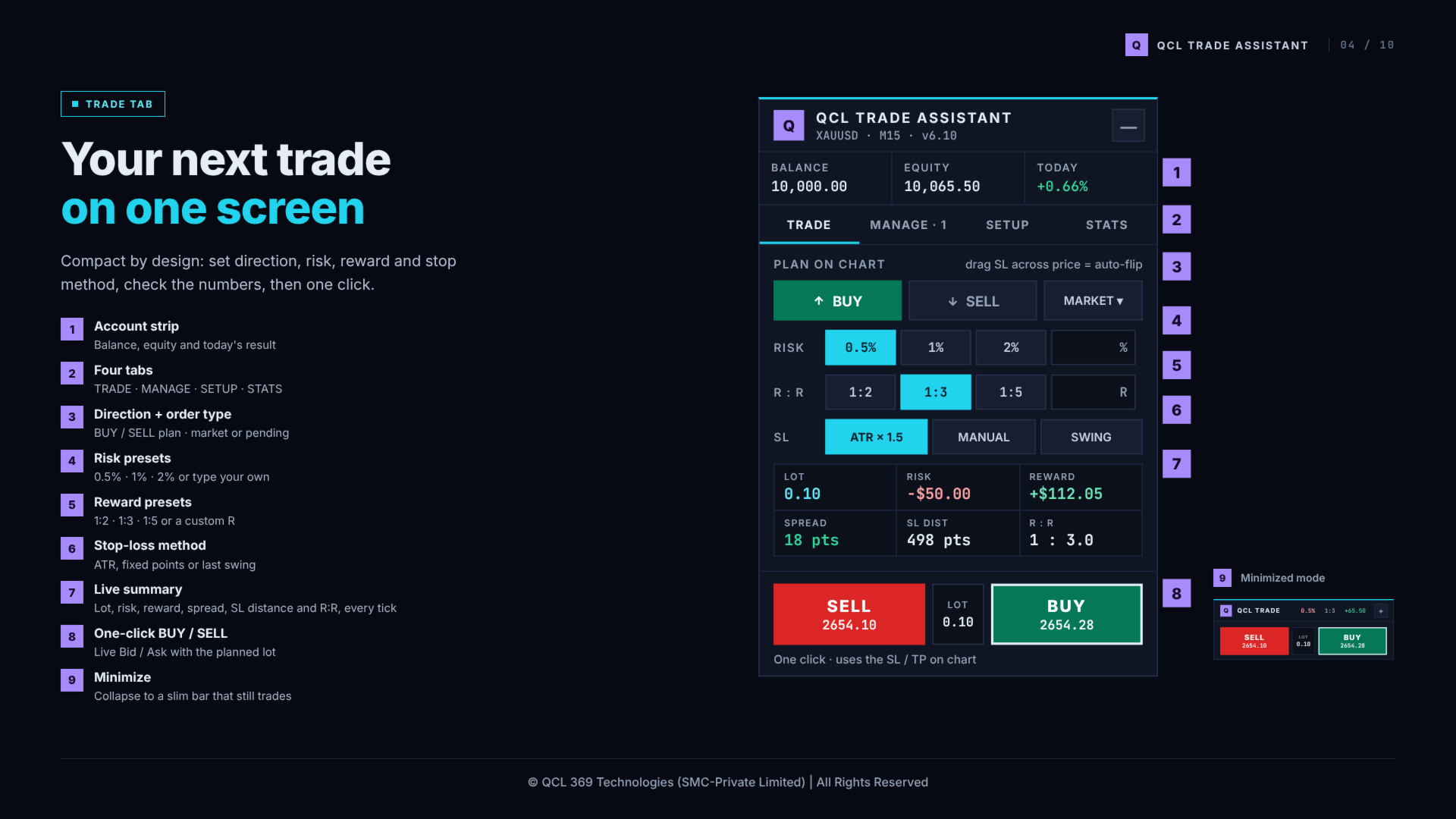
- Large BUY and SELL buttons with live Bid and Ask and the planned lot size.
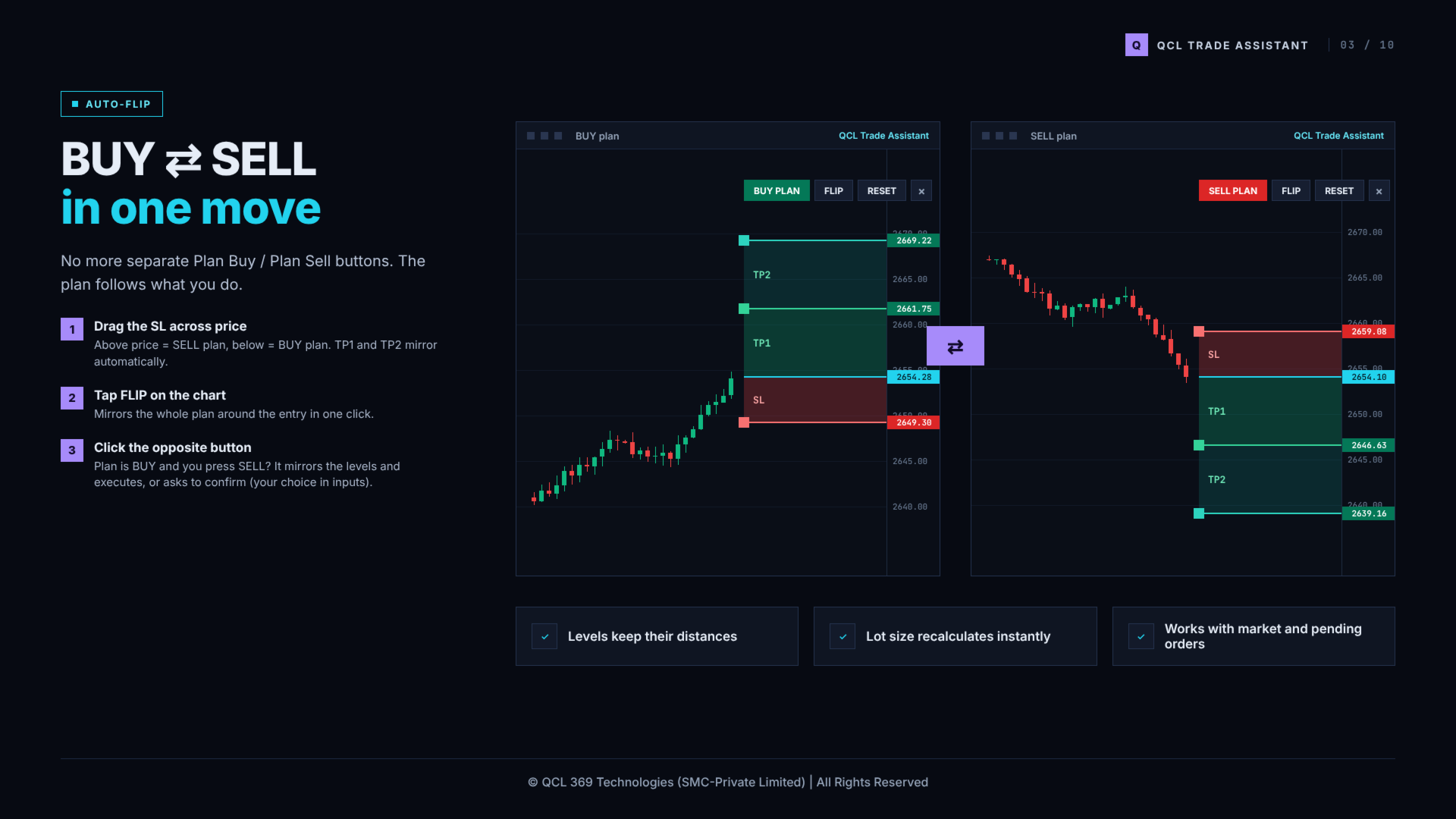
- Switch direction without extra buttons: drag the stop loss above the price for a SELL plan, below the price for a BUY plan. TP1 and TP2 mirror automatically.
- FLIP and RESET buttons on the chart.
- Clicking the opposite button can mirror the plan and execute at once, or flip the plan first and wait for a second click (selected in the inputs).
- Market and pending orders. The pending type (Limit or Stop) is chosen automatically from the entry position.
- Optional hotkeys: B for Buy, S for Sell.


AUTOMATIC LOT SIZE CALCULATION

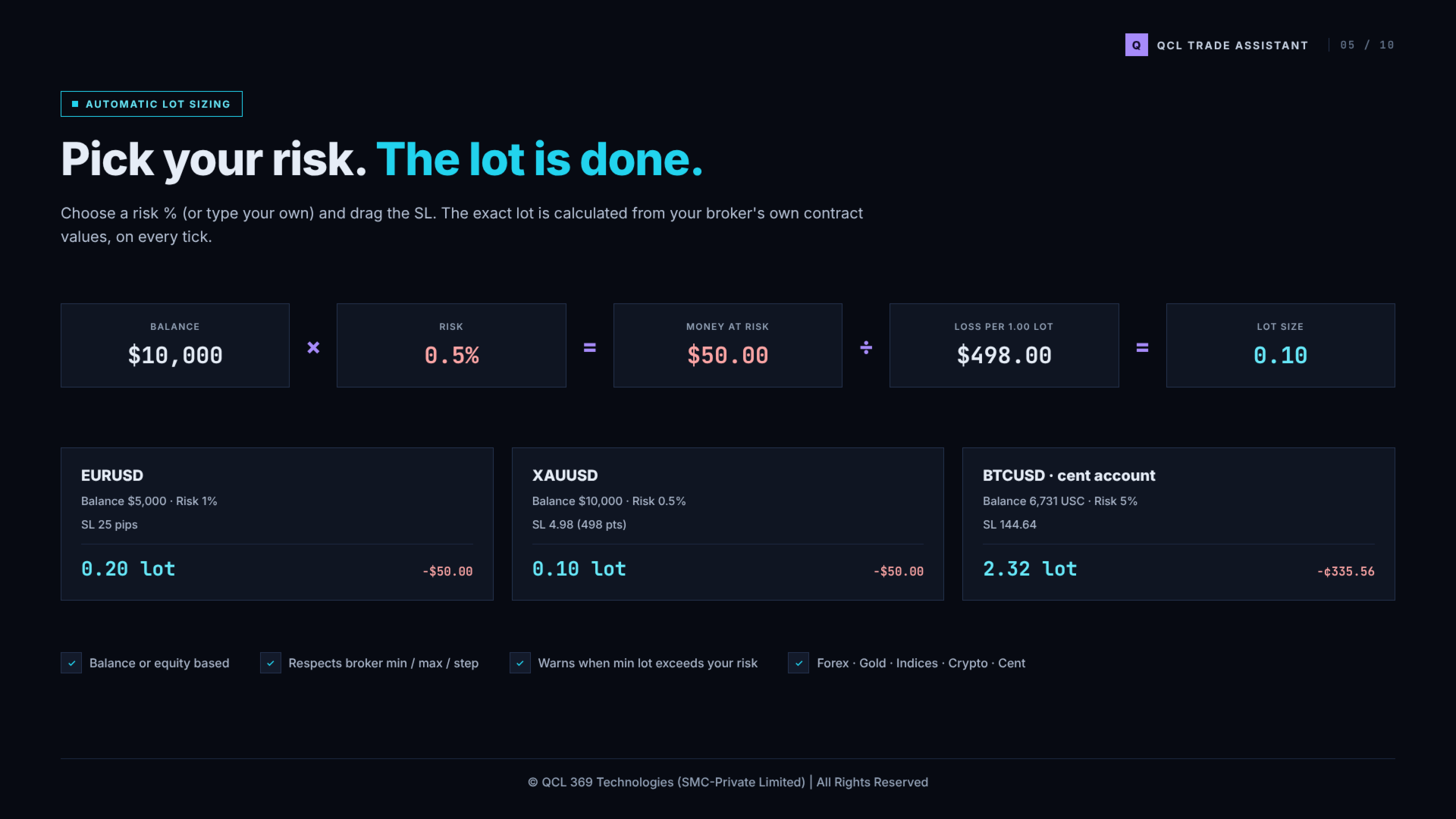
- Risk presets (0.5%, 1%, 2%) or any custom percentage, based on balance or equity.
- Reward presets (1:2, 1:3, 1:5) or any custom ratio.
- Stop loss by ATR, fixed points or the last swing high / low.
- Lot size uses the broker's own contract values and respects minimum, maximum and step volume.
- Works on Forex, metals, indices and crypto, including cent accounts.


SPLIT TAKE-PROFIT AND BREAKEVEN

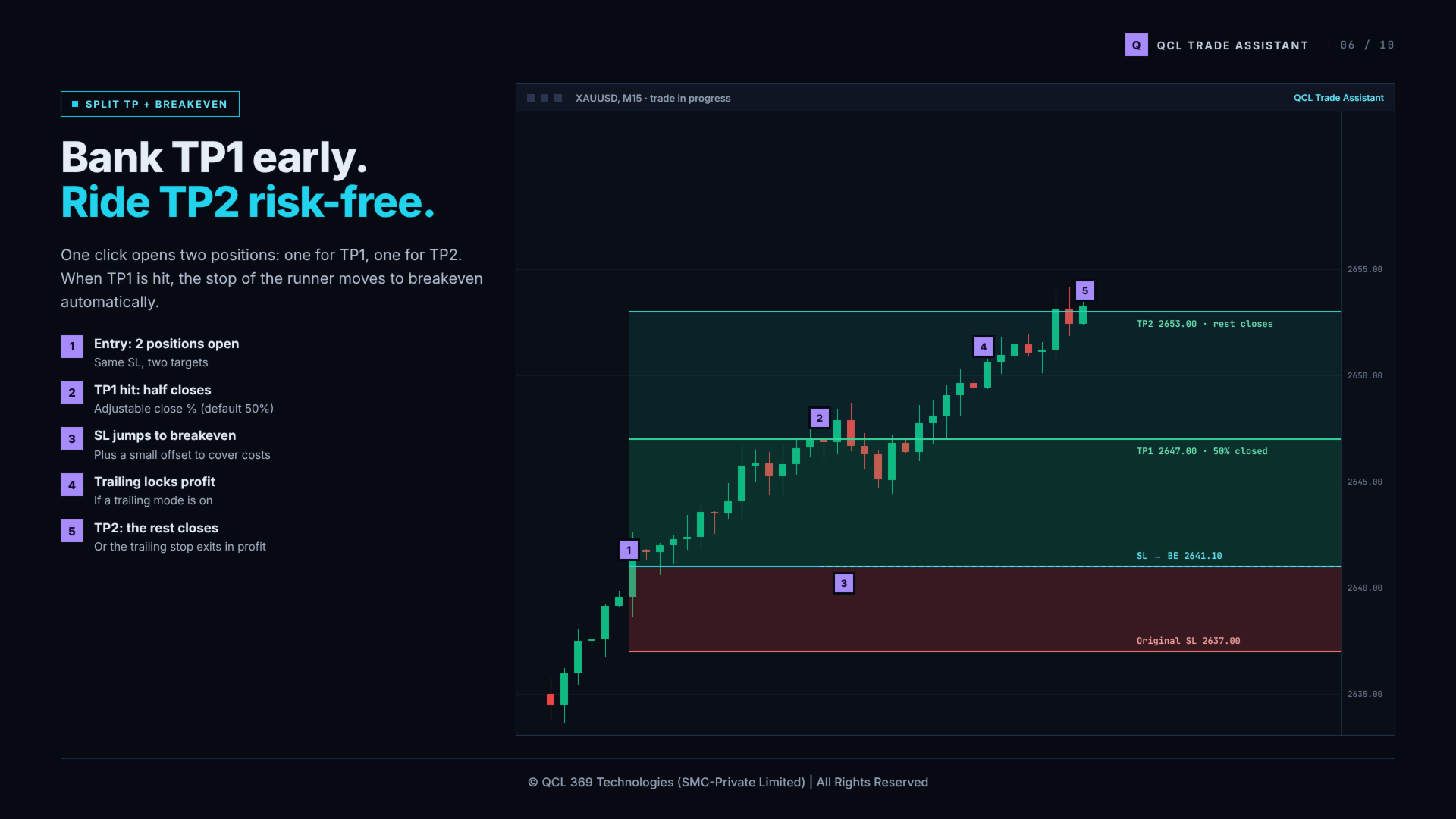
- One click can open two positions with the same stop loss: one closes at TP1, the other runs to TP2.
- The share closed at TP1 is adjustable (default 50%).
- When TP1 is reached, the stop loss of the remaining position moves to breakeven plus a small offset.


TRAILING STOP (5 MODES)

- Off: the stop loss stays where you placed it.
- Breakeven: moves the stop to entry after the chosen profit.
- Step: moves the stop 1R for every 1R of profit.
- Lock %: keeps a chosen percentage of open profit.
- ATR: follows the price at a volatility-based distance.
- Trailing starts after a profit you choose (in R) and is measured from the original risk of each trade.
- Also manages trades opened manually or from the mobile terminal on the same symbol (optional).


POSITION MANAGEMENT

- List of open positions on the symbol with live profit, plus close half and close buttons on each row.
- Total volume and average breakeven price.
- Quick actions: Close All, Close 50%, Stop Loss to Breakeven, Reverse, Close Profitable, Delete Pending.


ACCOUNT PROTECTION

- Maximum trades per day.
- Maximum risk per trade.
- Daily loss limit based on equity: when reached, new trades are locked until the next day (optional: close all positions).
- Daily profit target alert.
- Spread filter: blocks a new trade when the spread is too large compared to the stop loss distance.
- Clear messages explain why a trade was blocked, including broker responses such as close-only symbols.


STATISTICS

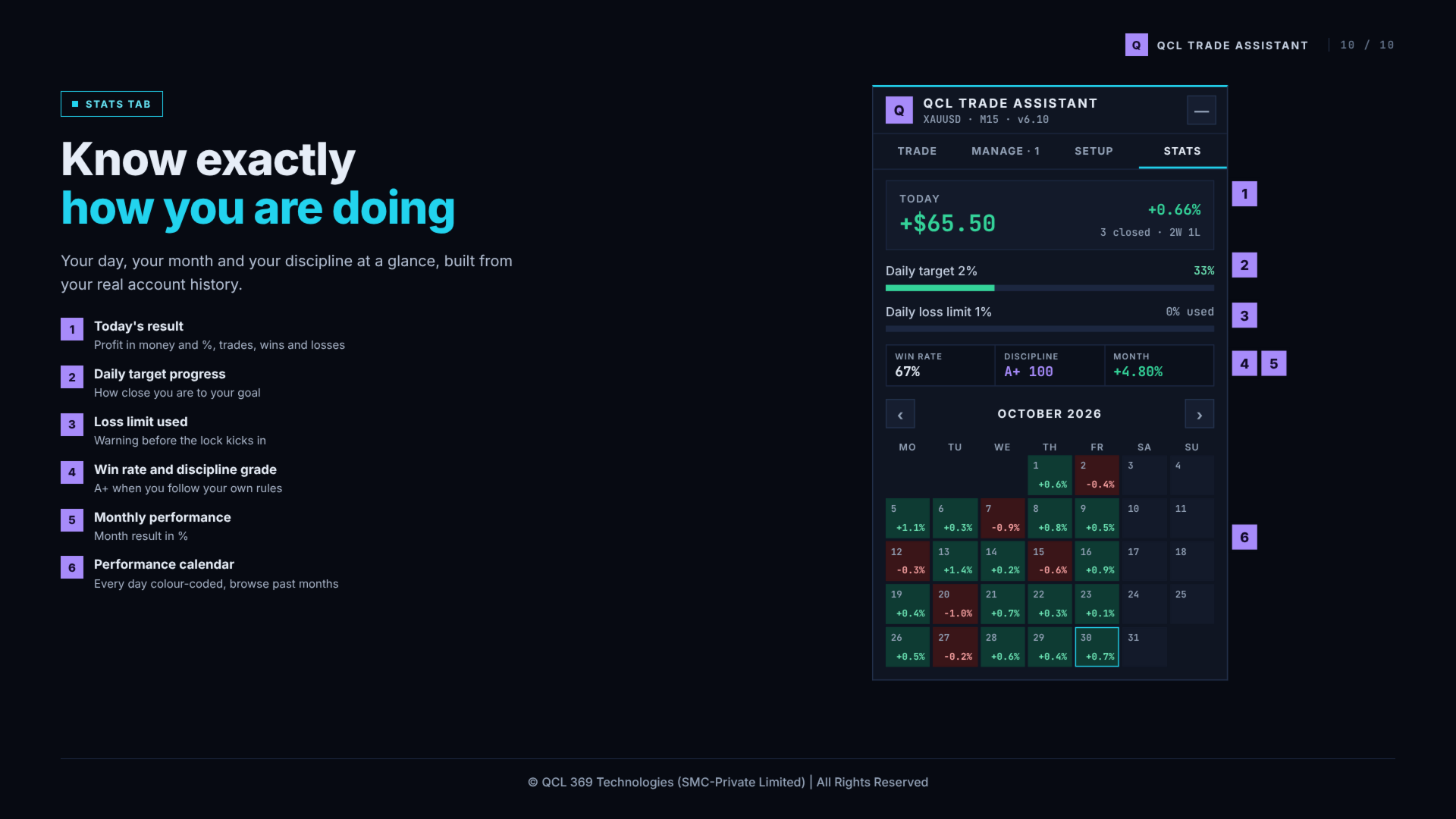
- Today's result in money and percent, number of trades, wins and losses.
- Progress towards the daily target and the daily loss limit.
- Win rate and a discipline score based on your own rules.
- Monthly performance calendar with the result of each trading day.


PANEL

- Compact panel with four tabs: Trade, Manage, Setup, Stats.
- Can be dragged anywhere on the chart and minimized to a small bar that still trades.
- Optional dark chart theme. Your original chart colours are restored when the utility is removed.
- Scales correctly on high-resolution screens.


MAIN INPUT PARAMETERS

- Risk button 1 / 2 / 3 (%) and default risk button
- Risk calculated from: Balance or Equity
- R:R button 1 / 2 / 3 and default R:R button
- TP1 distance as fraction of TP2 distance, volume closed at TP1 (%)
- Default stop loss method, ATR period and multiplier, fixed SL points, swing lookback
- Magic number, maximum slippage
- Clicking the opposite side of the plan: execute instantly or confirm first
- Split TP1 / TP2 by default, move SL to breakeven at TP1
- Also manage manual / phone trades
- Keyboard hotkeys
- Trailing mode, start after (R), lock %, ATR multiplier, breakeven offset
- Spread filter and maximum spread (% of SL)
- Maximum trades per day, maximum risk per trade, daily loss limit, close all on loss limit, daily profit target
- Panel scale, chart theme, zone width, zone colours and opacity, clock on chart


STRATEGY TESTER

Buttons cannot be clicked in the Strategy Tester. To show how trades are managed, the utility opens small demonstration trades in the tester only. This never happens on a live or demo chart.


NOTES

- One chart, one symbol: attach the utility to every chart you want to trade.
- Enable Algo Trading in the terminal.
- Trading involves risk. The assistant helps you control risk; it does not predict the market or guarantee results.

For questions or suggestions, please use the comments section or send a private message on MQL5.
Prodotti consigliati
Hisoka Trade Panel — v6.91 Description: Hisoka Trade Panel is a comprehensive on-chart trade management Expert Advisor for MetaTrader 5. It places a draggable, collapsible panel directly on your chart and lets you manage open positions — break-even locks, trailing stops, partial closes, and SL/TP modification — with one click. All risk math is dollar-based, so the same "BE 5$" button locks $5 of profit consistently across XAUUSD, BTCUSD, EURUSD or any other instrument, regardless of contract siz
HedgeSafe Trade Assistant Un pannello per il trading manuale su MetaTrader 5 orientato al controllo del rischio. HedgeSafe aiuta a preparare, verificare e gestire un'operazione direttamente sul grafico prima di premere BUY o SELL. HedgeSafe non è un servizio di segnali, uno strumento di previsione, un bot AI o una strategia automatica. Non sceglie la direzione e non promette profitti. Ogni decisione resta sotto il controllo del trader. Funzioni principali Calcolo del lotto da una percentuale del
Hello traders, Do you manage more than one MetaTrader 5 account? Do you want the trades opened on one account (manually, or by an EA) to be mirrored automatically — with no delay and with proper risk control — on your other accounts? Smart Copy Trader was built exactly for this: it copies positions from a "source" (Master) account to one or more "receiver" (Slave) accounts with millisecond precision, while protecting your capital with daily profit/loss limits, an open-position loss limit, and a
KF Hidden SL TP
Abdul Malikul Hanan
KF Hidden SL TP is a professional risk-management utility for MetaTrader 5 designed to keep your Stop Loss and Take Profit levels completely invisible to brokers. By holding your exit levels locally in the terminal and off the broker server (orders remain with SL=0 and TP=0), KF Hidden SL TP protects your positions from artificial spread widening, stop-hunting spikes, and broker-held stop transparency. When market price touches or crosses your virtual stop level, the utility instantly execute
FREE
For MT4: TP SL Calculator for MT4 This tool helps you to automatically calculate profit at Take - Profit price and loss at Stop - Loss price. Feature: - Calculate profit at TP price. Apply to all operators (BUY / BUY LIMIT / BUY STOP / SELL / SELL LIMIT / SELL STOP), with TP price is greater than 0. Profit is expressed in money and points. - Calculate loss at SL price. Apply to all operators (BUY / BUY LIMIT / BUY STOP / SELL / SELL LIMIT / SELL STOP), with SL price is greater than 0.   Loss is
Trade Assistant MT5 Pro – One Click Trading Panel | Auto Lot Size | Risk Management Tool Short Description Trade Assistant MT5 Pro is a professional trading utility for MetaTrader 5 that allows traders to execute trades with one click, manage risk automatically, and improve trading accuracy using advanced tools like ATR stop loss, risk reward ratios, breakeven, and trailing stop. Full Description Trade Assistant MT5 Pro is a powerful manual trading panel designed for traders who want speed, prec
Trade Plan Desk MT5 è un pannello di pianificazione e controllo delle operazioni progettato per strutturare ogni decisione prima dell’esecuzione. Imposta direzione, Entry, Stop Loss, Take Profit e rischio. Lo strumento calcola automaticamente il volume appropriato, il rapporto rischio/rendimento pianificato ed esegue un controllo completo delle condizioni del broker prima dell’esecuzione. Funzioni principali: • Pianificazione Entry / Stop Loss / Take Profit • Rischio in percentuale o importo
Resiko
Monita Melyana Sinurat
This tool functions to: 1. Manage Risk - Set SL and TP for all open orders - Close all open orders according to the set risk 2. Manage Orders - This tool also functions as an assistant for Martingale or Grid trading, according to the set order spacing. This tool is ideal for traders who prefer to use Grid or Martingale systems with strict risk management..........
Global Stop Loss and Take Profit Manager Drag Lines Auto Apply Already using my free Global Stop Loss and Take Profit Setter? This is the always on version. Instead of setting levels once, you drag two lines on the chart and every manual position on that symbol — plus every new one you open — instantly inherits the Stop Loss and Take Profit. No clicking into each order. No forgetting a stop. Global Stop Loss and Target Manager is a drag-and-drop risk tool for manual traders on MetaTrader 5. Pu
SC Copier Starter
Nino Rosano Calabro'
SC-Copier Starter è il componente operativo del sistema SC-Copier: riceve le operazioni dal Master e le replica sul conto Slave. Si installa su un secondo client MetaTrader 5 attivo sullo stesso computer o VPS del conto Master. La comunicazione avviene localmente tra i due terminali, senza servizi web, DLL o infrastrutture esterne. Il Receiver gestisce aperture, chiusure, chiusure parziali e modifiche di Stop Loss e Take Profit. Ogni evento mantiene un collegamento preciso tra il ticket Master e
Instructions for Using Reverse Copier EA Attach EA to Charts Open MetaTrader and attach the EA to any chart on both accounts (master & slave). Make sure AutoTrading is enabled. Master Account (Signal Sender) Set Mode = Master in EA settings. This account will send trade signals. Slave Account (Signal Receiver) Set Mode = Slave in EA settings. This account will receive trades in reverse (opposite direction). Lot Multiplier In Slave EA settings, set Multiplier to control lot size. Example: 1.0
BulkOp Trade Manager
Ahmed Jumaa Saif Ali Almheiri
BulkOp Trade Manager Trade faster. Manage smarter. Close with confidence. BulkOp Trade Manager is a powerful MT5 utility EA built for traders who need speed, control, and clean execution directly from the chart. It is designed for active manual traders, scalpers, gold traders, and anyone who wants to manage multiple positions with less delay and fewer clicks. Why BulkOp? Ultra-fast Buy and Sell execution One-click Bulk Close Profit One-click Bulk Close Loss Keyboard trading control Bulk order e
Breakeven Quick SL
Makarii Gubaydullin
Livelli di breakeven: sposta SL con 1 clic. Evita di perdere profitti esistenti Con questo strumento, puoi proteggere rapidamente il tuo profitto con un solo clic. Particolarmente importante per il trading a breve termine. Disponibile anche l'opzione offset. Utility multifunzione : 66+ funzioni, incluso questo strumento | Contattami per qualsiasi domanda | Versione MT4 Come spostare i livelli SL: 1. Specifica un [Simbolo] particolare, o seleziona [TUTTI] i simboli. 2. Seleziona il tipo di trade
Forget about enabling templates when you launch the window. Auto Template Master Service  is a professional utility tool that runs as a system service in MetaTrader 5, and it will do it for you. Unlike traditional indicators or expert advisors (EAs), the program runs in the background of the entire terminal and doesn't require you to add it to each window individually. As soon as you open a new chart of any instrument (Forex, Stocks, Crypto), the service immediately detects the new window and a
SAB Advance Assistant e un pannello di gestione manuale delle operazioni per MetaTrader 5. Costruisci ogni operazione visivamente sul grafico, controlla il tuo rischio esatto e lascia che il motore integrato gestisca i take-profit parziali, il break-even e il trailing, tutto da un unico pannello pulito e ridimensionabile. Progettato per trader discrezionali e ICT/SMC che vogliono precisione senza fogli di calcolo. CARATTERISTICHE PRINCIPALI - Linee trascinabili di Entry, Stop Loss, TP1-TP5 e
Trade Copilot - Pannello semi-automatico di gestione del rischio per l'Oro (XAUUSD) e qualsiasi strumento Trade Copilot è un pannello di trading semi-automatico progettato per i trader manuali che desiderano la disciplina di un EA senza rinunciare al controllo dei propri ingressi. Voi decidete la direzione e il livello; il pannello calcola automaticamente la dimensione del rischio, imposta lo stop-loss, gestisce il take-profit e protegge la posizione. CARATTERISTICHE PRINCIPALI - Calcolo del
Un solo EA al posto di una dozzina di strumenti: assistente di trading, gestione del rischio e 17 indicatori in un unico pannello. Mettilo sul grafico e hai tutto a portata di mano.   Prezzo di lancio: prime 20 copie a $49, poi $99. Sconto del 50%, solo ora.   FAI TRADING CON UN CLIC Il lotto si calcola da solo dal rischio in % del saldo — basta calcolatrici. Stop sul frattale di qualsiasi TF o manuale, take profit in R:R, chiusure parziali TP1/TP2/TP3, breakeven con un clic, trailing sugli swin
CloseByLossOrProfit
Konstantin Chernov
CloseByLossOrProfit Expert Advisor closes all positions as their total profit or loss reaches a specified value (in deposit currency). In addition, it can delete pending orders. Allow AutoTrading before running the Expert Advisor. Usage: Run the Expert Advisor on a chart. Input Parameters:  Language of messages displayed (EN, RU, DE, FR, ES) - language of the output messages (English, Russian, German, French, Spanish); Profit in the currency  - profit in points; Loss in the currency  - loss in p
FREE
Target Smart Order
Markeysuel De Sousa Ferreira
TARGET SMART ORDER Indicator Custom indicator for MetaTrader 5 that displays detailed information about each trade directly on the chart, showing real-time profit/loss, Take Profit and Stop Loss levels for each active order. Main Features: Real Profit Display Real-Time Profit/Loss: Shows the current value of each position. Continuous Update: Values ​​are updated tick by tick Dynamic Colors: Green for profit, red for loss. TP/SL Lines: Draws horizontal targets at Take Profit and Stop Loss l
Funded Account Guard
Edgar Alexis Benitez
Funded Account Guard monitors the whole trading account and enforces the risk limits you set. When a limit is reached, it closes all positions, deletes pending orders and blocks new entries until the limit period ends. It is intended for funded and evaluation accounts with a daily loss limit and a maximum drawdown limit, and for any trader who wants a fixed daily stop. The utility does not open trades, does not give signals and does not move stop loss or take profit levels. Rules - Daily loss
FREE
Trade Manager and Risk Calculator Ppm Short Description A comprehensive on-chart utility panel for manual trade execution, position management, and real-time risk calculation. Full Description Overview PPM  is an advanced on-chart utility designed to streamline manual trading and position management. The panel provides a centralized interface to execute market orders, calculate position sizes based on risk parameters, and manage existing trades across multiple symbols. It is designed as a visu
Product introduction : Trade Manager Tool for MT5 Trade Manager Tool will help trader calculate almost exactly the risk based on your account automatically. Along with that, there are features to support capital preservation with Trailing Stop, BreakEven, Risk Limit such as Daily Limit Profit/Loss,etc.. helps you avoid overtrading.In particular, the panel is simply designed with many interactive buttons inside the panel and outside the chart to help trader interact more easily.These features re
Turbo Close All
Phami Thanh Hoang
Turbo Close All is a powerful and versatile script designed to help traders quickly and efficiently manage their trading positions and pending orders on MetaTrader 5. With its advanced features and customizable settings, this script is an essential tool for traders who want to streamline their trading process and maintain control over their positions and orders. Key Features: Comprehensive Closing Options: Turbo Close All allows you to close all market positions and/or delete pending orders bas
Grid Manager — Manual Multi-Basket Grid Assistant for MT5 Grid Manager is a hands-on control panel for building and managing grid "baskets" directly on your chart. You decide the direction and the moment; the tool opens the grid, manages every leg, and protects the position with money-based risk controls, on-chart breakeven/SL/TP lines, and one-click actions. It is an execution and management assistant — fast, visual, and fully under your control. What it is — and what it is not Grid Manager is
StopLoss and TakeProfit Utility MT5 for automatic setting of stop loss and take profit levels. Created by a professional trader for traders.   The utility   works with any market orders opened by a trader manually or using advisors. Can filter trades by magic number. The utility can work with any number of orders simultaneously. WHAT THE UTILITY CAN DO: Set virtual stop loss and take profit from 1 pip Real   stop loss and take profit W ork with each order separately (   stop loss and take prof
SL TP Manager MMS
Muhammad Masood Sarkar
5 (2)
SL TP Manager is a compact on-chart panel that sets the stop loss or take profit of all open trades on a symbol in one click, or moves every stop loss to break-even. It is designed for traders who scale in with several positions and do not want to edit each trade one by one. HOW IT WORKS - Type a price in the SL box and click Set SL: the stop loss is applied to every open trade on the chart's symbol. - Type a price in the TP box and click Set TP: the take profit is applied the same way. - Clic
FREE
Manager Trader
Muhammad Firdaus Bin Zainun
Manual Trade Manager for MT5 This is not auto trade ea. It Manage your manually opened trades from one simple chart panel. Monitor your positions in real time and act on multiple layers with a single click. Features CLOSE ALL: Sends fast asynchronous close requests for managed manual positions. BE ALL: Checks each layer individually and sets its stop loss only when that layer has reached your chosen profit threshold. BE SET: Applies your current BE step setting to eligible layers. Optional Avera
This script is for changing all open tabs/charts at once on MetaTrader 5 using the drop-down box once the script has been initialized. It has all the standard timeframes available to be selected for MetaTrader 5. This is an individual script for all timeframes. You will need to select the timeframe you want all charts to go. Please watch the video for the installation instructions. 
Show Account Information Custom showing your MT5 account information Indicators add account information to chart. Profit, Balance, Equity, Free Margin, Margin and Margin Level % Profit.... Hide account information: Click anywhere on account information text.     The hide/show response is dependent on incoming ticks or chart refresh. In tick scarce or closed markets the indicator hide/show click will appear not to function while waiting for a tick or chart refresh. It is only necessary to attac
The purpose   of this utility is to manage one or more subwindow in the same chart by opening and closing them through a button or the keyboard keys How it works: If you want to handle more than one subwindow you need to reinstall the indicator . In this case some setups has to be customized onlu in the last subwindow installed and others setups in the installed subwindow during the first time installation. They are denoted in the input rispectively as ' LW ' and ' IW '. First of all install
Gli utenti di questo prodotto hanno anche acquistato
Trade Assistant MT5
Evgeniy Kravchenko
4.43 (216)
It helps to calculate the risk per trade, the easy installation of a new order, order management with partial closing functions, trailing stop of 7 types and other useful functions. Additional materials and instructions Installation instructions - Application instructions Line function -   shows on the chart the Opening line, Stop Loss, Take Profit. With this function it is easy to set a new order and see its additional characteristics before opening.   Risk management  - The risk calculation
FarmedHedge Pair Trading Dashboard
Tanapisit Tepawarapruek
5 (7)
Farmed Hedge Yield Farming | All Markets (Manual - Hybrid - Semi/Automated EA) VERIFIED TRADING RESULTS - Farmed Hedge Yield Axi Copy:  https://www.mql5.com/en/signals/2356376 - Farmed Hedge Yield Exn Copy:   https://www.mql5.com/en/signals/2356404 - Farmed Hedge Yield V Copy:  https://www.mql5.com/en/signals/2357156 IMPORTANT NOTICE: FarmedHedge is a MANUAL-FOCUSED TRADING UTILITY ,not a fully automated EA. Results shown on this Signal include manual trades and overall strategic management.
Forex Trade Manager MT5
InvestSoft
4.98 (689)
Benvenuto a Trade Manager EA, lo strumento definitivo per la gestione del rischio , progettato per rendere il trading più intuitivo, preciso ed efficiente. Non è solo uno strumento per l'esecuzione degli ordini, ma una soluzione completa per la pianificazione delle operazioni, la gestione delle posizioni e il controllo del rischio. Che tu sia un principiante, un trader avanzato o uno scalper che necessita di esecuzioni rapide, Trade Manager EA si adatta alle tue esigenze, offrendo flessibilità s
Local Trade Copier EA MT5
Juvenille Emperor Limited
4.94 (149)
Local Trade Copier EA MT5 è un trade copier rapido e flessibile per copiare e gestire operazioni tra più conti MetaTrader 5 sullo stesso computer Windows o Windows VPS. Combina la sincronizzazione locale delle operazioni con controlli lato Receiver per dimensione del lotto, gestione del rischio, filtraggio delle operazioni, mappatura dei simboli, gestione delle operazioni e protezione del conto. Configura i terminali Transmitter e Receiver in circa 1 minuto e copia operazioni manuali o aperte d
Telegram to MT5 MultiChannel Copier
Sergio Marquez Uroz
4.68 (22)
Telegram to MT5 Multi-Channel Copier   copia automaticamente i segnali di trading dai tuoi canali Telegram e Discord direttamente su MetaTrader 5. Niente bot, niente estensioni del browser, niente copia manuale. Il segnale arriva su Telegram o Discord e l'EA apre l'operazione nel tuo terminale in pochi secondi. E prima di copiare un canale, il backtester integrato ti mostra cosa avrebbe fatto quel canale sul tuo conto. Il prodotto include due componenti: un'applicazione Windows che ascolta i tuo
TradePanel MT5
Alfiya Fazylova
4.88 (170)
Trade Panel è un assistente commerciale multifunzionale. L'applicazione contiene più di 50 funzioni di trading per il trading manuale e permette di automatizzare la maggior parte delle attività commerciali. Istruzioni per l'applicazione: https://www.mql5.com/it/blogs/post/762331 Versione di prova dell'applicazione per un conto demo: https://www.mql5.com/it/blogs/post/762419 Come installare l'applicazione: https://www.mql5.com/it/blogs/post/762362 Come testare l'applicazione in modalità visuale:
Copia i segnali Telegram con le tue regole di trading Telegram to MT5 Signal Trader copia automaticamente i segnali di trading testuali dai canali e gruppi Telegram pubblici e privati in MetaTrader 5. Gestisci più fornitori e conti MT5 da un'unica applicazione desktop, con impostazioni di rischio e di trading specifiche per ogni fornitore . Per copiare i segnali non servono bot Telegram né configurazioni API. Accedi semplicemente con il tuo account Telegram tramite numero di telefono o codice QR
News Trade EA MT5
Konstantin Kulikov
4.55 (11)
Presento un utile robot che io stesso utilizzo da diversi anni. Questo robot può essere utilizzato sia in modalità semiautomatica che completamente automatica. >>> Chat <<< Il programma contiene le impostazioni flessibili per fare trading sulle notizie del calendario economico. Non può essere verificato nel tester delle strategie. Soltanto il vero lavoro. Scarica l'ultimo archivio di impostazioni: https://www.mql5.com/en/blogs/post/747929 Monitoraggio dei segnali: https://www.mql5.com/en/signa
Strategy Ledger Pro
Abdullah Uygar Tuna
5 (14)
Ora disponibile in italiano. Strategy Ledger Pro è un pannello di analisi del conto in sola lettura per MetaTrader 5. Separa i risultati del conto per Expert Advisor, strategia, simbolo e numero magic, così puoi vedere quanto contribuisce davvero ciascuno. Il pannello è disponibile in 11 lingue: English, Français, Deutsch, Español, Italiano, Português, Русский, Türkçe, 中文, 日本語 e 한국어. Prima di scaricare la demo. Il Market esegue la demo di qualsiasi prodotto a pagamento solo nello Strategy Teste
Exp COPYLOT CLIENT for MT5
Vladislav Andruschenko
3.97 (35)
Copiatore professionale di trade per MetaTrader 5 Un copiatore di trade veloce, professionale e affidabile per MetaTrader . COPYLOT consente di copiare operazioni Forex tra terminali MT4 e MT5 con supporto per conti Hedge e Netting . La versione MT5 di COPYLOT supporta: - MT5 Hedge → MT5 Hedge - MT5 Hedge → MT5 Netting - MT5 Netting → MT5 Hedge - MT5 Netting → MT5 Netting - MT4 → MT5 Hedge - MT4 → MT5 Netting Versione MT4 Descrizione completa + DEMO + PDF Come acquistare Come installare Come ot
================================================================================ POC BREAKOUT - V20.72. Full Professional Grade Toolkit ================================================================================ POC Breakout is a full MetaTrader 5 trading dashboard for discretionary traders who want breakout signals, Point of Control (POC) context, volume profiles, order flow, market structure, news, alerts, and advanced trade planning in one professional workspace. Attached directly to you
REVDEN AI Desk: gestisci il tuo trading da un'unica conversazione con la tua IA, sul contesto di mercato di REVDEN Immagina di gestire il tuo trading da un'unica conversazione. REVDEN AI Desk la porta in MetaTrader 5: chiedi alla tua IA come legge il mercato, e lei risponde dal contesto completo di REVDEN sui simboli che operi, con il loro stato, il loro quadro di rischio e le pubblicazioni in arrivo. Le sue proposte arrivano con ingresso, stop, target e rischio, e tu approvi quelle che ti convi
The product will copy all telegram signal to MT5 ( which you are member) , also it can work as remote copier.  Easy to set up, copy order instant, can work with almost signal formats, image signal,  s upport to translate other language to English Work with all type of channel or group, even channel have "Restrict Saving Content", work with  multi channel, multi MT5 Work as remote copier: with signal have ticket number, it will copy exactly via ticket number. Support to backtest signal. How to s
Power Candles Strategy Scanner - Strumento di ricerca configurazioni multi-simbolo con ottimizzazione automatica Power Candles Strategy Scanner utilizza lo stesso motore di auto-ottimizzazione che alimenta l'indicatore Power Candles, applicandolo a tutti i simboli presenti nel tuo Market Watch, uno accanto all'altro. Un unico pannello ti indica quali simboli sono statisticamente negoziabili in questo momento, quale strategia è vincente su ciascuno di essi, la coppia ottimale di Stop Loss / Take
Exp5 VirtualTradePad PRO SE for MT5
Vladislav Andruschenko
5 (1)
VirtualTradePad PRO SE MT5 — centro di controllo professionale per il trading su MetaTrader 5 VirtualTradePad PRO SE è un pannello di trading premium basato sul grafico e un ambiente di gestione delle operazioni per MetaTrader 5 . È progettato per i trader che desiderano esecuzione più rapida, controllo più chiaro delle posizioni, gestione strutturata delle operazioni, pianificazione visiva dei livelli e un workflow professionale direttamente dal grafico. Non è soltanto un semplice pannello BUY
MT5 to Telegram Signal Provider è un'utilità facile da usare e completamente personalizzabile che consente l'invio di segnali specificati a una chat, canale o gruppo Telegram, rendendo il tuo account un fornitore di segnali. A differenza della maggior parte dei prodotti concorrenti, non utilizza importazioni DLL. [ Dimostrativo ] [ Manuale ] [ Versione MT4 ] [ Versione Discord ] [ Canale Telegram ]  New: [ Telegram To MT5 ] Configurazione Una guida utente passo-passo è disponibile. Nessuna cono
Seconds Chart MT5
Boris Sedov
4.61 (18)
Seconds Chart - uno strumento unico per creare grafici in secondi su MetaTrader 5 . Con Seconds Chart , puoi generare grafici con timeframe definiti in secondi, ottenendo una flessibilità e una precisione d'analisi ideali, non disponibili nei grafici standard in minuti o ore. Ad esempio, il timeframe S15 indica un grafico con candele di 15 secondi. Puoi utilizzare qualsiasi indicatore e Expert Advisor con supporto per simboli personalizzati. Lavorare con loro è comodo quanto operare sui grafici
The Patch
Mian Rameez Ali
The Patch It never opens a trade. It walks behind the ones that did. Every open position, every pending order — checked twice a second for the one thing that's easy to forget: a stop, a target. Found bare, it doesn't ask. It writes the missing number in, measured in points from wherever the position began, and moves on to the next. No strategy, no opinion on direction. Just the quiet assumption that nothing should ever sit on the market unprotected — not because someone decided it shouldn't,
EA Overfitter
Stephen J Martret
5 (3)
That backtest looks great. But will it still be making money tomorrow, next week, next month? EA Overfitter re-runs your EA on 100 price histories it has never seen. One score tells you if the edge is real. A backtest tells you what an EA did on one price history — the one that happened to occur. What you cannot tell from it is how much of that result was the strategy and how much was the particular path. EA Overfitter answers that. It builds up to 100 synthetic price histories your EA has n
Anchor Trade Manager
Kalinskie Gilliam
5 (8)
Your EAs cannot see each other, but Anchor can. Anchor gives you one place to coordinate your EAs, manage risk, and decide when trading is allowed. It works alongside the trading bots you already use without any changes to them. The Problem One EA opens a trade. Then another starts trading. The next thing you know, you wake up to multiple grids built across your account. Each EA may be doing exactly what it was designed to do, but together they can place far more risk on your account than you in
Trade copier MT5
Alfiya Fazylova
4.61 (57)
Trade Copier è un'utilità professionale progettata per copiare e sincronizzare le transazioni tra conti di trading. La copiatura avviene dal conto/terminale del fornitore al conto/terminale del destinatario, che sono installati sullo stesso computer o vps. Prima di acquistare, puoi testare la versione demo su un account demo. Versione demo qui . Istruzioni complete qui . Funzionalità e vantaggi principali: Supporta la copia degli ordini: MT5> MT5, MT4> MT5, MT5> MT4, inclusi i conti di compensaz
Trade Manager DaneTrades
Levi Dane Benjamin
4.13 (31)
Trade Manager per aiutarti a entrare e uscire rapidamente dalle operazioni calcolando automaticamente il tuo rischio. Incluse funzionalità che ti aiutano a prevenire l'eccessivo trading, il vendetta trading e il trading emotivo. Le operazioni possono essere gestite automaticamente e i parametri di performance del conto possono essere visualizzati in un grafico. Queste caratteristiche rendono questo pannello ideale per tutti i trader manuali e aiuta a migliorare la piattaforma MetaTrader 5. Suppo
Timeless Charts
Samuel Manoel De Souza
5 (9)
Timeless Charts è un'utilità di trading completa progettata per trader professionisti. Combina tipi di grafici personalizzati come Grafici a Secondi e Renko con analisi avanzata del flusso ordini tramite Footprints , Clusters , Profili di Volume , studi VWAP e strumenti di analisi ancorata per una visione più approfondita del mercato. Il trading e la gestione delle posizioni vengono eseguiti direttamente dal grafico tramite un pannello integrato di gestione delle operazioni , mentre Market Repla
RETAILBERG FOOTPRINT CHART PRO — Order-Flow Workspace for MetaTrader 5 Version 7.00  |  Professional System  |  31 tools  |  One chart A full 150-page illustrated User Manual is included. Please read the full manual to understand this feature packed footprint chart elements and ui. https://www.mql5.com/en/blogs/post/777982 DEMO / STRATEGY TESTER — PLEASE READ FIRST
Trade Dashboard MT5
Fatemeh Ameri
4.94 (135)
Trade Dashboard simplifies how you open, manage, and control your trades, with built-in lot size calculation. It allows you to execute trades, manage risk, and control positions directly on the chart, with tools such as partial close, breakeven, and trailing stop. Designed to reduce manual work and help you stay focused on your trading decisions. A demo version is available for testing. Detailed explanations of features are provided within the MQL5 platform. Installation instructions are include
Trade Indicator Assistant   is a powerful MT5 utility designed to turn indicators into automated trading systems. Its main feature is the ability to automatically detect an indicator’s   BUY and SELL signal buffers , without requiring you to know the buffer numbers, search through indicator settings, or modify the indicator source code. Bonus Indicator:   After purchasing Trade Indicator Assistant, contact me to receive   Trade Signal Pro   completely free as a bonus indicator. [Download Demo V
Astro Trade MT5
Indra Maulana
5 (8)
25% discount on the release of the tool: only for the next 3 buyers Send a message to receive a demo version. AstroTrade Trading Assistant AstroTrade is a comprehensive multi-functional trading utility developed for the MetaTrader 5 platform. It integrates essential tools for trade execution, risk management, and technical monitoring into a single unified interface. The application is designed to assist traders in managing their daily operations through a visual and structured environment. Vi
DrawDown Limiter
Haidar Lionel Haj Ali
5 (23)
DrawDown Limiter v5.0 — Controller avanzato per la protezione del conto DrawDown Limiter v5.0 è un controller di protezione del conto lato client, progettato per monitorare il tuo conto di trading e reagire automaticamente quando vengono raggiunti i limiti configurati relativi a rischio, profitto, notizie, pianificazione, rollover o numero di posizioni. Può monitorare operazioni manuali, strategie automatizzate, più Expert Advisor, ordini pendenti e posizioni aperte da un unico grafico dedicato.
Telegram To MT5 Ultra
Mirel Daniel Gheonu
5 (5)
Telegram To MT5 — Copiatore di segnali Trasforma le indicazioni di trading dei tuoi canali Telegram in veri ordini MT5 — automaticamente, su quanti account vuoi, con rischio e regole totalmente sotto il tuo controllo. Telegram To MT5 collega i canali VIP / di segnali che già segui su Telegram al tuo terminale MetaTrader 5. Un'app desktop companion gratuita legge i messaggi (anche dai canali che bloccano i bot), e questo Expert Advisor li esegue sul tuo conto — applicando le tue impostazioni di r
RS Trade Copier - il local trade copier ultra-veloce con una vera interfaccia grafica. Smetti di inserire i numeri di conto manualmente. Addio alle interminabili liste di oltre 200 parametri nelle impostazioni. Uno strumento affidabile e flessibile per copiare operazioni di trading tra multipli terminali MT5 e MT4. È adatto sia a trader esperti e servizi di segnali, sia a investitori privati. Permette di sincronizzare il trading da uno o più Fornitori a uno o più Clienti con elevata precisione e
Altri dall’autore
QCL AI Scalper
Shujah Amin
5 (2)
The QCL AI Scalper is an analytical trading indicator for M1 and M5 timeframes on Forex, Gold (XAUUSD), and Indices. It identifies structural price levels, specifically Order Blocks and Fair Value Gaps (FVGs). Instead of moving average crossovers, the system waits for price action to retest these structural zones and confirms the entry using momentum and volatility algorithms. 2 Selectable Strategies: Choose the one you like. This indicator now includes two independent signal engines you can swi
QCL mt5 EA
Shujah Amin
The QCL MT5 EA is a fully automated Expert Advisor driven purely by advanced mathematical models and structural price action analytics, eliminating emotional bias to execute institutional-grade momentum setups . Special launch discount price. Final price $299 Track Our Live Automated Signals Here: EA Documentation EA User Manual | EA Setfiles Asset: XAUUSD Timeframe: Any Does`nt Matter Key System Capabilities Automated Position Sizing: Calculates precise execution volume automatically based on
QCL AI Scalper EA — SMC/ICT for XAUUSD M1 QCL AI Scalper EA is a fully automated Expert Advisor for MetaTrader 5, built on Smart Money Concepts and ICT principles. It identifies institutional price setups and trades them automatically with dynamic risk management. Special launch discount price. Final price $999 EA Documentation EA User Manual Requirements: XAUUSD M1 | Minimum deposit $500 Optimized for XAUUSD M1 This EA was developed and tested for XAUUSD (Gold) on the 1-minute chart. This is
AI Powered Buy Sell Signals QCL MT5 is a clean, easy-to-use signal indicator. It combines clear BUY / SELL signals with smart price zones on one chart. It tells you when a new move may be starting, and shows you where the better entry areas are, so you can wait for a retest instead of chasing price. How it works The indicator uses a quantitative volatility framework to detect breakout moves. A BUY or SELL signal is only printed when a closed candle confirms the move near a valid Order Block. Si
FREE
The Non Repaint Buy/Sell Signals QCL MT5 Indicator is a powerful trading tool built on mathematical analysis. This software reduces chart noise avoids confusion when making trading decisions and provides clear market signals directly on MetaTrader 5 without repainting. Special launch discount price. Final price $149 Indicator User Manual User Manual Asset: XAUUSD Timeframe: 15 Minutes, We doing manual trading upon the signals sent by our Indicator Core Quantitative Architecture Adaptive Momentum
Filtro:
Nessuna recensione
Rispondi alla recensione