Aurum Tachyon
- Experts
- Versione: 7.7
- Attivazioni: 10

I am developing Aurum Tachyon primarily for myself — to use in my own trading. Its logic, settings, and further improvements are guided by what I need for practical trading on my own account.
Selling a limited number of licenses is a way to raise capital to begin trading with the Expert Advisor myself. I plan to sell only 10 licenses, then discontinue new sales and focus on using and developing it for my own trading. I intend to allocate the proceeds to my own trading account.
Aurum Tachyon is an automated trading Expert Advisor for MetaTrader 5. Its default settings are prepared for gold trading, while the available parameters allow it to be adapted to other trading instruments.
The development draws on practical trading experience, the study of financial markets, and analysis of approaches used in popular Expert Advisors on the Market. Selected trading ideas have been combined in my own implementation, with attention to entry conditions, trade execution, and risk management.
The default settings are designed for gold quoted by brokers to two decimal places, for example 4000.25. For gold quoted to three decimal places and for other currency pairs, you need to select suitable Stop Loss and Take Profit settings and review the other parameters expressed in points, taking the instrument’s specifications into account.
Trading Account Type
The Expert Advisor is intended for MetaTrader 5 accounts with the Hedging position accounting system. Use on Netting accounts is not supported. Before starting, check your account type with your broker.
An Integrated Trading System
Since the Expert Advisor is being developed for my own use, I did not aim to divide a single trading idea into multiple products and sell its individual parts as separate strategies. Aurum Tachyon brings the selected approaches together in one system.
The algorithm is not artificially restricted to sell additional versions. The trading filters serve practical purposes: they check entry and execution conditions. The available limits can be adjusted to your broker’s conditions and your own trading approach.
Stop Loss and Take Profit
The Expert Advisor uses actual Stop Loss and Take Profit orders submitted to the broker when a position is opened, provided they are enabled in the settings. The user sets the distance to the protective stop and the profit target.
This allows you to plan the risk and target of each trade in advance. With a fixed lot size, you can select the position volume and Stop Loss distance according to your approach to money management. An option to increase trading volume based on the account balance is also available.
Stop Loss helps limit risk, but price gaps and slippage can cause the actual loss to differ from the calculated amount.
Historical Tests and Changing Market Conditions
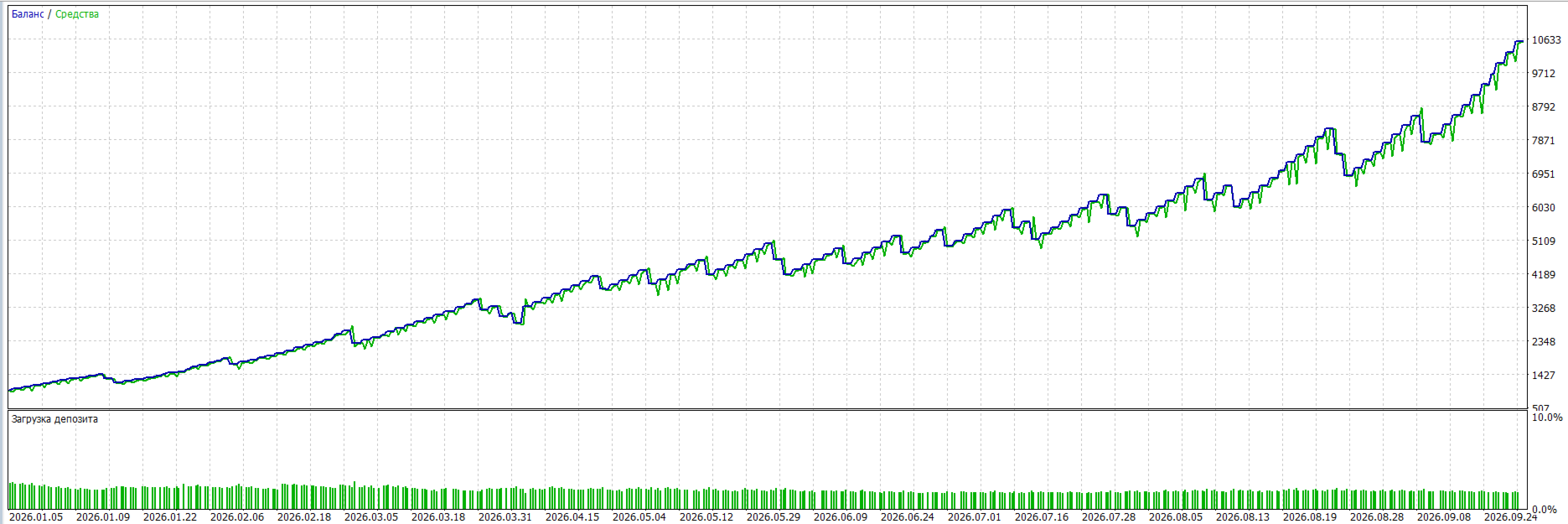
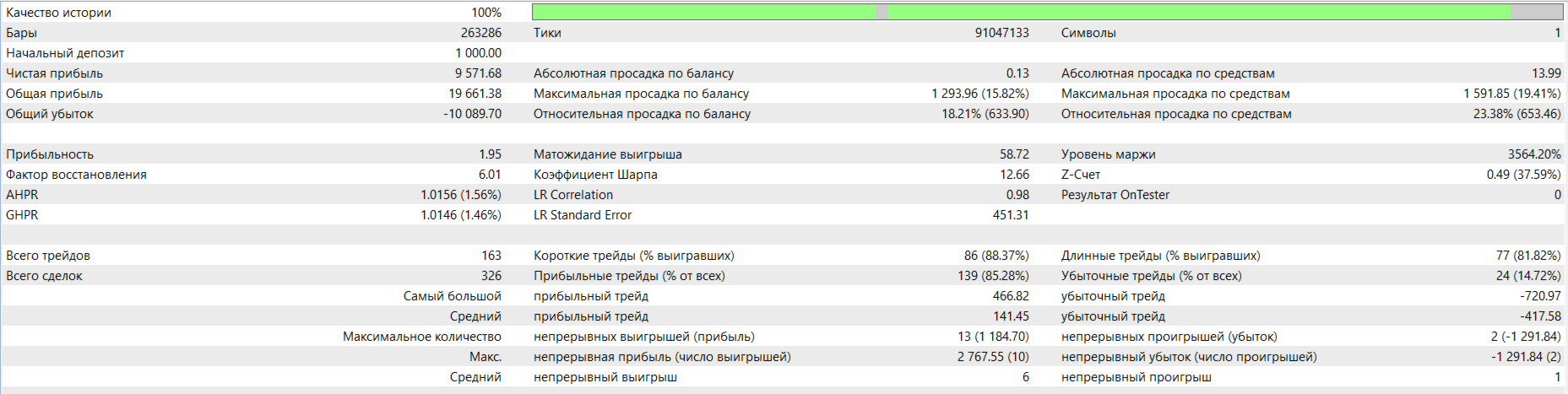
During development, I did not aim to produce an attractive equity curve across the entire available history by fitting the algorithm to past trades. The current settings are primarily based on market conditions over the last two years.
The instrument’s price, volatility, and average daily range of movement — ATR — change over time. Therefore, the same fixed Stop Loss and Take Profit distances may perform differently across historical periods.
When extending a backtest to earlier years, results with the current settings may be worse, including losses. When analysing a longer historical period, you should consider changes in daily price movements and whether the selected parameters suit the period being tested.
Simplicity with a Practical Purpose
For my own use, I need a system that I can understand, check, and improve. That is why I did not add unnecessary indicators, visual elements, or extra calculations merely to create an impression of complexity or disguise how the system works. Every element serves a specific purpose.
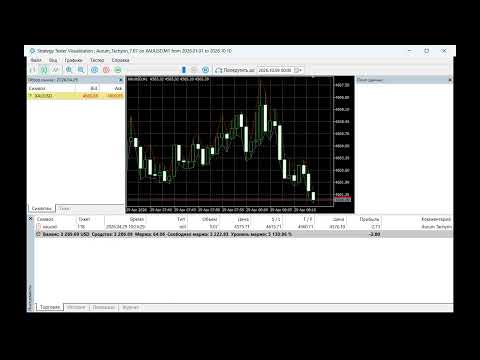
During testing, the chart is not cluttered with unnecessary indicators. The main focus is on trading logic, order execution, and clear settings. Simplicity of implementation is a deliberate choice that allows the Expert Advisor to be maintained and developed without unnecessary complexity.
Main Features
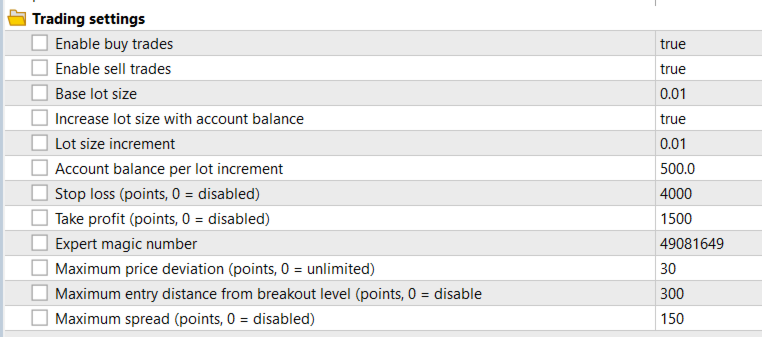
- Independently enable buy and sell trades.
- Use a fixed lot size or increase volume based on the account balance.
- Adjustable Stop Loss and Take Profit.
- Maximum spread limit.
- Limit the permitted entry distance from the prepared level.
- Adjustable permitted price deviation during execution.
- A dedicated trade identifier.
- Checks for sufficient funds and broker restrictions before submitting a trading request.
The Expert Advisor automatically analyses price movements and opens trades when its system conditions are met. Before submitting a request, it checks trading permissions, permitted volume, and available funds.
Getting Started
Use a MetaTrader 5 account with the Hedging position accounting system. Before starting, check the specifications of the selected instrument, including the number of decimal places, point size, and point value.
Distances in the settings are expressed in points. When switching to another instrument or quote format, select suitable Stop Loss and Take Profit settings, review the spread and entry distance limits, and choose an appropriate trading volume.
Test your selected settings on historical data and a demo account before using them on a live account. Trading involves the risk of losing capital; past results do not guarantee future returns.
About the Author and Collaboration
I study financial markets and develop trading software for MetaTrader 5. My work combines practical trading experience, programming, and the use of artificial intelligence tools to create, analyse, and improve algorithms.
I am open to partnerships, joint projects, and employment opportunities. I would consider joining a team that needs a specialist in the development and automation of trading systems.
I am also seeking an investor or investment partner to support the development of Aurum Tachyon and its use in live trading. I am ready to discuss test results, the approach to risk management, terms of participation, and the structure of our collaboration.
To discuss projects, investment, and collaboration, please contact me through private messages on MQL5.