Lightning Break EA
- Experts
- Versione: 3.50
- Aggiornato: 7 novembre 2026
- Attivazioni: 20

Lightning Break EA — Gold Multi-Timeframe Multi-Module Breakout System
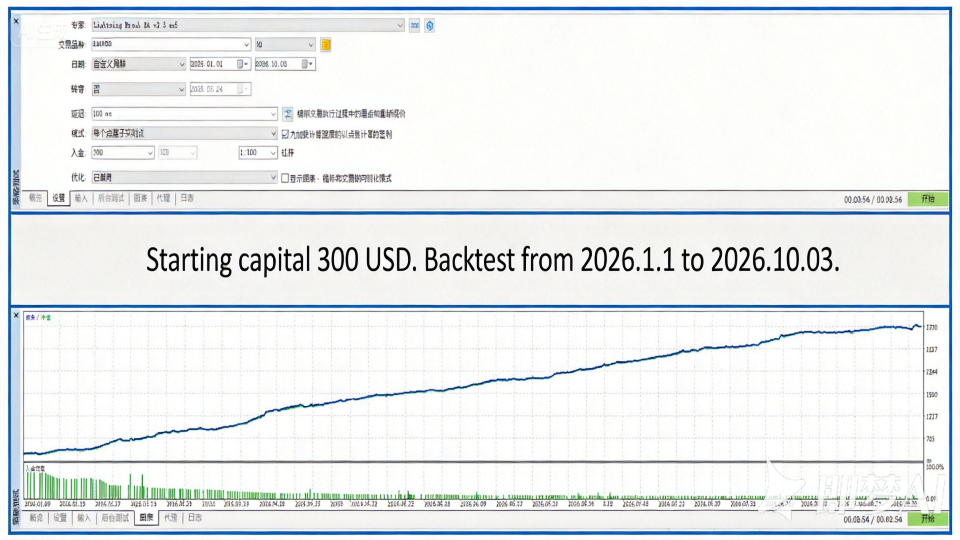
A multi-module breakout trading EA for XAUUSD. Recommended timeframe: H1.
MT5 live signals:
https://www.mql5.com/zh/signals/2377255
https://www.mql5.com/zh/signals/2377257
MT4 live signals:
https://www.mql5.com/zh/signals/2377259
All EA orders include stop loss and take profit.
Important parameters of Lightning Break EA:
Recommendation: attach the chart to the H1 timeframe.
Lightning Break EA v3.50 — Feature Introduction and User Guide
I. Core Features
Feature | Description
10 breakout modules | Blitz / Peak / Crest / Surge / Vortex / Titan / Aegis / Zenith / Nova / Hyper, each with independent magic numbers and no interference with one another
Multi-timeframe scanning | Selectable M5 / M15 / M30 / H1 / H4, default H1
Gold logic | SL = 3.0 price units, TP = 15/16 price units
News breakout | Automatically reads the economic calendar, places bidirectional stop orders before and after news, independent of the 10 modules
Pending order quantity control | Dropdown: 4 / 6 / 8 / 10 / 20 / Unlimited, default 4
II. Main Parameters
Group | Parameter | Default | Description
01 Position | Lot mode | Fixed lot | Fixed / Auto 0.3%~2.0%
Fixed lot | 0.05 | Fixed lot size
Max pending orders | 4 | Global pending order cap; Unlimited means no limit
02 Timeframe | M5~H4 | H1 | At least one must be selected
03 Modules | 10 switches | All on | Independently controlled
04 Session | Session filter | false | Off = trade all day
05 News | News currencies | AUTO | Automatically derived from the symbol
06 News pendings | Enable news pendings | true | Place orders before and after news
08 Global | Magic seed | 53300 | Must be changed when multiple EAs coexist
III. Quick Start
Installation: Place LightningBreakEA.mq5 into MQL5\Experts, press F7 to compile
Attach: Open an XAUUSD H1 chart and drag the EA onto it
Parameters: Lot mode = Fixed lot, Fixed lot = 0.01~0.05, Max pending orders = 4, select at least H1
Enable: Turn on "Algo Trading" in the MT5 toolbar until it turns green; the EA icon in the top-right corner of the chart should show a smiley face
Verification: If the log shows "Lightning Break EA v3.50 init symbol XAUUSD", everything is working normally
IV. Recommended Configurations
Type | Lot mode | Max pending
Conservative (beginners/small accounts) | Fixed 0.01 |
Balanced (medium accounts) | Auto 0.5% | 6
Aggressive (large accounts) | Auto 1% |
VI. Notes
Capital recommendation: XAUUSD, 0.04 lots requires approximately $1000 USD
Magic conflict: When using multiple EAs on the same account, the Magic seed must be changed
News data: Relies on the MT5 economic calendar; when no data is available, news pending orders are automatically skipped (does not affect the 10 modules)