Simba Alpha EA
- Experts
-
Emmanuel Ndacyayisenga
 NDACYAYISENGA Emmanuel is a quantitative trader and MQL5 Expert Advisor developer focused on transforming practical trading concepts into systematic and automated trading solutions.
 - Versione: 3.10
- Attivazioni: 10
One EA. Three Trading Approaches. Smarter Risk Control, Active Trade Management and Automated Reporting.
SIMBA ALPHA EA is an advanced Expert Advisor for MetaTrader 5 that combines multi-symbol market analysis, automated trade execution, manual-position management, portfolio risk controls, trade notifications and weekly performance reporting.
Whether you prefer fully automated trading, managing your own entries, or combining both approaches, SIMBA ALPHA EA provides a flexible, rules-based trading environment designed to help you monitor opportunities and manage positions more systematically.
You do not have to choose between making your own trading decisions and using automation. SIMBA ALPHA EA lets you combine both.
1. THREE WAYS TO USE SIMBA ALPHA EA
Fully Automated Trading
Configure your preferred symbols and trading parameters, then let the EA scan the markets and evaluate opportunities according to its programmed strategy.
The system combines multi-timeframe analysis, setup scoring, directional filtering, risk verification and position management to support a structured trading process.
Manual Trading with Automatic Position Management
Already know where you want to enter the market? Open your own trade and let SIMBA ALPHA EA help manage the position.
For eligible manual positions, the EA can:
-
Set a stop-loss and take-profit according to its configured rules.
-
Monitor open positions and their risk parameters.
-
Move stops toward break-even when the required conditions are met.
-
Apply trailing-stop and profit-protection mechanisms.
-
Manage partial closes and remaining positions when supported conditions are satisfied.
-
Apply programmed exit rules when market conditions change.
This feature is particularly useful for traders who identify opportunities manually but cannot watch every price movement throughout the trading session.
For example, you open a BUY position on gold after identifying a setup. SIMBA ALPHA EA can apply the configured protective levels and continue managing the position according to its rules. You can spend less time manually adjusting stops and targets while retaining control over your trading decisions.
Manual positions must meet the EA's management settings and applicable position-identification requirements. Confirm the behavior of your chosen configuration before live use.
Hybrid Trading
Combine your own entries with the EA's automated opportunity selection and execution.
You can take discretionary trades when you identify a setup while allowing the EA to execute qualifying opportunities under its automated settings.
This flexibility makes SIMBA ALPHA EA suitable for traders who want assistance without committing to a completely automated approach.
2. MULTI-SYMBOL MARKET ANALYSIS
Monitor up to 10 configured symbols from a single EA instance, rather than managing a separate EA instance for every instrument.
SIMBA ALPHA EA evaluates each configured symbol independently using its multi-timeframe analytical framework and technical scoring process.
Its analysis considers multiple factors, including:
-
Trend direction and moving-average alignment.
-
Momentum and directional confirmation.
-
Higher-timeframe market context.
-
Volatility and trend strength.
-
Price behavior and potential liquidity sweeps.
-
Setup quality and directional advantage.
A configurable setup score and directional-difference requirement help filter opportunities that do not satisfy the EA's criteria.
The result is a systematic process for evaluating multiple markets instead of treating every price movement as an invitation to trade.
3. RISK MANAGEMENT THAT LOOKS BEYOND ONE TRADE
Opening several positions can increase total exposure, especially when instruments move together. SIMBA ALPHA EA incorporates portfolio-level risk controls to help address this challenge.
Depending on the configured rules, the system includes:
-
Trade-level risk verification: Estimates potential monetary loss using the proposed trade volume and stop-loss, with trading costs considered.
-
Portfolio risk cap: Evaluates combined open-position risk before permitting additional exposure.
-
Correlation-aware risk adjustment: Reduces risk on qualifying new trades when correlated exposure is detected.
-
Drawdown monitoring: Tracks account conditions and applies restrictions when configured thresholds are reached.
-
Consecutive-loss monitoring: Responds to losing streaks through its adaptive risk framework.
-
Profit protection: Applies progressive profit-floor rules when their conditions are satisfied.
The five-state Survival Governor can transition between NORMAL, CAUTION, RESTRICTED, LOCKDOWN and RECOVERY. These states adjust trading permissions, risk limits, setup requirements or cooldown periods according to the programmed rules.
These mechanisms are designed to support disciplined trading and help limit excessive exposure. They cannot eliminate trading losses or guarantee a particular account outcome.
4. ADAPTIVE STOP-LOSS AND TAKE-PROFIT MANAGEMENT
SIMBA ALPHA EA is designed to adapt position management to market structure, volatility and setup conditions rather than relying exclusively on arbitrary fixed distances.
Its management framework includes:
-
Volatility- and structure-based stop-loss calculations.
-
Daily Fibonacci-derived target levels, with R-multiple fallbacks.
-
Targets that can vary according to setup quality and volatility.
-
Automatic partial position closing when configured target conditions are met.
-
Break-even management at the specified profit threshold.
-
R-based trailing stops and Parabolic SAR trailing.
-
Adaptive tightening as profits develop.
-
DEMA crossover exit conditions.
-
Runner management for positions that continue moving favorably.
The intention is to provide a structured approach to protecting positions, realizing partial profits and allowing qualifying winning trades to continue when conditions permit.
Actual outcomes depend on market behavior, broker execution and the selected settings.
5. ALERTS THAT HELP YOU STAY INFORMED
You do not need to stare at your charts all day to stay informed about every important change detected by the EA.
SIMBA ALPHA EA supports configurable notifications through:
-
On-chart popup alerts
-
Email notifications
-
MetaTrader 5 mobile push notifications
Depending on the enabled alert settings, notifications can inform you about new setups, changes in market direction, improving scores, changes in setup classification, entry-level changes and setup invalidation.
The EA can also notify you of Survival Governor state changes and other relevant trading events.
A configurable cooldown helps reduce repeated notifications.
This is particularly useful when you want to monitor opportunities, stay informed about changing conditions or review important events while away from your computer.
Notifications depend on the corresponding MT5 settings and services being configured correctly. An alert does not guarantee that a trade will execute or that a market opportunity will remain available.
6. AUTOMATED WEEKLY PERFORMANCE REPORT
Know what your EA has been doing without manually reconstructing every trading session.
SIMBA ALPHA EA includes an automated weekly performance reporting feature designed to give you a clearer picture of your trading activity.
The EA can deliver its scheduled report through the configured reporting channels, including the terminal journal, email, push notifications and popup alerts.
Its tracked performance information includes:
-
Trades opened and closed.
-
Winning and losing trades.
-
Win rate and profit/loss statistics.
-
Profit factor.
-
Partial closes and break-even adjustments.
-
Trailing-stop activity and adaptive stop movements.
-
Runner activations and recovered positions.
The EA also maintains lifecycle statistics during the trading session, helping you monitor its activity without relying entirely on manual journal reviews.
Weekly reporting makes it easier to review trading behavior, assess the activity of the EA and identify areas that may deserve further testing.
for example the weekly report you will recieve:
===== SIMBA ALPHA EA WEEKLY REPORT =====
Company: Simba Community C
Account: 12345678
Week: 2026.09.05 -> 2026.09.11
----------------------------------------
Entry deals: 12
Exit deals: 12
Wins: 7
Losses: 5
Win rate: 58.3%
Profit factor: 1.84
Gross profit: 245.30
Gross loss: 133.40
Net P/L: 111.90
Volume traded: 14.60
----------------------------------------
Base equity: 10000.00
Balance: 10111.90
Equity: 10111.90
Peak equity: 10245.00
Peak DD: 1.30%
Daily DD: 0.42%
Consecutive losses: 0
Survival state: NORMAL
Profit HWM: 2.45%
========================================
Reports are based on the information tracked by the EA. Configure MT5 email and push services as required, and remember that scheduled reporting is not an on-demand PDF or CSV export facility.
7. A LIVE DASHBOARD FOR GREATER VISIBILITY
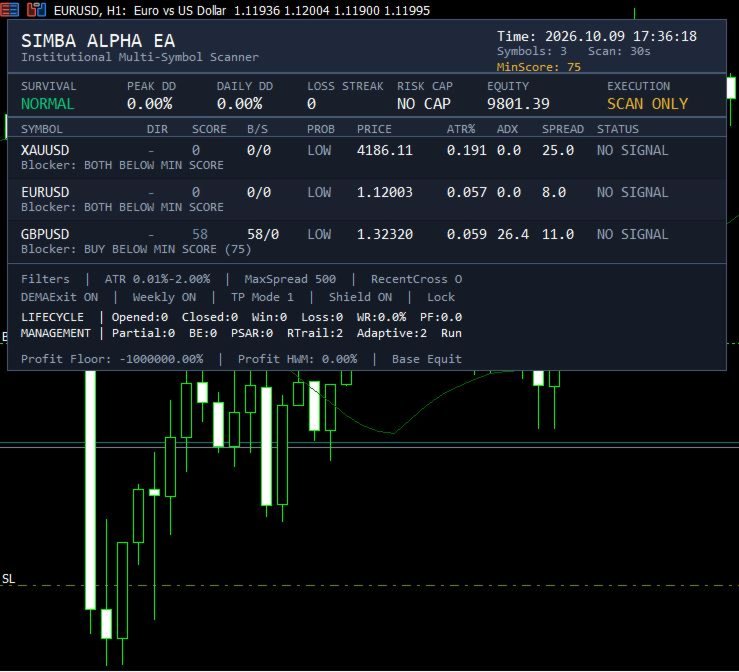
SIMBA ALPHA EA includes an on-chart dashboard that helps you understand what the system is doing.
Depending on the displayed section, information includes:
-
Current operating state and execution status.
-
Account equity and drawdown information.
-
Consecutive-loss tracking and applicable risk limits.
-
Symbol-by-symbol direction and setup scores.
-
Price, spread, volatility and trend-strength information.
-
Planned entry, stop-loss and target levels.
-
Reward-to-risk and estimated trade-risk information.
-
Portfolio exposure and risk-cap status.
-
Profit-protection levels and management statistics.
-
Reasons a potential trade may be blocked.
This provides practical visibility into the system's decision process rather than requiring you to rely only on trade-opening notifications.
8. DESIGNED FOR RELIABLE TRADE MANAGEMENT
SIMBA ALPHA EA incorporates execution checks and position-management safeguards intended to make its operation more consistent across different market conditions.
These include spread and volatility filters, market-session checks, fresh-price validation, broker stop-distance checks, order-execution locking and rate-limited position modifications.
The EA also stores management information so it can reconstruct eligible positions and resume supported management tasks after a terminal restart.
It supports both hedging and netting account modes, subject to broker and symbol requirements.
A restart, connection interruption or broker-side restriction can still affect execution. Users should monitor the terminal and verify position protection rather than assuming uninterrupted operation.
9. NO MARTINGALE. NO GRID. RULE-BASED TRADING.
SIMBA ALPHA EA does not use martingale lot multiplication, grid-based recovery or averaging down as its recovery strategy.
Instead, it uses programmed entry criteria, protective stops, risk controls and position-management rules.
Its approach is designed for traders who prefer a structured system over strategies that continually increase exposure after losses.
SIMBA ALPHA EA is rule-based software, not an artificial intelligence system, and does not include a built-in news filter.
10.WHO SHOULD CONSIDER SIMBA ALPHA EA?
SIMBA ALPHA EA is designed for traders with different approaches to the market. Whether you prefer making every entry yourself, automating your strategy, combining manual decisions with automation, or monitoring multiple instruments, the EA offers a flexible trading and management framework.
1. Manual Traders Who Want Better Position Management
Do you prefer analyzing the market and opening trades yourself but find it difficult to manage every position after entry?
SIMBA ALPHA EA can assist with managing eligible manual positions according to its configured rules, including stop-loss and take-profit placement, break-even management, trailing stops, profit protection, and programmed exit conditions.
You remain responsible for your trading decisions while the EA helps apply a more systematic approach to position management.
2. Part-Time Traders with Limited Screen Time
Not everyone can spend hours watching charts. Work, business, studies, and other responsibilities can make continuous market monitoring difficult.
SIMBA ALPHA EA can monitor configured markets, manage eligible positions, and send notifications through supported MT5 alert channels.
This helps you stay informed about relevant market developments without having to watch every price movement. Automated monitoring and management still depend on a running, connected terminal and the EA's configuration.
3. Full-Time Traders Seeking a More Systematic Workflow
Even experienced traders can face fatigue, inconsistent execution, and the temptation to deviate from their trading plan.
SIMBA ALPHA EA provides a structured framework for analyzing opportunities, applying predefined risk parameters, managing open positions, and reviewing trading activity.
It can serve as a trading assistant that helps reduce repetitive tasks while allowing you to concentrate on market context and broader trading decisions.
4. Algorithmic and Automated Traders
If you prefer systematic trading over manually executing every signal, SIMBA ALPHA EA offers an automated approach to market scanning, setup evaluation, execution, and position management.
Its multi-factor scoring framework evaluates configured instruments using technical and market-condition filters. Risk checks and execution conditions help determine whether a qualifying opportunity can proceed.
It is intended for traders who want a rule-based process rather than a system that enters every time a single indicator produces a signal.
5. Hybrid Traders Who Want Both Control and Automation
Some traders prefer to make their own decisions in certain situations while allowing software to handle other tasks.
SIMBA ALPHA EA supports a hybrid workflow in which you can manage your own eligible entries while also using its automated trading capabilities, subject to the selected configuration.
This approach may suit traders who want personal discretion without giving up systematic market monitoring and automated trade management.
6. Multi-Symbol and Multi-Market Traders
Do you trade gold, forex pairs, or stock indices and find it difficult to monitor every chart independently?
SIMBA ALPHA EA can analyze up to 10 configured symbols from a single EA instance.
It evaluates opportunities across the configured markets, helping you organize your trading workflow and compare potential setups without continually switching between charts.
Symbol availability and execution depend on your broker and configuration. Monitoring several markets does not mean that every market will produce a suitable trade.
7. Risk-Conscious Traders
Traders who prioritize controlled exposure may appreciate the EA's emphasis on predefined risk rules.
Its risk-management framework includes trade-level risk verification, portfolio risk limits, correlation-aware risk adjustments, and drawdown-responsive trading restrictions.
These mechanisms are designed to help traders avoid treating each position as an isolated decision when several open trades may contribute to the same overall account risk.
Risk controls cannot eliminate losses, and the actual outcome remains dependent on execution conditions and configuration.
8. Prop Firm Challenge and Funded Account Traders
Traders operating under proprietary trading firm rules often need to pay close attention to drawdown, daily loss limits, exposure, and consistency.
SIMBA ALPHA EA includes configurable risk controls and a multi-state Survival Governor designed to adjust trading behavior as account conditions change.
Its portfolio risk checks, protective stops, and trading restrictions may help traders apply a more disciplined process.
However, each prop firm has its own rules. You must configure and independently verify the EA against the firm's requirements, including news restrictions, maximum exposure, daily drawdown calculations, and other conditions. The EA does not guarantee that a challenge will be passed or a funded account retained.
9. Traders Who Need Alerts Instead of Constant Screen Monitoring
Some traders want to know when a setup develops or changes without keeping the trading terminal in front of them throughout the day.
SIMBA ALPHA EA supports configurable popup alerts, email notifications, and MT5 mobile push notifications.
Depending on your alert settings, you can receive updates about setup development, direction changes, score changes, setup classification, entry-level changes, and invalidation.
This makes the EA useful for traders who want to remain informed while carrying out other activities. Notifications are informational and do not guarantee execution at the indicated price.
10. Traders Who Want Weekly Performance Reports
If you want to evaluate your trading process rather than simply count profitable trades, regular reporting can help.
SIMBA ALPHA EA includes scheduled weekly performance reporting and tracks lifecycle statistics such as trades opened and closed, winning and losing trades, win rate, profit factor, profit/loss, partial closes, and position-management activity.
This helps you review how the EA has been operating and identify areas that may require further investigation or testing.
Reports are generated through supported configured channels. Their availability depends on the EA's reporting schedule and the terminal's email or notification setup.
11. Traders Who Prefer Visual Monitoring and Transparency
Some traders want to understand what a trading system is doing instead of relying exclusively on automated execution.
SIMBA ALPHA EA provides an on-chart dashboard showing relevant information about configured symbols, setup scores, market conditions, planned trade levels, account risk, drawdown state, and management activity.
This can help you review the EA's status and understand why a potential trade may be allowed or blocked under its programmed conditions.
12. Traders Who Want More Structured Exit Management
Entering a trade is only one decision. Knowing when to protect profits, tighten a stop, take partial profits, or exit when conditions change is another challenge.
SIMBA ALPHA EA includes programmed management techniques such as break-even adjustments, partial closes, R-based trailing, Parabolic SAR trailing, adaptive stop tightening, runner management, and DEMA crossover exits.
These rules can help reduce dependence on improvised decisions after entry. They do not guarantee that a profitable position will remain profitable or that every exit will occur at the expected price.
13. Traders Who Want to Reduce Emotional Interference
Fear, greed, hesitation, and revenge trading can undermine an otherwise reasonable trading plan.
SIMBA ALPHA EA is built around predefined rules for qualifying opportunities, controlling exposure, managing positions, and restricting trading under specified conditions.
It can help reduce the need to make every decision in the heat of the moment, although traders must still configure the EA responsibly and avoid changing settings impulsively.
14. Beginners Learning Structured Trading
Traders who are still learning how to organize their trading process may use SIMBA ALPHA EA to observe how a rule-based system evaluates opportunities, calculates protective levels, manages positions, and records trading activity.
Its dashboard, alerts, and reporting can provide useful information for reviewing trading behavior.
Beginners should start with a demo account, learn the relevant MT5 functions, understand leverage and drawdown, and avoid assuming that automation makes trading safe or guarantees profits.
15. Experienced Traders Testing and Refining Strategies
Experienced discretionary and systematic traders may find value in a framework that brings market analysis, execution rules, risk management, and trade monitoring together.
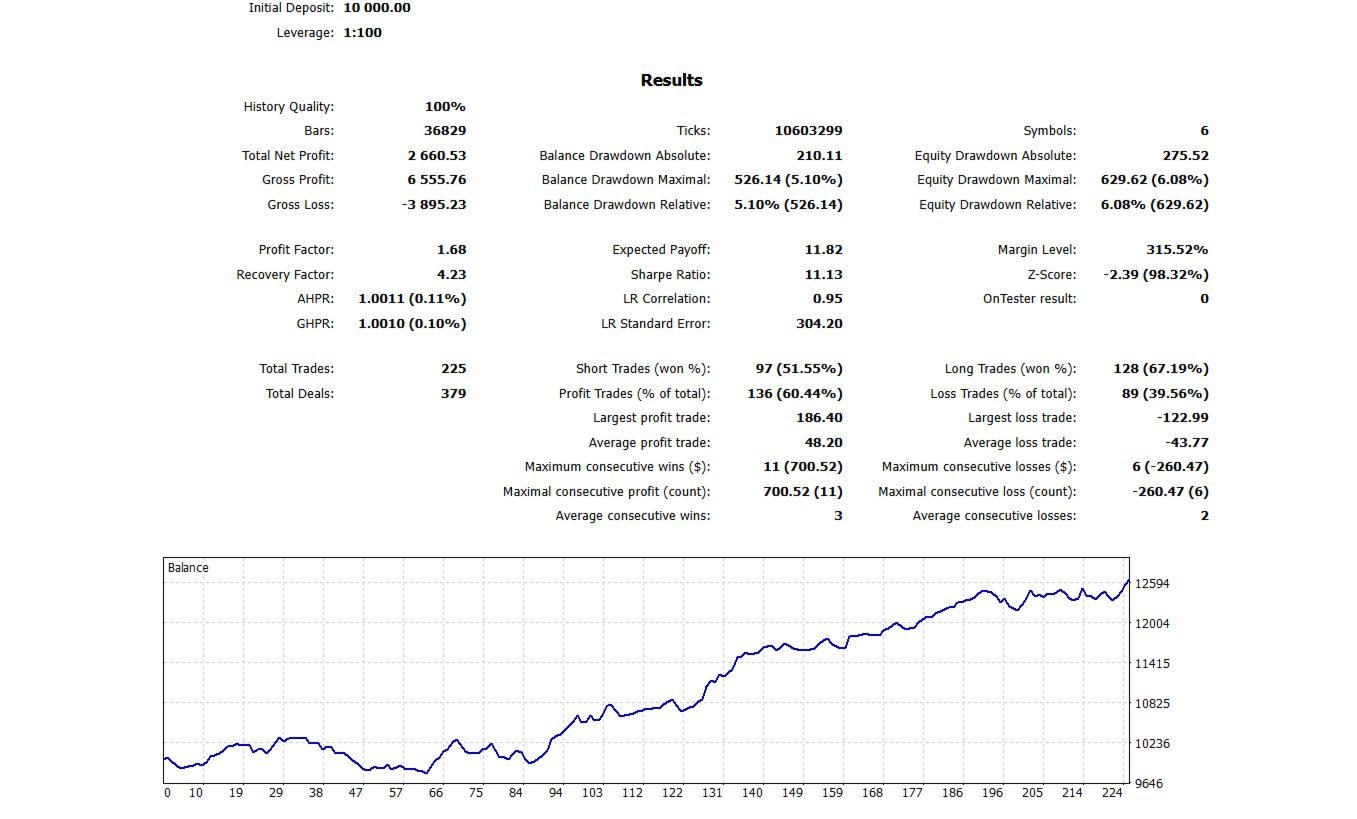
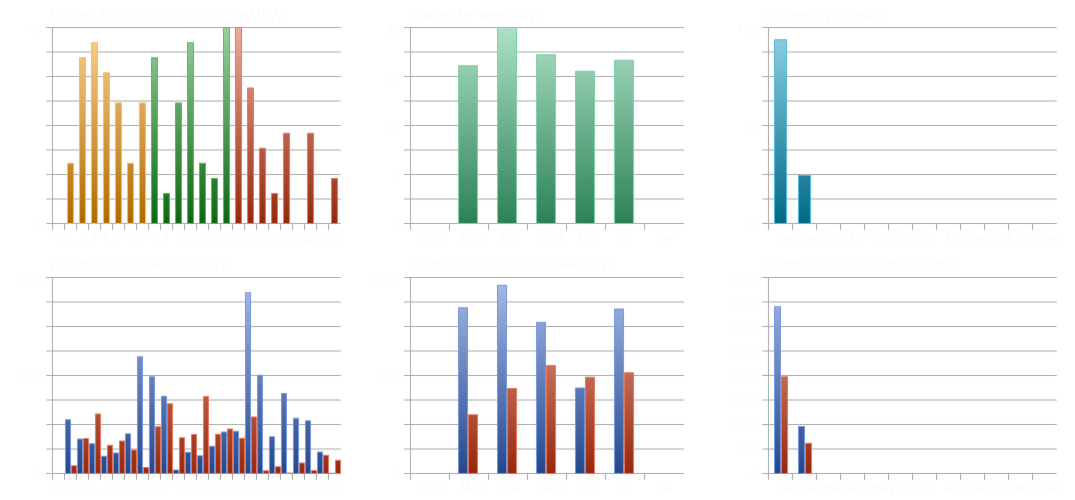
The EA can be evaluated through historical testing and demo forward testing under different instruments and configurations.
Its reports and lifecycle statistics can support review, but historical or demo results do not guarantee future live performance.
16. Traders Who Want One Trading Assistant Instead of Several Separate Tools
Some traders use one tool to scan markets, another to execute trades, another to manage stops, and separate methods to monitor performance.
SIMBA ALPHA EA combines multiple trading functions within a single MetaTrader 5 workflow: multi-symbol analysis, automated execution, eligible manual-position management, risk controls, notifications, dashboard monitoring, and scheduled weekly reporting.
Its main appeal is this combination of flexibility and integrated management rather than a promise that one trading system will suit every market or trader.
IS SIMBA ALPHA EA RIGHT FOR YOU?
SIMBA ALPHA EA may be worth evaluating if you want to:
-
Trade manually, automatically, or through a hybrid approach.
-
Manage eligible manual positions without adjusting every stop and target yourself.
-
Monitor several configured markets from one EA instance.
-
Apply predefined trade-level and portfolio risk controls.
-
Receive trading notifications while away from your screen.
-
Review scheduled weekly performance reports.
-
See important trading and risk information on an MT5 dashboard.
-
Apply systematic position-management rules instead of relying entirely on emotion.
IMPORTANT NOTICE FOR ALL SIMBA ALPHA EA USERS
After renting or purchasing SIMBA ALPHA EA, please contact the developer to receive the appropriate user manual and recommended settings tailored to your intended trading style, account type, and usage preferences.
Whether you plan to trade manually, use automated execution, manage existing positions, or combine different trading approaches, understanding the settings before use is essential.
SIMBA ALPHA EA is a trading assistant, not a guarantee of success. Always test it under your broker’s trading conditions, understand the available settings, and select a risk level appropriate for your account.
SIMBA ALPHA EA — Built for different trading styles. Designed for disciplined execution and structured trade management.
11. GETTING STARTED
-
Install SIMBA ALPHA EA on MetaTrader 5.
-
Configure your supported symbols and preferred trading mode.
-
Review risk limits, position-management settings and eligible manual-position rules.
-
Enable the alert channels and reporting services you intend to use.
-
Test the EA with suitable historical data in Strategy Tester.
-
Forward-test on a demo account before considering live deployment.
Keep MetaTrader 5 running and connected when the EA must scan markets, manage positions or generate scheduled reports.
IMPORTANT RISK WARNING
Trading forex, metals, indices and other leveraged instruments involves substantial risk. Losses can exceed expectations because of market gaps, slippage, spreads, commissions, execution delays and changing market conditions.
SIMBA ALPHA EA does not guarantee profits, a specific win rate, uninterrupted trade management or successful completion of a proprietary trading challenge. Risk controls reduce certain risks but cannot eliminate them.
Test thoroughly and use settings appropriate to your account and risk tolerance.
Developed by NDACYAYISENGA Emmanuel
SIMBA ALPHA EA — Find opportunities. Manage manual or automated trades. Stay informed. Review your performance. Trade with a plan.