Simba Bot Scanner
- Experts
-
Emmanuel Ndacyayisenga
 Emmanuel Ndacyayisenga is a quantitative trader and Expert Advisor developer dedicated to transforming professional trading concepts into reliable automated solutions. With experience across Forex, Gold, Indices, and CFD markets, he specializes in developing trading systems that combine market
 - Versione: 2.77
- Attivazioni: 10
Scan. Select. Execute. Protect. Manage.
One MetaTrader 5 Expert Advisor. Multiple layers of trading intelligence.
SIMBA Bot Scanner is a multi-market MT5 trading system designed to bring market scanning, setup evaluation, market selection, automated execution, trade management, risk control and manual-trading protection into one integrated environment.
Instead of watching charts one by one and manually checking dozens of conditions, SIMBA continuously evaluates the configured markets and organizes the information into a structured trading workflow.
SIMBA is built around one principle:
MORE THAN AN EAFind the market. Evaluate the setup. Control the risk. Manage the position. Protect the account.
SIMBA is designed as a complete trading assistant rather than a simple BUY/SELL signal generator.
It combines:
Market Scanner
Monitors multiple instruments for developing opportunities.
Setup Scoring
Evaluates multiple technical conditions and produces a configurable setup score.
MarketPicker
Compares available markets and identifies which instruments currently meet the configured selection criteria.
Automated Execution
Can execute qualified setups according to the configured rules.
Trade Management
Continues managing positions after entry rather than simply placing an order and stopping there.
Risk Management
Calculates and controls trading exposure according to configurable risk rules.
Survival Mode
Becomes progressively more defensive as drawdown increases.
News Protection
Monitors configured economic-event conditions and can restrict trading around significant events.
Security Shield
Helps prevent conflicts between SIMBA, manual positions and other Expert Advisors according to the selected configuration.
Dashboard & Analytics
Provides a centralized view of market conditions, setup information, trading state and protection status.
SIMBA can be configured for different operating styles.
AUTOMATED MODE
Allow SIMBA to:
Scan → Score → Select → Execute → Manage → Protect
The EA can automatically identify qualifying opportunities and execute them according to your configured risk and execution rules.
ASSISTED MODE
Use SIMBA as a market intelligence and decision-support tool.
Let the scanner and MarketPicker identify potential markets while you decide whether to enter.
MANUAL TRADING PROTECTION
Already trading manually?
SIMBA can also operate as a risk and protection layer around your manual trading environment, subject to the selected security configuration.
This means SIMBA does not have to be viewed only as an automated entry system.
It can also be used as a:
Scanner + Market Selector + Risk Manager + Trade Manager + Protection Layer
MULTI-MARKET SCANNINGSIMBA is designed to monitor multiple instruments instead of forcing the trader to remain focused on a single chart.
Default example universe:
-
XAUUSD
-
US30
-
US100
-
US500
-
GBPUSD
The symbol list is configurable according to your broker and trading environment.
This creates a simple workflow:
Don't ask "Which chart should I watch?"
Let the system continuously evaluate the configured universe and identify where the configured conditions are developing.
MULTI-TIMEFRAME ANALYSISSIMBA combines multiple timeframes to separate broader market structure from entry conditions.
Default configuration:
H4 — higher-timeframe DEMA context
H1 — higher-timeframe trend confirmation
M15 — primary signal analysis
M1 — entry confirmation
This allows the system to combine broader direction with lower-timeframe execution conditions.
SETUP SCORINGNot every market condition is treated equally.
SIMBA evaluates multiple technical factors and produces a configurable setup score.
Depending on configuration, the analysis can incorporate:
-
EMA structure
-
DEMA alignment
-
Momentum
-
Stochastic conditions
-
Parabolic SAR
-
ATR volatility
-
Market structure
-
Trend alignment
-
Risk/reward conditions
-
Higher-timeframe confirmation
-
Other internal filters
The minimum setup score is configurable.
Default: 70
This allows traders to decide how selective SIMBA should be.
MARKETPICKERLET THE SYSTEM COMPARE THE MARKETS
A major component of SIMBA is MarketPicker.
Instead of treating every symbol identically, MarketPicker evaluates the configured markets and compares their current conditions.
It can consider:
-
Market Score
-
Tradeability
-
Relative Strength
-
Stability
-
Freshness
-
Rotation
-
Exhaustion
-
Risk/Reward
The result is a structured market-selection process.
Rather than manually jumping from chart to chart, the trader can see which markets are currently meeting the configured criteria.
MARKETPICKER DEFAULTS
Minimum Score: 60
Minimum Tradeability: 50
Maximum Exhaustion: 80
Minimum RR: 1.50
Top Markets: 2
All configurable.
FROM ENTRY TO EXITSIMBA is designed to manage the entire trade lifecycle.
After a position is opened, the EA can apply configured management rules including:
-
Initial Stop Loss
-
Take Profit
-
Fibonacci-based targets
-
Risk/reward validation
-
Partial profit taking
-
Break-even protection
-
R-based trailing
-
Parabolic SAR trailing
-
DEMA exit conditions
-
Runner management
-
Adaptive trailing
-
Position protection
The objective is not simply:
"Find an entry."
The system also addresses:
"What happens after the entry?"
SMARTER RISK CONTROLSIMBA places significant emphasis on account protection.
Available risk controls include:
-
Percentage-based position sizing
-
High-probability setup risk
-
Low-probability setup risk
-
Volatility-based Stop Loss
-
Minimum RR requirements
-
Drawdown monitoring
-
Daily/target protection
-
Session-aware risk
-
News protection
-
Market/group exposure controls
-
Position ownership controls
Example default configuration:
Normal risk: 1.0%
Lower-probability risk: 0.5%
These values can be changed by the trader.
SURVIVAL MODEWHEN CONDITIONS DETERIORATE, PROTECTION BECOMES MORE IMPORTANT.
SIMBA includes a configurable Survival Mode designed to respond to increasing account drawdown.
Example protection stages:
NORMAL
Normal operating conditions.
↓
CAUTION — 3% DD
Increased protection.
↓
RESTRICTED — 5% DD
More restrictive trading conditions.
↓
LOCKDOWN — 7% DD
Trading activity can be significantly restricted.
↓
EMERGENCY — 9% DD
Maximum defensive conditions.
A configurable hard-stop mechanism can also be set at 10% drawdown.
These thresholds are configurable and should be adapted to the account and trading environment.
NEWS INTELLIGENCEMarkets can behave differently around major economic events.
SIMBA includes a configurable news-awareness layer designed to help manage exposure around significant events.
Depending on configuration, the system can:
-
Look ahead for upcoming events
-
Detect configured high-impact events
-
Block conflicting entries
-
Apply pre-event protection
-
Apply post-event protection
-
Consider actual vs forecast information
-
Monitor spread conditions
-
Apply news-related trading restrictions
Default example:
News look-ahead: 120 minutes
Extreme-news protection before: 15 minutes
Extreme-news protection after: 15 minutes
PROTECT THE TRADING ENVIRONMENT — NOT JUST THE TRADE.
SIMBA includes a configurable Security Shield designed to manage interaction between:
SIMBA positions
Manual positions
Other EA positions
Depending on configuration, the system can:
-
Detect position conflicts
-
Apply manual-conflict rules
-
Include/exclude other EA positions
-
Enforce SIMBA position ownership
-
Prevent configured execution conflicts
This makes SIMBA useful even in environments where automated and discretionary trading are used together.
MANUAL TRADING MODESIMBA does not have to replace the trader.
You can use the system as a second set of eyes.
For example:
SIMBA scans the markets
↓
MarketPicker identifies qualifying markets
↓
Dashboard displays the conditions
↓
Trader makes the final decision
↓
SIMBA provides configured protection and management
This allows traders who prefer discretionary execution to still benefit from systematic market monitoring and risk controls.
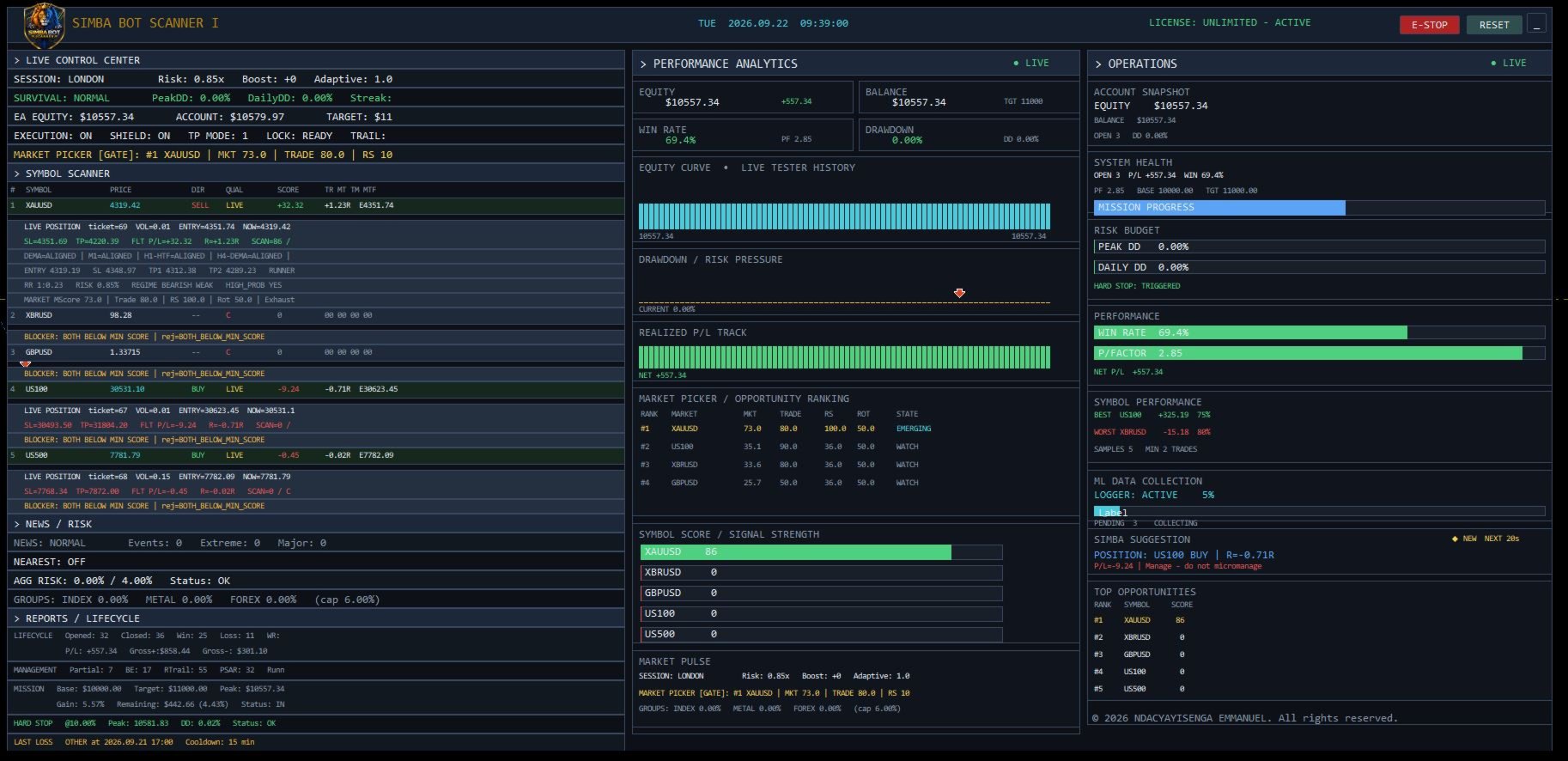
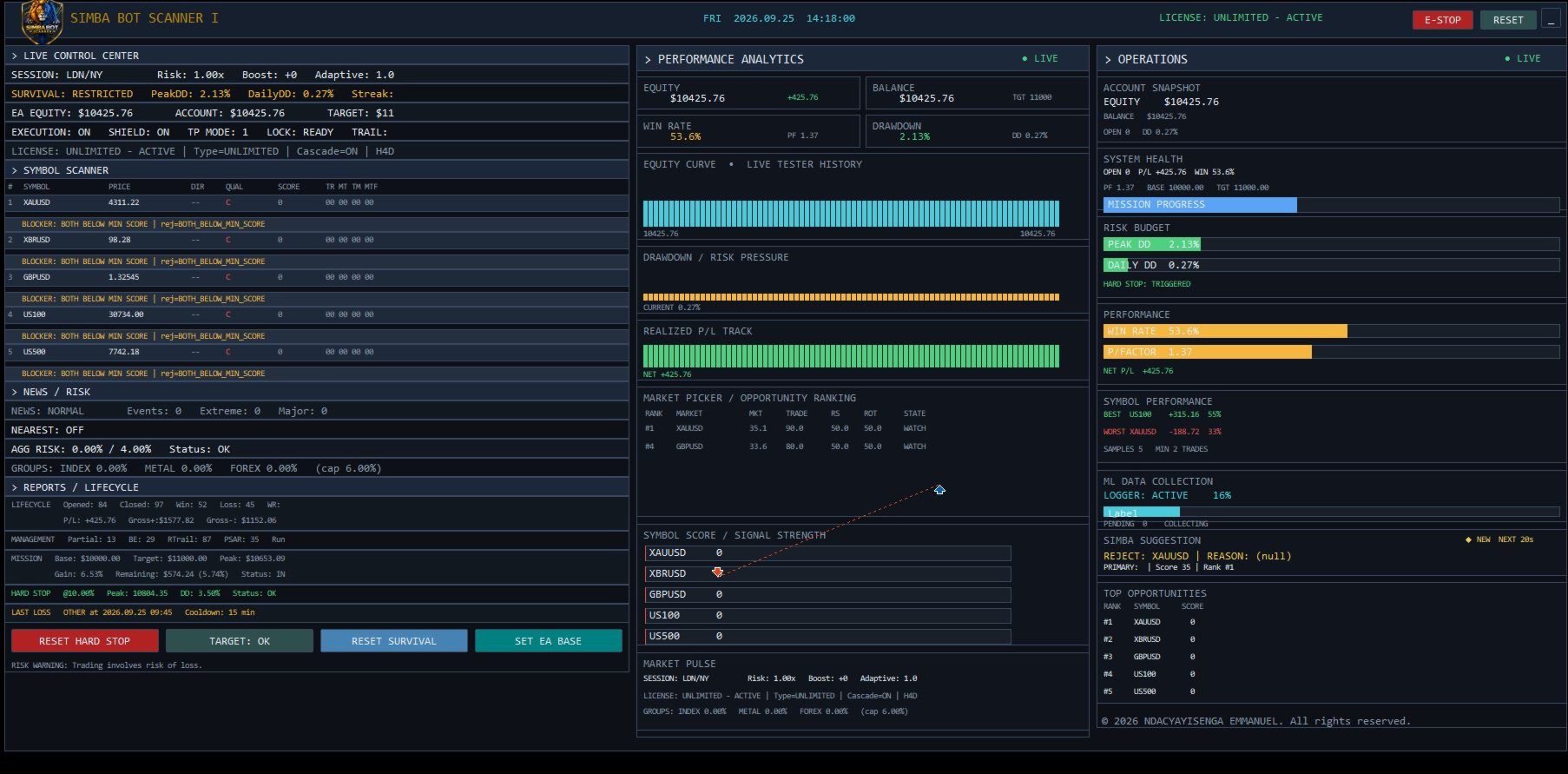
DASHBOARDSIMBA provides an on-chart dashboard designed to bring the important information together in one place.
Depending on configuration, the dashboard can display:
-
Market scanning information
-
Setup scores
-
MarketPicker information
-
Trading state
-
News conditions
-
Position information
-
Risk information
-
Protection status
-
Alerts
-
System status
The objective is simple:
LESS CHART HUNTING. MORE INFORMATION IN ONE PLACE.
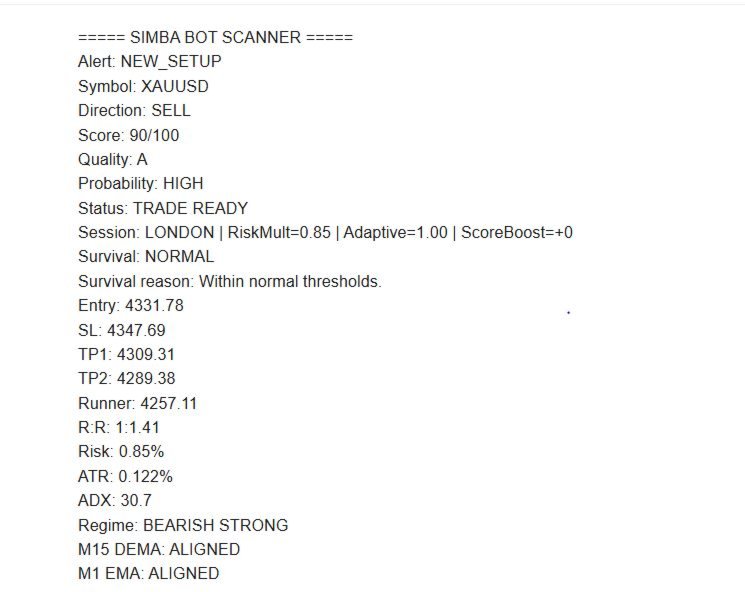
ALERTSSIMBA supports configurable notifications including:
-
MT5 popup alerts
-
Push notifications
-
Email notifications
This allows the trader to stay informed without continuously monitoring every chart.
FULLY CONFIGURABLESIMBA is designed for traders who want control over their trading environment.
You can configure:
Markets
Choose the instruments SIMBA monitors.
Timeframes
Define signal, entry and higher-timeframe analysis.
Risk
Set risk percentages and protection thresholds.
Setup Quality
Adjust minimum setup scores and filters.
Market Selection
Configure MarketPicker thresholds.
News
Configure news look-ahead and protection windows.
Trade Management
Configure trailing, break-even, targets and exit mechanisms.
Security
Define how manual and automated positions interact.
Dashboard
Configure the information displayed on the chart.
WHO IS SIMBA FOR?SIMBA is designed for traders who want more structure around their MT5 trading process.
SYSTEMATIC TRADERS
For traders who want predefined rules rather than making every decision manually.
DISCRETIONARY TRADERS
For traders who want a scanner and market-selection assistant without necessarily giving up manual decision-making.
MULTI-MARKET TRADERS
For traders monitoring several instruments simultaneously.
RISK-CONSCIOUS TRADERS
For traders who want configurable drawdown, exposure and position-management controls.
TRADERS DEVELOPING A SYSTEM
For traders who want a framework combining market analysis, execution and trade management in one MT5 environment.
THE SIMBA WORKFLOWThe complete architecture can be summarized as:
1. SCAN
Monitor the configured markets.
↓
2. ANALYZE
Evaluate multi-timeframe market conditions.
↓
3. SCORE
Measure setup quality.
↓
4. SELECT
MarketPicker compares available opportunities.
↓
5. VALIDATE
Check risk, RR, spread, news and configured restrictions.
↓
6. EXECUTE
Enter only when the configured execution conditions are satisfied.
↓
7. MANAGE
Apply SL, TP, break-even, trailing, partials and runner logic.
↓
8. PROTECT
Monitor drawdown, exposure, news and position conflicts.
↓
9. REPORT
Keep the trader informed through the dashboard and alerts.
WHY SIMBA?Many trading EAs concentrate primarily on one thing:
ENTRY.
SIMBA is designed around a broader question:
What does the trader need before, during and after a trade?
That is why SIMBA combines:
Market Scanning
+
Setup Scoring
+
Market Selection
+
Execution
+
Trade Management
+
Risk Management
+
Drawdown Protection
+
News Awareness
+
Manual Trading Protection
+
Dashboard & Alerts
into one MT5 Expert Advisor.
BUILT FOR CONTROLSIMBA does not promise to predict the market.
It provides a structured framework for responding to market conditions according to rules defined by the trader.
Markets change.
Volatility changes.
Liquidity changes.
Trends change.
Therefore, SIMBA focuses on process, selection, execution and risk control rather than promising certainty.
IMPORTANTSIMBA Bot Scanner is trading software and does not guarantee profits.
Trading involves substantial risk. Results can vary depending on broker conditions, spreads, commissions, slippage, execution, liquidity, market regime, account configuration and selected parameters.
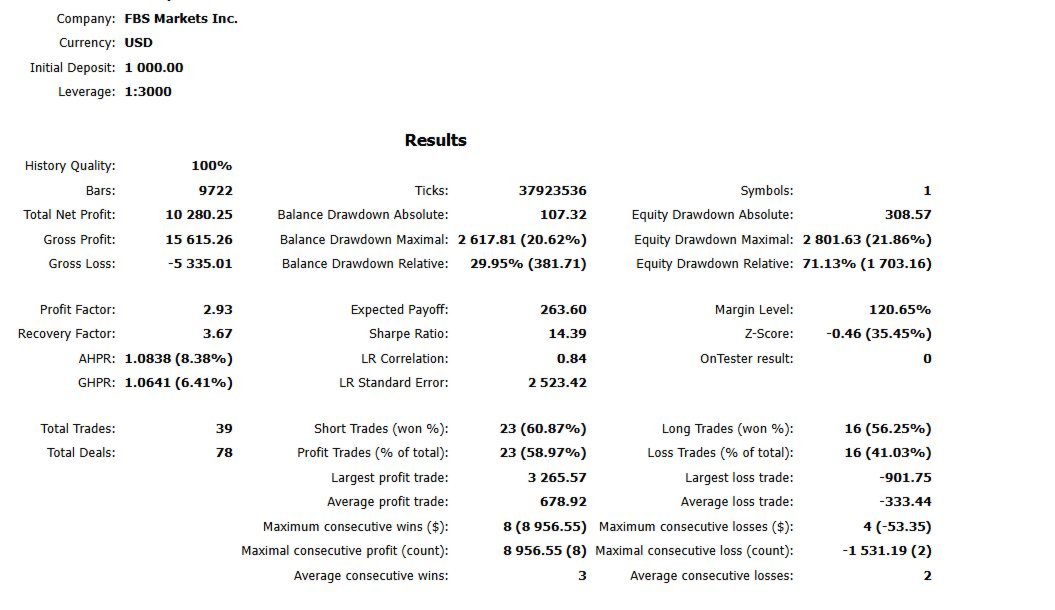
Past backtest or demo performance does not guarantee future results.
Always test SIMBA on a demo account and verify all settings with your broker before using real funds.
Automated execution is disabled by default in the supplied configuration. Review and test the system before enabling live execution.
PRODUCT INFORMATIONProduct: SIMBA Bot Scanner
Version: 2.76
Platform: MetaTrader 5
Type: Expert Advisor
Author: Ndacyayisenga Emmanuel
SIMBA BOT SCANNER
Scan the market.
Find the setup.
Control the risk.
Manage the trade.
Protect the account.
One EA. One trading environment. Multiple layers of control.