Smart Risk Trade Panel
- Utilità
- Versione: 1.0
- Attivazioni: 10

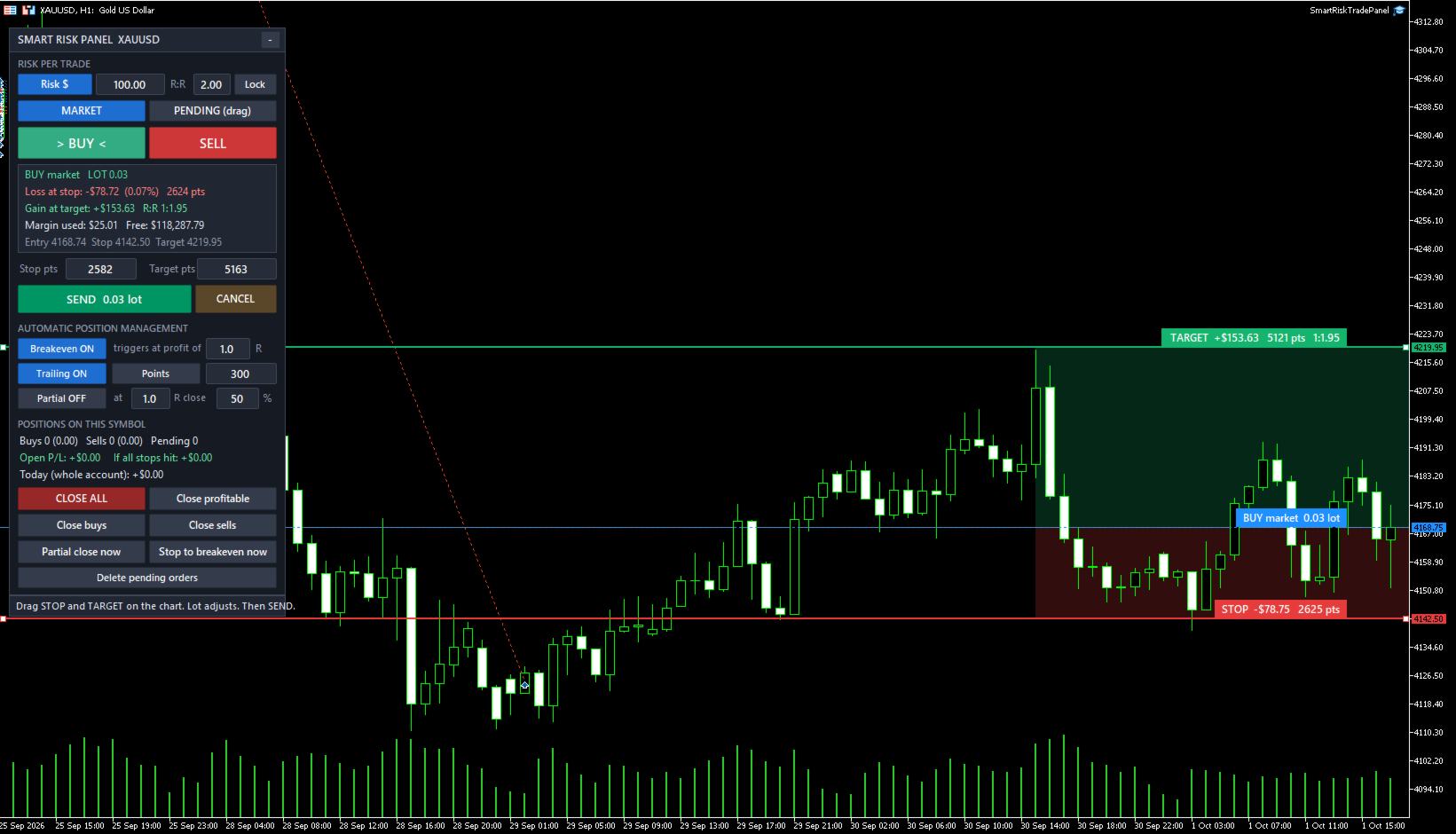
Smart Risk Trade Panel is a trading panel for MetaTrader 5 built around one idea: you decide how much you are willing to lose, and the panel calculates the correct lot size for you. No calculator, no spreadsheet, no guessing.
Press BUY or SELL and three lines appear on the chart: entry, stop loss and take profit. Drag the stop or the target wherever the chart tells you, and the lot size, the loss at stop, the gain at target and the reward:risk ratio are recalculated instantly. When everything looks right, press SEND.
How it works
- Choose the risk mode: fixed amount in account currency, percentage of balance, or fixed lot.
- Choose MARKET or PENDING.
- Press BUY or SELL. The initial stop is placed using ATR (or a fixed distance in points), the target uses your R:R.
- Drag the lines on the chart or type the distances in points. The lot follows.
- Press SEND. The order goes out with stop loss and take profit already attached.
Order entry
- Lot calculated from the real tick value of the symbol (works on Forex, metals, indices, crypto and CFDs), with the round-turn commission included in the math if you enter it.
- Lot always rounded down to the broker volume step, so the real risk never exceeds the risk you set.
- Pending orders: drag the entry line and the panel selects Buy Limit, Buy Stop, Sell Limit or Sell Stop automatically. Optional expiration time.
- R:R lock: when enabled, the target follows the stop to keep the ratio.
- Labels on the chart show the money at stop and target, points and ratio at all times.
- Checks before sending: stops level, free margin, minimum and maximum lot. A warning is shown when the minimum lot would exceed your risk, and the order can be blocked.
Position management
- Breakeven: moves the stop to entry (plus a few points) when profit reaches X R.
- Trailing stop by fixed points, by ATR multiple, or by the low/high of the last N candles.
- Partial close: closes a percentage of the position when profit reaches X R.
- Works on positions opened by the panel and, optionally, on positions opened manually or by other tools.
Protection and quick actions
- Daily loss limit for the whole account: when it is reached the panel locks until the next day and can close the positions of the symbol.
- Live summary: open P/L, total loss if every stop is hit, and result of the day.
- One-click buttons: close all (double click confirmation), close profitable, close buys, close sells, partial close now, stop to breakeven now, delete pending orders.
- Panel settings are remembered per symbol. The panel can be minimized.
Strategy Tester
Chart buttons cannot be clicked inside the Strategy Tester, so the panel runs a demonstration mode there: it opens alternating sample trades with 1% risk only to show the lot calculation, breakeven, trailing and partial close working in visual mode. These sample entries are not a trading strategy. On a live or demo chart the panel never opens a trade by itself.
Main inputs
- Risk mode, risk amount, risk percent, fixed lot, initial R:R, R:R lock.
- Commission per lot, maximum lot, block when the minimum lot exceeds the risk.
- Initial stop in points or ATR multiple, ATR period.
- Breakeven, trailing and partial close settings (all also editable on the panel).
- Daily loss limit, close positions at the limit, pending order expiration.
- Magic number, order comment, deviation, panel position, sounds.
Works with netting and hedging accounts and with any broker. For questions or suggestions, send me a private message here on MQL5.