Trade Deck MT5

TradeDeck — The One-Click Trade Manager Every Chart Should Have

Stop switching between order tickets, position lists, and calculators. TradeDeck puts full control of every trade — entry, exit, breakeven, and partial closes — into a single compact panel that lives right on your chart.

Whether you trade manually, scalp fast-moving markets, or just want a faster way to manage positions than MetaTrader's default order dialog, TradeDeck turns every action you do dozens of times a day into a single click.

What TradeDeck does

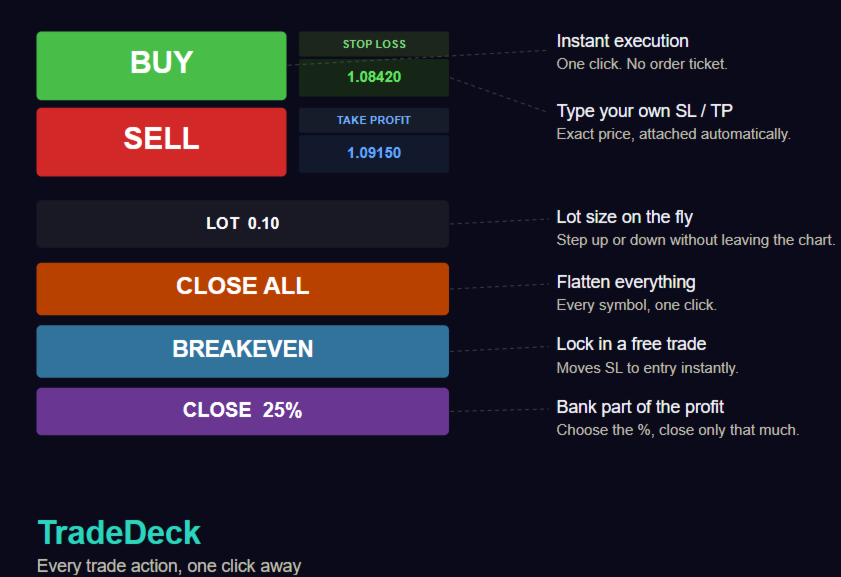
  • Instant BUY / SELL execution at market price, with dedicated colour-coded buttons — no order dialog, no extra clicks
  • Type your Stop Loss and Take Profit directly into the panel before you click — enter the exact price level you want, and it's attached to the order automatically
  • Adjustable lot size right on the chart — a +/- stepper lets you size up or down instantly, with no need to dig into settings
  • Close All — flattens every open position on the account in one click, across every symbol
  • Close Trade — closes only the positions open on the current chart's symbol, leaving the rest of your account untouched
  • One-click Breakeven — instantly moves the Stop Loss to the entry price on every open position for the current symbol, locking in a risk-free trade the moment it's earned
  • Partial close by percentage — a second stepper lets you choose exactly how much of a position to close (5% increments, from 5% up to 100%), then one click banks that portion of the profit
  • Compact, dark, unobtrusive panel — sits neatly in the corner of your chart and never gets in the way of your price action

Why traders will want this

Every one of these actions exists somewhere in MetaTrader already — buried in a right-click menu, a modify dialog, or a manual lot calculation. TradeDeck's entire purpose is collapsing all of it into the two seconds it takes to glance at a button and click it. For a discretionary trader watching a fast market, that difference in speed is the difference between locking in a breakeven and watching a winning trade round-trip back to a loss.

  • Scalpers and day traders get in and out without breaking focus on the chart
  • Swing traders managing several open positions can flatten, partially close, or de-risk with one click instead of navigating the terminal's position list
  • Anyone new to MetaTrader's native trading tools gets a simpler, faster interface than the built-in order ticket

A Note on Risk

Trading involves substantial risk of loss and is not suitable for every investor. TradeDeck is a manual execution tool: it does not analyze the market, generate signals, or manage risk on your behalf beyond the actions you click. Every trade, stop level, and lot size is your own decision. Always test on a demo account first, and never risk capital you cannot afford to lose.

Have a feature request — trailing stops, hotkeys, multi-symbol lot presets? Let us know.

Prodotti consigliati
This indicator helps you control several pairs in a small workspace, therefore, it is not necessary to open several charts on the platform to do so. The indicator shows sequentially up to 6 different pairs, besides that each of these pairs has a button with which you can stop the indicator to observe the selected pair. Place the indicator on a chart to monitor several pairs and the rest of your space use it on the chart of the pair you wish to observe in detail.   MT4 version       Parameters Ob
Position Limit Monitor: Efficient Control of Your Trading Operations Have you ever worried about having too many open trades simultaneously? Would you like precise control over the maximum number of positions in your account? Position Limit Monitor is the solution you need. Main Features: • Real-time monitoring: Constantly supervises the number of open positions in your account. • Customizable limit: Easily set the maximum number of positions you want to keep open. • Automatic closure: When the
DD Guardian Bot — User Guide Requirements MetaTrader 5 (any broker) A Telegram account Step 1 — Create your Telegram Bot Open Telegram and search for @BotFather Send /newbot and follow the prompts to set a name and username BotFather will reply with a Bot Token — copy and save it Send any message to your new bot (e.g. /start ) so it can detect your Chat ID Open the following URL in a browser to find your Chat ID: https://api.telegram.org/bot&lt ;YOUR_TOKEN>/getUpdates Look for "chat":{"id": 12
Sync In Many Ways MT5
Sa No Tsuyoshi Kokorozashi
Description This is a Utility tool for MT5 which will make our chart analysis task quite more efficient and save large amount of time. As for chart analysis, some are watching out several symbol simultaneously with single timeframe and others are trading only one single pair with   multi timeframe analysis. For both, a common troublesome issue is “scroll chart to look back” or “draw chart objects” in multi charts at the same time.  Especially for those who are trading with multi timeframe soluti
Danko DTC Panel
Ricardo Almeida Branco
Do not buy before seeing the Danko Trend Color product, as this panel is a way to view a summary of this indicator on various timeframes. The Danko DTC Panel utility allows you to look at the trend in up to 5 timeframes. When clicking on the timeframe texts, a new window will open with the indicator plotted on the screen so you can see the complete chart. The width of the panel, with the amount of candles you want to see, is customizable, see the images below. Ao clicar nos textos dos timeframe
AKCAP Hotkey Tool
AK Capital Markets Limited
5 (3)
Special offer for the next 10 copies Are you tired of manually navigating through menus and inputting data every time you want to execute a trade or open an order on Meta Trader? Our hotkey tool is here to make your life easier and boost your trading efficiency. Our tool is natively coded for lightning-fast performance and comes loaded with all the features you could possibly want. From pending orders and OCO orders to trailing and multiple buckets, it has everything a scalper could need. And
TradesManger
Ali Abdalrasool Ai-sayyd Sobai
Ultimate Manager is the ultimate Expert Advisor (EA) for MetaTrader5, empowering traders with seamless control over every aspect of their trades. This powerful tool manages lot sizes, stop losses, trailing stops, trade durations, and trailing activation thresholds with precision. Featuring intuitive buttons, you can execute two trades simultaneously, close all positions, close buys only, close sells only, or close profitable trades in an instant. Designed for efficiency and risk management, Ulti
Strategy Manager is a  Multi-Time-Frame & Multi-Currency  Dashboard for  Metatrader 4 and 5. Thanks to a free, external graphical user interface, build your own strategy by combining any indicators and loading them into the dashboard to see the result ! In addition, you can precisely  set-up your Auto-trading & Notifications and use indicators for Stop-Loss, partial profit or limit. Filter your automatic trading & notifications with forex calendar and more. Open and Manage your orders directly w
ICT PD Arrays Trader
Aesen Noah Remolacio Perez
Attention All ICT Students! This indispensable tool is a must-have addition to your trading arsenal... Introducing the ICT PD Arrays Trader: Empower your trading with this innovative utility designed to enhance and simplify your ICT trading strategy and maximize your potential profits.  How does it work? It's simple yet highly effective. Begin by placing a rectangle on your trading chart and assigning it a name like 'ict' or any preferred identifier. This allows the system to accurately ident
LineaResultadoyEjecucion
Juan Luis De Frutos Blanco
Result and Execution line, which shows the net global position, the expected profit at a given price level, and its percentage of the account balance. Additionally, with the line unselected, it executes position and/or order closing actions. You can move the line from one price to another by selecting it, to obtain information on the closing result of positions at different price levels. If you wish to close trades and/or orders, select this option in the EA parameters and then deselect the li
FREE
Order Trailing
Makarii Gubaydullin
Trailing degli ordini: ottieni il miglior prezzo di esecuzione mentre il mercato si muove Il trailing degli ordini in sospeso ti permetterà di mantenere la distanza dal prezzo di ingresso alla distanza specificata. L'ordine si sposterà se il prezzo di mercato si allontana da esso. Utilità multifunzione : 66+ funzioni, incluso questo strumento | Contattami se hai domande | Versione MT4 Per attivare il Trailing degli Ordini, è necessario impostare i 4 parametri principali (nel pannello): 1. Simbo
PropGuard OS — The Airbag for Your Prop-Trading Account Risk Manager | Trade Panel | Prop Firm EA | FTMO & Funding Pips Ready Be honest: How did you really lose your last challenge? Was it the strategy? Probably not. It was that one moment : The moment a small loss turned into a revenge trade. The moment you “just quickly” bent the rules. The moment your brain screamed “BUY” while your plan said “STOP”. You wouldn’t drive a car without a seatbelt. So why risk a $100,000 account without PropGuar
Replay historical price action bar by bar, log your entries with reasons, and automatically verify whether your trading method has a real statistical edge. Most traders backtest a method that looks perfect on a finished chart, then watch it fall apart the moment they trade it live. The problem is rarely the strategy - it is that reading a chart AFTER the fact is a completely different skill from reading it bar by bar, in real time, without knowing what happens next. FX Strategy Lab is a train
Pending Orders Grid Complete System opens any combination of Buy Stop, Sell Stop, Buy Limit and Sell Limit pending orders and closes all existing pending orders. You will be able to Drag-and-Drop the Script on the chart and it will pick up the start price for the first position in the grid from the "Drop" point. Usually it should be in the area of Support/Resistance lines. Input Parameters Before placing all pending orders, the input window is opened allowing you to modify all input parameters:
Equity Shield 2
Algori Systems FZ-LLC
Equity Shield 2 for MT5 Equity Shield 2 monitors your account limits while you trade. Set daily drawdown, maximum drawdown, daily profit and account profit targets, then track your remaining room live from one on-chart panel. When an enabled limit is reached, Equity Shield 2 can close your open positions and alert you. Built for prop firm challenges and traders who want an additional layer of account protection. Account protection Monitor up to four account limits: Daily drawdown Maximum accoun
LZ Spread Monitor
Lukasz Tomasz Zychal
LZ Spread Monitor is a professional utility designed to help traders monitor transaction costs and execution quality in real-time. It provides instant feedback on current market conditions, helping you avoid trading during high-spread periods (news releases, rollovers, low liquidity). Key Features - Spread Analytics: Monitor Current, Minimum, Maximum, and Average spread for the session. - Cost Calculator: Instantly see the monetary cost of the spread for a specific lot size (e.g., 1.0 Lot = $
FREE
"Telegram Notification EA for MetaTrader 5 with ThreadID Mode" Description: Introducing our advanced Expert Advisor (EA) tailor-made for MetaTrader 5, delivering seamless notifications for trade openings and closures, along with comprehensive profit and drawdown tracking. Stay ahead of the market curve with timely updates, empowering you to make informed decisions and optimize your trading strategy effortlessly. Key Features: Instant Trade Notifications: Receive real-time updates directly from y
Xiao Dan Kuai Pao is a fast and clean one-click order panel for MetaTrader 5. Open and manage your trades instantly, with Stop Loss and Take Profit placed automatically — no more typing TP distances by hand. Key features: - One-click buttons: BUY, SELL, CLOSE, BREAK EVEN - Custom Stop Loss and Take Profit (in points) — set any distance you want - Flexible risk/reward — combine SL and TP freely to build any ratio, such as 1:1, 1:2, 1:3, 1:4 or 1:5 - Real-time price display (Bid) - Bar countdown t
SMT Trade Planner e un calcolatore di rischio professionale e pannello di esecuzione ordini direttamente sul grafico MetaTrader. Calcola la dimensione del lotto, mostra linee visuali di entrata, Stop Loss e Take Profit trascinabili sul grafico, valida il trade contro regole di rischio configurabili e permette l'esecuzione con un clic.   Come funziona Allega il Trade Planner a qualsiasi grafico. Il pannello mostra le informazioni del conto e pulsanti di selezione rapida del rischio. Tre linee ori
Axiom Trade
Issam Kassas
Axiom Trade — OFFERTA SPECIALE Acquista Axiom Trade a 30 USD e ricevi Smart Universal Expert Advisor GRATIS. Pianifica l’operazione. Definisci il rischio. Gestiscila sul grafico. Axiom Trade combina preparazione visiva degli ordini e gestione delle posizioni in MT5. Sposta i livelli e verifica lotto e rischio prima dell’esecuzione. Ordini a mercato e pendenti con linee di ingresso, Stop Loss e Take Profit. Lotti fissi, rischio percentuale e calcoli del rapporto rischio/rendimento. Uscite parzial
MT5 for Telegram Signals
Sergey Batudayev
5 (10)
The utility is designed to send signals from MT4 to Telegram. It has several unique features, allowing not only the sending of trade signals but also the following functionalities: Send messages directly from the terminal to Telegram Send emojis along with custom text Send text and images from Telegram All of these features enable users to manage a signal channel while focusing on trading and finding quality signals. Customizable Signal Messages You can fully customize the signal message: Specif
PL Tracker
Zbynek Liska
Profit Loss Tracker A clean, draggable on-chart panel that shows your floating profit/loss in real time — one symbol at a time or your entire account at once — with permanent high/low watermark history and one-click close. Stop scrolling through the Trade tab or doing mental math. zProfit Loss Tracker keeps your floating P/L, your best and worst moments on every symbol, and your account health always visible in a compact, modern panel — and lets you close positions with a single click, right whe
Trading Reporter Dashboard MT5
Juergen Marcus Wolfgang Rosswinkel
5 (1)
Trading Reporter — Visual Performance Dashboard for MT5 A complete account performance dashboard rendered directly on your MT5 chart. No browser, no external tool, no subscription. Attach it once and resize it to fit your screen. Balance and Live Drawdown update every second, and closed-trade statistics refresh within about a second of a position closing, so there is no waiting for the next bar whatever timeframe the chart runs on. Free. No limitations. No trial period. Full source transparen
FREE
Track All Gains RJS MT5
Robert Jasinski-sherer
This Program will not execute any trades! Works on any chart and any time frame! This is the MT5 version. MT4 version : https://www.mql5.com/en/market/product/125500?source=Site+Market+My+Products+Page#description This EA will produce a comment box at the top left of the chart and show you your equity % difference throughout the day, week, month and year. Updating constantly in real time. The daily resets back to zero on open of a new market open day. The weekly resests back to zero at open
Discover the MSG Method: Master the Major Session Gap for Consistent Forex Profits Unlock the power of the MSG Method – our proprietary Major Session Gap strategy designed to capture high-probability trades during key market session transitions. Developed by the T1 FX Team, this innovative approach leverages algorithmic precision to identify and exploit price gaps between major trading sessions (London, New York, and Tokyo). Why Choose the MSG Method? High-Probability Setups : Focuses on session
SPICA CLICK TRADE CONTROL MT5 Spica Click Trade Control is a complete one-click trading panel for MT5 — built for traders who want speed without giving up control. Every trade shows you the exact lot size, dollar risk, and reward before you click Buy or Sell. Manage open positions with breakeven, trailing stops, and partial closes. Protect your whole account with automatic equity-based shutoffs. All from a clean, tabbed panel that stays out of your way until you need it. KEY FEATURES Trading
Un grafico. Controllo totale. Smetti di perdere tempo a gestire oggetti, colori e impostazioni su ogni grafico separatamente. Con       Chart Sync Manager   , puoi       sincronizza, copia e controlla tutti i tuoi grafici MetaTrader       all'istante, utilizzando un solo pannello e poche scorciatoie. Disegna una volta, aggiorna ovunque. Apri e chiudi i grafici con un solo clic. Mantieni pulito il tuo spazio di lavoro con       gestione degli oggetti basata sui simboli   . E non perdere mai detta
Indicator Summary The indicator dashboard displays values and trading actions, as well as provides a summary of trading actions based on 11 built-in indicators. Built-in Indicators: RSI (Relative Strength Index)   - A crossover from the overbought zone downwards is a sell signal. A crossover from the oversold zone upwards is a buy signal. When fluctuating in the zone between overbought and oversold, the signal is formed depending on the value's position relative to 50. Above 50 indicates a buy,
Ryoku XAU Engine
Iago Otero Marino
Ryoku XAU Engine Professional Trend Engine for XAUUSD (MT5) Ryoku XAU Engine is a professional Expert Advisor built exclusively for XAUUSD (Gold) on MetaTrader 5. It uses a structured, high-precision trend-following model designed for real market conditions and stable long-term behavior. The system avoids randomness, noise and over-optimization: every trade follows a clear, rule-based flow. It is suitable for prop firm challenges (FTMO, MFF, etc.) and real-account trading. How Ryoku XAU Eng
This indicator is fully user-adjustable, calculates corellation between all symbols, which you want. Indicator is real-time updated and fully automated.  You can adjust a lot of parameters. Calculation Parameters List of symbols: write all symbol, which you want to calculate, just separate them by comma Calculated bars: amount of bars from which will be calculated Time frame: time period of calculation Used price: used price - 0 (CLOSE), 1 (OPEN), 2 (HIGH), 3 (LOW), 4 (MEDIAN), 5 (TYPICAL), 6 (
Gli utenti di questo prodotto hanno anche acquistato
Trade Assistant MT5
Evgeniy Kravchenko
4.43 (216)
It helps to calculate the risk per trade, the easy installation of a new order, order management with partial closing functions, trailing stop of 7 types and other useful functions. Additional materials and instructions Installation instructions - Application instructions - Trial version of the application for a demo account Line function -   shows on the chart the Opening line, Stop Loss, Take Profit. With this function it is easy to set a new order and see its additional characteristics bef
Forex Trade Manager MT5
InvestSoft
4.98 (678)
Benvenuto a Trade Manager EA, lo strumento definitivo per la gestione del rischio , progettato per rendere il trading più intuitivo, preciso ed efficiente. Non è solo uno strumento per l'esecuzione degli ordini, ma una soluzione completa per la pianificazione delle operazioni, la gestione delle posizioni e il controllo del rischio. Che tu sia un principiante, un trader avanzato o uno scalper che necessita di esecuzioni rapide, Trade Manager EA si adatta alle tue esigenze, offrendo flessibilità s
================================================================================ POC BREAKOUT - V20.72. Full Professional Grade Toolkit ================================================================================ POC Breakout is a full MetaTrader 5 trading dashboard for discretionary traders who want breakout signals, Point of Control (POC) context, volume profiles, order flow, market structure, news, alerts, and advanced trade planning in one professional workspace. Attached directly to you
Local Trade Copier EA MT5
Juvenille Emperor Limited
4.94 (149)
Local Trade Copier EA MT5 è un trade copier rapido e flessibile per copiare e gestire operazioni tra più conti MetaTrader 5 sullo stesso computer Windows o Windows VPS. Combina la sincronizzazione locale delle operazioni con controlli lato Receiver per dimensione del lotto, gestione del rischio, filtraggio delle operazioni, mappatura dei simboli, gestione delle operazioni e protezione del conto. Configura i terminali Transmitter e Receiver in circa 1 minuto e copia operazioni manuali o aperte d
TradePanel MT5
Alfiya Fazylova
4.88 (168)
Trade Panel è un assistente commerciale multifunzionale. L'applicazione contiene più di 50 funzioni di trading per il trading manuale e permette di automatizzare la maggior parte delle attività commerciali. Istruzioni per l'applicazione + video tutorial: https://www.mql5.com/it/blogs/post/772320 Versione di prova dell'applicazione per un conto demo: https://www.mql5.com/it/blogs/post/762419 Come installare l'applicazione: https://www.mql5.com/it/blogs/post/762362 Come testare l'applicazione in m
Copia i segnali Telegram con le tue regole di trading Telegram to MT5 Signal Trader copia automaticamente i segnali di trading testuali dai canali e gruppi Telegram pubblici e privati in MetaTrader 5. Gestisci più fornitori e conti MT5 da un'unica applicazione desktop, con impostazioni di rischio e di trading specifiche per ogni fornitore . Per copiare i segnali non servono bot Telegram né configurazioni API. Accedi semplicemente con il tuo account Telegram tramite numero di telefono o codice QR
Telegram to MT5 MultiChannel Copier
Sergio Marquez Uroz
4.53 (15)
Telegram to MT5 Multi-Channel Copier   copia automaticamente i segnali di trading dai tuoi canali Telegram direttamente su MetaTrader 5. Niente bot, niente estensioni del browser, niente copia manuale. Il segnale arriva su Telegram e l'EA apre l'operazione nel tuo terminale in pochi secondi. E prima di copiare un canale, il backtester integrato ti mostra cosa avrebbe fatto quel canale sul tuo conto. Il prodotto include due componenti: un'applicazione Windows che ascolta i tuoi canali Telegram, e
FarmedHedge Pair Trading Dashboard
Tanapisit Tepawarapruek
5 (5)
Farmed Hedge Yield Farming | All Markets (Manual - Hybrid - Semi/Automated EA) VERIFIED TRADING RESULTS - Farmed Hedge Yield Axi Copy:  https://www.mql5.com/en/signals/2356376 - Farmed Hedge Yield Exn Copy:   https://www.mql5.com/en/signals/2356404 - Farmed Hedge Yield V Copy:  https://www.mql5.com/en/signals/2357156 IMPORTANT NOTICE: FarmedHedge is a MANUAL-FOCUSED TRADING UTILITY ,not a fully automated EA. Results shown on this Signal include manual trades and overall strategic management.
Premium Trade Manager - Il pannello di trading con un coach integrato Premium Trade Manager porta un coach di trading direttamente nel tuo grafico, con un motore di esecuzione completo al di sotto. Imposta il trade come fai sempre, poi lascia che Max, il tuo coach di trading IA, legga esattamente quel setup rispetto al tuo conto live e ti dia un verdetto chiaro prima che tu confermi: lo stop rispetta un approccio disciplinato, il rischio è ragionevole, c'è un evento ad alto impatto tra pochi min
Exp COPYLOT CLIENT for MT5
Vladislav Andruschenko
3.97 (35)
Copiatore professionale di trade per MetaTrader 5 Un copiatore di trade veloce, professionale e affidabile per MetaTrader . COPYLOT consente di copiare operazioni Forex tra terminali MT4 e MT5 con supporto per conti Hedge e Netting . La versione MT5 di COPYLOT supporta: - MT5 Hedge → MT5 Hedge - MT5 Hedge → MT5 Netting - MT5 Netting → MT5 Hedge - MT5 Netting → MT5 Netting - MT4 → MT5 Hedge - MT4 → MT5 Netting Versione MT4 Descrizione completa + DEMO + PDF Come acquistare Come installare Come ot
The product will copy all telegram signal to MT5 ( which you are member) , also it can work as remote copier.  Easy to set up, copy order instant, can work with almost signal formats, image signal,  s upport to translate other language to English Work with all type of channel or group, even channel have "Restrict Saving Content", work with  multi channel, multi MT5 Work as remote copier: with signal have ticket number, it will copy exactly via ticket number. Support to backtest signal. How to s
Trade Manager DashPlus
Henry Lyubomir Wallace
4.85 (13)
DashPlus è uno strumento avanzato di gestione delle operazioni progettato per migliorare l'efficienza e l'efficacia del trading sulla piattaforma MetaTrader 5. Offre una suite completa di funzionalità, tra cui calcolo del rischio, gestione degli ordini, sistemi di griglia avanzati, strumenti basati su grafici e analisi delle prestazioni. Caratteristiche Principali 1. Griglia di Recupero Implementa un sistema di griglia flessibile e di media per gestire le operazioni in condizioni di mercato avve
Astro Trade MT5
Indra Maulana
5 (7)
25% discount on the release of the tool: only for the next 3 buyers Send a message to receive a demo version. AstroTrade Trading Assistant AstroTrade is a comprehensive multi-functional trading utility developed for the MetaTrader 5 platform. It integrates essential tools for trade execution, risk management, and technical monitoring into a single unified interface. The application is designed to assist traders in managing their daily operations through a visual and structured environment. Vi
FUTURES ORDERFLOW FOOTPRINT CHART Professional OrderFlow EA for MetaTrader 5 Version 1.01| Professional tool for real traders | Institutional-Grade Visualization STRATEGY TESTER USERS - PLEASE SELECT EVERY REAL TICK WHEN TESTING AND YOU HAVE DOWNLOADED HISTORICAL DATA. IF YOU SEE A WAITING SCREEN AND IT IS NOT DOWNLOADING, IT MEANS YOU HAVE LOW HISTORICAL DATA. TRY 1 MIN AND 5 MIN FIRST ON 1 DAY DATA. ONE DAY DATA SHOULD BE THE NEWEST AND MOST CURRENT DATE. PLEASE WAIT UNTIL THE MARKET HAS ROL
Timeless Charts
Samuel Manoel De Souza
5 (8)
Timeless Charts è un'utilità di trading completa progettata per trader professionisti. Combina tipi di grafici personalizzati come Grafici a Secondi e Renko con analisi avanzata del flusso ordini tramite Footprints , Clusters , Profili di Volume , studi VWAP e strumenti di analisi ancorata per una visione più approfondita del mercato. Il trading e la gestione delle posizioni vengono eseguiti direttamente dal grafico tramite un pannello integrato di gestione delle operazioni , mentre Market Repla
Trade Copier Ultimate
Janitha Sandaruwan Amaradasa Wickramasingha Arachchilage
5 (5)
Trade Copier Ultimate - Telegram to MT5 Signal Copier Trade Copier Ultimate automatically copies Telegram trading signals into MetaTrader 5. The EA can read signal messages, detect the symbol, order type, entry price, Stop Loss, Take Profit levels and selected update commands, then execute or manage the trade in MT5 using your lot and risk settings. It is more than a basic Telegram to MT5 copier. TCU also supports Bot API and user-account Bridge workflows, Discord signal routing, local MT5 to MT
Trade Dashboard MT5
Fatemeh Ameri
4.94 (133)
Trade Dashboard simplifies how you open, manage, and control your trades, with built-in lot size calculation. It allows you to execute trades, manage risk, and control positions directly on the chart, with tools such as partial close, breakeven, and trailing stop. Designed to reduce manual work and help you stay focused on your trading decisions. A demo version is available for testing. Detailed explanations of features are provided within the MQL5 platform. Installation instructions are include
EA Overfitter
Stephen J Martret
5 (1)
That backtest looks great. But will it still be making money tomorrow, next week, next month? EA Overfitter re-runs your EA on 100 price histories it has never seen. One score tells you if the edge is real. A backtest tells you what an EA did on one price history — the one that happened to occur. What you cannot tell from it is how much of that result was the strategy and how much was the particular path. EA Overfitter answers that. It builds up to 100 synthetic price histories your EA has n
Trade Indicator Assistant   is a powerful MT5 utility designed to turn indicators into automated trading systems. Its main feature is the ability to automatically detect an indicator’s   BUY and SELL signal buffers , without requiring you to know the buffer numbers, search through indicator settings, or modify the indicator source code. Bonus Indicator:   After purchasing Trade Indicator Assistant, contact me to receive   Trade Signal Pro   completely free as a bonus indicator. [Download Demo V
HINN MagicEntry Extra
ALGOFLOW OÜ
4.74 (19)
HINN MAGIC ENTRY – the ultimate tool for entry and position management! SIMPLE. FASTEST. INTUITIVE. MAX AUTOMATED. Place orders by selecting a level directly on the chart! full description   ::  demo-version  :: 60-sec-video-description Key features: - Market, limit, and pending orders - Automatic lot size calculation - Automatic spread and commission accounting - Unlimited partitial take-profits  - Breakeven and trailing stop-loss and take-profit  functions - Invalidation leves - Intuitive, a
Trade Assistant 38 in 1
Makarii Gubaydullin
4.91 (23)
Strumento multifunzionale: Calcolatore di Lotto, Ordini Grid, Rapporto R/R, Gestore di Trade, Zone di Domanda e Offerta, Price Action e molto altro Versione Demo   |   Manuale Utente L'Assistente di Trading   non funziona nel tester di strategie : puoi scaricare la   Versione Demo QUI  per testare l' utilità . Contattami   per qualsiasi domanda  / idee di miglioramento / in caso di bug riscontrato Se hai bisogno di una versione MT4, è disponibile qui Semplifica, accelera e automatizza il tuo  
Footprint Chart Pro — Professional OrderFlow EA for MetaTrader 5 Version 6.34 | Professional tool for real traders | Institutional-Grade Visualization DEMO USERS - PLEASE SELECT EVERY TICK / REAL TICK WHEN TESTING AND YOU HAVE DOWNLOADED HISTORICAL DATA. IF YOU SEE A WAITING SCREEN AND IT IS NOT DOWNLOADING, IT MEANS YOU HAVE LOW HISTORICAL DATA. TRY 1 MIN AND 5 MIN FIRST ON 1 DAY DATA. ONE DAY DATA SHOULD BE THE NEWEST AND MOST CURRENT DATE. PLEASE WAIT UNTIL THE MARKET HAS ROLLED OVER PERIOD.
Grid Manual MT5
Alfiya Fazylova
4.73 (22)
Grid Manual è un pannello di trading per lavorare con una griglia di ordini. L'utilità è universale, ha impostazioni flessibili e un'interfaccia intuitiva. Funziona con una griglia di ordini non solo nella direzione delle perdite, ma anche nella direzione dell'aumento dei profitti. Il trader non ha bisogno di creare e mantenere una griglia di ordini, lo farà l'utilità. È sufficiente aprire un ordine e il manuale di Grid creerà automaticamente una griglia di ordini per esso e lo accompagnerà fino
Anchor Trade Manager
Kalinskie Gilliam
5 (9)
Your EAs cannot see each other, but Anchor can. Anchor gives you one place to coordinate your EAs, manage risk, and decide when trading is allowed. It works alongside the trading bots you already use without any changes to them. The Problem One EA opens a trade. Then another starts trading. The next thing you know, you wake up to multiple grids built across your account. Each EA may be doing exactly what it was designed to do, but together they can place far more risk on your account than you in
Seconds Chart MT5
Boris Sedov
4.61 (18)
Seconds Chart - uno strumento unico per creare grafici in secondi su MetaTrader 5 . Con Seconds Chart , puoi generare grafici con timeframe definiti in secondi, ottenendo una flessibilità e una precisione d'analisi ideali, non disponibili nei grafici standard in minuti o ore. Ad esempio, il timeframe S15 indica un grafico con candele di 15 secondi. Puoi utilizzare qualsiasi indicatore e Expert Advisor con supporto per simboli personalizzati. Lavorare con loro è comodo quanto operare sui grafici
Power Candles Strategy Scanner - Strumento di ricerca configurazioni multi-simbolo con ottimizzazione automatica Power Candles Strategy Scanner utilizza lo stesso motore di auto-ottimizzazione che alimenta l'indicatore Power Candles, applicandolo a tutti i simboli presenti nel tuo Market Watch, uno accanto all'altro. Un unico pannello ti indica quali simboli sono statisticamente negoziabili in questo momento, quale strategia è vincente su ciascuno di essi, la coppia ottimale di Stop Loss / Take
Il Local Trade Copier EA è una soluzione per i singoli trader o account manager che devono eseguire segnali commerciali da fonti esterne o che devono gestire più account contemporaneamente, senza la necessità di un account MAM o PAMM. Copia da un massimo di 8 account master su account slave illimitati [ Guida all'installazione | Guida all'aggiornamento | Risoluzione dei problemi | Domande frequenti | Tutti i prodotti ] 100% self-hosted Facile da installare e utilizzare Nessun programma di insta
Un pannello professionale per il trading manuale che tiene l'intero ciclo dell'operazione in un'unica finestra sul grafico, dall'ingresso preciso alla protezione del conto. Calcola il volume esattamente sul rischio che hai definito, costruisci l'operazione con le linee direttamente sul grafico grazie all'RR Tool e apri ordini a mercato e pendenti, griglie e OCO. La gestione della posizione la prende in carico il pannello: chiusura parziale fino a cinque livelli, sei tipi di trailing stop, breake
Signal Trading View to MT5 Pro
Mirel Daniel Gheonu
4.5 (2)
Signal TradingView to MT5 Pro Automator Esecuzione professionale istantanea tra TradingView e MetaTrader 5 Automatizza la tua strategia di trading con il ponte di comunicazione più robusto tra gli alert di TradingView e l'esecuzione reale in MT5. Progettato per i trader che richiedono velocità, flessibilità e una gestione del rischio impeccabile, questo Expert Advisor trasforma qualsiasi messaggio di avviso in un preciso ordine a mercato o limite. PUNTI DI FORZA E VANTAGGI Motore di Parsing Univ
Questo Expert Advisor aspetta che venga aperta una posizione (può essere aperta manualmente, tramite i pulsanti dell'EA o anche tramite mobile) e crea una Griglia di ordini pendenti in stop nella stessa direzione della prima posizione. I parametri di Input vengono usati solo per il primo uso o per l'utilizzo con il Tester Stategia , in seguito vengono salvati in un file in modo da essere mantenuti anche se si dovesse togliere l'EA dallo strumento e poi riutilizzarlo. Attenzione in modalità Teste
Altri dall’autore
Copytrade Sentinel MT4
David Julio Cuenca Oliver
CopyTrade Sentinel — Precision Trade Copier with Built-In Prop Firm Risk Protection Copy trades between any two MT5 accounts, on any broker, in milliseconds — with a full suite of independent, redundant safety systems built specifically for traders who cannot afford a single mistake. Whether you're managing multiple prop firm accounts, copying signals to client accounts, or running the same strategy across several brokers, CopyTrade replicates every trade with pinpoint accuracy — while a layered
Trade Deck MT4
David Julio Cuenca Oliver
TradeDeck — The One-Click Trade Manager Every Chart Should Have Stop switching between order tickets, position lists, and calculators. TradeDeck puts full control of every trade — entry, exit, breakeven, and partial closes — into a single compact panel that lives right on your chart. Whether you trade manually, scalp fast-moving markets, or just want a faster way to manage positions than MetaTrader's default order dialog, TradeDeck turns every action you do dozens of times a day into a single cl
Copytrade Sentinel MT5
David Julio Cuenca Oliver
CopyTrade Sentinel — Precision Trade Copier with Built-In Prop Firm Risk Protection Copy trades between any two MT5 accounts, on any broker, in milliseconds — with a full suite of independent, redundant safety systems built specifically for traders who cannot afford a single mistake. Whether you're managing multiple prop firm accounts, copying signals to client accounts, or running the same strategy across several brokers, CopyTrade replicates every trade with pinpoint accuracy — while a layered
Filtro:
Nessuna recensione
Rispondi alla recensione