Veyrion MT5
- Experts
- Versione: 1.64
- Attivazioni: 5

VEYRION is a fully automated Expert Advisor developed specifically for XAUUSD trading on MetaTrader 5.
It combines automated trade execution, position management and integrated account control into one complete trading system.
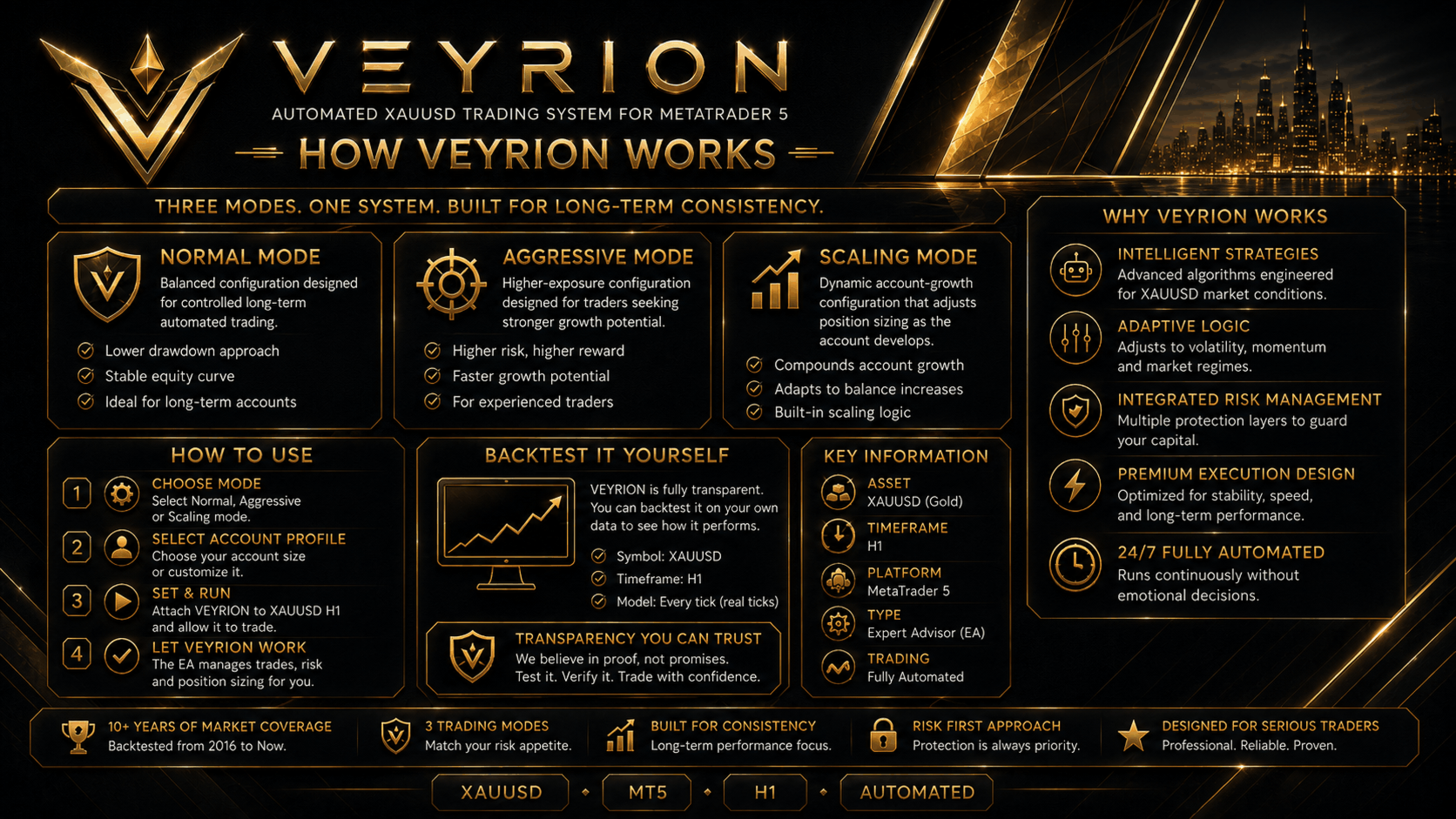
VEYRION is built around three distinct operating modes:
NORMAL. AGGRESSIVE. SCALING.
Each mode provides a different approach to account exposure and account growth while the underlying trading process remains fully automated.
The goal is simple:
Give traders one professional XAUUSD system with multiple approaches to capital growth without requiring constant manual intervention.
SPECIAL LAUNCH PRICE: $699.99
VEYRION is currently available at a special launch price of $699.99.
The price will progressively increase as more copies are sold until reaching:
FINAL PRICE: $1,199.99
Buy VEYRION during the launch period to secure your license at the special launch price before the next price increase.
VEYRION was not designed as an EA that simply opens trades and leaves the rest to the trader.
Trade execution, position management, account control and exposure management are integrated directly into the system.
Once correctly configured, VEYRION handles:
-
Market monitoring
-
Trade execution
-
Position management
-
Exit management
-
Stop Loss management
-
Daily account control
-
Trading schedule
-
Account protection logic
-
Position sizing
-
Dynamic scaling when Scaling Mode is enabled
No manual trade execution is required.
THREE TRADING MODESOne of the core features of VEYRION is the ability to choose between three integrated operating modes.
The trading system remains automated, while the selected mode determines the approach to account exposure and development.
NORMAL MODE
Normal Mode is the most controlled VEYRION configuration.
It is designed for traders who prioritize a balanced approach to automated account development.
Designed for:
-
Controlled exposure
-
Balanced account management
-
Long-term automated operation
-
More conservative account development
For users who are new to VEYRION, Normal Mode is the logical configuration to evaluate first.
AGGRESSIVE MODE
Aggressive Mode increases the capital exposure of the system.
It is designed for traders who are prepared to accept greater account exposure in exchange for stronger growth potential.
Designed for:
-
Increased exposure
-
Greater growth potential
-
Faster account development
-
More aggressive account management
The trading system itself remains automated.
The main difference is the level of exposure applied to the account.
SCALING MODE
Scaling Mode introduces dynamic account-growth management.
Instead of maintaining the same exposure indefinitely, VEYRION can adjust its position sizing as the account develops.
This creates a compounding-oriented approach where exposure can progressively increase together with account growth.
Designed for:
-
Dynamic account growth
-
Progressive position sizing
-
Compounding-oriented trading
-
Long-term account scaling
Scaling calculations are handled automatically by VEYRION once Scaling Mode is enabled.
INTEGRATED ACCOUNT MANAGEMENTVEYRION does not focus only on finding entries.
Position and account management are integrated directly into the trading system.
Depending on the selected mode and account configuration, VEYRION manages elements including:
-
Position sizing
-
Automated Stop Loss management
-
Trailing Stop management
-
Position management
-
Daily account control
-
Account protection logic
-
Trading schedule
-
Dynamic account scaling
This allows the complete trading process to remain under one automated system.
AUTOMATED OPERATIONOnce correctly configured, VEYRION manages the trading process automatically.
The EA handles:
-
Market monitoring
-
Entry execution
-
Position management
-
Exit management
-
Trading schedule
-
Account management
-
Scaling calculations when Scaling Mode is enabled
No manual trade execution is required.
SIMPLE CONFIGURATIONVEYRION is designed to keep setup straightforward.
The trader does not need to manually calculate every internal parameter.
Instead, VEYRION provides account configurations that automatically apply the corresponding internal values.
The basic setup consists of three main steps:
1. SELECT YOUR TRADING MODE
Choose:
NORMAL
AGGRESSIVE
or
SCALING
2. SELECT YOUR ACCOUNT CONFIGURATION
Choose the configuration corresponding to the account setup you intend to use.
VEYRION automatically applies the corresponding internal configuration.
3. ENABLE ALGORITHMIC TRADING
Once VEYRION is attached correctly and Algorithmic Trading is enabled, the system manages the trading process automatically.
RECOMMENDED SETUPInstrument: XAUUSD / Gold
Platform: MetaTrader 5
Timeframe: H1
Trading: Fully automated
Recommended Broker: IC Markets
Recommended Account: RAW / ECN
VPS: Recommended for continuous operation
Recommended Strategy Tester Model: Every tick based on real ticks
BROKER AND ACCOUNT REQUIREMENTSVEYRION is designed for XAUUSD and performs best under suitable low-cost trading conditions.
RECOMMENDED BROKER
IC Markets
The historical testing environment used during VEYRION development includes IC Markets data and trading conditions.
When using another broker, we recommend choosing an account with:
-
Low XAUUSD spreads
-
RAW pricing or ECN-style trading conditions
-
Fast and stable execution
-
Reliable XAUUSD historical data
-
MetaTrader 5 support
RECOMMENDED ACCOUNT TYPE
RAW / ECN
Low trading costs are important because broker conditions can directly influence automated trading results.
BROKER DIFFERENCESResults can differ between brokers.
Different brokers can provide different:
-
Spreads
-
Commissions
-
Tick history
-
Price feeds
-
Execution conditions
-
Slippage
-
Contract specifications
-
Trading sessions
-
Server times
-
Historical data quality
For the closest possible environment to the testing used during development, IC Markets is recommended.
If you use another broker, select a low-spread RAW or ECN account and test VEYRION using that broker's own XAUUSD historical data.
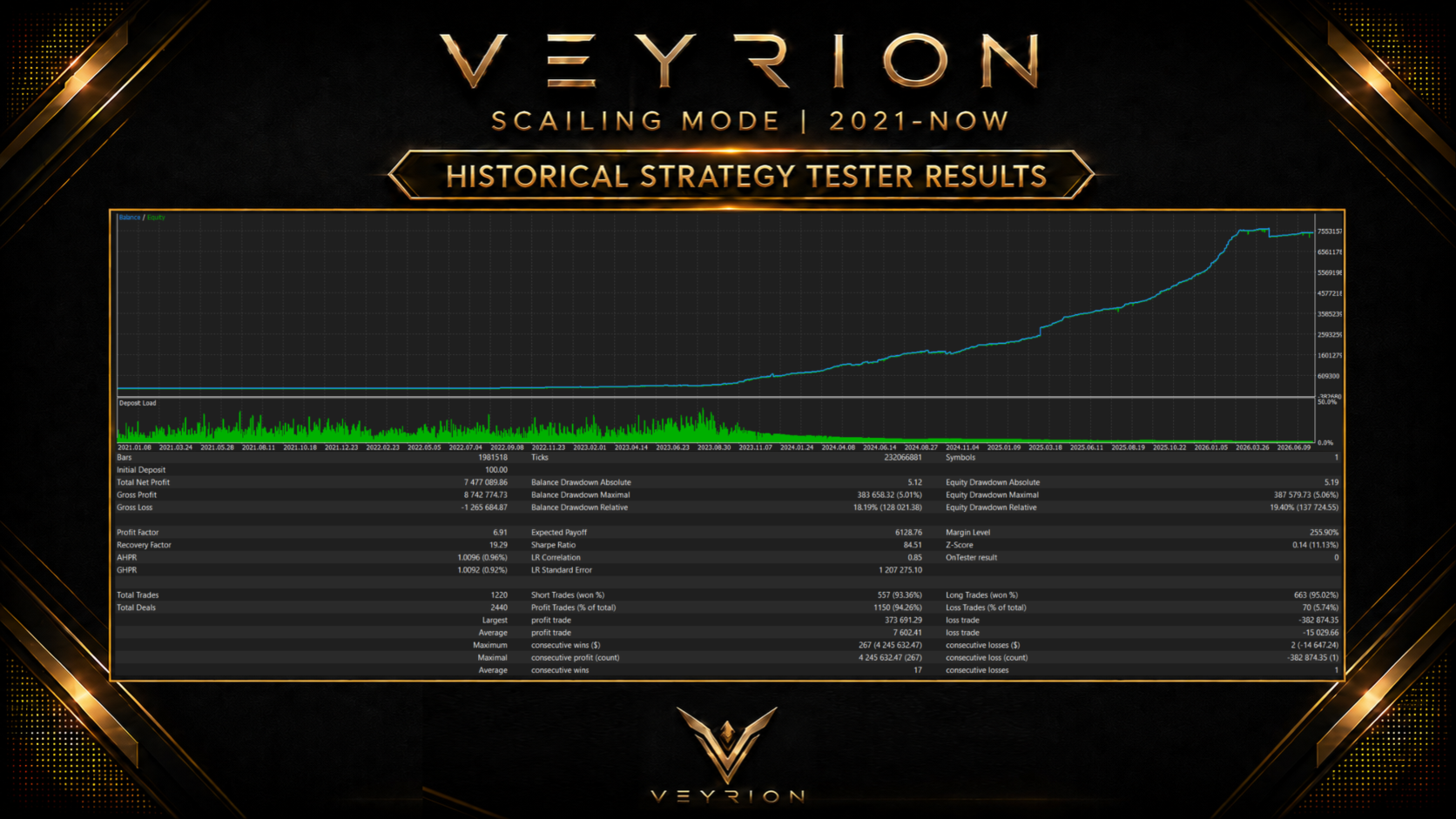
EXTENDED HISTORICAL TESTINGVEYRION has been evaluated across extended historical XAUUSD periods.
Long-term testing presented with the system extends as far back as:
2016This exposes the system to years containing different:
-
Gold price levels
-
Volatility environments
-
Market cycles
-
Trending conditions
-
Consolidation periods
-
Economic environments
The purpose of long-term evaluation is not to judge the EA from one isolated market period, but to examine how the system behaves across substantially different Gold market environments.
The product screenshots include Strategy Tester results for the different VEYRION modes.
STRATEGY TESTER TIME CONFIGURATIONBroker server time can differ between trading environments.
VEYRION therefore provides dedicated Strategy Tester broker-time settings.
When performing historical tests, configure:
Broker DST Rule
Broker Winter UTC Offset
Broker Summer UTC Offset
These values refer to the broker server timezone, not the trader's personal location.
During live operation, VEYRION handles the relevant broker-time synchronization automatically.
HOW TO START1. INSTALL VEYRION
Install VEYRION through the MQL5 Market in MetaTrader 5.
2. OPEN XAUUSD
Open your broker's XAUUSD / Gold chart.
3. SELECT H1
Set the chart timeframe to:
H1
4. ATTACH VEYRION
Drag VEYRION onto the XAUUSD H1 chart.
5. SELECT YOUR MODE
Choose:
Normal Mode
Aggressive Mode
or
Scaling Mode
6. SELECT YOUR ACCOUNT CONFIGURATION
Choose the appropriate configuration for the account setup you intend to use.
7. ENABLE ALGORITHMIC TRADING
Enable Algorithmic Trading in MetaTrader 5.
VEYRION can now manage its trading process automatically.
VPS RECOMMENDATIONFor continuous automated operation, a stable VPS is recommended.
MetaTrader 5 must remain connected and Algorithmic Trading must remain enabled for VEYRION to operate.
A VPS can provide:
-
Continuous MetaTrader 5 operation
-
Stable internet connectivity
-
Lower interruption risk
-
Continuous EA execution
Is VEYRION fully automated?
Yes.
Once correctly configured and enabled, VEYRION handles the trading process automatically.
Which market does VEYRION trade?
VEYRION is developed specifically for:
XAUUSD / GOLD
Which platform is required?
MetaTrader 5
Which timeframe should I use?
H1
VEYRION should be attached to the XAUUSD H1 chart.
Which broker is recommended?
IC Markets
If another broker is used, a low-spread RAW or ECN environment with reliable XAUUSD execution and historical data is recommended.
Which account type is recommended?
RAW / ECN
Broker trading costs and execution conditions can directly influence automated XAUUSD results.
What is the difference between the three modes?
NORMAL MODE
The most controlled VEYRION configuration.
AGGRESSIVE MODE
Higher account exposure with stronger growth potential.
SCALING MODE
Dynamic account-growth configuration where position sizing can increase as the account develops.
Which mode should I start with?
If you are unfamiliar with VEYRION, start by evaluating:
Normal Mode
Why can results differ between brokers?
Broker environments are not identical.
Differences in:
-
Spread
-
Commission
-
Historical tick data
-
Price feed
-
Server time
-
Contract specifications
-
Slippage
-
Execution conditions
can change results.
For the closest comparison with the environment used during development:
IC Markets is recommended.
Does my personal timezone matter?
Not for the trading strategy itself.
During live trading, VEYRION handles the relevant broker-time synchronization automatically.
For Strategy Tester operation, configure the provided tester settings according to the historical broker server timezone, not your personal timezone.
Does VEYRION trade every day?
Not necessarily.
Trading activity depends on whether the system's required market conditions are present.
Some periods can contain more trades than others.
Do I need to keep MetaTrader 5 running?
Yes.
MetaTrader 5 must remain connected with Algorithmic Trading enabled.
For continuous operation, a VPS is recommended.
Are future updates included?
Updates released for VEYRION through the MQL5 Market are available to licensed users through the platform.
LIMITED LAUNCH PRICEFuture VEYRION updates released through the MQL5 Market remain available to licensed users.
VEYRIONNORMAL. AGGRESSIVE. SCALING.
One automated XAUUSD system. Three approaches to account growth.
Test it. Choose your mode. Run VEYRION.
WARNINGTrading XAUUSD involves significant risk, and results may vary depending on market conditions, broker execution, spreads, commissions, slippage and price feed. Backtest results and previous performance do not guarantee identical results in live trading or future market conditions. VEYRION offers different trading modes with different levels of exposure, so always choose a configuration that matches your account size and personal risk tolerance.
At Redline Systems, our goal is to provide traders with reliable, transparent and professionally developed automated trading systems, but responsible risk management always remains in the hands of the trader. Test the EA before live use and never trade with capital you cannot afford to lose.
Trade safe.
Redline Systems