Polaris Nova
- Experts
- Versione: 52.0
- Aggiornato: 30 settembre 2026
- Attivazioni: 10

Polaris Nova is a single-model machine-learning EA built specifically for XAUUSD. It runs one ONNX classifier that scores entry timing, combined with a multi-timeframe RSI direction filter. It manages one basket at a time on gold — a single directional exposure that can, optionally, add further same-direction legs on adverse price movement to average into a position, rather than running multiple uncorrelated parallel slots.
The point of a single-basket design is control: at any moment you can see exactly what Polaris Nova is exposed to — one direction, one basket, one trailing state — instead of reasoning about several independent sub-systems at once.
Live signal: Polaris Edge — live signal
How entries work
At every new M1 bar, the EA builds a 23-feature snapshot (multi-timeframe returns, range-expansion, EMA distance and slope, range-position over several lookbacks, and multi-timeframe RSI) and runs it through the ONNX model. The model outputs a score between 0 and 1; if it crosses the configurable entry threshold (0.90 by default) and the RSI direction filter (M15+M30) agrees, and the session/news filters allow it, a basket opens.
There is no fixed take-profit. The exit is an adaptive trailing stop: once floating profit reaches an "arm" threshold, the stop follows the peak favorable price at a configured trail distance. Single-leg trades and multi-leg baskets can use separate arm/trail distances (baskets are allowed to run further before trailing kicks in, since a multi-leg position has a different risk profile than a single trade). An ATR-based trailing mode is also available if you prefer the distance to scale with realized volatility instead of fixed pips.Position sizing
Four modes: Fixed Lot (manual), and three auto-scaling profiles — Low / Medium / High Risk — that size the lot as a percentage of current equity, recalculated on every new basket.
The percentages were calibrated against this EA's own real historical worst-case account-level drawdown: Low, Medium and High target roughly 20%, 40% and 60% of that worst historical case respectively as the account's maximum drawdown, at increasing lot sizes.
Because broker minimum lot is typically 0.01, Low and Medium sizing only start differentiating from each other once equity is large enough that their computed lot exceeds that floor — on small accounts, expect Low/Medium/Fixed to all trade near the broker minimum.
A note on money management (read this)
Polaris Nova's averaging/recovery layer is, structurally, a grid. Grid systems have a real, honest limitation: no amount of testing, filtering or risk-profile tuning changes the fact that a grid can encounter a market condition it wasn't built to survive. Backtests show what already happened; markets eventually do something that hasn't happened before. That's not a flaw specific to this EA — it's true of every grid/averaging system, and pretending otherwise would be dishonest.
The practical answer isn't to look for a setting that makes the risk disappear (there isn't one), it's to manage capital around that risk. A simple, well-known discipline for this: whenever the account balance doubles, withdraw a large majority of the profit (e.g. 80%) into something outside the trading account entirely, and let only a small slice (e.g. 20%) keep compounding. Do this every time the balance doubles again. That way, an eventual bad outcome only ever risks what you chose to leave compounding, not the wealth you've already pulled out.
Backtest, the honest version
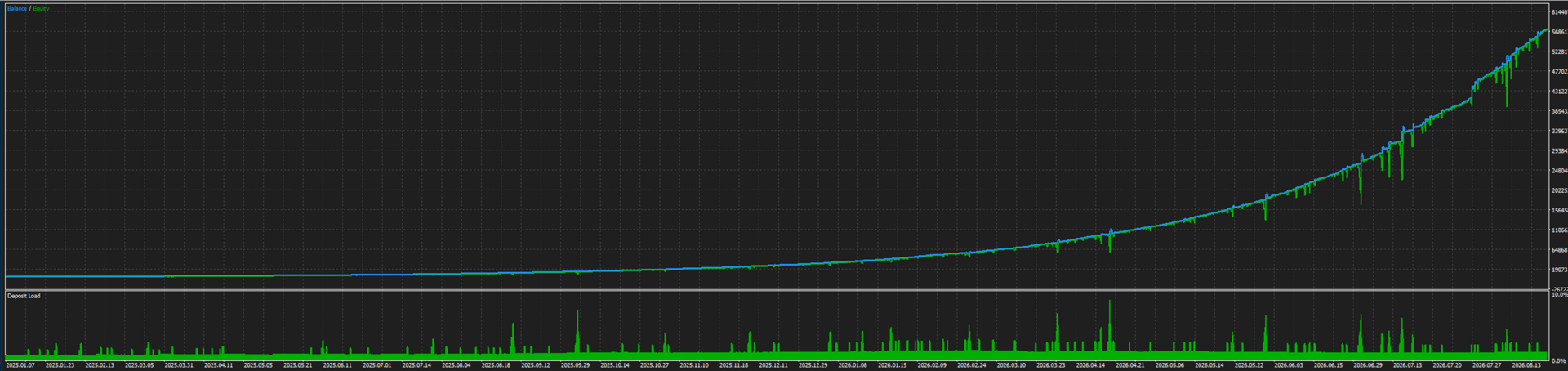
January 2025 to August 2026 (~20 months). Numbers: 1,047 trades, win rate 88.2%, profit factor 4.63, Sharpe ratio 7.38, recovery factor 14.24, max drawdown $292.10 (about 6% of equity at its peak, 14.6% of the $2,000 starting balance used for this run).
The on-chart panel
A live dashboard in the top-left shows: session state and active trailing preset, whether news/calendar is currently blocking entries, the model's current score/direction, current basket status (legs, average price, floating P&L, trailing arm/distance and armed state vs. leg cap), the active risk profile, computed lot for the next entry, equity/balance and drawdown from peak, and session trade history (closed trades, win rate, realized P&L). It can be turned off from the inputs if you prefer a clean chart.
Symbol scope
XAUUSD (gold) only. The entry model and pip arithmetic are gold-specific. In live trading, the EA will refuse to start on a non-gold symbol.
Position Sizing
Risk profile (default: *Fixed Lot*)
Chooses how the EA sizes each trade:
· Fixed Lot — always uses the "Lot size" input below, unchanged.
· Low / Medium / High Risk — lot size recalculates on every new basket as a percentage of current equity, so it grows or shrinks automatically with your account. Low, Medium and High target progressively larger position sizes (roughly 20% / 40% / 60% of this EA's own historical worst-case drawdown, respectively). On small accounts, Low and Medium may both round down to the broker's minimum lot until equity grows enough to lift them above that floor.
Lot size (default: 0.01)
Only used when Risk profile = Fixed Lot. The lot is still clamped to your broker's minimum/maximum/step for the symbol.
Entry: Neural Timing Model
Min. signal score to open (default: 0.90)
The entry model scores every new bar from 0 to 1. A trade is only considered when the score is at or above this threshold. Higher = more selective (fewer, higher-conviction entries). Lower = more trades, lower average conviction. 0.90 is a deliberately high bar; lowering it substantially changes the EA's trade frequency and risk profile and should be re-tested, not just tuned by feel.
Entry: Direction (RSI momentum)
RSI period (default: 14) — period used for the M15 and M30 RSI readings that confirm trade direction.
Buy level / Sell level (default: 50.0 / 50.0) — direction is BUY when both M15 and M30 RSI are above the buy level, SELL when both are below the sell level. Leaving a gap between them (e.g. buy=55, sell=45) makes the filter stricter; setting them equal (default) means direction always follows whichever side of 50 both timeframes agree on.
Entry: Session & Timing
Restrict trading to specific hours (default: true) — if off, the EA can open new baskets at any hour (existing exits/risk controls still apply regardless).
Active hours (default: 5,6,7,8,9,11,12,13,17,18,19, broker server time) — comma-separated list of hours (0–23) during which new baskets/legs may open. These were chosen to concentrate trading in the session windows that tested best; changing this list changes trade frequency and timing meaningfully.
Minimum minutes between new entries (default: 1) — cooldown after closing a basket before a new one can open.
Allow long / Allow short positions (default: both true) — disable either side if you only want the EA trading one direction.
Entry: News Calendar Filter
This is the EA's primary, always-recommended news-avoidance layer, using MetaTrader's own built-in economic calendar.
Pause trading around major news events (default: true) — master on/off switch for this filter. Recommended to leave on.
Currency to monitor (default: USD) — which currency's calendar events are checked (USD is the relevant one for gold).
Min. importance to trigger pause (default: High) — only used if the whitelist below is off.
Restrict to FOMC/NFP/PCE only (default: true, recommended) — instead of pausing around every high-importance USD release, only pause around FOMC decisions, Non-Farm Payrolls and PCE inflation data — the releases most consistently linked to sharp gold moves. Turning this off broadens the filter to all high-importance USD events, which will pause trading more often.
Hours to pause before an event (default: 24) — how far in advance the EA stops opening new baskets/legs ahead of a matched event.
Minutes to pause after an event (default: 30) — how long after the event the pause continues.
Entry: Live Forex Factory Feed (live trading only)
A second, independent news layer that pulls real-time data from a public Forex Factory calendar feed over the internet. This entire section only runs in live trading — it is always disabled in Strategy Tester automatically, so backtests are unaffected by whether it's on or off.
Enable Forex Factory news feed (default: true) — requires adding the URL below to MetaTrader's allowed WebRequest URLs (Tools → Options → Expert Advisors) or it will silently fail to fetch and log a warning.
Forex Factory calendar URL (default: https://nfs.faireconomy.media/ff_calendar_thisweek.json) — don't change unless the feed's address changes; must be whitelisted in the terminal's WebRequest settings to work.
Feed refresh interval (default: 6 hours) — how often the EA re-downloads the calendar.
Hours to pause before / minutes to pause after (default: 24 / 30) — same concept as the calendar filter above, applied to events found in this live feed.
Exit: Trailing Stop
Polaris Nova doesn't use a fixed take-profit — it lets profitable trades run and locks in gains with a trailing stop once a trade (or basket) has moved far enough in its favor.
Trailing preset (default: Combo (Recommended))
· Conservative — 25 pip arm / 12 pip trail, same for single trades and baskets.
· Optimized Single — 34 / 16 pips, same for single trades and baskets.
· Wide Basket — 25/12 pips for single trades, 50/25 for multi-leg baskets.
· Combo — 34/16 single, 50/25 basket.
· Combo Aggressive — 34/16 single, 80/35 basket (wider basket trail — more room to run, but a larger giveback if it reverses).
· Combo (Recommended) — 34/16 single, 60/15 basket. This is the shipped default, chosen after testing multiple single/basket combinations for the best balance of profit vs. worst-case drawdown found in our own testing.
· Custom — ignores the preset and uses the five manual fields below instead.
(Custom only) Arm trail after this many pips / Trail distance, single trade (default: 25.0 / 12.0) — for a single-leg position: once floating profit reaches the arm value, the stop trails the peak price by the trail distance.
(Custom only) Use separate arm/trail for multi-leg baskets (default: false) — if enabled, a basket (2+ legs) uses the two basket-specific values below instead of the single-trade ones.
(Custom only) Arm trail after this many pips / Trail distance, basket (default: 25.0 / 12.0).
Use ATR-based trailing instead of fixed pips (default: false) — if enabled, the arm/trail distances scale with recent volatility (ATR) instead of being fixed pip values; the settings below only apply when this is on.
ATR timeframe / ATR period (default: M5 / 14).
Arm trail at this many ATR units of profit (default: 0.29) — e.g. 0.29× the current ATR value.
Trail distance as ATR multiple (default: 0.17).
Risk: Stop Loss
All of these are optional, independent hard backstops — they work regardless of whether averaging (below) is enabled, and can be combined freely.
Emergency stop-loss on basket average price (default: 0.0 = off) — if set above 0, force-closes the whole basket if the price move against the basket's average entry price reaches this many price units.
Apply stop-loss only to single-leg baskets (default: false) — if enabled, the emergency stop-loss above only applies while the basket has exactly one leg (it stops protecting once averaging has added a second leg).
Close basket if floating loss exceeds this ($) (default: 0.0 = off) — a hard dollar loss cap per basket.
Close basket if floating loss exceeds this (% of equity) (default: 0.0 = off) — a hard percentage-of-equity loss cap per basket; if both this and the dollar cap are set, the percentage one takes priority.
Force-close basket at this many legs (default: 0 = off) — closes the whole basket the instant leg count reaches this number, regardless of current profit/loss. This is a structural cap independent of the dollar/percentage loss caps above.
Risk: Averaging Recovery
Enable averaging (default: true) — allows the EA to add further same-direction legs when price moves against the basket, instead of relying only on the trailing exit of the first leg.
Add a leg after this much adverse price movement (default: 20.0) — the required adverse move (in price units, scaling with the number of legs already open) before another leg is added.
Maximum legs per basket (default: 20) — hard ceiling on how many legs a single basket can reach through averaging, independent of the "Force-close at this many legs" input above (which actively closes the basket; this one just stops adding more legs).
Important: disabling averaging (false) turns Polaris Nova into a single-trade-per-basket EA relying purely on the trailing stop above (plus whatever hard stop-loss/loss-cap inputs you set) — a materially different risk profile than the shipped default. If you plan to run it that way, re-test first rather than assuming the default trailing preset is still optimal.
Execution
Max spread to allow entry (points) (default: 1000) — new baskets/legs won't open if the current spread exceeds this. Set lower if your broker's typical gold spread is much tighter and you want to avoid entries during abnormal spread widening (e.g. news spikes, low-liquidity hours).
Identification
Magic number (default: 70071337) — used to tag and recognize this EA's own positions, separating them from any other EA or manual trades on the same account/symbol. Change it if you run multiple instances of Polaris Nova on the same account (e.g. different presets on different charts) so they don't interfere with each other's position tracking.
Order comment (default: PolarisNova) — cosmetic, shows up in your trade history.
Display
Show on-chart info panel (default: true) — toggles the dashboard showing session state, model score/direction, current basket status, trailing state, risk profile and lot size, equity/drawdown, and session trade history. Turn off for a clean chart; has no effect on trading logic either way.
Risk warning
Trading FX and CFDs is risky. You can lose all your capital. The numbers in this listing are historical and depend on broker conditions, spread, and news-calendar completeness at your broker; your results will differ. This is not investment advice, and we are not liable for trading losses. Demo-test on your broker before going live, and never run the EA on capital you can't afford to lose. If you enable the averaging/recovery feature, understand that it increases simultaneous exposure during adverse moves — review the leg cap and loss-cap inputs before enabling it.