Candle Status Pro
- Indicatori
- Versione: 1.0

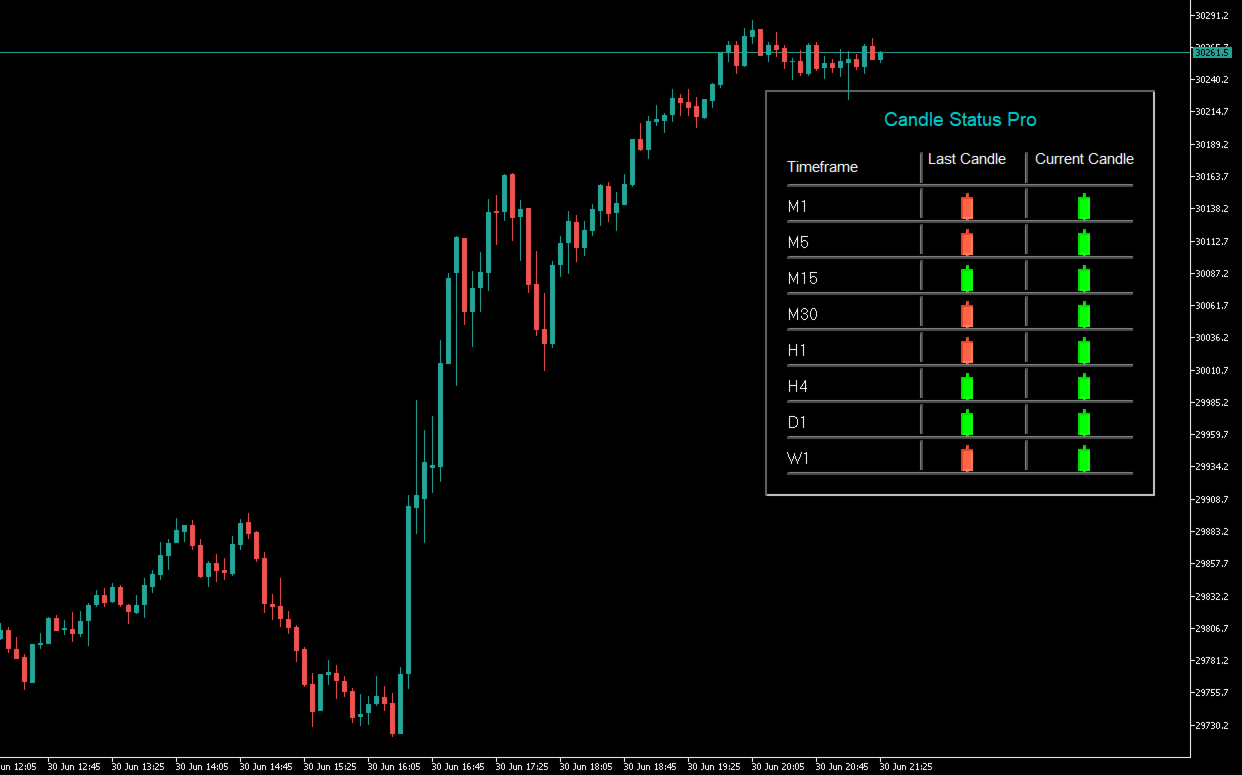
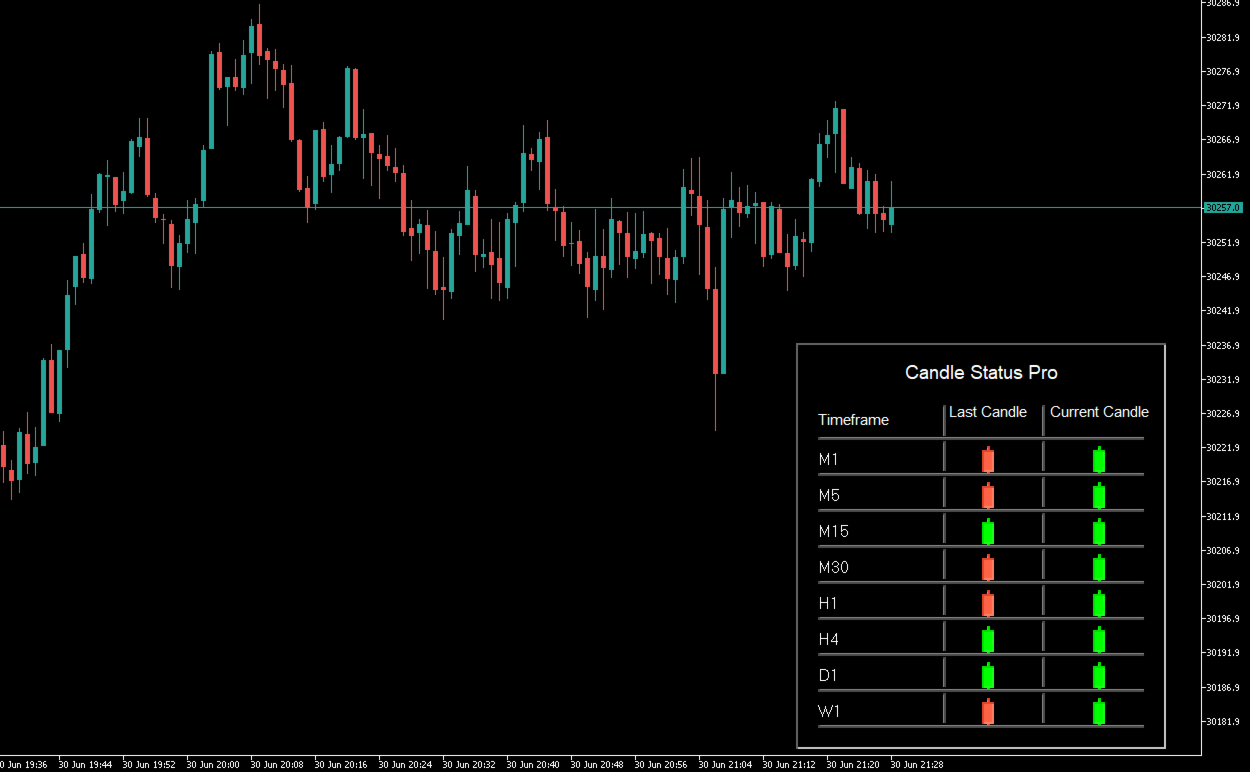
Candle Status Pro is a professional multi-timeframe indicator for MetaTrader 5 that displays the status of both the last closed candle and the current active candle across multiple timeframes in a clean and easy-to-read panel.
Instead of displaying a countdown timer, the indicator visualizes the direction of each candle using colored candle icons. This allows you to instantly see whether the last or current candle of any selected timeframe is bullish or bearish—without switching between multiple charts.
The indicator supports all major timeframes from M1 to W1 and updates automatically in real time. The panel is fully customizable, allowing you to adjust colors, transparency, font size, position, and the displayed timeframes to perfectly match your trading workspace.
Candle Status Pro is especially useful for traders who monitor multiple timeframes simultaneously and want to quickly determine whether different market structures are aligned in the same direction.
Main Features- Displays the last closed candle (Last Candle)
- Displays the current active candle (Current Candle)
- Color-coded bullish and bearish candle icons
- Optional neutral color for Doji candles
- Supports all timeframes from M1 to W1
- Freely selectable timeframes
- Clean and professional multi-timeframe panel
- Real-time updates with every market tick
- Optional background panel
- Optional grid lines (show or hide)
- Customizable background color
- Adjustable background transparency
- Customizable text color
- Customizable bullish, bearish, and neutral candle colors
- Adjustable font size
- Optional bold font
- Display in front of or behind the candles
- Freely movable panel via drag & drop
- Automatically saves the panel position
- Very resource-efficient
- Optimized for all MT5 charts
Candle Status Pro is ideal for:
- Multi-Timeframe Analysis
- Price Action Trading
- Scalping
- Day Trading
- Swing Trading
- Trend Following
- Breakout Trading
- Momentum Trading
- Market Structure Analysis
- Top-Down Analysis
For strategies that combine multiple timeframes, Candle Status Pro provides an instant overview of whether different timeframes confirm the same market direction or produce conflicting signals.
Advantages- Instant overview of all important timeframes
- No need to switch between charts
- Clear visualization of the current market direction
- Clean and professional panel layout
- Fully customizable to match any chart design
- Extremely low CPU usage
- Works on every symbol and every chart
- Ideal for multi-timeframe traders
Select which timeframes should be displayed in the panel.
Available timeframes:
- Show M1
- Show M2
- Show M3
- Show M4
- Show M5
- Show M6
- Show M10
- Show M12
- Show M15
- Show M20
- Show M30
- Show H1
- Show H2
- Show H3
- Show H4
- Show H6
- Show H8
- Show H12
- Show D1
- Show W1
Each timeframe can be enabled or disabled independently.
APPEARANCEBackground Color
Sets the background color of the panel.
Background Transparency
Controls the transparency of the panel background.
- 0 = Fully opaque
- 255 = Fully transparent
Border Color
Sets the color of the panel border.
Grid Color
Sets the color of the grid lines inside the panel.
Title Color
Sets the color of the panel title.
Text Color
Sets the color of the timeframe labels.
Bull Candle Color
Sets the color of bullish candle icons.
Bear Candle Color
Sets the color of bearish candle icons.
Neutral Candle Color
Sets the color of neutral (Doji) candle icons.
Font Size
Adjusts the font size.
Bold Font
Enables or disables bold text.
Font Name
Selects the font used by the panel.
Show Background
Shows or hides the panel background.
When disabled, only the text and candle icons remain visible.
Show Grid Lines
Shows or hides the grid lines between each row.
This allows you to switch between a clean minimalist appearance and a structured table layout.
Draw Behind Candles
Choose whether the panel is displayed:
- Behind the candles
- In front of the candles
By default, the panel is displayed behind the candles.
POSITION & DISPLAYHorizontal Offset
Sets the horizontal position of the panel.
Vertical Offset
Sets the vertical position of the panel.
Panel Width
Defines the width of the panel.
Row Height
Adjusts the vertical spacing between each row.
Horizontal Padding
Sets the left and right padding inside the panel.
Vertical Padding
Sets the top and bottom padding inside the panel.
Show Title
Shows or hides the panel title.
Title Text
Allows you to customize the panel title.
Allow Drag
Allows the panel to be moved directly on the chart using drag & drop.
Save Dragged Position
Automatically saves the panel's last position.
The next time the indicator is loaded, the panel will appear in the same location.
CANDLE ICONCandle Body Width
Defines the width of the displayed candle icons.
Candle Body Height
Defines the height of the candle body.
Candle Wick Height
Defines the total height of the candle, including the wick.
BEHAVIORUpdate Interval (Seconds)
Defines how often the panel is updated.
The default value is 1 second, ensuring that all candle statuses are refreshed almost instantly in real time.