Anchored VWAP Studio
- Indicatori
-
Thomas Ludwig
 Under the name XTSFORGE, I develop indicators, trading tools, and automation tools – primarily for MetaTrader 5.
 - Versione: 1.2
- Aggiornato: 5 agosto 2026
- Attivazioni: 10
Anchored VWAP Studio
Anchored VWAP Studio by XTSFORGE is a workflow-oriented VWAP and Anchored VWAP indicator for MetaTrader 5. It is designed for traders who use VWAP as a structural reference and want to manage manually selected anchor points directly on the chart.
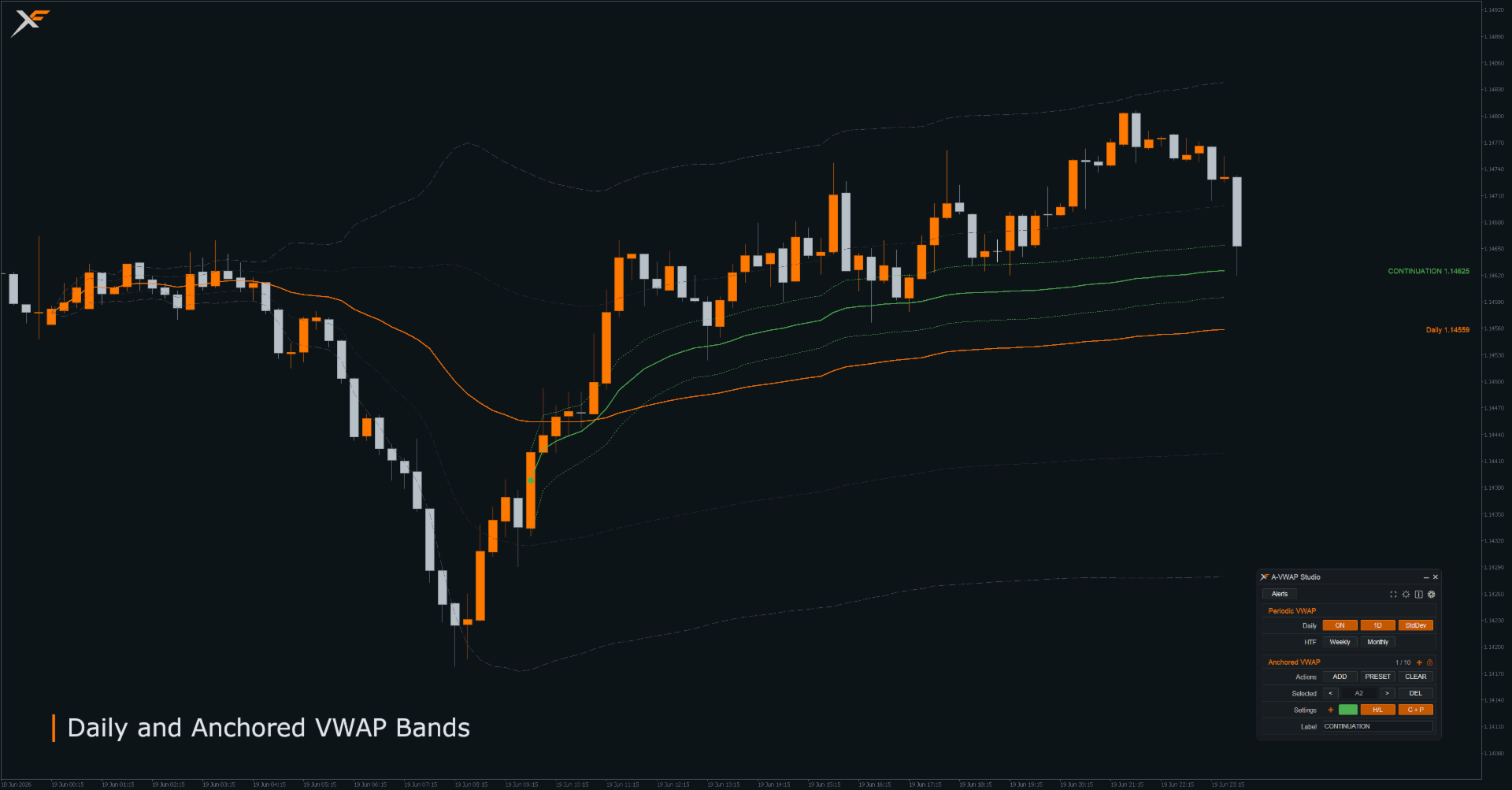
The indicator combines Daily, Weekly and Monthly VWAPs with manually placed Anchored VWAPs, optional bands, right-side price labels, alerts, hotkeys, settings profiles, anchor sets, intraday presets and an integrated chart control panel.
Anchored VWAP Studio does not generate automatic buy or sell signals. It is an analysis, reference and chart workflow tool. All trading decisions remain fully under the user's control.
Launch Pricing and Early User Feedback
Anchored VWAP Studio is currently available at an introductory lifetime price. This price is intended for the early launch phase while the product is new on the MQL5 Market and first users start using it across different setups, screen sizes, symbols, brokers and workflows.
The indicator has been carefully developed and tested, but real user environments can vary significantly. Feedback regarding visual display, usability, performance, broker data, screen resolution or reproducible technical issues helps to further review and improve Anchored VWAP Studio in a targeted way.
The current introductory price may be increased as the product matures, more user feedback is collected, further updates are released and broader Market usage is established.
Documentation
The full documentation is published as separate MQL5 articles so that each user can start with the part that is most relevant to them:
- Quick Start & First Setup - installation, first chart setup and basic workflow.
- User Manual & Feature Reference - complete user documentation for all main functions.
- Developer Guide - Data Interface v6, Command Interface v3, Alert Event Interface v1, public enum values and integration examples.
Main Features
- Daily, Weekly and Monthly VWAP reference lines
- Up to 20 manually placed Anchored VWAP slots
- Configurable maximum active anchor count
- Manual anchor placement directly on the chart
- Individual color, visibility, band mode and label mode per anchor
- NEW preset workflow for the next anchor before it is placed
- Anchor marker lock and live drag preview
- Optional bands for Daily VWAP and Anchored VWAPs
- High / Low bands and standard deviation bands
- Dual Band Mode with H/L and standard deviation bands
- Right-side VWAP labels with collision handling
- Custom labels for Anchored VWAPs
- Integrated chart control panel
- Scalable integrated UI with Compact, Standard and Comfort size presets
- Two-level Settings navigation for faster access to General and VWAP settings
- Dark, Light, Brand and Custom UI themes
- Optional Plain Symbols UI mode
- Configurable chart hotkeys
- Clean Screenshot Mode
- Alert system for VWAP and band interactions with controlled delivery testing
- Settings Profiles for saving indicator configurations and automatic runtime restoration
- Anchor Sets for saving and reusing groups of anchors
- Intraday Presets for recurring time-based anchors
- Optional custom display names for Intraday Preset slots
- Transactional hidden-object Data Interface v6 for EAs and scripts
- Verified global-variable Command Interface v3 for external control through Bridge modes
- Alert Event Interface v1 for external access to committed alert events and delivery diagnostics
Manual Anchored VWAP Workflow
Anchored VWAP Studio is built around manual anchor decisions. Instead of automatically guessing anchor points, the indicator lets the user decide exactly where an Anchored VWAP should begin.
An anchor can be placed on a swing high, swing low, session start, impulse candle, news candle, breakout, reclaim or any other chart location that is relevant to the user's own analysis.
Each anchor can be managed individually. Color, visibility, band mode, label mode, custom label text, marker position and deletion can be controlled per anchor. The NEW preset workflow allows the next anchor to be prepared before it is placed on the chart.
Periodic VWAP Context
Daily, Weekly and Monthly VWAPs can be used as broader reference levels. The Daily VWAP supports configurable reset behavior, history display and optional bands. Weekly and Monthly VWAPs provide higher-timeframe context for intraday analysis.
Periodic VWAP labels can show the name, current price or both near the right edge of the chart, helping important VWAP levels remain readable without tracing the line back across the chart.
Bands and Labels
Daily VWAPs and Anchored VWAPs can display optional bands. Available band modes are:
- OFF
- High / Low bands
- Standard deviation bands
- Dual Mode with High / Low and standard deviation bands
Right-side labels help keep current VWAP and Anchored VWAP levels readable. Collision handling separates labels that are close together. Anchored VWAP labels can display the anchor number, price, custom text or a combination of these values.
Alerts
Anchored VWAP Studio includes optional alerts for VWAP and band interactions. Supported event types include Cross, Break, Touch and Band Touch.
Alerts can be delivered as terminal alerts, push notifications or email alerts, depending on the user's MetaTrader 5 terminal configuration. The email subject can be customized in the alert settings. Hidden Anchored VWAPs do not trigger Anchored VWAP alerts.
An armed two-step delivery test can send controlled test messages across all enabled channels without triggering a VWAP market event or changing cooldown and once-per-bar state.
Hotkeys and Chart Workflow
The integrated chart panel is designed for visual chart operation. Configurable hotkeys can be used for frequent actions such as adding anchors, selecting anchors, toggling VWAPs, cycling band modes, changing labels and activating Clean Screenshot Mode.
Hotkeys are active only when the integrated UI is visible and hotkeys are enabled in the indicator inputs. In Bridge-only mode, integrated UI hotkeys are disabled.
Settings Profiles and Anchor Sets
Settings Profiles allow users to save and restore indicator configuration such as themes, line styles, label settings, alert settings and intraday preset rows. Profiles can be saved, loaded, updated, renamed or deleted from the integrated Settings window. Supported runtime settings are also restored automatically through a private Runtime Settings State, while an explicitly configured startup Settings Profile retains final priority.
Anchor Sets allow users to save groups of manually placed anchors for the current symbol. A saved Anchor Set can replace the current anchors or be added to free anchor slots. Anchor Sets can also be updated, renamed or deleted.
Profiles are intended for configuration. Anchor Sets are intended for actual symbol-specific anchor collections.
Intraday Presets
Intraday Presets make it possible to add recurring time-based anchors, such as session opens, market opens or scheduled event times. Preset rows can be grouped into P1, P2 and P3 and then added to the chart or used to replace the current anchors.
Preset times are interpreted in broker server time. The P1, P2 and P3 slots can use optional custom display names.
Clean Screenshot Mode
Clean Screenshot Mode temporarily hides the integrated UI and related control overlays so the chart can be reviewed or captured more clearly. While the mode is active, a restore button is shown.
VWAP lines, Anchored VWAPs, labels and anchor markers remain controlled by their normal visibility settings.
Developer Functions
Advanced users can enable the transactional hidden-object Data Interface v6 to read current VWAP, Anchored VWAP, band, alert and anchor-state data from EAs or scripts through verified dual-slot snapshots.
The global-variable Command Interface v3 allows external tools to control selected indicator functions with verified acknowledgements when a Bridge-capable control mode is active. Supported command areas include Periodic VWAP visibility, Daily history, Weekly and Monthly history, alerts, global anchor visibility, anchor lock state, anchor slots, colors, bands, label modes and label text. Published legacy compatibility with Command Interface v2 is retained.
The Alert Event Interface v1 publishes committed alert events and delivery diagnostics for external readers without providing trading decisions or order execution.
Data Interface v6, Command Interface v3 and Alert Event Interface v1 are documented separately in the Developer Guide.
Typical Use Cases
- Intraday VWAP analysis
- Manual Anchored VWAP workflows
- Anchoring from swing highs and swing lows
- Session open and market open reference levels
- Previous-session structure analysis
- Anchoring from news candles or impulse moves
- Multi-anchor confluence analysis
- Clean chart screenshots for review and journaling
- Alert-based monitoring of important VWAP levels
- EA-assisted workflows through public interfaces
Important Notes
VWAP behavior depends on available historical data, broker sessions, timeframe data and the selected price and volume settings. VWAP calculations require usable broker-provided volume data. On many Forex and CFD symbols, tick volume is used when real volume is not available. If a symbol does not provide usable or reliable volume data, VWAP and Anchored VWAP calculations may be incomplete or not meaningful.
Very old anchor points may be limited by the indicator's internal performance protection logic in order to keep chart interaction responsive.
MetaTrader may render non-solid line styles such as Dash, Dot or DashDot differently depending on line width, chart zoom and display scaling. For the clearest visual distinction between non-solid styles, line width 1 is recommended.
The MQL5 Market demo version of indicators can only be tested in the MetaTrader Strategy Tester visual mode. Because Anchored VWAP Studio is designed around interactive chart controls, manual anchors, hotkeys and visual workflow, screenshots, product video and documentation are important for understanding the full on-chart workflow before choosing a rental or full license.
Risk Disclaimer
This product is a technical analysis and chart workflow tool. It does not provide financial advice, investment advice, personal recommendations, trading recommendations or guaranteed entry or exit signals.
All displayed levels, calculations, markers, bands, labels, panels, alerts and workflow functions are informational or user-configured tools only. They must be interpreted, configured and controlled by the user.
This product does not guarantee profits, does not prevent losses and does not predict future market movements. Trading financial instruments involves significant risk. Past market behavior, visual examples, screenshots, described use cases or test results do not guarantee future results.
The user is solely responsible for all trading decisions, risk management, broker selection, position sizing, product settings and the use of this product on demo or live accounts. Before using this product on a live account, it should be tested carefully in the MetaTrader 5 Strategy Tester and/or on a demo account.
Anchored VWAP Studio itself does not generate buy or sell signals. The indicator provides volume-based reference levels, Anchored VWAPs, Periodic VWAPs, bands, alerts and visual workflow tools for market analysis. Any trading decision based on these levels is made exclusively by the user.
License and Updates
The unlimited license provides unlimited product validity within the MQL5 Market activation system. Rental licenses are valid for the selected rental period.
Product updates, maintenance releases and improvements are provided through the MQL5 Market when available. Ongoing feature development is not guaranteed. Critical issues affecting documented functionality will be reviewed and addressed where reproducible.
Support
Support is provided through the MQL5 product comments and MQL5 private messages.
For bug reports, please include the MetaTrader 5 build, broker, symbol, timeframe, product version, screenshots, relevant settings and a short description of the issue. If possible, include clear steps to reproduce the issue.
Support covers installation, documented product features, settings, reproducible technical issues and general usage clarification.
Support does not include financial advice, personal trading recommendations, account-specific strategy optimization, signal services, guaranteed setup files or guaranteed trading outcomes.
Support requests are reviewed regularly. During holidays or periods of limited availability, response times may be longer. Critical reproducible bug reports are prioritized.
Privacy
The product does not collect or transmit personal user data.
The product may store local configuration and workflow data inside the user's MetaTrader 5 environment, such as indicator settings, Runtime Settings State, Settings Profiles, Anchor Sets, local anchor persistence data, hidden chart objects used by the optional Data and Alert Event Interfaces, and terminal Global Variables used by the optional Command Interface.
Support is handled through the MQL5 platform. Please do not share account credentials, personal documents, payment data, private account numbers or other sensitive information in support messages.