OZ Telegram Report

OZ Telegram Report MT5

Turn your MetaTrader 5 account into a professional Telegram-powered trading journal, analytics hub, and risk assistant.

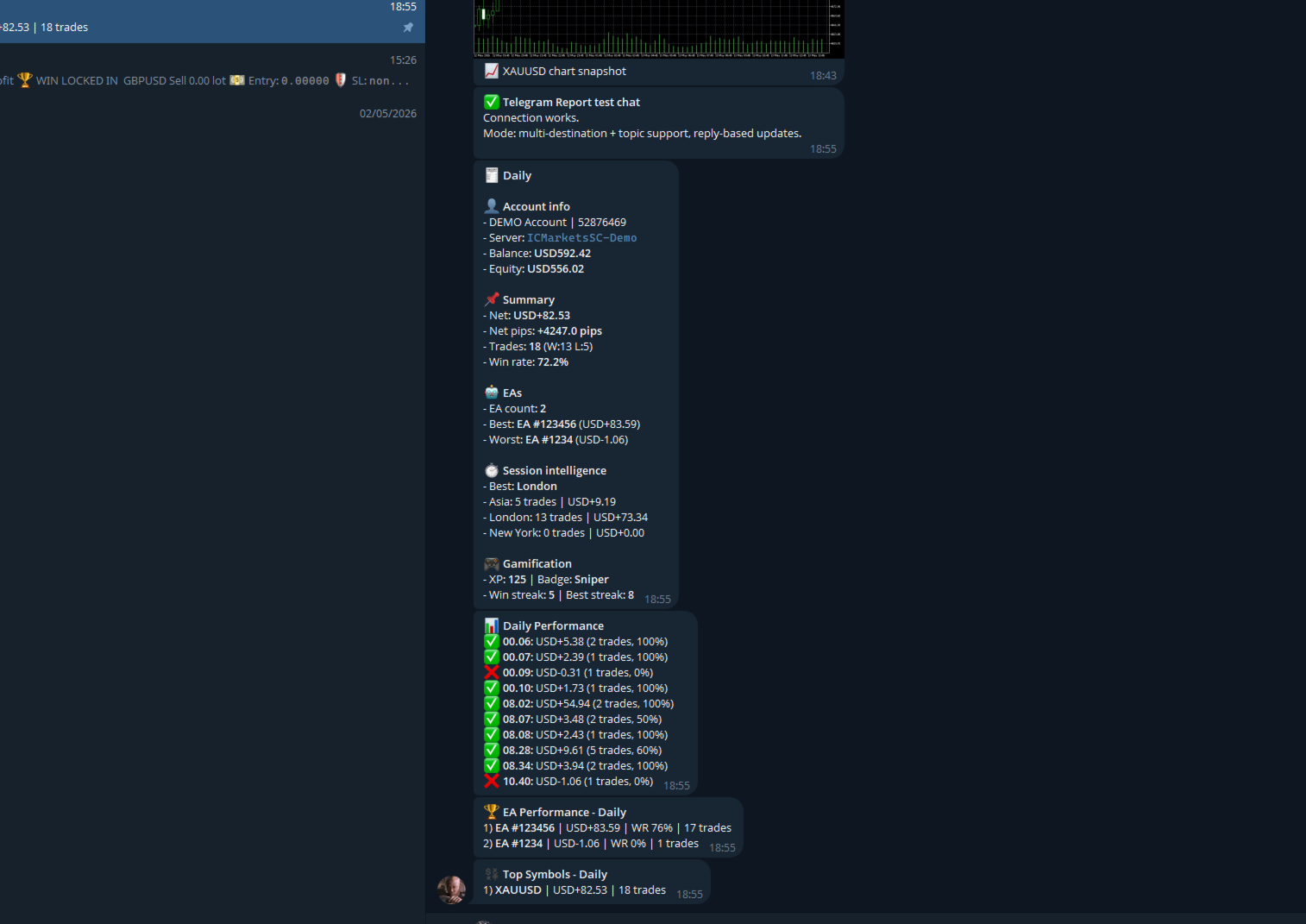
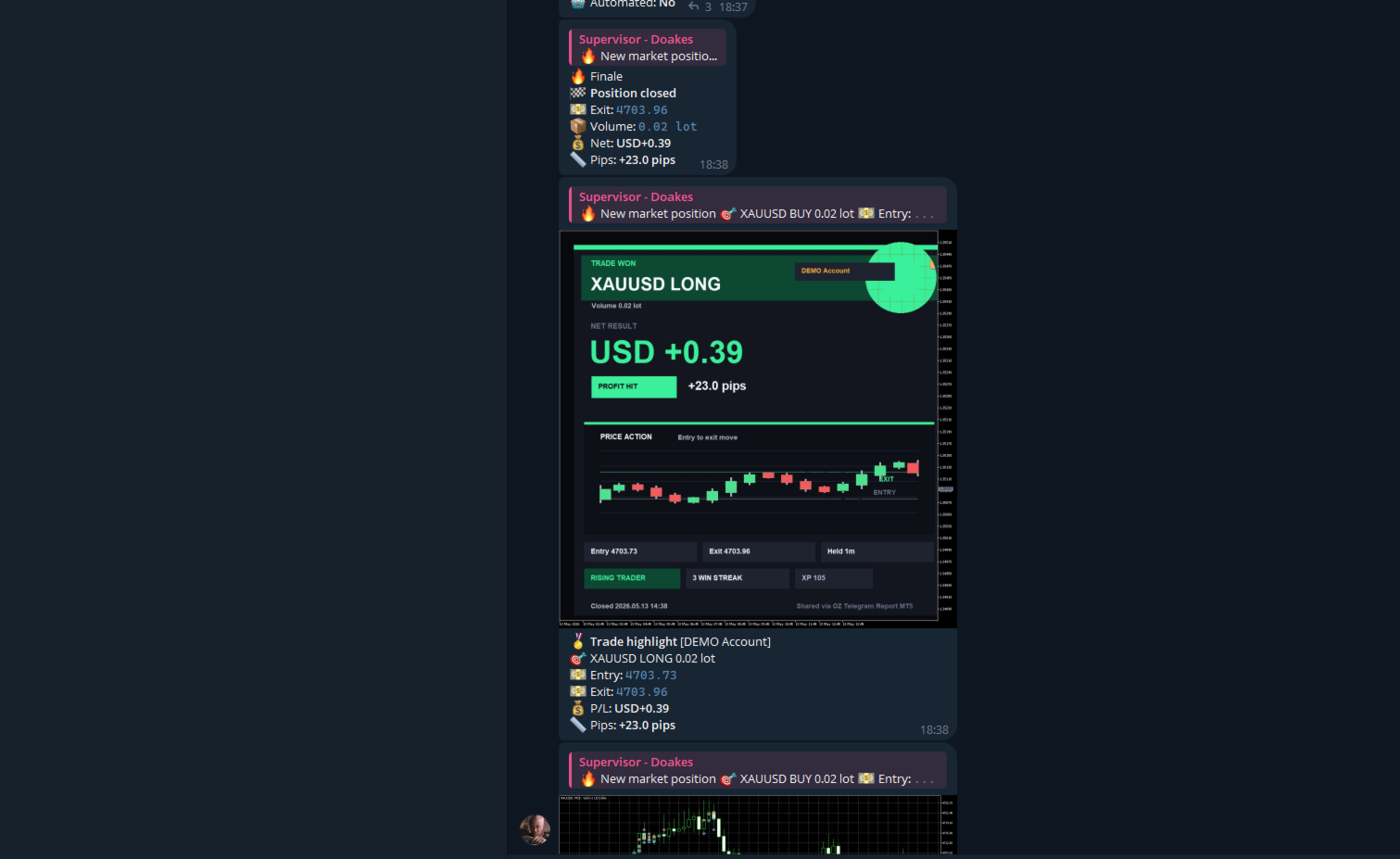
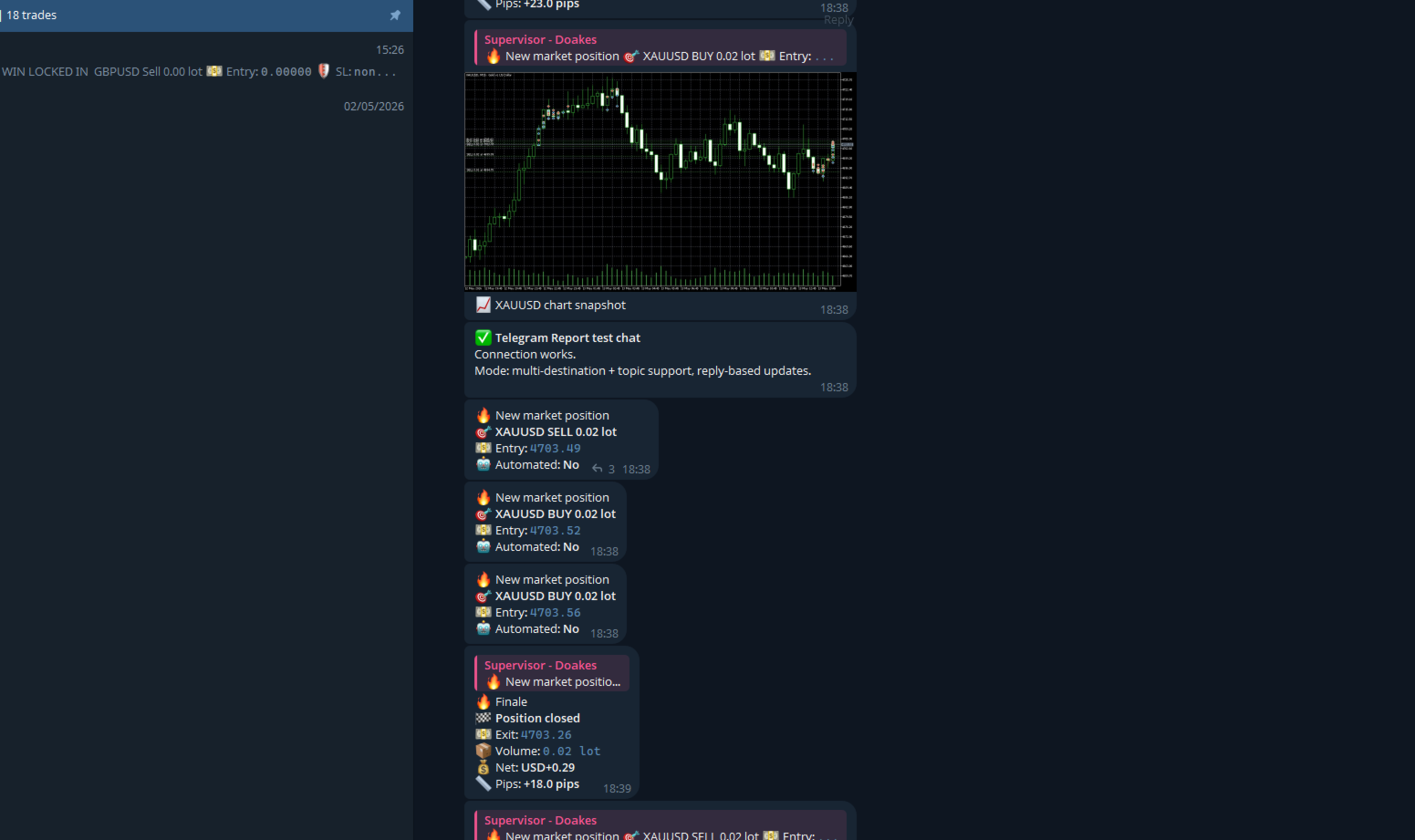
OZ Telegram Report MT5 automatically sends beautiful trade updates, scheduled reports, performance summaries, and risk alerts directly to Telegram — perfect for traders, signal providers, prop firm users, trading communities, and personal trade tracking.


📘 Setup Manual: OZ Telegram Report for MT5

This guide will walk you through setting up Telegram to receive trading reports and alerts from your MT5 terminal. You don't need any programming experience—just follow these steps carefully!

Step 1: Get the Telegram App

If you don't have Telegram yet:

  1. Download Telegram from the App Store (iOS), Google Play Store (Android), or download the Desktop app for your computer at telegram.org.
  2. Open the app, enter your phone number, and complete the quick registration process.

Step 2: Create Your Bot & Get the "Bot Token"

Your bot is the virtual assistant that will send messages from MT5 to your phone.

  1. Open Telegram and tap the Search bar at the top.
  2. Search for exactly:  @BotFather  (Look for the one with the blue verified checkmark ☑️).
  3. Click on BotFather and press the START button at the bottom of the screen.
  4. Type  /newbot  and send it.
  5. Choose a Name: BotFather will ask for a name. Type any name you like (e.g.,  My Trading Report ).
  6. Choose a Username: Now it will ask for a username. This must end in the word  bot  and have no spaces (e.g.,  JohnMT5Report_bot ).
  7. Get Your Token: BotFather will reply with a congratulatory message. Look for a long string of letters and numbers in red or bold text.
    • It looks like this:  1234567890:ABCdefGhIJKlmNoPQRstUvwXyz
    • Copy this entire code. This is your Bot Token. Save it somewhere safe (like a Notepad file).

Step 3: "Wake Up" Your Bot

Before your bot is allowed to send you messages, you must give it permission by starting a conversation with it.

  1. Go back to the Telegram Search bar.
  2. Search for the Username you just created in Step 2 (e.g.,  @JohnMT5Report_bot ).
  3. Click on your bot and press the START button at the bottom. (Your bot won't say anything back yet, but it is now awake and allowed to message you).

Step 4: Get Your "Chat ID"

The Bot Token identifies the bot, but the Chat ID tells the bot exactly who to send the messages to (you).

  1. In the Telegram Search bar, search for:  @getmyid_bot
  2. Click on the bot and press START.
  3. The bot will instantly reply with your account information.
  4. Look for the line that says Your user ID: (It will be a number, like  123456789 ).
  5. Copy this number. This is your Chat ID. (Note: If you want to send messages to a Telegram Group instead of a private chat, add your bot to the group, then add  @getmyid_bot  to the group. It will print a Group ID that starts with a minus sign  - , e.g.,  -100123456789 ).

Step 5: Connect MT5 to Telegram (Crucial Step!)

MetaTrader 5 blocks outside internet connections by default for your safety. You must give MT5 permission to talk to Telegram's servers.

  1. Open your MetaTrader 5 terminal.
  2. Go to the top menu and click Tools -> Options (or press  Ctrl + O ).
  3. Click on the Expert Advisors tab.
  4. Check the box that says "Allow WebRequest for listed URL".
  5. Click the green "+" button below it.
  6. Type exactly this URL:  https://api.telegram.org
  7. Press  Enter  on your keyboard, then click OK to save and close the window.

Step 6: Enter the Details into the EA

You now have everything you need!

  1. Attach the OZTelegramReport EA to any chart in MT5.
  2. The Inputs window will pop up. Scroll to the top under the "TELEGRAM" section.
  3. InpBotToken: Paste the long Token you got from BotFather in Step 2.
  4. InpTelegramChatIDs: Paste the Chat ID number you got in Step 4.
    • (Note: If you have multiple Chat IDs, you can separate them with a comma, e.g.,  123456789,987654321 )
  5. Configure the rest of your preferences (Story mode, colors, schedules, etc.).
  6. Click OK.

🎉 You are done!


What This EA Does

OZ Telegram Report MT5 monitors your trading activity in real time and delivers:

  • Trade open/close notifications
  • Trade story updates
  • Profit/loss summaries
  • Daily, weekly, and monthly reports
  • Risk management alerts
  • Telegram topic/thread support
  • Gamified trading statistics
  • Custom branded trading cards
  • Screenshot sharing
  • Multi-chat broadcasting

Everything is automated directly from MT5.

Main Features

Real-Time Trade Story Notifications

Transform boring trade alerts into engaging trade stories.

The EA can send:

  • Position opened
  • Position updated
  • SL/TP changes
  • Break-even movement
  • Position closed
  • Profit/Loss result
  • Pips gained/lost

Choose different storytelling styles:

  • Minimal
  • Energetic
  • Story mode

Perfect for:

  • Public Telegram channels
  • VIP groups
  • Trading journals
  • Personal accountability

Telegram Integration

Supports:

  • Telegram Bot API
  • Multiple chat IDs
  • Telegram forum topics
  • Threaded trade conversations
  • Reply-based updates

Prodotti consigliati
Haunted Risk Calculator is a visual risk management panel for MT5 that calculates the correct lot size in real time based on your account balance, risk percentage, and stop-loss distance. HOW IT WORKS Set your risk percentage or dollar amount, drag the SL and TP lines to your desired levels on the chart, and the panel instantly shows the calculated lot size, risk in dollars, reward-to-risk ratio, and expected profit. Execute with one click or a keyboard shortcut. FEATURES Draggable panel — grab

FREE
Free one click Stop Loss and Take Profit tool for manual trading on MetaTrader 5. Apply a fixed SL and TP to every open position on the current symbol at once, or move them all to break even, with a single button. It only modifies Stop Loss and Take Profit levels - it never opens or closes a trade. Works on any symbol and any account type: forex, gold and XAUUSD, indices, crypto. Useful on a prop firm or funded account, where an unprotected position is the fastest way to fail a challenge. TWO
FREE
SmartLotEA
Nana Yaw Osei
SmartLotEA – Auto Lot Size Calculator for All Pairs SmartLotEA is a professional-grade MetaTrader 5 Expert Advisor designed to calculate trading lot sizes automatically based on account balance. It helps traders maintain consistent risk control across all trading pairs with minimal configuration. Built for precision and simplicity, SmartLotEA is fully compatible with all symbols — including forex majors, minors, exotics, and synthetic instruments — and adapts its lot sizing logic to your account
FREE
Professional Trading Dashboard Un pannello professionale di monitoraggio del conto per MetaTrader 5 che consolida dati del conto in tempo reale, storico giornaliero delle operazioni e statistiche mensili in un'unica visualizzazione direttamente sul grafico. Professional Trading Dashboard è un indicatore utilitario per MetaTrader 5 progettato per offrire ai trader una visione chiara e strutturata del proprio conto in qualsiasi momento. Invece di navigare tra più finestre del terminale, tutte le i
FREE
MT5 AccountInfoEA
Nikolaos Pantzos
Account Info EA It is a tool that presents on the graph all the positions of the account, and specific information concerning the positions, but also the account. It enables the user to have an image of his account at a glance. Use like any expert advisor. You can't attach it in the same chart with other expert advisor. It does not have the ability to open or manage positions. You can attach it on any chart and any timeframe.
FREE
Trade assistant pro v8
Ahmed Mohammed Bakr Bakr
FREE FREE FREE Trade Assistant MT5 – Professional Trading & Risk Management Panel Trade Assistant MT5 is an advanced trading panel designed to help traders execute orders faster, safer, and more professionally . It simplifies manual trading by combining smart order management , precise risk control , and one-click execution , making it ideal for both beginners and advanced traders. This tool does not trade automatically . Instead, it empowers you with full control while applying professional-gra
FREE
Click Trading
Jawad Tauheed
5 (2)
One Click Trading – Auto TP SL Developer TraderLinkz Version 1.00 Category Utility What it does Adds missing TP and SL to your manual trades and pending orders Sets them once per ticket Lets you move TP and SL afterward Works on hedging and netting accounts Scans on every tick and reacts on trade events Why you want it You place faster entries You get consistent risk and exit targets You reduce fat finger errors You keep full manual control Quick start Attach the EA to any chart Keep TP and SL e
FREE
RoundNum Readme (Traders Club) 特徴: このツールはDOWやNIKKEIなど500や1000ポイントがラウンドナンバーの 指数を取引する際に表示するように開発しました。 もちろんメジャー通貨でも表示はされます。 更新頻度を制限しているのでチャート表示が遅くなるということは ありません。 XMでDOWを取引される場合、Main Levelsを10000 Sub Levelsを5000にしてください。 各パラメータの説明: Number to display lines:表示するライン数を設定します。 Main Levels:メインレベルをポイントで指定します。 Main Line Color:メインラインの色を設定します。 Main Line Style:メインラインで使用されるラインを設定します。 Show Sub Lines:サブラインを表示するか設定します。 Sub Levels:サブレベルをポイントで指定します。 Sub Line Color:サブラインの色を設定します。 Sub Line Style:サブラインで使用され
FREE
Support And Resistance indicator that can display round levels and zones . It shows them directly on the chart, providing an easy help when you want to set stop-loss or take-profit level, or when you want to see the next market target.   If an asset price is moving down and bounces back up, the level is called support (think: price floor). If an asset price is moving upward and hits a level where it reverses downward, this is called resistance (think: price ceiling).
FREE
Trade management panel for MetaTrader 5. It lets you place orders and manage open positions from a panel on the chart, without opening separate order windows. It works on any symbol and timeframe, on hedging and netting accounts. Layout and display The panel has two layouts. Single shows all controls in one view. Tabs splits the controls into separate tabs for a smaller footprint. You can hide the panel to see the chart behind it and restore it when needed. The panel scales with the screen res
FREE
Lot Calculator MT5
Ibrahim Olalekan Ganiu
CALCOLA IL TUO LOTTO PROPRIO QUI SU METATRADER!!! Ciao trader. Siete trader orientati alla gestione del rischio? Se sì, allora questo è per voi. Mi chiamo Ibrahim e ho sviluppato uno strumento che può aiutarvi a calcolare il vostro lotto in base alla percentuale di rischio rispetto al saldo del vostro conto. Questo strumento può anche aiutarvi a calcolare il vostro lotto se avete un valore assoluto che desiderate rischiare, invece di specificare il rischio in percentuale. Ad esempio, potete sp
FREE
Supports displaying up to 4 trading sessions with fully adjustable start and end times. Each session can be customized individually with unique colors and visual styles. Users can choose between drawing rectangles or filling areas, while the indicator clearly displays each session’s price range for better market insight. Free to use until the end of 2025. The paid version will be available starting from 2026.
FREE
Account Statistics – Dashboard per statistiche di trading in MetaTrader 5 Account Statistics è uno strumento di analisi e reporting per MetaTrader 5. Mostra le principali metriche del tuo conto di trading direttamente nel grafico e consente una valutazione strutturata delle tue performance su diversi periodi di tempo. Il prodotto è rivolto ai trader che desiderano analizzare sistematicamente i propri risultati e documentarli in modo trasparente. Funzioni Il dashboard integrato mostra in tempo
FREE
Manual Assistant MT5
Igor Kotlyarov
4.75 (4)
Bonus when buying an indicator or an advisor from my list. Write to me in private messages to receive a bonus. Manual Assistant MT5 is a professional manual trading tool that will make your trading fast and comfortable. It is equipped with all the necessary functions that will allow you to open, maintain and close orders and positions with one click. It has a simple and intuitive interface and is suitable for both professionals and beginners. The panel allows you to place buy and sell orders w
FREE
EmaRsi robot
Deepak Saini
https://youtu.be/KHhg88fXWTk?si=ZoVtpc-wpfTVImSL 5-Minute Trading Strategy | Quick & Effective for Beginners Welcome to our trading channel- the deepak trading In this video, we'll be exploring a simple 5-minute trading strategy that can help you capture quick market movements and make profitable trades. Whether you're a beginner or an experienced trader, this strategy is designed to give you clear entry and exit points using technical indicators like EMA, RSI, and Stochastic Oscillator.
FREE
Market Hours Pro
Musa Terrance Khosa
Market Hours Pro shows Tokyo, London, and New York trading sessions directly on your MT5 chart, including scheduled overlap periods. It’s designed to give you a clear view of global market timing so you can plan trades, spot high-activity periods, and align strategies with standard Forex hours. How It Works Displays scheduled session times visually on your chart. Highlights session overlaps for London/New York and Tokyo/London. Automatically adjusts times for your timezone or broker time. Shows
FREE
Manage all trades
Timo Mario Hoffmann
Manage All Trades for MT5 Manage All Trades is a free MT5 utility that gives you fast and convenient control over open positions directly from the chart. Close all trades, BUY trades, SELL trades, profitable trades, losing trades, or positions on the current symbol with one click. Built for traders who want speed, simplicity, and better trade management in live market conditions. Manage All Trades is a lightweight and practical trade management utility for MetaTrader 5 that helps you close open
FREE
SmartRisk Trade Tool — One-Click Risk-Based Trade Panel SmartRisk Trade Tool is a manual trading panel for MetaTrader 5 built around position sizing and risk control rather than signal generation. It does not analyze the market or suggest trade direction — it exists so that every order sent from the chart already has a calculated lot size, stop loss, and take profit consistent with a risk value the trader chooses, removing the manual arithmetic that normally happens between deciding to trade and
FREE
Equitypanel
Timo Mario Hoffmann
5 (1)
Equity Panel for MT5 Equity Panel is a free MT5 indicator that gives you a fast and convenient live overview of your account directly from the chart. Monitor balance, equity, floating P/L, drawdown, daily performance, margin data, and warning levels in one compact dashboard. Built for traders who want better control, faster risk awareness, and clearer account monitoring in live market conditions. Equity Panel is a lightweight and practical account monitoring indicator for MetaTrader 5 that helps
FREE
VR Color Levels MT5
Vladimir Pastushak
VR Color Levels è uno strumento utile per coloro che applicano l'analisi tecnica utilizzando elementi come linea di tendenza, rettangolo e testo. È possibile aggiungere testo direttamente al grafico e acquisire screenshot. È possibile ottenere impostazioni, file di set, versioni demo, istruzioni e risoluzione dei problemi da [blog] Puoi leggere o scrivere recensioni su [collegamento] Versione per [MetaTrader 4] Il lavoro con l'indicatore viene eseguito in un clic . Per fare ciò, fare clic sul
FREE
Zistilo AI Gold Tester
Hussein Adnan Kadhim
Input : EnableDebugLog — Enables detailed Expert/Journal logs for troubleshooting and monitoring. SymbolMap — Maps server symbol names to broker-specific symbol names. MagicNumber — Unique identifier used to recognize and manage the EA’s trades. MaxSpreadPoints — Maximum allowed spread in points before opening a new trade. MaxSlippagePoints — Maximum allowed execution slippage in points. MaxSignalTradesPerBasket — Maximum number of signal-based trades allowed per basket; 0 means unlimited. UseAu
FREE
Bundle Risk Manager Pro EA "Risk Manager Pro EA is an all-in-one trading utility that combines advanced risk management tools, ensuring full control over your trading account while protecting your capital and complying with trading regulations. By bundling Limit Positions , Concurrent Risk Capital , and the newly added Limit Profit , this EA is the ultimate solution for disciplined trading and achieving evaluation goals. Key Features: 1. Limit Positions : Enforces a maximum number of open posi
FREE
Norion Daily Key Levels is a professional indicator designed to display the most relevant price reference levels of the trading day in a clear and objective way. The indicator automatically plots essential daily levels such as: Previous day close Current day open Daily high Daily low In addition, the indicator allows the inclusion of other custom daily reference levels, making it adaptable to different trading styles and market strategies. These levels are widely used by professional traders as
FREE
Position Size Tool – Smart Risk Management & Trade Execution Panel The Position Size Tool is a powerful and intuitive MT5 panel that simplifies your trading by combining position sizing , risk calculation , risk/reward visualization , and order placement —all in one place. ️ Clean & Functional Interface The tool features a compact, real-time panel with the following: Balance & Equity display Live Price tracking Customizable Risk % input Auto-calculated Lot Size based on SL and Risk Input for S
FREE
This is an EA designed to support manual trading. It can accurately calculate risk, automatically enter trades, set stop loss, and perform trailing stop loss using buttons on the chart. There are many features for risk calculation, setting stop loss, and trailing stop loss to suit various trading styles. It can also automatically manage prop firms by closing trades when reaching the target profit level or maximum daily loss. Additionally, it can perform manual backtesting using the strategy test
FREE
Lot Size Line
Stefan Warratz
Questo piccolo strumento ti aiuta a definire la gestione del rischio con un semplice trascinamento della linea sul grafico. Ti mostra la dimensione effettiva del lotto calcolata sulla percentuale del conto o sull'importo fisso in denaro direttamente sulla linea. Tutto quello che devi fare è attivare la linea premendo il tasto "t" sulla tastiera e trascinare la linea fino al punto di stop loss. Questo è tutto. Nelle impostazioni puoi definire il colore e la larghezza della linea e del testo, an
FREE
OverTrading Blocker
- Md Rashidul Hasan
3 (2)
Auto-Shutdown MT5 Terminal - Saves you from Over-Trading by   automatically closing MT5 Termial   when daily loss limits are breached Love it? Hate it? Let me know in a review! Feature requests and ideas for new tools are highly appreciated. :) Try "The AUDCAD Trader": https://www.mql5.com/en/market/product/151841 ️ Your Automated Discipline Enforcer "I'll just make back what I lost..." "One more trade to break even..." "I can't end the day red..." Sound familiar?   These thoughts have d
FREE
Phone Trade Manager
Krutik Piyushkumar Parekh
Smart Lot-Size Calculator And Trade Assistant for Mobile Trading Overview: This is the tool every trader in the market must have no matter if you are scalper, swing traders, day trader, or long term trader. This On-The-Go trading tool will help you stay disciplined and also stay free from daily trade management chores, Most traders face common problems like   1. Calculation of proper lot-size of a position to take controlled risk  2. Managing every trade and trailing stop-loss if trades goes in
FREE
100% GRATUITO — versione completa, senza limitazioni né registrazione. 100% gratuito, senza limitazioni. Se si guadagna un posto sui tuoi grafici, una breve recensione è ciò che ci aiuta di più — bastano 30 secondi ed è così che altri trader scoprono questo strumento. Se Falcon ti è utile, lascia una recensione — ci aiuta molto e mantiene lo strumento gratuito. Altri strumenti dello stesso sviluppatore: - Aegis Account Protector (protezione equity dell'intero conto): https://www.mql5.com/en/
FREE
Signalator Trade Summary Panel MT5 is a free local MetaTrader 5 utility that gives traders a clear account and open-trade overview directly on the chart. It is part of the Signalator Trading and Analysis Ecosystem — a growing set of practical MetaTrader tools for account monitoring, market analysis, symbol scanning, alerts and trader workflow improvement. This panel focuses on the account and position side of the workflow. It helps you quickly understand floating profit or loss, account status,
FREE
Gli utenti di questo prodotto hanno anche acquistato
Trade Assistant MT5
Evgeniy Kravchenko
4.41 (215)
It helps to calculate the risk per trade, the easy installation of a new order, order management with partial closing functions, trailing stop of 7 types and other useful functions. Additional materials and instructions Installation instructions - Application instructions - Trial version of the application for a demo account Line function -   shows on the chart the Opening line, Stop Loss, Take Profit. With this function it is easy to set a new order and see its additional characteristics bef
Forex Trade Manager MT5
InvestSoft
4.98 (670)
Benvenuto a Trade Manager EA, lo strumento definitivo per la gestione del rischio , progettato per rendere il trading più intuitivo, preciso ed efficiente. Non è solo uno strumento per l'esecuzione degli ordini, ma una soluzione completa per la pianificazione delle operazioni, la gestione delle posizioni e il controllo del rischio. Che tu sia un principiante, un trader avanzato o uno scalper che necessita di esecuzioni rapide, Trade Manager EA si adatta alle tue esigenze, offrendo flessibilità s
Local Trade Copier EA MT5
Juvenille Emperor Limited
4.97 (144)
Sperimenta una copia di trading eccezionalmente veloce con il   Local Trade Copier EA MT5 . Con la sua facile configurazione in 1 minuto, questo copiatore di trading ti consente di copiare i trades tra diversi terminali di MetaTrader sullo stesso computer Windows o su Windows VPS con velocità di copia ultra veloci inferiori a 0.5 secondi. Che tu sia un trader principiante o professionista,   Local Trade Copier EA MT5   offre una vasta gamma di opzioni per personalizzarlo alle tue esigenze speci
================================================================================ POC BREAKOUT - V20.72. Full Professional Grade Toolkit ================================================================================ POC Breakout is a full MetaTrader 5 trading dashboard for discretionary traders who want breakout signals, Point of Control (POC) context, volume profiles, order flow, market structure, news, alerts, and advanced trade planning in one professional workspace. Attached directly to you
TradePanel MT5
Alfiya Fazylova
4.88 (166)
Trade Panel è un assistente commerciale multifunzionale. L'applicazione contiene più di 50 funzioni di trading per il trading manuale e permette di automatizzare la maggior parte delle attività commerciali. Prima dell'acquisto, è possibile testare la versione dimostrativa su un conto demo. Scaricare la versione di prova dell'applicazione per un account dimostrativo: https://www.mql5.com/it/blogs/post/762419 . Istruzioni complete qui . Commercio. Consente di effettuare operazioni di trading con u
Versione Beta Telegram to MT5 Signal Trader è quasi pronto per il rilascio ufficiale in versione alpha. Alcune funzionalità sono ancora in fase di sviluppo e potresti riscontrare piccoli bug. Se riscontri problemi, ti preghiamo di segnalarli, il tuo feedback aiuta a migliorare il software per tutti. Telegram to MT5 Signal Trader è uno strumento potente che copia automaticamente segnali di trading da canali o gruppi Telegram al tuo account MetaTrader 5 . Supporta canali pubblici e privati e cons
FarmedHedge Pair Trading Dashboard
Tanapisit Tepawarapruek
5 (3)
Farmed Hedge Yield Farming | All Markets (Manual - Hybrid - Semi/Automated EA) MULTI-ASSET SUPPORT Trade any asset available on your broker - Forex: Major, Minor, Exotic pairs - Crypto: BTC, ETH, XRP, SOL, BNB - Stocks: Apple, Tesla, Amazon, Google, etc. - Commodities: Gold, Silver, Oil, Gas - Indices: US30, NAS100, SPX500, DAX40 - Any CFD your broker offers VERIFIED TRADING RESULTS - Farmed Hedge Yield Axi Copy:  https://www.mql5.com/en/signals/2356376 - Farmed Hedge Yield Exn Copy:   https:/
HINN MagicEntry Extra
ALGOFLOW OÜ
4.71 (17)
LIMITED SUMMER SALE -40% !   ONLY $30 insead of $50!  Maximum real discount!  ONLY UNTIL 08/22 HINN MAGIC ENTRY – the ultimate tool for entry and position management! Place orders by selecting a level directly on the chart! full description   ::  demo-version  :: 60-sec-video-description Key features: - Market, limit, and pending orders - Automatic lot size calculation - Automatic spread and commission accounting - Unlimited partitial take-profits  - Breakeven and trailing stop-loss and take-p
Exp COPYLOT CLIENT for MT5
Vladislav Andruschenko
3.97 (35)
Copiatore professionale di trade per MetaTrader 5 Un copiatore di trade veloce, professionale e affidabile per MetaTrader . COPYLOT consente di copiare operazioni Forex tra terminali MT4 e MT5 con supporto per conti Hedge e Netting . La versione MT5 di COPYLOT supporta: - MT5 Hedge → MT5 Hedge - MT5 Hedge → MT5 Netting - MT5 Netting → MT5 Hedge - MT5 Netting → MT5 Netting - MT4 → MT5 Hedge - MT4 → MT5 Netting Versione MT4 Descrizione completa + DEMO + PDF Come acquistare Come installare Come ot
Telegram to MT5 Multi-Channel Copier copia automaticamente i segnali di trading dai tuoi canali Telegram direttamente in MetaTrader 5. Nessun bot, nessuna estensione del browser, nessuna copia manuale. Ricevi un segnale su Telegram e l'EA apre l'operazione sul tuo terminale in pochi secondi. Il prodotto include due componenti: un'applicazione Windows che ascolta i tuoi canali Telegram, e questo Expert Advisor che esegue i segnali sul tuo terminale MT5. È disponibile anche una versione per MT4. G
Footprint Chart Pro — Professional OrderFlow EA for MetaTrader 5 Version 6.34 | Professional tool for real traders | Institutional-Grade Visualization DEMO USERS - PLEASE SELECT EVERY TICK / REAL TICK WHEN TESTING AND YOU HAVE DOWNLOADED HISTORICAL DATA. IF YOU SEE A WAITING SCREEN AND IT IS NOT DOWNLOADING, IT MEANS YOU HAVE LOW HISTORICAL DATA. TRY 1 MIN AND 5 MIN FIRST ON 1 DAY DATA. ONE DAY DATA SHOULD BE THE NEWEST AND MOST CURRENT DATE. PLEASE WAIT UNTIL THE MARKET HAS ROLLED OVER PERIOD.
VirtualTradePad PRO SE MT5 — centro di controllo professionale per il trading su MetaTrader 5 VirtualTradePad PRO SE è un pannello di trading premium basato sul grafico e un ambiente di gestione delle operazioni per MetaTrader 5 . È progettato per i trader che desiderano esecuzione più rapida, controllo più chiaro delle posizioni, gestione strutturata delle operazioni, pianificazione visiva dei livelli e un workflow professionale direttamente dal grafico. Non è soltanto un semplice pannello BUY
Premium Trade Manager - Il pannello di trading con un coach integrato Premium Trade Manager porta un coach di trading direttamente nel tuo grafico, con un motore di esecuzione completo al di sotto. Imposta il trade come fai sempre, poi lascia che Max, il tuo coach di trading IA, legga esattamente quel setup rispetto al tuo conto live e ti dia un verdetto chiaro prima che tu confermi: lo stop rispetta un approccio disciplinato, il rischio è ragionevole, c'è un evento ad alto impatto tra pochi min
Trade copier MT5
Alfiya Fazylova
4.57 (51)
Trade Copier è un'utilità professionale progettata per copiare e sincronizzare le transazioni tra conti di trading. La copiatura avviene dal conto/terminale del fornitore al conto/terminale del destinatario, che sono installati sullo stesso computer o vps. PROMOZIONE - Se avete già acquistato il "Trade copier MT5", potete ottenere gratuitamente il "Trade copier MT4" (per la copia MT4 > MT5 e MT4 < MT5). Per maggiori informazioni sulle condizioni, vi preghiamo di contattarci tramite messaggi priv
Power Candles Strategy Scanner - Strumento di ricerca configurazioni multi-simbolo con ottimizzazione automatica Power Candles Strategy Scanner utilizza lo stesso motore di auto-ottimizzazione che alimenta l'indicatore Power Candles, applicandolo a tutti i simboli presenti nel tuo Market Watch, uno accanto all'altro. Un unico pannello ti indica quali simboli sono statisticamente negoziabili in questo momento, quale strategia è vincente su ciascuno di essi, la coppia ottimale di Stop Loss / Take
Anchor Trade Manager
Kalinskie Gilliam
5 (6)
Anchor: The EA Manager Your EAs manage their own trades. Anchor manages the account around them. Anchor gives you one place to control your EAs, manage risk and decide when trading is allowed. Any EA, any vendor, any broker or symbol. No source-code changes required. The Problem Most EAs only know what they are doing. They cannot see when another EA is already trading, when several EAs open and are stacking risk or when the account has reached your loss limit. Even using just one EA, it may not
Telegram To MT5 Ultra
Mirel Daniel Gheonu
5 (3)
Telegram To MT5 — Copiatore di segnali Trasforma le indicazioni di trading dei tuoi canali Telegram in veri ordini MT5 — automaticamente, su quanti account vuoi, con rischio e regole totalmente sotto il tuo controllo. Telegram To MT5 collega i canali VIP / di segnali che già segui su Telegram al tuo terminale MetaTrader 5. Un'app desktop companion gratuita legge i messaggi (anche dai canali che bloccano i bot), e questo Expert Advisor li esegue sul tuo conto — applicando le tue impostazioni di r
Astro Trade MT5
Indra Maulana
5 (2)
AstroTrade Trading Assistant AstroTrade is a comprehensive multi-functional trading utility developed for the MetaTrader 5 platform. It integrates essential tools for trade execution, risk management, and technical monitoring into a single unified interface. The application is designed to assist traders in managing their daily operations through a visual and structured environment. Visual Trade Execution and Risk Management The application includes a specialized trading panel that assists in c
Timeless Charts
Samuel Manoel De Souza
5 (7)
Timeless Charts è un'utilità di trading completa progettata per trader professionisti. Combina tipi di grafici personalizzati come Grafici a Secondi e Renko con analisi avanzata del flusso ordini tramite Footprints , Clusters , Profili di Volume , studi VWAP e strumenti di analisi ancorata per una visione più approfondita del mercato. Il trading e la gestione delle posizioni vengono eseguiti direttamente dal grafico tramite un pannello integrato di gestione delle operazioni , mentre Market Repla
Trade Manager DaneTrades
Levi Dane Benjamin
4.23 (30)
Trade Manager per aiutarti a entrare e uscire rapidamente dalle operazioni calcolando automaticamente il tuo rischio. Incluse funzionalità che ti aiutano a prevenire l'eccessivo trading, il vendetta trading e il trading emotivo. Le operazioni possono essere gestite automaticamente e i parametri di performance del conto possono essere visualizzati in un grafico. Queste caratteristiche rendono questo pannello ideale per tutti i trader manuali e aiuta a migliorare la piattaforma MetaTrader 5. Suppo
YuClusters
Yury Kulikov
4.93 (43)
Attention: You can view the program operation in the free version  YuClusters DEMO .  YuClusters is a professional market analysis system. The trader has unique opportunities to analyze the flow of orders, trade volumes, price movements using various charts, profiles, indicators, and graphical objects. YuClusters operates on data based on Time&Sales or ticks information, depending on what is available in the quotes of a financial instrument. YuClusters allows you to build graphs by combining da
Welcome to ENTRY IN THE ZONE WITH SMC MULTI TIMEFRAME Entry In The Zone and SMC Multi Timeframe is a real-time market analysis tool based on Smart Money Concepts (SMC), designed to analyze market structure, price direction, and key trading zones. It supports both Single-Timeframe Analysis and Multi-Timeframe Analysis, providing a clearer view of the overall market structure across multiple timeframes, with real-time BUY / SELL signals that do not repaint. It is designed to help filter trading op
EA Auditor
Stephen J Martret
5 (4)
EA Auditor is an independent analysis tool for traders evaluating Expert Advisors and trading signals on MetaTrader 5. It audits backtest reports, reviews posted developer signals, and cross-verifies the two against each other to help traders assess strategies before committing capital. The MQL5 market offers a wide range of Expert Advisors from many developers, with varying approaches, quality, and transparency. EA Auditor provides a consistent, data-driven framework for reviewing them, answer
Trade Command Center
Nguyen Thanh Trieu
5 (2)
Materiali e istruzioni aggiuntivi Istruzioni per l'installazione - Versione di prova dell'applicazione per un conto demo ; Informazioni Ufficiali Canale ufficiale Profilo del venditore Trade Command Center — Pannello di Esecuzione Operazioni Professionale & Controllo Risk Guard in Tempo Reale Trade Command Center è un pannello avanzato per l'esecuzione grafica degli ordini, il calcolo della dimensione dei lotti e la gestione del rischio su MetaTrader 5. È progettato per i trader manuali c
VirtualTradePad One Click Trading Panel
Vladislav Andruschenko
4.59 (74)
Pannello di trading per MetaTrader 5 — controllo professionale del trading in un clic dal grafico e dalla tastiera Un pannello di trading avanzato progettato per trader attivi, pensato per aprire, gestire e chiudere operazioni molto più velocemente rispetto all’interfaccia standard di MetaTrader. Questa soluzione è dedicata a chi desidera controllare posizioni, ordini pendenti, profitto totale ed esecuzione da un unico spazio di lavoro professionale. Non si tratta di un semplice utilitario. È u
Scarica la demo funzionante Copy Cat More (Gatto Copione) — Copiatore di Trade (Trade Copier) MT5 è un copiatore locale di trade e un framework completo di gestione del rischio e di esecuzione, progettato per le sfide di trading di oggi. Dalle challenge delle prop firm alla gestione di portafogli personali, si adatta a ogni situazione con una combinazione di esecuzione robusta, protezione del capitale, configurazione flessibile e gestione avanzata dei trade. Il copiatore funziona in entrambe l
Trade Dashboard MT5
Fatemeh Ameri
4.95 (132)
Trade Dashboard simplifies how you open, manage, and control your trades, with built-in lot size calculation. It allows you to execute trades, manage risk, and control positions directly on the chart, with tools such as partial close, breakeven, and trailing stop. Designed to reduce manual work and help you stay focused on your trading decisions. A demo version is available for testing. Detailed explanations of features are provided within the MQL5 platform. Installation instructions are include
Potenzia i tuoi segnali di trading con il nostro avanzato Telegram Bridge EA È il momento di conquistare il tuo pubblico con aggiornamenti di trading in tempo reale che siano professionali e visivamente accattivanti. Contattami per vedere la demo e ottenere una versione di prova Abbiamo investito significativamente in funzionalità intuitive che creano un'esperienza unica per clienti e fornitori.  SIGNAL BRIDGE è in grado di inviare SEGNALI 100% COMPATIBILI CON I COPIER per tutti i casi d'uso, a
Quant AI Agents
Ho Tuan Thang
5 (1)
Quant AI Agents are independent trading Expert Advisors. Instead of trading using a fixed strategy like other conventional EAs, Quant AI Agents   is a   multi-agent AI trading framework   that turns natural-language strategy prompts into live.  WANT THE SAME RESULTS AS MY LIVE SIGNAL?   Use the exact same brokers I do:   IC MARKETS , IC TRADING   .  Unlike the centralized stock market, Forex has no single, unified price feed.  Every broker sources liquidity from different providers, creating un
The product will copy all telegram signal to MT5 ( which you are member) , also it can work as remote copier.  Easy to set up, copy order instant, can work with almost signal formats, image signal,  s upport to translate other language to English Work with all type of channel or group, even channel have "Restrict Saving Content", work with  multi channel, multi MT5 Work as remote copier: with signal have ticket number, it will copy exactly via ticket number. Support to backtest signal. How to s
Filtro:
Ken Nguyen
65
Ken Nguyen 2026.05.31 15:59 
 

L'utente non ha lasciato alcun commento sulla valutazione.

Mike Geesing
763
Mike Geesing 2026.05.21 15:23 
 

L'utente non ha lasciato alcun commento sulla valutazione.

Rubi Jihantoro
647
Risposta dello sviluppatore Rubi Jihantoro 2026.05.22 05:42
thank you for trying this out
Stefano Di Paola
2547
Stefano Di Paola 2026.05.20 15:58 
 

L'utente non ha lasciato alcun commento sulla valutazione.

Rubi Jihantoro
647
Risposta dello sviluppatore Rubi Jihantoro 2026.05.21 02:44
thank you for trying the software, good to know its useful for you
Rispondi alla recensione