Owl Ict Killzones
- Indicatori
-
Gabriel Alejandro Sanchez Lledo
 Programador +20 años de experiencia- Trader profesional - Developer
 - Versione: 1.0
- Attivazioni: 5
OWL ICT Killzones MT5 The Most Professional ICT Sessions & Killzones Painter with Live Countdown
Asian • London • New York Sessions + True ICT Killzones + OTE Zones + Session High/Low + Midnight Open
OWL ICT Killzones MT5 is the ultimate visual tool for ICT and Smart Money Concepts traders who want to trade only during the highest-probability market hours.
It automatically paints all major sessions, highlights the exact ICT Killzones (the most aggressive institutional trading windows), draws OTE retracement zones, session highs/lows, and shows a real-time countdown to the next session or killzone — all in a clean, premium dark pastel dashboard with the iconic 🦉 OWL trademark logo.
Stop guessing when the smart money is active. Know exactly when and where the institutions are trading.
Why Professional Traders Choose OWL ICT Killzones
- Crystal-clear session and killzone visualization on the chart
- Real-time countdown timer for the next high-impact period
- OTE (0.618–0.705) retracement zones automatically drawn during active sessions
- Professional dark pastel design with large 🦉 OWL logo
- Fully customizable session and killzone times (supports any broker GMT offset)
- Clean, non-cluttered chart with history painting (up to 5 days)
Key Features
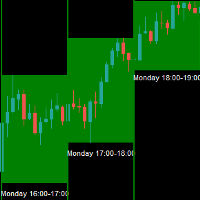
- Full Session Painting – Asian, London, and New York sessions with semi-transparent blocks
- True ICT Killzones – London Open, New York AM, New York Lunch/PM, and Asian Killzone (fully customizable)
- OTE Zones – Automatic 61.8%–70.5% retracement zones during active sessions
- Session High/Low Lines – Dotted horizontal rays with labels for each session
- Midnight Open Line – Classic ICT midnight open price level
- Live Countdown Timer – Shows “Next Session / Killzone in Xh Xm Xs” in the dashboard
- Professional Multi-Section Dashboard – Current active session, status, next countdown, and session stats (High, Low, Range, OTE levels)
- Elegant Dark Pastel Design – Deep navy background, muted teal/green/orange accents, large 🦉 logo in the header
- Fully Draggable Dashboard – Custom X/Y position
- Clean Code & Resource Management – Zero lag, perfect in Strategy Tester, no DLLs, no external files
How to Use (Step-by-Step Guide)
- Attach the Indicator Drag OWL ICT Killzones MT5 onto any chart (recommended M15, M30 or H1). All sessions, killzones, OTE zones, and the beautiful dashboard will appear instantly.
- Set Your Broker’s GMT Offset (very important) In the Inputs tab, set Server GMT offset to match your broker (usually 0, +2, +3, etc.). All times are based on GMT and automatically converted to your server time.
- Customize Sessions & Killzones
- Enable/disable any session or killzone
- Adjust exact open/close times if your broker uses non-standard hours
- Choose which elements to display (OTE, Session H/L, Midnight Open, etc.)
- Read the Chart at a Glance
- Colored transparent blocks show each session
- Brighter blocks highlight active ICT Killzones
- Dotted lines show session High and Low
- OTE zone is automatically drawn inside the active session range
- Midnight Open appears as a dashed horizontal line
- Use the Professional Dashboard
- See which session is currently ACTIVE (green dot)
- Real-time countdown to the next session or killzone
- Live session statistics: High, Low, and OTE levels for the active session
- Overall market timing at a single glance
- Trade High-Probability Setups
- Focus only on Killzone periods (highest volatility and institutional order flow)
- Use OTE zones as precise entry areas during London or New York killzones
- Combine with Order Blocks or FVG for maximum confluence
- The countdown helps you prepare before the session opens
- Backtesting & Optimization The indicator works perfectly in the MT5 Strategy Tester. Test different killzone combinations and session times on historical data.
Who Is This For?
- ICT / Smart Money Concepts traders
- London and New York session specialists
- Scalpers and day traders who only trade during high-volatility windows
- Prop firm traders who need clean, professional session timing
- Anyone tired of trading during low-volume “dead zones”
OWL ICT Killzones MT5 transforms your chart into a professional institutional trading desk — showing you exactly when the smart money is most active and giving you the timing edge that separates consistent winners from the rest.
Trade only when the institutions trade. Trade with precision. Trade with OWL.
Ready to master ICT timing in 2026? Add to cart now and get the cleanest and most professional Killzones & Sessions indicator on the MQL5 Market.
Version: 1.00 Updated: April 2026 Type: Indicator (no DLL, no external files, no trading orders) Works on: MetaTrader 5 (build 4000+) Symbols: All Forex, Gold, Indices, Crypto Timeframes: All