Pattern Detector
- Indicatori
-
Domantas Juodenis
 Are you looking for a reliable and skilled EA developer who can bring your trading ideas to life with precision and performance?
 - Versione: 2.0
MT5 Custom Indicator — Full Description & User Guide
What This Indicator Does
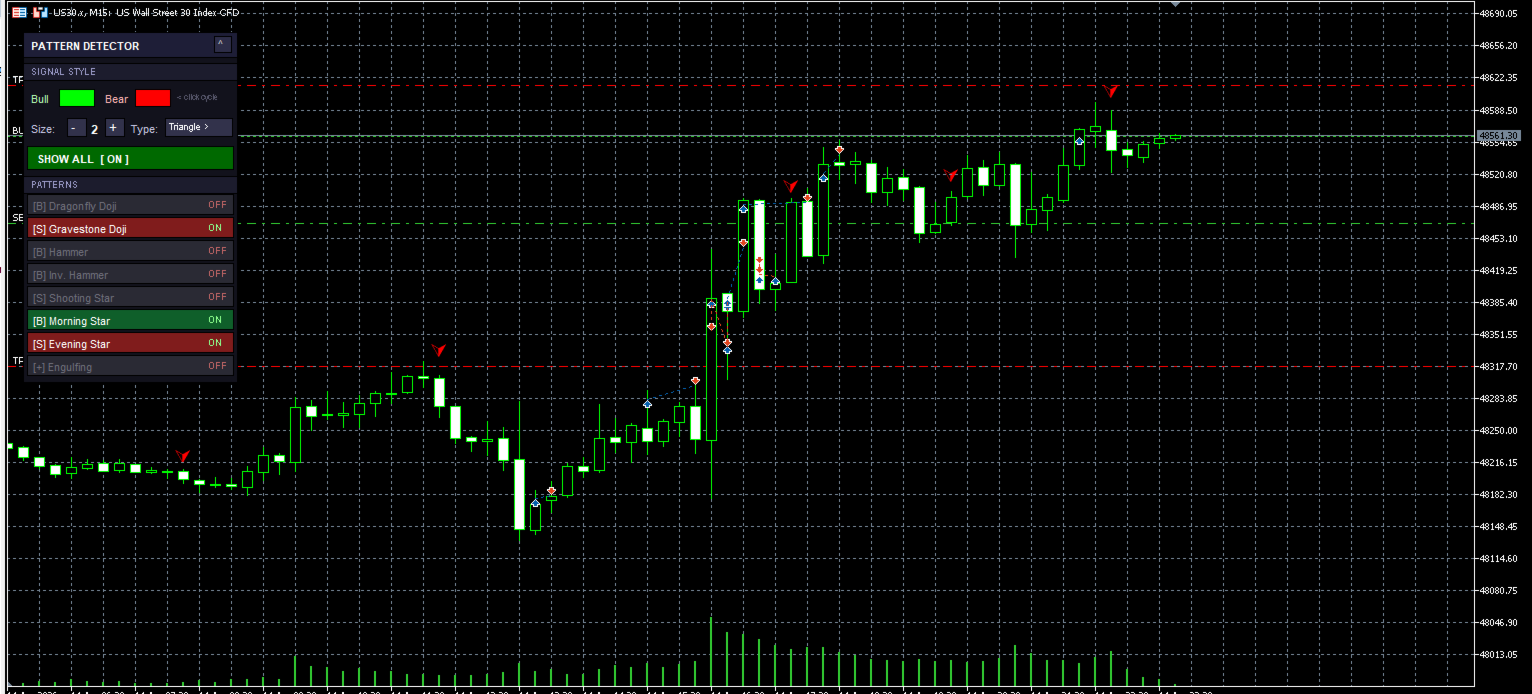
CandlePatternDetector is a MetaTrader 5 chart indicator that automatically scans every closed bar on your chart and identifies 8 key candlestick reversal patterns in real time. When a pattern is found, it places a coloured arrow directly above or below the signal candle — green for bullish signals, red for bearish signals.
Every signal is context-aware: the indicator reads the current market trend at each bar and uses that to decide whether a pattern is a bullish reversal or a bearish reversal. The same candle shape can mean different things in different conditions, and the indicator handles this automatically.
All visual settings, pattern toggles, and style controls are accessible directly from an interactive on-chart panel — no need to open the settings dialog to change anything during live trading.
Detected Patterns
All 8 patterns fire in both directions. The trend context at the signal bar determines whether the arrow is green (bullish) or red (bearish).
| Pattern | Shape Description | Bullish Meaning | Bearish Meaning |
|---|---|---|---|
| Dragonfly Doji | Long lower shadow, tiny body at the top, almost no upper shadow | Buyers rejected a push lower; reversal up likely | Indecision at resistance; potential stall or reversal down |
| Gravestone Doji | Long upper shadow, tiny body at the bottom, almost no lower shadow | Indecision at support; potential bounce | Sellers rejected a push higher; reversal down likely |
| Hammer | Small body in upper portion, lower wick at least 2× the body, minimal upper wick | Classic bullish reversal at lows (Hammer) | Bearish warning at highs — same shape is called a Hanging Man |
| Inverted Hammer | Small body in lower portion, long upper wick at least 2× the body, minimal lower wick | Buyers tested higher and almost held; reversal up likely | Bearish signal at highs — same shape is called a Shooting Star |
| Shooting Star | Identical shape to Inverted Hammer (separate toggle for independent control) | Bullish in downtrend context | Classic bearish reversal at highs |
| Morning Star | 3 candles: large bearish → small-body star → bullish close past the midpoint of candle 1 | Strong bullish reversal — exhaustion of sellers | In uptrend: three-bar exhaustion warning |
| Evening Star | 3 candles: large bullish → small-body star → bearish close below the midpoint of candle 1 | In downtrend: three-bar capitulation/reversal signal | Strong bearish reversal — exhaustion of buyers |
| Engulfing | Current candle body completely contains the prior candle body (both bull and bear variants) | Bullish Engulfing: bull bar swallows prior bear bar | Bearish Engulfing: bear bar swallows prior bull bar |
Note on Inverted Hammer vs Shooting Star: These are the same candle shape. The indicator keeps them as separate panel toggles so you can enable one context and disable the other. For example: enable Shooting Star (bearish) but disable Inverted Hammer (bullish) if you only want to trade that shape in uptrends.
Signal Logic
For every fully closed bar (bar index ≥ 1): 1. Detect trend → Uptrend or Downtrend 2. Check all enabled patterns against that bar's OHLC 3. If pattern found: Downtrend → Green arrow below the candle (bullish reversal) Uptrend → Red arrow above the candle (bearish reversal)
Signals are placed only on fully closed bars. The current (forming) bar is never marked. This means the indicator does not repaint — once an arrow appears it stays exactly where it was placed.
Trend Detection
You choose the trend method in the input settings. Two methods are available:
Moving Average (default) The bar's closing price is compared to the MA value at that bar.
- Close > MA → Uptrend → bearish signal context
- Close < MA → Downtrend → bullish signal context
Configure with: MA Period, MA Type (SMA/EMA/SMMA/LWMA), MA Applied Price.
Market Structure Looks back N bars and finds the highest high and lowest low of that range. The midpoint of that range is used as the trend divider.
- Close > midpoint → Uptrend
- Close < midpoint → Downtrend
Configure with: Structure Lookback (bars).
The On-Chart Panel
The panel is displayed directly on the chart and gives you full real-time control without opening any dialog.
┌────────────────────────────────┬────┐
│  PATTERN DETECTOR              │ ^  │  ← Click ^ to minimise
├────────────────────────────────┴────┤
│  SIGNAL STYLE                       │
│  Bull [████]  Bear [████]  <click   │  ← Click swatches to cycle colour
│  Size:  [ - ] [ 2 ] [ + ]           │
│  Type:  [ Arrow >        ]          │  ← Click to cycle arrow type
├─────────────────────────────────────┤
│  [ SHOW ALL  [ ON ]               ] │  ← Master signal toggle
├─────────────────────────────────────┤
│  PATTERNS                           │
│  [B] Dragonfly Doji          ON  ]  │
│  [S] Gravestone Doji         ON  ]  │
│  [B] Hammer                  ON  ]  │
│  [B] Inv. Hammer             ON  ]  │
│  [S] Shooting Star           ON  ]  │
│  [B] Morning Star            ON  ]  │
│  [S] Evening Star            ON  ]  │
│  [+] Engulfing               ON  ]  │
└─────────────────────────────────────┘
Signal Style Controls (inside the panel)
| Control | How to use | Effect |
|---|---|---|
| Bull colour swatch | Click to cycle through 5 colours: Lime → Green → Aqua → Yellow → White | Changes colour of all bullish arrows instantly |
| Bear colour swatch | Click to cycle through 5 colours: Red → OrangeRed → Magenta → Orange → HotPink | Changes colour of all bearish arrows instantly |
| Size − / + | Click − or + to decrease or increase | Arrow size 1 (smallest) to 5 (largest); updates all markers instantly |
| Type | Click to cycle: Arrow → Triangle → Dot → Star | Changes arrow wingdings code on all markers instantly |
Pattern Controls
| Control | Action |
|---|---|
| SHOW ALL [ ON / OFF ] | Master switch — hides or reveals every signal arrow on the chart at once. Individual pattern states are remembered and restored when you turn it back ON. |
| Individual pattern row | Click anywhere on the row to toggle that pattern ON (coloured) or OFF (grey). Signals for that pattern are immediately hidden or shown. |
| ^ / v (header) | Minimises the panel to just the header bar to save chart space. Click again to restore. |
Pattern Row Colours
| Row colour | Meaning |
|---|---|
| Green | Pattern is ON and primarily bullish |
| Red | Pattern is ON and primarily bearish |
| Blue | Pattern is ON and covers both directions (Engulfing) |
| Grey | Pattern is OFF — no signals will appear |
Input Parameters
Trend Detection
| Parameter | Default | Description |
|---|---|---|
| Method | Moving Average | Switch between MA-based or Market Structure trend detection |
| MA Period | 50 | Number of bars used to calculate the moving average |
| MA Type | EMA | Smoothing method: SMA, EMA, SMMA, or LWMA |
| MA Price | Close | Which price the MA is applied to |
| Structure Lookback | 10 | How many bars back to look for HH/LL when using Market Structure mode |
Pattern Sensitivity
| Parameter | Default | Description |
|---|---|---|
| Doji Body % | 5.0 | A candle qualifies as a Doji only if its body is ≤ this % of total range. Lower = stricter. |
| Hammer Body % | 33.0 | Max body size as % of range for Hammer, Inverted Hammer, Shooting Star. |
| Hammer Wick Ratio | 2.0 | Minimum ratio of the dominant wick to the body. Higher = longer wick required. |
| Star Body % | 30.0 | Max body size % for the middle candle of Morning/Evening Star. |
Alerts
| Parameter | Default | Description |
|---|---|---|
| Popup alert | Off | Shows a dialog box when a new signal appears on the last closed bar |
| Sound alert | Off | Plays a sound file when a new signal appears |
| Push notification | Off | Sends a push notification to your mobile MT5 app (requires MT5 mobile linked) |
| Sound file | alert.wav | Filename of the sound — must exist in your MT5 installation's Sounds folder |
Alerts only fire on bar index 1 (the most recently closed bar) and only once per bar, so a full chart recalculation never triggers a flood of alerts.
Panel Position
| Parameter | Default | Description |
|---|---|---|
| X offset | 15 | Horizontal distance from the top-left corner of the chart in pixels |
| Y offset | 30 | Vertical distance from the top-left corner of the chart in pixels |
Installation
- Open MetaTrader 5
- Go to File → Open Data Folder
- Navigate to MQL5 → Indicators
- Copy CandlePatternDetector.mq5 into that folder
- In MT5, open the Navigator panel (Ctrl+N)
- Right-click Indicators → Refresh
- Double-click CandlePatternDetector or drag it onto any chart
- Set your preferred inputs in the dialog, then click OK
The indicator compiles automatically the first time it loads. If there are compilation errors, open MetaEditor (F4), open the file, and press F7 to see the error list.
Tuning Guide
| Goal | What to change |
|---|---|
| See more signals | Increase Doji Body %, increase Hammer Body %, decrease Hammer Wick Ratio |
| Reduce noise / false signals | Decrease Doji Body %, increase Hammer Wick Ratio, use a longer MA Period |
| Longer-term trend bias | Increase MA Period (e.g. 100, 200) |
| Faster trend response | Switch to Market Structure with a smaller Lookback |
| Trade only one candle shape in one direction | Disable the pattern on the opposite context (e.g. keep Shooting Star ON, turn Inverted Hammer OFF) |
| Clean up chart temporarily | Click SHOW ALL [ OFF ] — all arrows hide instantly, nothing is deleted |
Technical Notes
- No repainting — signals are placed only on bars with index ≥ 1 (fully closed). Bar 0 is never touched.
- Object naming — every chart object is prefixed CPD_ . This guarantees clean removal when the indicator is detached and prevents conflicts with other tools.
- Marker naming convention — CPD_MRK_<PATTERNCODE><B|S>_<BARNUMBER> . The B/S suffix records which direction the signal fired in, allowing the panel to independently toggle visibility per pattern.
- Performance — on a full scan (chart load), the indicator scans all bars in a single pass with no nested indicator calls inside the loop. The MA buffer is copied once before the loop begins. Panel objects use partial updates (only the changed object is redrawn) rather than rebuilding the entire panel on every click.
CandlePatternDetector v2.0 — MQL5 Custom Indicator