
Trade Manager MT5 Position Size Calculator
- Utilità
- Versione: 1.0
- Attivazioni: 5

Offerta speciale di lancio!
Ottieni il Risk Control Panel a $30 — offerta a tempo limitato.
Per favore, se ti piace questa utility, lascia una recensione, ci aiuta a creare più strumenti come questo.
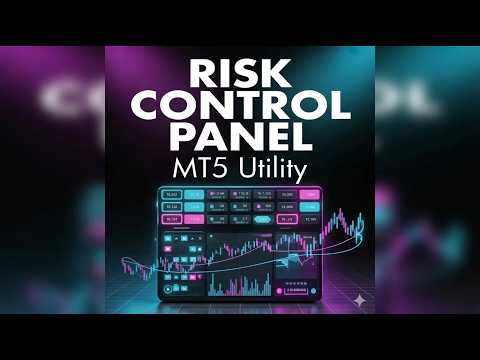
Il Risk Control Panel fornisce una gestione precisa del rischio di trading direttamente dal grafico. Imposta il rischio nella valuta del conto e lo strumento calcola automaticamente la dimensione del lotto appropriata in base alla distanza dello Stop Loss, garantendo una funzionalità coerente di calcolatore della dimensione della posizione senza calcoli manuali.
Il pannello interattivo consente di posizionare e regolare Stop Loss, livelli di Take Profit (TP1 e TP2, opzionali), Break Even e Trailing direttamente sul grafico.
Caratteristiche principali
- Gestione dinamica del rischio – Definisci il rischio nella valuta del conto; la dimensione del lotto viene calcolata automaticamente con logica integrata di calcolatore della dimensione della posizione.
- Take Profit flessibile – Usa uno o due livelli di Take Profit con percentuali regolabili di uscita parziale.
- Break Even e Trailing – Automatizza la protezione dei profitti aperti.
- Pannello interattivo sul grafico – Avanzato pannello di trading per regolare SL, TP1, TP2, BE e TR direttamente dal grafico.
- Monitoraggio delle operazioni attive – Monitora e gestisci più operazioni con chiara visibilità del P&L utilizzando questo gestore delle operazioni.
- Scorciatoie da tastiera ed esecuzione – Esegui e aggiorna le operazioni tramite hotkey o pulsanti del pannello.
Ideale per day trader e scalper, questo gestore delle operazioni migliora la precisione di esecuzione, riduce gli errori manuali e fornisce controllo delle operazioni in tempo reale con strumenti integrati di calcolatore della dimensione della posizione.
Come usare
Panoramica del pannello
- Impostazioni del rischio
- Controlli delle linee
- Operazioni attive
- Esecuzione
Impostazioni del rischio
Rischio (valuta del conto)
Definisce l'importo da rischiare per operazione.
Lotti calcolati
Calcolati automaticamente in base alla distanza dello Stop Loss e al rischio utilizzando la logica del calcolatore della dimensione del lotto.
Logica di calcolo dei lotti:
- Rischio ÷ (distanza dello Stop Loss × valore del tick)
- Adattato ai vincoli del broker:
- Arrotondato per difetto al passo di lotto valido più vicino
- Non inferiore al lotto minimo
- Non superiore al lotto massimo
Direzione
Indica Long o Short in base alla posizione dello Stop Loss rispetto al prezzo.
Linee dell'operazione
SL (Stop Loss)
Richiesto per il calcolo del rischio.
TP1 (Opzionale)
Primo obiettivo di profitto.
TP2 (Opzionale)
Secondo obiettivo di profitto per la chiusura parziale.
Percentuale TP2 (logica di chiusura parziale):
- Definisce la posizione rimanente dopo TP1
- Esempio:
- TP2 % = 50
- A TP1 → viene chiuso il 50%
- Il restante 50% continua verso TP2
Comportamento dell'arrotondamento:
- Basato sulla dimensione originale del lotto
- Arrotondato per difetto al passo di lotto valido
- Garantisce che il lotto minimo rimanga aperto
- Se non possibile (lotto molto piccolo), TP1 potrebbe essere saltato
BE (Break Even)
Sposta lo Stop Loss al prezzo di entrata quando attivato.
TR (Trailing Stop)
Si attiva dopo il livello di attivazione e regola continuamente lo Stop Loss.
Apertura di un'operazione
- Imposta lo Stop Loss
- Imposta TP1 e/o TP2
- Abilita opzionalmente BE e TR
- Definisci il rischio
- Clicca ESEGUI
Gestione delle operazioni
- Trascina le linee per regolare SL/TP in tempo reale
- Naviga tra le operazioni usando le frecce
- Clicca Aggiorna per modificare un'operazione
Chiusura parziale a TP1 (se TP2 è attivo):
- Chiude una parte in base alla % di TP2
- La posizione restante continua verso TP2
- Tutti i volumi rispettano i vincoli del broker
Break Even e Trailing
Break Even (BE)
Sposta lo Stop Loss al prezzo di entrata dopo l'attivazione.
Trailing (TR)
Si attiva dopo l'attivazione e regola lo Stop Loss per bloccare i profitti.
Scorciatoie da tastiera
- S → Attiva/disattiva Stop Loss
- 1 → Attiva/disattiva TP1
- 2 → Attiva/disattiva TP2
- B → Attiva/disattiva Break Even
- T → Attiva/disattiva Trailing
- Spazio → Esegui operazione
Le scorciatoie sono completamente personalizzabili nelle impostazioni di input.
Note importanti
- Imposta sempre uno Stop Loss prima di eseguire un'operazione
- Assicurati che il rischio corrisponda alla dimensione del conto e alla strategia
- Testa su un conto demo prima dell'uso reale








































L'utente non ha lasciato alcun commento sulla valutazione.