Forge X
- Experts
- Versione: 4.15
- Aggiornato: 16 novembre 2026
- Attivazioni: 10

FORGE X EA MT5
Supply & Demand Trading with Controlled Scaling and Recovery
Forge X EA is a fully automated MT5 trading system based on multi-timeframe Supply & Demand zone confluence.
Version 4.15 includes built-in optimized profiles for GBPUSD, EURUSD, AUDCAD, USDJPY, NZDCAD and EURGBP. Attach Forge X to a supported chart, choose your risk, and AUTO mode automatically loads the correct strategy settings and assigns a dedicated Magic Number.
No external .set files or manual Magic Number configuration are required in AUTO_OPTIMIZED mode. Forge X automatically recognizes the supported currency pair, loads its built-in optimized strategy settings, and assigns a dedicated Magic Number. Users retain full control over their money management and risk settings.
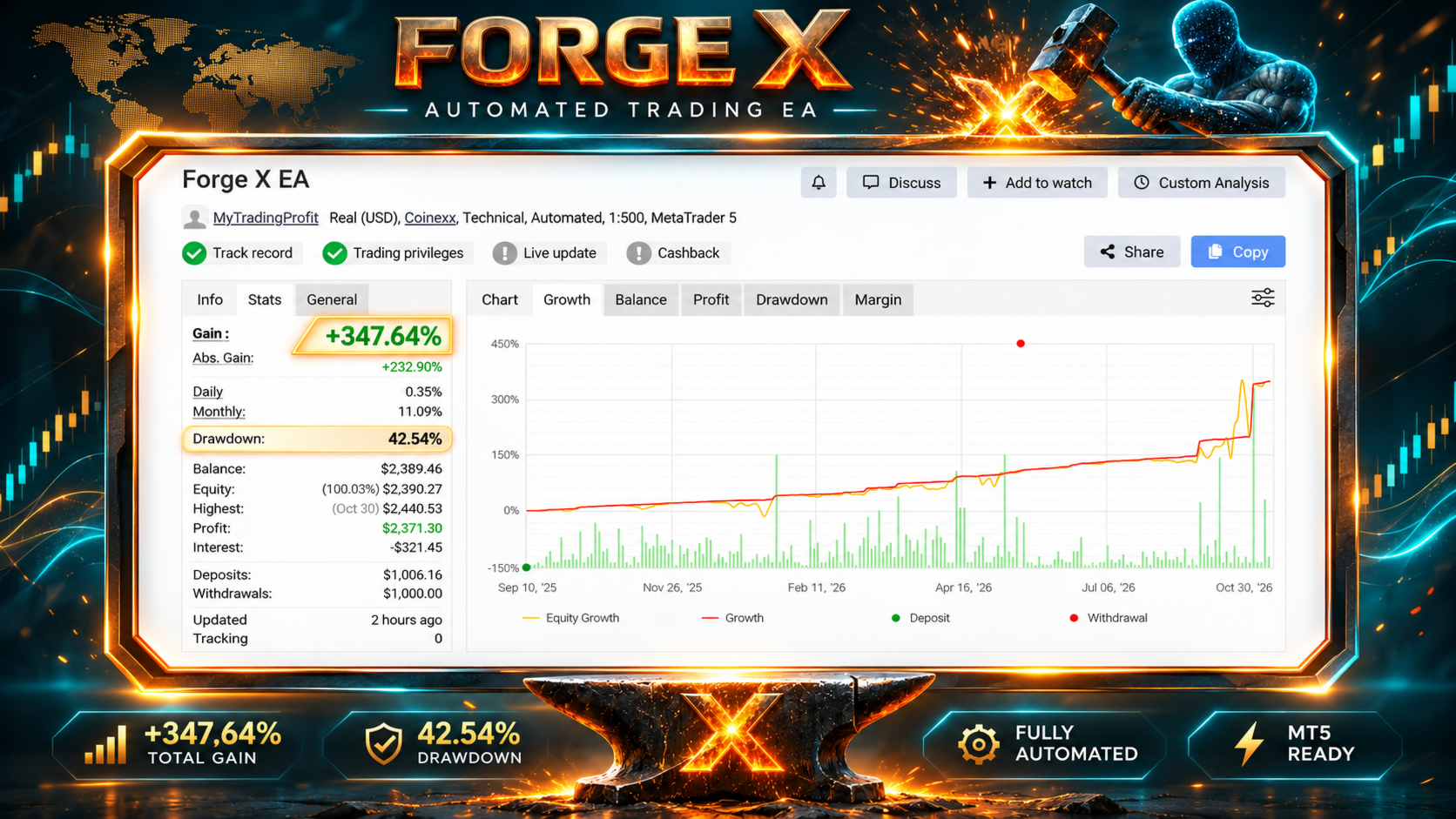
Live performance:
📊 View the Live Track Record ---> HERE
Optional CUSTOM Settings (.set Files)
Forge X includes built-in optimized AUTO configurations for six currency pairs:
GBPUSD, EURUSD, AUDCAD, USDJPY, NZDCAD, and EURGBP.
No external .set files are required for normal AUTO operation.
For advanced users, downloadable .set files provide alternative configurations for CUSTOM mode, backtesting, and further optimization.
📥 Download the official .set files ---> HERE
To load a CUSTOM preset:
-
Attach Forge X to the appropriate chart.
-
Open the EA's Inputs tab.
-
Select SettingsMode = CUSTOM_INPUTS.
-
Click Load and select the .set file matching the instrument.
-
Review money management and risk settings before enabling trading.
Users who prefer the built-in configurations should leave SettingsMode = AUTO_OPTIMIZED.
Built-In Optimized Settings — Six Currency Pairs
Forge X includes six built-in, instrument-specific trading configurations:
-
GBPUSD
-
EURUSD
-
AUDCAD
-
USDJPY
-
NZDCAD
-
EURGBP
Recommended timeframe: M15
Recommended starting capital: $1,000, subject to broker conditions, lot sizing, and selected risk settings.
With SettingsMode = AUTO_OPTIMIZED, Forge X automatically recognizes the supported instrument, applies its corresponding optimized strategy configuration, and assigns a dedicated Magic Number.
No external .set files are required for standard AUTO operation.
Each supported currency pair can operate independently on its own M15 chart.
Trading Strategy
Multi-Timeframe Supply & Demand
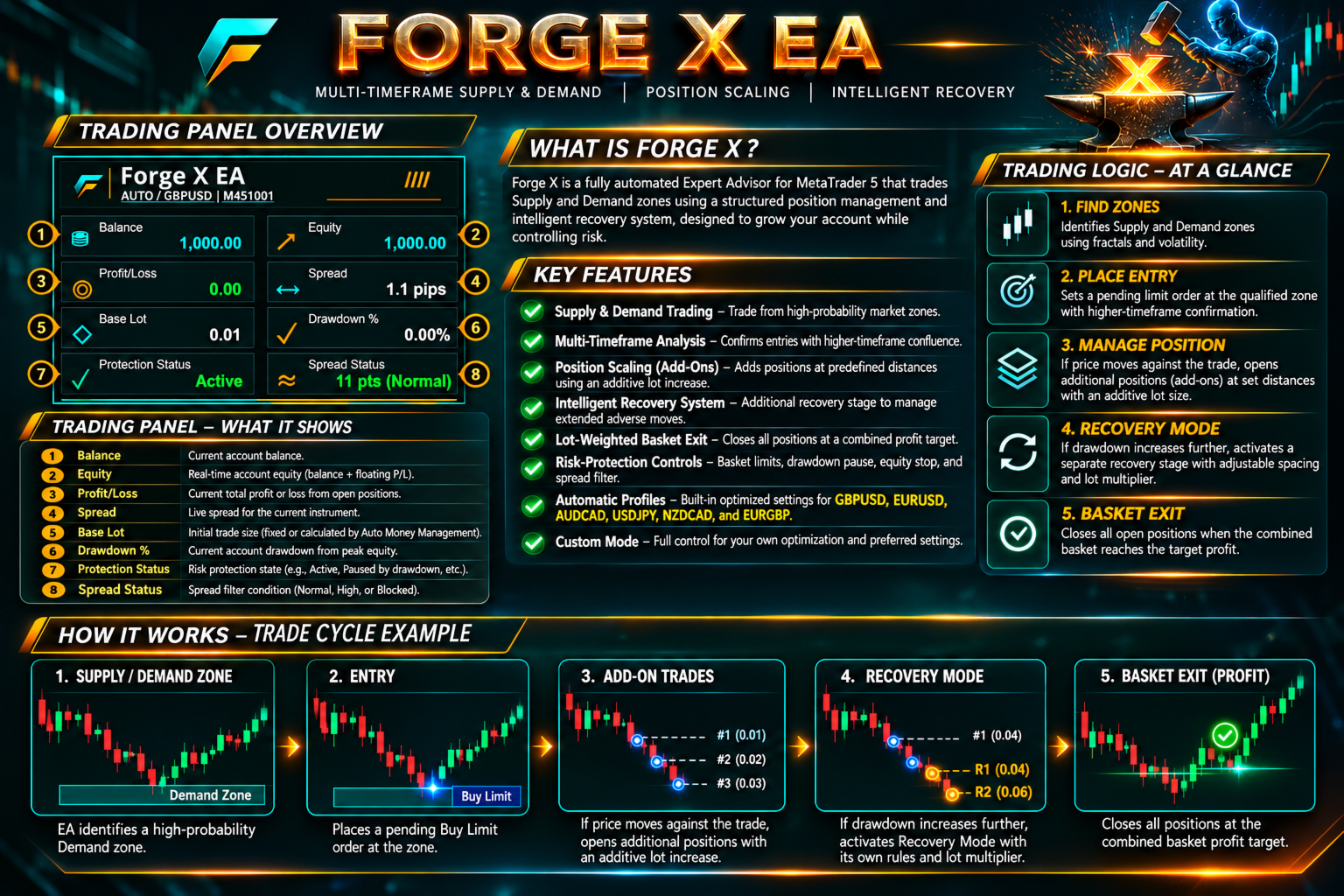
Forge X analyzes historical price action to identify Supply & Demand zones. Trading opportunities are selected when zones on the entry timeframe align with zones on a higher timeframe.
Limit-Order Execution
The EA uses pending limit orders at qualifying price levels rather than entering every trade at the current market price.
Controlled Position Scaling
If the market moves against an open position, additional trades may be placed at predefined distances using configurable lot-sizing rules.
Recovery Management
When a basket moves further into drawdown, Forge X can activate a separate recovery sequence with its own trade spacing, volume multiplier, and maximum number of recovery positions.
Basket Profit Management
When multiple positions are open, the EA calculates basket profit targets using position volumes and manages the combined positions according to its configured exit rules.
Recovery and scaling may increase margin requirements and floating drawdown. A maximum trade count limits the number of positions but does not guarantee protection against large losses.
Money Management and Protection
Forge X provides the following controls:
-
Equity-based automatic lot sizing
-
Fixed initial lot sizing
-
Maximum basket volume limit
-
Maximum additional trade count
-
Maximum recovery trade count
-
Configurable recovery spacing and lot multiplier
-
Drawdown-based pause for new entries
-
Emergency equity stop
-
Spread protection
-
Optional Moving Average trend filter
-
Automatic broker symbol prefix/suffix recognition
These features allow traders to configure position exposure and risk according to their account conditions.
Chart Visualization
Forge X includes an on-chart trading panel displaying information such as account balance, equity, profit and loss, drawdown, and current trading conditions.
The panel also identifies the active AUTO or CUSTOM configuration.
Supply & Demand zone drawings can be enabled or disabled, and chart presentation settings can be adjusted through the EA inputs.
AUTO and CUSTOM Modes
AUTO_OPTIMIZED — Recommended for Standard Operation
Designed for GBPUSD, EURUSD, AUDCAD, USDJPY, NZDCAD, and EURGBP.
-
Built-in optimized strategy configurations
-
Automatic currency pair recognition
-
Automatic Magic Number assignment
-
No external .set files required
-
User-configurable money management and risk controls
CUSTOM_INPUTS — Advanced Configuration
Designed for traders who want to adjust strategy parameters, load custom .set files, perform independent optimization, or test additional instruments.
Optional CUSTOM presets are available through the official download link above.
CUSTOM mode allows users to optimize their configurations according to their broker's trading conditions and individual risk preferences.
Installation
-
Install Forge X from the MQL5 Market.
-
Open an M15 chart for one of the six supported currency pairs: GBPUSD, EURUSD, AUDCAD, USDJPY, NZDCAD, or EURGBP.
-
Attach Forge X to the chart.
-
Select SettingsMode = AUTO_OPTIMIZED.
-
Configure your preferred lot-sizing method and risk controls.
-
Enable Algo Trading in MetaTrader 5.
-
Repeat on additional supported charts if desired.
A VPS is recommended for uninterrupted automated operation.
Requirements
-
MetaTrader 5
-
Hedging account
-
M15 chart recommended
-
Sufficient account margin for multi-position trading
-
Broker with suitable spread, commission, swap, and execution conditions
Forge X may maintain positions overnight or through weekends. Swap costs and changes in spreads can affect trading outcomes.
User Manual and Official Settings
The Forge X user manual and CUSTOM configuration files are available through the official MQL5 blog:
https://www.mql5.com/en/blogs/post/779962
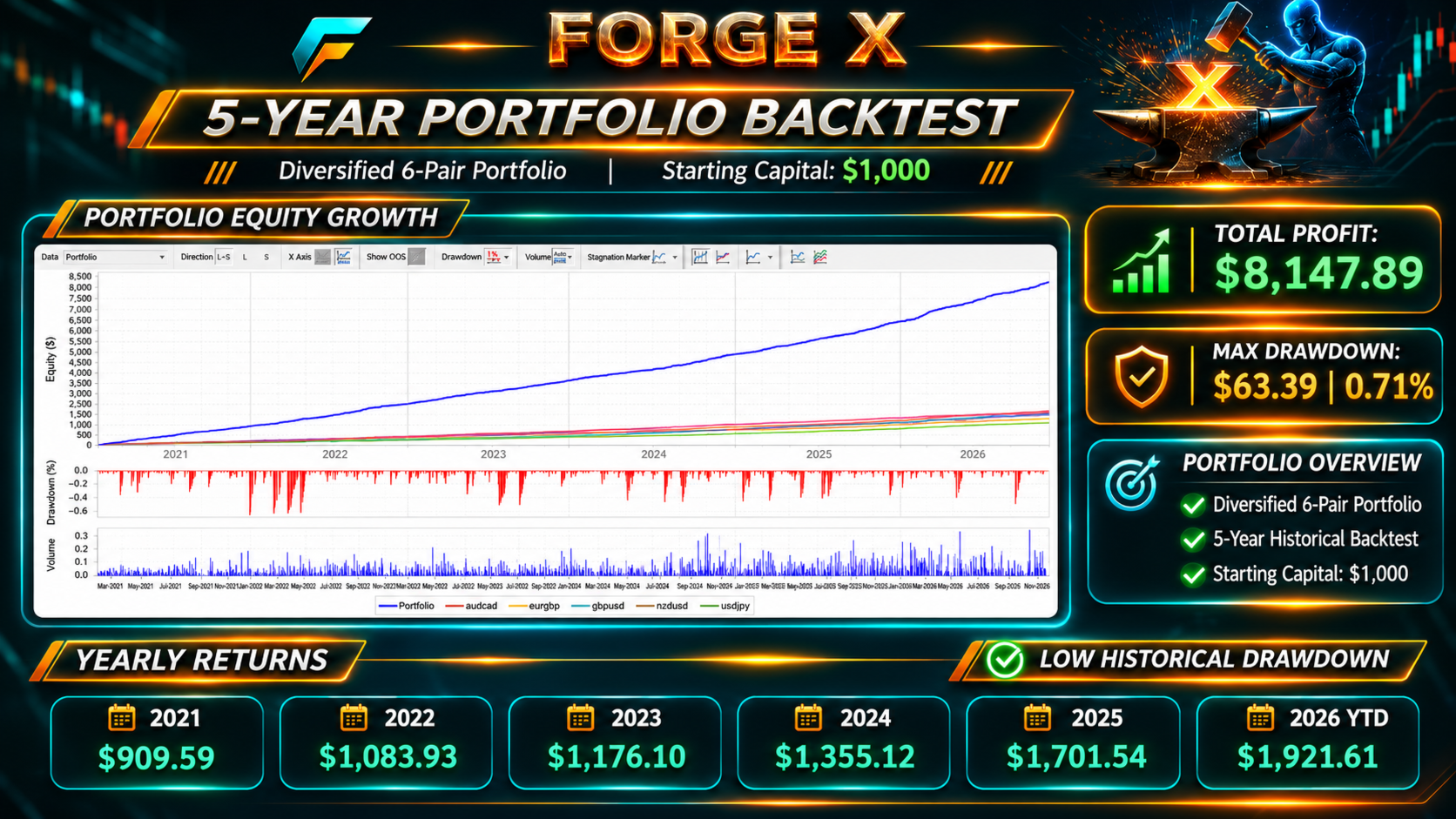
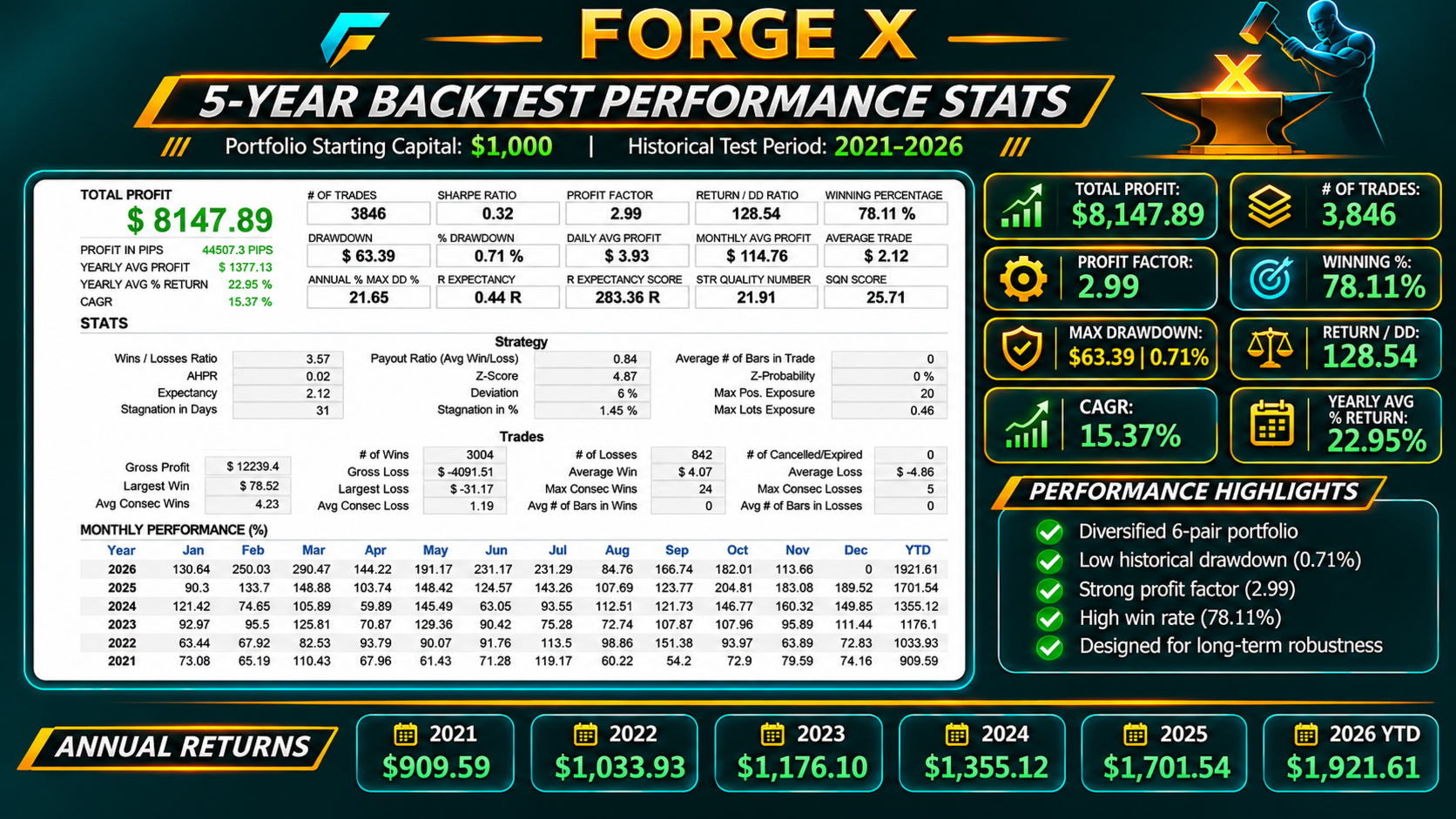
The documentation covers installation, AUTO operation, CUSTOM settings, and historical testing.
Testing and Risk Disclosure
The MQL5 Market demo can be tested in the MetaTrader 5 Strategy Tester.
Users are encouraged to test Forge X using their broker's data and trading conditions before beginning live operation.
Historical trading performance and backtest results do not predict future outcomes. Scaling and recovery strategies involve significant financial risk, particularly during sustained directional market movements or periods of reduced liquidity.