Cockpit
- Indicatori
-
Victor Paul Hamilton
 # Victorious Creations Mission Statement
First and foremost, I, Victor Hamilton, am a trader first and a developer second. I began creating financial tools and Expert Advisors out of necessity, not as a primary business venture. - Versione: 2.2
- Aggiornato: 10 febbraio 2026
See Everything. Chase Nothing.
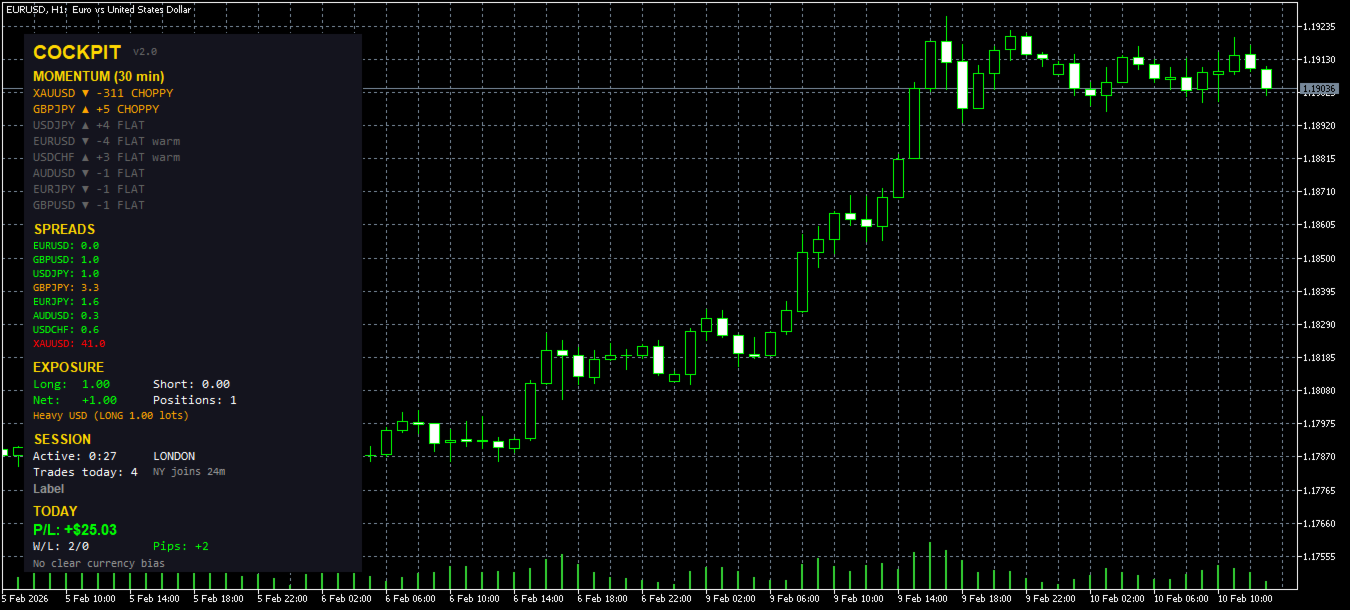
Cockpit is a real-time dashboard that watches up to 8 pairs simultaneously and tells you which ones are worth your attention right now. It ranks pairs by momentum, flags move quality, spots sweet spot entries, tracks your exposure, monitors your fatigue, and counts your session — all in one compact panel that lives on your chart.
No signals to blindly follow. No arrows telling you when to click buy. Just clean, accurate information so you can make better decisions faster.
What You See
Cockpit runs as a single panel on any chart. Every half second it scans all your watched pairs and updates five sections:
Momentum Scanner — Your pairs ranked by how much they've moved, strongest first. Each line shows the pair name, direction arrow, pip movement, and two critical tags:
Move quality tells you HOW the pair moved. CLEAN means bodies bigger than wicks, consistent direction — a tradeable move. CHOPPY means big wicks and indecision — stay away. SPIKE means one bar did all the work — you missed it. FLAT means nothing is happening.
ATR context tells you if that move matters. "HOT" means the move exceeds 1.5x the pair's average true range — this is unusual activity. "warm" means it's at or above average range. No tag means the move is within normal noise for that pair. This solves the problem of comparing 18 pips on EURUSD (which is significant) with 18 pips on XAUUSD (which is nothing).
The sweet spot star (★) appears next to pairs that pass all filters simultaneously: the move is big enough to be real but not so extended you'd be chasing, the move started recently (not 30 minutes ago), the quality is CLEAN, and the spread is tight. During London and New York sessions only, unless you disable that filter. When you see the star, that pair is in the zone.
Spread Monitor — All 8 pairs with live spreads in pips. Green means tight, orange means widening, red means stay out. You set the thresholds.
Exposure Tracker — Total long lots, total short lots, net exposure, and position count. Below that, a currency concentration warning appears if you're stacking too much exposure on one currency across multiple pairs. Catches the classic mistake of being long EURUSD and GBPUSD and AUDUSD thinking you have three trades when you really have one massive USD short.
Session Clock — Which trading session is active, how long you've been at the screen, and a countdown to the next session change. Not just "LONDON+NY" but "overlap ends 47m" so you know how much prime time you have left. The active timer changes colour as you approach fatigue thresholds.
Daily Stats — Today's P/L in dollars, win/loss count, and total pips. The pip calculation uses proper tick value data from the broker for each instrument, so it's accurate on gold, JPY pairs, indices, and exotics — not the approximate calculation most dashboards use.
Currency Pulse — One line at the bottom summarising the dominant theme. If USD is weak across 3 or more of your watched pairs, it says "USD weak". If there's no clear bias, it says so. Gives you the macro picture without a separate indicator.
Why Quality Matters More Than Pips
Most momentum scanners show you which pair moved the most. That's the wrong question. The right question is: which pair moved cleanly and is still tradeable?
A pair that moved 25 pips in a single spike candle 20 minutes ago is showing strong momentum by the numbers, but the move is over. A pair that moved 15 pips across 5 clean-bodied candles with small wicks in the last 30 minutes is a better opportunity despite showing less momentum.
Cockpit analyses the last several bars for body-to-wick ratio, directional consistency, and whether one bar accounts for more than 60% of the total move. The result is a single word — CLEAN, CHOPPY, SPIKE, or FLAT — that tells you instantly whether to look closer or scroll past.
The Sweet Spot
The star symbol is the feature that ties everything together. It only appears when all of these conditions are true at the same time:
The pair has moved between your minimum and maximum pip thresholds (default 8–35 pips). Below minimum means nothing is happening yet. Above maximum means you would be chasing.
At least half of the total move occurred in the most recent bars, meaning the move is still accelerating rather than stalling out.
Move quality is CLEAN — consistent bodies, controlled wicks, directional agreement across bars.
Spread is below your warning threshold — no point entering when the spread will eat your profit.
The session filter passes (London or New York hours by default).
You do not need to watch 8 charts to find this. Cockpit finds it for you and puts a star next to it.
Configurable Timeframe
The momentum scanner is not locked to M5. You choose which timeframe to scan through the inputs. The panel title automatically adjusts to show the actual lookback window (e.g. "MOMENTUM (30 min)" for 6 bars on M5, or "MOMENTUM (6 min)" for 6 bars on M1).
This means you can run Cockpit on any chart timeframe while scanning momentum on a different one. Attach it to your H1 chart for context, scan momentum on M5 for entries.
Fatigue Protection
Cockpit tracks how long you have been active and how many trades you have taken today. Configurable warning thresholds trigger colour changes and text warnings:
First warning at 3 hours active or 15 trades (configurable). Gentle reminder.
Strong warning at 5 hours active or 25 trades. Direct message to stop.
If both time and trade count hit the strong threshold simultaneously, you get the clearest possible message.
These numbers are not arbitrary. Research on trader performance shows that decision quality degrades significantly after extended screen time, and overtrading is the most common account killer for scalpers. The dashboard does not prevent you from trading — it makes sure you know what you are doing to yourself.
Setup
- Place Cockpit_v2.mq5 in your MQL5/Indicators directory
- Restart MetaTrader 5
- Drag the indicator onto any chart
- Configure your watched pairs and thresholds in the inputs
- Start trading
No external dependencies. No DLLs. No web connections. Everything runs locally inside MetaTrader.
Requirements: MetaTrader 5 build 2515 or higher. Compatible with all brokers and account types. Works on all MT5-supported instruments.
Inputs Reference
Pairs: Up to 8 symbols. Leave blank to skip a slot. The indicator verifies each symbol exists in your Market Watch on startup.
Momentum: Choose timeframe (default M5), bar count (default 6), and the pip threshold for flagging hot pairs.
Sweet Spot: Minimum move, maximum move, freshness bars, and session filter. Adjust these to match your style — tighter for conservative scalping, wider for momentum plays.
Spread: Warning and critical thresholds in pips. Colour codes the spread display.
Fatigue: Time and trade count thresholds for warning and strong warning levels.
Display: Panel position, all colours customisable. The panel is 340 pixels wide and fits comfortably alongside price action on a standard monitor.
What This Is Not
This is not a signal service. There are no buy/sell arrows. There is no alert that tells you to enter now. Cockpit assumes you know how to trade and gives you the information you need to do it well — which pair to focus on, whether the move is clean, whether your exposure is balanced, whether you have been at the screen too long, and whether the session supports what you are trying to do.
If you want an indicator that does your thinking for you, this is not it. If you want an indicator that makes your thinking faster and more accurate, this is it.