VantageFX Matrix Basic MT5
- Indicatori
- Artem Koliada
- Versione: 1.10
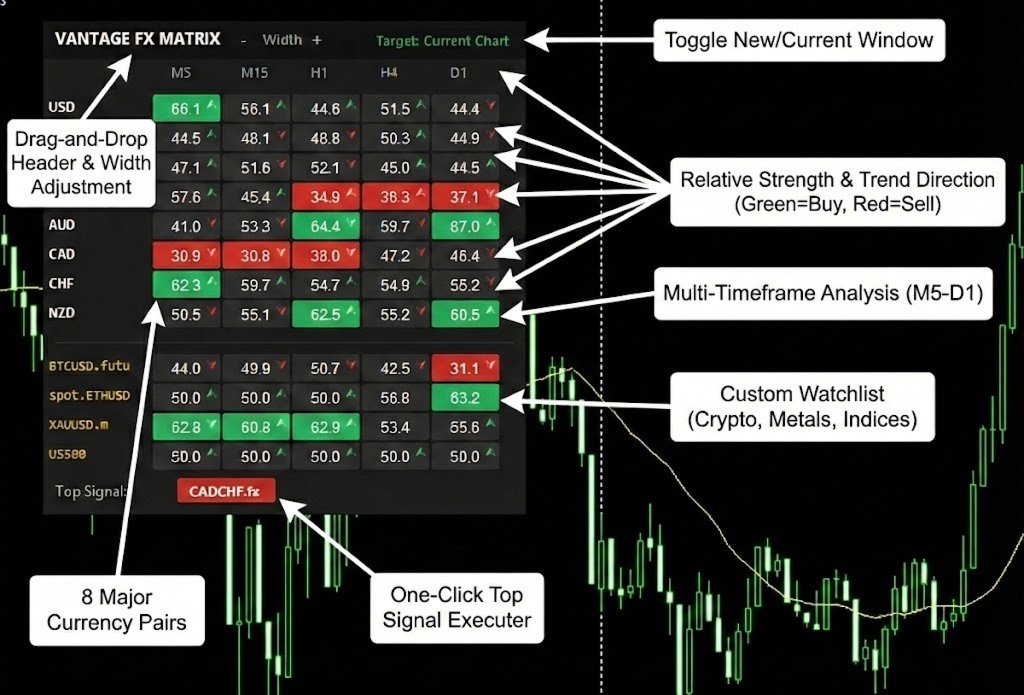
Vantage FX Matrix Basic is a specialized market analysis dashboard designed for the MetaTrader 4 platform. It allows traders to monitor the relative strength and momentum of major global currencies in real-time. This edition is optimized for traders focusing on the four most liquid currencies: USD, GBP, JPY, and AUD.
The dashboard combines multi-timeframe analysis with a proprietary RSI-based algorithm to identify potential trend continuations and reversals without switching charts.
Functionality of this Edition
This version maintains the full calculation accuracy of the algorithm but presents a streamlined data set:
-
Focused Currency Display: The dashboard visualizes strength values for USD, GBP, JPY, and AUD. (Internal calculations process all major pairs to ensure mathematical precision).
-
Compact Watchlist: The custom market scanner allows monitoring of up to 2 additional assets (e.g., Gold, S&P500, or Bitcoin).
-
Visual Monitoring: This version is designed for on-screen analysis. Signal alerts (Pop-up/Push) are disabled.
-
Standard Configuration: Timeframes and calculation parameters are set to industry-standard defaults (M5, M15, H1, H4, D1).
Operational Logic
The indicator analyzes price action across multiple timeframes simultaneously. It generates a strength score (0-100) and a momentum direction for each asset:
-
Values > 60: Suggest upward (Bullish) momentum.
-
Values < 40: Suggest downward (Bearish) momentum.
-
Arrows: Indicate the current speed and direction of the move.
Key Features
-
Smart Suffix Scanner: The indicator automatically detects broker-specific symbol names (e.g., EURUSD.fx , BTCUSD-pro ) directly from the Market Watch window. No manual text setup is required.
-
Interactive Interface:
-
Drag & Drop: Move the dashboard to any location on the chart using the mouse.
-
Position Memory: The panel remembers its exact position and width for every chart.
-
Resize Controls: Adjust the column width using the [-] and [+] buttons on the panel header.
-
-
Template Integration:
-
New Window: Clicking a symbol opens a new chart with your preferred template applied automatically.
-
Current Window: Updates the active chart to the selected symbol.
-
Parameters
Visual and Position
-
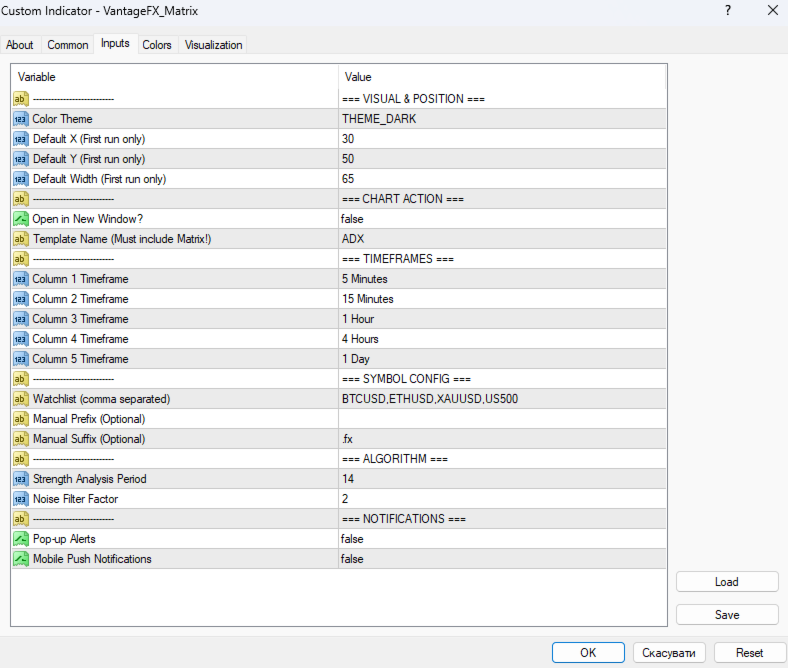
InpTheme: Select between Dark (Modern) and Light (Institutional) visual themes.
-
InpX_Start / InpY_Start: Initial screen coordinates for the dashboard.
-
InpLabelWidth: Initial column width.
Chart Action
-
InpNewWindow: Controls whether clicking a symbol updates the current chart or opens a new window.
-
InpTemplateName: Specifies the template (.tpl) to apply when opening charts.
Symbol Configuration
-
InpCustomList: Input for the custom watchlist (supports up to 2 symbols in this edition).
-
Manual Prefix/Suffix: Optional overrides for symbol detection.
Risk Warning: Past performance is not indicative of future results. This tool is designed to assist in technical analysis and decision-making but does not guarantee profits.