
On Chart Watchlist
- Indicatori
- Versione: 1.31
- Aggiornato: 28 settembre 2026

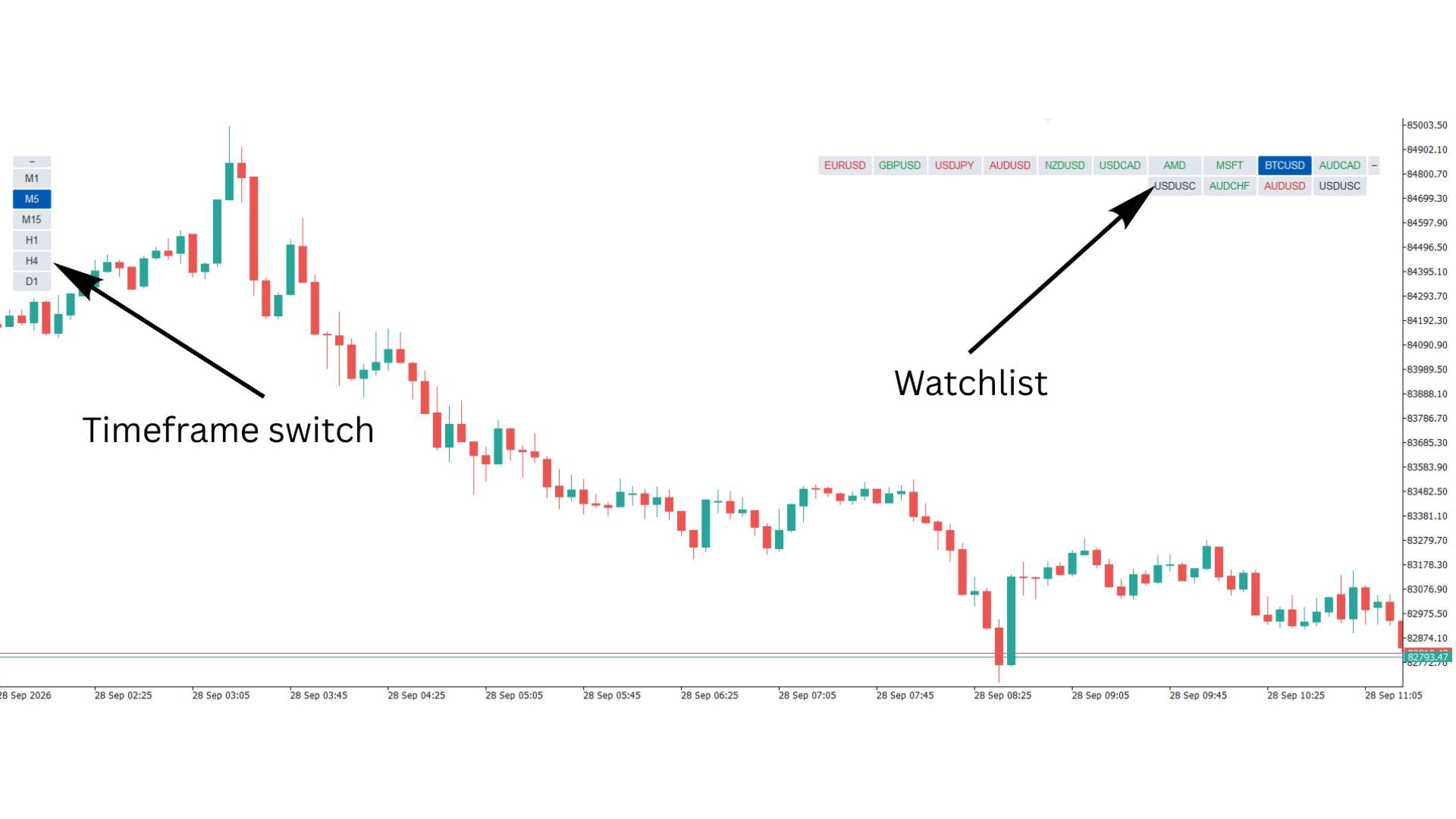
On Chart Watchlist puts your Market Watch symbols and your favourite timeframes on the chart as compact buttons, so you can switch with one click. The panels are live: symbol text turns green or red with the daily change, and hovering a button shows bid, spread and daily %. You can collapse the panels, page through long lists, open a symbol in a new chart with Ctrl+Click, step through symbols with the keyboard, and keep linked charts in sync. It detects broker prefixes and suffixes automatically and adapts to any chart colour scheme.
On Chart Watchlist is a lightweight navigation panel for MetaTrader 5. It replaces the Market Watch window, the symbol dropdown and the timeframe toolbar with compact buttons placed right on your chart. Click a symbol to switch to it, click a timeframe to change the period, and the button for the active symbol and timeframe stays highlighted.
The panel was built to stay out of the way: small buttons, no bulky frames, a collapse button in line with the list, and a layout that works in any of the four chart corners.
KEY FEATURES
1. One-click symbol switching
- Market Watch mode (default): shows every symbol in your Market Watch and follows it live. Add, remove or reorder symbols in Market Watch and the panel updates within a second, with no need to reload the indicator.
- Custom list mode: type your own comma-separated list, for example EURUSD,GBPUSD,XAUUSD,US30.
- Duplicate entries are removed automatically.
- The button for the symbol on the chart is highlighted. The highlight changes as soon as you click, before the chart finishes loading.
2. One-click timeframe switching
- Supports all 21 MT5 timeframes: M1, M2, M3, M4, M5, M6, M10, M12, M15, M20, M30, H1, H2, H3, H4, H6, H8, H12, D1, W1 and MN1.
- Entries are case-insensitive and spaces are ignored, so h4, H 4 and H4 all work. Invalid or duplicate entries are skipped, so there are never dead buttons.
- The current timeframe is highlighted.
3. Automatic broker prefix/suffix handling
- Type plain names like EURUSD in the custom list and the indicator finds your broker's real symbol, such as EURUSD.m, EURUSDm, EURUSD.pro or US30.cash.
- How it matches: your prefix/suffix inputs first (if set), then the exact name, then the same decoration as the current chart symbol, then a smart search of all broker symbols. US30 will never be mistaken for US300.
- Buttons can show clean names (EURUSD instead of EURUSD.m), which keeps them short and readable.
- A symbol your broker does not offer appears greyed out, and its tooltip explains why.
4. Live daily-change colours and tooltips
- Symbol text is coloured green when the price is above the previous daily close and red when it is below. You can read the market at a glance without opening another window.
- Hover any symbol to see its full name, description, current bid, spread in points and daily change in %.
- Values refresh every second. Only the visible buttons are updated, and the chart is redrawn only when something actually changes.
5. Collapsible panels
- Each panel has a small − button placed in line with the list: at the start of a row, or at the top of a column.
- Click it to collapse the panel to a single small + button, which frees the chart instantly. The button stays in the same spot, so you can expand the panel again without looking for it.
- The collapsed state is remembered on each chart when you switch symbols or timeframes.
6. Paging for large watchlists
- If your Market Watch holds more symbols than fit on screen, the list is split into pages (30 symbols per page by default, adjustable).
- A single small pager button in line with the list shows the page number. Click it for the next page and Ctrl+Click for the previous page.
- On load, the page that contains the current symbol is opened automatically, and the page you chose is remembered.
7. Ctrl+Click opens a new chart
- Hold Ctrl and click a symbol to open it in a new chart on the current timeframe. Hold Ctrl and click a timeframe to open the current symbol on that timeframe in a new chart.
- The new chart can copy the template of the current chart, including indicators, colours and settings.
8. Keyboard navigation
- Up / Down arrows step to the previous or next symbol in the list. The list wraps around and unavailable symbols are skipped.
- Left / Right arrows step to a lower or higher timeframe from your list. If the current timeframe is not in your list, it jumps to the nearest one in that direction.
- The modifier key is selectable: Shift (default), Ctrl or none. This avoids clashing with the chart's own arrow-key scrolling.
- When paging is active, the panel moves to the page that contains the new symbol.
9. Linked-chart symbol sync
When you change symbol, other open charts can follow automatically. Each synced chart keeps its own timeframe:
- Off (default)
- Charts showing the same symbol: ideal for multi-timeframe layouts (for example, M5 + H1 + D1 of the same pair).
- Charts with the same timeframe
- All open charts
10. Flexible layout
- Place each panel in any of the four chart corners: Top-Left, Top-Right, Bottom-Left or Bottom-Right.
- Choose a horizontal (row) or vertical (column) layout for each panel.
- Grid wrapping: set how many buttons go in one row or column before wrapping to the next.
- Correct in every corner: X/Y distances always mean "distance from the corner edge". Items read in natural order (left to right, top to bottom), and incomplete rows or columns hug the corner.
- Auto-stacking: put both panels in the same corner and the timeframe panel automatically sits beside or below the watchlist with a clean gap, never overlapping.
- One-Click Trading aware: panels in the top-left corner move down automatically when the One-Click Trading panel is shown, and move back when it is hidden.
11. Themes and styling
- Auto theme (default): detects whether your chart background is dark or light and picks matching colours. It re-adapts live if you change the chart colours.
- Built-in Dark and Light themes, or Custom with your own colours for background, text, active button, active text, up/down daily colours and panel background.
- Adjustable button width, height, font, font size and gaps.
- Auto-width: buttons widen just enough to fit long names such as GER40Cash, so text is never clipped.
- Optional background panel behind each group of buttons.
- Optional high-DPI scaling for 4K and scaled displays.
12. Clean and safe
- No buffers, no plots and no calculations on price data, so it adds virtually no load to the terminal.
- Buttons are hidden from the Object List and cannot be selected or moved accidentally.
- Multiple copies can run on the same chart without interfering with each other, thanks to automatic or manual instance IDs.
- All objects are removed when the indicator is removed. Saved panel states are cleaned up when the indicator is removed or the chart is closed.
INPUT PARAMETERS
Data Source
- Symbol Source: Auto-Fetch Market Watch (live update) / Use Custom List. Default: Market Watch.
- Custom Symbols: comma-separated list used in Custom mode. Default: EURUSD,GBPUSD,USDJPY,XAUUSD,US30.
- Broker Symbol Prefix: leave blank for auto-detect.
- Broker Symbol Suffix: leave blank for auto-detect.
- Hide Broker Prefix/Suffix on Buttons: show clean names. Default: true.
Watchlist Panel
- WL: Corner: Default: Top-Right.
- WL: Orientation: Horizontal / Vertical. Default: Horizontal.
- WL: Buttons per Row/Column: Default: 10.
- WL: Buttons per Page: 0 = no paging. Default: 30.
- WL: X Distance from Corner Edge: Default: 30.
- WL: Y Distance from Corner Edge: Default: 50.
Timeframe Panel
- Show Timeframes: Default: true.
- Timeframe List: Default: M1,M5,M15,H1,H4,D1.
- TF: Corner: the same corner as the watchlist enables auto-stacking. Default: Top-Left.
- TF: Orientation: Default: Vertical.
- TF: Buttons per Row/Column: Default: 10.
- TF: X Distance from Corner Edge: Default: 20.
- TF: Y Distance from Corner Edge: Default: 50.
Behaviour
- Sync Symbol Change to Other Charts: Off / Same symbol / Same timeframe / All charts. Default: Off.
- Ctrl+Click Opens a New Chart: Default: true.
- New Chart: Copy This Chart's Template: Default: true.
- Keyboard Navigation: Default: true.
- Keyboard Modifier Key: None / Shift / Ctrl. Default: Shift.
- Move Top-Left Panels Below One-Click Trading: Default: true.
Live Info
- Colour Symbol Text by Daily Change: Default: true.
- Show Tooltips (Bid, Spread, Daily %): Default: true.
Styling
- Colour Theme: Auto / Dark / Light / Custom. Default: Auto.
- Watchlist Button Width: Default: 70.
- Timeframe Button Width: Default: 50.
- Auto-Widen Buttons to Fit Text: the widths above act as the minimum. Default: true.
- Button Height: Default: 25.
- Font: Default: Arial.
- Font Size: Default: 8.
- Gap Between Buttons: Default: 2.
- Gap Between Stacked Panels: Default: 10.
- Draw Background Panel Behind Buttons: Default: false.
- Scale Sizes on High-DPI Screens: Default: false.
Custom Theme Colours (used when Theme = Custom)
- Button Background, Button Text, Active Background, Active Text, Text: Day Up, Text: Day Down, Panel Background.
Advanced
- Instance ID: leave blank for automatic. Set a different ID on each copy if you run two or more copies on the same chart.
QUICK START
- Drag the indicator onto any chart. By default, the symbols from your Market Watch appear top-right and your timeframes appear top-left.
- Click a symbol or timeframe to switch. Hold Ctrl while clicking to open it in a new chart instead.
- Press Shift + Up/Down to cycle symbols and Shift + Left/Right to cycle timeframes. The chart window must be focused.
- Click the − button at the start of a list to collapse it, and + to bring it back.
- To use your own list, set Symbol Source to Use Custom List and type plain symbol names. Broker suffixes are handled for you.
TIPS
- For a multi-timeframe setup, open several charts of the same pair on different timeframes, attach the indicator to one of them and set Sync to Charts showing the same symbol. Switching symbol on that chart updates the whole group.
- Save the chart as a template, or as your default.tpl, so every new chart opens with the panel ready.
- To place both panels together in one corner, give them the same corner. The timeframe panel stacks next to or under the watchlist automatically.
Works with all instruments offered by your broker: Forex, metals, indices, commodities, stocks and crypto. It works on any timeframe and on both netting and hedging accounts.































Thanks, Good Job