ECNture Piranha Bar
- Experts
- Versione: 2.2
- Attivazioni: 10

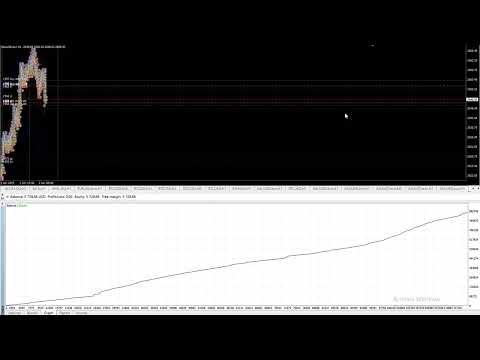
A flock of piranhas devours trading bars on the chart, collecting profits. They hunt, receive signals to act, and enter the market. They don't wait long for distant prey, resting until it's nearby or switching to a new bar and ravaging it as it rises or falls. This happens so quickly and imperceptibly on the chart, as the number of closed orders increases in the statistics window and the profit line curves upward. Your terminal may freeze, but underneath, the piranhas are actively fighting to collect as much profit as possible. The terminal always monitors the piranhas and collects their prey in closed orders and the balance column. Their hunt isn't always successful, and they suffer losses, but this doesn't stop them from continuing the hunt, and losses are quickly recovered.
Want to add my cute fish to your MT4 aquarium? Give them some food and watch them hunt for the bars.
This is an exclusive, a combination of my algorithms and filters. It's a new version of ECNture, co-written with artificial intelligence. Development progressed well from version to version, with tons of testing, but at one point it became clear that the AI's errors were the cause of the results. The small fish became more aggressive, attacking at every opportunity. They're not a threat to us, however; they stay on the other side of the tank, but we need to be careful. If the water is murky, they lose visibility and will demand food to survive.
No matter how I describe an advisor, few people go into detail. The only thing that matters is whether it will make money.
This advisor can! It can. If you really want it and are willing to take the necessary steps to achieve it.
My advisors are successful, proven, and long-term. ECNture Piranha Bar and ECNture Raging Gold are also important. However, the trading environment is equally important, and yes, there are places where the conditions are right. However, you won't know until you launch it, and testing it with real money may require a larger deposit, but with a larger sum.
You can contact me before purchasing or renting. To discuss all the possibilities, visit my profile .
##$ --> Attention!!! We are recruiting for a managed joint account. From any amount.
1+ Deposits and withdrawals are on your account, in your name, and only you have the right to withdraw your invested funds and your share of the profits.
2+ You don't pay for the trading system! You pay nothing until you start making a profit.
3+ You don't need a remote server, you don't even need a trading terminal; you just monitor your funds as they change.
4++ You don't need a large deposit to trade with smaller spreads and commissions. This greatly affects the final profit.
I've already ensured that my system can be used with even $100, with an initial risk of losing $5 per $1,000. $50 > next point.
5+ During the initial stages, ECNture trading systems will be tested. On minimal trades. Until stable trading is established.
At the initial stage, your risk will be no more than 5% of your invested funds, which is sufficient for testing with real funds, and your shared trading account will be protected by a proven fund protection system. Tests can be completed as early as the first two weeks. Deposits will begin
once the details have been discussed with everyone and a sufficient number of participants and a minimum total amount have been reached. Once everyone is ready, an agreement will be signed between you, me, and the broker, and we will deposit funds. Some interested parties are already interested.
If you're looking to make money, write to me to hear my suggestions and details.
Launch and configuration.
In principle, everything is ready and can be launched on a new chart without any changes with a minimum lot of 0.01.
> For testing and running, you need to disable UseMarginCheck !!!Lot Settings
The lot calculation is fixed, based on a percentage of the trading account equity, and my favorite feature is that it trades and increases/decreases the lot relative to the funds assigned to it. This lot calculation, based on allocated funds, protects the overall trading account and can increase profits with successful trading without worrying about other EAs' trades. If you want this option for each of your EAs, I have it in EA's Holder.
1=Fixed, 2=Risk%, 3=AllocatedBalance - How you want to start trading. Enter the number.
Lot value - If the lot is fixed, specify it. If the lot is risky, specify the percentage. If the lot is risky, specify the initial lot, and if the lot is risky, specify the percentage. If the lot is risky, specify the initial lot, and specify the percentage change based on the gain or loss of the balance. * You should test the lot in the strategy tester.
Allocated Balance - This is the portion of funds you want to allocate for trading. *Please note that the allocated amount must always be available for trading.
NEW ORDER
Magic Number - Set a magic number for your new orders.
forUp 0=Off,1=Market,2=Stop,3=Limit - For BUY orders, there must be 2 pending BUY
forDown 0=Off,1=Market,2=Stop,3=Limit - For SELL orders, there must be 2 pending SELL orders. *Initially disabled, as it was not tested for upload to the Market. Set this to 2 or leave only pending BUY orders. The results will be no worse and the number of trades will be smaller.
Pending Zone Filter
Zones before a pending order. When the price enters the zone, the pending order may be canceled based on the specified filters. Since converting it to a market order could result in a loss.
Distance before pending order (zone height) - Distance to the pending order. Below the STOP BUY and above the STOP SELL.
Maximal spread to disable order (in zone) - Set the maximum spread. If the spread is higher in the zone, the pending order will be deleted.
Spread repeat times to disable order (in zone) - If you specify more than one, for example, 3, the spread must rise above the allowed value 3 times, each time falling back to below the allowed value. Then the pending order will be canceled.
Price stay seconds in zone to disable order (in zone) - When entering the zone, the price must reach the pending order line within the specified number of seconds. Otherwise, the pending order will be canceled. * Ideal if you want to only execute orders when the price is moving rapidly in your direction.
Price exit from zone distance (START in zone) – The distance to exit the zone. If the price retraces from any point in the zone by this distance, the pending order will be canceled.
Price exit times from zone (START from zone) - The number of times the price must move the distance. * So, if the price constantly rolls back before the pending order, then when the pending order is reached, the price may immediately roll back, without having time to reach the designated profit.
Stop Loss & Take Profit
Real Take Profit
Real Stop Loss
Virtual Take Profit
Virtual Stop Loss
Real and virtual Stop Loss and Take Profit. The virtual one helps with real slippage.
Breakeven
Real SL to Breakeven start
Real SL if Ignore Commission
Virtual SL to Breakeven start
Virtual SL if Ignore Commission
Real and virtual transfer of the order to breakeven, having reached the START distance, Stop Loss will begin to follow the price until it reaches breakeven, and then closing occurs at Take Profit or Trailing.
Real Trailing Stop
Real Trailing Stop Start - Start of real Trailing
Real Trailing Stop RollBack in (%) - Real Trailing rollback, in percent.
Real Trailing Start minus Open Spread - Subtracts the spread from the Trailing Start, the spread at which the order was opened. * With a wide spread, the price has a long way to go to achieve profit, and it may be better to close less profit than not achieve profit.
Virtual Trailing Stop
Virtual Trailing Stop Start
Virtual RollBack in (%)
Virtual Pullbacks - Skips Trailing pullbacks and locks in the specified one. If there are 3, Trailing will trigger twice, but the order won't close, and it will close on the third. * Sleeps and waits for minor pullbacks to pass to catch a broader price movement.
Virtual Trailing Partial Close - If enabled and set to a value greater than one, the order will be split and closed in parts at each new Trailing pullback. * Testing is recommended to understand.
Virtual Trailing start minus open spread - Subtracts the spread from the Trailing Start
Like real trailing, virtual trailing always works, unlike real trailing, if the terminal isn't overloaded, even with minimal initial load.
Balance Protection
Profit protection and loss protection. Stop Balance - When the account reaches the specified amount, all bot orders will be closed and it will stop opening new ones. If the lot is calculated based on the specified balance, the bot will only look at the funds allocated for it. If you set it to 0, it will not lose more than the allocated balance.
Total Profit Trailing Start - Start profit in cash. Once the set profit for the entire trading period is reached, a rollback is activated. Until profit falls to the calculated rollback, the bot will continue trading, but your profit is now protected.
Total Profit Trailing Rollback in (%) - The percentage of rollback from the specified maximum recorded profit.
Order Limits
Maximum Market Orders - The maximum number of market orders, less relevant since trading is conducted with pending orders.
Maximum Stop Orders - Maximum number of pending orders.
Pending Expiration - Expiration time of pending orders, in hours.
Sounds (in the Sounds folder)
It's very effective when the bot runs in the background, allowing you to hear profitable or losing orders closing, orders opening, and even individual sounds when a stop-balance is triggered or a long-term profit rollback occurs.
You can easily replace the files with your own, customizing them to suit your emotions.
Order Open
Order Profit
Order Loss
Stop Balance
Total Profit
File Open
File Profit
File Loss
File Stop
File Trailing
Sound Repeat
Sound Interval
News
Stay tuned or contact us to stay updated on the progress.