Fixer

Track your orders, build a unified equity across selected symbols, magic numbers, terminals, and trading accounts.
Closes orders when specified conditions are met.
Creates new portfolios and adapts to already running portfolios according to your conditions.
In short, take a look — it is worth it. If you have questions, write. If you are not sure about the settings, ask, I will help.

Virtual SL, TP, Trailing.  * * *

* It may seem like nothing special, but in practice they often help more than a “guaranteed” stop. More than once I observed how a small Trailing does not trigger, profit stretches and then rolls back, you optimistically wait for closure, but it already happens by stop loss. The stop loss also does not trigger, as if it does not exist at all, the order just wanders on the chart.
+ Virtual stops receive a set signal to close the order and immediately send a close request to the broker. Simply put, the bot closes the order without relying on the broker.

Equity Trailing. * * * *

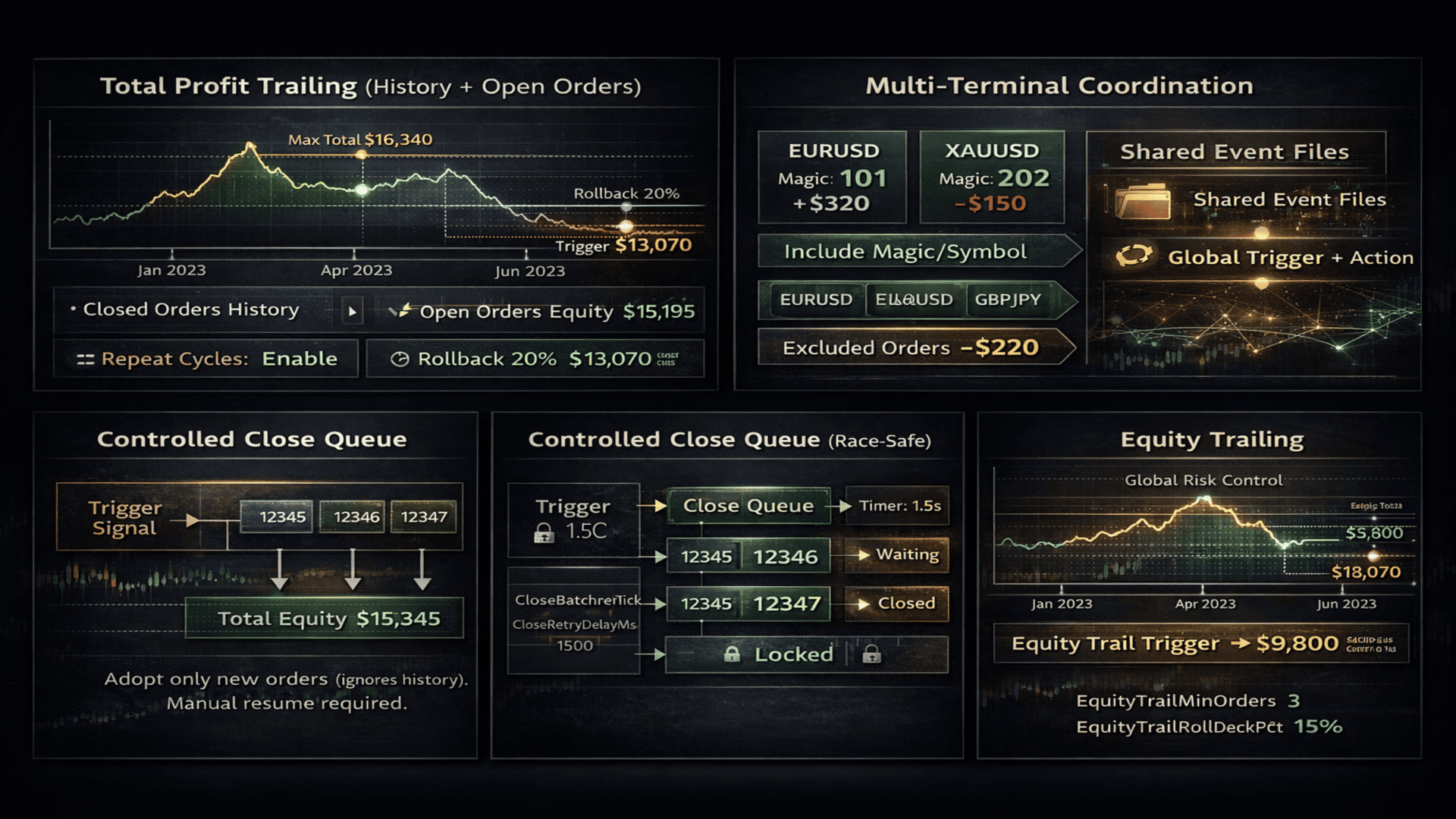
Trail open orders and close them by equity trailing. Common for all or only filtered orders.
Trailing can be done in money or in points. Points should be used with caution. If a 0.01 lot has gained 500 points and a 1 lot has −100 points, the closure will be unprofitable.
Trailing is calculated as a percentage rollback from the maximum achieved profit — in money or in points.
A minimum number of orders participating in common trailing can be specified.
Trailing can be applied to all orders or only to those with magic numbers specified in the parameters.

Total profit trailing. * * * * *

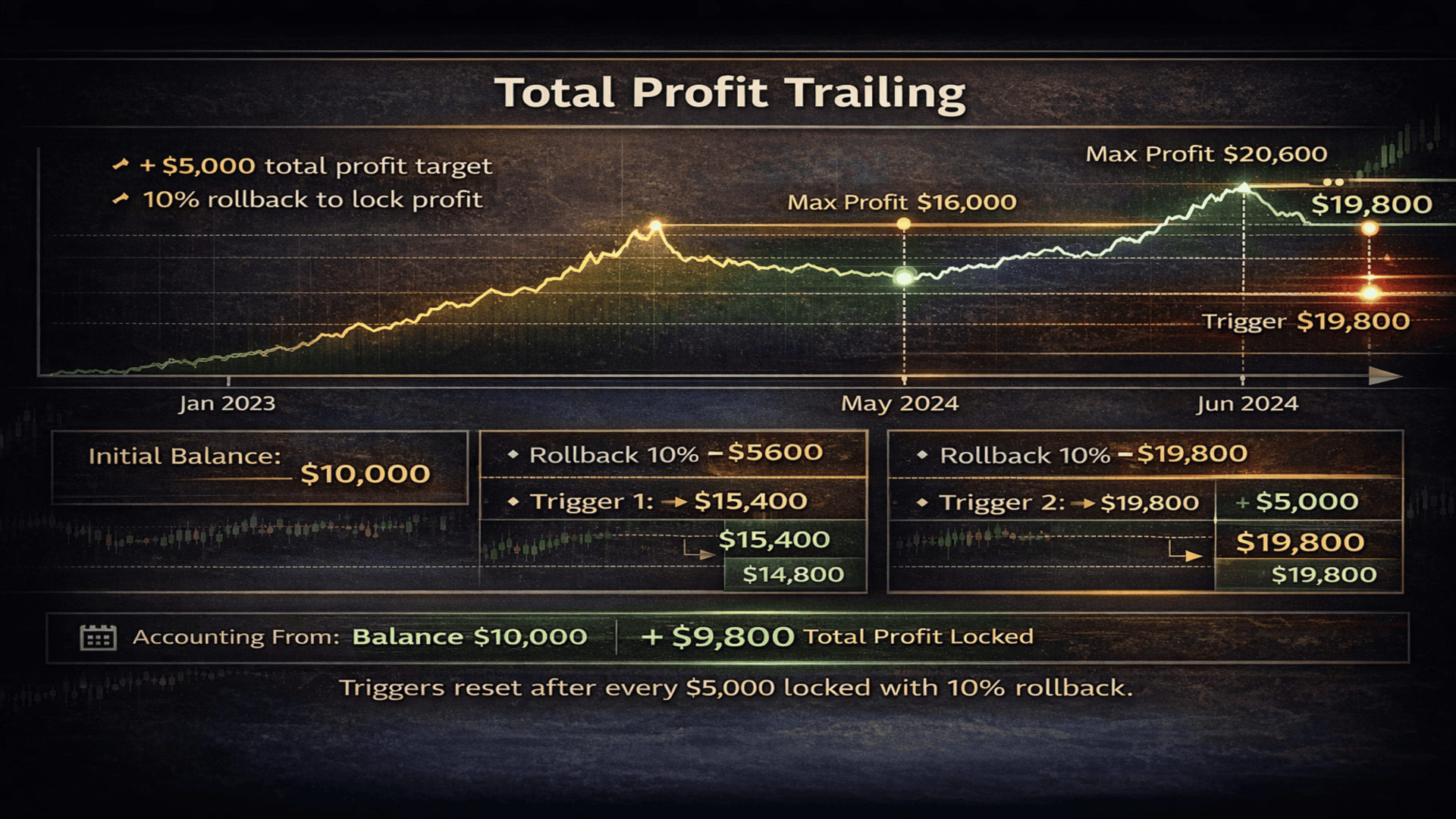
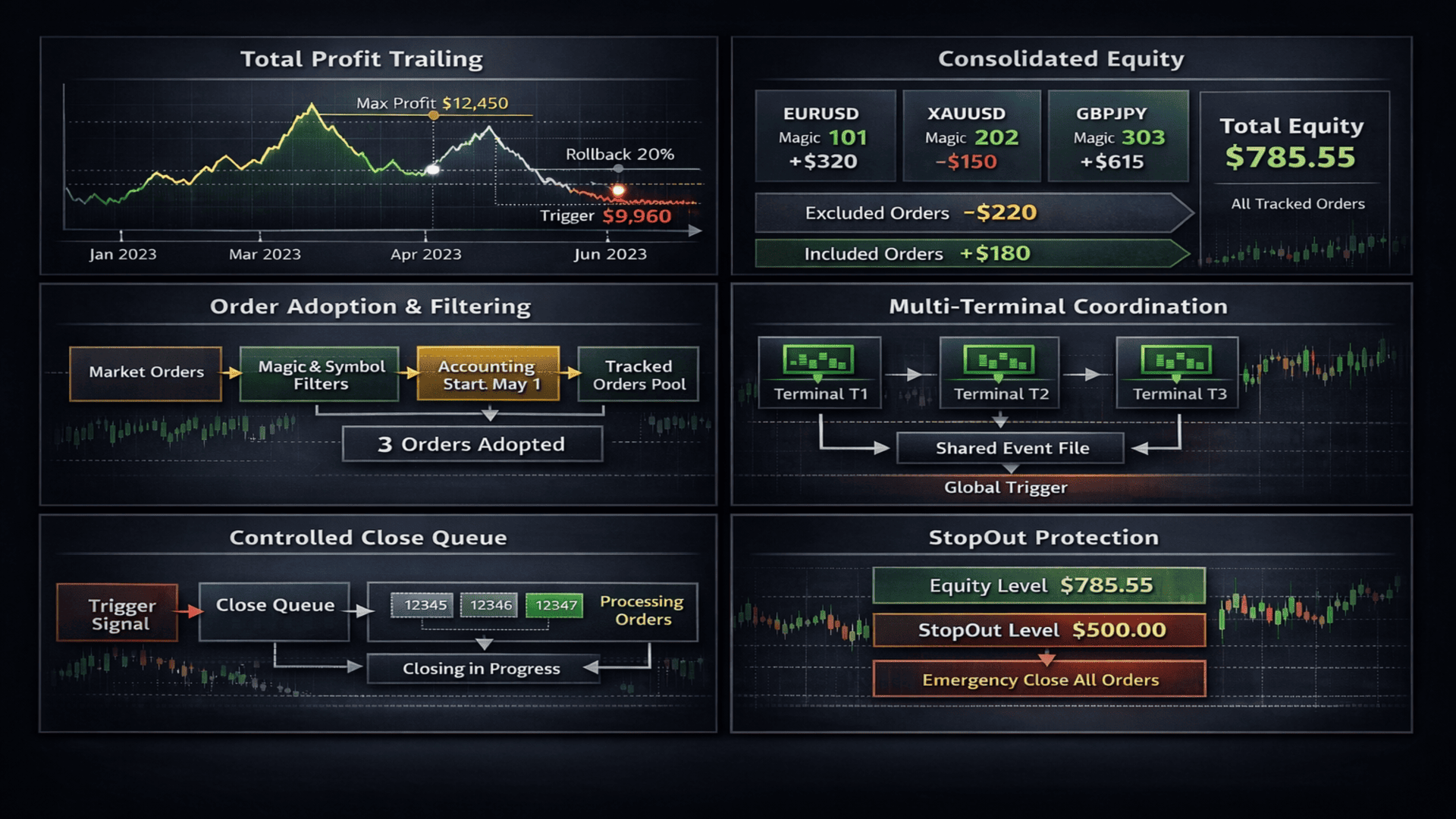
The utility can monitor trading and when the desired profit in money is reached — even after a year — all open orders will be closed and the terminal can be closed or a notification will be sent.
After reaching the set profit, trading can continue until profit drops by a specified percentage from the maximum achieved profit.
The utility keeps a log for both open and closed orders from the very first order since the utility was launched.
Even in case of terminal failures, freezes, or forced reboots, it can restore the process and will not lose accumulated profit data.
Has universal application in real trading.
- accumulate profit and withdraw funds in time.
- one bot on two charts trades with and against the trend. One earns more, the other less, and we want to get their combined profit, close all their orders, and start over.
- one bot trades 10 symbols with unique settings per symbol. Accumulate total profit and stop trading.
- when fixing profit, you can completely stop all trading or continue. If continuing, profit can be fixed repeatedly. Profit, rollback, fix. Profit, rollback, fix. * But without fully stopping trading, your EAs will continue trading, fixing new growth.

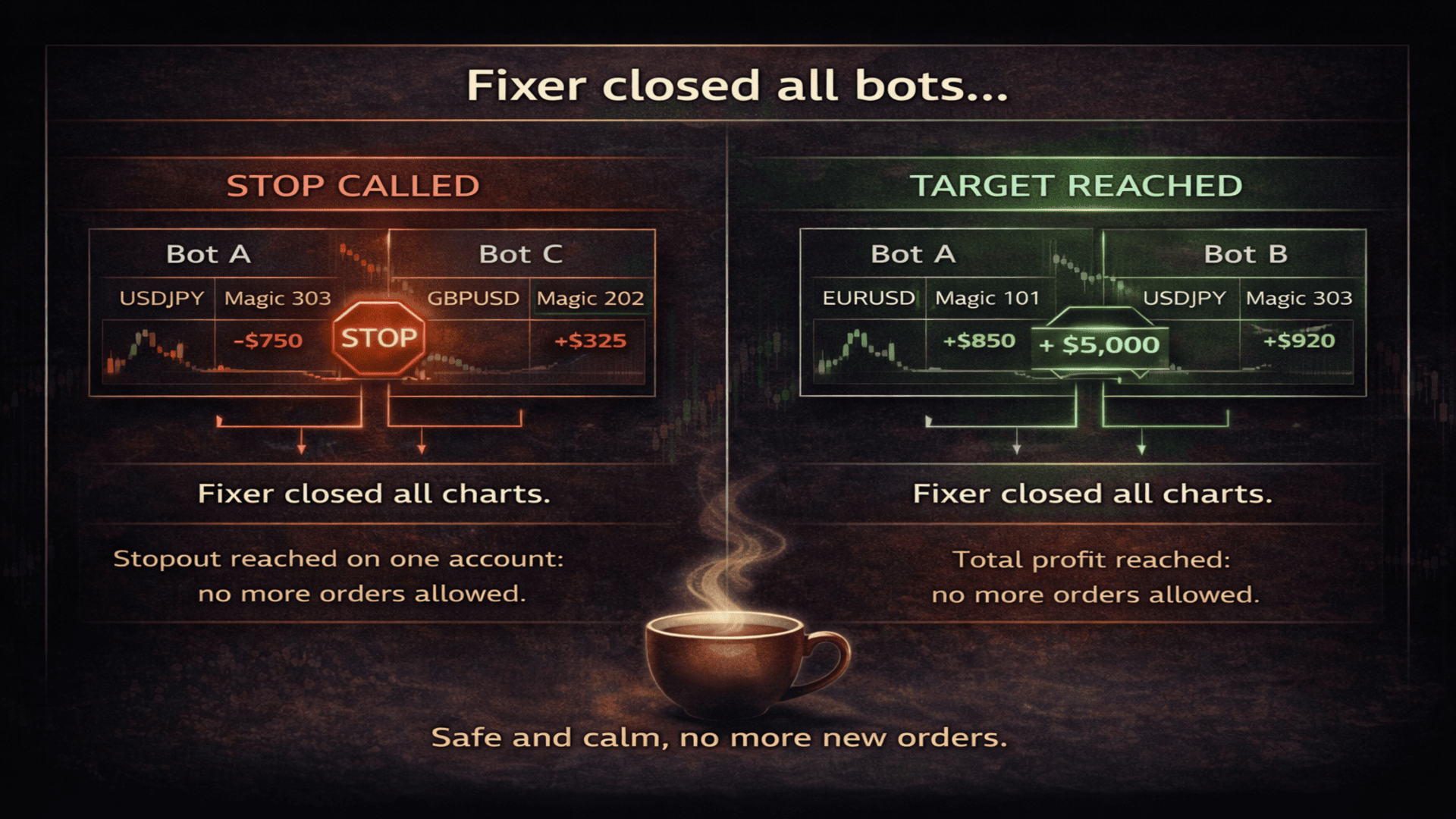
StopOut. * * * *

For all or filtered orders, you can set a StopOut level of balance or equity at which a signal will be given to close all orders or only those in filters.
On a Stop signal, chart closing with trading robots can be triggered to completely stop trading and avoid additional losses.

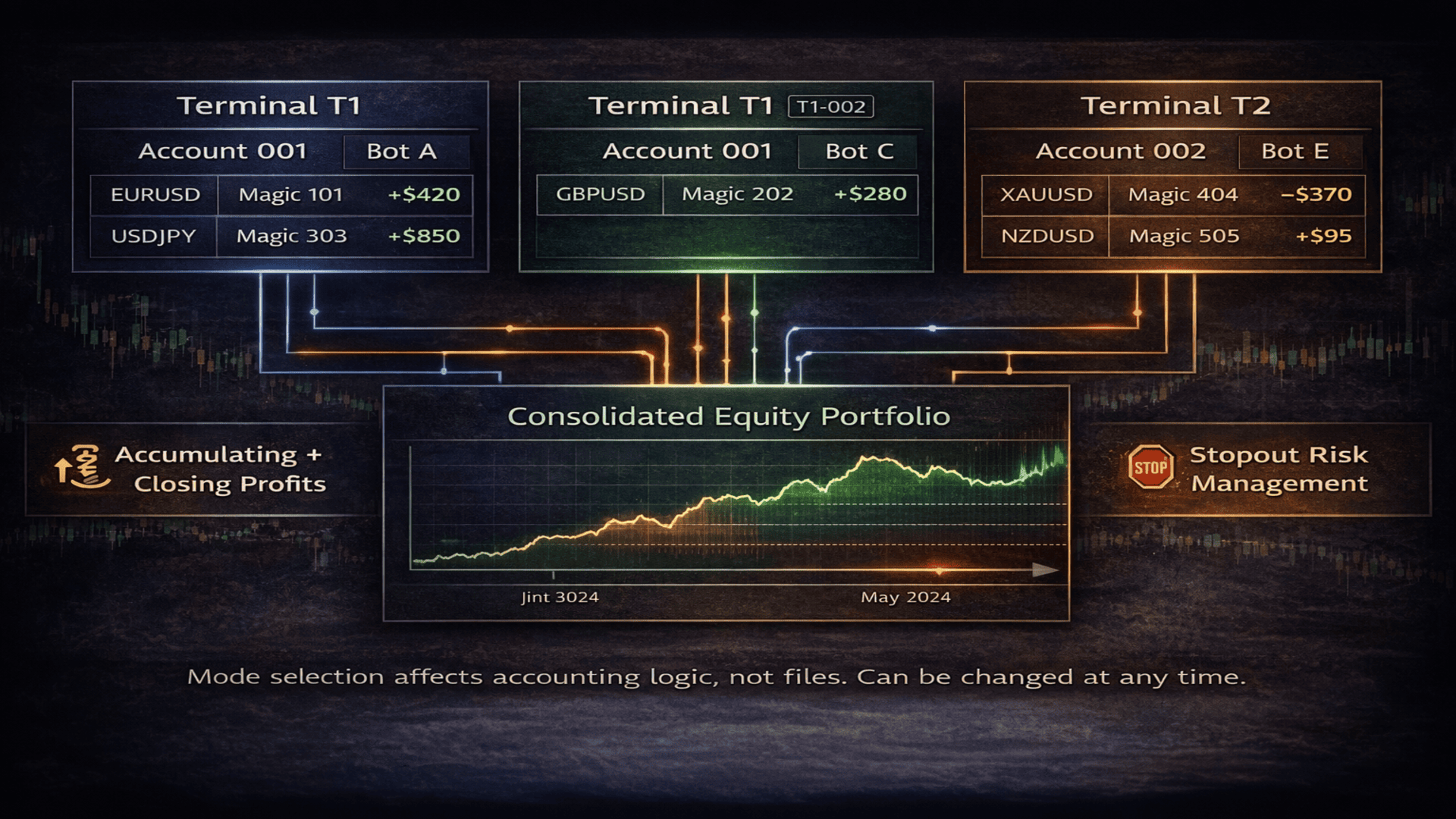
Joint operation of all MT4 terminals and trading accounts. * * * * *

Fixer sees all orders from all terminals and works only with those that are allowed by the filters.

Equity Trailing — Fixer maintains equity of selected orders, ignoring those orders that were excluded by magic number or symbol.
When our orders grow in profit to a specified level and then roll back by a specified percentage, Fixer fixes the profit.

Total profit trailing — Set a growth target of how much all your EAs must earn in order to fix profit. From one terminal or from all. From one trading account or from several, even 20 accounts.
What Fixer can do when profit is reached: first, wait for a rollback percentage or fix profit immediately. We can choose to continue or close the entire trading environment. If we continue, we can fix profit repeatedly. For example, after each $1000 of profit we fix profit immediately or on rollback, close all orders and continue with the next $1000. Over time, the target profit can be changed in the parameters, for example to $5000.

StopOut — I will not lose more than I am ready to lose. If with a deposit of 10,000 I set the bottom at 8,000, then 8,000 is what will remain for me in case of unsuccessful trading. Whether those 10,000 are on one terminal or one account. For selected EAs from any MT4 terminal. I know that 8,000 is my safety cushion — the amount I will take back if trading does not work out.
When fixing losses, I can only close orders, but then there is a risk of opening new trades in my absence, which can lead to even greater losses. Therefore, I close all charts on which trading is running.
* Loss fixing by StopOut, like Trailing, does not guarantee an exact expected number — slippage may occur at the moment of closing.

A more complex trading process — splitting trading into 2 or more streams. One stream with certain magic numbers and profit/loss fixing parameters. Another stream with different settings. They will not intersect. For each stream, specify the same file names. Applicable both for a single MT4 terminal and for a group of terminals.

Closing trading charts and orders — this is what I described in the closing capabilities. I want to separately discuss the usefulness and drawbacks of this feature.
A — When fixing accumulated profit or StopOut, to ensure fixation, Fixer can close all charts on which trading is running, the orders for which we build separate equity, or all orders and all charts. Fixation is precise and will wait for us until we take further action.
B — To continue trading after closing trading charts, you will need to reopen charts and attach trading robots or utilities again. For less experienced MT4 traders and the less lazy, I give advice or a reminder: save each chart as a template. In the template name, add the chart number from left to right. Restoration of all charts takes about 2 minutes. Open a new chart, right-click, Templates, and select the template. You can also place chart number labels on charts — they will also be saved in the template.
C — When closing orders, charts are closed first so that no EA can open a new order, then the required orders are closed immediately.
D — On one terminal, charts can be closed, while on another they are not, according to your portfolio management strategy.
E — It is not necessary to close all charts from which orders are sent to Fixer; you specify the chart numbers to close yourself.

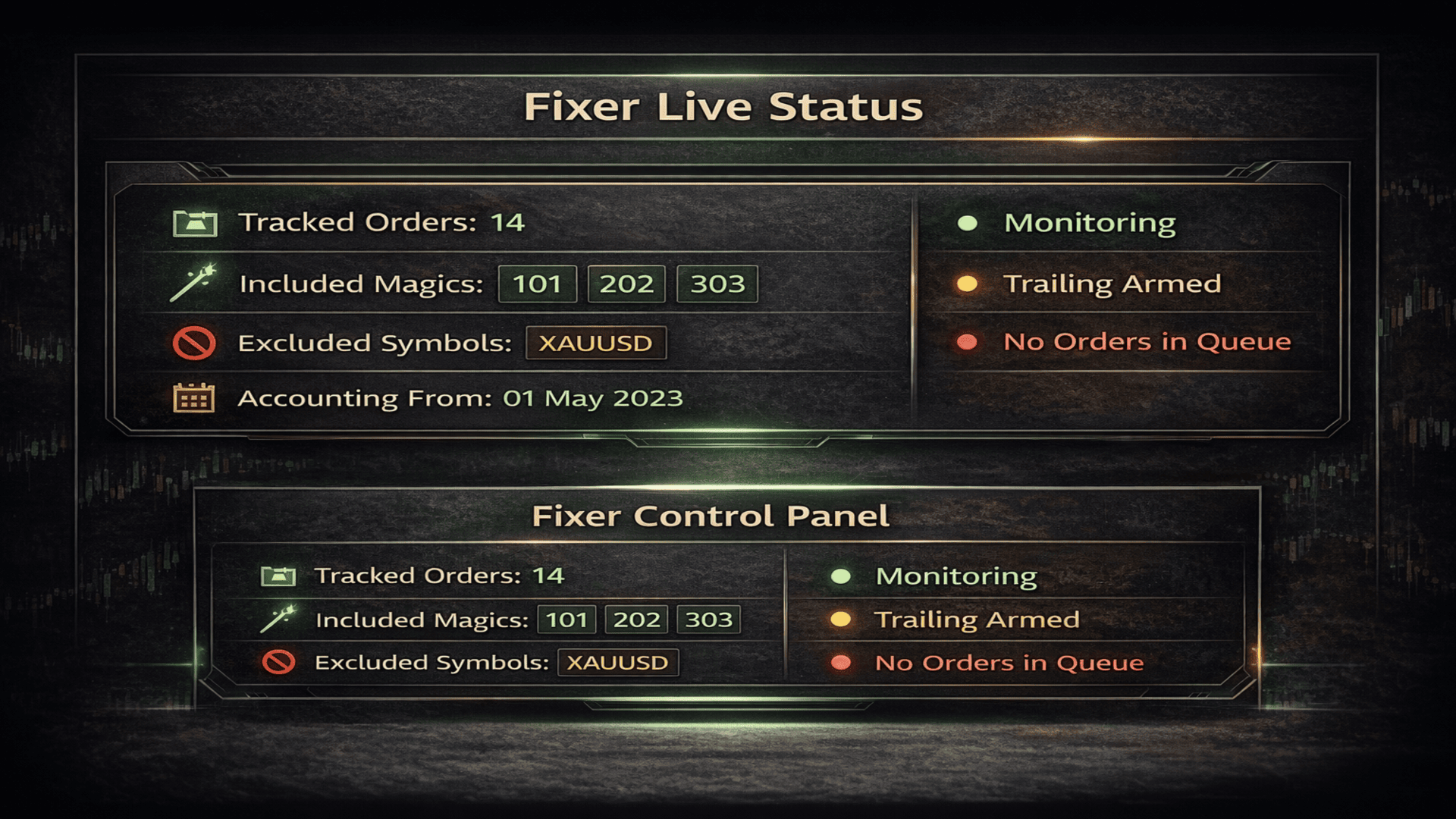
Orders by filters — Fixer sees and recognizes only those orders that you show it.
Include / Exclude by magic numbers and symbols.
Exclude is more applicable if we work with all orders.
Fixer sees only their profit and their losses, as if other orders simply do not exist. It sees their growth and losses, combines them all into one balance and equity. This has just given me an idea :) I output these metrics to the panel.

Telegram notifications.
- When Equity Trailing is fixed
- When Total Profit Trailing is fixed
- When StopOut is fixed
Regardless of whether Fixer closed orders or not — the goal is reached, you will receive a notification. The same applies to whether to close orders and charts or not.


Parameters

- Filter Settings -

Include Magic numbers
A list of magic numbers of orders that Fixer will include in its work.
If left empty, Fixer will work with all magic numbers.

Include Symbols
A list of trading symbols that Fixer will include.
If empty, all symbols are used.

Exclude Magic numbers
Magic numbers that will be completely excluded from Fixer processing.

Exclude Symbols
Trading symbols that will be excluded from processing.

Adopt existing orders on start
Allows Fixer to pick up already open orders at startup.
If disabled, Fixer will work only with orders opened after it starts.

- Profit Accounting -

Accounting start date and time
The date and time from which Fixer accounts for trading history and results.
All orders opened or closed before this moment are ignored.

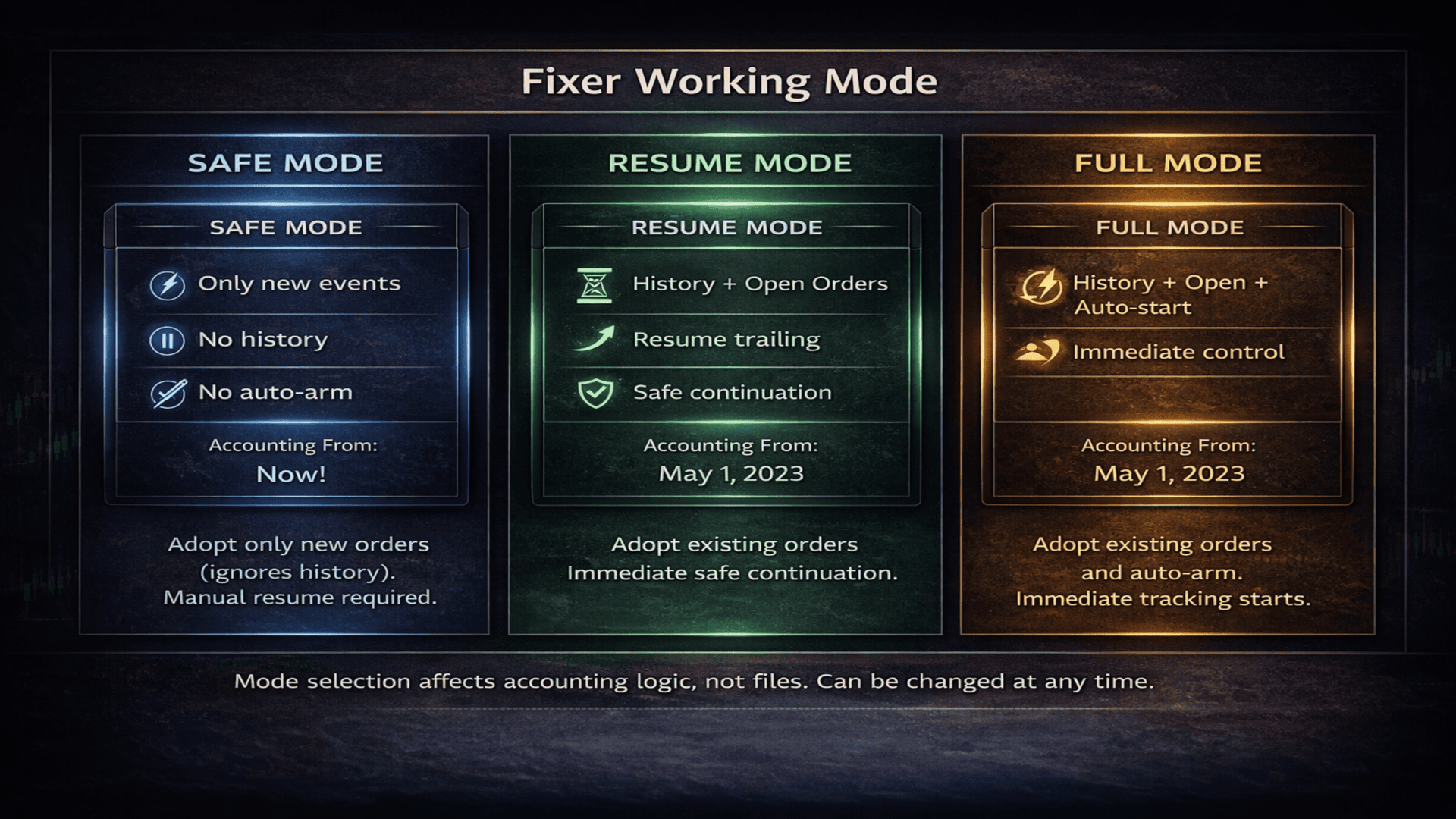
Fixer working mode

This parameter defines how Fixer connects to the trading process
and what data it uses for calculations and protective mechanisms.

Modes allow Fixer to be used safely:

Safe mode — only new events

Fixer works only with new events after startup.
Trading history and previously accumulated profit are not taken into account.

Resume mode — history + open orders
Fixer analyzes trading history and current open orders.
Allows continuation of an ongoing trading process without resetting logic.

Full mode — full control
Fixer gains full control over the entire trading logic:
history, open orders, and automatic management of protective mechanisms.

- Virtual SL / TP -

Virtual Stop Loss
Virtual stop loss in points.
Works independently of the broker and is not visible to the server.

Virtual Take Profit
Virtual take profit in points.
Closing occurs by Fixer logic, not by server TP.

- Individual Order Trailing -

Trailing start
The number of profit points after which trailing is activated for an individual order.

Trailing rollback percent
The percentage rollback from the maximum order profit at which closing occurs.

- Equity Trailing (all orders) -

Minimum orders for equity trailing
The minimum number of orders at which equity trailing is activated.
If 0 — the parameter is disabled.

Use money instead of points
Equity trailing operates in monetary values rather than points.

Equity trailing start
The profit level from which equity trailing starts.

Equity rollback percent
The percentage rollback from the maximum equity profit at which protective closing occurs.

- Total Profit Trailing (closed + open) -

Total profit trailing start
The total profit amount (closed + open orders)
after which total profit trailing is activated.

Total profit rollback percent
The percentage rollback from the maximum total profit at which protection is triggered.

Close all orders on hit
When total profit trailing is triggered, all orders are closed.

Close only filtered orders
Only orders that match the specified filters are closed.

Repeat total profit cycle
After closing, the total profit cycle can be started again.

Disable AutoTrading on hit
After protection is triggered, automatically disables AutoTrading in the terminal.

Close charts on total profit
Allows closing selected charts when total profit is reached.
You can close all or specify them by order.

Fixer chart index
The chart number on which Fixer is running (from left to right).

Save total profit report
Saves a report of total profit closures to a file.

Total profit report file name
The name of the file with total profit fixation reports.

- StopOut Close -

StopOut level
The critical loss level at which Fixer forcibly closes orders.

StopOut reset level
The level at which StopOut can be reactivated.

- Technical close -

Orders per tick
How many orders Fixer attempts to close per tick.

Retry delay
The pause between close attempts, protection against trade context busy errors.

- Multi-terminal (Hybrid mode) -

Terminal ID
A unique terminal identifier for joint operation of multiple Fixer instances.

Snapshot write interval
How often Fixer updates its activity status.

Snapshot alive time
After how many seconds a terminal is considered inactive.

- Telegram Alerts -

Enable Telegram alerts
Enables sending notifications to Telegram.

Telegram bot token
Telegram bot token.

Telegram chat ID
Chat ID for sending notifications.

- Log & Panel -

Save event log
Saves all Fixer events to a file.

Event log file name
The name of the event log file.

Show event panel
Displays the Fixer information panel on the chart.

Skip line between records
Adds an empty line between panel rows.

Panel font size
Panel font size.

Line spacing factor
Panel line spacing.

Panel text color
Panel text color.

Panel font
Panel font.

Top indent
Panel top indent from the chart.

- Statistics -

Save statistics
Saves trading statistics to a file.

Statistics file name
The name of the statistics file.

Total profit data file
The file storing total profit state between runs.
Prodotti consigliati
Manual Trade Panel EA MT4
Juvenille Emperor Limited
5 (5)
Manual Trade Panel EA MT4 è il pannello di trading più semplice e facile da usare che puoi trovare per MT4. Ha tutte le sue opzioni e funzioni in un'unica superficie, senza la necessità di aprire finestre o pannelli aggiuntivi. È un'utilità di gestione degli ordini, calcolatore del rischio, chiusura parziale e protezione dell'account, tutto in un'interfaccia estremamente comoda da usare! Utilizzando Manual Trade Panel EA MT4 puoi fare trading molte volte più velocemente e in modo più accurato
PyramidExpert
Joel Protusada
P Y R A M I D   E X P E R T    This Forex utility is a complex exit strategy and order management tool that executes four trading methods; scalping, pyramid style, hedging, and scaling method to close trades with a profit.           V E R Y  I M P O R T A N T     This is not a stand alone expert advisor. Use it with your own volatility-based strategy. Once you found the currency pair to trade, you can just attach this tool to the chart of the chosen pair and it will do the
Risk Commander
Adisorn Soodkanueng
Product Name: Risk Commander: Trade Assistant & Strategy Simulator Risk Commander is more than just a trade panel—it is a complete Manual Trading Ecosystem . It serves two powerful purposes: Live Assistant: Helps you execute trades with speed, precision, and perfect risk management in real-time markets. Training Simulator: Fully compatible with the Strategy Tester (Visual Mode) , allowing you to practice manual trading on historical data without risking a cent. NEW! Built-in Simulator Mode S
Expert Advisor for MT4 Useful utility MUST have for all traders.  With 1 click button, you're able to close all your open positions. Its come with a warning pop up notification when you click to close all your trades, to avoid an accident press the button. Just press 'Yes' to confirm or 'No' to cancel it. The expert will close all your open positions no matter what pairs you currently open or directions. Just attach the expert on 1 of your chart, and you're good to go.


VN Trade Panel II
Vyacheslav Nekipelov
4 (1)
The new version of the trading panel, which now has the ability to separately close Buy and Sell orders, display targets for all orders on the chart, as well as the ability to use the panel to trade with brokers working on the FIFO rule. Also, the new version adds option buttons for separate management of open orders. It has a convenient visualized interface and intuitive control without a lot of additional tabs to which traders have to be distracted and switch their attention. Thanks to this,
Price Spread Candletime
Sven Hans-rainer Uebel-scholz
Indicator with price, spread and candle time display + changeable font size + any color choice + can be placed in all four corners + Price and spread display runs on all timeframes + Candle Time runs on M1, M5, M15, M30, H1, H4, D1 + Price Up / Down with changing color + Spread display + Candle time display (time until the next candle) + All ads can also be hidden + Display Markt Open / Close as a comment
Auto Close Manager EA – Equity & Account Protection Utility Overview Auto Close Manager EA is a risk management utility for MetaTrader 4 designed to automatically close all open positions when a predefined floating profit or floating loss level is reached. This Expert Advisor does NOT open trades. It only monitors account equity and manages existing positions. The EA works with manual trades and can optionally include trades opened by other Expert Advisors. How It Works The EA continuously moni
Panel "panel_kjutaMultiTerminal" for trading. Opens, modifies, closes and deletes trading and pending orders from the chart using virtual lines, buttons and the active information terminal. Automatically opens an order by indicator levels. Hints in Russian, English or disabled. It has a number of functions for trailing virtual Take Profit lines and limit orders. Displays information on the active information terminal.  Hides and includes virtual lines S/L , T / P, buttons "<>","M","X", as well a
Exp Swing
Vladislav Andruschenko
4.51 (59)
Utilizza il modello di una famosa strategia chiamata Swinger (Pendulum, Cheburashka) - posizionamento alternativo di ordini pendenti con aumento del lotto. La strategia consiste nel piazzare due ordini pendenti opposti. Quando il prezzo si muove in una determinata direzione, viene attivato un ordine pendente, mentre la dimensione del lotto dell'altro ordine viene aumentata. L'EA prevede tre tipologie di apertura degli ordini pendenti (TypeofTrade) Apertura automatica dopo il posizionamento (Ape
FREE
Trade Assistant Pro 36 in 1
Makarii Gubaydullin
4.76 (21)
Strumento Multifunzionale: Calcolatore di Lotti, Ordini Grid, Rapporto R/R, Gestore Trade, Zone di Domanda e Offerta, Price Action e molto altro Versione Demo   |   Manuale utente L'Assistente di Trading non funziona nel tester di strategie: puoi scaricare la Versione Demo QUI per testare l' utilità . Contattami per qualsiasi domanda / idee di miglioramento / in caso di bug trovato Se hai bisogno di una versione MT5, è disponibile qui Semplifica, accelera e automatizza il tuo processo di tradin
Lucky Trade Panel MT4
Nina Yermolenko
5 (1)
Trading panel for manual trading. Has a fairly wide functionality. Allows you to automatically calculate the order size, open both market and pending orders. It has a wide range of options for closing orders, it is possible to partially close orders, close orders after reaching a certain profit or loss, separately close profitable and unprofitable, buy and sell, as well as pending orders. The panel also contains a simple implementation of a grid of pending orders, reverse and lock functions, tr
L'indicateur montre les heures d'ouverture des bourses mondiales. Vous aide à voir quels marchés sont actuellement les plus actifs Découvrez mon  #1 Pro  Utility : 66+ fonctionnalités, incluant cet outil  |   Contactez-moi  si vous avez des questions Aide à sélectionner les instruments les plus volatils en ce moment; Particulièrement utile pour les traders intraday; 1) Lors de l'utilisation sur des délais 1H et inférieurs: les lignes correspondront à la position réelle des barres sur le graphiq
Virtual Collider Manual   is a trading assistant with a built-in panel for manual trading. It automatically moves a position opened by a trader in profit using innovative adaptive grid algorithm of averaging and adaptive pyramiding Know-how of the grid algorithm of averaging and pyramiding of the   Virtual Collider Manual   trading robot is based on fully automatic adaptation of all characteristics of dynamically build order grid and pyramid with actual price movement with no need for adjusting
ASTA Trade Manager is a semi-automated trading tool designed to assist professional traders in Exit Strategy Management . This EA will not open trading positions automatically. This version is made to manage manual transactions on 1 chart (pair) only. For the Multipair version, you can check the product at:  ASTA Multipair Trade Manager . FEATURES: 1. Entry and Exit Panel Order Panel: Buy, Sell and Pending Orders Exit Button: Close All Order, Close All Buy, Close All Sell Can be used on strategy
TradePilot
Hossein Khalil Alishir
TradePilot Expert Advisor (EA) for MetaTrader 4 TradePilot is a professional and user-friendly Expert Advisor (EA) for MetaTrader 4 (MT4) . It simplifies automated trading , risk management , and trade execution using a smart trading panel . Perfect for beginners and experienced traders looking for a reliable trade manager EA with automated lot size calculation . Key Advantages User-Friendly Trading Panel: Customizable panel with buttons and hotkeys. Smart Risk Management: Supports percen
Trade Auto Close
Makarii Gubaydullin
Chiusura automatica trade: a tempo, o trigger di Profitto / Perdita Con questa utility, puoi automatizzare la chiusura dei trade in base a una determinata condizione. Utility multifunzione : 66+ funzioni, inclusa questo strumento  |   Contattami  se hai domande  |   Versione MT5 Per attivare la Chiusura Automatica, è necessario impostare i seguenti parametri (nel pannello): 1. Simbolo   a cui verrà applicata la funzione: per un   [Symbol]   specifico / o per   [ALL]   tutti i simboli. 2.   Cond
Smartility
Syed Oarasul Islam
This utility is designed to help you with your Manual Trading. It allows different ways of closing trades. It can display total number of BUY and SELL orders individually and also their individual profits. It can enter trades without stopl loss and take profits. However upon selecting UseStopLossTakeProfit from the settings it can use best possible stop loss and take profits based on the market conditions. Upon selecting the CloseOppositeTrades  from the settings it can close opposite trades. Fo
This tool will perform Trailing stop loss and Break even management for orders. Helps you limit or reduce the time spend watching orders on the screen, especially when you need to go to sleep. Just add this EA to 1 chart, you can manage all pairs. You can filter orders by comment, magic number, symbol, and order ticket number. When Breakeven it can add shift/offset pips (to cover the commission...). You can try in strategy tester before purchase. The EA will add Buy and Sell alternately, so yo
Slow Pips OCO Trade Panel is an advanced trading panel for placing pending orders. Traders can use this panel to place two pending orders at once. One pending order would be of buy entry type and the other one would be of sell entry type. Both orders will have Stop Loss and Take Profit parameters. Since two pending orders are placed at the same time, the pending order for which the price hits first gets converted into a market order and the other pending order gets deleted (one order cancels the
Symbol Manager
Taras Slobodyanik
5 (4)
Symbol Manager or Grid Manager, designed to group orders into one position (by Symbol or by Magic Number). This utility will be useful to multi-currency traders (many EAs), who can have multiple orders on several pairs. You will be able to see the total number of lots, the total profit, and set virtual stop loss and virtual take profit. To set a real TP (or SL), you must first set the virtual value, and then enter the command in this cell: "set". If you want to set real TP/SL for all orders at
Virtual Exchange Reserve Equity Monitor In an environment where exchanges offer increasingly high leverage ratios, it is all the more important for traders to tightly regulate their level of equity .  This software is designed to be run in the background on any virtual private server that can run Meta Trader 4/5.  It implements basic equity control functions ahead of the broker---allowing users to set their own equity trailing stop, an equity limit to lock-in a certain profit margin, and a unive
FREE
VR Cub
Vladimir Pastushak
VR Cub è un indicatore per ottenere punti di ingresso di alta qualità. L'indicatore è stato sviluppato per facilitare i calcoli matematici e semplificare la ricerca dei punti di ingresso in una posizione. La strategia di trading per la quale è stato scritto l'indicatore ha dimostrato la sua efficacia per molti anni. La semplicità della strategia di trading è il suo grande vantaggio, che consente anche ai trader alle prime armi di commerciare con successo con essa. VR Cub calcola i punti di apert
TP SL Bot
Ruslan Brezovskiy
TP SL Bot - un'utilità che imposta automaticamente Stop Loss e Take Profit per gli ordini appena aperti in vari modi secondo le tue indicazioni. È inoltre disponibile una funzione per calcolare il volume con cui aprire un trade per ottenere l'importo desiderato con la dimensione specificata di Stop Loss/Take Profit. Ci sono diversi modi per calcolare la dimensione e impostare i parametri: 1. Impostazione basata sull'importo specificato dall'utente come percentuale del saldo corrente del conto. 2
Kalifx Equity Guard EA
Calvin Andile Mahlangu
5 (1)
Kalifx Equity Guard — Account Protection Utility (MT4) Kalifx Equity Guard is a MetaTrader 4 utility that monitors account equity and floating losses and closes open positions when predefined risk limits are reached. It operates independently of trade entry logic and works with both manual trades and Expert Advisors. The utility runs continuously in the background after being attached to any chart and timeframe. Main Functions Monitors account equity drawdown using percentage or monetary thresh
FREE
Golden Gestion TP SL
Matthias Hubert Patrick Snidaro
Auto SL/TP Manager EA – Gestion Automatique Intelligente Auto SL/TP Manager EA est un Expert Advisor conçu pour automatiser la gestion des commandes avec une efficacité maximale et une grande discrétion. Il gère automatiquement : Le Stop Loss (SL) et le Take Profit (TP) Le Profit Lock (verrouillage progressif des bénéfices) Le Trailing Stop avec plusieurs méthodes avancées L' affichage masqué du SL et du TP pour plus de discrétion (non visible par le courtisan) C'est l'outil idéal pour les
You can change the time period of the chart at the touch of a button. You can also change multiple charts at the touch of a button. You can also change multiple charts at the touch of a button, saving you the trouble of changing time periods. We are live-streaming the actual operation of the system. https://www.youtube.com/@ganesha_forex We do not guarantee your investment results. Investments should be made at your own risk. We sharll not be liable for any disadvantage or damage caused by th
Angry bull Option Binary
Fabio Oliveira Magalhaes
1 (1)
Angry Bull Option Binary   This is a Binary Options robot, which contains 7 strategies, you can backtest it to check what the best strategies are Settings Initial Batch Value Dynamic Investment = If activated it will use an automatic lot according to its capital Balance ($) w/ backtest = Starting balance to backtest PorcRiscoInvestment = It will be the value of % for the automatic lot if it is activated Expiration (in minutes) = It will be the expiration time of orders in Binary Options Magic
Automate Risk Management with Smart Trailing Stop Manager for MetaTrader 4 Looking for MetaTrader 5 version? I t is available separately in the Market:   Smart Trailing Stop Manager MT5 Full User Guide    –  Public channel:   CLICK HERE Struggling with manually adjusting stops and securing profits? Smart Trailing Stop Manager MT4 is an intelligent utility for MetaTrader 4 that automates trailing stops, break-even management, partial closes, and auto SL. Optimized specifically for MT4 users, it e
Trade panel manual is a multifunctional trading assistant. It allows you to open market and pending orders in one click. Value is set via button menu edit or deleted by specific buttons pending orders and the value of take profit and stop loss in one click. Through the edit menu of the button, a value is set that can be easily changed by simply moving level_tp lines for take profit or stop loss levels and for pending orders. It is possible to select orders and determine for them and set the leve
Trade Monitor Pro
Valery Sorrentino
DOWNLOAD VERSIONE DEMO QUI TradeMonitorPro è uno strumento potente progettato per aiutarti a monitorare e gestire efficacemente le tue attività di trading nel mercato forex. Questo EA offre una serie di utili funzionalità che ti consentono di tenere traccia dei tuoi trade aperti, dei guadagni e delle perdite flottanti giornaliere (drawdown flottante) , nonché dei livelli di margine e del volume di lotti aperti. Per un corretto conteggio del "Trading Volume" abilitare lo storico completo nel ter
Gli utenti di questo prodotto hanno anche acquistato
The product will copy all telegram signal to MT4   ( which you are member  ) , also it can work as remote copier.  Easy to set up, copy order instant, can work with almost signal formats, image signal, s upport to translate other language to English Work with all type of channel or group, even channel have "Restrict Saving Content", work with  multi channel, multi MT5 Work as remote copier: with signal have ticket number, it will copy exactly via ticket number. Support to backtest signal. How to
ManHedger MT4
Peter Mueller
5 (2)
THIS EA IS A SEMI-AUTO EA, IT NEEDS USER INPUT. Manual & Test Version Please TEST this product before   BUYING  and watch my video about it. Contact me for user support or bug reports, or if you want the MT5 version! MT5 Version I do not guarantee any profits or financial success using this EA. With this Expert Advisor, you can: Implement your own   Zone Recovery   strategy to capitalize on trending markets. Create   Grid   trading strategies, to profit from ranging markets. Place orders easil
Dashboard Trade Manager
Moegamat Luqmaan Titus
Dashboard.mq4 - Gestore di Trading Semplice Progettato per coloro che amano il trading manuale e desiderano uno strumento per semplificare la gestione delle operazioni, questo potente strumento MQL4 migliora l'efficienza del trading fornendo una dashboard in tempo reale per gestire le proprie operazioni. Si integra perfettamente in MetaTrader, calcola la dimensione dei lotti e tiene traccia delle metriche di rischio senza sforzo. Funzionalità principali: Visualizzazione del Rischio e della Margi
The product will copy all  Discord  signal   to MT4   ( which you are member  ) , also it can work as remote copier.  Easy to set up. Work with almost signal formats, support to translate other language to English Work with multi channel, multi MT4. Work with Image signal. Copy order instant, auto detect symbol. Work as remote copier: with signal have ticket number, it will copy exactly via ticket number. How to setup and guide: Let read all details about setup and download Discord To MetaTrader
Crystal Trade Manager PRO – Sistema Avanzato di Gestione del Rischio e Controllo delle Operazioni per MT4 Versione Gratuita: https://www.mql5.com/en/market/product/150632 Panoramica Crystal Trade Manager PRO (CTM) è uno strumento professionale progettato per la gestione del rischio, il controllo delle operazioni e l’automazione avanzata su MetaTrader 4. È ideato per i trader che richiedono un'esecuzione disciplinata, una forte protezione del capitale e un sistema di controllo affidabile. Il sist
Unlimited Trade Copier Pro
Vu Trung Kien
3.86 (7)
Unlimited Trade Copier Pro is a tool to copy trade remotely to multiple MT4, MT5 and cTrader accounts at different computers/locations over internet. This is an ideal solution for you if you are a signal provider and want to copy your trades to other receivers globally on your own rules. One provider can copy trades to multiple receivers and one receiver can get trade from multiple providers as well. The provider can even set the subscription expiry for each receiver, so that receiver will not b
--------------Welcome to use [MQL5 Signal Analyze Master]------------------  Function: Draw order tracks of MQL5 MT4 and MT5 signal on MT4 chart. [Using guide] 1.Use it as Experts. 2.Download history record from MQL5 signal(MT4 signal or MT5 signal).  3.Paste history record file below "MQL4/Files/" 4.Load [Signal Analyze Master] on the symbol chart what you want to analyze. 5.Paste the history record file name to parameter 'FileName' 6.Select  SignalType  match the history you download on MT4
Custom Alerts AIO: Monitora tutti i mercati — senza alcuna configurazione Panoramica Custom Alerts AIO è una soluzione di monitoraggio dei mercati pronta all’uso che non richiede alcuna configurazione. Tutti gli indicatori necessari — FX Power, FX Volume, FX Dynamic, FX Levels, IX Power — sono integrati internamente. Non vengono mostrati grafici, rendendolo ideale per generare alert in tempo reale in modo discreto ed efficiente. Supporta tutte le classi di asset offerte dal tuo broker: Forex,
EasyInsight AIO MT4
Alain Verleyen
4 (2)
EASY Insight AIO – La soluzione all-in-one per un trading intelligente e senza sforzo Panoramica Immagina di poter analizzare l’intero mercato — Forex, Oro, Cripto, Indici e persino Azioni — in pochi secondi, senza dover controllare manualmente i grafici, installare indicatori o affrontare configurazioni complicate. EASY Insight AIO è il tuo strumento definitivo di esportazione per il trading alimentato dall’IA, pronto all’uso. Offre una panoramica completa del mercato in un unico file CSV pul
Strategy Builder offers an incredible amount of functionality. It combines a trade panel with configurable automation (covert indicators into an EA), real-time statistics (profit & draw down) plus automatic optimization of SL, TP/exit, trading hours, indicator inputs. Multiple indicators can be combined into an single alert/trade signal and can include custom indicators, even if just have ex4 file or purchased from Market. The system is easily configured via a CONFIG button and associated pop-up
RedFox Copier Pro
Rui Manh Tien
4.7 (10)
Time saving and fast execution Whether you’re traveling or sleeping, always know that Telegram To Mt4 performs the trades for you. In other words, Our   Telegram MT4 Signal Trader  will analyze the trading signals you receive on your selected Telegram channels and execute them to your Telegram to MT4 account. Reduce The Risk Telegram To Mt4   defines the whole experience of copying signals from   Telegram signal copier to mt4 platforms. Users not only can follow all instructions from the signa
Trade Copier Pro
Vu Trung Kien
4.57 (14)
Trade Copier Pro is a tool to copy trade remotely to MT4, MT5 and cTrader accounts at different computers/locations over internet. This is an ideal solution for you if you are a signal provider and want to copy your trades to other receivers globally on your own rules. One provider can copy trades to multiple receivers and one receiver can get trade from multiple providers as well. The provider can even set the subscription expiry for each receiver, so that receiver will not be able to receive t
Smart Channel M4
Vahidreza Heidar Gholami
The trend in the market can be predicted using trend lines but the problem is you don’t know where exactly the price is going to touch the trend line where you can put your pending orders on. Smart Channel Expert Advisor makes it possible to put an advanced channel around the price data, which can be configured to handle placing orders, opening and closing positions, managing risk per trade, spread, slippage, and trailing stop-loss and take-profit automatically. Features Money Management (Calcul
Live Forex Signals è progettato per il trading sui segnali del sito   https://live-forex-signals.com/en   e   https://foresignal.com/en . Live Forex Signals for MetaTrader 5  https://www.mql5.com/ru/market/product/81448 Parametri Username e Password se si dispone di un abbonamento ai siti live-forex-signals.com/foresignal.com. quindi dovresti compilare questi parametri con le tue credenziali; se non c'è abbonamento, lascia i campi vuoti; Comment Commento sulle offerte sbloccabili Risk rischio
The FFx Hidden Manager panel will help you to manage easily your orders directly on the chart. Below all features described: TP, SL and TrailingStop are hidden Each order has its own lines on chart Drag & Drop any line to change the TP/SL as per your need Option to move automatically the SL line at breakeven when TP #1 is reached Option to choose the TP/SL type (by pips or price) Option to choose the TrailingStop type (by pips, MA, Fractals, PSAR or ATR) Define which order(s) you want to manage
FFx Risk Calculator
Eric Venturi-Bloxs
FFx Risk Calculator panel will help you to calculate very easily your trades size, SL or the risk directly on the chart. All features are described below: Option to select which parameter to calculate: Risk, Stop Loss or Lot Size The panel will show if the lot size is allowed according to the current account free margin Button to maximize/minimize the panel Drag and Drop the panel anywhere on the chart How to use it? Select the parameter you want to be calculated. It will be based on the 2 other
News Trader Pro
Vu Trung Kien
4.38 (16)
News Trader Pro is a unique robot that allows you to trade the news by your predefined strategy. It loads every piece of news from several popular Forex websites. You can choose any news and preset the strategy to trade it, and then News Trader Pro will trade that news by selected strategy automatically when the news comes. News release gives opportunity to have pips since the price usually has big move at that time. Now, with this tool, trading news becomes easier, more flexible and more exciti
FFx Watcher PRO
Eric Venturi-Bloxs
The FFx Watcher PRO is a dashboard displaying on a single chart the current direction of up to 15 standard indicators and up to 9 timeframes. It has 2 different modes: 1. Watcher mode: Multi Indicators User is able to select up to 15 indicators to be displayed User is able to select up to 9 timeframes to be displayed 2. Watcher mode: Multi Pairs User is able to select any number of pairs/symbols User is able to select up to 9 timeframes to be displayed This mode uses one of the standard indicat
Transaction Repeater Full
Alexandr Bryzgalov
5 (4)
Copies transactions between MT4 terminals. Possibilities: quick copy start minimum processor load direct and reverse (reverse) copying. copying Take Profit and Stop Loss levels copying deferred and their changes copy transactions one to many copy trades many to one local copy only Attention: The product is designed for copying trades only within a single computer or VPS with access to the desktop. The product will not work on the built-in Virtual Hosting of the terminal. We will help you set up
The product combines a manual trade panel with the ability to perform actions automatically in a highly configurable way. Actions include capturing indicator values and then based on those values raising alerts, open/close or partially close trades, scale-in, setting up pending orders, adjusting stop loss, take profit and more. On-chart controls can be configured, such as tick boxes and buttons, so can be fully interactive. The EA also handles money management, news events, hidden stop loss, tak
Binary Options Copier Remote is an EA that allows to copy binary options trades between MT4 accounts at different computers. This is an ideal solution for signal provider, who want to share his trade with the others globally on his own rules. Provider can give free bonus license to 10 receivers. That means those 10 receivers can copy from provider by using Binary Options Receiver Free (no cost). From 11th one, receiver have to buy Binary Options Receiver Pro (paid version) in order to copy from
Price Action DashBoard
Chantal Sala
4.17 (6)
The Price Action Dashboard is an innovative tool to help the trader to control a large number of financial instruments. This tool is designed to automatically suggest signals and price conditions. The Dashboard analyzes all major Time Frame suggesting price action conditions with graphic elements. The Dashboard can suggest you the strength of the trend identifying directional movement, it is an indispensable tool for those who want to open position themselves using market trends identifiers. The
Elliott Wave Counter è un pannello per il markup manuale rapido e intuitivo delle onde di Elliott. Si può selezionare un colore e un livello di segni. Sono inoltre disponibili funzioni per la rimozione dell'ultimo markup e dell'intero markup effettuato dallo strumento. Il markup viene eseguito con un clic. Fai clic cinque volte: ottieni cinque onde! Elliott Wave Counter sarà un ottimo strumento sia per i principianti che per gli analisti professionisti delle onde di Elliott. Guida all'installazi
If you wish to draw Support and Resistance lines, view: daily market opening, classical pivot levels, Fibonacci pivot levels, trend lines, Fibonacci levels, the remaining time to candle closing, and current spread. If you seek to place your orders with the exact lot that meets your desired stop loss risk. If you wish to do all this and more with just one click, then this is the perfect tool to use. This tool will allow you to feel more relaxed when deciding to open orders, as well as predicting
Partial Close Expert
Omar Alkassar
5 (1)
Partial Close Expert   è uno strumento che combina numerose funzioni in un unico sistema automatizzato. Questo EA può aiutare i trader a gestire le proprie posizioni in modo più efficace, offrendo molteplici opzioni per gestire il rischio e massimizzare i potenziali guadagni. Con Partial Close Expert, i trader possono impostare un       chiusura parziale       livello per bloccare i profitti, un       stop mobile       livello per proteggere i profitti e limitare le perdite, un       pareggiare
Master Trend Dashboard
Chantal Sala
4.67 (3)
Master Trend Dashboard is a new generation indicator, compact, light and efficient. Each element of this Dashboard is designed to return specific signals as: Price Action, Breakout, Net Change (performance of the instrument), algorithmic studies, correlations and statistical calculations. This tool will change your way of trading allowing you to receive important information. See the Graphic Signals to understand every single signal below: Graphic Signals Symbol name and arrow color Green = Cur
Trade Copier Agent è progettato per copiare operazioni tra account/terminali multi MetaTrader (4/5). Con questo strumento, puoi agire come fornitore (fonte) o ricevitore (destinazione). Tutte le azioni di trading verranno copiate dal fornitore al destinatario senza alcun ritardo. Questo strumento ti consente di copiare operazioni tra più terminali MetaTrader sullo stesso computer con velocità di copia fulminee inferiori a 0,5 secondi. Guida all'installazione e agli input di Trade Copier Agent S
Unlimited Binary Options Copier Remote is a powerful tool to copy binary options trades remotely between multiple accounts at different locations over internet. This is an ideal solution for signal provider, who want to share his binary options trades with the others globally on his own rules. One provider can copy trades to unlimited receivers and one receiver can get trade from unlimited providers as well. The provider can set the subscription expiry for each receiver, so that receiver will no
This is an Expert Adviser use for manual trading as a background EA or combine with external EA to open orders. Loss Recovery Trading is one of your options to handle the lose positions instead of using stop loss by setting a zone recovery area and target to exit the turn rounds sequence. How It Work? If the market goes against your first positions direction at the specific of losing points, the EA will open an opposite direction position with calculated larger lot size and also keep the first
RoboTradeSoft Panel
Volodymyr Hrybachov
Professional and highly customizable utility for automated trading. It can become an indispensable to any trader regardless of the skills. It will help to save the time that would be required for daily routine activities and it will allow to develop custom strategies. The utility can also work manually opened orders and orders opened by any other EAs. This can be applied to attempt to recover the losing trades or even save the trader form losing the deposit. The utility allows to automate the tr
Altri dall’autore
One King Stocks and Crypto
Dimitri Nepomniachtchi
What we are talking about: This assistant can serve you for a long trading career. Optimized for those cases when you work on forecasts and want to buy a stock or crypto coin cheaper and sell it more expensive. Do you have an estimated closing price for profit: - If yes, then we will set up the robot to reach the price with greater profit and less risk. - If not, if you do not know exactly how much a stock or coin can grow, then you can maximize profit even with a small increase, due to a tempor
FREE
BreakOut Space Center Projection
Dimitri Nepomniachtchi
5 (2)
Using the indicator you can 1 Identify the trend and follow the large and small trends by drawing lines. When the price leaves the corridor of the lines, then with a high probability the price will go to the next line and reverse on it. 2 Long-line - Lay lines along the centers of fractals, the indicator can detect the fractal of the second point (Number bars analysis). Often the price can approach the line even after a week or a month and you can open a reversal trade. If the wave has passed w
FREE
BreakOut Space Fixation
Dimitri Nepomniachtchi
4.5 (2)
An EA version is being prepared. You can send a private message "notify about EA version". EA will be versatile with many settings for trading on various indicators. The new EA will also allow trading on this indicator. For example, allowing signals after X signals/bars to X signals/bars in one direction, before changing direction. If Break Out happened before/after the signal of another indicator. Collect profit on each next signal above/below the previous one. Send a private message "notify
FREE
Magics Scanner addon
Dimitri Nepomniachtchi
EA   scans trades by magic numbers from trading robots in mt4 terminals. Then it passes the data on trades to   EA`S HOLDER     which filters the entry and exit signals by applying its own filters for opening and closing orders. Thus   EA`S HOLDER    conducts its trading based on the signals of running robots. Opening your own orders. Your trading robots transmit signals to this scanner.   The scanner transmits signals to the senior EA and you have a lot of opportunities.   Such as: - Maintain
FREE
Magics Scanner Flip addon
Dimitri Nepomniachtchi
This addon will pick up opened orders of experts by magic number and transfer to EA`s HOLDER inverted. If your trading bot opens a Buy order, then EA`s HOLDER will open a Sell order. If your trading bot opens a Sell order, then EA`s HOLDER will open a Buy order. Then EA`s HOLDER works with the orders opened by it according to your settings: - Copy, do not copy exit. - Change the stops to your own. SL TP. Original or Real or leave the original. - Set trailing, there are two of them. This can work
FREE
Min Max spread study
Dimitri Nepomniachtchi
Do you know the spreads on which your trades are / will be opened. How well do you know about the spreads on which your trades are / will be opened. The main task of the indicator. Help the user / trader to study the spreads in the trading terminal. Get information about the minimum and maximum spread on each candle, from M1 and above. This information will help in the following cases: - Maximum trading spread EA    --- If your broker has smaller spreads or average statistically higher and th
Live Go
Dimitri Nepomniachtchi
Set your favorite indicator and start trading. Found your favorite indicator by virtual tests. - Virtual trading - Without opening trades on a live or demo account. ---- All transactions are saved only for you and trading statistics will be displayed on the chart. ---- Live Go conducts a full trading test in real time, showing clear test reports. ---- Live Go opens and closes trades without a spread / with spread, which allows you to check your trading strategy regardless of the broker’s condi
EAs Holder
Dimitri Nepomniachtchi
TITOLARE di EA: gestisci più robot di trading sotto il pieno controllo holder di EA è un sistema avanzato per i trader che li aiuta a gestire in modo efficace più robot di trading (EA). Con il programma, puoi distribuire i tuoi robot in conti virtuali separati e configurare rischi individuali e parametri di trading per ciascuno. Come funziona il TITOLARE di EA? holder di EA risolve il problema chiave dei trader che hanno molti robot di trading o vogliono acquisirli: la gestione caotica. Il pro
Fast flat
Dimitri Nepomniachtchi
The Fast flat indicator can recognize and notify you of short flats after the price rises or falls. Where the price can rush further or reverse. ++ The indicator is open to arbitrary flat settings. You will probably have to conduct quite a few tests, approaching the best results. I will be very grateful if you share in the comments your tests, parameters and advice to other users, who may also be able to improve your results. Should I use it for entry signals, order stops, hedging...? - The indi
An indicator of independent technical analysis by fractals and breakouts. Semi-automatic drawing of lines along points "A and B" in a matter of clicks. The classic version is available for free in my store under the name " BreakOut Space Center Projection " You can use it for your pleasure, the results of the indicators will be the same, but I wanted so much to simplify the process of technical analysis and created a quite comfortable indicator. My feeling is how to change from an old car to a n
ECNture Raging Gold
Dimitri Nepomniachtchi
Gold is a popular trading instrument for traders. It offers accessible conditions for long-term trading and scalping for quick profits. Read it, don't look between the lines, only then will you understand what kind of monster this is, this is the word I screamed when my keys opened the lock to the world of trade, which shook me up completely and opened many more doors, both in trade and in my career. The stars of fate led me to create a trading robot for gold. Specifically, gold. It's not just c
ECNture Piranha Bar
Dimitri Nepomniachtchi
A flock of piranhas devours trading bars on the chart, collecting profits. They hunt, receive signals to act, and enter the market. They don't wait long for distant prey, resting until it's nearby or switching to a new bar and ravaging it as it rises or falls. This happens so quickly and imperceptibly on the chart, as the number of closed orders increases in the statistics window and the profit line curves upward. Your terminal may freeze, but underneath, the piranhas are actively fighting to co
Instant converter of MT4 strategy tester report files to CSV files. For traders or developers. Test a trading EA in the strategy tester. Save the report (Results -> right-click -> Save as report) and move the StrategyTester.HTM file (you can rename it) to the common/files folder, which is the shared file folder for all terminals. Apply the script to any live chart where no EA is running. The script won't disrupt anything and will disappear from the chart after conversion. Set the strategy te
Filtro:
Nessuna recensione
Rispondi alla recensione