Trade Performance Dashboard
- Indicatori
-
Quoc Tuan Ngo
 Welcome to my MQL5 profile!
Hello! I am a developer and trader with a passion for building helpful MQL5 utilities. My goal is to create clean, professional tools that help you analyze your trading history and find your edge. - Versione: 1.0
- Attivazioni: 10
you tired of exporting your trading history to Excel just to figure out your stats? Do you struggle to know if your EA is actually profitable, or if your manual trades are hurting your performance?
Stop guessing and start analyzing.
The Trade Performance Dashboard is a powerful, all-in-one utility that replaces guesswork with facts. It loads directly onto your chart and instantly analyzes your entire trading history, presenting all vital statistics in one clean, professional panel.
Finally, Know What Works!
The dashboard's most powerful feature is its Magic Number filter. For the first time, you can instantly separate the performance of your EAs, your manual trades, or any specific strategy.
Stop wondering if your bot is carrying your account or if your manual scalping is the problem. Now you will know for sure with a single click.
A 5-in-1 Analysis Tool
This single indicator provides five complete analysis views:
-
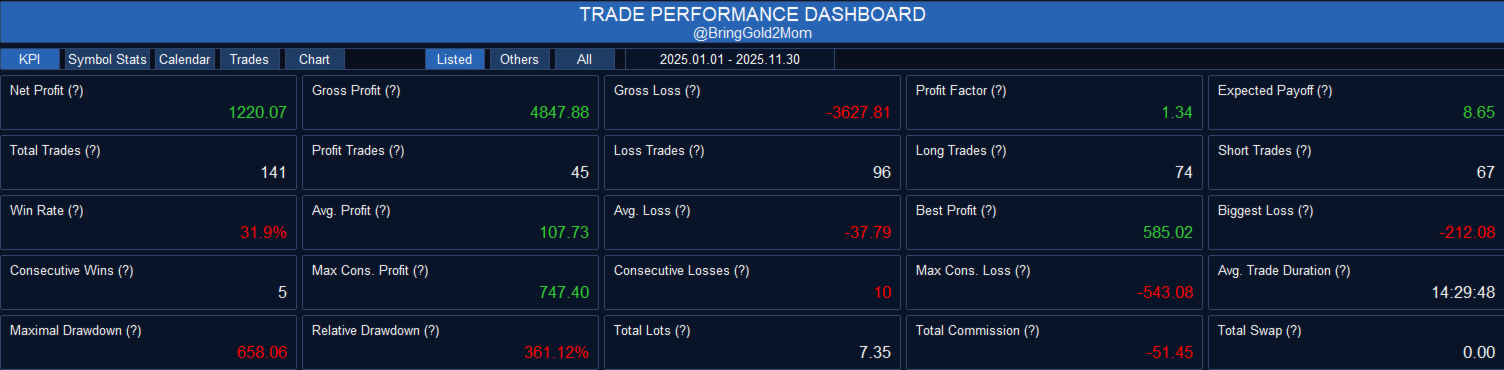
KPI Dashboard: A stunning grid of 25 essential performance metrics. Your entire trading report at a glance.
-
Symbol Stats: A detailed breakdown of your performance by each currency pair or symbol. Find out which pairs are your winners and which are your losers.
-
Trades List: A complete, paginated log of every closed trade with details on PnL, commission, swap, lots, and points.
-
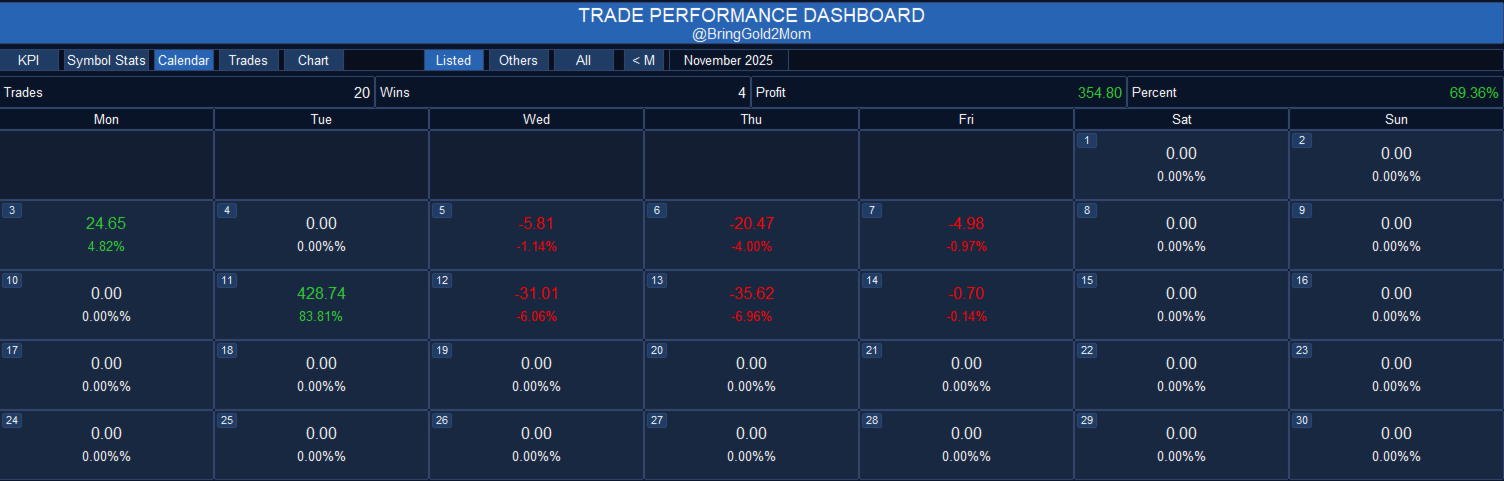
Daily Calendar: A visual calendar of the month showing your profit or loss for each specific day. Identify your best and worst trading days.
-
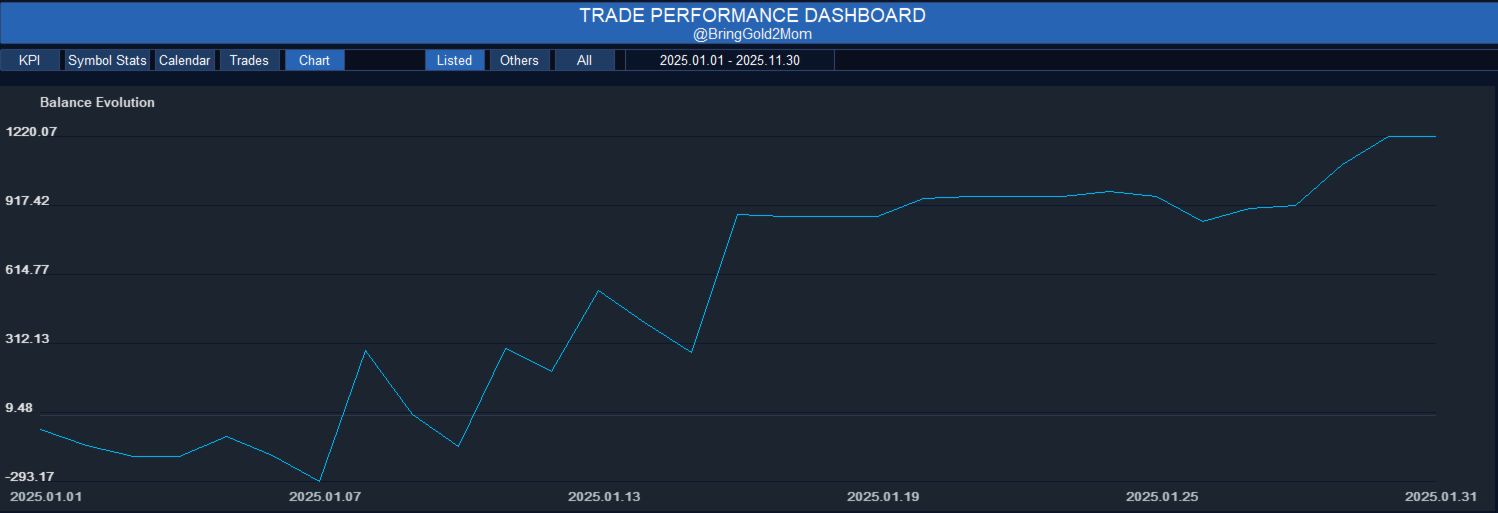
Balance Chart: A beautiful equity curve showing your account's profit evolution over the selected period.
Understanding Your 25 KPIs
The main KPI tab gives you an instant, professional-grade report. We track everything that matters, including:
-
Profit Overview:
-
Net Profit: Your final bottom-line profit.
-
Gross Profit / Gross Loss: The total of all winning vs. all losing trades.
-
Profit Factor: How many times your profit exceeds your loss.
-
Expected Payoff: The average profit you can expect per trade.
-
-
Trade Statistics:
-
Total Trades: Total number of trades in the period.
-
Win Rate %: The percentage of your trades that were profitable.
-
Avg. Profit / Avg. Loss: The average amount you win on winning trades vs. lose on losing trades.
-
Best / Biggest: Your single best trade's profit and your single worst trade's loss.
-
-
Consecutive Trades:
-
Max Cons. Wins: Your longest winning streak.
-
Max Cons. Losses: Your longest losing streak.
-
Max Cons. Profit/Loss: The total money made or lost during those streaks.
-
-
Risk & Costs:
-
Maximal Drawdown: The largest peak-to-trough decline in your profit.
-
Relative Drawdown %: The largest percentage drop from your peak.
-
Total Lots: Total volume traded.
-
Total Commission / Total Swap: See exactly how much you are paying in costs.
-
How to Use
Using the dashboard is simple:
-
Drag the indicator onto any chart in MT5.
-
In the Inputs tab:
-
Enter the Magic Numbers you want to track, separated by a comma (e.g., "1001, 1002, 1003").
-
Set your Custom Start and End Date for the analysis (Format: YYYY.MM.DD).
-
-
On the Chart:
-
Use the main buttons (KPI, Symbol Stats, Calendar, Trades, Chart) to switch between views .
-
Use the filter buttons ("Listed", "Others", "All") to instantly filter your performance data .
Magic Filter Explained
These buttons control exactly which trades are included in the entire dashboard:
-
Listed (MODE_ONLY_LISTED):
When pressed, the dashboard will ONLY show and calculate trades whose Magic Number exactly matches the list you provided in the InpMagicNumbers_CSV input. This is the perfect way to see the performance of your specific EAs.
-
Others (MODE_ONLY_OTHERS):
When pressed, the dashboard will show all trades that are NOT in your "Listed" list. This is extremely useful for seeing the performance of:
-
Your manual trades (which usually have a Magic Number of 0).
-
Any other EAs that you did not include in the tracking list.
-
-
All (MODE_SHOW_ALL):
Shows every single trade within the selected date range, regardless of its Magic Number.