Hull Max MTF Indicator
- Indicatori
-
Elias Mtwenge
 Elias Mtwenge is an Entrepreneur, Innovator and A philanthropist. He is a founder and CEO of Piptera Digital Solutions.
He is creative in nature and probably a genius of our generation! - Versione: 1.0
- Attivazioni: 5
🔹 Overview
The Hull Max MTF Indicator is a professional-grade technical analysis tool built for serious traders who perform multi-timeframe (top-down) market analysis.
It combines the speed and precision of the Hull Moving Average (HMA) with advanced forecasting, projection zones, and adaptive visual styles — helping traders clearly understand trend alignment across hourly, daily, weekly, monthly, and yearly structures in one chart window.
Whether you are a scalper, day trader, swing trader, or long-term investor, Hull Max MTF gives you clarity, accuracy, and market direction confidence at a glance.
⚙️ Key Features
✅ Multi-Timeframe Forecasting (MTF)
Analyze multiple timeframes at once — hourly to yearly — without switching charts. Perfect for top-down strategy alignment.
✅ Visual Forecast Zones
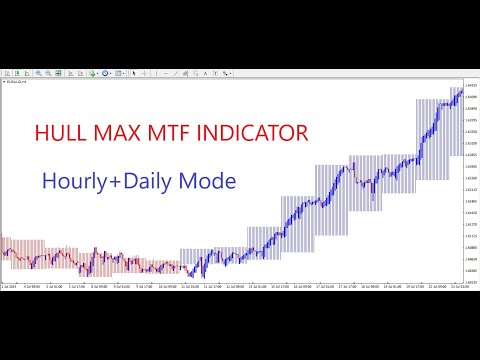
Colored projection boxes (blue for bullish, red for bearish) show trend direction, volatility range, and possible continuation areas.
✅ Heiken Ashi MTF Overlay
Get smooth, clear momentum readings with Heiken Ashi applied across all selected timeframes.
✅ Dynamic Visual Styles
Choose among 4 professional themes:
-
Standard: Vibrant and colorful
-
Light: Clean and subtle
-
Solid: High-contrast display
-
Carbon: Sleek dark mode
✅ Built-In Alerts System
Receive notifications when the Hull trend changes direction:
-
On-Screen Popup
-
Sound
-
Email
-
Mobile Push
✅ Auto Forecast Mode
When activated, Hull Max MTF automatically generates and updates projections in real time based on selected forecast modes.
🧭 How to Use the Indicator
1️⃣ Apply to Any Chart
Attach the Hull Max MTF Indicator to any instrument or timeframe (M1–MN1).
It automatically adjusts scaling and projection according to the current chart.
2️⃣ Select a Forecast Mode
Available modes:
-
MODE_HOURLY — Short-term intraday analysis
-
MODE_DAILY — Medium-term trading setups
-
MODE_WEEKLY — Swing structure view
-
MODE_MONTHLY — Long-term cycle positioning
-
MODE_YEARLY — Macro market overview
You can combine multiple modes (e.g., Hourly + Daily + Weekly) to visualize alignment across periods.
3️⃣ Adjust Your Visual Style
Customize appearance easily:
-
Choose one of four display styles to fit your chart theme.
-
Switch styles anytime without affecting the underlying logic.
4️⃣ Interpret the Forecast Zones
Each timeframe draws a colored box:
-
🔵 Blue: Bullish projection zone
-
🔴 Red: Bearish projection zone
Automatic labels (hourly, daily, weekly, monthly, yearly) make identifying timeframe direction effortless.
5️⃣ Enable Alerts (Optional)
Get notified instantly when Hull trend changes occur — allowing you to react quickly to potential trade entries or exits.
📊 Example: Multi-Timeframe Setup
Scenario: Analyzing EURUSD
-
Choose MODE_HOURLY_DAILY_WEEKLY .
-
View short, medium, and long-term trend boxes overlaid on one chart.
-
If all zones are blue, trend alignment is bullish — confirming trade direction.
-
If intraday frames turn blue while higher frames stay red, it indicates a short-term pullback within a bearish macro trend.
This clarity helps you manage entries and exits with precision.
🧩 Main Settings Overview
| Setting | Description |
|---|---|
| TimeFrameAuto | Automatically adapts to higher timeframe |
| ForecastMode | Selects active MTF combination |
| VisualStyle | Choose display theme (Standard, Light, Solid, Carbon) |
| EnableAutoForecast | Automatically updates projection boxes |
| Enable_HeikenAshi_MTF | Adds multi-timeframe Heiken Ashi overlay |
| Alerts Options | Choose notification method |
| Projection Settings | Adjusts forecast depth and projection length |
💡 Why Traders Love Hull Max MTF
⭐ Unified top-down analysis in a single chart
⭐ Intuitive forecast boxes & momentum clarity
⭐ Flexible design suitable for any trading style
⭐ Real-time multi-timeframe adaptation
⭐ Lightweight & fast – no lag
⚠️ Risk Disclaimer
Trading foreign exchange, CFDs, and other leveraged products involves significant risk and may not be suitable for all investors.
The Hull Max MTF Indicator is a technical analysis tool, not trading advice or an automated system.
Always test indicators on a demo account before live use.
Past performance does not guarantee future results.
🏁 Installation & Setup
1️⃣ Copy the file Hull Max MTF Indicator.ex4 to your MQL4/Indicators/ folder.
2️⃣ Restart MetaTrader 4.
3️⃣ Attach it to any chart.
4️⃣ Choose your preferred Forecast Mode and Visual Style.
5️⃣ Watch the multi-timeframe projections update in real time.
🌟 Transform the Way You See the Market
The Hull Max MTF Indicator transforms raw data into actionable visual intelligence.
With its multi-timeframe forecasting, Heiken Ashi integration, and advanced alerting, it gives you a professional trading edge — no matter your style.
Trade with structure. Trade with precision. Trade with Hull Max MTF.
Incase you need any help with this tool please be free to private message me and I will be very glad to help you.