 MetaTrader 5
 Sistemi Esperti
 Indicatori
 Script
 Librerie
 Archiviazione
Guarda come scaricare robot di trading gratuitamente
Ci trovi su Twitter!
Unisciti alla nostra fan page
Ti è piaciuto lo script? Provalo nel Terminale MetaTrader 5

StrictJson: RFC 8259 JSON parser and writer for MQL5 - libreria per MetaTrader 5
George Ciprian Mandache

Mostly writing code that does stuff...
User guides are on my blog. For questions or bugs, write in the product's Comments tab or send me a message.
- Visualizzazioni:
- 71
- Pubblicato:
- Aggiornato:
-
 Ti stai perdendo delle opportunità di trading:
- App di trading gratuite
- Oltre 8.000 segnali per il copy trading
- Notizie economiche per esplorare i mercati finanziari
Registrazione AccediAccetti la politica del sito e le condizioni d’uso
Se non hai un account, registrati -
 Hai bisogno di un robot o indicatore basato su questo codice? Ordinalo su Freelance
Vai a Freelance

StrictJson reads and writes JSON in MQL5 and MQL4. It is one include file with no other dependencies: save your EA's settings and state to a file and load them on the next start, read what a WebRequest returns, or build the JSON you send. You read a value by its key, its position in a list, or a path such as "panel.theme" or "days.0", and you write a document on one line or indented.
It follows RFC 8259, the official JSON standard, exactly. Text that is not valid JSON is refused with the line and column of the mistake instead of being half read, numbers come back exactly as they went in, and files are read and written as UTF-8, the encoding other programs expect for JSON.
#include <StrictJson\StrictJson.mqh> Save your settings and state
An EA's panel settings and the state it tracks go into a file and come back on the next start. A key an older file does not have yet keeps its default, so the format can grow without breaking saved files.
void SaveSettings() {
    CJsonValue doc;
    doc.PutDouble("lots", g_lots);
    doc.PutLong("max_spread", g_maxSpread);
    doc.Set("alerts").SetObject().PutBool("push", g_alertPush);
    CJsonValue *panel = doc.Set("panel").SetObject();
    panel.PutLong("x", g_panelX);
    panel.PutString("theme", g_theme);
    doc.Set("state").SetObject().PutLong("buys", g_buys);
    if (doc.SaveFile("MyEA\\settings.json") != JSON_OK) {
        Print("settings not saved");
    }
}

void LoadSettings() {
    CJsonValue doc;
    string error;
    if (doc.LoadFile("MyEA\\settings.json", error) != JSON_OK) {
        return;                                          // first start: keep the defaults
    }
    g_lots = doc.GetDouble("lots", g_lots);
    g_maxSpread = doc.GetInt("max_spread", g_maxSpread);
    g_alertPush = doc.GetBool("alerts.push", g_alertPush);
    g_panelX = doc.GetInt("panel.x", g_panelX);
    g_theme = doc.GetString("panel.theme", g_theme);
    g_buys = doc.GetLong("state.buys", g_buys);
}
The attached example saves a settings object like this and the file looks the way you would write it by hand:
{
  "lots": 0.05,
  "max_spread": 30,
  "alerts": {
    "push": true,
    "sound": true
  },
  "panel": {
    "x": 340,
    "y": 30,
    "theme": "dark"
  },
  "symbols": [
    "US500",
    "XAUUSD",
    "EURUSD"
  ],
  "state": {
    "last_buy": "2026.11.24 16:30",
    "buys": 12
  }
}
Features
- Broken JSON is refused. Some JSON readers accept text that is not valid JSON: a comma after the last item ([1,2,]), a number with a leading zero (01), TRUE in capitals, .5 without the 0, or a second document after the first. StrictJson refuses all of them. It is checked against JSONTestSuite, a public set of 318 test files for comparing JSON readers: it accepts all 95 files that must be accepted and refuses all 188 that must be refused.
- Errors say where the mistake is, for example "line 2 column 1: unexpected text after the value". When reading fails, the value you read into stays as it was.
- Numbers stay exact. 0.1 is saved as 0.1, not 0.10000000000000001, and 1.0 stays 1.0. Whole numbers keep the full range of a long, up to 9223372036854775807.
- Empty is not missing: null, an empty string, an empty list and an empty object stay four different things, and an object keeps its keys in the order you added them.
- Files and WebRequest results are read and written as UTF-8, so text in any language and emoji come through unchanged. A save writes a temporary file first and then replaces the old one, so it never leaves half a file behind.
- Every getter takes a default: GetDouble("lots", 0.01) returns 0.01 when the key is missing, so there is no NULL to check.
- Every call that can fail returns JSON_OK or a JSON_ERROR_* code, and the library never prints anything by itself.
Example
#include <StrictJson\StrictJson.mqh>

void OnStart() {
    CJsonValue doc;
    string error;
    if (doc.Parse("{\"symbol\":\"US500\",\"days\":[\"Mon\",\"Wed\"],\"alerts\":{\"push\":true}}", error) != JSON_OK) {
        Print("parse failed: ", error);
        return;
    }
    string symbol = doc.GetString("symbol");    // "US500"
    string firstDay = doc.GetString("days.0");  // "Mon"
    bool push = doc.GetBool("alerts.push");     // true
    int spread = doc.GetInt("max_spread", 30);  // missing, so 30

    doc.PutDouble("lots", 0.01);
    doc.Set("levels").SetArray().AddDouble(1.5);
    doc.SaveFile("MyEA\\settings.json");        // indented UTF-8, directories made

    CJsonValue bad;
    bad.Parse("[1,]", error);
    Print(error);                               // line 1 column 4: unexpected character
}
The attached StrictJsonExample script saves and loads settings and state, then runs through reading, refusing and exact numbers, and prints this among its output:
refused text=[1,] error="line 1 column 4: unexpected character"
refused text=[01] error="line 1 column 3: expected ',' or ']'"
refused text=TRUE error="line 1 column 1: unexpected character"
refused text=[.5] error="line 1 column 2: unexpected character"
refused text={"a" 1} error="line 1 column 6: expected ':'"
round trip text={"price":0.1,"id":9223372036854775807,"none":null,"empty":"","obj":{}} 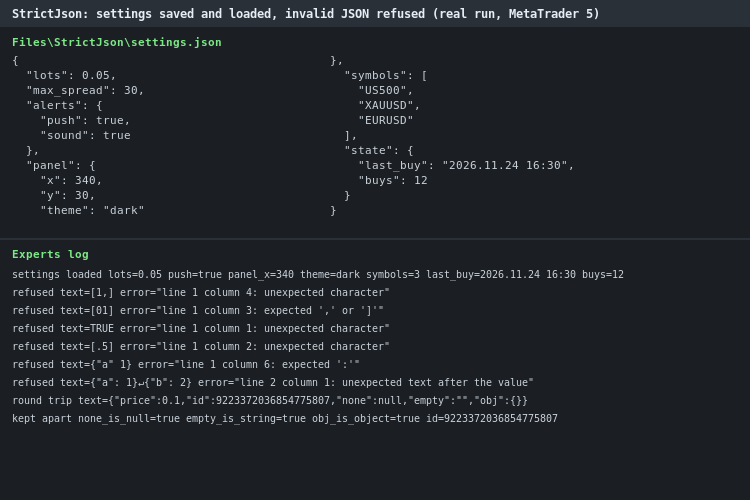
API
| Call | What it does |
|---|---|
| Parse(text, error), ParseUtf8(bytes, error), LoadFile(path, error) | Read JSON into the value; error says where it failed |
| Serialize(out, indent), ToString(indent), SaveFile(path, indent) | Write it on one line (indent 0) or with each level indented by indent spaces |
| Get(key), At(index), Find("panel.theme"), Size(), KeyAt(i), Has(key) | Go into objects and lists; a missing part is NULL |
| GetString, GetDouble, GetLong, GetInt, GetBool (path, fallback) | Read a value by path, or the fallback |
| AsString, AsDouble, AsLong, AsInt, AsBool (fallback), Type(), IsNull() and the other Is checks | Read the value itself |
| SetString, SetDouble, SetLong, SetBool, SetNull, SetArray, SetObject | Replace the value; each returns it, for chaining |
| Set(key), Append(), PutString and the other Put calls, AddString and the other Add calls | Add or replace members and items |
| Remove(key), RemoveAt(i), CopyFrom(other) | Delete parts, deep copy |
| StrictJsonErrorText(code) | Describe an error code |
A CJsonValue owns its children and deletes them; the pointers Get, Find, Set and Append return belong to the document.
 Divergence Detector without repaint: RSI, MACD, Stochastic, CCI, Momentum
Regular and hidden divergences between price and RSI, MACD, Stochastic, CCI or Momentum. Swings confirmed on closed bars, signal on the confirmation bar, lines on oscillator and price. No repaint, buffers for EAs.
Key Levels: PDH/PDL, weekly and monthly levels, midnight open, Asian range, sweeps
Previous day, week and month high and low, New York midnight open, period opens and the Asian range, with sweep marks and one alert per level. Day from broker or New York time. No repaint, buffers for EAs.
Currency Strength Free MT5 - Eight Currency Scanner
Free MT5 dashboard comparing eight major-currency strengths and ranking up to 28 FX pairs from completed candles. Includes broker-prefix/suffix detection, synchronization checks, chart navigation and eight output buffers. Independent MIT-licensed source; no trading operations.
 CustomStopOut: your own margin call and stop-out levels, worst position closed first
A script that sets your own margin call and stop-out levels above the broker's. It alerts when the margin level falls below your margin call level and, below your stop-out level, closes positions one at a time, the worst net result first, until the level is back up, the way a broker stop-out works.