 MetaTrader 5
 Sistemi Esperti
 Indicatori
 Script
 Librerie
 Archiviazione
Guarda come scaricare robot di trading gratuitamente
Ci trovi su Telegram!
Unisciti alla nostra fan page
Ti è piaciuto lo script? Provalo nel Terminale MetaTrader 5

Currency Strength Free MT5 - Eight Currency Scanner - indicatore per MetaTrader 5
Sondang Manik

Forex Trader | MetaTrader Tools & Broker Research
Forex trader based in Indonesia, with a focus on price action, market structure and disciplined risk management. I take a structured approach to chart analysis, position sizing and reviewing trading decisions.
- Visualizzazioni:
- 63
- Valutazioni:
- Pubblicato:
-
 Ti stai perdendo delle opportunità di trading:
- App di trading gratuite
- Oltre 8.000 segnali per il copy trading
- Notizie economiche per esplorare i mercati finanziari
Registrazione AccediAccetti la politica del sito e le condizioni d’uso
Se non hai un account, registrati -
 Hai bisogno di un robot o indicatore basato su questo codice? Ordinalo su Freelance
Vai a Freelance

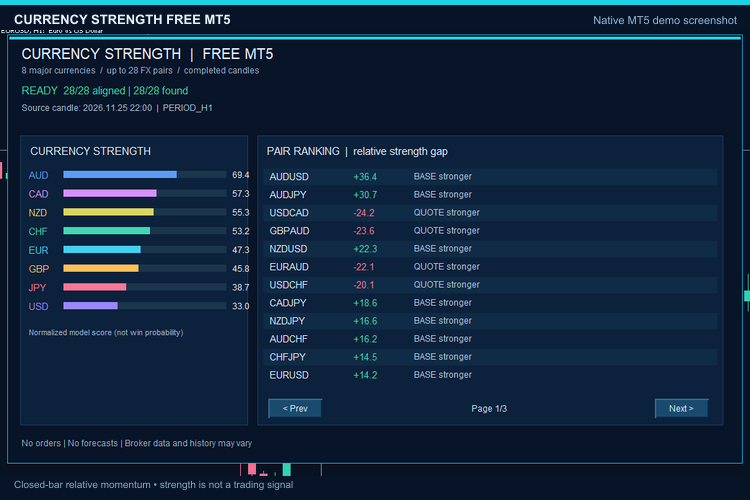
Currency Strength Free for MetaTrader 5
Currency Strength Free is an original standalone MQL5 indicator for comparing the eight major currencies (EUR, USD, GBP, JPY, CHF, AUD, CAD and NZD). It combines data from up to 28 forex crosses into an on-chart currency-strength panel and a ranked list of pairs. Its purpose is to help traders understand recent relative momentum and select charts for further research—not to provide entry, exit or profit forecasts.
How the calculations work
For each available pair, the indicator reads the completed candles on your selected analysis timeframe. It calculates the logarithmic change over the lookback period and scales that change by the variation of the intervening closed-bar returns. The base currency receives the resulting signed contribution; the quote currency receives the opposite contribution. Each currency's contributions are averaged over its valid pair coverage, converted to a 0–100 scale around 50, and ranked. Larger differences between two currency scores appear higher in the pair-ranking panel.
The scale describes the model's relative momentum, not the likelihood of a winning transaction. Positive and negative pair gaps indicate which component currency has the higher score. Scores can change when source bars change or when missing broker history finishes loading.
Features
- Eight individually colored currency-strength bars, ranked from stronger to weaker.
- Up to 28 supported pairs with a relative-strength gap and a base/quote-strength explanation.
- One independently configurable analysis timeframe and a closed-bar lookback.
- Automatic identification of common broker symbol prefixes and suffixes, with an optional preferred suffix.
- Readiness information showing discovered and synchronized pairs; data-gap and stale-quote notices.
- Previous/Next navigation for the pair list and a compact fallback for small chart windows.
- Eight indicator buffers carrying the latest currency-strength snapshot for further study; these buffers are not a historical backfill.
- No trading functions, DLL imports, external accounts, or subscription requirements.
Setup
- Download the source file to the MetaTrader 5 Indicators directory through CodeBase/MetaEditor and compile it, or open and compile the downloaded .mq5 file directly.
- Attach Currency Strength Free to a chart and allow the terminal to synchronize the histories of the available forex pairs.
- Adjust InpTimeframe (default H1) and InpLookbackBars (default 12) to match the observation horizon you wish to study.
- Use InpMinimumPairs (default 20) to control when the dashboard may label its data context READY, and InpPreferredSuffix when your broker's preferred symbol naming requires it.
- Read the strongest/weakest currency panel first, then examine the ranked pair list and the currently synchronized-pair count before evaluating a possible trading setup independently.
Data and testing notes
Partial coverage is labeled instead of being presented as complete. If some broker pairs cannot be identified or their closed-bar timestamps do not align, the dashboard will show the available information with a data warning. Live quote age is informational; weekend or closed-market data should not be interpreted as a live trading signal. A larger chart gives a more readable dashboard.
This standalone edition includes a single .mq5 source file and does not depend on private modules or auxiliary files. The source includes an MIT license notice. It was compiled in MetaEditor without errors or warnings and smoke-tested with 28/28 synchronized pairs on MetaQuotes-Demo; this does not guarantee equivalent coverage at every broker. No orders were sent during testing. Research and education only; no trading outcome is guaranteed.
 StrictJson: RFC 8259 JSON parser and writer for MQL5
One include file that reads and writes JSON in MQL5 and MQL4. It refuses broken JSON and tells you the line and column of the mistake, keeps numbers exact, reads and writes UTF-8 files, and saves your EA's settings to a file and loads them back.
Divergence Detector without repaint: RSI, MACD, Stochastic, CCI, Momentum
Regular and hidden divergences between price and RSI, MACD, Stochastic, CCI or Momentum. Swings confirmed on closed bars, signal on the confirmation bar, lines on oscillator and price. No repaint, buffers for EAs.
 CustomStopOut: your own margin call and stop-out levels, worst position closed first
A script that sets your own margin call and stop-out levels above the broker's. It alerts when the margin level falls below your margin call level and, below your stop-out level, closes positions one at a time, the worst net result first, until the level is back up, the way a broker stop-out works.
MACD Signals
Indicator edition for new platform.