 MetaTrader 5
 Sistemi Esperti
 Indicatori
 Script
 Librerie
 Archiviazione
Unisciti alla nostra fan page

Live Test Bench: automated checks of an EA on a demo account - sistema esperto per MetaTrader 5

Cosa faccio:
- Trasformo la tua strategia, il tuo script TradingView o le tue regole scritte in un Expert Advisor MT5 pulito
- Visualizzazioni:
- 60
- Valutazioni:
- Pubblicato:
-
 Ti stai perdendo delle opportunità di trading:
- App di trading gratuite
- Oltre 8.000 segnali per il copy trading
- Notizie economiche per esplorare i mercati finanziari
Registrazione AccediAccetti la politica del sito e le condizioni d’uso
Se non hai un account, registrati -
 Hai bisogno di un robot o indicatore basato su questo codice? Ordinalo su Freelance
Vai a Freelance
Hai bisogno di un robot o indicatore basato su questo codice? Ordinalo su Freelance
Vai a Freelance
The Strategy Tester cannot check what happens on a live chart: a terminal restart, Expert Advisors that start before the account is connected, a second copy of the same EA on another chart, the account history on the server, or a click on a chart button. This bench checks these automatically on a demo account and writes a PASS/FAIL report.
Files
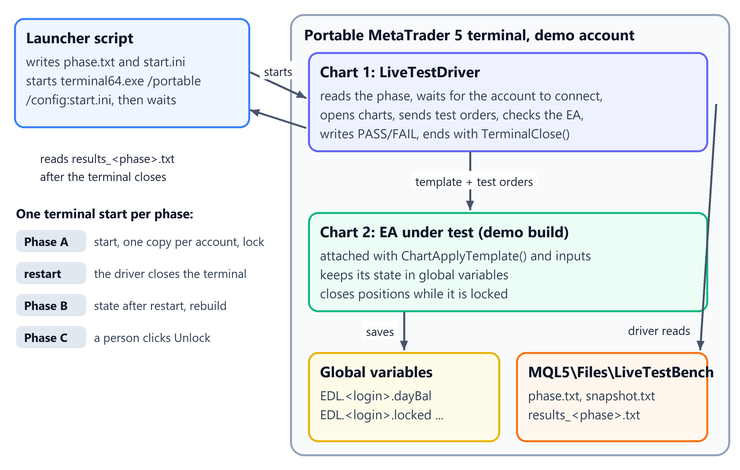
- LiveTestDriver.mq5: the test driver. It reads the phase (A, B or C) from MQL5\Files\LiveTestBench\phase.txt, runs the checks of that phase and closes the terminal with TerminalClose(). It refuses to run on anything but a demo account.
- ExampleDailyLock.mq5: the example EA under test, a daily loss lock that keeps its state in global variables, allows one copy per account (GlobalVariableSetOnCondition) and has an Unlock button.
- ExampleDailyLock_DemoTest.mq5: a demo-only build of the example. It defines DEMO_ONLY and includes the EA, so the source of the EA does not change.
- run_live_test.ps1 (in the zip): a PowerShell launcher that writes a start-up configuration, starts the portable terminal for one phase and prints the report.
Phases
- A: start, one copy per account, the lock, how fast a locked EA closes a new position. Ends by closing the terminal.
- B: after the restart: the chart is restored from the profile, the saved state is identical, the lock is still enforced, the day-start balance is rebuilt from the history.
- C: a person clicks Unlock on the chart. Chart objects ignore posted mouse messages, so this step needs a real click; the driver shows an instruction and waits up to 10 minutes.
How to use
- Copy terminal64.exe to a new folder, start it with the /portable key and log in to a demo account with the password saved.
- Put the three .mq5 files in MQL5\Experts\LiveTestBench of that terminal and compile them.
- Close the terminal, then run: .\run_live_test.ps1 -Terminal "D:\MT5_demo" -Phase A , then B, then C.
To test your own EA, add the demo-only check to its OnInit(), create a second file with #define DEMO_ONLY and #include, and change EA_NAME, EA_PATH, the inputs written by Attach() and the checks in the driver.
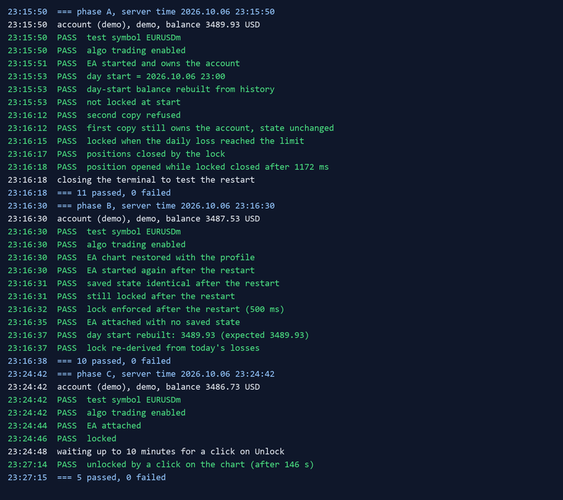
A real run on a demo account passed 26 checks in three phases (picture 1). Phase C found a real bug in the first version of the example: after Unlock the EA locked again within the same second, because the loss of the day was still above the limit.
 AccountGuard - lock your EA to licensed accounts (single include)
Single-header account lock for MT5 EAs: licensed account numbers, optional demo allowance, expiry date, tester bypass. Licence compiled in with #define. No DLL.
PropGuard Lite - daily and max loss guard for prop firm accounts
Risk tool for prop firm accounts: closes all positions and blocks new trades when the daily loss or max loss limit is reached. Never opens trades on a live chart.
TesterReport: read a saved Strategy Tester report into deals and trades
Reads a Strategy Tester report saved as HTML into its deals, closed trades, net profit and balance drawdowns, for comparing, combining or exporting backtests.
PortfolioWeights: risk parity, HRP, minimum variance and maximum diversification
Portfolio weights from the returns of symbols or Expert Advisors: inverse volatility, risk parity, hierarchical risk parity, minimum variance, maximum diversification, Ledoit-Wolf covariance.