 MetaTrader 5
 Sistemi Esperti
 Indicatori
 Script
 Librerie
 Archiviazione
Unisciti alla nostra fan page

TesterReport: read a saved Strategy Tester report into deals and trades - libreria per MetaTrader 5

Cosa faccio:
- Trasformo la tua strategia, il tuo script TradingView o le tue regole scritte in un Expert Advisor MT5 pulito
- Visualizzazioni:
- 49
- Valutazioni:
- Pubblicato:
-
 Ti stai perdendo delle opportunità di trading:
- App di trading gratuite
- Oltre 8.000 segnali per il copy trading
- Notizie economiche per esplorare i mercati finanziari
Registrazione AccediAccetti la politica del sito e le condizioni d’uso
Se non hai un account, registrati -
 Hai bisogno di un robot o indicatore basato su questo codice? Ordinalo su Freelance
Vai a Freelance
Hai bisogno di un robot o indicatore basato su questo codice? Ordinalo su Freelance
Vai a Freelance
TesterReport.mqh reads a Strategy Tester report saved as HTML (Backtest tab > right click > Report > HTML) and gives you its deals, its closed trades and the main figures, so other MQL5 code can work with a backtest after it is saved: compare reports, combine them into a portfolio, export them, or check them against the account history.
Usage
#include <TesterReport\TesterReport.mqh>

CTesterReport report;
if(report.Load("MyTest.htm"))            // a file in MQL5\Files; Load(file, true) for the common folder
  {
   for(int i = 0; i < report.Trades(); i++)
     {
      SReportTrade t;
      report.Trade(i, t);                // open, close, symbol, buy, volume, entry, exit, profit, swap, commission, net, balance
     }
   double maxMoney, maxPercent, relMoney, relPercent;
   report.BalanceDrawdowns(maxMoney, maxPercent, relMoney, relPercent);
  }
else
   Print(report.LastError());
What it reads
- The settings of the test: Expert Advisor, period, currency and the initial deposit.
- Every row of the Deals table (SReportDeal): time, ticket, symbol, type, direction, volume, price, commission, swap, profit, balance, comment.
- The closed trades (SReportTrade). The report has no position numbers, so each exit is matched with the oldest open entries of the same symbol and the opposite side. A partial close or a reversal gives one trade per part, and the commission of the entry is shared in proportion to the closed volume.
- NetProfit(), and the balance drawdowns as the report shows them: "Maximal" (the largest fall in money, with its percent) and "Relative" (the largest fall in percent, with its money). Deposits and withdrawals made after the first trade are kept out of the drawdown, as the tester does.
Reports saved by the terminal are UTF-16; UTF-8 copies are read too.
Example
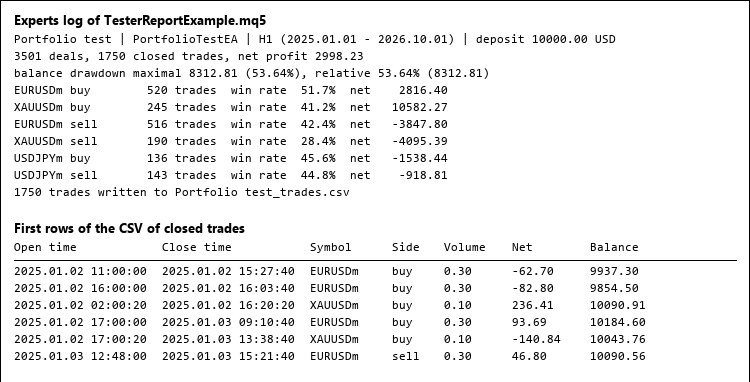
The script TesterReportExample.mq5 reads a report from MQL5\Files, prints the summary and the results by symbol and side, and writes every closed trade to a CSV file (picture 1).
Checked
On 12 saved reports (one to seven symbols, execution delay, withdrawals during the test, deposits from 2 000 to 100 000), the net profit and both balance drawdowns were equal to the figures in the report header, and the 9 874 closed trades were identical to an independent Python reader of the same files.
Files
TesterReport.mqh goes to MQL5\Include\TesterReport, TesterReportExample.mq5 to MQL5\Scripts\TesterReport.
 Live Test Bench: automated checks of an EA on a demo account
Automated checks of an Expert Advisor on a live demo chart (restart, second copy, server history, chart button) with a PASS/FAIL report.
AccountGuard - lock your EA to licensed accounts (single include)
Single-header account lock for MT5 EAs: licensed account numbers, optional demo allowance, expiry date, tester bypass. Licence compiled in with #define. No DLL.
PortfolioWeights: risk parity, HRP, minimum variance and maximum diversification
Portfolio weights from the returns of symbols or Expert Advisors: inverse volatility, risk parity, hierarchical risk parity, minimum variance, maximum diversification, Ledoit-Wolf covariance.
DrawdownBootstrap: Monte Carlo of the maximal drawdown
Block bootstrap of daily results: how deep the drawdown of an account or strategy can get over the next months, with percentiles and a seeded generator for repeatable runs.