 MetaTrader 5
 Sistemi Esperti
 Indicatori
 Script
 Librerie
 Archiviazione
Unisciti alla nostra fan page

PropGuard Lite - daily and max loss guard for prop firm accounts - sistema esperto per MetaTrader 5

- Visualizzazioni:
- 80
- Valutazioni:
- Pubblicato:
-
 Ti stai perdendo delle opportunità di trading:
- App di trading gratuite
- Oltre 8.000 segnali per il copy trading
- Notizie economiche per esplorare i mercati finanziari
Registrazione AccediAccetti la politica del sito e le condizioni d’uso
Se non hai un account, registrati -
 Hai bisogno di un robot o indicatore basato su questo codice? Ordinalo su Freelance
Vai a Freelance
Hai bisogno di un robot o indicatore basato su questo codice? Ordinalo su Freelance
Vai a Freelance

PropGuard Lite is a risk tool for prop firm accounts (FTMO and similar) and for anyone who wants a hard stop on bad days. On a live or demo chart it never opens trades.
What it does
It watches account equity, including floating P/L. When a limit is reached it:
- closes all positions (or only the positions with one magic number), oldest first,
- deletes pending orders,
- keeps closing anything that opens later. A daily halt lasts until the next trading day. A max-loss halt lasts until you reset it.
Main features
- Daily loss limit: a % of the initial capital (FTMO style) or a % of the day-start reference.
- Day-start reference: the balance at day start, or the higher of balance and equity at day start.
- Max (overall) loss limit: a % of the initial capital.
- Safety buffer: the guard acts a little before the real limit, to leave room for slippage.
- Day reset time: set the hour and the firm's time zone offset from the server.
- Restart-safe: the day-start balance is rebuilt from deal history on every check, so restarting the terminal, recompiling or a VPS sync does not reset the day. Halt states are stored in terminal global variables.
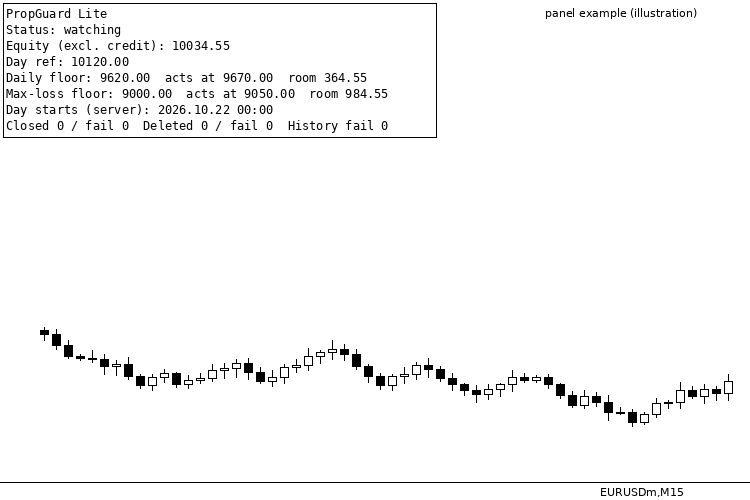
- Chart panel: current reference, floors, remaining room, and counters for closes and failed closes.
- CSV log (MQL5/Files/PropGuard_log.csv) with every halt, close and failure and its retcode.
- Push notification to the MT5 mobile app (optional).
- Built-in self-test (InpRunSelfTest=true): checks the day-boundary and limit math against known answers and writes PropGuard_selftest.txt.
Input parameters
- InpInitialCapital: initial account size (e.g. 100000). 0 = auto: the first deposit in the account history. Auto is only used if the balance now is between 0.5x and 2x of it; otherwise the guard warns you and does not check limits until you set this input.
- InpUseDaily: enable the daily loss limit.
- InpDailyLossPct: daily loss limit, %.
- InpDailyBase: the daily % is taken from the initial capital or from the day-start reference.
- InpDayRef: day-start reference: balance, or the higher of balance and equity.
- InpResetHour: day reset hour in the firm's time zone (0-23).
- InpServerMinusResetTZ: server time minus the firm's time zone, in hours (0 if the same).
- InpUseMaxLoss: enable the max (overall) loss limit.
- InpMaxLossPct: max loss, % of the initial capital.
- InpClearMaxLossHalt: set to true once to clear a saved max-loss halt, then set it back to false.
- InpBufferPct: act this % of capital before the limit.
- InpScope: close all positions, or only one magic number.
- InpMagic: the magic number when InpScope = magic (0 = manual trades).
- InpDeletePending: delete pending orders when halted.
- InpDeviationPoints: max slippage when closing, in points.
- InpPush: push notification to the MT5 mobile app.
- InpShowPanel: show the status panel in the chart corner.
- InpRunSelfTest: run the self-test at start.
- InpTesterDemo: Strategy Tester only. Opens demo trades (about 10x notional, one every 4 hours, alternating buy/sell) so you can watch the guard halt and close them. It has no effect on a live or demo chart.
Quick setup (FTMO-style 100k example)
- InpInitialCapital = 100000 (set it yourself for a prop account)
- InpDailyLossPct = 5, InpDailyBase = % of initial capital
- InpDayRef = balance at day start (or "higher of" if your firm uses it)
- InpResetHour = 0, InpServerMinusResetTZ = server time minus your firm's time zone
- InpMaxLossPct = 10
- InpBufferPct = 0.5 (acts about 500 before the limit)
Strategy Tester
The guard does not trade, so in the tester InpTesterDemo opens demo trades to give it something to watch. The tester report shows those demo trades: they are not a strategy and their result means nothing.
Run one copy only
Turn Algo Trading ON in the terminal where the guard actually runs. If you migrate it to an MQL5 VPS, turn Algo Trading OFF in your local terminal, otherwise the local copy and the VPS copy both act on the account. On a terminal where Algo Trading is off, the panel says so: that is normal when the guard runs on the VPS.
Honest limits
- It cannot switch off other EAs. While halted, it closes whatever they open.
- If the server and the firm's time zone change daylight-saving time on different dates, adjust InpServerMinusResetTZ for those weeks.
- The "higher of balance/equity" reference needs the EA to be running at the reset moment. If it was not, the panel shows the balance reference as "estimated".
- When the market is closed, closes fail. They are retried and logged.
- Read your firm's own rules: this tool helps you stay inside them, it does not replace them.
 Line Master – Fast and Slow Trend Lines with Trend Change Signals
Line Master is a trend-following indicator for MetaTrader 5 that displays fast and slow dynamic price lines to help traders identify market direction and potential trend changes. Blue represents a bullish trend, while red represents a bearish trend. Visual markers highlight changes in the indicator's trend state. The indicator includes adjustable Fast Length and Slow Length parameters, allowing traders to customize its sensitivity. It can be used on forex, gold (XAUUSD), indices, and other MT5-supported markets. For better results, combine its signals with price action, support and resistance levels, and proper risk management. Signals are not guaranteed and should be confirmed before entering a trade.
Spread Monitor
Spread Monitor is an MQL5 Expert Advisor that draws a colour-coded panel on the chart. The panel shows the current spread of the attached symbol in points, along with the average, minimum, and maximum over a rolling history. It also counts how many stored samples exceeded a warning level, and turns the status row red when the current spread is above that level. The utility does not place orders. Inputs control the warning level, the history size, the refresh interval, and the panel position. Panel objects are removed when the EA is detached.
 AccountGuard - lock your EA to licensed accounts (single include)
Single-header account lock for MT5 EAs: licensed account numbers, optional demo allowance, expiry date, tester bypass. Licence compiled in with #define. No DLL.
MACD Signals
Indicator edition for new platform.