Sure Fire Hedging Strategy Mt5
- Experts
- Version: 20.3
- Mise à jour: 10 avril 2026
- Activations: 5

SureFireHedgeStrategy v20.3
Professional Equity Protection & Profit Shield Added
SureFireHedgeStrategy v20.3 is a high-logic algorithmic trading system engineered for traders who prioritize capital safety above all else. Optimized specifically for high-volatility assets like Gold (XAUUSD) and Bitcoin (BTCUSD), version 20.3 introduces a sophisticated financial management layer designed to grow small accounts into significant wealth.
🛡️ Advanced Safety Features:
-
The "Profit Vault" Technology: Unlike other robots that leave all your money exposed, our EA features a unique "Vault" system. It automatically harvests your realized profits and secures them in an invisible digital safe. This ensures your hard-earned gains are protected from future market fluctuations.
-
Smart "Ratchet" Safety Floor: Our proprietary Net Profit Guard works like a one-way security lock. As your account reaches new peaks, the safety floor moves up to lock in your progress. It deepens to give trades room to breathe during growth, but it never loosens—ensuring your account peak is always protected.
-
Nuclear Protection Protocol: In extreme market conditions, the EA acts as its own risk manager. If a predefined safety limit is reached, it triggers an instant "Nuclear Close" to liquidate all positions. This prevents total account wipeouts and preserves your core capital.
-
Automatic Emergency Bailout: Version 20.3 features a "Reincarnation" logic. If the safety protocol is triggered, the EA can automatically pull funds from its own "Vault" to restart the trading sequence. You don't need to manually intervene; the system uses its own savings to recover and continue trading.
-
High-Precision 20-Step Sequence: The EA follows a sophisticated, pre-calculated 20-level directional strategy. This allows it to navigate complex market trends with controlled layering, avoiding the common pitfalls of basic martingale systems.
📊 Live Dashboard Intelligence:
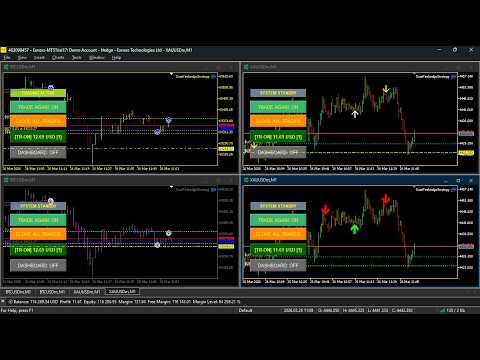
The integrated HUD (Heads-Up Display) gives you total transparency. At a glance, you can monitor:
-
Total Savings: Combined funds currently secured in your Vaults.
-
Safety Distance: Real-time monitoring of how far you are from the safety floor.
-
Performance Peak: The highest record of your account success.
Setup Recommendations:
-
Account Type: Cent Account or Standard ECN.
-
Minimum Start: $10 (on Cent) or $1,000 (on Standard).
-
Leverage: 1:500 recommended.
-
Timeframe: M1 for maximum calculation precision.
-
Pairs: XAUUSD (Gold), BTCUSD (Bitcoin), and major currency pairs.
SureFireHedgeStrategy v20.3 - Input Parameters Guide
To ensure the best performance, please refer to the following guide for the EA settings:
1. Trading Configuration
-
Initial Lot Size: The volume of the first trade to start the sequence.
-
Lot Multiplier: The factor used to increase the lot size for subsequent recovery trades.
-
Maximum Trading Steps: The maximum number of allowed positions in a single cycle (up to 20 levels).
-
Step Distance (Points): The price gap required between consecutive trades.
2. Profit Vault System (Capital Shield)
-
Enable Global Vault: Activate the proprietary system that secures profits into a "Hidden Vault," safe from active trading risks.
-
Profit Target to Vault ($): The amount of profit required on the active dashboard before the EA automatically transfers it to the Vault.
-
Vault 1 & Vault 2 Allocation: Two independent storage "pockets" for flexible profit management and emergency reserves.
3. Net Profit Guard (Equity Protection)
-
Enable Profit Guard: Activates the advanced equity protection system.
-
Safety Floor Percentage (%): The percentage of your account's peak profit used to set the "Safety Floor" (the maximum allowed floating loss).
-
Safety Trigger Amount ($): The dollar threshold in your Vault that triggers the Dynamic Buffer for extra security during high-growth phases.
4. Emergency & Recovery Protocol
-
Nuclear Attack Protocol: When enabled, the EA will instantly close all open positions if the floating loss hits the "Safety Floor" to preserve your core capital.
-
Emergency Bailout (Vault Reincarnation): If active, the EA will automatically pull funds from Vault 1 to replenish your trading dashboard after a safety liquidation occurs.
-
Post-Nuclear Floor Management: Determines whether the safety limits should be expanded or tightened after a successful emergency recovery.
5. Interface & Identification
-
Show Radar Display: Toggle the on-chart HUD (Heads-Up Display) to monitor price targets, vault balances, and safety distances.
-
Magic Number: A unique identification number for the EA, allowing it to run alongside other robots or manual trades without interference.
Recommended Setup:
-
Default Settings: Optimized for XAUUSD (Gold) on the M1 timeframe.
-
Capital Management: For balances below $1,000, we highly recommend using a Cent Account to provide the EA enough "breathing room" for the hedging sequences.
-
VPS: A stable, low-latency VPS is required to ensure the Profit Guard can execute emergency closures without delay.
SureFireHedgeStrategy v20.3
Professional Equity Protection & Profit Shield Added
SureFireHedgeStrategy v20.3 is a high-logic algorithmic trading system engineered for traders who prioritize capital safety above all else. Optimized specifically for high-volatility assets like Gold (XAUUSD) and Bitcoin (BTCUSD), version 20.3 introduces a sophisticated financial management layer designed to grow small accounts into significant wealth.
🛡️ Advanced Safety Features:
-
The "Profit Vault" Technology: Unlike other robots that leave all your money exposed, our EA features a unique "Vault" system. It automatically harvests your realized profits and secures them in an invisible digital safe. This ensures your hard-earned gains are protected from future market fluctuations.
-
Smart "Ratchet" Safety Floor: Our proprietary Net Profit Guard works like a one-way security lock. As your account reaches new peaks, the safety floor moves up to lock in your progress. It deepens to give trades room to breathe during growth, but it never loosens—ensuring your account peak is always protected.
-
Nuclear Protection Protocol: In extreme market conditions, the EA acts as its own risk manager. If a predefined safety limit is reached, it triggers an instant "Nuclear Close" to liquidate all positions. This prevents total account wipeouts and preserves your core capital.
-
Automatic Emergency Bailout: Version 20.3 features a "Reincarnation" logic. If the safety protocol is triggered, the EA can automatically pull funds from its own "Vault" to restart the trading sequence. You don't need to manually intervene; the system uses its own savings to recover and continue trading.
-
High-Precision 20-Step Sequence: The EA follows a sophisticated, pre-calculated 20-level directional strategy. This allows it to navigate complex market trends with controlled layering, avoiding the common pitfalls of basic martingale systems.
📊 Live Dashboard Intelligence:
The integrated HUD (Heads-Up Display) gives you total transparency. At a glance, you can monitor:
-
Total Savings: Combined funds currently secured in your Vaults.
-
Safety Distance: Real-time monitoring of how far you are from the safety floor.
-
Performance Peak: The highest record of your account success.
Setup Recommendations:
-
Account Type: Cent Account or Standard ECN.
-
Minimum Start: $10 (on Cent) or $1,000 (on Standard).
-
Leverage: 1:500 recommended.
-
Timeframe: M1 for maximum calculation precision.
-
Pairs: XAUUSD (Gold), BTCUSD (Bitcoin), and major currency pairs.
SureFireHedgeStrategy v20.3 - Input Parameters Guide
To ensure the best performance, please refer to the following guide for the EA settings:
1. Trading Configuration
-
Initial Lot Size: The volume of the first trade to start the sequence.
-
Lot Multiplier: The factor used to increase the lot size for subsequent recovery trades.
-
Maximum Trading Steps: The maximum number of allowed positions in a single cycle (up to 20 levels).
-
Step Distance (Points): The price gap required between consecutive trades.
2. Profit Vault System (Capital Shield)
-
Enable Global Vault: Activate the proprietary system that secures profits into a "Hidden Vault," safe from active trading risks.
-
Profit Target to Vault ($): The amount of profit required on the active dashboard before the EA automatically transfers it to the Vault.
-
Vault 1 & Vault 2 Allocation: Two independent storage "pockets" for flexible profit management and emergency reserves.
3. Net Profit Guard (Equity Protection)
-
Enable Profit Guard: Activates the advanced equity protection system.
-
Safety Floor Percentage (%): The percentage of your account's peak profit used to set the "Safety Floor" (the maximum allowed floating loss).
-
Safety Trigger Amount ($): The dollar threshold in your Vault that triggers the Dynamic Buffer for extra security during high-growth phases.
4. Emergency & Recovery Protocol
-
Nuclear Attack Protocol: When enabled, the EA will instantly close all open positions if the floating loss hits the "Safety Floor" to preserve your core capital.
-
Emergency Bailout (Vault Reincarnation): If active, the EA will automatically pull funds from Vault 1 to replenish your trading dashboard after a safety liquidation occurs.
-
Post-Nuclear Floor Management: Determines whether the safety limits should be expanded or tightened after a successful emergency recovery.
5. Interface & Identification
-
Show Radar Display: Toggle the on-chart HUD (Heads-Up Display) to monitor price targets, vault balances, and safety distances.
-
Magic Number: A unique identification number for the EA, allowing it to run alongside other robots or manual trades without interference.
Recommended Setup:
-
Default Settings: Optimized for XAUUSD (Gold) on the M1 timeframe.
-
Capital Management: For balances below $1,000, we highly recommend using a Cent Account to provide the EA enough "breathing room" for the hedging sequences.
-
VPS: A stable, low-latency VPS is required to ensure the Profit Guard can execute emergency closures without delay.