Hide Pending Orders Pro Tool

The tool will help you to hide your pending orders (buy/sell limit; buy/sell stop)

To run it, you just need to add it on any chart (only 1 chart needed).

So, when you make any pending order, it will remember that order (with price to open, lot number, symbol, your stop loss, take profit....) then, it will delete your pending order (hide it with broker). And it will make trade when market price reached the open price of your pending order, will all same parameters get from your old pending order.

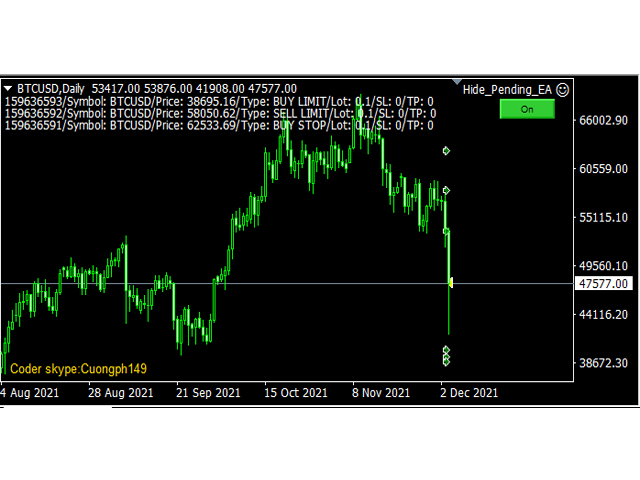
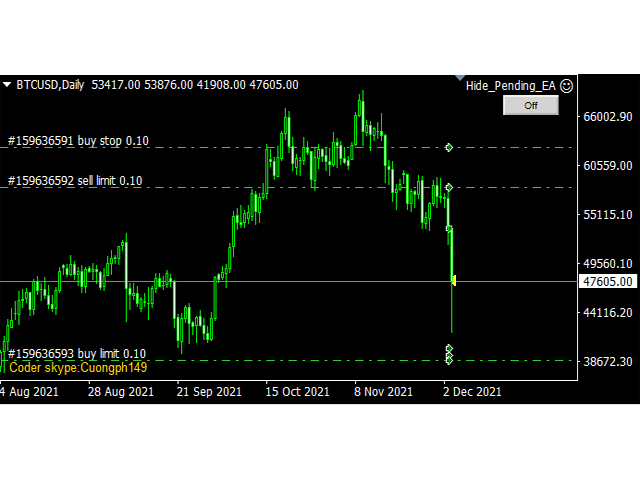
The EA will show you all information about pending orders list on top-left of chart (see screenshot below)

The EA draws a button for you to control On/Off of working, if you turn it On, it will hide your pending orders, if you turn it off, it will replace your pending orders for you 

to modify SL, TP if you need! after that turn it On to continue working

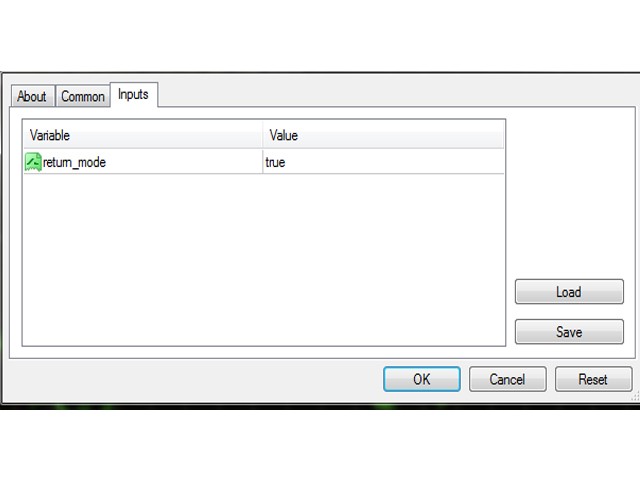
The EA have one input parameter is: return_mode =true/false

if return_mode =true, so, when you remove the EA from chart, it will return all your pending orders it is managing to market (which still not be reached to live on market).

if return_mode =false, so, when you remove the EA from chart, it will not return your pending orders.

email hungcuongkhmt51@gmail.com

Thanks you!

Produits recommandés
Risk Commander
Adisorn Soodkanueng
Product Name: Risk Commander: Trade Assistant & Strategy Simulator Risk Commander is more than just a trade panel—it is a complete Manual Trading Ecosystem . It serves two powerful purposes: Live Assistant: Helps you execute trades with speed, precision, and perfect risk management in real-time markets. Training Simulator: Fully compatible with the Strategy Tester (Visual Mode) , allowing you to practice manual trading on historical data without risking a cent. NEW! Built-in Simulator Mode S
EA Risk Manager is a professional risk‑management Expert Advisor designed to protect your trading account and enforce disciplined money management. The EA does not open trades by itself – it only monitors and manages all existing positions (manual and automated) on the account. It is especially useful for traders who want to: Hard‑limit daily / weekly / monthly losses and profits. Restrict lot size and the number of open trades. Trade a basket of G7‑related Forex pairs using one centralized
This tool will perform Trailing stop loss and Break even management for orders. Helps you limit or reduce the time spend watching orders on the screen, especially when you need to go to sleep. Just add this EA to 1 chart, you can manage all pairs. You can filter orders by comment, magic number, symbol, and order ticket number. When Breakeven it can add shift/offset pips (to cover the commission...). You can try in strategy tester before purchase. The EA will add Buy and Sell alternately, so yo
Smartility
Syed Oarasul Islam
This utility is designed to help you with your Manual Trading. It allows different ways of closing trades. It can display total number of BUY and SELL orders individually and also their individual profits. It can enter trades without stopl loss and take profits. However upon selecting UseStopLossTakeProfit from the settings it can use best possible stop loss and take profits based on the market conditions. Upon selecting the CloseOppositeTrades  from the settings it can close opposite trades. Fo
Exp COPYLOT CLIENT for MT4
Vladislav Andruschenko
4.65 (66)
Copieur commercial pour MetaTrader 4.       Il copie les transactions de change, les positions et les ordres de tous les comptes. C'est l'un des meilleurs copieurs commerciaux       MT4 - MT4, MT5 - MT4       pour le       COPYLOTE MT4       version (ou       MT4 - MT5 MT5 - MT5       pour le       COPYLOTE MT5       version). Version MT5 Description complète   +DEMO +PDF Comment acheter Comment installer     Comment obtenir des fichiers journaux     Comment tester et optimiser     Tous les p
Fermer   toutes   les   transactions   d'un   seul   coup ,   gérant   directement   depuis   votre   application  MT4  mobile . Cette  utilité   peut   fermer   9   catégories   différentes   de   transactions. Pour   activer   l'   action ,   il  suffit   de   placer   un   ordre   en   attente   à   un   prix   prédéterminé   (peut  être  fait   à   distance   via   l'   application  MT4 mobile). Ensuite   , l'utilité   détectera   l'   ordre   et   fermera   toutes   les   transactions   n
The program is use to copy trading from MT4   to MT4 and MT5  on local PC or copy  over the Internet.   Now you can easy copy trades to any where or share to friends. Only run one Flash Server on VPS, also need allow the apps if you turn on Windows Firewall. Can not add more than 20 account copier to server, include both  MT4 and MT5 Get free Copier EA for MT4 and MT5 (only  receive signal),   download here Instants copy, speed smaller 0.1 seconds, easy to setup How to setup and guide Let read a
RSI Scanner
Tetyana Shcherba
Utility is designed to monitor and analyze the market conditions for all symbols of the MetaTrader 4 terminal using real-time data from the RSI indicator. Automatically detects all the pairs in your terminal, and also can filter them into groups. Gets the RSI indicator data for all timeframes and all selected pairs. Tracks up to 4 programmable signal patterns and notifies when they appear. Automatically opens a new chart for a given template when you click the desired pair in the table. Input p
Trade Manager MT4 DaneTrades
Levi Dane Benjamin
4.09 (11)
Trade Manager pour vous aider à entrer et sortir rapidement des transactions tout en calculant automatiquement votre risque. Y compris des fonctionnalités pour vous aider à éviter le sur-trading, le trading de vengeance et le trading émotionnel. Les transactions peuvent être gérées automatiquement et les mesures de performances du compte peuvent être visualisées dans un graphique. Ces fonctionnalités rendent ce panneau idéal pour tous les traders manuels et contribuent à améliorer la plateforme
| Fully-automated Smart Money Concept (ICT) inspired trading solution with multi-strategy capabilities | Built by a grid trader >> for grid traders.  This is MT4 version, click  here  for  Blue CARA MT5  (settings and logics are same in both versions)     Real monitoring signal  -->  Cara Gold Intro Blue CARA EA   ('CARA') - short for  C omprehensive  A lgorithmic R esponsive A dvisor is a next-gen  multi-currency    multi-timeframe  EA base on the widely known (and perhapse most popular) Inn
Royal Copier — 전문 MT4 트레이드 복사기 Royal Copier는 MetaTrader 4용 전문 로컬 실시간 트레이드 복사기입니다. 이제 두 기능이 하나의 MT4 Expert Advisor 안에 통합되었습니다. 입력값에서 EA를 Master 모드 로 실행할지 Client 모드 로 실행할지 선택하면 됩니다. 즉, 동일한 EA를 원본 계정과 수신 계정 모두에서 사용할 수 있으며, 기존 복사기의 동작 방식은 그대로 유지됩니다. Royal Copier는 다음과 같은 일반적인 계정 간 복사를 지원합니다. MT4에서 MT4 MT4에서 MT5 MT5에서 MT4 MT5에서 MT5 MT5 복사를 위해서는 MT5_Copier 를 사용하십시오. 작동 방식 Royal Copier는 동일한 Windows PC의 공유 파일을 통해 작동하는 로컬 복사기입니다. EA가 Master 모드 로 설정되면 원본 계정을 모니터링하고 모든 거래 활동을 공유 파일에 기록합니다. EA가 Client 모드 로 설
Adviser-Utilitaire pour copier les transactions d'un compte MT5 ou d'un compte MT4 vers un autre compte MT4. Demo-version can be downloaded   here . Vous pouvez copier des positions entre les comptes de compensation et de couverture dans n'importe quelle combinaison. Vous pouvez définir des filtres par le nom de l'instrument et les nombres magiques des positions qui seront copiées. Jusqu'à présent, la source n'envoie des informations que sur les positions du marché. Les ordres en attente sont
SFG Grid Manager MT4 – Système de Grille et de Miroir Intelligent SFG Grid Manager MT4 est un gestionnaire de grille automatique et professionnel qui suit une position existante (manuelle ou ouverte par un autre EA) et ouvre une opération de moyenne à chaque étape définie (GridPips). Lorsque la position principale se ferme ou disparaît, toutes les positions ouvertes par le gestionnaire sont automatiquement clôturées. Il fonctionne avec tout courtier prenant en charge les comptes Netting ou He
Auto trade V20 is a trading tool like Robot or Expert Advisor that is used for automatic trading, this type is Martingale EA, the recommended broker is FBS, EU Pair, default setting. If you want to find the best setting, please look for it by backtesting it, so that you find the best setting and help your trading become more profitable, please try this tool to help you trade. minimum deposit 200 $ cen lot 0.01, pipstep in points.
SwiftEdge Scalper EA Professionnel de Scalping avec Contrôle Manuel Complet Le scalping exige des décisions en une fraction de seconde, une gestion précise des risques et une exécution parfaite des ordres. Gérer les calculs de breakeven, les trailing stops et plusieurs positions tout en surveillant l'action des prix est accablant sans les bons outils. SwiftEdge Scalper est votre assistant de trading professionnel conçu pour les scalpers actifs et les day traders. Exécutez des trades en un clic o
How to Use the Features       MT5 VERSION   TRADE COPIER Select Role: On the account sending trades, choose Sender (Master Account) . On the account receiving trades, choose Copier (Receiver Account) . Lot Size Mode: Same Lot Size as Master: Ignores multipliers, copies exactly what the Master has. Multiply Master Lot Size: Uses the "Lot Multiplier" field (e.g., Master 0.10, Multiplier 2.0 = Copier 0.20). Use Fixed Lot Size: Ignores Master's volume entirely, uses the "Fixed Lot Size" field for ev
The TargetChanger The TargetChanger Script is the easiest way to change the takeprofits of multiple open orders . It automatically changes the takeprofit of both open orders as well as limit orders on the current pair.  To change your target you simply drag the TargetChanger on the current chart, type in the new takeprofit level and click "ok". All the takeprofits get changed within seconds now. If you only trade with one single order each time, this tool might not be super useful for you, bu
Harvest GOLD
Sayan Vandenhout
Harvest GOLD USES THE TREND WAVE INDICATOR AND IT CAN IDENTIFY THE BEGINNING AND THE END OF A NEW WAVE TREND MOVEMENT. AS AN OSCILLATOR, THE INDICATOR IDENTIFIES THE OVERBOUGHT AND OVERSOLD ZONES. IT WORKS GREAT TO CATCH THE SHORT TERM PRICE REVERSALS AND USES A MARTINGALE STRATEGY TO CLOSE ALL TRADES IN PROFIT. USE DEFAULT SETTINGS ON H1 OR HIGHER TIME FRAME ON ANY PAIR FOR MORE ACCURATE TRADES WHY THIS EA : Smart entries calculated by 3 great strategies The EA can be run on even a $30000
Lucky Trade Panel MT4
Nina Yermolenko
5 (1)
Trading panel for manual trading. Has a fairly wide functionality. Allows you to automatically calculate the order size, open both market and pending orders. It has a wide range of options for closing orders, it is possible to partially close orders, close orders after reaching a certain profit or loss, separately close profitable and unprofitable, buy and sell, as well as pending orders. The panel also contains a simple implementation of a grid of pending orders, reverse and lock functions, tr
Trade Assistant Pro 36 in 1
Makarii Gubaydullin
4.76 (21)
Outil Multifonction : Calculatrice de Lots, Ordres Grid, Ratio R/R, Gestionnaire de Trades, Zones d'Offre et de Demande, Price Action et bien plus Version Démo   |   Manuel d'utilisation L'Assistant de Trading ne fonctionne pas dans le testeur de stratégies : vous pouvez télécharger la Version Démo ICI pour tester l' utilitaire . Contactez-moi pour toute question / idées d'amélioration / en cas de bug trouvé Si vous avez besoin d'une version MT5, elle est disponible ici Simplifiez, accélérez et
Black Square
Maksim Neimerik
This is an Expert Advisor with the elements of graphics trading. It performs trading operations using the "Rectangle" (or "Square") shape. The Expert Advisor automatically draws a square and opens a Buy or Sell orders when the price crosses its lower or upper bounds respectively. The shape can be drawn manually. For this purpose you should disable the auto drawing feature in the Expert Advisor settings. If the price moves in the wrong direction, the Expert Advisor sets up to four orders in accor
TSTrendLineSymbol
Salvatore Labriola
Utility, which draws buy or sell trendlines, which can also become support or resistances able to close any position on the screen Algorithm that calculates the gain of the position, at the touch closure of the line.   The benefits you get: Works on forex and CFD, timeframe from M1 to Weekly. Easy to use screen control panel. Audible warning messages at the touch of the line. Easy to use.
Trade copier MT4
Alfiya Fazylova
4.58 (33)
Trade Copier est un utilitaire professionnel conçu pour copier et synchroniser les commandesentre les comptes de trading. Les commandes sont copiées du compte/terminal du fournisseur vers le compte/terminal du destinataire, qui sont installés sur le même ordinateur ou vps. Avant d'acheter, vous pouvez tester la version démo sur un compte démo. Version démo ici . Instructions complètes ici . Principales fonctionnalités et avantages: Prend en charge la copie des commandes MT4> MT4, MT4> MT5, MT5>
Just Copier MT4
Agung Imaduddin
5 (4)
"Just copier" is designed to copy trading without any complicated settings. The copy can be done in one PC. One EA can be set as master (provider) or slave (receiver). The receiver lot can be set to multiple providers lots. Please also check this product at fxina.hostingerapp.com.  Any type of copy is available. MT4 -> MT5 MT4 -> MT4 MT5 -> MT5 MT5 -> MT4 If you want to copy MT4 -> MT5 or MT5 -> MT4, please purchase "Just copier" for MT4 and "Just copier" for MT5 separately. Just Copier can copy
Smart Funded Hft
Barbaros Bulent Kortarla
4.7 (66)
Smart Funded EA est un conseiller expert conçu pour réussir les défis HFT des sociétés de prop trading qui autorisent son utilisation. Quelles sociétés de prop trading HFT puis-je utiliser ? Il a été testé sur presque tous les défis de sociétés de prop trading HFT avec un taux de succès de 100 %, tels que Kortana Fx, Nova Funding, Fast Forex Funds, Infinity Forex Funds, Quantec Trading Capital, Next Step Funded, Msolutionff, Genesis Forex Funds, The Talented Traders, Only Funds, Tradicave et t
"Auto FIBO Pro" Crypto_Forex indicator - est un excellent outil auxiliaire dans le trading ! - L'indicateur calcule et place automatiquement sur le graphique les niveaux de Fibo et les lignes de tendance locales (couleur rouge). - Les niveaux de Fibonacci indiquent les zones clés où le prix peut s'inverser. - Les niveaux les plus importants sont 23,6 %, 38,2 %, 50 % et 61,8 %. - Vous pouvez l'utiliser pour le scalping inversé ou pour le trading en grille de zones. - Il existe également de nomb
Slow Pips OCO Trade Panel is an advanced trading panel for placing pending orders. Traders can use this panel to place two pending orders at once. One pending order would be of buy entry type and the other one would be of sell entry type. Both orders will have Stop Loss and Take Profit parameters. Since two pending orders are placed at the same time, the pending order for which the price hits first gets converted into a market order and the other pending order gets deleted (one order cancels the
H4 GBPUSD Trend Scalper is a trend signal scalper The EA trades according to the trend strategy using original built-in indicator for opening and closing orders. The external inputs for limiting trading on Fridays and Mondays are available. The purpose of the strategy is to use the current trend with the most benefit. According to the results of testing and working on demo and real accounts, the best results achieved by using the Н4 timeframe on the GBP/USD pair Works on MetaTrader 4 Build 971+
Automate Risk Management with Smart Trailing Stop Manager for MetaTrader 4 Looking for MetaTrader 5 version? I t is available separately in the Market:   Smart Trailing Stop Manager MT5 Full User Guide    –  Public channel:   CLICK HERE Struggling with manually adjusting stops and securing profits? Smart Trailing Stop Manager MT4 is an intelligent utility for MetaTrader 4 that automates trailing stops, break-even management, partial closes, and auto SL. Optimized specifically for MT4 users, it e
Niveaux automatiques de seuil de rentabilité En   utilisant   cet   outil ,   v ous pouvez activer le déplacement automatique du SL, lorsque le trade atteint un profit souhaité.  Particulièrement   important   pour   les   traders   à   court terme   .   L'option de décalage est également disponible: une partie du profit peut être protégée. Outil multifonction : 66+ fonctionnalités, incluant cet outil  |   Contactez-moi  si vous avez des questions  |   Version MT5 Processus d'activation de la f
Les acheteurs de ce produit ont également acheté
Trade Assistant MT4
Evgeniy Kravchenko
4.43 (194)
It helps to calculate the risk per trade, the easy installation of a new order, order management with partial closing functions, trailing stop of 7 types and other useful functions. Additional materials and instructions Installation instructions   -   Application instructions   -   Trial version of the application for a demo account Line function -   shows on the chart the Opening line, Stop Loss, Take Profit. With this function it is easy to set a new order and see its additional characteris
Local Trade Copier EA MT4
Juvenille Emperor Limited
4.96 (109)
Découvrez une expérience exceptionnellement rapide de copie de trades avec le Local Trade Copier EA MT4 . Avec sa configuration facile en 1 minute, ce copieur de trades vous permet de copier des trades entre plusieurs terminaux MetaTrader sur le même ordinateur Windows ou Windows VPS avec des vitesses de copie ultra-rapides de moins de 0.5 seconde. Que vous soyez un trader débutant ou professionnel, le Local Trade Copier EA MT4 offre une large gamme d'options pour le personnaliser en fonction d
Bienvenue sur Trade Manager EA, l’outil ultime de gestion des risques conçu pour rendre le trading plus intuitif, précis et efficace. Ce n’est pas seulement un outil d’exécution d’ordres ; c’est une solution complète pour la planification des trades, la gestion des positions et le contrôle des risques. Que vous soyez débutant, trader expérimenté ou scalpeur ayant besoin d’une exécution rapide, Trade Manager EA s’adapte à vos besoins, offrant une flexibilité sur tous les marchés, des devises et i
The product will copy all telegram signal to MT4   ( which you are member  ) , also it can work as remote copier.  Easy to set up, copy order instant, can work with almost signal formats, image signal, s upport to translate other language to English Work with all type of channel or group, even channel have "Restrict Saving Content", work with  multi channel, multi MT5 Work as remote copier: with signal have ticket number, it will copy exactly via ticket number. Support to backtest signal. How to
TradePanel MT4
Alfiya Fazylova
4.84 (94)
Trade Panel est un assistant commercial multifonction. L'application contient plus de 50 fonctions de trading pour le trading manuel et permet d'automatiser la plupart des tâches commerciales. Attention ! Les réductions sont limitées dans le temps, chaque mardi le prix augmentera de 5$ (jusqu'à 90$). Avant l'achat, vous pouvez tester la version de démonstration sur un compte de démonstration. Télécharger la version d'essai de l'application pour un compte de démonstration : https://www.mql5.com/f
Trading History MT4
Siarhei Vashchylka
5 (9)
Trading History - A program for trading and money management on the history of quotes in stratagy tester. It can work with pending and immediate orders, and is equipped with trailing stop, breakeven and take profit functions. Very good for training and testing different strategies. Manual (Be sure to read before purchasing) Advantages 1. Allows you to test any trading strategy in the shortest possible time 2. An excellent simulator for trading training. You can gain months of trading experience
Copy Cat More Trade Copier MT4 (Copie Chat MT4) n’est pas seulement un simple copieur de trades local ; c’est un cadre complet de gestion des risques et d’exécution conçu pour les défis actuels du trading. Des challenges de prop firms à la gestion de comptes personnels, il s’adapte à chaque situation grâce à une combinaison d’exécution robuste, de protection du capital, de configuration flexible et de traitement avancé des opérations. Le copieur fonctionne en mode Master (émetteur) et en mode Sl
Seconds Chart - un outil unique pour créer des graphiques en secondes dans MetaTrader 4 . Grâce à Seconds Chart , vous pouvez créer un graphique avec une période définie en secondes, offrant une flexibilité et une précision idéales pour l'analyse, indisponibles sur les graphiques standards en minutes ou en heures. Par exemple, la période S15 indique un graphique avec des bougies d'une durée de 15 secondes. Vous pouvez utiliser n'importe quel indicateur, expert advisor (EA) ou script. Leur utilis
Risk Manager for MT4
Sergey Batudayev
4.6 (10)
Expert Advisor Risk Manager pour MT4 est un programme très important et, à mon avis, nécessaire pour chaque commerçant. Avec cet Expert Advisor, vous pourrez contrôler le risque de votre compte de trading. Le contrôle des risques et des bénéfices peut être effectué à la fois en termes monétaires et en termes de pourcentage. Pour que l'Expert Advisor fonctionne, attachez-le simplement au tableau des paires de devises et définissez les valeurs de risque acceptables dans la devise du dépôt ou en
Trader Evolution MT4
Siarhei Vashchylka
5 (2)
" Trader Evolution " - A utility designed for traders who use wave and technical analysis in their work. One tab of the utility is capable of money management and opening orders, and the other can help in making Elliott wave and technical analysis. Manual (Be sure to read before purchasing) | Version for MT5 Advantages 1. Trading in a few clicks. Immediate and pending orders are available in the panel 2. Money management. The program automatically selects the appropriate lot size 3. Simplifies
Telegram to MT4 Coppy
Sergey Batudayev
3.44 (9)
Télégramme vers MT4 :   la solution ultime pour copier des signaux Simplifiez votre trading avec   Telegram vers MT4   , l'utilitaire de pointe conçu pour copier les signaux de trading directement depuis les canaux et chats Telegram vers votre plateforme MetaTrader 4, sans DLL. Cette solution robuste garantit une exécution fluide des signaux avec une précision et des options de personnalisation inégalées, vous faisant gagner du temps et optimisant votre efficacité. [ Instructions and DEMO ] Cara
Attention, cet EA ne fonctionnera pas sur le testeur, uniquement sur des comptes de démonstration ou réels, contactez-moi si vous souhaitez essayer la démo https://www.mql5.com/en/users/abudabi MT5 Version Envoyez(placez) des ordres rapides dans MetaTrader 4 depuis le clavier et la souris : Déplacez le curseur sur le prix désiré, appuyez sur la touche : Achat au marché : E Achat Limite : A Achat Stop : Z Vente au marché : Q Vente Limite : D Vente Stop : C (Touches personnalisables) Lorsque l'o
DrawDown Limiter MT4
Haidar Lionel Haj Ali
5 (8)
Expert Advisor "Drawdown Limiter"  Vous êtes au bon endroit si vous recherchez un contrôle de drawdown, un limiteur de drawdown, une protection du solde, une protection de l'équité ou une limite quotidienne de drawdown en rapport avec les entreprises de gestion de capitaux (Prop Firm), FTMO, My Forex Fund, ou si vous souhaitez protéger votre compte de trading. Avez-vous déjà eu du mal à contrôler votre drawdown en tradant sur des comptes financés ? Cet EA est fait pour vous. Les entreprises de
VirtualTradePad mt4 Extra
Vladislav Andruschenko
4.85 (61)
Panneau de trading pour trader en 1 clic.   Travailler avec des positions et des commandes!   Trading à partir du graphique ou du clavier. En utilisant notre panel de trading, vous pouvez trader en un clic à partir du graphique et effectuer des opérations de trading 30 fois plus rapidement que le contrôle MetaTrader standard. Des calculs automatiques de paramètres et de fonctions qui facilitent la vie d'un trader et aident un trader à mener ses activités de trading beaucoup plus rapidement et pl
EchoTrade Telegram to MT4 Copier
Perpetual Chinemerem Vincent
5 (2)
EchoTrade Telegram to MT5 Copier Seamless, Instant, and Reliable Signal Copying - Direct from Telegram to MetaTrader 4! The product does not run in the strategy tester but you can get free trial version   here  for testing before purchase. Tired of manually executing trades from Telegram signals? EchoTrade automates the process, instantly copying trades from any Telegram channel or group directly into your MT5 account—accurately, efficiently, and without delay. Key Features: Universal Compatib
Chart Button
Chantal Sala
3 (1)
Chart Button is a very useful indicator that allows you to navigate all charts with a simple click. This tool has been designed to work both vertically and horizontally. The particularity of this navigator is that you can change more charts simultaneously setting the input value. This tool will give you the ability to optimize your navigation and speed up all your analyzes. Input Values Direction (the direction of symbols buttons) Horizontal Vertical 32 SYMBOLS Forex_Suffix_Symbols (add Forex S
Trade Dashboard MT4
Fatemeh Ameri
4.92 (53)
Tired of complex order placement and manual calculations? Trade Dashboard is your solution. With its user-friendly interface, placing orders becomes effortless, by a single click, you can open trades, set stop loss and take profit levels, manage trade lot size, and calculate risk to reward ratios, allowing you to only focus on your strategy. Say goodbye to manual calculations and streamline your trading experience with Trade Dashboard. Download  Demo Version  right now. You can find  Details of
ManHedger MT4
Peter Mueller
5 (2)
THIS EA IS A SEMI-AUTO EA, IT NEEDS USER INPUT. Manual & Test Version Please TEST this product before   BUYING  and watch my video about it. Contact me for user support or bug reports, or if you want the MT5 version! MT5 Version I do not guarantee any profits or financial success using this EA. With this Expert Advisor, you can: Implement your own   Zone Recovery   strategy to capitalize on trending markets. Create   Grid   trading strategies, to profit from ranging markets. Place orders easil
Offre spéciale trading – 40 % de réduction Gestionnaire de transactions avancé – La solution tout-en-un par excellence pour un trading manuel plus rapide, plus intelligent et plus sûr. Transformez votre trading manuel avec NextGen Trade Manager AI – le panneau professionnel intégré au graphique qui combine exécution instantanée, planification visuelle des transactions et gestion des risques performante dans un outil intuitif. Exécutez vos ordres, gérez les risques et protégez vos profits plus
Comprehensive on chart trade panel with the unique ability to be controllable from mobile as well. Plus has a library of downloadable configuration, e.g. exit rules, extra panel buttons, pending order setup and more. Please see our product video. Works with all symbols not just currency pairs. Features On chart panel plus controllable from free app for Windows, iPhone and Android Built-in script engine with library of downloadable configuration, e.g. add 'Close All Trades in Profit' button, exit
MT4 Professional Copy Trading System (Édition MT4) Copieur de trades LOCAL ultra-rapide, niveau industriel, pour pros, fournisseurs de signaux et multi-comptes. Architecture LOCAL industrielle Fonctionne dans le même environnement Windows (même PC / même VPS Windows). Faible latence, haute stabilité, 24/7. Master / Slave / Self + Cross Copy (MT4 ↔ MT5) Modes Master/Slave/Self-Copier. MT4→MT4, MT4→MT5, MT5→MT4, MT5→MT5. Important : le cross-copy MT4↔MT5 nécessite les deux versions (MT4 & MT5)
The News Filter
Leolouiski Gan
5 (25)
Ce produit filtre tous les conseillers experts et les graphiques manuels pendant les heures de publication des actualités, de sorte que vous n'avez pas à vous soucier des pics de prix soudains qui pourraient détruire vos configurations de trading manuelles ou les transactions entrées par d'autres conseillers experts. Ce produit est également livré avec un système de gestion des ordres complet qui peut gérer vos positions ouvertes et vos ordres en attente avant la publication de toute actualité.
Riskless Pyramid
Snapdragon Systems Ltd
5 (1)
Introduction This powerful MT4 trade mangement EA offers a way potentially to aggressively multiply trade profits in a riskfree manner. Once a trade has been entered with a defined stoploss and take profit target then the EA will add three pyramid add-on trades in order to increase the overall level of profit. The user sets the total combined profit target to be gained if everything works out. This can be specified either as a multiple of the original trade profit or as a total dollar amount. Fo
TradeMirror est un outil de copie d'ordres localisé, spécialement conçu pour les plateformes MT4/MT5, qui synchronise les opérations de trading en temps réel. Avantages du produit En se basant sur les normes élevées des logiciels financiers en matière de sécurité, de stabilité et de protection de la vie privée, nous avons procédé à des optimisations en profondeur sur trois dimensions principales : Une interface graphique simple et intuitive, permettant une utilisation sans aucune barrière Des mé
Eezeorder 2
Tawanda Tinarwo
5 (2)
NEW VERSION!  NB: IF YOU ARE USING A VERY HIGH RESOLUTION MACHINE AND THE EA DISPLAY LOOKS TOO SMALL, CONTACT ME SO I CAN HELP YOU. Open Multiple Trades on MT4 in 1 click at one price. Enter the Lot size Specify the number of trades you want to open Choose whether you want TP SL or Trailing Stop Once you are done, click Buy or Sell Open Multiple Pending Orders on MT4 in 1 click at one price. Enter the Lot size Specify the gap from the current price, where you want to place the pending order Spe
Length Movement
Pavel Verveyko
5 (1)
Measures the length of the selected movement in points, shows the duration of the movement, as well as the speed of movement.   Outputs the average value of each dimension. It is designed to calculate the expected target based on typical market movements. The intended goal will provide information about the ratio of the stop size to the possible profit and will allow you not to open positions with a small expected profit. It will also help you determine the point at which it is more logical to c
Grid Manual MT4
Alfiya Fazylova
4.71 (17)
Grid Manual est un panneau de trading permettant de travailler avec une grille d'ordres. L'utilitaire est universel, possède des paramètres flexibles et une interface intuitive. Il fonctionne avec une grille d'ordres non seulement dans le sens des pertes, mais aussi dans le sens de l'augmentation des profits. Le commerçant n'a pas besoin de créer et de maintenir une grille d'ordres, l'utilitaire le fera. Il suffit d'ouvrir une ordre et "Grid Manual" créera automatiquement une grille de ordres po
Exp4 Duplicator
Vladislav Andruschenko
4.5 (22)
L'Expert Advisor   répète les   transactions et les positions un nombre prédéfini de fois sur votre compte   MetaTrader 4   . Il copie toutes les transactions ouvertes manuellement ou par un autre Expert Advisor. Copie les positions et augmente le lot à partir des positions ! Augmente le lot des autres EA. Les fonctions suivantes sont prises en charge : lot personnalisé pour les transactions copiées, copie du Stop Loss, Take Profit, utilisation du stop suiveur. Version MT5 Description complète
Ultimate Trade Copier
BLAKE STEVEN RODGER
5 (2)
This trade copy utility allows you to instantly and seamlessly replicate and synchronize unlimited orders from multiple master accounts to multiple slave accounts on your local machine. You can create custom channels (or portfolios) with advanced filtering capabilities to copy from multiple master accounts to multiple slave accounts. Moreover, you can tailor these channels with a range of lot sizing and trade condition options to ensure that copied trades outperform the original source. You can
MicroScalp Signal Finder Scanner de Signaux de Scalping Smart Money Multi-Symboles et Multi-Timeframes pour MetaTrader 5 Le scalping exige un timing précis et une analyse multicouche sur plusieurs instruments — une tâche presque impossible à réaliser manuellement en temps réel. Suivre simultanément la structure du marché, les blocs d'ordres, les gaps de valeur équitable, les balayages de liquidité et les confirmations de momentum sur plusieurs symboles nécessite une automatisation. MicroScalp Si
Plus de l'auteur
This is a free demo version for USDJPY only. Here is the link to full version: https://www.mql5.com/en/market/product/25912 This product has no input parameters. The product helps you to open and close orders faster, include instant and pending orders. It helps you to open order faster and easier, to make an order you simply click on the button. Buttons List BUY/SELL: to open instant Buy or Sell orders. BUY STOP/BUY LIMIT/SELL STOP/SELL LIMIT: to open pending order. The distance to the current
FREE
This is an indicator that helps you to see what symbols have the best SCORE of SWAP and SPREAD. The SCORE is calculated as follows: SWAP/SPREAD. So, the higher SCORE/SPREAD symbols have, the better (because everyone wants their orders to have positive swap, while keeping spread small). This indicator will help traders have an advantage in swap when choosing symbols and type (buy or sell) to make an order. You can see (in the picture) that this indicator shows a list of symbols with their score b
This indicator will help you merge two (or more than two) charts to view multi-symbols in just 1 chart (see the screenshots). You can choose any symbols to add with any timeframe you want. You can choose bull/bear color for bars. You can mirror the chart that will be added. If you want to add many charts, just run the indicator many times with each symbol and each timeframe.
MA CROSS ALARM
Cuong Pham
1 (1)
This indicator will help you show signals when the fast MA and slow MA (moving average) cross. The signals are displayed as up and down arrows (see picture). It can also give you a Pop Up Alert or Notification on your Phone or sending you an Email to inform the signal (this mode can be turned on/off in parameters). There are 2 MA crossovers to use: fast MA1 crosses slow MA1  fast MA2 crosses slow MA2 And there is one more MA line, MA3, to filter alert. When fast MA1 crosses slow MA1, the signal
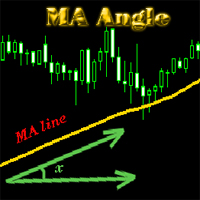
MA_Angle calculates the angle value between MA line and horizontal line at every bar on the main chart. Suppose that there is a bar number n . MA line is specified by a line segment (view the screenshots below, that is the Red line connecting MA point value at bar n and bar number n+1 ). This indicator shows you the strength of the market trend (up or down). You can customize how angle is displayed by "alertAngle" parameter (view the screenshots below). The default angle value is 30 degrees. It
The indicator shows you buy/sell signals and does not repaint. It works well with almost all pairs, while the best ones are GBPUSD, XAUUSD and EURUSD. The product works better on H1 and H4. You can change the parameters in the inputs tab to get the best signals and the best trade results on each pair. You can enable/disable alerts when signal appears. The indicator is easy to use. Parameters barstrip & Sensitive: amount of bars to process the highest and lowest prices (relates to the internal l
The indicator shows you time remaining till completion of the current candlestick of any timeframe you chose, showing struct (see details). Minute: second. The indicator has 3 parameters: TF - this parameter will help you choose timeframe you want, for example, if you want to show remaining time for M30, set TF=30. If you want to show remaining time of the current period you are seeing on chart, set TF=0 (like in default). Local - this parameter will help you choose location on the chart where t
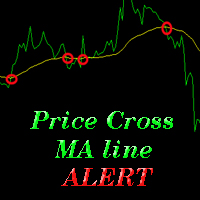
The indicator alerts you when the market price crosses MA line. You can choose any MA line to use via the parameter input tab (see the screenshot below). Parameters (the same as the four parameters you have to choose when you add MA line on a chart): ma_period ma_shift  ma_method (0=Simple; 1=Exponential...) ma_apply (0=Close; 1=Open; 2=High; 3=Low...)  When the price crosses MA line, it will alert you with a message looking as follows: "Price crossing DOWN MA line, pair: EURUSD Period: 60" or "
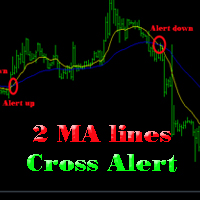
The indicator help you to do alert when two MA lines cross action You can choose all parameters for two these MA lines to use via parameter input tab (see screenshot below). Parameters Same as 4 parameters you have to choose when you add MA line on chart. Fast MA:  ma1_period ma1_shift  ma1_method (0=Simple; 1=Exponential...) ma1_apply (0=Close; 1=Open; 2=High; 3=Low...)  Slow MA: ma2_period ma2_shift  ma2_method (0=Simple; 1=Exponential...) ma2_apply (0=Close; 1=Open; 2=High; 3=Low...)  When f
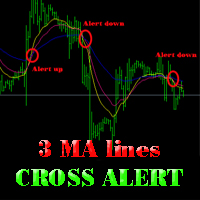
The indicator alerts you when 3 MA lines cross UP/DOWN (see the screenshot below). You can choose all parameters for these 3 MA lines to use via parameter input tab. Parameters Same as 4 parameters you have to choose when you add MA line on the chart. Fast MA:  ma1_period ma1_shift  ma1_method (0=Simple; 1=Exponential...) ma1_apply (0=Close; 1=Open; 2=High; 3=Low...)  Medium MA: ma2_period ma2_shift  ma2_method (0=Simple; 1=Exponential...) ma2_apply (0=Close; 1=Open; 2=High; 3=Low...)  Slow MA:
The EA created based on this strategy: This EMA crossover trading strategy is made with MACD. For MACD, you can avoid false signals from this EMA crossover. With this strategy, you can get more accurate signals. So this is more profitable . Strategy required FAST EMA SLOW EMA MACD with default setting How Signals come Buy Signal: When FAST EMA cross SLOW EMA from lower to upper, then you have to wait for MACD confirmation. After crossover, when you see MACD above 0.0 level, then you can take buy
This EA will help you to automatically put stop loss and take profit for all your orders. Stop loss point and take profit points can be selected in the tab of the input parameters. You can specify three symbols with SL and TP values (you can see symbol1 , symbol2 ... in the input tab below). The EA performs checks. If a new order with symbol1 appears, it puts SL and TP with stoploss1 and takeprofit1 values (in points). If a new order with symbol2 appears, it puts SL and TP with stoploss2 and tak
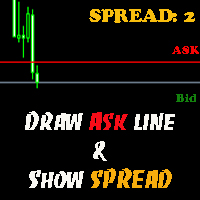
The indicator helps you to draw Ask line on the current chart and show the current spread. So, it helps you to do scalping trade easier. See the video below. It shows you how it works. Parameters line_color – Ask line color text_size – text size of spread value text_color – color of spread value Thank you! If you have any question, please contact me via Skype: cuongph149, or email: hungcuongkhmt51@gmail.com
Strategy requirements You need to set-up the chart manually for this strategy. You need three mt4 default indicator: FAST EMA (Exponential Moving Average of the close price) SLOW EMA (Exponential Moving Average of the close price) CCI (Commodity Channel Index) Buy signal: When FAST EMA is above the SLOW EMA, you can take buy when CCI crosses 0.0 level from bottom to top. Sell signal: When FAST EMA is below the SLOW EMA, you can take sell entry when CCI crosses 0.0 level from top to bottom . The
This indicator will help you to show ALL history trading statistics of any account you want. You just need to add it on any chart, and it will calculate important information from history of trading to help you to analyze trading result. It will help you to save your time to analyze any account's trading result, you will see win/lose rate of all trades on all pairs, trades number of all pairs, total lot on each pair, total lots on all pairs, total win/lose on this account... So, you will know wh
This utility tool help you to close all orders or apart of all (you can choose which symbol you want) immediately with only ONE CLICK, its work very fast ,so it will helpful for you in your trading to manage trading faster. If you want to close all orders, you just need to let symbol parameter is blank (like in default setting). If you want to close all orders of one pair (for example EURUSD orders) you need to put symbol =EURUSD (see screenshot below). This is a script, so its will be putted in
This utility tool help you to close all orders having profit immediatly with only ONE CLICK, its work is very fast. You can choose which symbol you want or close all symbols so it will helpful for you in your trading to manage trading faster. If you want it work on all symbols, you just need to leave symbol parameter blank (like in default setting). If you want it work on 1 symbol only (for example EURUSD orders) you need to put symbol =EURUSD (see screenshot below). This is a script, so its wil
This utility tool help you to close all orders which is having loss immediatly with only ONE CLICK, its work is very fast. You can choose which symbol you want or close all symbols so it will helpful for you in your trading to manage trading faster. If you want it work on all symbols, you just need to leave symbol parameter blank (like in default setting). If you want it work on 1 symbol only (for example EURUSD orders) you need to put symbol =EURUSD (see screenshot below). This is a script, so
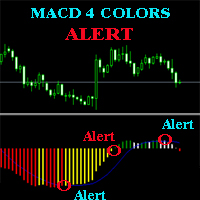
The MACD ALERT 4 COLORS is an indicator, that helps you to check MACD's value changes easily with 4 clear colors: when MACD grows up and above 0, it will have green color when MACD goes down and still above 0, it will have white color when MACD goes down and below 0 value, it will have red color when MACD grows up and below 0 value, it will have yellow color The indicator also generates alerts for you, with two alert types (see screen shot): Alert1 : (true/false) the alert will trigger when MACD
The indicator alerts you when the market price crosses your line level (adjustable). You can change color, thickness and default pip distance for the line via the parameter in input tab (see the screenshot and video below). Parameters line_color : color for the line to be drawn line_thickness : thickness of the line sound : name of sound file if you want it to play at crossing time default_distancepip : at the first times you add the indicator on chart, it will use this param to draw the line w
This product has no input parameters. The product helps you to open and close orders faster, include instant and pending orders. It helps you to open order faster and easier, to make an order you simply click on the button. Buttons List BUY/SELL: to open instant Buy or Sell orders. BUY STOP/BUY LIMIT/SELL STOP/SELL LIMIT: to open pending order. The distance to the current price is "Dis" (below of these buttons). SL/TP: Distance in point far from the current price, to put stop loss and take prof
This tool will help you hide your stoploss and takeprofit prices of all trades, it will manage them to close your trade when market price reached these levels. And it will replace all these StopLoss, TakeProfit levels for trades when you removed it, so you don't need to worry about missing your StopLoss, TakeProfit level when you remove it. It draw a button for you to control On/Off of working, you can see your SL,TP and modify it easy by the way turn Off the button, then drag your SL,TP price,
This is a support tool that will notify you when the price crosses a trend line, you can draw any trend line by manual, and you can change or drag it on chart in working time This tool will automatically update the new location of the trend line to alert you How to use: after added it on chart, you will draw a trend line and set name of the trend line same as in input of the tool (the parameter LineName ) There are 3 notification methods : Pop Up Alert, Send Email or Notification You can choose
This is a support tool that will notify you when a fast MA (Moving Average) Line crosses a slow MA Line, you can choose any fast MA Line and slow MA Line by parameters in input tab The Indicator will draw a red arrow where fast MA line crosses DOWN slow MA line and it will  draw a green arrow where fast MA line crosses UP slow MA line There are 3 Alert methods : Pop Up Alert, Send Email or Notification You can choose true or false to use or not for any Alert method in input tab You can choose Al
Filtrer:
Aucun avis
Répondre à l'avis