Trade Panel Pro by RunwiseFX

4.86

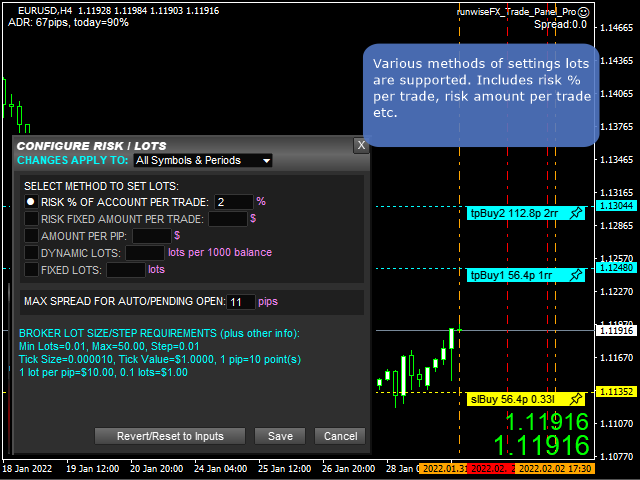
Fully functional manual trade panel with risk/reward, auto SL, lot size calculation, one-click trading, hidden (virtual) stop loss/take profit and pending orders, scale in and out of trades (partial close), news events and more. Works with all symbols not just currency pairs. Brings an incredible amount of functionality to MetaTrader for free and for both demo and live accounts.

Features

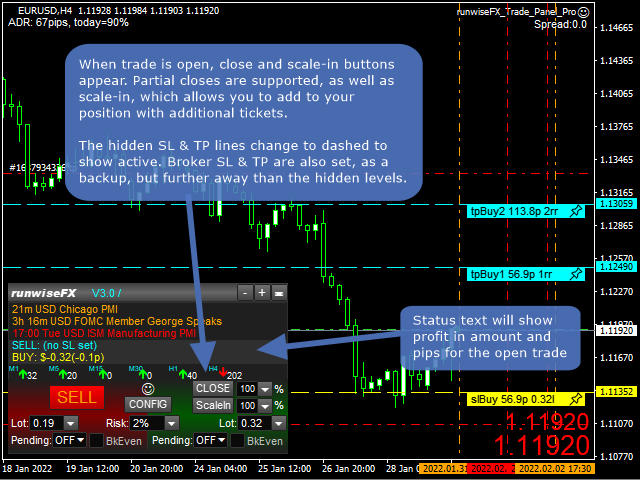
  • Lot size calculation - based on % of account to risk, fixed amount or dynamic lots
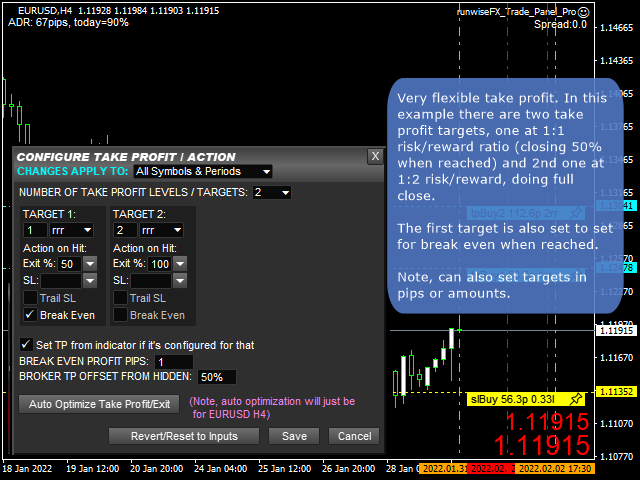
  • Automatic take profit based on risk reward ratios, pips or amount
  • Partial closes (scale-out)
  • Hidden (stealth) stop loss, take profit and pending orders
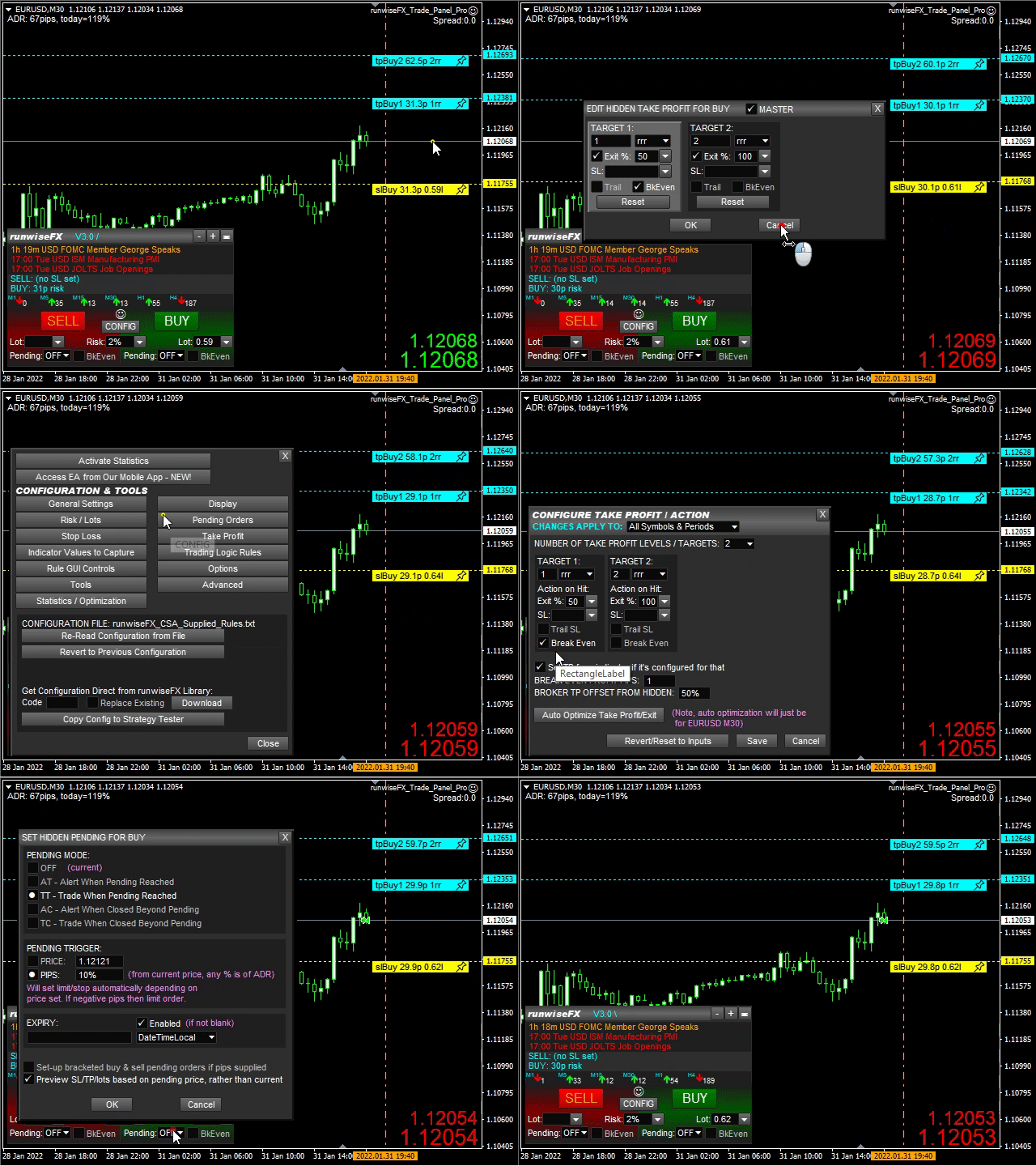
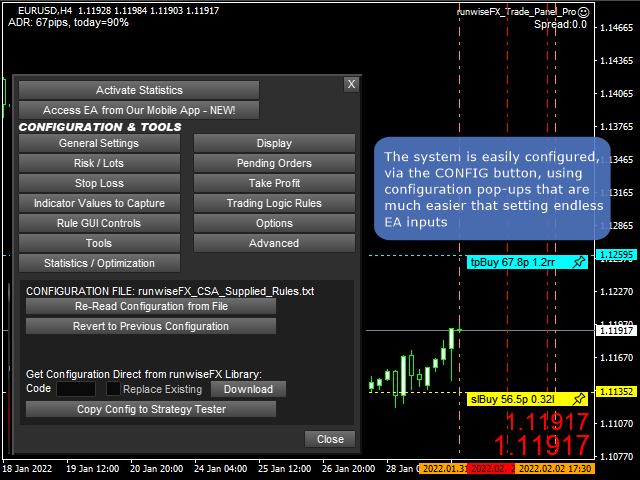
  • Easy to use configuration pop-up forms via CONFIG button
  • Stop loss, take profit lines can be positioned manually on the chart
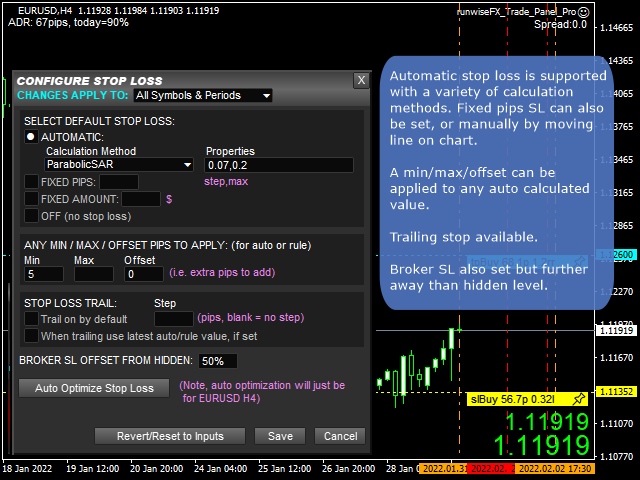
  • Automatic stop loss - variety of calculation methods can be selected
  • Trailing stop loss and break even, which can be triggered when target reached
  • Trail with latest indicator value, e.g. trail SL with Parabolic SAR
  • Sets broker SL/TP as backup but further away than hidden level
  • Hidden pending lines can be set to alert or trade, based on market price or candle close. Can be set with expiry and auto One Cancels Other (OCO).
  • Scale in (open additional tickets), plus automatic scale-in when target reached
  • News events (both text and vertical lines)
  • Optional multi-trade mode for multiple trades / pending orders on the same chart/symbol, all with separate SL/TP
  • Can be configured on a per symbol and/or timeframe basis, e.g. to have different SL for different symbols or timeframes
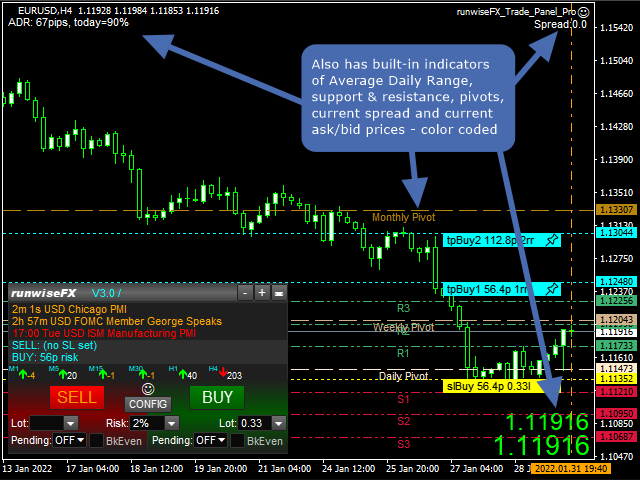
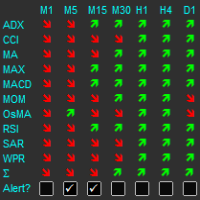
  • Includes indicators providing multiple timeframe trend, support/resistance, pivots, average daily range (or average true range - configurable), current spread and ask/bid prices in large text, color coded as price changes
  • Logs trades including execution time, slippage and profit, in a spreadsheet CSV file
  • Robust error handling
  • Additionally: Can download configuration from our library to give a Close All Trades button on account
  • Underlying code base has been in live use since 2015

    Important: If you have problem with EA then please message us before writing a review. It's usually a simple matter to address. If it turns out to be a bug then we have a good track record of issuing a new version quickly. Thank you.


    Usage

    See video below. Also, see our product manual in pdf format.

    EA Inputs

    The system is configured via the panel's CONFIG button rather than relying on inputs. However, here are a few inputs you may wish to change:

    • Important_brokerSLTPSetOnOrderSend - set to true if broker requires SL to be set on Order Send (can also be set in CONFIGU button | Options), e.g. some European brokers require this, where classic ECN brokers require this to be false (default)
    • Main_confirm* - set to false to turn off confirmation dialogs on trade close click, for example
    • Main_selection* - change what is shown in the various selection lists
    • Main_panelShowSingleLotSetting - set to true to show single lots box on panel
    • Gen_forcePointToPipDivider - set to 100 if trading indices so 1 pip is 1 basis point for most brokers (can also be set in CONFIG button | Advanced)
    • Color_* - change color of the various lines
    • Style_line* - change style of the various lines
    • Gen_color* - change color of other items


    Avis 45
    Warren Willis
    18
    Warren Willis 2026.01.07 15:34 
     

    I have been using Trade Panel Pro for the last six months. It works extremely well for me and my trading style. This week, I had to contact Support at Runwise because I needed to make some adjustments to my settings. I was impressed by the response I received and the clear instructions on how to resolve my query. Thank you, Runwise support.

    PerryTrader23
    43
    PerryTrader23 2025.05.13 12:22 
     

    Ganz starkes Tool, mit vielen Funktionen, die auch Sinn machen! Große Empfehlung! Vielen Dank!

    customanalog
    164
    customanalog 2024.04.13 17:13 
     

    This is a sophisticated tool for trade entry and management. The options are more extensive than a number of paid programs I've seen, and it's free, which is amazing. Makes me want to check out their optimizing software, which also looks very cool. I've been involved with forex since 2008.

    Produits recommandés
    OTRX Fimathe Backtest is a tool for the Trader or Enthusiast who uses the Fimathe technique created by Trader Marcelo Ferreira to carry out his training and validate if he can obtain profitability. In this tool you will be able to: 1. Define whether you are looking for a buy or sell entry. (Trend). 2. Define by clicking twice on the horizontal lines where your Reference Zone and your Neutral Zone will be. 3. Monitor the entry, subcycle and exit of the trade. 4. Trading Summary, Daily, Week
    FREE
    NAS100 Auto Sl And TP
    Moustapha Boulouz
    5 (2)
    Voici NAS100 Auto SL and TP Maker pour MT4 : Ne manquez plus jamais le réglage du StopLoss et du TakeProfit avec notre NAS100 Auto SL and TP Maker, un assistant indispensable pour les traders naviguant sur le marché du Nasdaq 100 sur MetaTrader 4. Cet outil est conçu pour ceux qui recherchent une solution transparente pour automatiser la gestion des niveaux de StopLoss et TakeProfit. Caractéristiques principales : Automatisation sans effort : Surveille automatiquement les transactions sur le Na
    FREE
    Profitstat free
    Tonny Obare
    4 (2)
    Profitstat is a free indicator that scans your history and displays it on the chart. The free version shows the number of trades and profit made on the current and previous day. The data is updated instantly as soon as a trade closes. Simply attach it to any chart and it gives the account data irrespective of the chart currency nor timeframe.
    FREE
    Lot by Risk
    Sergey Vasilev
    4.83 (23)
    La barre de trading Lot by Risk est conçue pour le trading manuel. C'est un moyen alternatif d'envoyer des ordres. La première caractéristique du panneau est l'affichage pratique des ordres à l'aide de lignes de contrôle. La deuxième caractéristique est le calcul du volume de la transaction à un risque donné en présence d'une ligne stop loss. Les lignes de contrôle sont affichées à l'aide de raccourcis clavier: take profit-touche T Par défaut; price-touche P par Défaut; stop loss – touche s p
    FREE
    FREE UNTIL FEBRUARY 14, 2023 SPEND MORE TIME WITH YOUR FAMILY. ENJOY LIFE… DO NOTHING. This version is only auto set of Takeprofit and StopLoss Main Version  of  TropangFX:   MT4 Version  |  MT5 Version Recommended timeframe:   H1 Supported currency pairs:  GBPUSD, EURUSD, EURCHF ,   USDCAD, USDCHF ,  AUDCAD, EURCAD, EURAUD and many more... Requirements The EA requires good brokerage conditions:   low spread   and   slippage   during the rollover time. I advise using a really   good ECN brok
    FREE
    SL and TP Setter
    Giacomo Barone
    4 (1)
    You can manually open a trade (one click), and this EA will take care of setting the SL and TP. SL and TP are set based on the number of pips you specify in the input screen. You can also choose monetary SL and TP. SL and TP are determined based on the weighted average price (WAP), so if you open a new trade, SL and TP will be updated according to the new WAP. The WAP is not unique but differentiated between buy and sell trades (this is useful only if you open opposite trades on the same chart)
    FREE
    IceFX TradeInfo
    Norbert Mereg
    4.77 (44)
    IceFX’s TradeInfo is an utility indicator which displays the most important information of the current account and position. Displayed information: Information about the current account (Balance, Equity, Free Margin). Current spread, current drawdown (DD), planned profit, expected losses, etc. Number of open position(s), volume (LOT), profit. Today’s and yesterday’s range. Remaining time to the next candle. Last day profit information (with integrated IceFX ProfitInfo indicator). Risk-based LOT
    FREE
    Safety
    Sergey Ermolov
    5 (2)
    Je pense que tout le monde connaît une telle règle de gestion de l'argent, comme le «coffre-fort». Pour ceux qui ne sont pas au courant, le coffre-fort suggère de fermer la moitié de la position après que le profit sur la transaction a égalisé avec la taille de l'arrêt. Ainsi, même si le prix se déroule et s'accroche à l'arrêt, Vous ne perdrez pas d'argent, car le même montant de profit a été reçu lors de la fermeture d'une partie de la position plus tôt. Safety Advisor n'a qu'un seul paramètr
    FREE
    Auto TP SL Manul Open Panding Orders Overview: AUto TP SL Manul Open Panding Orders is an innovative trading platform designed to enhance trading efficiency and effectiveness in managing financial investments. Key Features: Automated Management : Seamlessly manage take-profit (TP) and stop-loss (SL) orders with our advanced automation tools. Manual Adjustments : Maintain control with manual options, allowing traders to adjust orders according to market conditions.
    FREE
    .....................................hi....................... ................for showing high s and low s and support and resistanses .....................we have a lot of ways............................... it can be helpful for finding trends , higher highs , higher lows , lower highs , lower lows .......................today i write on of thems.......................... ........................you can enter the number of last support and resistanses .........................and it will dra
    FREE
    This utility keeps a watchful eye on your trading terminals and ensures that you are notified if any of them are disconnected. Simply attach the utility to a chart and connect to a monitoring service who can notify you. We use UptimeRobot for both VPS and terminal monitoring; however, any service supporting heartbeat monitoring can be employed. Many such services offer free plans and various notification methods, such as Cronitor.io
    FREE
    Signalator Lot Size Evaluator MT4 is a free local MetaTrader 4 utility for manual traders. It helps calculate an estimated lot size before opening a trade manually. The calculation is based on account size, trade direction, entry price, stop loss, risk percentage or fixed money risk, and broker symbol settings. The main purpose is simple: Enter your setup → define your risk → get the suggested lot size. The panel also shows useful pre-trade information such as spread, risk amount, SL/TP distance
    FREE
    一键平仓小工具,可以针对买单、卖单和挂单进行批量操作,可以操作当前图表订单和所有订单,简单高效。 第一行第一个按钮是关闭当前图表 品种 所有买单,第二个按钮是关闭当前图表品种的所有卖单,第三个按钮是关闭当前图表 品种 的所有订单; 第二行 第一个按钮是删除当前图表 品种 所有买单挂单,第二个按钮是 删除 当前图表品种的所有卖单 挂单 ,第三个按钮是 删除 当前图表 品种 的所有 挂单 ; 第三行第一个按钮是关闭所有 品种的全部买单,第二个按钮是关闭所有 品种的全 卖单,第三个按钮是关闭所有 品种的全部订单; 第四行第一个按钮是删除所有 品种全部买单挂单 ,第二个按钮是 删除 全部品种 的全部卖单挂单 ,第三个按钮是删除 全部品种 的全部挂单 。 希望此程序能对您有用
    FREE
    Scalping Day Trading Support Utility Scalping One MT4 free One position is displayed with one button. View P & L, Lot, and Point in real time. It is possible to switch the display of positions of only chart currencies and all currency pairs.  (The free version has only 3 positions) Supports automatic identification in Japanese and English   Account currency notation corresponds to dollar, euro, pound, yen (automatic identification) The timeline drawing function can be linked with the clock disp
    FREE
    This simple but useful script calculates the lot in % of the deposit. It is indispensable for risk management. There is only one customizable parameter: MaxRisk - risk in % for lot calculation. The product works as a standard script. Launch it once on an appropriate chart and start trading using the calculated lot value. Genious is simplicity! Happy trading!
    FREE
    This indicator shows the latest untouched support and resistance as horizontal lines. The indicator can show support/resistance from higher timeframes. With this indicator you can e.g. easily see the support/resistance of the timeframes H4, D1 and W1 on a H1 chart, which can be a big advantage while time your entry on H1. This is the FREE version of the indicator: Support Resistance Multi Time Frame The free version works only on EURUSD and GBPUSD! Parameters referenceTF: the timeframe from whi
    FREE
    SX Supply Demand Zones accurately identifies and draws high-probability Supply and Demand zones using a sophisticated algorithm. Unlike traditional indicators that clutter your chart, this indicator is designed with a focus on performance and a clean user experience. New Unique Feature: Interactive Legend System What truly sets this indicator apart from everything else is the Interactive Control Legend. You have a professional dashboard directly on your chart that allows you to: Show/Hide: Ins
    FREE
    Account Info EA It is a tool that presents on the graph all the positions of the account, and specific information concerning the positions, but also the account. It enables the user to have an image of his account at a glance. Use like any expert advisor. You can't attach it in the same chart with other expert advisor. It does not have the ability to open or manage positions. You can attach it on any chart and any timeframe.
    FREE
    PZ Trade Pad EA
    PZ TRADING SLU
    4.29 (31)
    This simple visual expert advisor allows you to trade easily from the chart. It handles risk management for you and can perform several useful tasks with your existing trades, saving time and making risk-management for each individual trade easier.  [ Installation Guide | Update Guide | Troubleshooting | FAQ | All Products   |  Get Help ] Trade easily from the chart Trade with precise risk management, hassle free Trade pending order with drag and drop price selection Set SL and TP levels with
    FREE
    AP VWAP Bands Pro (MT4) Volume-weighted average price with ±σ bands for clear intraday bias, mean-reversion zones, and dynamic support/resistance. Works on crypto (incl. BTC), FX, indices, and metals. Uses tick-volume when real volume isn’t available. What it shows VWAP line (volume-weighted mean price). Two envelopes around VWAP (default ±1σ and ±2σ) to highlight balance vs. extension. Reset modes: Day, Week, or Anchor Time (HH:MM) to start VWAP where you need it (e.g., exchange open). Why
    FREE
    The Magic SMA indicator is of great help in determining trend direction. It can be an excellent addition to your existing strategy or the basis of a new one. We humans can make better decisions when we see better visually. So we designed it to show a different color for rising and falling trends. Everyone can customize this in the way that suits them best. By setting the Trend Period, we can optimize it for longer or shorter trends for our strategy. It is great for all time frames. IF YOU NEED
    FREE
    MQLTA Auto Close Demo
    MQL4 Trading Automation
    Auto Close is an expert advisor that can assist you with your money and risk management rules. The EA can monitor your Balance, Equity, Margin, Global Profit and Global Loss and alert you in case any of these reaches a specified threshold. This Demo Version has Notification and Close features disabled, full version can be found https://www.mql5.com/en/market/product/29141 How does it work? Load the Auto Close EA in the chart and set the parameters you want to keep monitored. If any of the risk
    FREE
    Master the market rhythm with the Advanced Market Sessions indicator. Timing is everything in trading. Knowing exactly when major financial centers open and close is the key to understanding market volatility, liquidity, and directional bias. This indicator gives you crystal-clear visibility into the three major trading sessions: Asia, London, and New York. By automatically mapping the exact High and Low of each session in real-time, this tool empowers you to trade with true institutional contex
    FREE
    This utility allows you to check and improve your binary options trading skills. This is an indicator, not an Expert Advisor. Therefore, you do not need to remove your active EA from the chart. Inputs Expiry, min - option expiration time; InfoPanel background color - info panel background color; InfoPanel text color - info panel text color; InfoPanel text fontsize - info panel font size.
    FREE
    PZ Penta O MT4
    PZ TRADING SLU
    2.33 (3)
    The Penta-O is a 6-point retracement harmonacci pattern which usually precedes big market movements. Penta-O patterns can expand and repaint quite a bit. To make things easier this indicator implements a twist: it waits for a donchian breakout in the right direction before signaling the trade. The end result is an otherwise repainting indicator with a very reliable trading signal. The donchian breakout period is entered as an input. [ Installation Guide | Update Guide | Troubleshooting | FAQ | A
    FREE
    This MQL4 indicator creates a customizable grid of horizontal lines on your trading chart. Here's what it does: **Main Functions:** - Draws equally spaced horizontal lines across the visible price range - Supports two line types: horizontal lines or trend lines with forward projection - Automatically adjusts to price scale changes **Key Features:** 1. **Customizable Spacing**: Set grid distance in pips (20 pips by default) 2. **Flexible Starting Point**: Auto-calculates starting price or lets
    FREE
    Free automatic Fibonacci is an indicator that automatically plots a Fibonacci retracement based on the number of bars you select on the BarsToScan setting in the indicator. The Fibonacci is automatically updated in real time as new highest and lowest values appears amongst the selected bars. You can select which level values to be displayed in the indicator settings. You can also select the color of the levels thus enabling the trader to be able to attach the indicator several times with differe
    FREE
    Update:ver1.53 (2023/08/16) ・概要と必要環境 手動発注もしくは他ツール等からの発注に対し、指値発注予約の複製を生成します。こちらは「発注操作の簡易化」に特化したものになります。発注判断となる分析は、資料を漁る、経験則を導く、他の分析ツールやEAを併用する等、利用者ご自身で頑張ってください。なお、ver1.28より、「決済後、自動で再発注する」機能が実装されました。(有償版でのみ有効化できます) ・導入と導入後の操作 導入そのものは簡単です。「自動売買可能なEA」として、適当なチャートにて動作させるだけです。(チャートの対象相場は問いません。このEAは、チャートを見ていません)。あとは、「このEAでのローカルコピー以外の発注」があれば、それに応じて「損失が出た場合に備えての追加取引の予約」という形で、指値発注が自動生成されます。 導入操作上の注意として、「本EAを、複数のチャートで動作」はできません。EAがチャート自体を見ておらず、注文状況だけを見ているため、複数のチャートで動かす意味もありません。また、ターミナルとEAの設定として「自動売買」を許可しない
    FREE
    Shadow Flare MT4
    Kestutis Balciunas
    L’indicateur Shadow Flare est un outil de tendance et de liquidité non re‑dessinant pour MetaTrader 4. Il calcule une ligne de base configurable à partir d’une moyenne mobile (HMA, EMA, SMA ou RMA), l’entoure d’une enveloppe basée sur l’Average True Range et produit un état de tendance « collant » qui ne bascule que lorsque le prix de clôture franchit la bande supérieure ou inférieure. Le même moteur de tendance alimente un module automatique de zones d’offre/demande qui détecte les sommets et c
    FREE
    Un assistant commercial simple qui permet d'acheter et de vendre facilement avec l'effet de levier souhaité. Il a été créé pour le trader éventuel ou novice et inspiré des plates-formes de trading Web populaires telles que eToro ou Binary.com. Il comporte un ensemble de boutons de négociation mettant en œuvre différentes options d'effet de levier, et un bouton supplémentaire pour fermer toutes les transactions. Toutes les transactions sont placées avec un stop-loss en fonction de l'effet de lev
    FREE
    Les acheteurs de ce produit ont également acheté
    Bienvenue sur Trade Manager EA, l’outil ultime de gestion des risques conçu pour rendre le trading plus intuitif, précis et efficace. Ce n’est pas seulement un outil d’exécution d’ordres ; c’est une solution complète pour la planification des trades, la gestion des positions et le contrôle des risques. Que vous soyez débutant, trader expérimenté ou scalpeur ayant besoin d’une exécution rapide, Trade Manager EA s’adapte à vos besoins, offrant une flexibilité sur tous les marchés, des devises et i
    Trade Assistant MT4
    Evgeniy Kravchenko
    4.43 (195)
    It helps to calculate the risk per trade, the easy installation of a new order, order management with partial closing functions, trailing stop of 7 types and other useful functions. Additional materials and instructions Installation instructions   -   Application instructions   -   Trial version of the application for a demo account Line function -   shows on the chart the Opening line, Stop Loss, Take Profit. With this function it is easy to set a new order and see its additional characteris
    Local Trade Copier EA MT4
    Juvenille Emperor Limited
    4.96 (110)
    Découvrez une expérience exceptionnellement rapide de copie de trades avec le Local Trade Copier EA MT4 . Avec sa configuration facile en 1 minute, ce copieur de trades vous permet de copier des trades entre plusieurs terminaux MetaTrader sur le même ordinateur Windows ou Windows VPS avec des vitesses de copie ultra-rapides de moins de 0.5 seconde. Que vous soyez un trader débutant ou professionnel, le Local Trade Copier EA MT4 offre une large gamme d'options pour le personnaliser en fonction d
    Custom Alerts AIO : Surveillez tous les marchés à la fois — sans aucune configuration Présentation Custom Alerts AIO est une solution de surveillance du marché prête à l’emploi, sans configuration nécessaire. Tous les indicateurs requis — FX Power, FX Volume, FX Dynamic, FX Levels, IX Power — sont directement intégrés. Aucun graphique n’est affiché, ce qui rend cet outil idéal pour la génération d’alertes en temps réel. Il prend en charge toutes les classes d’actifs proposées par votre courtie
    Exp COPYLOT CLIENT for MT4
    Vladislav Andruschenko
    4.69 (65)
    Copieur de trades professionnel pour MetaTrader 4 Un copieur de trades rapide, fiable et professionnel pour MetaTrader 4 . COPYLOT permet de copier des opérations Forex entre les terminaux MetaTrader 4 et MetaTrader 5 , avec une synchronisation flexible adaptée à différents types de comptes et styles de trading. La version COPYLOT MT4 prend en charge : MetaTrader 4 → MetaTrader 4 MetaTrader 5 Hedge → MetaTrader 4 MetaTrader 5 Netting → MetaTrader 4   Version MT5 Description complète + DEMO + PDF
    Copy Cat More Trade Copier MT4 (Copie Chat MT4) n’est pas seulement un simple copieur de trades local ; c’est un cadre complet de gestion des risques et d’exécution conçu pour les défis actuels du trading. Des challenges de prop firms à la gestion de comptes personnels, il s’adapte à chaque situation grâce à une combinaison d’exécution robuste, de protection du capital, de configuration flexible et de traitement avancé des opérations. Le copieur fonctionne en mode Master (émetteur) et en mode Sl
    TradePanel MT4
    Alfiya Fazylova
    4.84 (95)
    Trade Panel est un assistant commercial multifonction. L'application contient plus de 50 fonctions de trading pour le trading manuel et permet d'automatiser la plupart des tâches commerciales. Avant l'achat, vous pouvez tester la version de démonstration sur un compte de démonstration. Télécharger la version d'essai de l'application pour un compte de démonstration : https://www.mql5.com/fr/blogs/post/762644 . Instructions complètes ici . Commerce. Permet d'effectuer des opérations commerciales e
    The product will copy all telegram signal to MT4   ( which you are member  ) , also it can work as remote copier.  Easy to set up, copy order instant, can work with almost signal formats, image signal, s upport to translate other language to English Work with all type of channel or group, even channel have "Restrict Saving Content", work with  multi channel, multi MT5 Work as remote copier: with signal have ticket number, it will copy exactly via ticket number. Support to backtest signal. How to
    The News Filter
    Leolouiski Gan
    5 (25)
    Ce produit filtre tous les conseillers experts et les graphiques manuels pendant les heures de publication des actualités, de sorte que vous n'avez pas à vous soucier des pics de prix soudains qui pourraient détruire vos configurations de trading manuelles ou les transactions entrées par d'autres conseillers experts. Ce produit est également livré avec un système de gestion des ordres complet qui peut gérer vos positions ouvertes et vos ordres en attente avant la publication de toute actualité.
    Smart Channel M4
    Vahidreza Heidar Gholami
    The trend in the market can be predicted using trend lines but the problem is you don’t know where exactly the price is going to touch the trend line where you can put your pending orders on. Smart Channel Expert Advisor makes it possible to put an advanced channel around the price data, which can be configured to handle placing orders, opening and closing positions, managing risk per trade, spread, slippage, and trailing stop-loss and take-profit automatically. Features Money Management (Calcul
    Trade copier MT4
    Alfiya Fazylova
    4.58 (33)
    Trade Copier est un utilitaire professionnel conçu pour copier et synchroniser les commandesentre les comptes de trading. Les commandes sont copiées du compte/terminal du fournisseur vers le compte/terminal du destinataire, qui sont installés sur le même ordinateur ou vps. PROMOTION - Si vous avez déjà acquis le "Trade copier MT5", vous pouvez obtenir le "Trade copier MT4" gratuitement (pour la copie MT4 > MT5 et MT4 < MT5). Pour obtenir des informations plus détaillées sur les conditions, veuil
    OrderManager MT4
    Lukas Roth
    4.73 (26)
    Présentation du OrderManager : Un utilitaire révolutionnaire pour MT4 Gérez vos transactions comme un pro avec le tout nouveau utilitaire Order Manager pour MetaTrader 4. Conçu avec simplicité et facilité d'utilisation à l'esprit, l'Order Manager vous permet de définir et de visualiser sans effort le risque associé à chaque transaction, vous permettant de prendre des décisions éclairées et d'optimiser votre stratégie de trading. Pour plus d'informations sur l'OrderManager, veuillez vous référer
    Trade Dashboard MT4
    Fatemeh Ameri
    4.96 (53)
    Trade Dashboard simplifies how you open, manage, and control your trades, with built-in lot size calculation. It allows you to execute trades, manage risk, and control positions directly on the chart, with tools such as partial close, breakeven, and trailing stop. Designed to reduce manual work and help you stay focused on your trading decisions. A demo version is available for testing. Detailed explanations of features are provided within the MQL5 platform. Installation instructions are include
    CloseIfProfitorLoss with Trailing
    Vladislav Andruschenko
    4.87 (31)
    Close If Profit or Loss with Trailing pour MetaTrader 4 — fermeture automatique par profit total ou perte totale Un utilitaire pratique pour MetaTrader 4 qui ferme automatiquement les positions lorsque le profit total ou la perte totale atteint le niveau que vous avez défini. L’Expert Advisor surveille les opérations ouvertes, calcule le résultat flottant, peut utiliser Trailing Profit et aide à gérer les positions plus rapidement qu’une réaction manuelle. MetaTrader 4 reste très utilisé par le
    Elevate Your Trading Signals with Our Advanced Telegram Bridge EA It’s time to captivate your audience with real-time trading updates that are both professional and visually appealing. Contact me to receive a trial and see the demo channel! We have significantly invested in user friendly features that create a unique experience for customers and providers.  SIGNAL BRIDGE is able to deliver 100% COPIER FRIENDLY SIGNALS for all business cases, even bypassing Metatrader logics where other EAs stru
    Trade Manager MT4 DaneTrades
    Levi Dane Benjamin
    4.09 (11)
    Trade Manager pour vous aider à entrer et sortir rapidement des transactions tout en calculant automatiquement votre risque. Y compris des fonctionnalités pour vous aider à éviter le sur-trading, le trading de vengeance et le trading émotionnel. Les transactions peuvent être gérées automatiquement et les mesures de performances du compte peuvent être visualisées dans un graphique. Ces fonctionnalités rendent ce panneau idéal pour tous les traders manuels et contribuent à améliorer la plateforme
    This is a simple utility which will put Automatic Stop Loss and Take Profit. It also has Trailing Stop Loss and Break Even features. The input value of the Stop Loss and Take Profit is in Pips. Whenever you open a trade it will put stop loss and take profit in pips automatically. *If you need a more practical stop loss and take profit for your trades then you may like this ATR based stop loss utility,  Here! Inputs: 1. SL and Trailing SL - This is the Stop Loss value in Pips. Also used as Traili
    Managing trades MT4
    David Julio Cuenca Oliver
    Managing Trades 3.0 MT5 version:  https://www.mql5.com/en/market/product/172666?source=Site With Managing Trades 3.0, you can manage your trades quickly and efficiently. It features an intuitive visual interface with large buttons, allowing you to manage your trades as quickly as possible. With Managing Trades 3.0 you can: - Open a Buy and Sell order instantly with a single click, using any lot size you want. You can also optionally set Stop Loss and Take Profit. - Close all open trades in
    Trade Board MT4
    Ashkan Hazegh Nikrou
    Informations importantes avant l'achat Version Démo Complète Disponible – Testez sur le Marché Réel Trade Board MT4 fournit une version Démo entièrement fonctionnelle que les traders peuvent télécharger et tester directement dans des conditions réelles de marché en utilisant un compte démo sans aucune limitation de fonctionnalités. Tester des assistants de trading dans le Strategy Tester ne fournit pas un comportement d'exécution réaliste, c'est pourquoi nous recommandons fortement de téléchar
    Ultimate Trailing Stop EA
    BLAKE STEVEN RODGER
    4.33 (15)
    This EA Utility allows you to manage (with advanced filtering) unlimited open orders (manual or EA) with 16 trailing stop methods: fixed, percent, ATR Exit, Chandelier Exit, Moving Average, Candle High Low Exit, Bollinger Bands, Parabolic, Envelope, Fractal, Ichimoku Kijun-Sen, Alligator, Exit After X Minutes or Bars, RSI and Stochastic. The trailing stop can be either real or virtual, and you can exit fully or with a partial close percent on touch or bar close.  Moreover, you can add (overrid
    Telegram to MT4 Multi-Channel Copier   copie automatiquement les signaux de trading de vos canaux Telegram directement dans MetaTrader 4. Sans bots, sans extensions de navigateur, sans copie manuelle. Vous recevez un signal sur Telegram et l'EA ouvre le trade sur votre terminal en quelques secondes. Le produit comprend deux composants : une application Windows qui écoute vos canaux Telegram, et cet Expert Advisor qui exécute les signaux sur votre terminal MT4. Consultez le guide pour télécharger
    Auto Trade Copier
    Vu Trung Kien
    4.76 (85)
    Auto Trade Copier is designed to copy trades to multiple MT4, MT5 and cTrader accounts/terminals with 100% accuracy. The provider and receiver accounts must be on the same PC/VPS. With this tool, you can copy trades to receiver accounts on the same PC/VPS. All trading actions will be copied from provider to receiver perfectly. This version can be used on MT4 accounts only. For MT5 accounts, you must use Auto Trade Copier for MT5 . Reference: - For MT4 receiver, please download Trade Receiver Fre
    Trading History MT4
    Siarhei Vashchylka
    5 (9)
    Trading History - A program for trading and money management on the history of quotes in stratagy tester. It can work with pending and immediate orders, and is equipped with trailing stop, breakeven and take profit functions. Very good for training and testing different strategies. Manual (Be sure to read before purchasing) Advantages 1. Allows you to test any trading strategy in the shortest possible time 2. An excellent simulator for trading training. You can gain months of trading experience
    EchoTrade Telegram to MT4 Copier
    Perpetual Chinemerem Vincent
    5 (2)
    EchoTrade Telegram to MT5 Copier Seamless, Instant, and Reliable Signal Copying - Direct from Telegram to MetaTrader 4! The product does not run in the strategy tester but you can get free trial version   here  for testing before purchase. Tired of manually executing trades from Telegram signals? EchoTrade automates the process, instantly copying trades from any Telegram channel or group directly into your MT5 account—accurately, efficiently, and without delay. Key Features: Universal Compatib
    The product will copy all  Discord  signal   to MT4   ( which you are member  ) , also it can work as remote copier.  Easy to set up. Work with almost signal formats, support to translate other language to English Work with multi channel, multi MT4. Work with Image signal. Copy order instant, auto detect symbol. Work as remote copier: with signal have ticket number, it will copy exactly via ticket number. How to setup and guide: Let read all details about setup and download Discord To MetaTrader
    Telegram to MT4 Coppy
    Sergey Batudayev
    4 (10)
    Télégramme vers MT4 :   la solution ultime pour copier des signaux Simplifiez votre trading avec   Telegram vers MT4   , l'utilitaire de pointe conçu pour copier les signaux de trading directement depuis les canaux et chats Telegram vers votre plateforme MetaTrader 4, sans DLL. Cette solution robuste garantit une exécution fluide des signaux avec une précision et des options de personnalisation inégalées, vous faisant gagner du temps et optimisant votre efficacité. [ Instructions and DEMO ] Cara
    Grid Manual MT4
    Alfiya Fazylova
    4.71 (17)
    Grid Manual est un panneau de trading permettant de travailler avec une grille d'ordres. L'utilitaire est universel, possède des paramètres flexibles et une interface intuitive. Il fonctionne avec une grille d'ordres non seulement dans le sens des pertes, mais aussi dans le sens de l'augmentation des profits. Le commerçant n'a pas besoin de créer et de maintenir une grille d'ordres, l'utilitaire le fera. Il suffit d'ouvrir une ordre et "Grid Manual" créera automatiquement une grille de ordres po
    EAs Manager MT4
    Abdeljalil El Kedmiri
    The  MT4  EAs Manager   is a professional risk management and trade assistance tool designed to monitor, control, and optimize all trading activities on your MT5 account. It acts as a   central command center   that oversees every trade - whether opened by other Expert Advisors or manually by you. How it's work with other EAs :   Blog post  MT5 version :  https://www.mql5.com/en/market/product/166211 Only 10 copies will be sold at the early-bird price. After 10 copies, the price jumps directly t
    Riskless Pyramid
    Snapdragon Systems Ltd

    5 (1)
    Introduction This powerful MT4 trade mangement EA offers a way potentially to aggressively multiply trade profits in a riskfree manner. Once a trade has been entered with a defined stoploss and take profit target then the EA will add three pyramid add-on trades in order to increase the overall level of profit. The user sets the total combined profit target to be gained if everything works out. This can be specified either as a multiple of the original trade profit or as a total dollar amount. Fo
    If you need an advisor on any arrow indicator signals - this utility will definitely help you.  You will be able, with the help of this utility to form an unlimited number of EAs on YOUR signals , with your set of settings, with your copyright and complete source code . You will be able to use the resulting EAs unlimitedly , including adding them to the Market and other resources. Free simple version of the generation script to help you understand how it works - here What does the utility do? 
    Plus de l'auteur
    Fully functional manual trade panel with lot size calculation, one-click trading, hidden (virtual) stop loss/take profit and pending orders, scale in and out of trades (partial close), auto SL/TP and more. Works with all symbols not just currency pairs. Brings an incredible amount of functionality to MetaTrader for free and for both demo and live accounts. Features Lot size calculation - based on % of account to risk, fixed amount or dynamic lots Automatic take profit based on risk reward ratio
    FREE
    Comprehensive on chart trade panel with the unique ability to be controllable from mobile as well. Plus has a library of downloadable configuration, e.g. exit rules, extra panel buttons, pending order setup and more. Please see our product video. Works with all symbols not just currency pairs. Features On chart panel plus controllable from free app for Windows, iPhone and Android Built-in script engine with library of downloadable configuration, e.g. add 'Close All Trades in Profit' button, exit
    Comprehensive on chart trade panel with the unique ability to be controllable from mobile as well. Plus has a library of downloadable configuration, e.g. exit rules, extra panel buttons, pending order setup and more. Please see our product video. Works with all symbols not just currency pairs. Features On chart panel plus controllable from free app for Windows, iPhone and Android Built-in script engine with library of downloadable configuration, e.g. add 'Close All Trades in Profit' button, exit
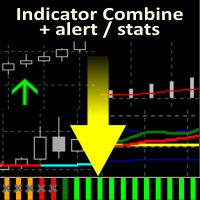
    Allows multiple indicators to be combined into a single indicator, both visually and in terms of an alert. Indicators can include standard indicators, e.g. RSI, CCI, etc., and also Custom Indicators, even those purchased through Market, or where just have the ex4 file. An early alert is provided, say when 4 out 5 indicators have lined up, and a confirmed alert when all are in agreement. A‌lso features a statistics panel reporting the success of the combined indicator by examining the current cha

    Allows multiple indicators to be combined into a single indicator, both visually and in terms of an alert. Indicators can include standard indicators, e.g. RSI, CCI, etc., and also Custom Indicators, even those purchased through Market, or where just have the ex4 file. An early alert is provided, say when 4 out 5 indicators have lined up, and a confirmed alert when all are in agreement. A‌lso features a statistics panel reporting the success of the combined indicator by examining the current cha
    Displays multiple indicators, across multiple timeframes and symbols to give a comprehensive overview of the market. Uniquely, the indicators are configurable and can include custom indicators, even those where you just have the ex4 file or those purchased from Market. Standard indicators can also be selected, the default being ADX, CCI, market price above/below Moving Average (MA), Moving Average Cross (MAX), MACD, Momentum (MOM), OsMA, RSI, Parabolic SAR, William's Percentage Range (WPR). Use
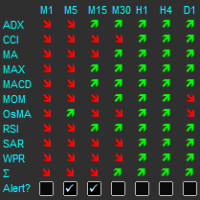
    The indicator displays a matrix of indicators across multiple timeframes with a sum total and optional alert. Custom indicators can also be added to the matrix, in a highly configurable way. The alert threshold can be set to say what percentage of indicators need to be in agreement for an alert to happen. The alerts can turned on/off via on chart tick boxes and can be set to notify to mobile or sent to email, in addition to pop-up. The product offers a great way to create an alert when multiple
    Description Shows Heikin-Ashi candles (often misspelled Heiken-Ashi) on the chart and can alert when candles change color. The alert is useful for both entry and exit. The number of candles of the new color before an alert is raised can be set. The alert can be controlled interactively, directly from the chart. Also includes bonus indicators of current spread and ask/bid prices in large text, color coded as price changes. Usage Heikin-Ashi candles give a much better insight to the underlying tre
    Description The product draws lines on the chart to show daily support, resistance and pivot plus weekly and monthly pivot. An alert can be set when the price reaches one of the lines or the price closes above/below it. This can be useful for both entry and exit. The alerts can be controlled interactively directly from the chart. The product also includes bonus indicators of Average Daily Range (or Average True Range - configurable), current spread and ask/bid prices in large text, color coded a
    Description Shows whether market is trending or not, to what extent, which direction, and if the trend is increasing. The indicator is very useful for trend following strategies. The indicator can also alert when the market transitions from being flat to trending, which can serve as a great entry point. The alert is controllable directly from the chart, with an on-chart tick box to enable the alert. Also includes bonus indicators of current spread and ask/bid prices in large text, color coded as
    Provides the simplicity of binary options but addresses the shortcomings of regular binary options, namely: Poor risk reward ratio, fixed duration trades, poor broker choice, poor indicators/alerts, no hidden (stealth) stop loss/take profit, etc. Features 1 to 1 risk reward ratio, calculated automatically (configurable) Manual (with alert) or automatic trade entry (on alert conditions) Lot size calculation (money management) - based on % of account to risk or fixed amount Compact interactive on
    The product combines a manual trade panel with the ability to perform actions automatically in a highly configurable way. Actions include capturing indicator values and then based on those values raising alerts, open/close or partially close trades, scale-in, setting up pending orders, adjusting stop loss, take profit and more. On-chart controls can be configured, such as tick boxes and buttons, so can be fully interactive. The EA also handles money management, news events, hidden stop loss, tak
    Allows symbols/currency pairs to be ordered based on a configured indicator, with the best performing symbols shown at the top. This helps you to select the symbol with better prospects from a given list of symbols. Can optionally alert when a symbol moves into the top two (configurable). Also shown is the number of pips that the symbol has moved in its current direction, allowing you to tell if you've 'missed the boat'. Further, a graph is shown, per symbol, of the indicator value over time all
    The indicator displays trend strength, including showing the transition from buy to sell and visa versa. It is ideal for trend following strategies and also highlights possible reversals/flattening trend with a yellow X on the indicator window. By default, the indicator does not repaint/flicker, however, there is an option to calculate on the live candle but even then the indicator will not repaint unduly. The indicator can also be used for exit. Usage Enter long/buy trade when the indicator tr
    Strategy Builder offers an incredible amount of functionality. It combines a trade panel with configurable automation (covert indicators into an EA), real-time statistics (profit & draw down) plus automatic optimization of SL, TP/exit, trading hours, indicator inputs. Multiple indicators can be combined into an single alert/trade signal and can include custom indicators, even if just have ex4 file or purchased from Market. The system is easily configured via a CONFIG button and associated pop-up
    The first currency based indicator to draw a distinction between map and strength. The map shows the currencies in terms of oversold/overbought levels and gives the direction of travel. The currency strength calculates and shows the strength of that move. Alerts are included for changes in currency direction on the map (confirmed over two bars) and also when the strength reached the appropriate level.  The currency map is useful for finding currency pairs to trade and in which direction. Look fo
    The product combines a manual trade panel with the ability to perform actions automatically in a highly configurable way. Actions include capturing indicator values and then based on those values raising alerts, open/close or partially close trades, scale-in, setting up pending orders, adjusting stop loss, take profit and more. On-chart controls can be configured, such as tick boxes and buttons, so can be fully interactive. The EA also handles money management, news events, hidden stop loss, tak
    The indicator displays a matrix of indicators across multiple timeframes with a sum total and optional alert. Custom indicators can also be added to the matrix, in a highly configurable way. The alert threshold can be set to say what percentage of indicators need to be in agreement for an alert to happen. The alerts can turned on/off via on chart tick boxes and can be set to notify to mobile or sent to email, in addition to pop-up. The product offers a great way to create an alert when multiple
    Shows whether market is trending or not, to what extent, which direction, and if the trend is increasing. The indicator is very useful for trend following strategies, where it can filter out flat/choppy markets. The indicator can also alert when the market transitions from being flat to trending, which can serve as a great trade entry point. The alert is controllable directly from the chart, via a tick box. Also, the product includes bonus indicators of the current spread and ask/bid prices in l
    Displays multiple indicators, across multiple timeframes and symbols to give a comprehensive overview of the market. Uniquely, the indicators are configurable and can include custom indicators, even those where you just have the ex4 file or those purchased from Market. Standard indicators can also be selected, the default being ADX, CCI, market price above/below Moving Average (MA), Moving Average Cross (MAX), MACD, Momentum (MOM), OsMA, RSI, Parabolic SAR, William's Percentage Range (WPR). Use
    Strategy Builder offers an incredible amount of functionality. It combines a trade panel with configurable automation (covert indicators into an EA), real-time statistics (profit & draw down) plus automatic optimization of SL, TP/exit, trading hours, indicator inputs. Multiple indicators can be combined into an single alert/trade signal and can include custom indicators, even if just have ex4 file or purchased from Market. The system is easily configured via a CONFIG button and associated pop-u
    The first currency based indicator to draw a distinction between map and strength. The map shows the currencies in terms of oversold/overbought levels and gives the direction of travel. The currency strength calculates and shows the strength of that move. Alerts are included for changes in currency direction on the map (confirmed over two bars) and also when the strength reached the appropriate level.  The currency map is useful for finding currency pairs to trade and in which direction. Look fo
    Filtrer:
    Warren Willis
    18
    Warren Willis 2026.01.07 15:34 
     

    I have been using Trade Panel Pro for the last six months. It works extremely well for me and my trading style. This week, I had to contact Support at Runwise because I needed to make some adjustments to my settings. I was impressed by the response I received and the clear instructions on how to resolve my query. Thank you, Runwise support.

    LINJIANWEI
    29
    LINJIANWEI 2025.08.01 05:00 
     

    为什么 Target 2 设 50% 不止盈,设 100% 才行?

    Runwise Limited
    69293
    Réponse du développeur Mark Mather 2025.08.01 06:49
    Please DM us or email support@runwisefx.com and we can look into properly. We've got a great a track record helping folk even with our free version. For partial closes it's important the lot size is sufficiently large that it can be closed partially and still keep to broker's minimum lots and lot step.
    PerryTrader23
    43
    PerryTrader23 2025.05.13 12:22 
     

    Ganz starkes Tool, mit vielen Funktionen, die auch Sinn machen! Große Empfehlung! Vielen Dank!

    yerallnobeds
    31
    yerallnobeds 2025.01.27 17:46 
     

    L'utilisateur n'a laissé aucun commentaire sur la note

    [Supprimé] 2024.12.01 17:32 
     

    L'utilisateur n'a laissé aucun commentaire sur la note

    [Supprimé] 2024.11.29 07:34 
     

    L'utilisateur n'a laissé aucun commentaire sur la note

    customanalog
    164
    customanalog 2024.04.13 17:13 
     

    This is a sophisticated tool for trade entry and management. The options are more extensive than a number of paid programs I've seen, and it's free, which is amazing. Makes me want to check out their optimizing software, which also looks very cool. I've been involved with forex since 2008.

    Runwise Limited
    69293
    Réponse du développeur Mark Mather 2024.04.13 19:07
    Many thanks for the review. The paid for version also gives you access to our rules library which has lots of account management rules, additional buttons, etc.: https://www.runwisefx.com/library/
    Gabor Bocsak
    3279
    Gabor Bocsak 2024.03.04 14:36 
     

    Somethig fantastic for free what you get for big bucks somewhere else! so many great options! Thank you for sharing!

    40512398
    14
    40512398 2024.01.22 13:49 
     

    It is Awesome

    Anne Bee
    18
    Anne Bee 2024.01.19 10:24 
     

    I really like it. Super handy. Very much recommend

    SUYANTO_SE
    223
    SUYANTO_SE 2023.12.25 15:01 
     

    Helpfull EA. Thank you very much to share it for free.

    ruecha_m
    396
    ruecha_m 2023.09.01 08:40 
     

    Thank you for this wonderful and handy utility.

    james272
    144
    james272 2023.07.13 12:59 
     

    it have many functions but because of this it very heavy. how to optimize ? whenever i change currency pair it stuck some then can change.

    Runwise Limited
    69293
    Réponse du développeur Mark Mather 2023.07.13 13:06
    ? We replied to your comment about this in the Comments section with some ideas and said to get in touch if still having trouble
    ROBERT URBANSKI
    2412
    ROBERT URBANSKI 2023.06.18 14:41 
     

    Great Panel for trading. Many options to understand but this is it power and free people take it don't miss it.

    Happy Scalper
    1041
    Happy Scalper 2023.05.08 02:40 
     

    Hello everybody. Just wanted to give my review for the EA Trade Panel Pro by RunwiseFX . For starters, this author is the most responsive author in the MQL5 market place when you ask a question. Also, he is very humble when it comes to his great work. This EA is the most thought out EA I have ever used, and I have used a lot of them. The logic behind this EA is just amazing. It will make your trades much more profitable. If you do not give this EA a try, you will be losing out on a great way to earn more passive income. This is just my opinion, so take it with a grain of salt. But I have been trading with EA's for over 6 years and I am telling you this EA is the holy grail for adding consistent profits. And for FREE you would be a fool not to give it a try. Plus, this EA is worth $100 or more. So I would snag this EA up quickly before he comes to his senses and starts charging money. Thank you so much for changing my life for the better Mark. God bless you and your family. Happy Trading everyone!

    Runwise Limited
    69293
    Réponse du développeur Mark Mather 2023.05.08 11:48
    Many thanks for the detailed review. Our paid for versions offer even more features with access to our trade rules library, control from mobile and indicator automation/optimization.
    Alex Florin
    28
    Alex Florin 2023.03.16 13:32 
     

    Amazing, very helpful, thank you very much.

    Andre Babiak
    170
    Andre Babiak 2023.01.07 20:50 
     

    Unbelievable value even with this free version. Thank you so much.

    Steefy01
    104
    Steefy01 2022.09.23 02:38 
     

    Wow!

    bzlbrush
    34
    bzlbrush 2022.08.25 13:58 
     

    I downloaded this panel quickly and easily, I had a quick look at the video on this site and set the panel up on my charts, played around to check I was setting up and moving my trade and stop loss lines easily and used it for market trades and it worked first time, with correct risk percentage and price per pips calculated by the panel. It worked first time and allowed me to adjust the stop loss easily as market conditions moved so I can confidently press buy or sell immediately, stress free with my buy price, stop loss and target take profit clearly marked on the charts and moveable should I like to increase or reduce my targets. Basically it's everything I need. I will next look into pending trades but so farr, I've made 6% profit in 3 days, not bad!

    Tu An Cao
    121
    Tu An Cao 2022.07.11 15:27 
     

    HOW in the world is this free?, I promise you when I trade up to be rich I will pay back somehow

    Runwise Limited
    69293
    Réponse du développeur Mark Mather 2022.07.21 05:49
    Our paid for products offer even more features
    123
    Répondre à l'avis