TradeKeeper Pro MT5

The utility TradeKeeper Pro allows you to open a trade manually with a magic and a volume of your choice. It does not open its own trades, it can only open a trade by your command.

TradeKeeper Pro can trail any open trades by the iSAR (parabolic) indicator, and a simple trail. It can set the stoploss level at the open price as soon as possible. To trail any open trades for any instruments, it suffices to launch the utility in one chart.

TradeKeeper Pro can close any trades or pending orders of a specific type. Using the utility buttons, you can close all, close all profitable, close trades upon reaching a profit target, close all losing, close all limit orders or close all stop orders.

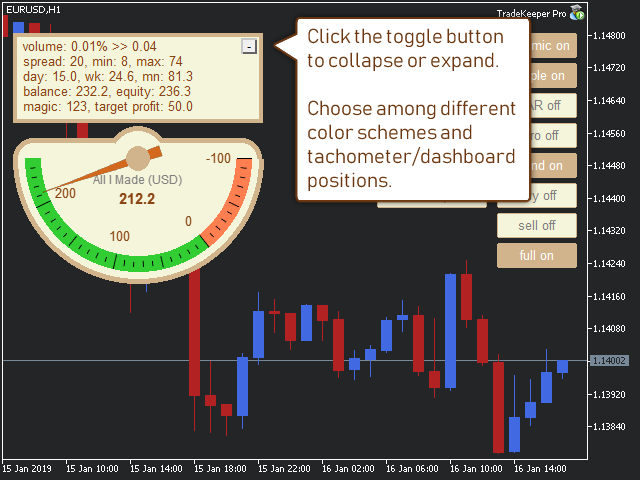
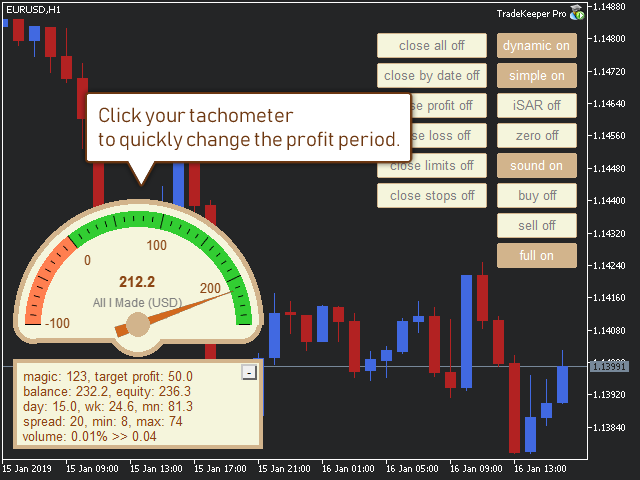
TradeKeeper Pro can show your profits for different periods and bip a sound when you reach a profit target value. Click the tachometer to quickly switch to the next profit period. There are 5 of them: This Day, This Week, This Month, Last 90 Days and All I Made.

Click the minus/plus button in the corner to collapse or expand all data.

The profit calculation takes into account swaps and commissions.


Properties of the TradeKeeper Pro:

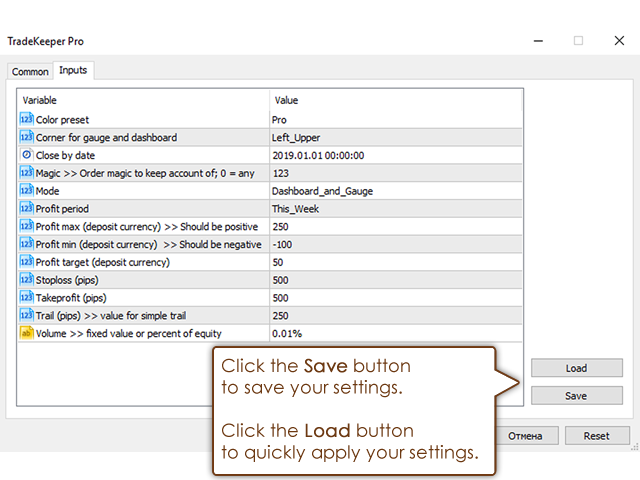
Color preset - you can choose among 4 for now.

Fontsize - helps fit texts to your screen resolution.

Corner - choose where to place your data: Left_Upper corner, Left_Lower corner, or Right_Lower corner.

Magic - your magic number to keep account of. It is handy if you have several strategies and you want to see the stats for only one of them.

Mode - three modes are available: Dashboard_and_Gauge, Gauge, and Dashboard.

Profit period - how your tachometer calculates profits by default: This Day, This Week, This Month, Last 90 Days or All I Made.

Profit max - it is used for creating your tachometer. It should be a positive value in your deposit currency.

Profit min - it is used for creating your tachometer. It should be a negative value in your deposit currency.

Profit target - you indicate this in your deposit currency. The TradeKeeper Pro calculates the current profit value as a difference of Equity and Balance. When the target you set is reached, the TradeKeeper Pro notifies you with a sound.

Stoploss - use pips.

Takeprofit - use pips.

Trail - use pips. To start trailing using a simplу trail, activate the simple button in the chart.

Volume - a volume for trades opened by the buy and sell buttons in the chart. Set a fixed value (example: 0.01), or a percentage of equity (example: 0.03%).


Comments to the buttons in the chart:

lock - locks all actions of the advisor to the symbol in which the advisor is working. If there are several trades of different symbols, and the button "close profit" is clicked, the advisor will only close trades of this symbol. It also shows the stats of only the current symbol.

dynamic - activates a search of stoploss and takeprofit levels by the nearest bar extrema. These levels may not be closer then the values of stoploss and takeprofit currently set.

simple - activates a simple trailing-stop. The value is set with the property Trail.

iSAR - activates a trailing-stop following the iSAR (parabolic) indicator. It is recommended if you like to open lengthy, trending trades with a large takeprofit value.

zero - a stoploss is going to be set at the open price line as soon as the trade gets profitable.

sound - activates sounds of a new trade, a trailing-stop move, and a closed trade.

buy - opens a buy in the current chart with a magic and a volume of your choice.

sell - opens a sell in the current chart with a magic and a volume of your choice.

full - shows / hides most buttons.

clear levels - reset existing stoploss and takeprofit values.

close all - closes all open trades and pending orders.

close profit - closes all currently profitable trades.

close target - close trades upon reaching a profit target as defined by the value of "Profit target". It may be a negative value. If it is several trades, it should be their common profit. You may limit trades by a magic or by clicking the symbol button. A current profit target is indicated by the tachometer.

close loss - closes all currently losing trades.

close limits - closes all pending limit orders (reversal orders).

close stops - closes all pending stop orders (continuation orders).


Produits recommandés
Click Trading
Jawad Tauheed
5 (1)
One Click Trading – Auto TP SL Developer TraderLinkz Version 1.00 Category Utility What it does Adds missing TP and SL to your manual trades and pending orders Sets them once per ticket Lets you move TP and SL afterward Works on hedging and netting accounts Scans on every tick and reacts on trade events Why you want it You place faster entries You get consistent risk and exit targets You reduce fat finger errors You keep full manual control Quick start Attach the EA to any chart Keep TP and SL e
FREE
Trailing Stop Manager PRO — Gestion professionnelle du stop suiveur (MT5) Trailing Stop Manager PRO est un Expert Advisor pour MetaTrader 5 qui automatise la gestion du stop suiveur sur vos positions ouvertes. Il peut gérer toutes les positions du compte ou uniquement celles filtrées par symbole et/ou MagicNumber. L’EA intègre plusieurs fonctions : trailing stop fixe en pips, trailing basé sur l’ATR, break-even automatique, clôture partielle et un tableau de bord visuel. Objectif de l’outil Stan
Imagine flying a real aircraft without ever stepping into a flight simulator. That's what trading is like. You have to simulate your strategy before you can take it to a live market. It is good if you can simulate things speedily before even stepping into any live market, or before coming up with an automated system.  People don't have all day to stare at a higher timeframe chart until the entry signal finally arrives. That's why I built this so that you can simulate your strategy with speed. Th
FREE
EasyTradePad for MT5
Sergey Batudayev
5 (5)
EasyTradePad – Panneau de trading pour MetaTrader 5 EasyTradePad   est un outil de trading manuel et semi-automatisé. Son interface permet une gestion rapide des ordres et des positions, ainsi que des calculs de gestion des risques en un clic. Caractéristiques du panneau : Ouvrir et fermer des transactions avec un risque prédéfini (% ou devise de dépôt) Définissez SL et TP en points, en pourcentages ou en valeurs monétaires Calculer automatiquement le ratio risque/récompense Déplacez le stop lo
Auto Breakeven MT5
Volodymyr Hrybachov
A utility for automatically setting breakeven levels, transfers trades to breakeven   when passing a given distance   . Allows you to minimize risks. Created by a professional trader for traders.       Utility       works with any market orders opened manually by a trader or using advisors. Can filter trades by magic number. The utility can work with any number of orders simultaneously. MT4 version https://www.mql5.com/ru/market/product/57076 WHAT THE UTILITY CAN DO: install virtulnoe levels   b
Lot by Risk MT5
Sergey Vasilev
4.93 (14)
La barre de trading Lot by Risk est conçue pour le trading manuel. C'est un moyen alternatif d'envoyer des ordres. La première caractéristique du panneau est l'affichage pratique des ordres à l'aide de lignes de contrôle. La deuxième caractéristique est le calcul du volume de la transaction à un risque donné en présence d'une ligne stop loss. Les lignes de contrôle sont affichées à l'aide de raccourcis clavier: take profit-touche T Par défaut; price-touche P par Défaut; stop loss – touche s p
FREE
Voici NAS100 Auto SL and TP Maker pour MT5 : Ne manquez plus jamais le réglage du StopLoss et du TakeProfit avec notre NAS100 Auto SL and TP Maker, un assistant indispensable pour les traders qui naviguent sur le marché du Nasdaq 100 sur MetaTrader 5. Cet outil est conçu pour ceux qui recherchent une solution transparente pour automatiser la gestion des niveaux de StopLoss et TakeProfit. Caractéristiques principales : Automatisation sans effort : Surveille automatiquement les transactions sur
FREE
TP & SL Calculator Indicator for MT5 The Take Profit & Stop Loss Calculator Indicator is an effective risk and capital management tool designed for MetaTrader 5. It helps traders easily determine and set take profit (TP) and stop loss (SL) levels directly on the chart. This indicator improves trading efficiency through its dedicated control panel, which includes: Creating and managing TP and SL levels for both Buy and Sell positions Calculating trade volume in lots Displaying the Risk-to-Reward
FREE
This EA help traders close their open positions at a specific MT5 server time before news or before ending of H4 timeframe of the morning New York session to protect their profit or prevent from unexpected loss. The default setting is 19:30 (HH:MM) and you can adjust as require to fit trading strategies. It very user friendly where contain only single input parameter to specify a time that position will be closed.  
TRADE PANEL PRO - Advanced Risk Management for Prop Firms Professional trading tool designed for Prop Traders and individual traders KEY FEATURES THREE INTELLIGENT MONEY MANAGEMENT MODES Normal Mode: Traditional manual lot input Risk % Mode: Auto-calculate lot based on account risk percentage Fixed Loss Mode: Auto-calculate lot based on maximum USD loss TRADING LINES - VISUAL ORDER PLACEMENT Draw Entry, TP, SL directly on chart with drag & drop Auto-detect order types: BUY STOP, SELL STOP, BUY
Lot calculator tool MT5
Ernestas Kvedaras
3.67 (3)
More stable MetaTrader 4 version is available here:  Lot Calculator Tool . This tool helps you to automatically calculate and manage risk, conveniently place orders visually, schedule orders, trail stops, move them to break-even and more. Features Place market or pending orders using draggable lines Schedule orders Calculate and limit risk using various methods See current spread See time till next candle Set custom order comments Trail stops Move stops to break-even See order profit/loss in p
This MQL4 code is a   custom indicator   that draws multiple colored rectangles on a chart, spaced apart by a defined pip distance, and projected into the future. Here's a brief breakdown: Purpose: Draws several horizontal rectangles (zones) starting from a specified price. Rectangles are spaced apart vertically by a pip distance. Colors alternate between FirstColor and SecondColor . Rectangles can be drawn behind candles and optionally filled. Each rectangle extends into the future for a specif
FREE
L'utilitaire Close Buttons est un utilitaire MQL5 compact et flexible pour la gestion manuelle des positions et des ordres en attente, directement depuis le graphique. Ce panneau vous permet de clôturer des groupes d'ordres et des positions sur le symbole actuel ou un groupe de symboles sélectionnés en un seul clic. Il fonctionne avec tous les ordres, ainsi qu'avec une liste spécifiée de numéros magiques ou des ordres manuels. Le panneau peut être réduit ou déplacé sur l'écran. Les thèmes clair
Quickly Helper is a tool to help us deal with multiple orders quickly. It has five function keys. They are: The "清空" button to quickly level out all orders;  Quick flat out the long position "平多单" button;  Quick flat out the short position "平空单" button;  The "买多" button to quickly buy at the current price;  The "买空" button to sell quickly at the current price;  It has seven display information items. They are: bp: the total income of multiple orders; (  profit of  buy/long position ) avgb: avera
Exp Assistant 5
Vladislav Andruschenko
4.77 (121)
Réglage automatique, stop loss, take profit, trailing stop, seuils de rentabilité, permettant un stop loss   virtuel   et un take profit. Exp Assistant   vous aidera à organiser le maintien de vos positions. Ce programme, l'Expert Advisor, est conçu pour définir automatiquement le   réel ou le virtuel       Niveaux   Stop Loss et Take Profit   pour vos positions pendant la négociation. Vous pouvez facilement gérer toutes les opérations de l'Expert Advisor depuis le panneau de contrôle sur la car
FREE
Tool Auto Modify SLTP – Protect Your Trades, Optimize Your Strategy In trading, risk is always present. Just one forgotten SL/TP can turn a promising trade into a loss. Even experienced traders occasionally make mistakes. That’s why Tool Auto Modify SLTP was created – to keep you protected and let you focus on your strategy. Key Features: Manage Orders for All Symbols: Monitor and adjust SL/TP for all your trading pairs. Three Flexible Risk Modes: Point-Based: Set fixed SL/TP distances. Account
FREE
Breakevan Utility
Jose Luis Thenier Villa
BreakEvan Utility  Is a simple tool in a panel with this utilities: This utility will draw a Golden Line in the chart applied showing the breakeven price, considering all the positions opened for that specific symbol. Also the information panel shows: Balance Breakeven Price for that chart Force Breakeven (for that symbol) as ON/OFF Force Breakeven Global (takes into account all trades opened) as ON/OFF Total Lots opened for Symbol Total Lots opened Global And two buttons: Force Breakeven: Whe
Virgilio is a multifunction control panel consisting of several panels, each of which performs one of the most useful functions used by traders. Its aesthetic is unique, designed to blend into any working environment and offer a user experience that makes work even more enjoyable. Its operativity is simple and intuitive, developed with attention to details to be as userfriendly as possible. Its main panel displays all the basic account and chart data. The first panel offers the user the possib
Very often there are situations when you need to quickly close all open positions or close only under a certain condition... The Positions Close script closes open positions according to the selected settings. You can choose to close All positions , only Buy, only Sell You can also choose by which symbols to close positions: by all symbols or only by the current one, on the chart of which the script was thrown There is a filter for closing profitable or unprofitable positions, as well as bo
FREE
Core function Intelligent transaction management one-click opening and closing operation, which supports user-defined lots to set multiple closing modes: all closing, closing by direction and closing by profit and loss status. Professional risk control, real-time risk monitoring and spread control to avoid high-cost trading environment. Visual control panel has an intuitive graphical interface, and all functions can be operated with one button to display position information, profit and loss sta
FREE
Panel Trade Basic
Juan Pablo Sanchez Correa
Panel Trade Basic is a compact, functional panel for trading quickly from the chart. Execute BUY, SELL, and LIMIT orders, and close positions with a single click or keystroke. Control lot size, stop-loss, and take-profit instantly, without menus or complications. Floating and draggable panel. Market and pending orders. Hotkeys for trading. Real-time P&L and margin visualization. Ideal for manual traders who value speed and control. BUY key (C) SELL key (V) CLOSE ALL key (X) Delete Pending Key
EmaRsi robot
Deepak Saini
https://youtu.be/KHhg88fXWTk?si=ZoVtpc-wpfTVImSL 5-Minute Trading Strategy | Quick & Effective for Beginners Welcome to our trading channel- the deepak trading In this video, we'll be exploring a simple 5-minute trading strategy that can help you capture quick market movements and make profitable trades. Whether you're a beginner or an experienced trader, this strategy is designed to give you clear entry and exit points using technical indicators like EMA, RSI, and Stochastic Oscillator.
FREE
Note:   All   inputs of this EA   are designed in Arabic for easier configuration and management Auto Smart Trade Manager EA Ar   automatically manages trades on MetaTrader 5. Sets   Stop Loss (SL)   and   Take Profit (TP) , supports   Trailing Stop   to secure profits, and includes   Equity Protection . Smart management for all trades or by Magic Number and symbol, with full control over slippage and risk. Trading involves high risk and you may lose part or all of your capital. Use this EA cau
FREE
LT Trade Panel Lite
Thiago Duarte
4.65 (49)
Have you missed any tools or shortcuts in Meta Trader? Simple things that would make your daily trading much easier ? We have the solution for you: our Trade Panel! This is an EA tool (Expert Advisor) that, if configured to controll all symbols, needs to be loaded only once. This is the Lite version (free) of our tool. Professional version:   https://www.mql5.com/en/market/product/42658 If you have some problemas with the shortcut buttons on chart on unpinned mode try change the tickets digi
FREE
Crash5 EA ,I s a automatic robot that has the level of professional decision when to take a trade without any emotion. The bot will help in your scalping decision making with its own TP (take profit) and SL (stop loss) with the trail stop when in profit. This is a trend based spike catching ,looking on whats happening in real time charts no repainting of any signals. The robot helps in making decisions on the candle stick pattern opened and closed lat price with the help of RSI ,MACD and the EMA
Talents ATR Scalper Utility (MT5) The Talents ATR Scalper Utility is a professional-grade trade execution and management tool built for MetaTrader 5. Inspired by the Biblical Parable of the Talents , this utility is designed to help traders multiply their potential with precision risk control, one-click simplicity, and advanced automation. Whether you’re scalping forex, gold, or indices, this tool delivers speed, consistency, and confidence. Key Features One-Click Trade Preview Click below price
Auto SLTP Maker MT5  is an assistant for all those who forget to set StopLoss and/or TakeProfit in deal parameters, or trade on a very fast market and fail to place them in time. This tool automatically tracks trades without StopLoss and/or TakeProfit and checks what level should be set in accordance with the settings. The tool works both with market and pending orders. The type of orders to work with can be set in the parameters. It can track either trades for the instrument it runs on, or all
Auto SL TP levels
Makarii Gubaydullin
Placement automatique du SL et TP Les niveaux seront créés automatiquement pour les trades qui n'ont pas encore de niveaux SL  /  TP définis . Cela peut être pratique si vous exécutez des trades depuis votre téléphone portable. Utilitaire multifonction : 65+ fonctionnalités, incluant cet outil  |   Contactez-moi  si vous avez des questions  |   Version MT4 Pour activer les Niveaux Auto, vous devez définir les 4 paramètres principaux (sur le panneau): 1. Symbole   pour lequel la fonction sera ap
Product Name: Anchor auto TP and SL Trade Manager Pro MT5 The ultimate manual assistant. Turns trades into auto-grids with Hedging, Zero-Loss Breakeven & Spread Detection. Your manual trade will be managed automatically. Anchor Auto TP and SL Trade Manager MT5 Pro is the advanced edition of our popular trade assistant. It transforms simple manual trades into sophisticated, professional-grade recovery grids. Unlike the free version, this PRO edition fully supports Hedging (simultaneous Buy & Sell
DynamicTrader 1
Markus Christer Ekengren
Smart Trade Manager EA – Simple, Visual, and Risk-Based Trading Take control of your trades with ease! This free Expert Advisor is designed for traders who want a fast, intuitive, and risk-based way to manage entries directly from the chart. Risk-Based Position Sizing – Just set your preferred % risk in the EA settings, and lot size is calculated automatically. One-Click Trading – Place trades instantly with two simple buttons: BUY or SELL . Interactive SL & TP Lines – Drag and drop stop-
FREE
Les acheteurs de ce produit ont également acheté
Trade Assistant MT5
Evgeniy Kravchenko
4.42 (204)
It helps to calculate the risk per trade, the easy installation of a new order, order management with partial closing functions, trailing stop of 7 types and other useful functions. Additional materials and instructions Installation instructions - Application instructions - Trial version of the application for a demo account Line function -   shows on the chart the Opening line, Stop Loss, Take Profit. With this function it is easy to set a new order and see its additional characteristics bef
Bienvenue sur Trade Manager EA, l’outil ultime de gestion des risques conçu pour rendre le trading plus intuitif, précis et efficace. Ce n’est pas seulement un outil d’exécution d’ordres ; c’est une solution complète pour la planification des trades, la gestion des positions et le contrôle des risques. Que vous soyez débutant, trader expérimenté ou scalpeur ayant besoin d’une exécution rapide, Trade Manager EA s’adapte à vos besoins, offrant une flexibilité sur tous les marchés, des devises et i
Local Trade Copier EA MT5
Juvenille Emperor Limited
4.96 (116)
Découvrez une expérience exceptionnellement rapide de copie de trades avec le   Local Trade Copier EA MT5 . Avec sa configuration facile en 1 minute, ce copieur de trades vous permet de copier des trades entre plusieurs terminaux MetaTrader sur le même ordinateur Windows ou Windows VPS avec des vitesses de copie ultra-rapides de moins de 0.5 seconde. Que vous soyez un trader débutant ou professionnel, le   Local Trade Copier EA MT5   offre une large gamme d'options pour le personnaliser en fonc
TradePanel MT5
Alfiya Fazylova
4.86 (143)
Trade Panel est un assistant commercial multifonctionnel. L'application contient plus de 50 fonctions de trading pour le trading manuel et vous permet d'automatiser la plupart des opérations de trading. Attention, l'application ne fonctionne pas dans le testeur de stratégie. Avant d'acheter, vous pouvez tester la version démo sur un compte démo. Version démo ici . Instructions complètes ici . Commerce. Permet d'effectuer des opérations de trading en un clic : Ouvrez des ordres et des positions e
Trade Dashboard MT5
Fatemeh Ameri
4.96 (103)
Tired of complex order placement and manual calculations? Trade Dashboard is your solution. With its user-friendly interface, placing orders becomes effortless, by a single click, you can open trades, set stop loss and take profit levels, manage trade lot size, and calculate risk to reward ratios, allowing you to only focus on your strategy. Say goodbye to manual calculations and streamline your trading experience with Trade Dashboard. Download  Demo Version  right now. You can find  Details of
Ultimate Extractor
Clifton Creath
5 (7)
Ultimate Extractor - Professional Trading Analytics for MT5 Ultimate Extractor transforms your MetaTrader 5 trading history into actionable insights with comprehensive analytics, interactive charts, and real-time performance tracking. What It Does Automatically analyzes your MT5 trading history across all Expert Advisors and generates detailed HTML reports with interactive visualizations. Tracks live performance metrics including open positions, floating P/L, and drawdown in real-time. Supports
Version Bêta Le Telegram to MT5 Signal Trader est presque prêt pour la sortie officielle en version alpha. Certaines fonctionnalités sont encore en développement et vous pourriez rencontrer de petits bugs. Si vous rencontrez des problèmes, merci de les signaler, vos retours aident à améliorer le logiciel pour tout le monde. Le prix augmentera après 20 ventes. Copies restantes à $90:   2/20 . Telegram to MT5 Signal Trader est un outil puissant qui copie automatiquement les signaux de trading de
Smart Stop Scanner – Analyse multi-actifs des stop-loss basée sur la structure réelle du marché Vue d’ensemble Smart Stop Scanner offre une surveillance professionnelle des niveaux de stop-loss sur de nombreux marchés. Le système identifie automatiquement les zones de stop les plus pertinentes à partir de la structure réelle du marché, des ruptures importantes et de la logique du price action, puis affiche toutes les informations dans un panneau clair, cohérent et optimisé pour les écrans haut
Copy Cat More Trade Copier MT5 (Chat Copieur MT5) est un copieur de trades local et un framework complet de gestion des risques et d'exécution conçu pour les défis commerciaux d'aujourd'hui. Des défis de prop firms à la gestion de portefeuille personnel, il s'adapte à chaque situation avec une combinaison d'exécution robuste, de protection du capital, de configuration flexible et de gestion avancée des trades. Le copieur fonctionne à la fois en mode Master (expéditeur) et Slave (récepteur), avec
Smart Stop Manager – Exécution automatique du stop-loss avec une précision professionnelle Présentation Smart Stop Manager est la couche d’exécution de la gamme Smart Stop, conçue pour les traders qui recherchent une gestion du stop-loss structurée, fiable et entièrement automatisée sur plusieurs positions ouvertes. Il surveille en continu toutes les opérations actives, calcule le niveau de stop optimal à l’aide de la logique de structure de marché Smart Stop, puis met à jour les stops automat
Trade Manager DashPlus
Henry Lyubomir Wallace
5 (11)
DashPlus est un outil de gestion de trading avancé conçu pour améliorer l'efficacité et la performance de vos transactions sur la plateforme MetaTrader 5. Il offre un ensemble complet de fonctionnalités, incluant le calcul des risques, la gestion des ordres, des systèmes de grilles avancés, des outils basés sur les graphiques et des analyses de performance. Fonctionnalités principales 1. Grille de récupération Implémente un système de grille flexible et de moyenne pour gérer les transactions dan
MT5 to Telegram Signal Provider est un utilitaire facile à utiliser et entièrement personnalisable qui permet l'envoi de signaux spécifiés vers un chat, un canal ou un groupe Telegram, transformant ainsi votre compte en fournisseur de signaux. Contrairement à la plupart des produits concurrents, il n'utilise pas d'importations DLL. [ Démonstration ] [ Manuel ] [ Version MT4 ] [ Version Discord ] [ Canal Telegram ]  New: [ Telegram To MT5 ] Configuration Un guide utilisateur étape par étape est
Seconds Chart MT5
Boris Sedov
4.59 (17)
Seconds Chart — un outil unique pour créer des graphiques en secondes dans MetaTrader 5 . Grâce à Seconds Chart , vous pouvez créer un graphique avec une période définie en secondes, offrant une flexibilité et une précision idéales pour l'analyse, indisponibles sur les graphiques standards en minutes ou en heures. Par exemple, la période S15 indique un graphique avec des bougies d'une durée de 15 secondes. Vous pouvez utiliser n'importe quels indicateurs et experts advisors compatibles avec les
HINN MagicEntry Extra
ALGOFLOW OÜ
4.6 (10)
HINN MAGIC ENTRY – the ultimate tool for entry and position management! Place orders by selecting a level directly on the chart! Key features: - Market, limit, and pending orders - Automatic lot size calculation - Automatic spread and commission accounting - Unlimited partitial take-profits  - Breakeven and trailing stop-loss  functions - Intuitive, adaptive, and customizable interface - Session and strong algorithmic level visualization - Works with any assets and account types Join the   ALG
Exp COPYLOT CLIENT for MT5
Vladislav Andruschenko
3.82 (34)
Le copieur commercial pour MT5 est un copieur commercial pour la plate-forme МetaТrader 5   . Il copie les transactions de change   entre       tous les comptes   MT5   -   MT5, MT4   -   MT5 pour la version COPYLOT MT5 (ou MT4   -   MT4 MT5   -   MT4 pour la version COPYLOT MT4) Copieur fiable ! Version MT4 Description complète   +DEMO +PDF Comment acheter Comment installer     Comment obtenir des fichiers journaux     Comment tester et optimiser     Tous les produits de Expforex Vous pouvez
Trade Manager DaneTrades
Levi Dane Benjamin
4.33 (27)
Trade Manager pour vous aider à entrer et sortir rapidement des transactions tout en calculant automatiquement votre risque. Y compris des fonctionnalités pour vous aider à éviter le sur-trading, le trading de vengeance et le trading émotionnel. Les transactions peuvent être gérées automatiquement et les mesures de performances du compte peuvent être visualisées dans un graphique. Ces fonctionnalités rendent ce panneau idéal pour tous les traders manuels et contribuent à améliorer la plateforme
EasyInsight AIO MT5
Alain Verleyen
4.91 (11)
EASY Insight AIO – La solution tout-en-un pour un trading intelligent et sans effort Présentation Imaginez pouvoir analyser l’ensemble du marché — Forex, Or, Crypto, Indices et même Actions — en quelques secondes, sans aucune analyse manuelle de graphiques, sans installation complexe ni configuration d’indicateurs. EASY Insight AIO est votre outil d’exportation ultime, prêt à l’emploi, pour un trading alimenté par l’IA. Il fournit une vue d’ensemble du marché dans un fichier CSV propre — prêt
Cerberus Equity Watcher
Samuel Bandi Roccatello
5 (3)
Cerberus the Equity Watcher est un outil de gestion des risques qui surveille en permanence la valeur de votre compte et empêche les pertes importantes, qu'elles soient causées par des EA défectueux ou des émotions si vous êtes un trader discrétionnaire. Il est extrêmement utile pour les traders systématiques qui s'appuient sur des EA susceptibles de contenir des bogues ou de ne pas fonctionner correctement dans des conditions de marché inattendues. Cerberus vous permet de définir une valeur min
Panneau de trading pour trader en 1 clic.   Travailler avec des positions et des commandes!   Trading à partir du graphique ou du clavier. Avec notre panneau de trading, vous pouvez exécuter des transactions en un seul clic directement depuis le graphique et effectuer des opérations de trading 30 fois plus rapidement qu'avec le contrôle MetaTrader standard. Les calculs automatiques des paramètres et des fonctions rendent le trading plus rapide et plus pratique pour les traders. Des conseils grap
Telegram to MT5 Coppy
Sergey Batudayev
5 (7)
Télégramme vers MT5 :   la solution ultime pour copier des signaux Simplifiez votre trading avec Telegram vers MT5, l'outil moderne qui copie les signaux de trading directement des canaux et chats Telegram vers votre plateforme MetaTrader 5, sans DLL. Cette solution puissante garantit une exécution précise des signaux, de nombreuses options de personnalisation, un gain de temps et une efficacité accrue. [ Instructions and DEMO ] Caractéristiques principales Intégration directe de l'API Telegram
Trade Assistant 38 in 1
Makarii Gubaydullin
4.91 (22)
Ultimate Trade Assistant MT5 — Assistant de Trading Multifonction Plus de 66 outils professionnels intégrés pour gérer, analyser et automatiser vos opérations de trading. Cet assistant regroupe la gestion du risque, le contrôle des positions, les ordres intelligents et l’analyse du marché dans un seul tableau de bord clair et efficace. Convient pour Forex, actions, indices, crypto et autres instruments financiers. Pourquoi les traders choisissent cet outil Ouverture et gestion rapides des positi
Zentral Trading Manager
Ray Zeanrik Parreno Fredeluces
5 (4)
Zentral Trading Manager Your Command Center for Precision Trading — Now Stronger than Ever Take control of your trades like never before. Zentral Trading Manager is your all-in-one manual trading panel for MetaTrader 5 — built for scalpers, day traders, and serious strategy execution. Fully compatible with both Mac and Windows laptops. High-DPI safe. No more layout issues. Key Features (Latest 2025 Update): • One-Click Close – Instantly close Buy/Sell, winning/losing trades, or even half positi
Copieur ->Interaction d'interface pratique et rapide, les utilisateurs peuvent l'utiliser immédiatement       ->>>> Recommandé pour une utilisation sur des ordinateurs Windows ou VPS Windows Caractéristiques: Paramètres de copy trading diversifiés et personnalisés : 1. Différents modes de lot peuvent être définis pour différentes sources de signaux 2. Différentes sources de signaux peuvent être définies pour le copy trading avant et arrière 3. Les signaux peuvent être définis avec des commentai
MT5 To Tradovate
Laurent Xavier Richer
MT5 → Tradovate Bridge (Prop-Firm Ready) Mirror your MT5 trades into Tradovate in real time—perfect for running your favorite indices/gold EA on MT5 while meeting the rules of top prop firms like Apex , etc. What it does Live mirroring: Replicates MT5 market executions (open/close) to Tradovate as market orders. Symbol routing:  Map your chart (e.g., US100/USTEC) to the right futures contract (MNQ/NQ/MES/ES/…); roll-aware (quarterly/monthly). Position cap: Limit how many MT5 positions are mirro
The product will copy all telegram signal to MT5 ( which you are member) , also it can work as remote copier.  Easy to set up, copy order instant, can work with almost signal formats, image signal,  s upport to translate other language to English Work with all type of channel or group, even channel have "Restrict Saving Content", work with  multi channel, multi MT5 Work as remote copier: with signal have ticket number, it will copy exactly via ticket number. Support to backtest signal. How to s
Auto Trade Copier is designed to copy trades to multiple MT4, MT5 and cTrader accounts/terminals with 100% accuracy. The provider and receiver accounts must be on the same PC/VPS. With this tool, you can copy trades to receiver accounts on the same PC/VPS. All trading actions will be copied from provider to receiver perfectly. This version can be used on MT5 accounts only. For MT4 accounts, you must use Auto Trade Copier (for MT4). Reference: - For MT4 receiver, please download Trade Receiver Fr
Custom Alerts AIO : Surveillez tous les marchés à la fois — sans aucune configuration Présentation Custom Alerts AIO est une solution de surveillance du marché prête à l’emploi, sans configuration nécessaire. Tous les indicateurs requis — FX Power, FX Volume, FX Dynamic, FX Levels, IX Power — sont directement intégrés. Aucun graphique n’est affiché, ce qui rend cet outil idéal pour la génération d’alertes en temps réel. Il prend en charge toutes les classes d’actifs proposées par votre courtie
EasyTrade MT5
Alain Verleyen
5 (2)
Easy Trade – Gestion des transactions intelligente, simple et puissante Easy Trade est la solution tout-en-un pour la gestion des transactions destinée aux utilisateurs de MetaTrader souhaitant garder le contrôle du risque et assurer une exécution fluide. Conçu dès le départ avec les retours des traders, Easy Trade facilite l'exécution, la surveillance et la gestion des transactions sur plusieurs symboles – sans complexifier votre flux de travail. Que vous pratiquiez le scalping manuel ou que
Entry In The Zone and SMC Multi Timeframe   est un outil d’analyse de marché en temps réel développé sur la base des Smart Money Concepts (SMC). Il est conçu pour aider les traders à analyser la structure du marché de manière systématique et à obtenir une vision plus claire de la direction globale du marché. Le système analyse automatiquement les Points de Retournement, les Zones Clés et la Market Structure sur plusieurs unités de temps, tout en affichant les Points of Interest (POI), les signa
Le Local Trade Copier EA est une solution pour les commerçants individuels ou les gestionnaires de compte qui ont besoin d'exécuter des signaux commerciaux à partir de sources externes ou qui ont besoin de gérer plusieurs comptes en même temps, sans avoir besoin d'un compte MAM ou PAMM. Il copie jusqu'à 8 comptes maîtres vers un nombre illimité de comptes esclaves [ Guide d'installation | Guide de mise à jour | Dépannage | FAQ | Tous les produits ] 100% auto-hébergé Facile à installer et à util
Plus de l'auteur
Chanlun Master
Evgeniy Scherbina
Chanlun Master: Fusion de la Philosophie Orientale du Marché et des Réseaux Neuronaux Chanlun Master est un robot de trading professionnel qui combine la légendaire théorie chinoise du mouvement des prix et les technologies modernes d' Apprentissage Profond (Deep Learning) . Histoire : Qu'est-ce que Chanlun ? En 2006, un trader mystérieux est apparu sur le segment Internet chinois sous le pseudonyme Chan Shi ("Maître Zen"). Il a publié une série d'articles décrivant une structure mathématiqu
Gold Chaser
Evgeniy Scherbina
5 (3)
The "Gold Chaser" expert advisor trades in fully automated mode these 4 symbols: XAUUSD (Gold), XAGUSD (Silver), US30, US500, and BTCUSD (Bitcoin) Possibilities of the "non-major" symbols really differ from what you are accustomed to with the usual set of symbols. First of all, gold moves very quickly. Like major symbols, gold reacts to political events, important economic events and speeches of VIP geeks. However, gold moves in a much more swaying manner. The same is applicable to silver, oil a
Your False Hope
Evgeniy Scherbina
3.94 (18)
The advisor "Your False Hope" is a fully automated strategy which trades major symbols. The set of symbols may change while the strategy is improved. I created this strategy as a parody of pipe dreams of Internet users about magical possibilities of machine learning for financial markets. The objective is to show that normalized inputs of any set of symbols can be learned by a neural network. This strategy has two trading modes: "False_hope" and "Reality". Start the advisor on one chart of any s
FREE
QuantumPip
Evgeniy Scherbina
4.36 (11)
The expert "QuantumPip" is a fully automated expert which can trade several symbols from one chart. The expert also uses prices of Gold, Oil, "Schmuksie" (my adaptation of the "Dixie" indicator), DAX or FTSE to calculate inputs for the symbols. The expert uses 2 types of recurrent neural model - 1 network (decisions "buy" or "sell") and 2 networks (decisions "buy" or "uncertainty" and "sell" or "uncertainty"). QuantumPip can, therefore, trade 16 strategies as one, because it is 2 models per each
Dark Mars
Evgeniy Scherbina
5 (1)
The Dark Mars Expert Advisor is ready for fully automated trading with various symbols. The Dark Mars EA is a scalper that I have tested on the M5, M15, M30, and H1 timeframes. The EA opens trades on breakouts or pullbacks based on the Bollinger Bands indicator. The EA is ready to trade right away with default settings — no optimization needed for GBPUSD and USDCAD A well-known advantage of scalpers is the high number of trades executed daily. The market is in a flat range 80% of the time, and
Latte
Evgeniy Scherbina
5 (9)
The "Latte" EA is ready to trade several symbols in the fully automated mode from 1 chart. The EA uses a "Transformer" neural network to forecast price movements. The main advantage of the Transformer over an LSTM network is its ability to find patterns even across very long sequences of data. While LSTMs often lose information when dealing with sequences longer than 2–3 months, Transformers handle sequences as long as a year with ease. The Transformer architecture was first introduced by Googl
LuminaFX
Evgeniy Scherbina
4.7 (10)
LuminaFX is a fully automated expert which trades 8 symbols from one chart. The expert implements a popular version of the recurrent neural model. Values of the "Schmuksie" indicator (my adaptation of the American Dollar Index DXY, or "Dixie"), are used as inputs to the neural model. You can download a free indicator IDixie and put it on one chart with the expert LuminaFX. IDixie calculates close prices of the American Dollar Index, which is used in the expert, and it also shows a moving average
NewsCatcher Pro opens both pending and market orders based on data from the mql5.com calendar. In live mode, NewsCatcher Pro automatically downloads the calendar, opens orders, trails and closes orders. NewsCatcher Pro can trade any event from the calendar with any symbol available in MetaTrader, including Gold, Oil and cross-rates. To change the default symbol, go to the event view you want to change it for. NewsCatcher Pro uses two strategies: Strategy 1 (pending orders): the advisor opens two
IQuantum
Evgeniy Scherbina
The indicator IQuantum shows trading signals for 10 symbols in the daily chart: AUDCAD, AUDUSD, EURUSD, GBPCAD, GBPCHF, GBPUSD, NZDUSD, USDCAD, USDCHF, and USDJPY. Signals of the indicator are produced by 2 neural models which were trained independently from one another. The inputs for the neural models are normalised prices of the symbols, as well as prices of Gold, Silver and markers of the current day. Each neural model was trained in 2 ways. The Ultimate mode is an overfitted neural model
FREE
My Big Bars MT5
Evgeniy Scherbina
4.58 (12)
The indicator My Big Bars can show bars (candles) of a higher timeframe. If you open an H1 (1 hour) chart, the indicator puts underneath a chart of H3, H4, H6 and so on. The following higher timeframes can be applied: M3, M5, M10, M15, M30, H1, H3, H4, H6, H8, H12, D1, W1 and MN. The indicator chooses only those higher timeframes which are multiple of the current timeframe. If you open an M2 chart (2 minutes), the higher timeframes exclude M3, M5 and M15. There are 2 handy buttons in the lower r
FREE
NewsCatcher Free MT5
Evgeniy Scherbina
4.5 (2)
The advisor NewsCatcher Free opens trades when the price makes a reversal move from support and resistance levels. Market entries should be confirmed by the Relative Strength Index (RSI). The RSI is implemented as a tachometer. It is recommended to use this advisor in a highly volatile market after a political event or a release of major economic data. You can use this advisor in the semi-automated mode (the RSI performs an information role) or in the fully automated mode (the RSI decides when t
FREE
High Trend Lite MT5
Evgeniy Scherbina
5 (1)
The indicator High Trend Lite monitors 5 symbols in up to 3 timeframes simultaneously and calculates the strength of their signals. The indicator notifies you when a signal is the same in different timeframes. The indicator can do this from just one chart. Therefore, High Trend Lite is a multicurrency and multitimeframe indicator. With the High Trend Pro , available at this link , you will have an unlimited number of symbols, 4 timeframes, a colourful chart of the primary MACD indicator, several
FREE
IRush
Evgeniy Scherbina
5 (1)
Indicator IRush uses a modified version of a popular indicator RSI (Relative Strength Index) to look for entries on a daily chart or lower. The indicator has been set up and tested with the major symbols: AUDUSD, EURUSD, GBPUSD, USDCAD, USDCHF, and USDJPY. An automated trading with this indicator is implemented in the expert advisor Intraday Rush . This expert advisor can open, trail and close its trades. Check it out, it may be exactly what you are looking for! A Correct Reading of IRush The c
FREE
IDixie
Evgeniy Scherbina
IDixie is an indicator which shows open and close values of the American dollar index, DXY or "Dixie". The indicator is calculated from weighted values of 6 major symbols: EURUSD, USDJPY, GBPUSD, USDCAD, USDSEK, and USDCHF. In addition to "Dixie" values, the indicator also shows a moving average. You can set the period of the moving average. When bars of the indicator break through the moving average, this creates good opportunities to enter the market. As a rule, signals from this indicator are
FREE
My Big Bars
Evgeniy Scherbina
4.75 (4)
The indicator My Big Bars can show bars (candles) of a higher timeframe. If you open an H1 (1 hour) chart, the indicator puts underneath a chart of H4, D1 and so on. The following higher timeframes can be applied: M3, M5, M10, M15, M30, H1, H3, H4, H6, H8, H12, D1, W1 and MN. The indicator chooses only those higher timeframes which are higher than the current timeframe and are multiple of it. If you open an M30 chart (30 minutes), the higher timeframes exclude M5, M15 and M30. There are 2 handy
FREE
The utility TradeKeeper Lite can show your profits for different periods and bip a sound when you reach a profit target value. Click the tachometer to quickly switch to the next profit period. There are 5 of them: This Day, This Week, This Month, Last 90 Days and All I Made. With the utility TradeKeeper Pro , available at this link , you can also open trades with a magic number and volume of your choice, trail any orders with a simple trail or iSAR-based trail, as well as close any open trades a
FREE
NewsCatcher Free
Evgeniy Scherbina
4.67 (3)
The advisor NewsCatcher Free opens trades when the price makes a reversal move from support and resistance levels. Market entries should be confirmed by the Relative Strength Index (RSI). The RSI is implemented as a tachometer. It is recommended to use this advisor in a highly volatile market after a political event or a release of major economic data. You can use this advisor in the semi-automated mode (the RSI performs an information role) or in the fully automated mode (the RSI decides when t
FREE
Filled Area Chart MT5
Evgeniy Scherbina
5 (1)
The utility Filled Area Chart adds to the standard set of price presentations. It is a brand new, nice price chart. You will certainly like it if you want to feel yourself a trader born under the Bloomber lucky star. The Properties allow to set the colors and other things: Color preset - choose a preset or set to "Custom" and set your own colors using the properties below. Custom area color - color of the area below the price line. Works only with Color preset = Custom. Custom chart color - col
FREE
High Trend Lite
Evgeniy Scherbina
1 (1)
The indicator High Trend Lite monitors 5 symbols in up to 3 timeframes simultaneously and calculates the strength of their signals. The indicator notifies you when a signal is the same in different timeframes. The indicator can do this from just one chart. Therefore, High Trend Lite is a multicurrency and multitimeframe indicator. With the High Trend Pro , available at this link , you will have an unlimited number of symbols, 4 timeframes, a colourful chart of the primary MACD indicator, several
FREE
The utility TradeKeeper Lite can show your profits for different periods and bip a sound when you reach a profit target value. Click the tachometer to quickly switch to the next profit period. There are 5 of them: This Day, This Week, This Month, Last 90 Days and All I Made. With the utility TradeKeeper Pro , available at this link , you can also open trades with a magic number and volume of your choice, trail any orders with a simple trail or iSAR-based trail, as well as close any open trades a
FREE
The utility Filled Area Chart adds to the standard set of price presentations. It is a brand new, nice price chart. You will certainly like it if you want to feel yourself a trader born under the Bloomber lucky star. The Properties allow to set the colors and other things: Color preset - choose a preset or set to "Custom" and set your own colors using the properties below. Custom area color - color of the area below the price line. Works only with Color preset = Custom. Custom chart color - col
FREE
NewsCatcher Pro
Evgeniy Scherbina
4.71 (14)
NewsCatcher Pro opens both pending and market orders based on data from the mql5.com calendar. In live mode, NewsCatcher Pro automatically downloads the calendar, opens orders, trails and closes orders. NewsCatcher Pro can trade any event from the calendar with any symbol available in MetaTrader, including Gold, Oil and cross-rates. To change the default symbol, go to the event view you want to change it for. NewsCatcher Pro uses two strategies: Strategy 1 (pending orders): the advisor opens two
TradeKeeper Pro
Evgeniy Scherbina
The utility TradeKeeper Pro allows you to open a trade manually with a magic and a volume of your choice. It does not open its own trades, it can only open a trade by your command. TradeKeeper Pro can trail any open trades by the iSAR (parabolic) indicator, and a simple trail. It can set the stoploss level at the open price as soon as possible. To trail any open trades for any instruments, it suffices to launch the utility in one chart. TradeKeeper Pro can close any trades or pending orders of a
High Trend
Evgeniy Scherbina
The indicator High Trend Pro monitors a big number of symbols in up to 4 timeframes simultaneously and calculates the strength of their signals. The indicator notifies you when a signal is the same in different timeframes. The indicator can do this from just one chart. Therefore, High Trend Pro is a multicurrency and multitimeframe indicator. High Trend Pro uses emproved versions of popular and highly demanded indicators for calculating its signals. High Trend Pro calculates the signal strength
NewsCatcher Visual
Evgeniy Scherbina
The advisor NewsCatcher Visual automatically downloads actual data from 2 economic calendars: investing.com or mql5.com . The advisor can work in the "autoclick" mode, that is it can open trades automatically by comparing actual and forecast values. It also allows to manually open both instant and pending orders with a set volume. Recommendations By default the advisor NewsCatcher Visual applies the "autoclick" strategy to all events of high volatility. This allows the advisor to work in the fu
QuantumPip MT4
Evgeniy Scherbina
5 (1)
The expert "QuantumPip" is a fully automated expert which can trade several symbols from one chart. The expert also uses prices of Gold, Oil, Dixie, DAX or FTSE to calculate inputs for the symbols. The expert uses 2 types of recurrent neural model - 1 network (decisions "buy" or "sell") and 2 networks (decisions "buy" or "uncertainty" and "sell" or "uncertainty"). QuantumPip can, therefore, trade 20 strategies as one, because it is 2 models per each of the 10 symbols. This can help diversify ri
High Trend MT5
Evgeniy Scherbina
The indicator High Trend Pro monitors a big number of symbols in up to 4 timeframes simultaneously and calculates the strength of their signals. The indicator notifies you when a signal is the same in different timeframes. The indicator can do this from just one chart. Therefore, High Trend Pro is a multicurrency and multitimeframe indicator. High Trend Pro uses emproved versions of popular and highly demanded indicators for calculating its signals. High Trend Pro calculates the signal strength
The advisor NewsCatcher Visual automatically downloads actual data from the mql5.com calendar. The advisor can work in the "autoclick" mode, that is it can open trades automatically by comparing actual and forecast values. It also allows to manually open both instant and pending orders with a set volume. Recommendations By default the advisor NewsCatcher Visual applies the "autoclick" strategy to all events of high volatility. This allows the advisor to work in the fully automatic mode. However
Intraday Rush
Evgeniy Scherbina
4 (4)
The "Intraday Rush" Expert Advisor trades several symbols simultaneously in automatic mode: AUDUSD, EURUSD, GBPUSD, USDCAD, USDCHF, and USDJPY. The advisor uses a modified version of the popular indicator RSI (Relative Strength Index) to make open and close trading decisions. You can download a free indicator IRush , used by this advisor, to visualize trading. The one major difference of this advisor is that it can check its trading decisions several times during the day. If the market condition
Neural Transformer
Evgeniy Scherbina
The "Neural Transformer" expert is a fully automated expert which is ready to trade on the daily timeframe with 2 symbols: GBPUSD and USDCAD. In addition to this, you can train the expert to trade on any timeframe with any symbol. The expert will automatically pick up the files of your new customized neural network. The "Neural Transformer" has made training neural networks for Forex an easy and exciting process! Currently, I am offering one type of network - LSTM. It is the most popular neural
Filtrer:
Aucun avis
Répondre à l'avis