Keelmark Order Panel MT5

Keelmark Order Panel - open several market orders in one click, close them with one button

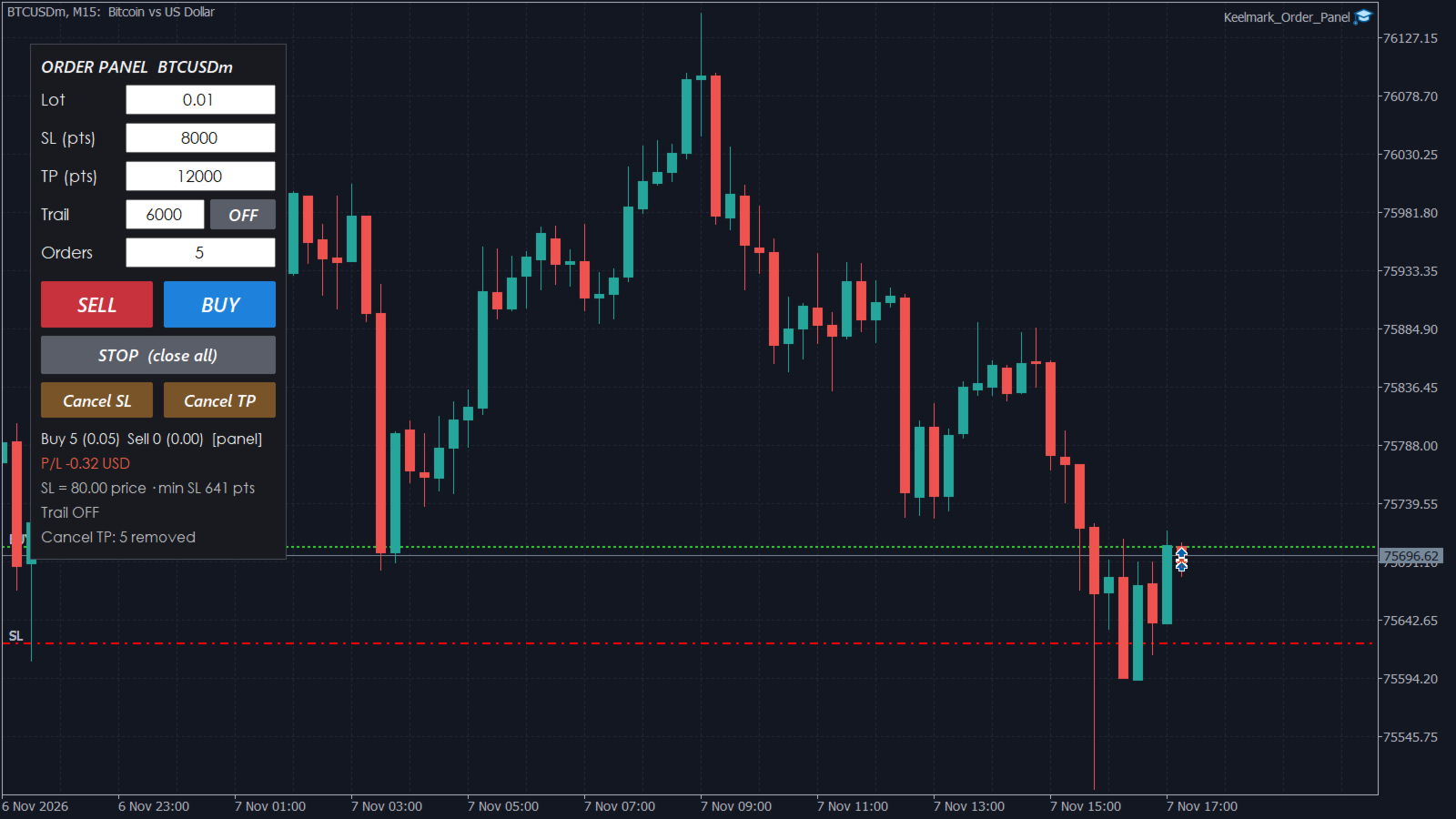
Keelmark Order Panel is a small manual trading panel for MetaTrader 5. You type the lot, the SL and TP distance and how many orders you want, then press BUY or SELL: the panel sends that many market orders at once, each with its own SL and TP. STOP closes them again. The panel does not open trades by itself and gives no buy or sell signals - every order comes from a button you press.

ON THE PANEL

  • Lot - lot per order, rounded to the symbol's lot step.
  • SL / TP - distance from the entry price in points (or pips / price, see inputs). 0 = no SL or no TP.
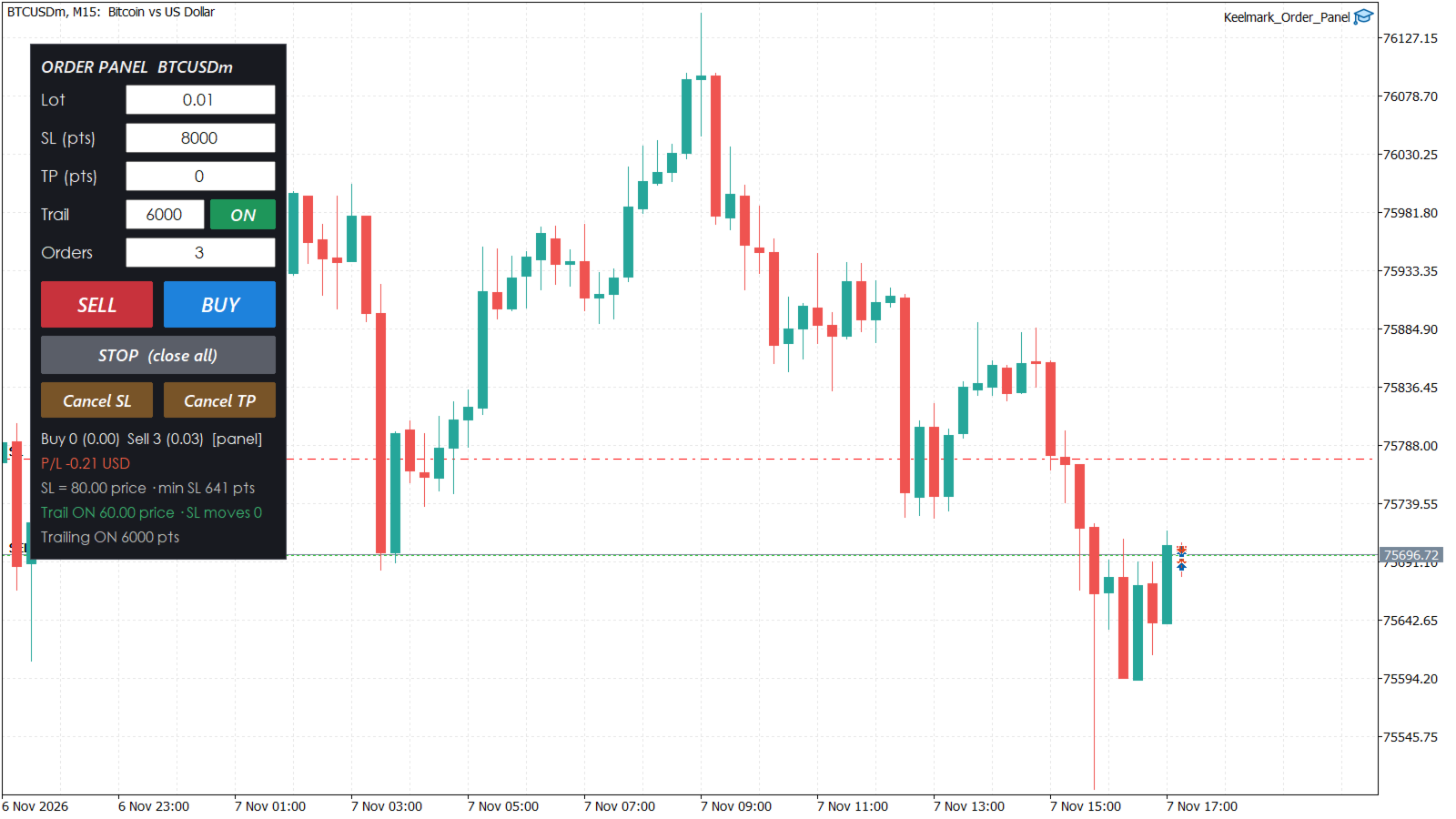
  • Trail - trailing stop distance and an ON / OFF button.
  • Orders - number of orders per click (1 to 50 by default), for example 5, 7 or 10.
  • SELL / BUY - send the orders at the current price.
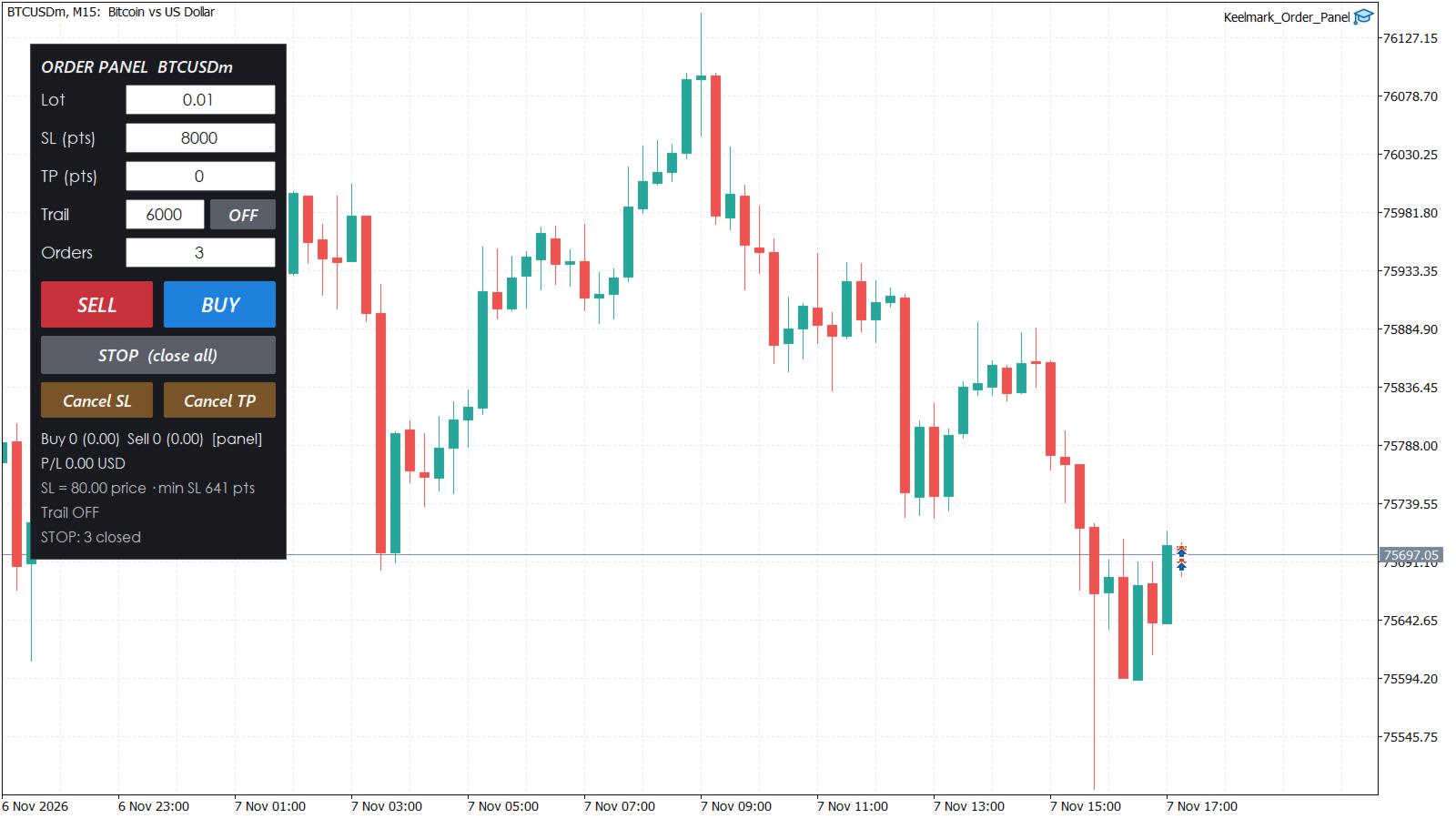
  • STOP (close all) - close the orders of the panel on this symbol (or all positions on this symbol, see inputs).
  • Cancel SL / Cancel TP - remove the SL or the TP from the open orders; the other level stays. Cancel SL also turns trailing off, so the SL is not set again.
  • Info lines: number of buy / sell orders and their lots, floating P/L, the SL in price, the smallest SL the broker accepts right now, trailing state and the result of the last action.

CHECKS BEFORE SENDING

  • SL must be wider than the spread plus the broker's stop level. A buy SL is hit by the Bid and a sell SL by the Ask, so a SL inside the spread would be refused by the server. The panel shows the minimum SL and does not send orders with a closer SL.
  • Free margin must cover all the orders of the click, and the broker's volume limit for the symbol is checked.
  • If an error would repeat for every order (invalid stops, no money, market closed, trading disabled...), the panel stops sending the rest and shows the error.

TRAILING STOP

When trailing is ON, the SL of each order follows price at the set distance once the order is in profit by the start distance (0 = at once). The SL only moves in the direction of the trade and only by at least one step (default 10% of the distance), and the panel checks at most once per second, so the server does not get a modify request on every tick. Trailing works while MetaTrader 5 is running and the panel is on the chart.

INPUTS

  • Default values: lot, SL, TP, number of orders, unit for SL / TP (points, pips or price).
  • Trading: STOP closes panel orders only or all positions on the symbol, confirmation box before BUY / SELL / STOP / Cancel, max orders per click, magic number, slippage, async sending (faster for many orders), order comment.
  • Trailing: ON at start, distance, start after profit of, step.
  • Panel: position, font size, colours.

The values you type are kept for the chart when you change timeframe.

NOTES

  • Allow Algo Trading in the terminal and in the panel settings, otherwise the panel shows "Algo Trading is OFF".
  • Works on hedging and netting accounts. On a netting account several orders on one symbol become one position.
  • N orders means N times the risk of one order. Check the total lot shown on the panel before you press.
  • Without SL an order has no stop on the server. Removing the SL is your decision.
  • In the Strategy Tester the buttons cannot be pressed; test the panel on a demo account.
Produits recommandés
Click Trading
Jawad Tauheed
5 (2)
One Click Trading – Auto TP SL Developer TraderLinkz Version 1.00 Category Utility What it does Adds missing TP and SL to your manual trades and pending orders Sets them once per ticket Lets you move TP and SL afterward Works on hedging and netting accounts Scans on every tick and reacts on trade events Why you want it You place faster entries You get consistent risk and exit targets You reduce fat finger errors You keep full manual control Quick start Attach the EA to any chart Keep TP and SL e
FREE
Noetrix Partial Entry
Julien Jeremy Rodrigue Gazagnaire
Noetrix Partial Entry Noetrix Partial Entry est un utilitaire visuel de planification d’entrées fractionnées pour MetaTrader 5. Il aide les traders discrétionnaires à construire et gérer un plan d’ordres en attente directement sur le graphique. L’utilitaire ne génère aucun signal de trading et ne place aucun ordre automatiquement. Le plan est envoyé uniquement après un clic explicite sur PLACE ALL puis, par défaut, une fenêtre de confirmation. FONCTIONS PRINCIPALES • Créez de 1 à 5 ordres Bu
FREE
ATC Alert Manager vous permet de définir des alarmes de prix directement sur le graphique et de les gérer depuis un petit panneau. Chaque alarme est affichée comme une ligne sur le graphique que vous pouvez faire glisser vers un nouveau prix. Une alarme se déclenche une fois, au moment où le prix croise votre niveau, avec une alerte popup, un son et une notification push optionnelle sur votre téléphone. Un prix déjà au-delà du niveau ne la déclenche pas, donc vous ne recevez jamais d'alertes ré
FREE
Risk Manager – Account Protection Tool Risk Manager is an Expert Advisor for MetaTrader 5 designed to protect your trading account by applying automatic risk management rules. This tool does not open trades . It continuously monitors your account and enforces predefined limits to help prevent excessive losses and maintain disciplined trading. Risk Manager works in the background and can manage positions opened by manual trading or other Expert Advisors. It is particularly useful for: • Manual tr
FREE
FiT Panel Pro
Thonglak Janyakorn
Overview FiT Panel Pro is a professional-grade trade management panel designed for MetaTrader 5 traders who demand speed, precision, and full control over their trades. Built with a modern dark-theme UI, it combines one-click execution with advanced risk management, visual SL/TP drag lines, automatic Fibonacci-based levels, and comprehensive order management — all in a single, compact panel. Whether you are a scalper, day trader, or swing trader, FiT Panel Pro gives you the edge you need to exec
FREE
Smart SLTP ATR Trade Manager A trade management utility for MetaTrader 5 that automatically assigns Stop Loss and Take Profit levels to open positions, and trails Stop Loss as price moves in the trader's favor. Compatible with manual trades, Expert Advisors, and copy trading signals simultaneously. Overview The utility monitors all open positions on the chart and assigns SL/TP levels immediately upon trade entry, based on one of four configurable calculation modes. An optional step-based traili
FREE
================================================================ MATRIX CONDITION MONITOR Live Trade Condition Panel for MetaTrader 5 Fully Automatic -- Works with ALL Matrix EAs ================================================================ NEVER MISS A TRADE SETUP AGAIN Matrix Condition Monitor is a free utility that attaches to any chart and automatically checks all 10 trade conditions in real time -- showing you exactly why a trade will or will not open, and alerting you the moment ever
FREE
Trade assistant pro v8
Ahmed Mohammed Bakr Bakr
2 (1)
FREE FREE FREE Trade Assistant MT5 – Professional Trading & Risk Management Panel Trade Assistant MT5 is an advanced trading panel designed to help traders execute orders faster, safer, and more professionally . It simplifies manual trading by combining smart order management , precise risk control , and one-click execution , making it ideal for both beginners and advanced traders. This tool does not trade automatically . Instead, it empowers you with full control while applying professional-gra
FREE
Place trades in one click with the lot size calculated from your risk. How it works Type your risk percent, stop loss in points and take profit as a multiple of the stop. The panel shows the lot size and the money at risk before you click. BUY and SELL open the order with SL and TP already attached. Management buttons move stops to break-even, close half or close all positions on the chart symbol. Key features Risk based lot size from balance, tick value and stop distance SL and TP attached to e
FREE
This is an EA designed to support manual trading. It can accurately calculate risk, automatically enter trades, set stop loss, and perform trailing stop loss using buttons on the chart. There are many features for risk calculation, setting stop loss, and trailing stop loss to suit various trading styles. It can also automatically manage prop firms by closing trades when reaching the target profit level or maximum daily loss. Additionally, it can perform manual backtesting using the strategy test
FREE
Equity Master Stop v1 MT5
Frank William Jr Colbert
An advanced equity protection and trade management script. It monitors individual trade P&L and closes positions when floating equity targets (profit or loss) are met. It features "skip closing hours" for high volatility, wide spreads, or price instability times . Features: Closes trades at a target profit (`MAX_FLOATING_EQUITY`) or maximum loss (`MAX_FLOATING_LOSS`). Includes a `FORCE_CLOSE_AT_MAX_EQUITY` level that bypasses all exit protection checks. "SKIP_CLOSING_HOURS" input to pause loss
FREE
ARMOR Risk Calculator Trade with a plan. Calculate your risk before you enter the market. ARMOR Risk Calculator is a professional and easy-to-use risk management tool for MetaTrader 5, designed to help traders calculate their position size and potential trade risk before placing a trade. Instead of manually calculating lot sizes and risk values, ARMOR Risk Calculator provides a clean and intuitive dashboard where you can enter your trade parameters and instantly review the calculated results. Ke
FREE
Lot by Risk MT5
Sergey Vasilev
4.88 (16)
La barre de trading Lot by Risk est conçue pour le trading manuel. C'est un moyen alternatif d'envoyer des ordres. La première caractéristique du panneau est l'affichage pratique des ordres à l'aide de lignes de contrôle. La deuxième caractéristique est le calcul du volume de la transaction à un risque donné en présence d'une ligne stop loss. Les lignes de contrôle sont affichées à l'aide de raccourcis clavier: take profit-touche T Par défaut; price-touche P par Défaut; stop loss – touche s p
FREE
Equity monitor
Vasiliy Pritchin
Equity monitor This is a simple means change informer. I wrote it for myself, maybe someone will need it... 1. Displays the change in funds for the day. Every day, when the terminal is first launched, it remembers the current funds and monitors changes throughout the day. 2. The first day of the month, well remembers the money and, within months, to monitor changes. 3. Well, it displays the profit of the open position. To work, you need to create 4 global variables: gvarEqityDay , gvarEq
FREE
SmartRisk Trade Tool — One-Click Risk-Based Trade Panel SmartRisk Trade Tool is a manual trading panel for MetaTrader 5 built around position sizing and risk control rather than signal generation. It does not analyze the market or suggest trade direction — it exists so that every order sent from the chart already has a calculated lot size, stop loss, and take profit consistent with a risk value the trader chooses, removing the manual arithmetic that normally happens between deciding to trade and
FREE
AI Smart Risk Trade Manager
Fadi Hassan Khaled Ghanem
AI Smart Risk Trade Manager is a professional trade-management utility panel for MetaTrader 5. It does not open trades on its own signal - instead it gives you a one-click, risk-based way to enter the market and then automatically manages every open position (yours or from any other EA) with breakeven, trailing and partial-close logic. Key features: One-click BUY / SELL panel buttons that size the position automatically from your chosen risk percent of account balance Automatic Stop Loss and Tak
FREE
Export History Data to CSV
Muhammad Jawad Shabir
5 (1)
Crystal AI Data Extractor — Get Clean MT5 Data Into Excel or Python in One Click If you have ever tried to pull historical data out of MetaTrader 5 and ended up with a messy file where everything lands in one column — this tool is for you. Crystal AI Data Extractor does one job and does it properly: it takes your MT5 chart data and saves it as a clean, properly separated CSV file that opens correctly in Excel, Python, or any other tool you use. No more copying and pasting from the terminal. No m
FREE
Monitor Your EAs and Manual Trading From One MT5 Dashboard One account. Multiple strategies. One clear overview. Quantum Magic Monitor is a professional MT5 trading dashboard designed to help traders monitor multiple Expert Advisors and manual trading activity separately and in one place . Instead of analysing a mixed account history, Quantum Magic Monitor lets you organise trading activity by Magic Number / EA group and monitor the performance of different strategies independently. WHY QUANTUM

FREE
Seredina
Oleksandr Kashyrnyi
SEREDINA est votre outil polyvalent pour l’évaluation et le contrôle des positions ! Ce script calcule automatiquement le prix moyen des positions ouvertes d'achat (BUY) et de vente (SELL) pour tout instrument de trading sur la plateforme MetaTrader 5, affichant non seulement des données précises mais aussi des niveaux visuels sur le graphique, vous permettant de voir instantanément le niveau moyen d'entrée de vos positions. Avec SEREDINA , vous pouvez : Identifier le point de "prix moyen" pour
FREE
A position size calculator that won’t round you past your risk. QRM Risk Calculator sizes your trade from your risk %, stop distance and current broker data, separately for BUY and SELL, because Bid/Ask prices, currency conversion and broker rules can give different results in each direction. Volume is never rounded up if that would exceed your risk budget. If the broker’s minimum lot would break it, the calculator shows RISK_BELOW_MIN_LOT instead of forcing the trade. What you see. For each dir
FREE
TITAN Prop Guard – Prop Firm Risk Protection for MT5 TITAN Prop Guard is a risk management utility for MetaTrader 5. It helps traders stay within the daily and maximum loss limits of their prop firm. Attach it to one chart and it monitors the account equity continuously. When the configured loss threshold is reached, it closes open positions and pending orders and activates a trading lock until the next daily reset. During the lock, any new trade opened manually or by another Expert Advisor is c
FREE
TrendVision AI
Murtadha Majid Jeyad Al-Khuzaie
TrendVision AI – Smart Trend Channels & Price Forecasting for MetaTrader 5 Discover market structure and explore potential future price direction with TrendVision AI, an advanced technical indicator for MetaTrader 5 that combines automatic trendline analysis with a machine-learning-based price forecasting model. How Does TrendVision AI Work? TrendVision AI analyzes historical candlestick data within a configurable lookback window. It automatically draws two trendlines directly on the chart:
FREE
ABQ Visual Risk Sizer
Cristian David Castillo Arrieta
ABQ Visual Risk Sizer - Risque Institutionnel et Exécution de Transaction Catégorie : Utilitaires / Gestion du Risque Le calcul manuel des lots coûte du temps et de l'argent. Dans le trading moderne, particulièrement lors de la gestion de comptes financés (Prop Firms), une erreur de calcul de lotissage ou un délai de 5 secondes lors de la saisie d'un ordre peut signifier la violation de la règle de Drawdown quotidien ou la perte du prix d'entrée parfait. ABQ Visual Risk Sizer est un outil de qua
FREE
This MQL5 indicator creates a customizable grid of horizontal lines on your trading chart. Here's what it does: **Main Functions:** - Draws equally spaced horizontal lines across the visible price range - Supports two line types: horizontal lines or trend lines with forward projection - Automatically adjusts to price scale changes **Key Features:** 1. **Customizable Spacing**: Set grid distance in pips (20 pips by default) 2. **Flexible Starting Point**: Auto-calculates starting price or lets
FREE
Account Info EA It is a tool that presents on the graph all the positions of the account, and specific information concerning the positions, but also the account. It enables the user to have an image of his account at a glance. Use like any expert advisor. You can't attach it in the same chart with other expert advisor. It does not have the ability to open or manage positions. You can attach it on any chart and any timeframe.
FREE
TradeStats Pro – Lot & Risk Analytics Panel for MT5 TradeStats Pro is an analytics panel for MetaTrader 5 that displays trading history and account statistics in a structured, readable format directly on the chart. Account Overview The panel shows real-time account data including balance, equity, margin, free margin, floating profit/loss, win rate, profit factor, and maximum drawdown in both value and percentage. Lot Exposure Tracking Total buy lot, sell lot, and net lot exposure from open posi
FREE
Tollan Account Information
Marcela Martinez Quiroga
This script allows you to visualize the risk of your account based on the open orders you have. * Low risk is between 0 and 10% of handicap * Medium risk is between 11% and 30% of handicap * High risk is more than 31% of handicap The script displays the spread of the current pair, the total of open positions, showing the lotage for both directions (buy, sell) as well as the number of buy and sell operations.
FREE
️ This is a FREE version of the tool. Developed by a practicing trader with 12 years of live trading experience (verified tax records, 51 Finam certificates). Looking for professional trading solutions (Volume Profile, SMC, Risk Manager)? Author's full lineup of PRO indicators: https://www.mql5.com/en/users/musa1994/seller Official website and portfolio: https://developer-mql4-mql5.netlify.app/ VolumeMonitorUtility is a service utility for the MetaTrader 5 terminal that displays key volum
FREE
Les acheteurs de ce produit ont également acheté
Trade Assistant MT5
Evgeniy Kravchenko
4.43 (216)
It helps to calculate the risk per trade, the easy installation of a new order, order management with partial closing functions, trailing stop of 7 types and other useful functions. Additional materials and instructions Installation instructions - Application instructions Line function -   shows on the chart the Opening line, Stop Loss, Take Profit. With this function it is easy to set a new order and see its additional characteristics before opening.   Risk management  - The risk calculation
Bienvenue sur Trade Manager EA, l’outil ultime de gestion des risques conçu pour rendre le trading plus intuitif, précis et efficace. Ce n’est pas seulement un outil d’exécution d’ordres ; c’est une solution complète pour la planification des trades, la gestion des positions et le contrôle des risques. Que vous soyez débutant, trader expérimenté ou scalpeur ayant besoin d’une exécution rapide, Trade Manager EA s’adapte à vos besoins, offrant une flexibilité sur tous les marchés, des devises et i
Farmed Hedge Yield Farming | All Markets (Manual - Hybrid - Semi/Automated EA) VERIFIED TRADING RESULTS - Farmed Hedge Yield Axi Copy:  https://www.mql5.com/en/signals/2356376 - Farmed Hedge Yield Exn Copy:   https://www.mql5.com/en/signals/2356404 - Farmed Hedge Yield V Copy:  https://www.mql5.com/en/signals/2357156 IMPORTANT NOTICE: FarmedHedge is a MANUAL-FOCUSED TRADING UTILITY ,not a fully automated EA. Results shown on this Signal include manual trades and overall strategic management.
Telegram to MT5 Multi-Channel Copier   copie automatiquement les signaux de trading de vos canaux Telegram et Discord directement vers MetaTrader 5. Pas de bots, pas d'extensions de navigateur, pas de copie manuelle. Un signal arrive sur Telegram ou Discord et l'EA ouvre le trade dans votre terminal en quelques secondes. Et avant de copier un canal, le backtester intégré vous montre ce que ce canal aurait fait sur votre compte. Le produit comprend deux composants : une application Windows qui éc
Local Trade Copier EA MT5
Juvenille Emperor Limited
4.94 (150)
Local Trade Copier EA MT5 est un copieur de trades rapide et flexible permettant de copier et de gérer des trades entre plusieurs comptes MetaTrader 5 sur le même ordinateur Windows ou Windows VPS. Il combine la synchronisation locale des trades avec des contrôles côté Receiver pour la taille des lots, la gestion du risque, le filtrage des trades, le mappage des symboles, la gestion des trades et la protection du compte. Configurez vos terminaux Transmitter et Receiver en environ 1 minute et co
TradePanel MT5
Alfiya Fazylova
4.88 (172)
Trade Panel est un assistant commercial multifonction. L'application contient plus de 50 fonctions de trading pour le trading manuel et permet d'automatiser la plupart des tâches commerciales. Instructions d'utilisation : https://www.mql5.com/fr/blogs/post/762589 Version d'essai de l'application pour un compte démo : https://www.mql5.com/fr/blogs/post/762644 Comment installer l'application : https://www.mql5.com/fr/blogs/post/762645 Comment tester l'application en mode visuel : https://www.mql5.
News Trade EA MT5
Konstantin Kulikov
4.55 (11)
Je voudrais vous présenter un robot efficace que j'utilise depuis plusieurs années. Il peut être utilisé en mode semi-automatique, comme en mode totalement automatique. >>> Chat <<< Le programme comporte des paramètres souples pour le commerce sur les nouvelles du calendrier économique. Il est impossible de le vérifier dans le testeur des stratégies. Ce qu’il faut, c’est le travail réel. Téléchargez la dernière archive des paramètres : https://www.mql5.com/en/blogs/post/747929 Surveillance des
Copiez les signaux Telegram avec vos propres règles de trading Telegram to MT5 Signal Trader copie automatiquement les signaux de trading au format texte provenant de canaux et de groupes Telegram publics et privés vers MetaTrader 5. Gérez plusieurs fournisseurs et comptes MT5 depuis une seule application de bureau, avec des paramètres de risque et de trading propres à chaque fournisseur . Aucun bot Telegram ni configuration d'API n'est nécessaire pour copier les signaux. Connectez-vous simpleme
Strategy Ledger Pro
Abdullah Uygar Tuna
5 (14)
Désormais disponible en français. Strategy Ledger Pro est un panneau d'analyse de compte en lecture seule pour MetaTrader 5. Il sépare les résultats du compte par Expert Advisor, stratégie, symbole et numéro magic, pour que vous voyiez ce que chacun apporte réellement. Le panneau est disponible en 11 langues : English, Français, Deutsch, Español, Italiano, Português, Русский, Türkçe, 中文, 日本語 et 한국어. Avant de télécharger la démo. Le Market exécute la démo de tout produit payant uniquement dans l
================================================================================ POC BREAKOUT - V20.72. Full Professional Grade Toolkit ================================================================================ POC Breakout is a full MetaTrader 5 trading dashboard for discretionary traders who want breakout signals, Point of Control (POC) context, volume profiles, order flow, market structure, news, alerts, and advanced trade planning in one professional workspace. Attached directly to you
Exp COPYLOT CLIENT for MT5
Vladislav Andruschenko
3.97 (35)
Copieur professionnel de trades pour MetaTrader 5 Un copieur de trades rapide, professionnel et fiable pour MetaTrader . COPYLOT permet de copier des trades Forex entre les terminaux MT4 et MT5 avec prise en charge des comptes Hedge et Netting . La version MT5 de COPYLOT prend en charge : - MT5 Hedge → MT5 Hedge - MT5 Hedge → MT5 Netting - MT5 Netting → MT5 Hedge - MT5 Netting → MT5 Netting - MT4 → MT5 Hedge - MT4 → MT5 Netting Version MT4 Description complète + DEMO + PDF Comment acheter Comme
The product will copy all telegram signal to MT5 ( which you are member) , also it can work as remote copier.  Easy to set up, copy order instant, can work with almost signal formats, image signal,  s upport to translate other language to English Work with all type of channel or group, even channel have "Restrict Saving Content", work with  multi channel, multi MT5 Work as remote copier: with signal have ticket number, it will copy exactly via ticket number. Support to backtest signal. How to s
EA Overfitter
Stephen J Martret
5 (3)
That backtest looks great. But will it still be making money tomorrow, next week, next month? EA Overfitter re-runs your EA on 100 price histories it has never seen. One score tells you if the edge is real. A backtest tells you what an EA did on one price history — the one that happened to occur. What you cannot tell from it is how much of that result was the strategy and how much was the particular path. EA Overfitter answers that. It builds up to 100 synthetic price histories your EA has n
Power Candles Strategy Scanner - Outil de recherche de configurations multi-symboles à optimisation automatique Le Power Candles Strategy Scanner utilise le même moteur d'auto-optimisation que celui qui alimente l'indicateur Power Candles, pour chaque symbole de votre Market Watch, en parallèle. Un panneau vous indique quels symboles sont statistiquement négociables à l'instant, quelle stratégie est la plus performante pour chacun, la paire Stop Loss / Take Profit optimale, et vous alerte dès qu
HINN MagicEntry Extra
ALGOFLOW OÜ
4.74 (19)
HINN MAGIC ENTRY – the ultimate tool for entry and position management! SIMPLE. FASTEST. INTUITIVE. MAX AUTOMATED. Place orders by selecting a level directly on the chart! full description   ::  demo-version  :: 60-sec-video-description Key features: - Market, limit, and pending orders - Automatic lot size calculation - Automatic spread and commission accounting - Unlimited partitial take-profits  - Breakeven and trailing stop-loss and take-profit  functions - Invalidation leves - Intuitive, a
Telegram To MT5 Ultra
Mirel Daniel Gheonu
5 (5)
Telegram To MT5 — Copieur de signaux Transformez les appels de trading de vos canaux Telegram en véritables ordres MT5 — automatiquement, sur autant de comptes que vous le souhaitez, avec le risque et les règles entièrement sous votre contrôle. Telegram To MT5 relie les canaux VIP / de signaux que vous suivez déjà sur Telegram à votre terminal MetaTrader 5. Une application de bureau compagnon gratuite lit les messages (même des canaux qui bloquent les bots), et cet Expert Advisor les exécute sur
Timeless Charts
Samuel Manoel De Souza
5 (9)
Timeless Charts est un utilitaire de trading tout-en-un destiné aux traders professionnels. Il combine des types de graphiques personnalisés tels que les graphiques en secondes et Renko avec une analyse avancée du flux d’ordre s utilisant Footprints , Clusters , Profils de Volume , études VWAP et outils d’analyse ancrés pour une compréhension plus approfondie du marché. Le trading et la gestion des positions sont effectués directement depuis le graphique via un panneau intégré de gestion des ord
Panneau de trading pour MetaTrader 5 — contrôle professionnel du trading en un clic depuis le graphique et le clavier Un panneau de trading avancé conçu pour les traders actifs, afin d’ouvrir, gérer et clôturer des positions bien plus rapidement qu’avec l’interface standard de MetaTrader. Cette solution s’adresse à ceux qui veulent contrôler positions, ordres en attente, profit global et exécution depuis un seul espace de travail professionnel. Il ne s’agit pas d’un simple utilitaire. C’est un
Anchor Trade Manager
Kalinskie Gilliam
5 (8)
Your EAs cannot see each other, but Anchor can. Anchor gives you one place to coordinate your EAs, manage risk, and decide when trading is allowed. It works alongside the trading bots you already use without any changes to them. The Problem One EA opens a trade. Then another starts trading. The next thing you know, you wake up to multiple grids built across your account. Each EA may be doing exactly what it was designed to do, but together they can place far more risk on your account than you in

Boleta Scalper Ultra
Nelson Lopes De Paula Neto
ScalperBoleta Ultra — Panneau de Trading pour MetaTrader 5 ScalperBoleta Ultra est un panneau de trading manuel développé pour MetaTrader 5, principalement destiné au scalping et au day trading. Il centralise l'exécution des ordres, la gestion des positions et le contrôle des risques directement sur le graphique, afin de faciliter les opérations de trading. Fonctionnalités principales : Achat et vente : Exécution des ordres à l'aide de boutons ou de raccourcis clavier. Gestion des positions : Cl
VirtualTradePad PRO SE MT5 — centre de contrôle de trading professionnel pour MetaTrader 5 VirtualTradePad PRO SE est un panneau de trading premium basé sur le graphique et un espace de gestion des trades pour MetaTrader 5 . Il est conçu pour les traders qui souhaitent une exécution plus rapide, un contrôle plus clair des positions, une gestion structurée des trades, une planification visuelle des niveaux et un flux de travail professionnel directement depuis le graphique. Ce n’est pas seulement
Trade Indicator Assistant   is a powerful MT5 utility designed to turn indicators into automated trading systems. Its main feature is the ability to automatically detect an indicator’s   BUY and SELL signal buffers , without requiring you to know the buffer numbers, search through indicator settings, or modify the indicator source code. Bonus Indicator:   After purchasing Trade Indicator Assistant, contact me to receive   Trade Signal Pro   completely free as a bonus indicator. [Download Demo V
Trade Manager DaneTrades
Levi Dane Benjamin
4.13 (31)
Trade Manager pour vous aider à entrer et sortir rapidement des transactions tout en calculant automatiquement votre risque. Y compris des fonctionnalités pour vous aider à éviter le sur-trading, le trading de vengeance et le trading émotionnel. Les transactions peuvent être gérées automatiquement et les mesures de performances du compte peuvent être visualisées dans un graphique. Ces fonctionnalités rendent ce panneau idéal pour tous les traders manuels et contribuent à améliorer la plateforme
Prochaine mise à jour — Version 2.52 bientôt disponible ! [NOUVEAU] Préparez-vous à découvrir 4 nouvelles fonctionnalités majeures conçues pour améliorer votre analyse du marché et votre flux de travail de trading Nous faisons passer l’analyse du marché au niveau supérieur avec 4 nouvelles fonctionnalités conçues pour répondre à vos besoins en trading. Découvrez : 1. TRADE OVERVIEW DASHBOARD 2. CONFLUENCE AT ZONE 3. STRONG & WEAK HIGH/LOW 4. OTE 1. TRADE OVERVIEW DASHBOARD Un tableau de bord qu
MT5 to Telegram Signal Provider est un utilitaire facile à utiliser et entièrement personnalisable qui permet l'envoi de signaux spécifiés vers un chat, un canal ou un groupe Telegram, transformant ainsi votre compte en fournisseur de signaux. Contrairement à la plupart des produits concurrents, il n'utilise pas d'importations DLL. [ Démonstration ] [ Manuel ] [ Version MT4 ] [ Version Discord ] [ Canal Telegram ]  New: [ Telegram To MT5 ] Configuration Un guide utilisateur étape par étape est
Seconds Chart MT5
Boris Sedov
4.61 (18)
Seconds Chart - un outil unique pour créer des graphiques en secondes dans MetaTrader 5 . Grâce à Seconds Chart , vous pouvez créer un graphique avec une période définie en secondes, offrant une flexibilité et une précision idéales pour l'analyse, indisponibles sur les graphiques standards en minutes ou en heures. Par exemple, la période S15 indique un graphique avec des bougies d'une durée de 15 secondes. Vous pouvez utiliser n'importe quels indicateurs et experts advisors compatibles avec les
Advanced Dashboard Ultra
Mirel Daniel Gheonu
5 (6)
Stats Dashboard & Journal ULTRA pour MT5 Le Centre de Commandement de Trading Complet : Analytique, Automatisation & Intelligence des Actualités. Stats Dashboard ULTRA est l'évolution ultime de l'outil d'analyse Pro. Il transforme MetaTrader 5 en une station de trading professionnelle, combinant une analyse de performance de niveau institutionnel avec une protection automatisée contre les actualités et des métriques psychologiques avancées. Conçu pour les traders manuels et les gestionnaires de
Trade copier MT5
Alfiya Fazylova
4.61 (57)
Trade Copier est un utilitaire professionnel conçu pour copier et synchroniser les commandesentre les comptes de trading. Les commandes sont copiées du compte/terminal du fournisseur vers le compte/terminal du destinataire, qui sont installés sur le même ordinateur ou vps. Avant d'acheter, vous pouvez tester la version démo sur un compte démo. Version démo ici . Instructions complètes ici . Principales fonctionnalités et avantages: Prend en charge la copie des commandes MT5> MT5, MT4> MT5, MT5>
DrawDown Limiter
Haidar Lionel Haj Ali
5 (23)
DrawDown Limiter v5.0 — Contrôleur avancé de protection de compte DrawDown Limiter v5.0 est un contrôleur de protection de compte côté client conçu pour surveiller votre compte de trading et réagir automatiquement lorsque les limites configurées de risque, de profit, d’actualités, de planification, de rollover ou de nombre de positions sont atteintes. Il peut surveiller les opérations manuelles, les stratégies automatisées, plusieurs Expert Advisors, les ordres en attente et les positions ouvert
Telegram to MT5 Coppy
Sergey Batudayev
5 (10)
Télégramme vers MT5 :   la solution ultime pour copier des signaux Simplifiez votre trading avec Telegram vers MT5, l'outil moderne qui copie les signaux de trading directement des canaux et chats Telegram vers votre plateforme MetaTrader 5, sans DLL. Cette solution puissante garantit une exécution précise des signaux, de nombreuses options de personnalisation, un gain de temps et une efficacité accrue. [ Instructions and DEMO ] Caractéristiques principales Intégration directe de l'API Telegram
Plus de l'auteur
Keelmark All-In Challenge - FREE. An "all-in" compounding gold robot, so you can see how this style really behaves. Can $10 become $100,000 if a robot puts the whole account into every trade and compounds the wins? This EA does exactly that, so you can run it on a demo and watch the result for yourself. It is an experiment, not an income tool. WHAT IT DOES One basket at a time: several equal market positions in the same direction (default 7). Total lots = capital x Lots per $1. Every win makes t
FREE
Vtrade Challenge Dashboard shows how much room is left before your prop firm's daily loss limit and maximum loss limit, counted the way the firm counts it: floating profit and loss included, from the firm's own daily reset time. One copy on one chart covers the whole account: every symbol, every Expert Advisor and every manual trade. What it shows Status: protecting, warning, or limit reached. Today's profit or loss and the time left until the firm's daily reset (Prague midnight, UTC, server mid
FREE
VDivergence Pro - Price / OsMA Divergence on Confirmed Swings VDivergence Pro finds Regular and Hidden divergence between price and OsMA (MACD minus Signal) on swings from an ATR-based ZigZag. It works on closed bars only, and every signal is placed on the bar where it actually became known. What you see on history is what you would have seen live. HOW A SIGNAL IS BUILT Swing: the ZigZag locks a swing high/low only after price has reversed by N x ATR (default 2.5) on a closed bar. Divergence: th
Gold Reversal
Quang Vinh Huynh
Gold Reversal is an automated Stop & Reverse trade management tool for XAUUSD, controlled with a single ON / OFF button. It does not predict the market: you decide when to switch it on, and the bot handles the entry, the reverse order at the Stop Loss, the profit lock and the risk limits for you. The idea is simple: the bot always holds one position, and an opposite Stop order is already sitting exactly at that position's Stop Loss. When the market turns and hits your SL, the old position closes
Vtrade Challenge Lock watches the whole account and acts before the prop firm's loss limit is reached: it closes all positions, deletes pending orders and locks trading. The limits are counted the way the firms count them: floating profit and loss included, from the firm's own daily reset time. One copy on one chart covers the whole account: every symbol, every Expert Advisor and every manual trade. Daily loss lock At your safety level (default 80% of the firm's daily limit) it closes all positi
Keelmark Wave Gauge - where the current wave stands, and what waves on your chart did next Keelmark Wave Gauge follows the current price wave and shows it in plain words: which way it goes, how far it has travelled, how long it has been running, how much it has given back, and how straight the last bars pushed with it. A second table counts on the history of your own chart how often price went on with the wave by a fixed distance before turning against it by the same distance. The indicator desc

Keelmark SR Key Zones - support / resistance zones from reaction-weighted swing density Keelmark SR Key Zones finds the price areas where the market turned most often and most strongly, then replays the recent closed bars to show how price behaved on each visit to the zone: held (pushed back) or crossed (accepted on the other side). The zone engine uses closed bars of the source timeframe only, so a zone does not change while the source bar is still forming. HOW A ZONE IS BUILT Swings: an ATR zi
Keelmark All-In Challenge READY - the all-in compounding gold EA, set up for a live account, with manual or automatic lot size. READ THE WARNINGS BEFORE YOU BUY Use a separate live account, only for this EA, with money you can fully afford to lose. Never run it on your main account, savings or borrowed money. Test it first on a demo account, or on a very small live account, so you see how the EA behaves before you put real money in. Study and watch how the EA works and find the way tha
Filtrer:
Aucun avis
Répondre à l'avis