SynthGuard Account Protector
- Utilitaires
-
PROSPRA IQ ENTERPRISES (PTY) LTD
 MQL5 developer, South Africa. I build Expert Advisors, indicators and utilities for MetaTrader 5 and 4, and convert MT4 code to MT5. Every delivery: a written spec first, code compiled with 0 errors and 0 warnings, every input documented, and a Strategy Tester report on real ticks, not bar
 - Version: 1.0
- Activations: 10
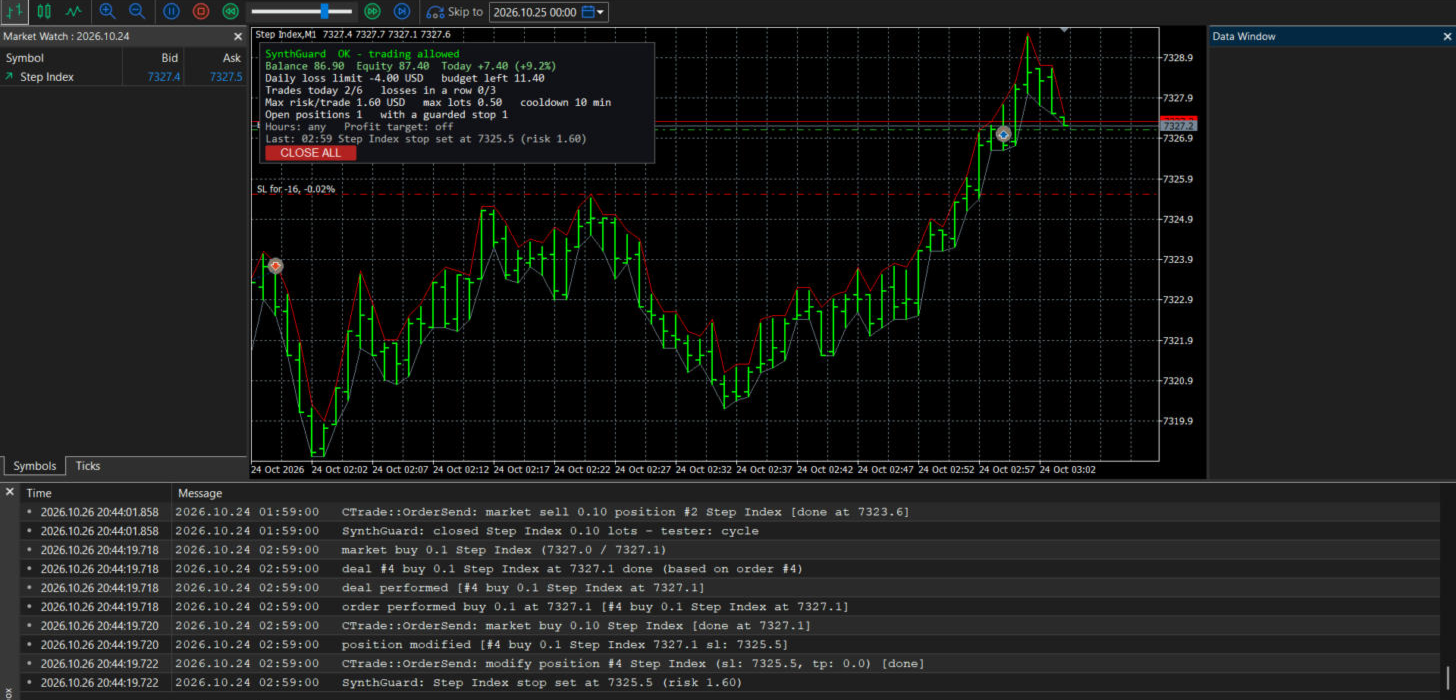
SynthGuard is a utility Expert Advisor that does not open trades. It watches the account and enforces the limits you set. When a limit is hit it closes positions, adds missing stop-losses and shows the reason on the chart.
It was built for synthetic indices (Volatility, Boom and Crash, Step, Jump) and for accounts between 50 and 500 USD, where one unmanaged trade can be the whole account. It works on any symbol and any MetaTrader 5 broker, hedging or netting.
WHAT IT DOES
1. Daily loss limit, in percent of day-start balance or in money, counting open losses. When reached, all positions are closed, and any position opened later that day is closed again on the next tick.
2. Optional daily profit target: reach it, everything is closed, done for the day.
3. Forced stop-loss. Any position without a stop-loss gets one, placed at the distance that equals your maximum risk per trade. Stops that risk far more than that can be tightened.
4. Maximum lot size. Positions above the cap are closed (or only reported, your choice).
5. Maximum trades per day.
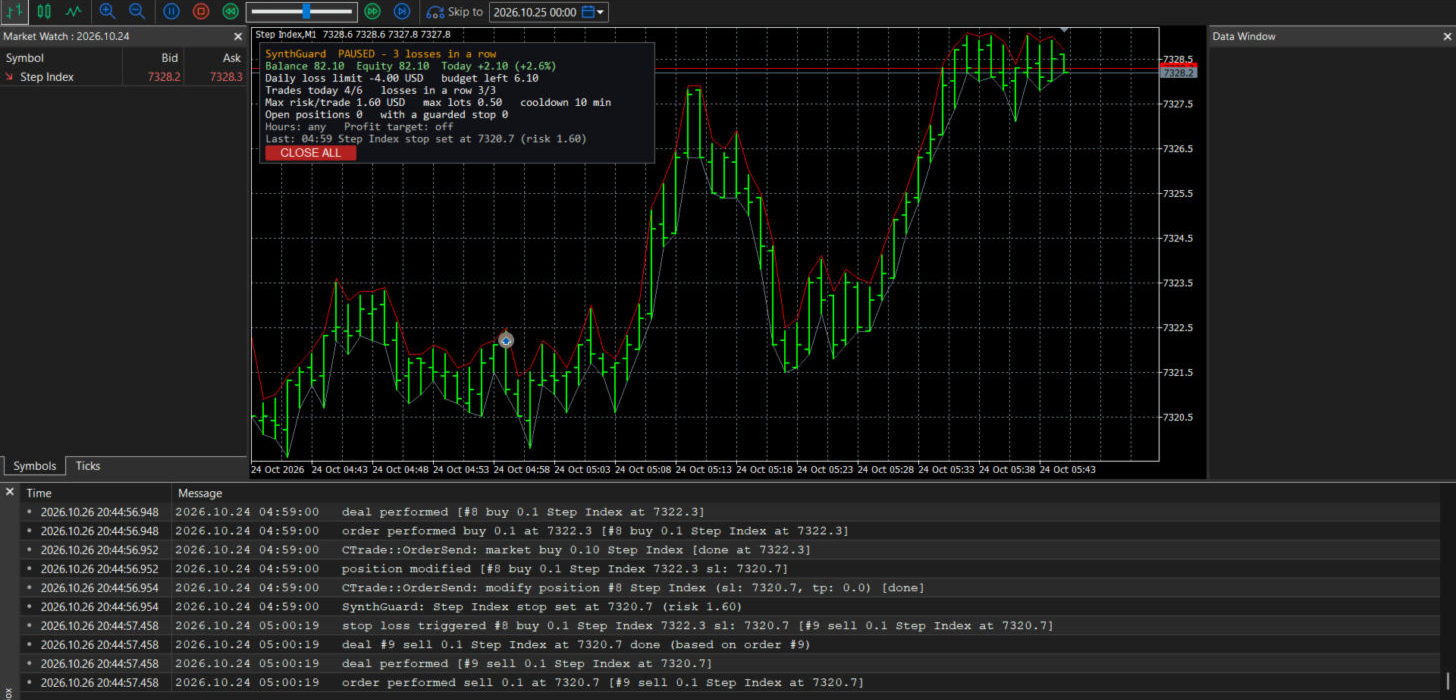
6. Pause after N consecutive losing trades.
7. Cooldown in minutes after a losing trade.
8. Optional trading-hours window (server time).
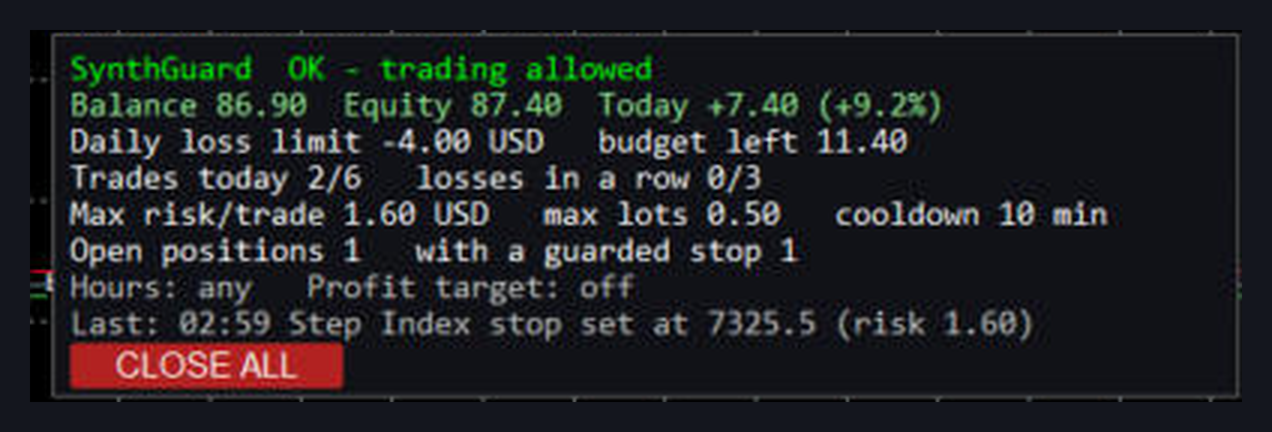
9. Chart dashboard: balance, equity, today's result, remaining daily budget, trades used, losses in a row, status, and the reason for the last action. CLOSE ALL button.
10. Pop-up and push alerts for every action it takes.
WHAT IT DOES NOT DO
It does not trade and it has no strategy. It cannot make an account profitable; it limits how much a bad day costs.
It cannot grey out the buy and sell buttons. MetaTrader does not allow a program to do that. A trade opened while you are blocked is closed on the next tick, so you pay the spread and nothing more.
It only works while MetaTrader 5 is running with SynthGuard on a chart and Algo Trading enabled. If you close the terminal, the protection stops. A VPS keeps it running.
It does not change broker-side margin rules or stop-out levels.
HOW TO INSTALL
1. Attach SynthGuard to one chart only. From that chart it monitors the whole account, every symbol, every timeframe.
2. Enable Algo Trading (toolbar button). Without it the utility can see positions but cannot close them or set stop-losses; the dashboard shows a warning.
3. Set the inputs. The defaults are for an 80 USD account.
4. Check that the dashboard shows status OK and today's remaining budget.
INPUTS
Daily limits
DailyLossMode - Percent of day-start balance, or Money (account currency). Default: Percent.
DailyLossValue - the limit. Default: 5.0. Today's result is realised profit plus floating profit, so an open loss counts.
CloseAllOnDailyStop - close every position when the limit is hit. Default: true.
BlockAfterDailyStop - close any new position opened after the daily stop. Default: true.
DailyProfitTarget - money amount; when reached, close everything and stop for the day. Default: 0 (off).
Per-trade protection
MaxRiskPerTrade - money amount; forced stop-losses are placed at the distance that loses exactly this. Default: 1.60.
ForceStopLoss - put a stop-loss on positions that have none. Default: true.
TightenWideStops - also move stops that risk more than MaxRiskPerTrade x StopTolerance. Default: true.
StopTolerance - 1.5 means an existing stop may risk up to 150 percent of MaxRiskPerTrade before it is tightened. Default: 1.5.
MaxLots - positions larger than this are closed (or only reported, see next). Default: 0.50.
CloseOversized - true closes oversized positions; false only warns. Default: true.
Trade and loss limits
MaxTradesPerDay - positions opened today; anything beyond is closed. Default: 6. 0 = off.
MaxConsecLosses - pause for the rest of the day after this many losses in a row. Default: 3. 0 = off.
CooldownMinutes - block new positions for this long after a losing trade. Default: 10. 0 = off.
UseTradingHours, StartHour, EndHour - server hours; positions opened outside the window are closed. Default: off, 8, 20.
Dashboard and alerts
ShowDashboard, DashCorner, DashX, DashY, DashFontSize - dashboard position and size.
PopupAlerts - Default: true.
PushAlerts - Default: false. Needs your MetaQuotes ID in Tools > Options > Notifications.
Tester / self-test
TesterSelfTest - in the Strategy Tester only, opens small test positions every TesterEveryBars bars so you can watch the guard act. It never opens positions on a live chart. Default: true.
MagicNumber - magic number of those tester positions. Default: 20261026.
"Today" is the server day. Day-start balance is rebuilt from the deal history, so attaching the utility in the middle of a day still gives the right number, and a restart does not reset your loss count.
RECOMMENDED SETTINGS FOR 50-100 USD ON SYNTHETIC INDICES
The defaults are already set for an 80 USD account: 5 percent daily loss (4 USD), 1.60 per trade (2 percent), 6 trades a day, pause after 3 losses, 10-minute cooldown. Change one thing: set MaxLots to the minimum lot of the symbol you trade that day (Jump and Boom/Crash 0.01, Volatility 75 0.001, Step Index 0.10). Run it on a demo account for a day first and read the Experts log so you know what each action looks like.
FAQ
Does it work on a demo account? Yes. Any MetaTrader 5 account, demo or real, any broker. Test it on demo first.
What happens if I close MetaTrader or remove the EA from the chart? The protection stops immediately. SynthGuard is a program on a chart, not a setting at the broker. If you want it running when your PC is off, use a VPS.
Can it stop me from opening trades? Not physically. MetaTrader does not let any program disable the trade buttons. When you are blocked, every new position is closed on the next tick. You lose the spread each time. It makes breaking your own rules expensive and visible, not impossible.
Will it close trades opened by other EAs? Yes. It polices every position on the account, manual or automated, on every symbol. There is no way to exempt one EA in this version; that is deliberate.
Does it open trades in the Strategy Tester? Only there, and only if TesterSelfTest is on: it opens small test positions so you can watch the guard close them, set stops and hit the daily limit. On a live or demo chart it never opens a position.
Will the forced stop-loss protect me in a Boom/Crash spike? It sets the stop, but a spike can gap through any stop, and the broker fills at the next available price. SynthGuard reduces the damage; it cannot guarantee the exact stop price. Nothing can.
Does it promise profit? No. It does not trade. It limits losses to the number you chose.
One MaxLots value for all symbols? In this version, yes. Set it to the minimum lot of the symbol you are trading that day. A per-symbol list is planned for the next version.