Prop Rules Guard MT5
- Utilitaires
-
Allan Aparece Ninal
 Je développe des indicateurs et des Expert Advisors pour MetaTrader 5.
Ma façon de travailler :
- Chaque indicateur est vérifié contre le repaint : les signaux sont décidés uniquement sur des barres clôturées, et un test sur chaque tick confirme qu'ils ne changent plus ensuite. - Version: 1.0
- Activations: 5
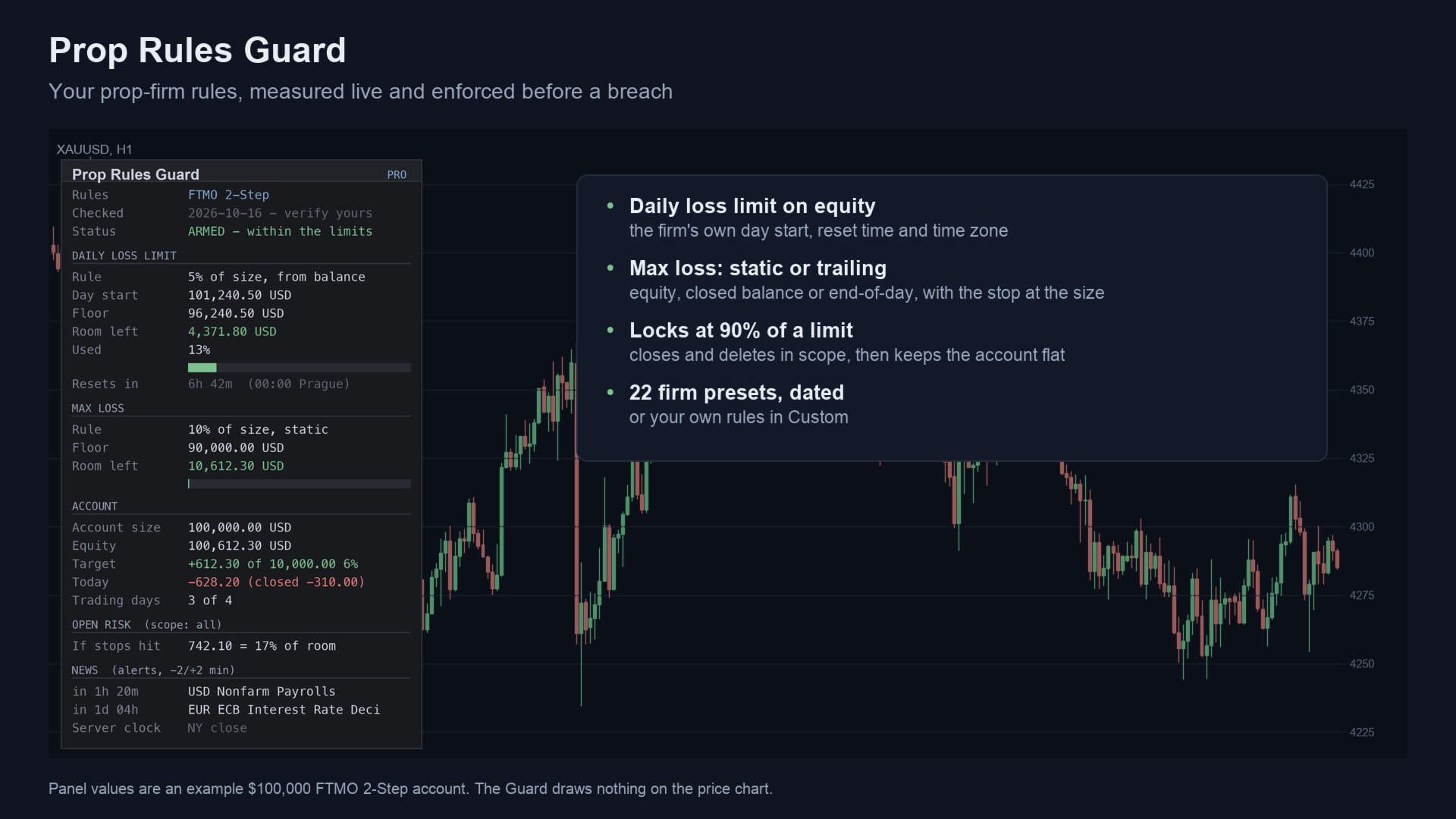
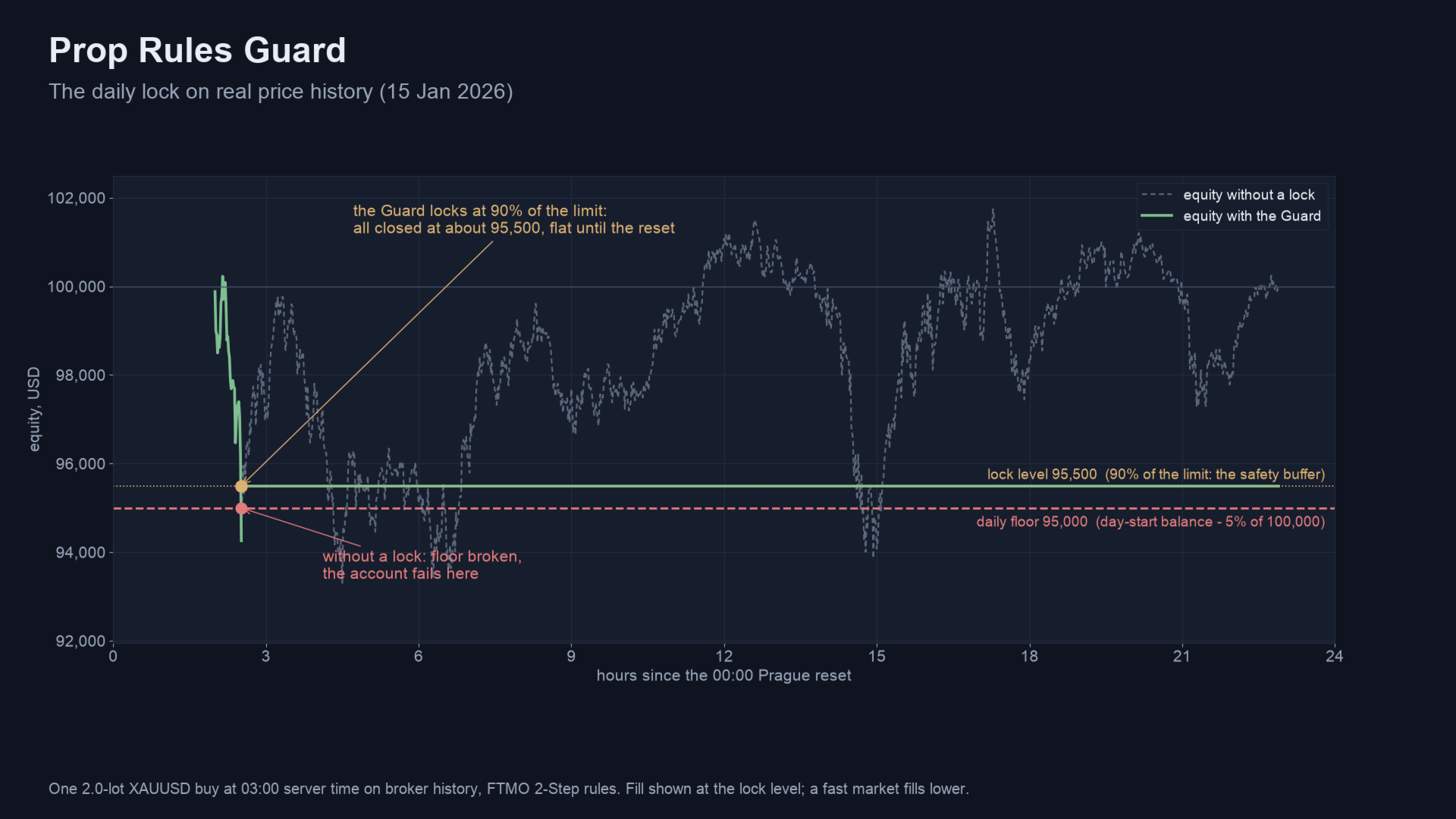
Prop Rules Guard MT5 is a utility (Expert Advisor) for MetaTrader 5 that keeps a prop-firm account inside its rules. It measures the daily loss limit and the max loss on equity, the way the firm does. At a safety buffer before a limit, it closes your trades and keeps the account flat until the firm's daily reset.
It never opens a trade. It works with manual trading and with other Expert Advisors on the same account.
Quick start
- Attach the Guard to one chart and turn Algo Trading on.
- Pick your firm in "Firm preset", or leave Custom and enter the rules.
- Check the lock level (default 90% of a limit used) and what it closes: every position, this chart's symbol, or listed magic numbers.
- Set the news mode and the warning level, then watch the panel.
What it does
Daily and max loss
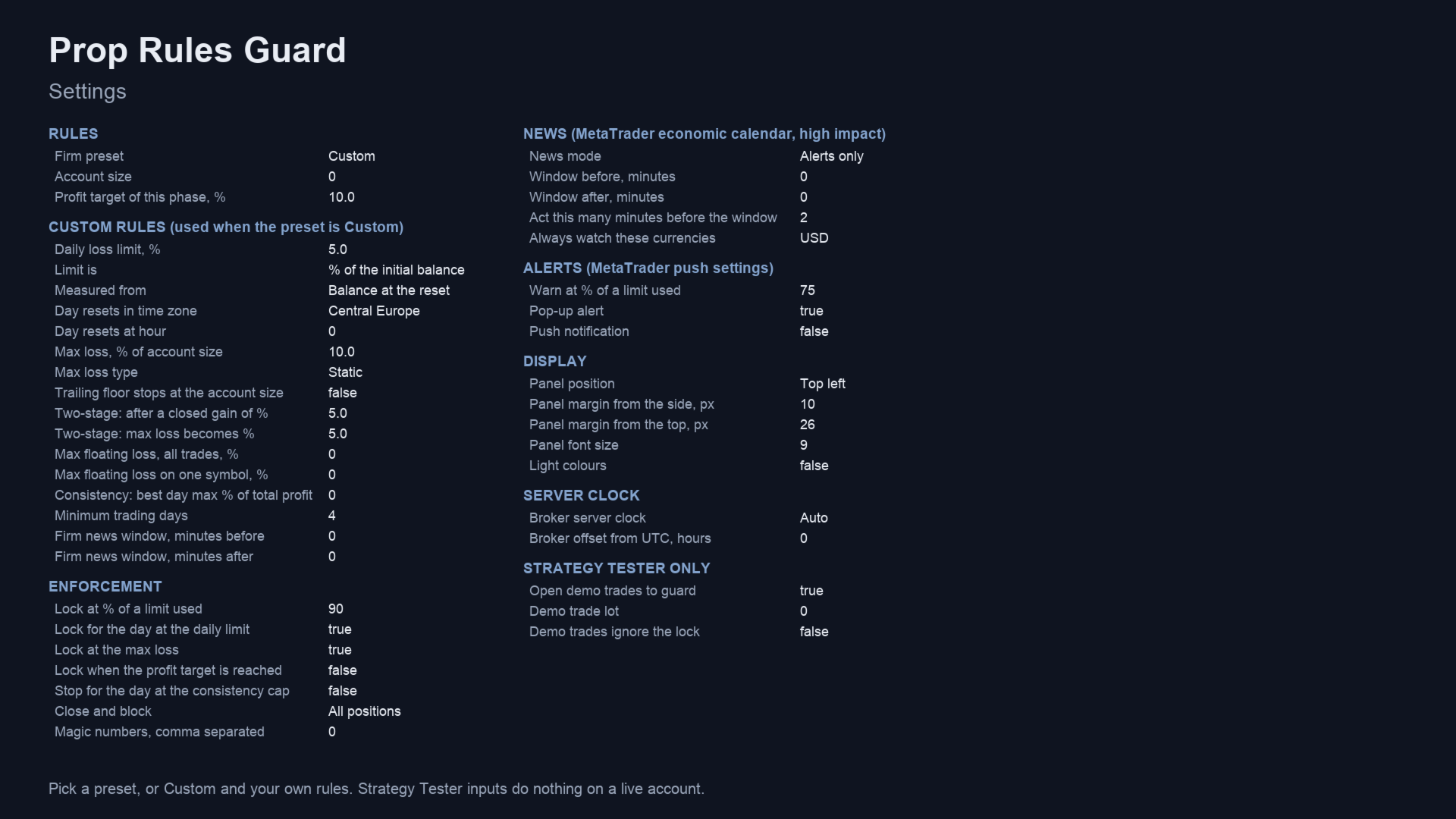
- Daily loss limit: measured on equity from the balance, the equity or the higher of the two at the reset. It is a % of the account size or of the day start.
- Reset: the firm's time and time zone, such as 00:00 Prague, 17:00 New York, 00:00 UTC+3 or server midnight. Daylight saving is handled.
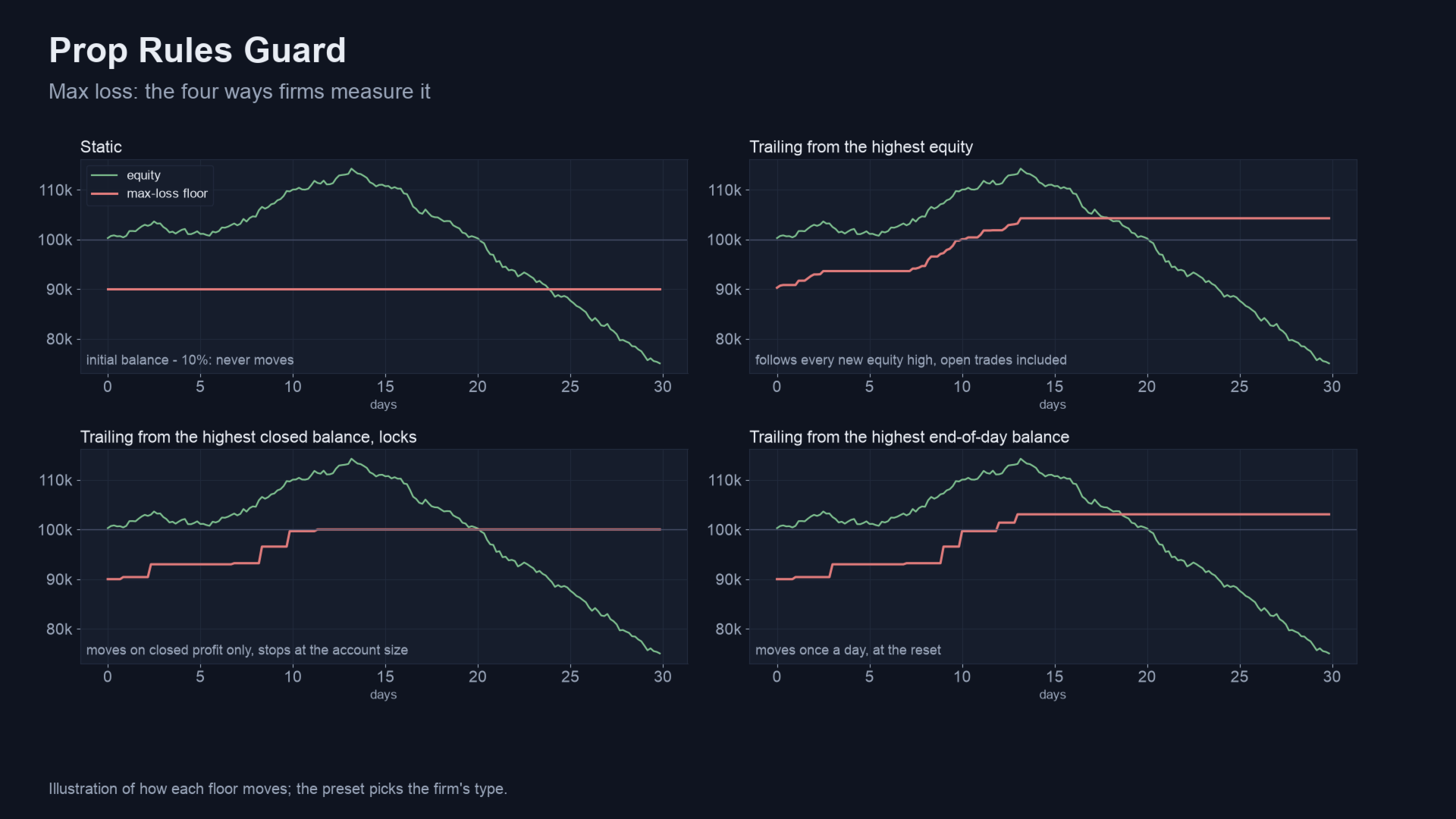
- Max loss: static, or trailing from the highest equity, the highest closed balance or the highest end-of-day balance. It can stop at the account size. A two-stage type is also available.
Lock, consistency and news
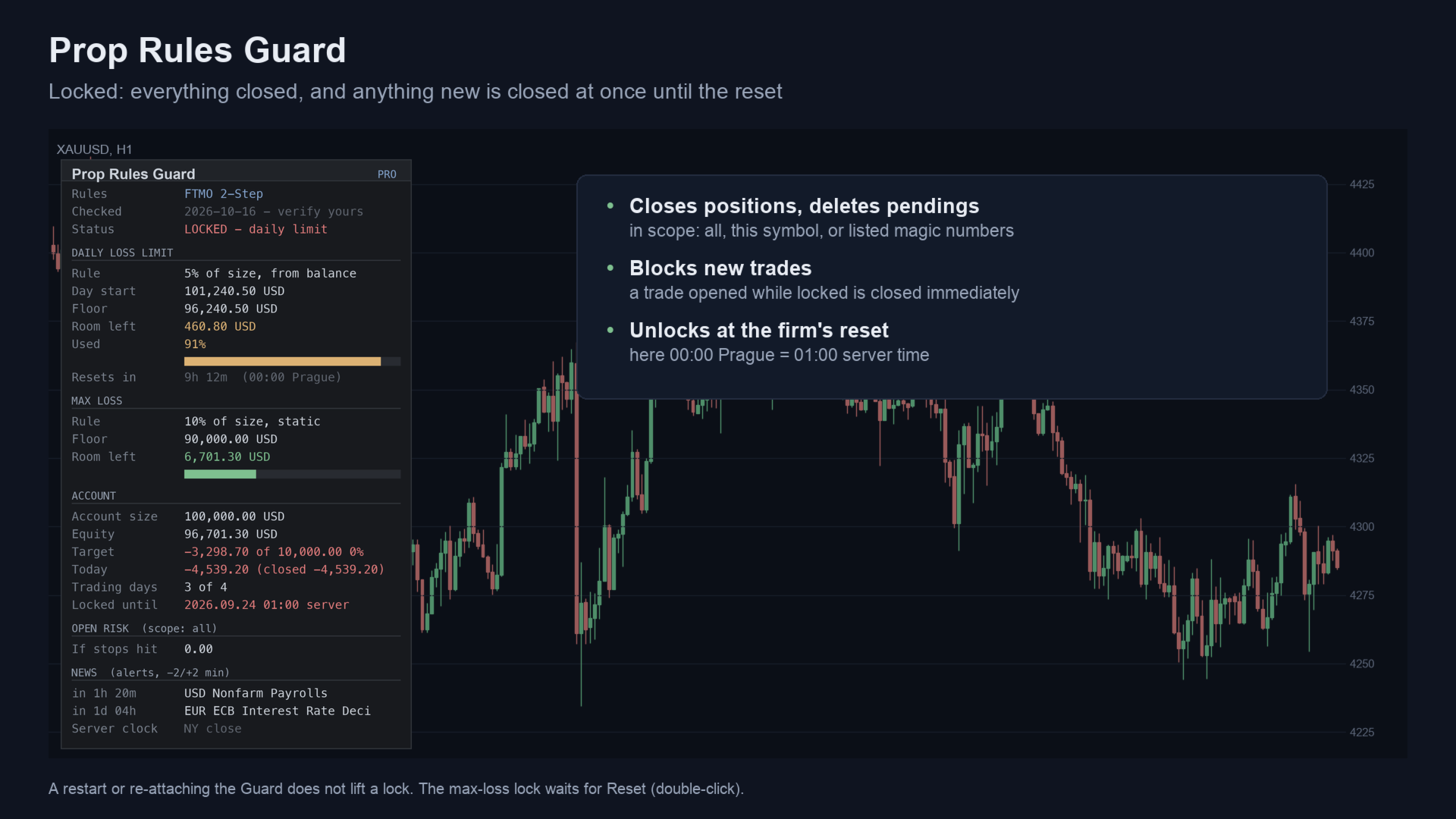
- Lock: at 90% of a limit (adjustable), it deletes pending orders, closes positions and closes anything opened while locked. A restart or re-attaching does not lift a lock. A daily lock ends at the reset. A max-loss lock ends when you press Reset.
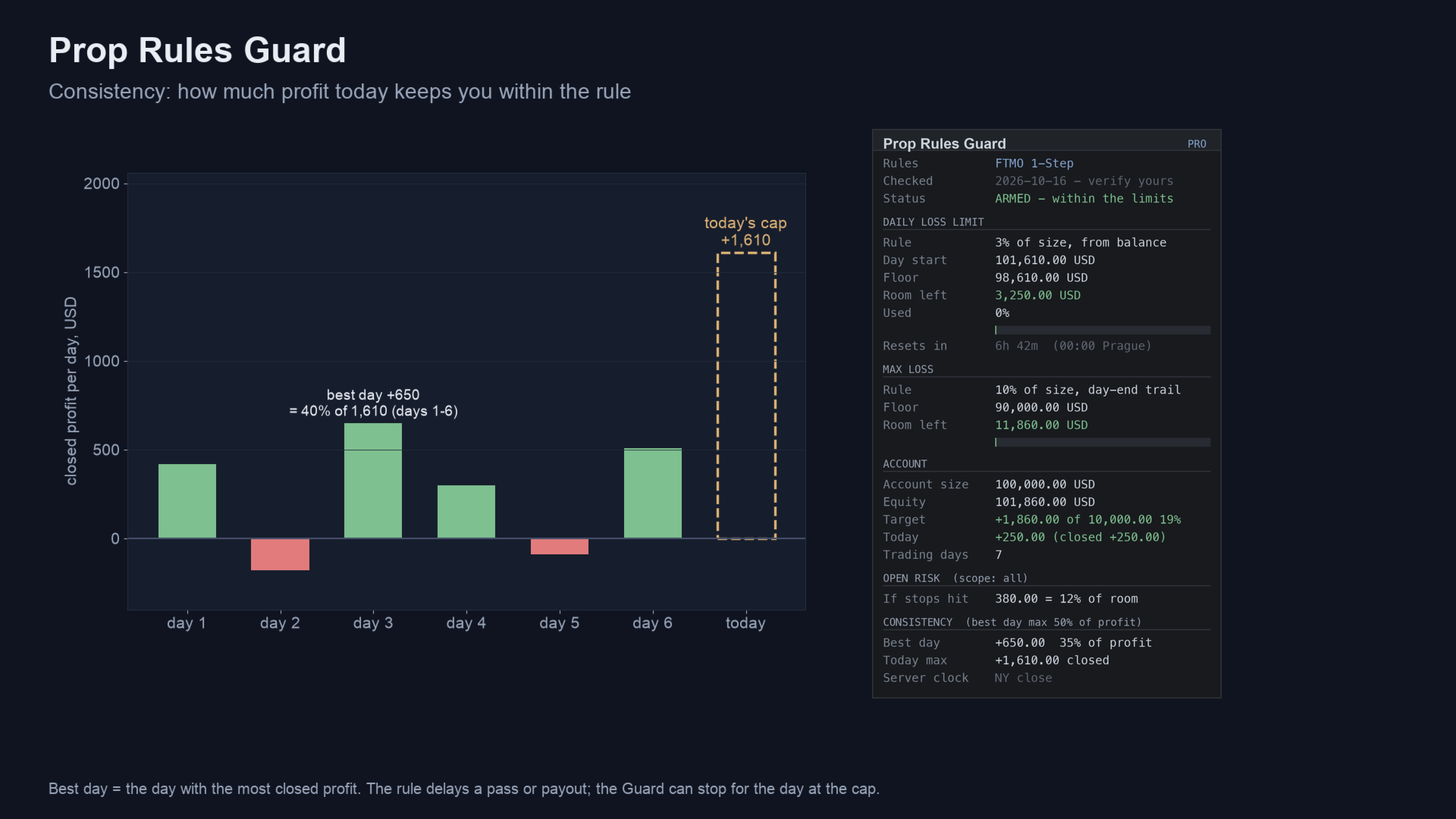
- Consistency: tracks your biggest profit day as a share of total profit. It shows today's profit cap that keeps you within the rule, with an optional stop for the day at the cap.
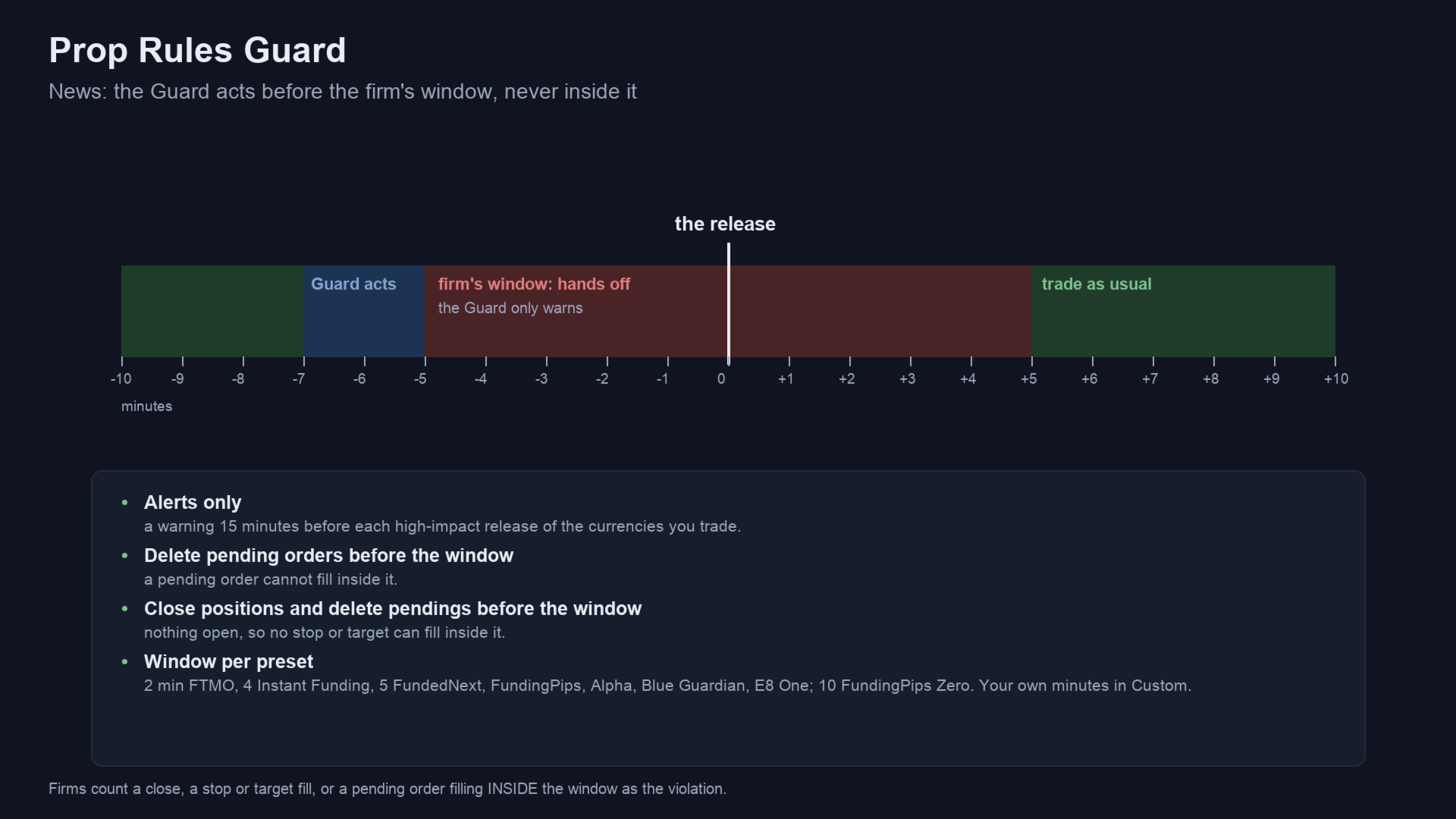
- News: alerts before high-impact releases from the MetaTrader economic calendar. It can also delete pendings or close positions before the firm's window opens. Inside the window it only warns, because at most firms a close inside the window is itself the violation.
Risk caps and targets
- Caps: floating-loss caps for all trades or per symbol, open risk at your stop losses against the room left, and positions without a stop loss.
- Targets: profit target and trading days on the panel, with an optional lock when the target is reached.
- Scope: every position, this chart's symbol, or listed magic numbers (0 = manual trades).
Firm presets
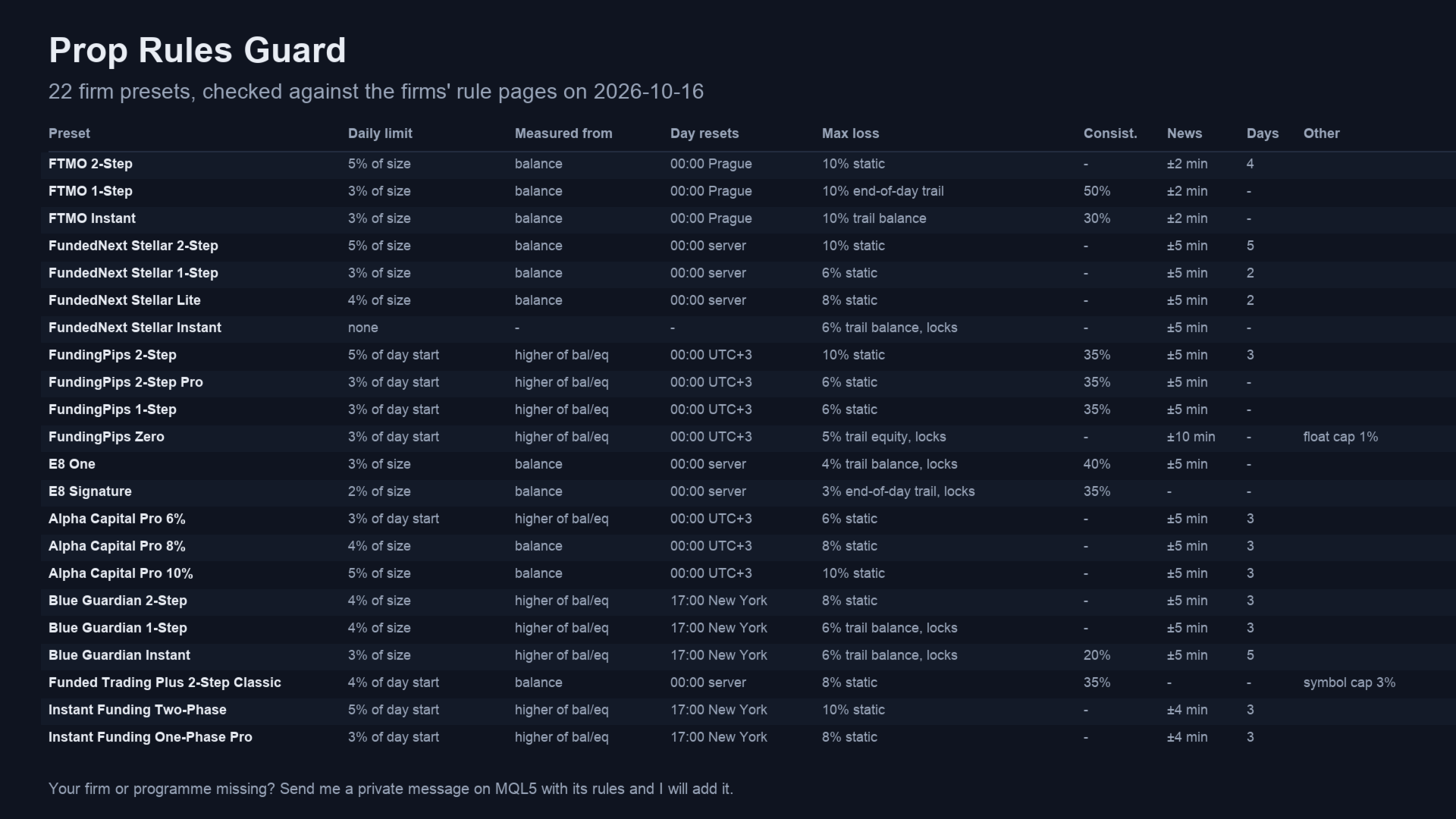
There are 22 presets, checked against each firm's own rule pages on 2026-10-16. FTMO: 2-Step, 1-Step, Instant. FundedNext Stellar: 2-Step, 1-Step, Lite, Instant. FundingPips: 2-Step, 2-Step Pro, 1-Step, Zero. E8: One, Signature. Alpha Capital: Pro 6%, 8%, 10%. Blue Guardian: 2-Step, 1-Step, Instant. Funded Trading Plus: 2-Step Classic. Instant Funding: Two-Phase, One-Phase Pro. The Custom preset takes any other rule set. Firms change their rules. The panel shows the date each preset was checked, so compare it with your firm's current rules.
Your firm is not listed? Send me a private message here on MQL5 with these details.
- Your firm and programme.
- The daily loss limit (% and what it is measured from).
- The daily reset time and time zone.
- The max loss and its type (static or trailing).
- Any consistency or news rule.
I will add it as a preset in the next update. Until then, the Custom preset takes the same settings.
Before you use it on a firm account
- Check your firm's policy on Expert Advisors. Some firms allow risk-management EAs, some need approval, some forbid any purchased EA. The Guard only closes trades, but it is still an EA.
- Algo Trading: it must be on. Otherwise the Guard can only warn. The panel turns red when it is off.
- The buffer lowers the chance of touching a limit. It cannot remove it. In a fast market, a gap or a closed market, a close can fill beyond the lock level, even beyond the floor.
- One chart: attach it to one chart only. A second copy on the same account stays inactive.
Main inputs
| Input | Default |
|---|---|
| Firm preset | Custom - or one of the 22 presets |
| Account size | 0 - 0 takes the first deposit |
| Profit target of this phase | 10% |
| Custom rules | daily %, measured from, reset zone and hour, max % and type, consistency, trading days, news window |
| Lock at % of a limit used | 90 |
| Lock for the day / at max loss / at target / at the consistency cap | on / on / off / off |
| News mode | Alerts only - or delete pendings, or close and delete, before the window |
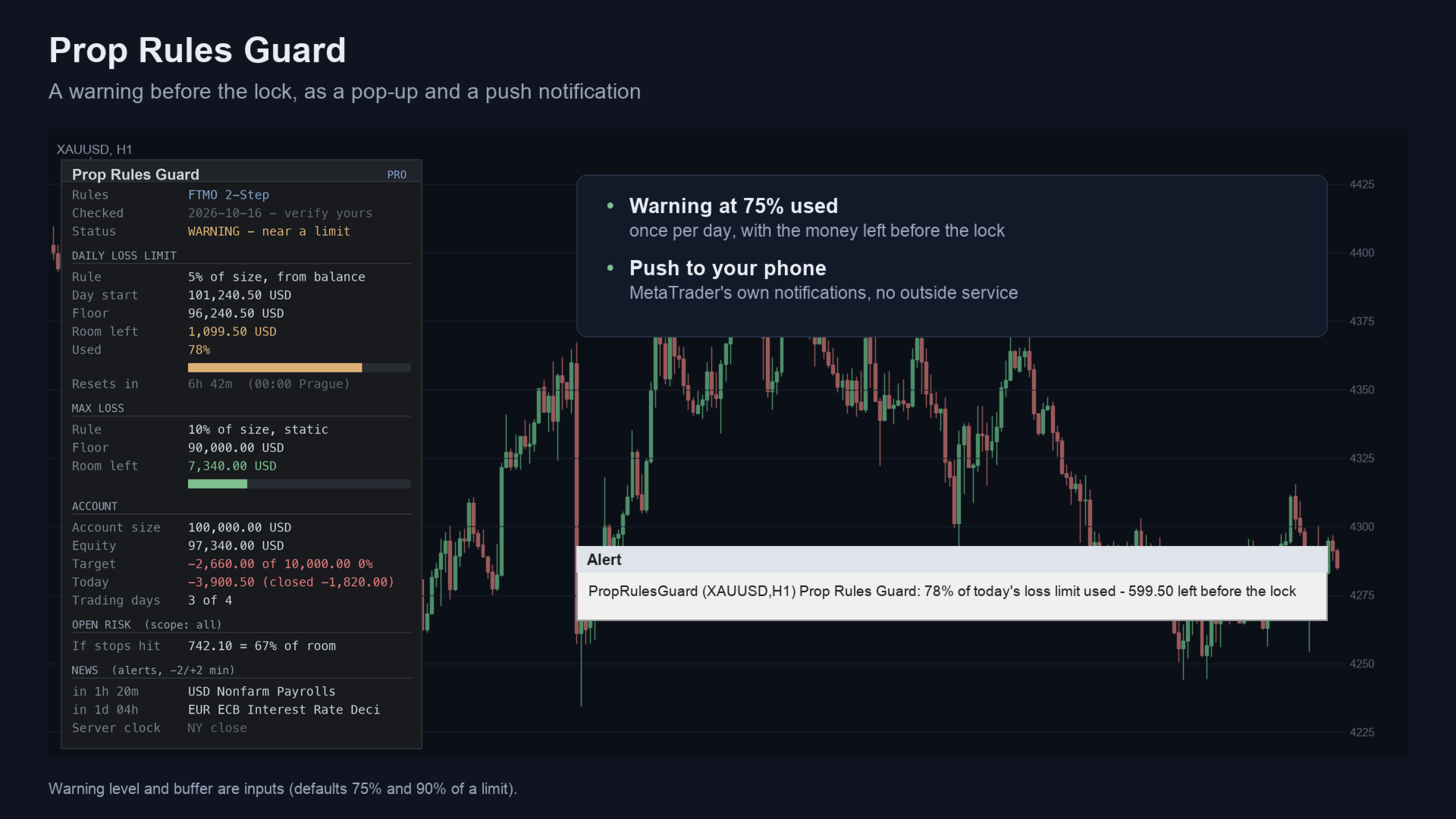
| Warn at % of a limit used | 75; pop-up and push notification |
Strategy Tester
In the tester only, the Guard opens small demo trades so you can watch it lock and release in visual mode. On a live or demo account it never opens a trade. In the tester the news filter uses a built-in list of high-impact USD releases, because the economic calendar is not available there.
Related products
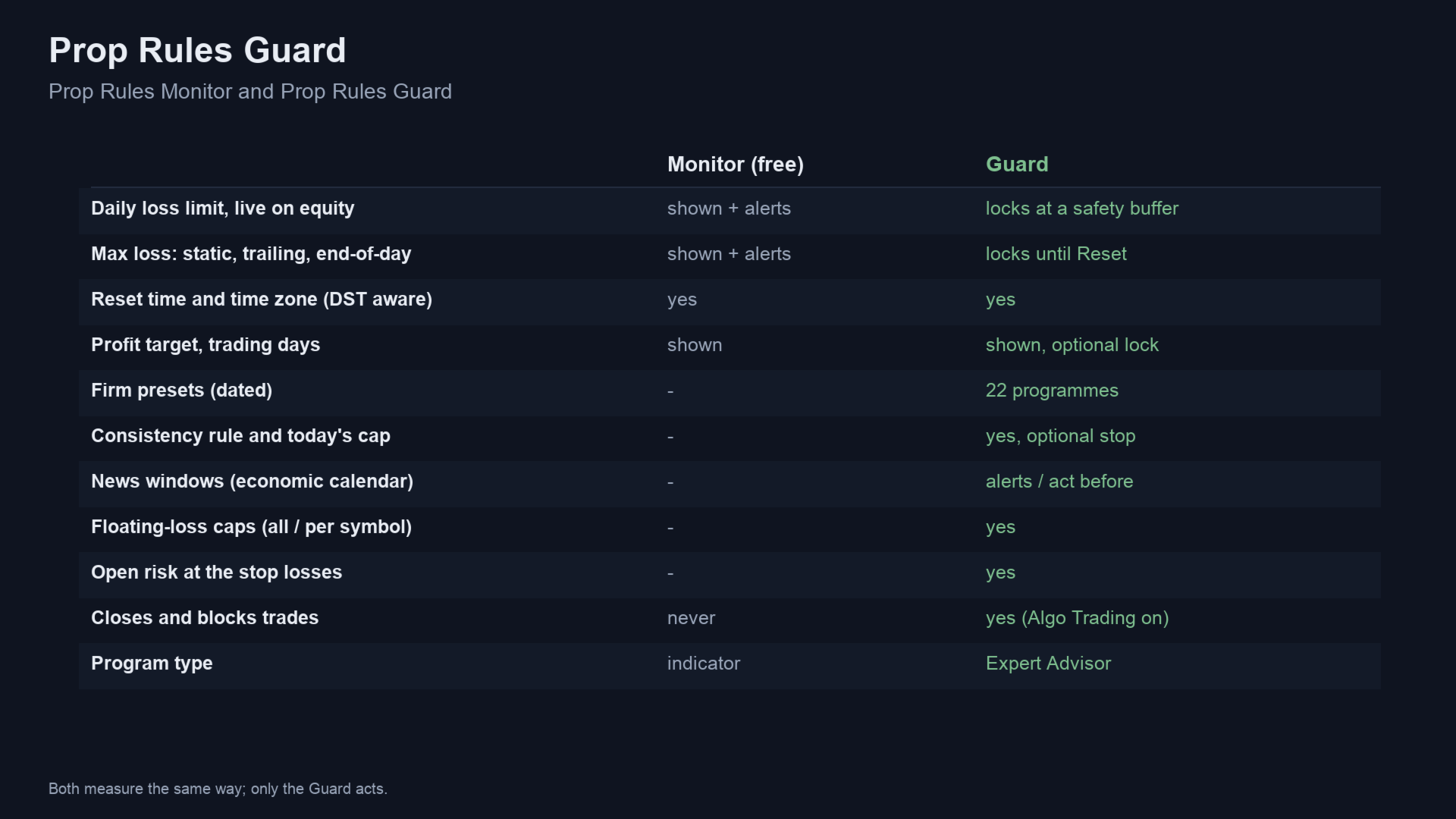
- Prop Rules Monitor - the same daily and max-loss measurements with alerts, without closing anything.
- Risk Trade Manager MT5 - sizes and sends orders from chart lines. It refuses new orders while this Guard's lock is on.
- All my products on MQL5
Questions
- Does it stop rule breaks? It closes and blocks trading before a limit, but fills in fast markets can go further. It lowers the risk. It cannot ensure a pass.
- Will my firm accept it? That depends on the firm's EA policy. Ask the firm if you are unsure.
- Does it work with other EAs? Yes. It closes their trades too, unless you limit the scope by magic number.
- What if the terminal is off? Nothing runs while the terminal is off. A VPS keeps it running.
If it helps your trading, a short review on this page helps other traders find it.
Questions: use the comments on this page or send me a message on MQL5.
Trading involves risk. The Guard enforces limits you set; it does not predict the market and does not ensure that an account passes or stays funded.