Nasdaq H1 Pullback Expert
- Experts
- Version: 1.0
- Activations: 5

Nasdaq H1 Pullback Expert
Nasdaq H1 Pullback Expert is an automated trading Expert Advisor developed for MetaTrader 5 and designed specifically for Nasdaq-100 related instruments.
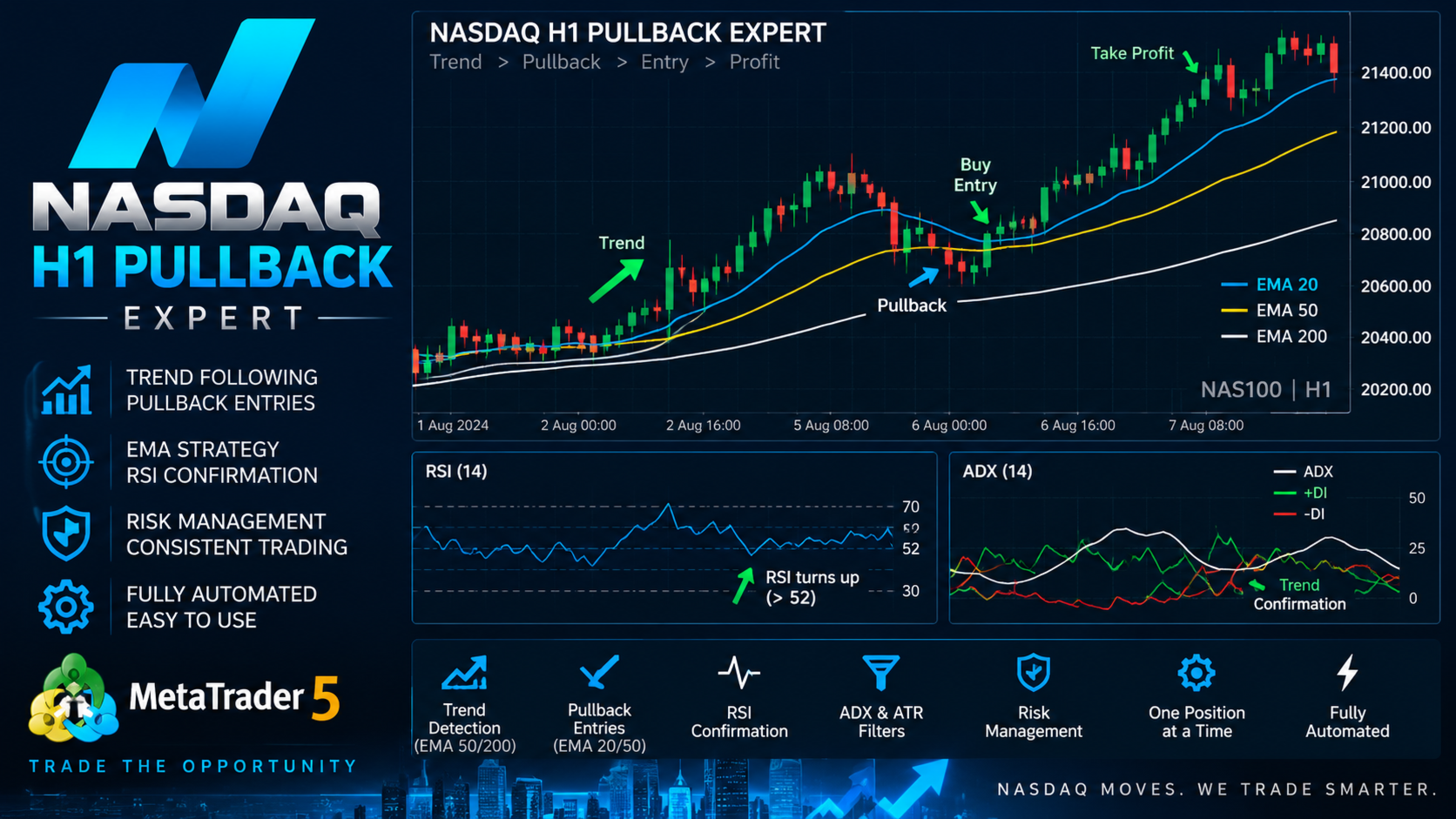
The strategy is built around trend pullbacks. Instead of chasing price after a strong move or entering immediately on a breakout, the EA first identifies the main market trend, waits for a temporary pullback, and then looks for confirmation that momentum is returning in the direction of the prevailing trend.
TRADING CONCEPT
The EA follows a three-stage process:
1. Identify the main trend
2. Detect a pullback toward the EMA zone
3. Confirm that momentum is returning in the trend direction
All trading signals are calculated using completed H1 candles.
TREND DETECTION
The strategy uses EMA 50 and EMA 200 to determine the primary market direction.
BUY trend conditions include:
• Price above EMA 200
• EMA 50 above EMA 200
• EMA 50 showing an upward slope
SELL trend conditions include:
• Price below EMA 200
• EMA 50 below EMA 200
• EMA 50 showing a downward slope
PULLBACK DETECTION
EMA 20 and EMA 50 are used to identify the pullback area.
During an established bullish trend, the EA waits for price to temporarily move back toward the EMA 20 / EMA 50 area.
During an established bearish trend, the EA waits for price to temporarily move upward toward the same dynamic EMA zone.
The default Pullback Lookback is 5 completed H1 candles.
The purpose is to avoid chasing extended price movements and instead search for entries after a controlled retracement.
MOMENTUM CONFIRMATION
A pullback alone is not sufficient to open a position.
The EA uses RSI and candle direction to confirm that momentum is returning.
For BUY opportunities:
• Main trend must be bullish
• A valid pullback must have occurred
• RSI must recover above the configured bullish level
• RSI must be moving upward
• The latest completed H1 candle must confirm bullish momentum
For SELL opportunities:
• Main trend must be bearish
• A valid pullback must have occurred
• RSI must fall below the configured bearish level
• RSI must be moving downward
• The latest completed H1 candle must confirm bearish momentum
Default RSI settings:
RSI Period: 14
BUY Level: 52
SELL Level: 48
ADX TREND STRENGTH FILTER
An optional ADX filter can be used to avoid weak market conditions.
Default settings:
ADX Period: 14
Minimum ADX: 20
ADX Filter: Enabled
Directional Indicators (+DI and -DI) are also used to confirm the direction of the trend.
ATR VOLATILITY FILTER
The EA includes an optional ATR filter to evaluate market volatility.
This can help prevent entries when volatility is outside the configured acceptable range.
ATR Period: 14
RISK-BASED POSITION SIZING
The EA can automatically calculate position size according to available free margin and the selected risk percentage.
Default Risk Per Trade: 1%
The calculation considers:
• Available free margin
• Stop Loss distance
• Symbol tick value
• Symbol tick size
• Minimum and maximum trading volume
• Broker volume step
• Required margin
If sufficient margin is not available for the calculated volume, the EA can reduce the position size.
If the minimum permitted volume cannot be opened safely, no trade is placed.
STOP LOSS MANAGEMENT
The EA combines ATR-based and pullback swing-based Stop Loss calculations.
Default ATR Stop Loss:
1.5 × ATR
For BUY positions, the recent pullback swing low can also be considered.
For SELL positions, the recent pullback swing high can also be considered.
The strategy compares the calculated protection levels and uses the safer distance while respecting the broker's trading specifications.
TAKE PROFIT
Take Profit is calculated from the actual Stop Loss distance.
Default Reward/Risk Ratio: 2.0
This creates an initial target of approximately:
1:2 Risk/Reward
DAILY LOSS PROTECTION
The EA includes a daily risk protection system.
Default Daily Loss Limit: 3%
When the configured daily equity loss limit is reached, the EA stops opening new positions for the remainder of the trading day.
Existing position management can continue.
The daily protection resets for the next trading day.
ADDITIONAL PROTECTION FEATURES
• Maximum one position per symbol and Magic Number
• Maximum one new trade per H1 candle
• No Martingale
• No recovery grid
• No averaging down
• Maximum spread filter
• Free margin verification
• Broker volume validation
• Trading session checks
• Stop Level and Freeze Level checks
• Optional ATR-based trailing stop
• Trailing Stop disabled by default
SUPPORTED NASDAQ SYMBOLS
The EA is designed to recognize common Nasdaq-100 symbol variations used by different brokers, including:
NAS100
US100
USTEC
NASDAQ100
NDX
USTECH100
USTECH_100
Broker-specific prefixes or suffixes may also be supported.
DEFAULT STRATEGY SETTINGS
Timeframe: H1
Fast EMA: 20
Trend EMA: 50
Slow EMA: 200
Pullback Lookback: 5
RSI Period: 14
BUY RSI Level: 52
SELL RSI Level: 48
ADX Period: 14
Minimum ADX: 20
ATR Period: 14
Stop Loss ATR Multiplier: 1.5
Reward/Risk Ratio: 2.0
Risk Per Trade: 1%
Daily Loss Limit: 3%
Trailing Stop: Disabled
IMPORTANT
Nasdaq-100 instruments can have different symbol names, spreads, contract sizes, tick values and trading conditions depending on the broker.
The EA should always be tested using your broker's historical data in the MetaTrader 5 Strategy Tester before considering live trading.
Forward testing on a demo account is also recommended.
RISK WARNING
Trading leveraged financial instruments involves significant risk. Pullback signals can fail and market conditions can change rapidly.
Historical results and backtests do not guarantee future performance.
Nasdaq H1 Pullback Expert does not guarantee profits or eliminate trading risk. Users are responsible for selecting appropriate risk parameters and evaluating the strategy under their own broker and market conditions.