TauronX
- Experts
- Version: 2.22
- Activations: 5

What is TauronX
TauronX is a fully automated Expert Advisor (EA) for trading XAUUSD (gold). It is not a generic EA adapted to gold — it is a system designed and validated by backtesting specifically under XAUUSD's own conditions (volatility, typical spread, trend behavior).
The robot combines three decision layers working together: a grid strategy with adaptive spacing between levels, a dynamic hedge mechanism that protects the basket in proportion to its real exposure, and a trend filter that avoids opening new positions against strong market moves. No manual management is required — the only setting you need to choose is a risk profile (Conservative, Moderate, or Aggressive).
How the strategy works
1. Grid with adaptive spacing
The EA trades in cycles ("baskets"): it opens an initial position and, if price moves against it, adds new levels in the same direction, with each level's lot size multiplied by a fixed factor relative to the previous one (classic grid/martingale style). The distance between levels is not fixed — it uses a compounded percentage increment (each new level sits ~17% closer than the previous one), which tightens the grid as price moves further away instead of keeping constant spacing.
2. Trend filter
Before opening a new position (whether it's the first order of a new cycle or another level added to an already-open basket), the EA checks how far price is from a long-term moving average (50-period EMA on the H4 chart). If price is "too far" from that average — a sign of a strong trend — the EA pauses new positions against that trend, avoiding reinforcement of a grid exactly during the strongest, most sustained market moves (historically the costliest scenario for any grid-based strategy).
3. Dynamic hedge proportional to exposure
Once the basket reaches a certain number of levels, the EA opens a hedge position in the opposite direction. Its size is not fixed: it is calculated as a percentage of the TOTAL exposure of all open positions in the basket (not just the last order), which prevents the hedge from being under-sized during fast moves. The hedge is actively managed — it can be rolled forward as the basket evolves — and the EA aims to close the basket and its hedge together as soon as their combined result turns positive.
Risk management
Risk management is built in independent layers, each covering a different scenario:
- Risk profile (the only setting exposed to the user): sets, in one choice, the grid's multiplier factor, the maximum number of levels per basket, the basket stop (% of balance), and the hedge coverage percentage. Three options: Conservative, Moderate, and Aggressive (details in the table below).
- Basket stop: closes the current basket (grid + hedge) if its combined loss reaches a percentage of balance defined by the chosen profile.
- Account-wide stop: halts the EA's trading if the account's cumulative loss reaches 30% of balance (a last-line safeguard, independent of individual baskets).
- Margin filters: new entries are only allowed while margin level stays above 180% and the account's floating drawdown stays below 29%.
- Spread control: no new order (grid or hedge) is sent while the current spread is above 30 points, avoiding entries under abnormal market conditions (session opens, news events, etc.).
- Time-based safety valves: if the hedge stays stuck unable to roll for about 1 day (288 M5 bars), the EA forces a roll; if a basket stays open for more than about 3 days (864 M5 bars) without resolving on its own, the EA forces the entire cycle closed. These valves exist to eliminate the risk of a position getting stuck indefinitely.
- Equity-based dynamic lot sizing (optional): instead of a fixed lot size, the EA can scale up the base lot of each NEW basket as account equity grows, in steps (e.g., every 50,000 of equity), following the same risk-profile logic. A basket that is already open never has its base lot changed mid-way.
Available risk profiles
| Profile | Multiplier | Max. levels per basket | Basket stop | Hedge coverage | Validation |
|---|---|---|---|---|---|
| Conservative | 1.40 | 3 | 8% of balance | 75% of exposure | Reduced-risk scaling derived from the validated configuration — not yet backtested on its own |
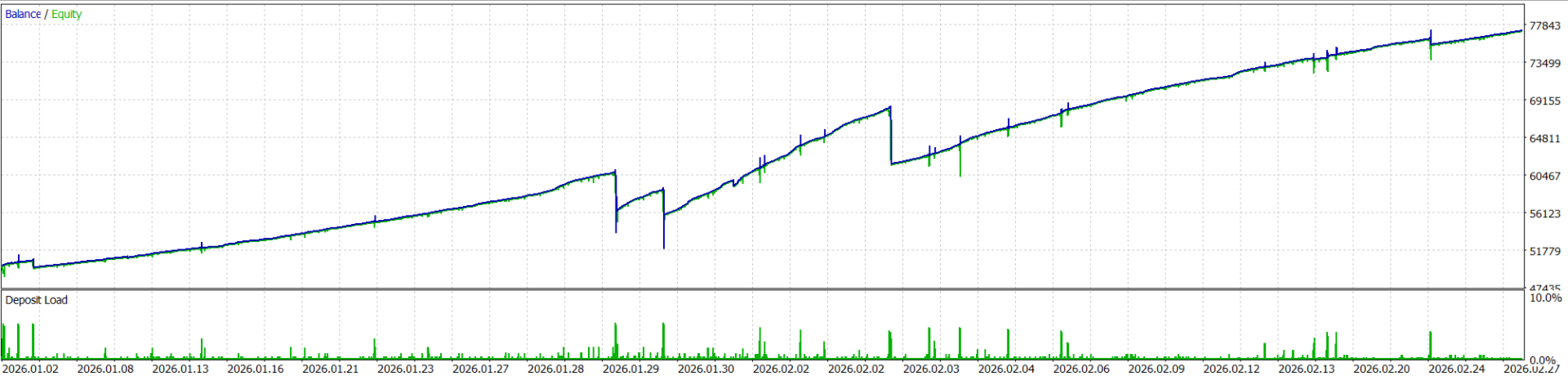
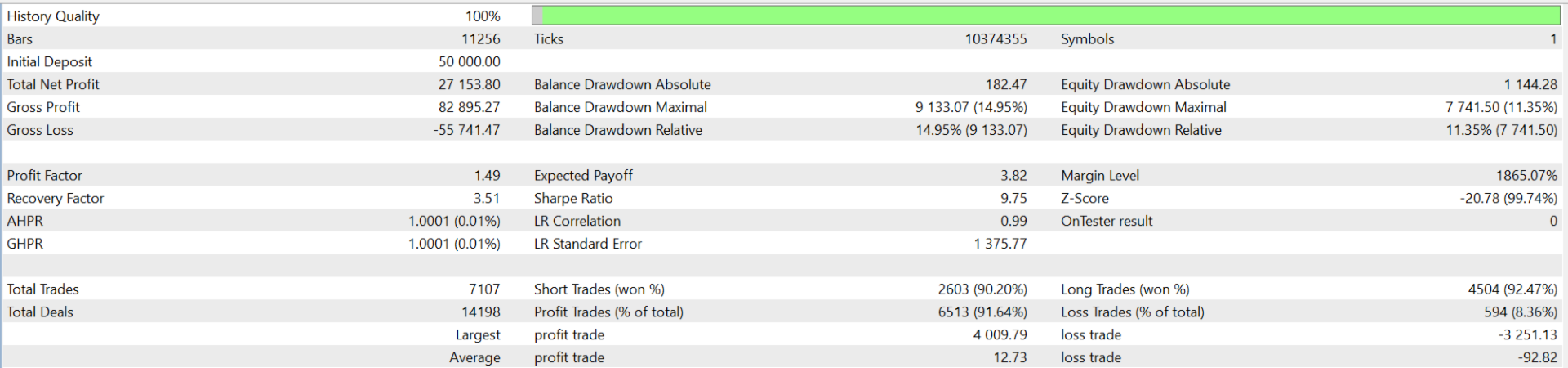
| Moderate | 1.65 | 5 | 12% of balance | 60% of exposure | Homologated configuration, validated by backtest |
| Aggressive | 1.85 | 7 | 16% of balance | 45% of exposure | Increased-risk scaling derived from the validated configuration — not yet backtested on its own |
The rest of the configuration (trend filter, level-spacing method) is fixed and identical across all three profiles — it is the part of the strategy that was validated as a whole and does not change with the risk profile.
User-configurable parameters
| Parameter | Default | Description |
|---|---|---|
| Risk Profile | Moderate | Risk profile — automatically sets the multiplier, max levels, basket stop, and hedge coverage |
| Lots | 0.01 | Base lot size used when dynamic lot sizing is disabled |
| Dynamic Lot Active | true | Enables automatic base-lot scaling by equity |
| Dynamic Lot Profile | Moderate | Risk profile used exclusively for the dynamic lot calculation |
| Equity Step | 50,000 | Equity required for each lot-size step increase |
| Base Lot per profile | 0.01 / 0.02 / 0.03 / 0.05 | Lot size at the 1st step, per dynamic-lot profile |
| Show Panel | true | Shows or hides the on-chart information panel |
All the backtest-validated strategy logic (spacing, hedge, trend filter) stays fixed — the user does not need to (and cannot) adjust these individually, removing the risk of de-calibrating the tested configuration.
Information panel
The EA displays an on-chart panel with real-time information: broker date/time, account data (broker, name, balance, equity, open P/L, daily P/L, max drawdown on the asset), position status (buys, sells, active hedge), and current spread — for monitoring only, with no manual controls for opening or closing positions.
Technical requirements
- MT5 account in Hedging mode (required — the EA holds simultaneous positions on the same symbol, the grid plus the hedge leg; on a Netting account this is not possible, and the EA refuses to initialize).
- Minimum capital:
- Cent account - 500 USD
- Standard account - 50,000 USD
- Symbol: XAUUSD.
Disclamer
Past results do not guarantee future results. Trading derivatives and Forex involves significant risk of capital loss—never trade with capital you cannot afford to lose.