
Joon Trade Planner
- Indicateurs
- Version: 2.18

Thank you for using Joon Trade Planner.
Joon Trade Planner is a visual trade planning tool for MetaTrader 5 designed to help traders prepare BUY and SELL scenarios before placing real market orders.
The indicator allows users to quickly configure trade direction, position size, take-profit (TP), stop-loss (SL), and visualize potential risk and reward directly on the chart.
This indicator does not place any real orders.
It is intended solely for trade planning and risk management.
2. FeaturesInteractive Trading Panel
Control your trading plan directly from the chart.
BUY / SELL Direction
Switch instantly between BUY and SELL planning modes.
Adjustable Lot Size
Increase or decrease lot size using the built-in controls.
Draggable TP Line
Move the Take Profit line freely on the chart.
Draggable SL Line
Move the Stop Loss line freely on the chart.
Automatic Risk/Reward Calculation
Displays:
- TP Distance
- SL Distance
- Estimated Profit
- Estimated Loss
- Risk/Reward Ratio
Persistent Settings
The following settings remain unchanged even after changing chart timeframes:
- Lot Size
- BUY / SELL Direction
- Current Planning State
- Copy the indicator file into:
MQL5\Indicators\Market\ - Restart MetaTrader 5.
- Open a chart.
- Drag Joon Trade Planner onto the chart.
- Enable DLL imports only if required.
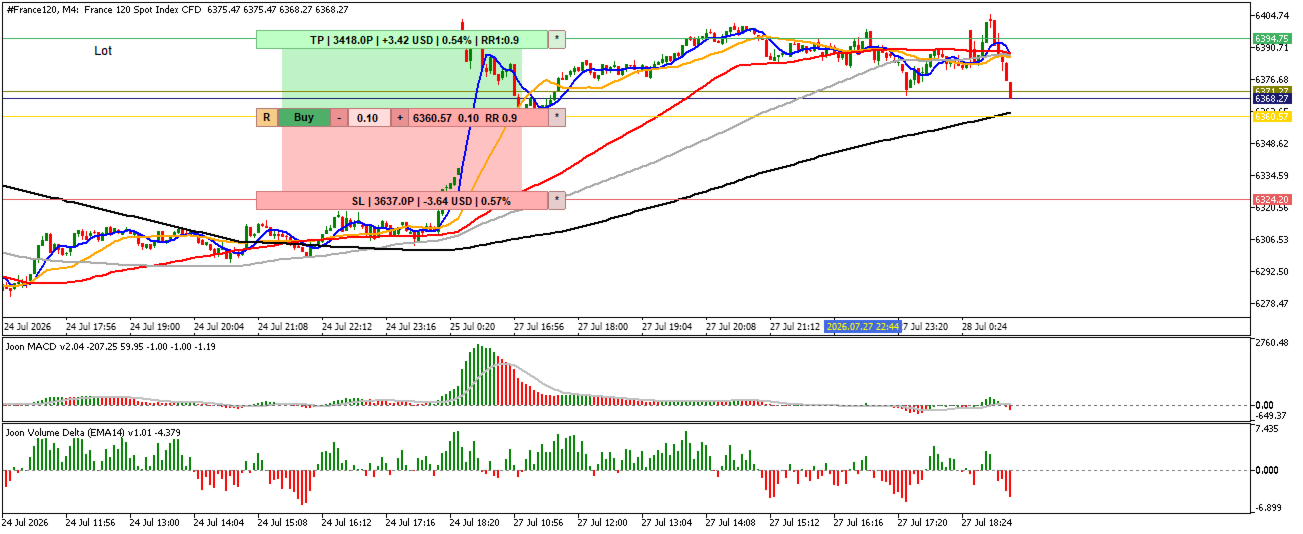
The interface consists of three main sections.
TP Panel
Displays
- Take Profit distance
- Estimated profit
- Profit percentage
- Risk/Reward ratio
The TP line can be dragged with the mouse.
Main Control Panel
Contains
- Reset button
- BUY / SELL selector
- Lot size controls
- Current market price
- Risk/Reward information
SL Panel
Displays
- Stop Loss distance
- Estimated loss
- Loss percentage
The SL line can also be dragged.
5. How to UseStep 1
Select BUY or SELL.
Step 2
Adjust your preferred lot size.
Step 3
Move the TP line to your target price.
Step 4
Move the SL line to your desired stop level.
Step 5
Review
- Estimated Profit
- Estimated Loss
- Risk/Reward Ratio
before entering a real position.
6. Risk and Reward PlanningThe indicator continuously calculates:
Estimated Profit
Estimated Loss
Risk Percentage
Reward Percentage
Risk/Reward Ratio
This helps traders evaluate whether a trade setup is worth taking.
7. Timeframe BehaviorChanging chart timeframes does not reset your planning session.
The following values are preserved automatically:
- Selected Lot Size
- BUY/SELL Mode
- Planning Status
This allows uninterrupted trade planning across multiple chart periods.















L'utilisateur n'a laissé aucun commentaire sur la note