
NotifyMe Free for MT4

5

Overview

The Expert Advisor sends notifications to a mobile phone, via e-mail or activates an audio alarm in case a position is opened or closed on the trading account. The Expert does not trade, it only monitors your account and orders.


Launching the Expert Advisor

For the Expert Advisor to work, place the file NotifyMe_free.ex4 in terminal_folder/experts (probably it will be placed there automatically). NotifyMe_free should appear in the Expert Advisors section of the Navigator window. If not, restart the MetaTrader 4 terminal.

For the Expert Advisor to work, allow using Expert Advisors in the setting of MetaTrader 4. To do it, go to Tools menu, then Options, and then select Expert Advisors tab. Enable the option Enable Expert Advisors (except the Custom Indicators and Scripts).

To launch the Expert Advisor, right-click its name in the Navigator window and select "Attach to chart" or drag and drop it on the chart by mouse. The windows of the Expert Advisor's parameters will appear. Set the desired parameters and click OK.

The Expert Advisor can be attached to the chart of any financial instrument Since the EA analyzes the trade account state at every tick coming, to decrease delays of notifications it is recommended to run the EA on a symbol, where ticks come most often (for example, one of Forex currency pairs:: EURUSD, GBPUSD, USDCHF or USDJPY). on any time frame.


Expert's Input Parameters

  • Push_Notify_Enable - enable notifications sent to the mobile terminal (true - enable notifications, false - disable notifications);
  • Push_Notify_Interval - minimum time interval (in seconds) between notifications sent to the mobile terminal;
  • Push_Length_Limit - maximum length of a message sent to the mobile terminal;
  • Mail_Notify_Enable - enable notifications sent via e-mail (true - enable notifications, false - disable notifications);
  • Mail_Notify_Interval - minimum time interval (in seconds) between notifications sent via e-mail;
  • Sound_Notify_Enable - enable audio alarm notifications (true - enable notifications, false - disable notifications);;
  • Sound_Notify_Interval -  minimum time interval (in seconds) between sound alarm notifications;
  • Sound_File_Name - name of the alarm sound file activated when an event occurs;
  • Use_Local_Time - time specified in messages sent to the mobile terminal or via email (false - trade server time, true - time of the PC the Expert Advisor is running at);
  • Show_Information - show (true) or hide (false) information about the conditions of notifications activation (Show, Hide).


Sending Notifications to the Mobile Terminal

First of all, you should have mobile version of MetaTrader 4 or MetaTrader 5 terminal installed on your Android or iOS powered device to receive notifications. You can download MetaTrader 4 or MetaTrader 5 mobile terminal for Android, as well as MetaTrader 4 or MetaTrader 5 mobile terminal for iOS for free.

You should also allow sending push notifications in MetaTrader 4 trading terminal, on which the EA is to be launched. To do this, enter Tools – Options – Notifications tab, turn "Enable Push Notifications" parameter on and specify MetaQuotes_ID that can be found on Messages tab of the mobile terminal.

"Push_Notify_Enable" parameter allows you to enable or disable sending notifications to the mobile terminal.

"Push_Notify_Interva" input parameter allows you to set the minimum time interval (in seconds) between notifications sent to the mobile terminal. The Expert Advisor will not send a new notification if less than specified time has passed since sending the previous one. It will save that notification instead. When the time specified in "Push_Notify_Interval" parameter passes since sending the previous notification, the Expert Advisor will send a message containing descriptions of all events accumulated by that time. There is a limitation (of push notifications service developed by MetaQuotes) on the number of sent messages per unit time: no more than two messages per second and no more than 10 messages per minute (if this limitation is violated, sending push notifications can be blocked by MetaQuotes). Therefore, it is not recommended to set very small values (especially in case of the events' high frequency on a trading account).

" Push_Length_Limit" parameter allows you to set the maximum number of symbols in a message sent to the mobile terminal. If a message is longer, it is truncated down to the length specified in the parameter. The maximum permissible length of a push message is 255 characters. A message consists of two parts: account number with account owner's name (generated automatically) and a text description of an event generated by an Expert Advisor (its length is limited by "Push_Length_Limit" parameter). In some cases, a message may become invisible in the mobile terminal if its length exceeds 255 characters. "Push_Length_Limit" parameter value should be selected based on the length of the automatically added part of the message (account number and owner's name).


Sending Notifications Via E-Mail

To receive notifications via e-mail, you should allow sending emails in the settings of MetaTrader 4 trading terminal, at which NotifyMe Free for MT4 is launched. To do this, enter Tools – Options – Email tab, turn Enable parameter on and specify your e-mail account and SMTP e-mail server parameters.

Messages sent by the Expert Advisor via e-mail have subject "Account account_number notification". 

"Mail_Notify_Enable" parameter allows you to enable or disable sending notifications via e-mail.

"Mail_Notify_Interval" input parameter allows you to set the minimum time interval (in seconds) between notifications sent via e-mail. The Expert Advisor will not send a new notification if less than specified time has passed since sending the previous one. It will save that notification instead. When the time specified in "Mail_Notify_Interval" parameter passes since sending the previous notification, the Expert Advisor will send an e-mail containing descriptions of all events accumulated by that time. Some e-mail servers perceive frequent emails as harmful actions. Therefore, it is not recommended to set too small values for "Mail_Notify_Interval" parameter.


Audio Alarm Notifications

" Sound_Notify_Enable" parameter allows you to enable or disable sound notifications.

"Sound_Notify_Interval" input parameter allows you to set the minimum time interval (in seconds) between sound notifications.

"Sound_File_Name" allows you to set the name of an audio file to be activated when a notification arrives. A file in .wav format should be located in terminal_folder/sounds or its subdirectory.


Displaying the Data on Screen

If Show_Information parameter is set to true, then the information about the server and local time will be displayed in the upper left corner of the chart as well as the settings for each notification type.

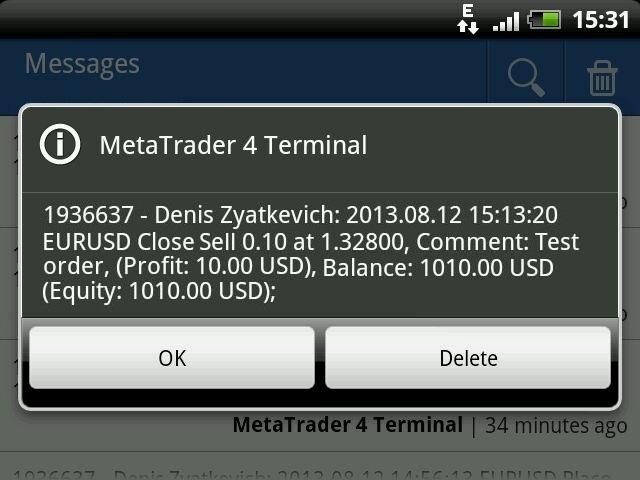
Examples of messages sent by the program

  • Opening pending order: 2013.08.12 14.56.49 Sell Limit -> Sell at 1.32900, SL: 1.32980, TP: 1.32800, Comment: Test order;
  • Opening market position: 2013.08.12 14:56:52 EURUSD Sell 0.10 at 1.32900, SL: 1.32980, TP: 1.32800, Magic: 17;
  • Closing position: 2013.08.12 15:13:20 EURUSD Close Sell 0.10 at 1.32800, Magic: 17, (Profit: 10.00 USD), Balance: 1010.00 USD (Equity: 1010.00 USD);


Full Version and Version for MetaTrader 5

There is a full version of the program - NotifyMe for MT4. Unlike the free version, it allows sending notifications about placing or deleting pending orders, modifications of order parameters (open price, Stop Loss, Take Profit), change of balance and leverage, decrease of the account equity and free margin as a ration to margin. There is also a free and a full version of NotifyMe for the MetaTrader 5 trading platform that have the same features.


Warning

The developer of NotifyMe Free for MT4 is not responsible for possible modification or termination of the program's operation due to changes in MQL4 language implemented by the trading terminal and language developer - MetaQuotes company. The developer of NotifyMe Free for MT4 is not responsible for any loss, damage or missed profits caused by the use of the program, its work or malfunction.


Contact Information

If you have any questions about the application, comments on its operation or suggestions for future improvements, please send them by email or leave your personal messages via this web site. Let me know what products (Expert Advisors, indicators, scripts) you would like to see.
Avis 9
Oleg Pavlenko
17847
Oleg Pavlenko 2023.06.07 09:29 
 

Хорошая утилита. Не хватает только названия брокера в сообщении. А то когда много счетов, то без названия брокера сложно разобраться с какого именно терминала пришло сообщение. А в остальном, утилита отрабатывает на все 100%. Советую!

Nathan Rodrigues
18
Nathan Rodrigues 2022.11.27 12:46 
 

Super useful and works as desired.

Al Rizqi
38
Al Rizqi 2022.01.30 18:27 
 

What a useful EA. Thank you

Produits recommandés
OTRX Fimathe Backtest is a tool for the Trader or Enthusiast who uses the Fimathe technique created by Trader Marcelo Ferreira to carry out his training and validate if he can obtain profitability. In this tool you will be able to: 1. Define whether you are looking for a buy or sell entry. (Trend). 2. Define by clicking twice on the horizontal lines where your Reference Zone and your Neutral Zone will be. 3. Monitor the entry, subcycle and exit of the trade. 4. Trading Summary, Daily, Week
FREE
Confirmation Entry
Fawwaz Abdulmantaser Salim Albaker
Dear Valuable Friends ,   This New Free EA works as below : - waiting the M15 diagram to show the reverse or continuing of the trend - confirm  signal on H4 Diagram . - wait till the entry strategy is being extremely true  - put direct entry point (sell or Buy ) and put Pending Orders (P.O) in grid   All these will be Active after manually set in common parameters that u fully controlled . Check the pics to recognize .. for any Question write to me directly .. Best Luck  Best Luck  
FREE
Update:ver1.53 (2023/08/16) ・概要と必要環境 手動発注もしくは他ツール等からの発注に対し、指値発注予約の複製を生成します。こちらは「発注操作の簡易化」に特化したものになります。発注判断となる分析は、資料を漁る、経験則を導く、他の分析ツールやEAを併用する等、利用者ご自身で頑張ってください。なお、ver1.28より、「決済後、自動で再発注する」機能が実装されました。(有償版でのみ有効化できます) ・導入と導入後の操作 導入そのものは簡単です。「自動売買可能なEA」として、適当なチャートにて動作させるだけです。(チャートの対象相場は問いません。このEAは、チャートを見ていません)。あとは、「このEAでのローカルコピー以外の発注」があれば、それに応じて「損失が出た場合に備えての追加取引の予約」という形で、指値発注が自動生成されます。 導入操作上の注意として、「本EAを、複数のチャートで動作」はできません。EAがチャート自体を見ておらず、注文状況だけを見ているため、複数のチャートで動かす意味もありません。また、ターミナルとEAの設定として「自動売買」を許可しない
FREE
Grid Assistant Pro
Alessandro De Cristofaro
Grid Assistant Pro – Utility for Managing Grid Strategies on MetaTrader 4 Grid Assistant Pro is a professional utility that helps traders manage and monitor unidirectional grid strategies directly from the MT4 chart. It provides a visual dashboard , clear controls, and automated risk protection features for precise and efficient grid operation. Key Features Visual Dashboard Real-time metrics: Balance, Equity, Floating P/L, Drawdown %, Free Margin Grid status: active and pending or
FREE
FREE UNTIL FEBRUARY 14, 2023 SPEND MORE TIME WITH YOUR FAMILY. ENJOY LIFE… DO NOTHING. This version is only auto set of Takeprofit and StopLoss Main Version  of  TropangFX:   MT4 Version  |  MT5 Version Recommended timeframe:   H1 Supported currency pairs:  GBPUSD, EURUSD, EURCHF ,   USDCAD, USDCHF ,  AUDCAD, EURCAD, EURAUD and many more... Requirements The EA requires good brokerage conditions:   low spread   and   slippage   during the rollover time. I advise using a really   good ECN brok
FREE
SL and TP Setter
Giacomo Barone
4 (1)
You can manually open a trade (one click), and this EA will take care of setting the SL and TP. SL and TP are set based on the number of pips you specify in the input screen. You can also choose monetary SL and TP. SL and TP are determined based on the weighted average price (WAP), so if you open a new trade, SL and TP will be updated according to the new WAP. The WAP is not unique but differentiated between buy and sell trades (this is useful only if you open opposite trades on the same chart)
FREE
Révolutionnez votre trading avec notre Gestionnaire de Trades Avancé pour MT4 et MT5 Version MT5 : https ://www .mql5 .com /en /market /product /107253 Dynamisez votre stratégie de trading avec l'outil ultime de précision et de contrôle – notre Gestionnaire de Trades Avancé pour MT4 et MT5. Contrairement aux gestionnaires de trades classiques, le nôtre s’adapte dynamiquement aux conditions de marché et définit automatiquement des niveaux de stop-loss et take-profit dès l’entrée en position. Car
FREE
Fully functional manual trade panel with risk/reward, auto SL, lot size calculation, one-click trading, hidden (virtual) stop loss/take profit and pending orders, scale in and out of trades (partial close), news events and more. Works with all symbols not just currency pairs. Brings an incredible amount of functionality to MetaTrader for free and for both demo and live accounts. Features Lot size calculation - based on % of account to risk, fixed amount or dynamic lots Automatic take profit base
FREE
Free automatic Fibonacci is an indicator that automatically plots a Fibonacci retracement based on the number of bars you select on the BarsToScan setting in the indicator. The Fibonacci is automatically updated in real time as new highest and lowest values appears amongst the selected bars. You can select which level values to be displayed in the indicator settings. You can also select the color of the levels thus enabling the trader to be able to attach the indicator several times with differe
FREE
Profitstat free
Tonny Obare
4 (2)
Profitstat is a free indicator that scans your history and displays it on the chart. The free version shows the number of trades and profit made on the current and previous day. The data is updated instantly as soon as a trade closes. Simply attach it to any chart and it gives the account data irrespective of the chart currency nor timeframe.
FREE
The Saz_Timer indicator belongs to the Saz_Forex suite of professional indicators designed by Traders, for Traders. This indicator will show minutes and seconds of real time on the chart window. The indicator uses the OnTimer() event so it can update even while no ticks received on the chart. The text is shown toward the bottom right of the chart, encircled red in the screenshot. Inputs: Text Colour, allows selection of the colour for the text.
FREE
VR Color Levels MT4
Vladimir Pastushak
5 (1)
VR Color Levels est un outil pratique pour ceux qui appliquent l'analyse technique à l'aide d'éléments tels que la ligne de tendance, le rectangle et le texte. Il est possible d'ajouter du texte directement au graphique et de prendre des captures d'écran. Les paramètres, les fichiers de configuration, les versions de démonstration, les instructions, la résolution de problèmes peuvent être obtenus auprès de [Blog] Vous pouvez lire ou écrire des critiques sur [lien] Version pour [MetaTrader 5] L
FREE
IceFX TradeInfo
Norbert Mereg
4.77 (44)
IceFX’s TradeInfo is an utility indicator which displays the most important information of the current account and position. Displayed information: Information about the current account (Balance, Equity, Free Margin). Current spread, current drawdown (DD), planned profit, expected losses, etc. Number of open position(s), volume (LOT), profit. Today’s and yesterday’s range. Remaining time to the next candle. Last day profit information (with integrated IceFX ProfitInfo indicator). Risk-based LOT
FREE
Trend Analizer Bot
Pavel Predein
4.5 (2)
Automatic trading Advisor .This is a free version of the expert Advisor "Trend Analyzer Pro" https://www.mql5.com/ru/market/product/42792.В the robot is based on 2 strategies: at the intersection of moving averages and Bollinger bands indicator .In the paid version, three strategies are available, which increases profitability several times .Designed for the EURUSD H1 currency pair.It is possible to use it on other tools after optimization.Test only on tick data. ** Does not use such dangerous
FREE
This simple but useful script calculates the lot in % of the deposit. It is indispensable for risk management. There is only one customizable parameter: MaxRisk - risk in % for lot calculation. The product works as a standard script. Launch it once on an appropriate chart and start trading using the calculated lot value. Genious is simplicity! Happy trading!
FREE
Grid Trade Manager MT4
Biswarup Banerjee
1 (2)
Optimisez votre stratégie de grid trading avec le Grid Trade Manager MT4, un EA utilitaire gratuit polyvalent conçu pour automatiser le placement et la gestion d'ordres grid, inspiré de l'approche grid trading testée par le temps popularisée dans les 2000 par les communautés forex pour sa capacité à profiter des oscillations de marché en conditions ranging. Adopté par des milliers de traders sur plates-formes comme MQL5 et Forex Factory pour ses contrôles de risque robustes et customisation, cet
FREE
Simple RSI Forex Trading Strategy
Victor Manuel Valderrama Zamora
4 (1)
Diversify the risk in your trading account by combining our Expert Advisors. Build your own custom trading system here:   Simple Forex Trading Strategies The expert advisor opens trades when RSI indicator enter in oversold or overbought areas. The Stop Loss, Take Profit, and Trailing Stop are calculated based on the ATR indicator. The recommended currency pair is EURGBP and the recommended timeframe to operate and to do backtests is H4. This Expert Advisor can be profitable in any TimeFrame an
FREE
NAS100 Auto Sl And TP
Moustapha Boulouz
5 (2)
Voici NAS100 Auto SL and TP Maker pour MT4 : Ne manquez plus jamais le réglage du StopLoss et du TakeProfit avec notre NAS100 Auto SL and TP Maker, un assistant indispensable pour les traders naviguant sur le marché du Nasdaq 100 sur MetaTrader 4. Cet outil est conçu pour ceux qui recherchent une solution transparente pour automatiser la gestion des niveaux de StopLoss et TakeProfit. Caractéristiques principales : Automatisation sans effort : Surveille automatiquement les transactions sur le Na
FREE
Un assistant commercial simple qui permet d'acheter et de vendre facilement avec l'effet de levier souhaité. Il a été créé pour le trader éventuel ou novice et inspiré des plates-formes de trading Web populaires telles que eToro ou Binary.com. Il comporte un ensemble de boutons de négociation mettant en œuvre différentes options d'effet de levier, et un bouton supplémentaire pour fermer toutes les transactions. Toutes les transactions sont placées avec un stop-loss en fonction de l'effet de lev
FREE
Safety
Sergey Ermolov
5 (2)
Je pense que tout le monde connaît une telle règle de gestion de l'argent, comme le «coffre-fort». Pour ceux qui ne sont pas au courant, le coffre-fort suggère de fermer la moitié de la position après que le profit sur la transaction a égalisé avec la taille de l'arrêt. Ainsi, même si le prix se déroule et s'accroche à l'arrêt, Vous ne perdrez pas d'argent, car le même montant de profit a été reçu lors de la fermeture d'une partie de la position plus tôt. Safety Advisor n'a qu'un seul paramètr
FREE
EasyClose MT4
Nina Yermolenko
4 (1)
A simple and convenient utility for closing orders. It can close both all orders together as well as buy, sell or pending orders separately. Has an intuitive graphical interface. MT5 version of the utility -  https://www.mql5.com/en/market/product/78599 If you like this utility, take a look at my other products -   https://www.mql5.com/en/users/nina_yermolenko/seller
FREE
Account Info EA It is a tool that presents on the graph all the positions of the account, and specific information concerning the positions, but also the account. It enables the user to have an image of his account at a glance. Use like any expert advisor. You can't attach it in the same chart with other expert advisor. It does not have the ability to open or manage positions. You can attach it on any chart and any timeframe.
FREE
Proftrader Free
Alexander Nikolaev
4 (3)
This Expert Advisor analyzes the last candles and determines whether there will be a reversal or a large correction. Also, the readings of some indicators are analyzed (their parameters can be adjusted). Is a free version of Proftrader . Unlike the full version, in the free version of the adviser the initial lot cannot be higher than 0.1, trading pair only EURUSD and also it has fewer configurable parameters. Input parameters Lots - lot size (at 0, the lot will be calculated from the percentage
FREE
EA Gap Catcher
Mikita Kurnevich
5 (3)
Read more about my products EA Gap Cather - is a fully automated trading algorithm based on the GAP (price gap) trading strategy. This phenomenon does not occur often, but on some currency pairs, such as AUDNZD, it happens more often than others. The strategy is based on the GAP pullback pattern. Recommendations:  AUDNZD  TF M1  leverage 1:100 or higher  minimum deposit 10 USD Parameters:  MinDistancePoints - minimum height of GAP  PercentProfit - percentage of profit relative to GAP level
FREE
MQLTA Auto Close Demo
MQL4 Trading Automation
Auto Close is an expert advisor that can assist you with your money and risk management rules. The EA can monitor your Balance, Equity, Margin, Global Profit and Global Loss and alert you in case any of these reaches a specified threshold. This Demo Version has Notification and Close features disabled, full version can be found https://www.mql5.com/en/market/product/29141 How does it work? Load the Auto Close EA in the chart and set the parameters you want to keep monitored. If any of the risk
FREE
This utility keeps a watchful eye on your trading terminals and ensures that you are notified if any of them are disconnected. Simply attach the utility to a chart and connect to a monitoring service who can notify you. We use UptimeRobot for both VPS and terminal monitoring; however, any service supporting heartbeat monitoring can be employed. Many such services offer free plans and various notification methods, such as Cronitor.io
FREE
Trailinator MT4
Christian Opperskalski
TRAILINATOR  is a unique Solution to use different Trailing-Stop Variants and change your settings via Remotecontrol. You configure your Trailing-Stop for a specified Symbol only once. This setting will be used for all your Positions of the same Symbol. Currently we support these different Trailing-Stops: Standard : works like you use in Metatrader Terminal, starts trailing if your profit is greater than trailing stop Start after points : trailing stop will start after your defined points in p
FREE
Ultra Scalper Pro
Vadim Korolyuk
4.29 (7)
Scalping Expert Advisor trades from daily support and resistance levels. Trading expert does not use indicators. Recommended use a broker with 5 signs and a low spread. To protect the account from trading during spread expansion, added parameter: "MaxSpread", in which you specify the maximum allowable spread (15-20 pips). A month opens 16-18 deals on average. Benefits: Expert always uses Takeprofit, Stoploss and Traillingstop; Expert does not use a grid or martingale system; Expert can work with
FREE
SuperMac Free
Agus Wahyu Pratomo
4 (1)
FREE VERSION ONLY USE LOT SIZE 0.01 TO UNLOCK IT GO HERE  https://www.mql5.com/en/market/product/61498 SuperMac EA is a trading robot  for the trading on forex and trades  Scalping  Strategy and Tren Follower. This is a Trend Following system that trades in all session.   It use Multi Complex Algorithm to determine tren behaviour.  EA optimized on EURUSD, GBPUSD and NZDUSD (Use together) but can be use on other pair  Use PAIR can use 3 pairs (recommended to maximize profit) at the same time (
FREE
Les acheteurs de ce produit ont également acheté
Trade Assistant MT4
Evgeniy Kravchenko
4.42 (192)
It helps to calculate the risk per trade, the easy installation of a new order, order management with partial closing functions, trailing stop of 7 types and other useful functions. Additional materials and instructions Installation instructions   -   Application instructions   -   Trial version of the application for a demo account Line function -   shows on the chart the Opening line, Stop Loss, Take Profit. With this function it is easy to set a new order and see its additional characteris
Local Trade Copier EA MT4
Juvenille Emperor Limited
4.96 (106)
Découvrez une expérience exceptionnellement rapide de copie de trades avec le Local Trade Copier EA MT4 . Avec sa configuration facile en 1 minute, ce copieur de trades vous permet de copier des trades entre plusieurs terminaux MetaTrader sur le même ordinateur Windows ou Windows VPS avec des vitesses de copie ultra-rapides de moins de 0.5 seconde. Que vous soyez un trader débutant ou professionnel, le Local Trade Copier EA MT4 offre une large gamme d'options pour le personnaliser en fonction d
Bienvenue sur Trade Manager EA, l’outil ultime de gestion des risques conçu pour rendre le trading plus intuitif, précis et efficace. Ce n’est pas seulement un outil d’exécution d’ordres ; c’est une solution complète pour la planification des trades, la gestion des positions et le contrôle des risques. Que vous soyez débutant, trader expérimenté ou scalpeur ayant besoin d’une exécution rapide, Trade Manager EA s’adapte à vos besoins, offrant une flexibilité sur tous les marchés, des devises et i
Copy Cat More Trade Copier MT4 (Copie Chat MT4) n’est pas seulement un simple copieur de trades local ; c’est un cadre complet de gestion des risques et d’exécution conçu pour les défis actuels du trading. Des challenges de prop firms à la gestion de comptes personnels, il s’adapte à chaque situation grâce à une combinaison d’exécution robuste, de protection du capital, de configuration flexible et de traitement avancé des opérations. Le copieur fonctionne en mode Master (émetteur) et en mode Sl
Exp COPYLOT CLIENT for MT4
Vladislav Andruschenko
4.69 (65)
Copieur commercial pour MetaTrader 4.       Il copie les transactions de change, les positions et les ordres de tous les comptes. C'est l'un des meilleurs copieurs commerciaux       MT4 - MT4, MT5 - MT4       pour le       COPYLOTE MT4       version (ou       MT4 - MT5 MT5 - MT5       pour le       COPYLOTE MT5       version). Version MT5 Description complète   +DEMO +PDF Comment acheter Comment installer     Comment obtenir des fichiers journaux     Comment tester et optimiser     Tous les p
The product will copy all telegram signal to MT4   ( which you are member  ) , also it can work as remote copier.  Easy to set up, copy order instant, can work with almost signal formats, image signal, s upport to translate other language to English Work with all type of channel or group, even channel have "Restrict Saving Content", work with  multi channel, multi MT5 Work as remote copier: with signal have ticket number, it will copy exactly via ticket number. Support to backtest signal. How to
Trade copier MT4
Alfiya Fazylova
4.58 (33)
Trade Copier est un utilitaire professionnel conçu pour copier et synchroniser les commandesentre les comptes de trading. Les commandes sont copiées du compte/terminal du fournisseur vers le compte/terminal du destinataire, qui sont installés sur le même ordinateur ou vps. Avant d'acheter, vous pouvez tester la version démo sur un compte démo. Version démo ici . Instructions complètes ici . Principales fonctionnalités et avantages: Prend en charge la copie des commandes MT4> MT4, MT4> MT5, MT5>
--------------Welcome to use [MQL5 Signal Analyze Master]------------------  Function: Draw order tracks of MQL5 MT4 and MT5 signal on MT4 chart. [Using guide] 1.Use it as Experts. 2.Download history record from MQL5 signal(MT4 signal or MT5 signal).  3.Paste history record file below "MQL4/Files/" 4.Load [Signal Analyze Master] on the symbol chart what you want to analyze. 5.Paste the history record file name to parameter 'FileName' 6.Select  SignalType  match the history you download on MT4
ManHedger MT4
Peter Mueller
5 (1)
THIS EA IS A SEMI-AUTO EA, IT NEEDS USER INPUT. Manual & Test Version Please TEST this product before   BUYING  and watch my video about it. Contact me for user support or bug reports, or if you want the MT5 version! MT5 Version I do not guarantee any profits or financial success using this EA. With this Expert Advisor, you can: Implement your own   Zone Recovery   strategy to capitalize on trending markets. Create   Grid   trading strategies, to profit from ranging markets. Place orders easil
Trade Dashboard MT4
Fatemeh Ameri
4.96 (53)
Tired of complex order placement and manual calculations? Trade Dashboard is your solution. With its user-friendly interface, placing orders becomes effortless, by a single click, you can open trades, set stop loss and take profit levels, manage trade lot size, and calculate risk to reward ratios, allowing you to only focus on your strategy. Say goodbye to manual calculations and streamline your trading experience with Trade Dashboard. Download  Demo Version  right now. You can find  Details of
Trading History MT4
Siarhei Vashchylka
5 (9)
Trading History - A program for trading and money management on the history of quotes in stratagy tester. It can work with pending and immediate orders, and is equipped with trailing stop, breakeven and take profit functions. Very good for training and testing different strategies. Manual (Be sure to read before purchasing) Advantages 1. Allows you to test any trading strategy in the shortest possible time 2. An excellent simulator for trading training. You can gain months of trading experience
Le MT4 to Telegram Signal Provider est un outil facile à utiliser et entièrement personnalisable qui permet d'envoyer des signaux à Telegram, transformant ainsi votre compte en fournisseur de signaux. Le format des messages est entièrement personnalisable ! Cependant, pour une utilisation simple, vous pouvez également opter pour un modèle prédéfini et activer ou désactiver des parties spécifiques du message. [ Démonstration ]   [ Manuel ] [ Version MT5 ] [ Version Discord ] [ Canal Telegram ]  N
Le MT4 to Discord Signal Provider est un outil convivial et entièrement personnalisable conçu pour envoyer directement des signaux de trading à Discord. Cet outil transforme votre compte de trading en un fournisseur de signaux efficace. Personnalisez les formats de messages pour qu'ils correspondent à votre style ! Pour plus de facilité, choisissez parmi des modèles pré-conçus et décidez quels éléments du message inclure ou exclure. [ Démo ] [ Manuel ] [ Version MT5 ] [ Version Telegram ]  New:
Le Local Trade Copier EA est une solution pour les commerçants individuels ou les gestionnaires de compte qui ont besoin d'exécuter des signaux commerciaux à partir de sources externes ou qui ont besoin de gérer plusieurs comptes en même temps, sans avoir besoin d'un compte MAM ou PAMM. Il copie jusqu'à 8 comptes maîtres vers un nombre illimité de comptes esclaves [ Guide d'installation | Guide de mise à jour | Dépannage | FAQ | Tous les produits ] 100% auto-hébergé Facile à installer et à util
Riskless Pyramid
Snapdragon Systems Ltd
5 (1)
Introduction This powerful MT4 trade mangement EA offers a way potentially to aggressively multiply trade profits in a riskfree manner. Once a trade has been entered with a defined stoploss and take profit target then the EA will add three pyramid add-on trades in order to increase the overall level of profit. The user sets the total combined profit target to be gained if everything works out. This can be specified either as a multiple of the original trade profit or as a total dollar amount. Fo
Telegram to MT4 Coppy
Sergey Batudayev
3.75 (8)
Télégramme vers MT4 :   la solution ultime pour copier des signaux Simplifiez votre trading avec   Telegram vers MT4   , l'utilitaire de pointe conçu pour copier les signaux de trading directement depuis les canaux et chats Telegram vers votre plateforme MetaTrader 4, sans DLL. Cette solution robuste garantit une exécution fluide des signaux avec une précision et des options de personnalisation inégalées, vous faisant gagner du temps et optimisant votre efficacité. [ Instructions and DEMO ] Cara
TradePanel MT4
Alfiya Fazylova
4.82 (91)
Trade Panel est un assistant commercial multifonctionnel. L'application contient plus de 50 fonctions de trading pour le trading manuel et vous permet d'automatiser la plupart des opérations de trading. Attention, l'application ne fonctionne pas dans le testeur de stratégie. Avant d'acheter, vous pouvez tester la version démo sur un compte démo. Version démo ici . Instructions complètes ici . Commerce. Permet d'effectuer des opérations de trading en un clic : Ouvrez des ordres et des positions e
Comprehensive on chart trade panel with the unique ability to be controllable from mobile as well. Plus has a library of downloadable configuration, e.g. exit rules, extra panel buttons, pending order setup and more. Please see our product video. Works with all symbols not just currency pairs. Features On chart panel plus controllable from free app for Windows, iPhone and Android Built-in script engine with library of downloadable configuration, e.g. add 'Close All Trades in Profit' button, exit
RedFox Copier Pro
Rui Manh Tien
4.7 (10)
Time saving and fast execution Whether you’re traveling or sleeping, always know that Telegram To Mt4 performs the trades for you. In other words, Our   Telegram MT4 Signal Trader  will analyze the trading signals you receive on your selected Telegram channels and execute them to your Telegram to MT4 account. Reduce The Risk Telegram To Mt4   defines the whole experience of copying signals from   Telegram signal copier to mt4 platforms. Users not only can follow all instructions from the signa
Seconds Chart — un outil unique pour créer des graphiques en secondes dans MetaTrader 4 . Grâce à Seconds Chart , vous pouvez créer un graphique avec une période définie en secondes, offrant une flexibilité et une précision idéales pour l'analyse, indisponibles sur les graphiques standards en minutes ou en heures. Par exemple, la période S15 indique un graphique avec des bougies d'une durée de 15 secondes. Vous pouvez utiliser n'importe quel indicateur, expert advisor (EA) ou script. Leur utilis
KT Equity Protector MT4
KEENBASE SOFTWARE SOLUTIONS
3.4 (5)
Protégez votre capital de trading sans effort Protéger votre capital est aussi essentiel que de le faire fructifier. KT Equity Protector agit comme votre gestionnaire de risques personnel, surveillant en continu l’équité de votre compte et intervenant automatiquement pour limiter les pertes ou sécuriser les profits en fermant toutes les positions et ordres en attente dès que les objectifs prédéfinis sont atteints. Fini les décisions émotionnelles ou les incertitudes — laissez ce protecteur fiabl
Unlimited Trade Copier Pro is a tool to copy trade remotely to multiple MT4, MT5 and cTrader accounts at different computers/locations over internet. This is an ideal solution for you if you are a signal provider and want to copy your trades to other receivers globally on your own rules. One provider can copy trades to multiple receivers and one receiver can get trade from multiple providers as well. The provider can even set the subscription expiry for each receiver, so that receiver will not b
Multi Copy
Kaijun Wang
5 (1)
Copieur ->Interaction d'interface pratique et rapide, les utilisateurs peuvent l'utiliser immédiatement       ->>>> Recommandé pour une utilisation sur des ordinateurs Windows ou VPS Windows Fonctions de base : La vitesse d'interaction normale du copy trading est inférieure à 0,5 s Détecter automatiquement les sources de signal et afficher une liste des comptes de sources de signal Associez automatiquement les symboles, 95 % des symboles de trading couramment utilisés sur différentes plateformes
EasyInsight AIO MT4
Alain Verleyen
4 (2)
EASY Insight AIO – La solution tout-en-un pour un trading intelligent et sans effort Présentation Imaginez pouvoir analyser l’ensemble du marché — Forex, Or, Crypto, Indices et même Actions — en quelques secondes, sans aucune analyse manuelle de graphiques, sans installation complexe ni configuration d’indicateurs. EASY Insight AIO est votre outil d’exportation ultime, prêt à l’emploi, pour un trading alimenté par l’IA. Il fournit une vue d’ensemble du marché dans un fichier CSV propre — prêt
Account Protector Metatrader 4
Emmanuel Lovski Ijeawele Maduagwuna
Account Protector Meta Trader 4 This utility prevents risk of ruin per trading cycle.  Retail forex trading accounts are designed with   stop out levels   that make it impossible to quickly restore lost trading capital   (to initial levels)   in the event of a human or algorithm trader  " blowing"   an account. This hampers the efforts of a trader who after growing an account investment to a multiple of its initial value, suddenly suffers irreparable loss because of several trade entry mishaps.
Equity Protect Pro : Votre expert en protection de compte complet pour un trading en toute sérénité Si vous recherchez des fonctionnalités telles que la protection de compte, la protection des capitaux propres, la protection de portefeuille, la protection multi-stratégies, la protection des bénéfices, la prise de bénéfices, la sécurité de trading, les programmes de contrôle des risques, le contrôle automatique des risques, la liquidation automatique, la liquidation conditionnelle, la liquidatio
MT4/MT5 Dual Copier Pro: Skyrocket Your Trading Success with Seamless Precision! Youtube Demonstration: https://youtu.be/auW00CG386o?si=Du2axdoBzTmUJ3yp Unlock the power of automated trade replication with Dual Copier Pro, the ultimate Expert Advisor (EA) designed to revolutionize your trading experience on MetaTrader 4 and MetaTrader 5. Whether you are a seasoned trader, a hedge fund manager, or a prop firm guru, this robust, feature-packed tool ensures your trades are copied with lightning-fa
KopirMT4 Copy trades for MT4
Alexandr Gavrilin
4.54 (82)
The adviser has been withdrawn from sale  KopirMT4 (CopierMT4) - transaction copier for the MetaTrader 4 terminal, copies (synchronizes, duplicates) transactions from any accounts (copier, copy dealers).  Supports copying: MT4 <-> MT4, MT4 -> MT5 Hedge, MT5 Hedge -> MT4 Support:  https://www.mql5.com/ru/messages/01c3f341a058d901 Why exactly our product? The copier has a high speed and is not dependent on ticks. Copy speed - less than 0.5 sec. Transactions are copied with high accuracy, the sc
EchoTrade Telegram to MT4 Copier
Perpetual Chinemerem Vincent
5 (2)
EchoTrade Telegram to MT5 Copier Seamless, Instant, and Reliable Signal Copying - Direct from Telegram to MetaTrader 4! The product does not run in the strategy tester but you can get free trial version   here  for testing before purchase. Tired of manually executing trades from Telegram signals? EchoTrade automates the process, instantly copying trades from any Telegram channel or group directly into your MT5 account—accurately, efficiently, and without delay. Key Features: Universal Compatib
Shepherd Safety EA
AW Trading Software Limited
4.92 (13)
The work of the utility is directed at opening new market orders, maintaining them, transferring the unprofitable orders into profit using an internal loss handling algorithm, trend filtering and various types of trailing stop and take profit. Suitable for any instruments and timeframes. The algorithm works separately for buys and sells, which allows simultaneously working in both directions as well. For the event when the additional orders opened by the utility do not become profitable, a StopO
Plus de l'auteur
NotifyMe for MT5
Denis Zyatkevich
5 (4)
Overview The Expert Advisor sends notifications to a mobile phone, via e-mail or activates an audio alarm in case any changes are detected on the trading account: opening/closing positions, changing order and position parameters, balance or leverage. Also, the Expert Advisor can inform that Equity on the trading account has dropped below a specified value or Free Margin is small compared to Margin. The Expert Advisor does not trade, it only monitors your account and orders. Launching the Expert
NotifyMe Free for MT5
Denis Zyatkevich
5 (5)
Overview The Expert Advisor sends notifications to a mobile phone, via e-mail or activates an audio alarm in case any changes are detected on the trading account: opening/closing positions, changing order parameters, balance or leverage. Also, the Expert Advisor can inform that Equity on the trading account has dropped below a specified value or Free Margin is small compared to Margin. The Expert does not trade, it only monitors your account and orders. Launching the Expert Advisor You should a
FREE
Overview The script displays information about the trade account: Information about the trade account: Account - account number and type (Real, Contest or Demo); Name - name of the account owner; Company - name of a company that provide the access to trading; Server - trade server name; Connection State - connection state; Trade Allowed - shows whether trading is allowed on the account at the moment; Experts Allowed - shows whether it is allowed to trade using Expert Advisors; Balance - account
FREE
Overview The script displays information about the trade account: Account - account number and type (Real or Demo); Name - name of the account owner; Company - name of a company that provide the access to trading; Server - trade server name; Connection State - connection state; Trade Allowed - shows whether trading is allowed on the account at the moment; Balance - account balance; Equity - account equity; Credit - amount of credit; Profit - profit size; Free Margin - free margin on the account;
FREE
NotifyMe for MT4
Denis Zyatkevich
5 (4)
Overview The Expert Advisor sends notifications to a mobile phone, via e-mail or activates an audio alarm in case any changes are detected on the trading account: opening/closing positions, changing order parameters, balance or leverage. Also, the Expert Advisor can inform that Equity on the trading account has dropped below a specified value or Free Margin is small compared to Margin. The Expert does not trade, it only monitors your account. Launching the Expert Advisor For the Expert Advisor
Overview The script displays information about the trade account and the current financial instrument. Information about the trade account: Account - account number and type (Real or Demo); Name - name of the account owner; Company - name of a company that provide the access to trading; Server - trade server name; Connection State - connection state; Trade Allowed - shows whether trading is allowed on the account at the moment; Balance - account balance; Equity - account equity; Credit - amount
Overview The Expert Advisor allows you to receive notifications to the mobile phone (or tablet PC), mailbox or play the sound alert when some events occured: opening or closing position, placing or deleting pending order; changing open price, stop loss or take profit; the account balance, equity, margin level, free margin or drawdown has reached the user specified level. You can specify a notification interval, notification text template and audio file for sound alerts. Expert Advisor saves the
Advanced NotifyMe Large
Denis Zyatkevich
5 (1)
This is Advanced NotifyMe version with large interface. Overview The Expert Advisor allows you to receive notifications to the mobile phone (or tablet PC), mailbox or play the sound alert when some events occured: opening or closing position, placing or deleting pending order; changing open price, stop loss or take profit; the account balance, equity, margin level, free margin or drawdown has reached the user specified level. You can specify a notification interval, notification text template an
Overview The Expert Advisor sends notifications to a mobile phone, via e-mail or plays a sound in case any changes are detected on the trading account: opening/closing positions, changing order parameters, balance or leverage. Also, the Expert Advisor can inform that Equity on the trading account has dropped below a specified value or Free Margin is small compared to Margin. The Expert does not trade, it only monitors your account. Launching the Expert Advisor For the Expert Advisor to work, pl
Overview The script displays information about the trade account and the current financial instrument. Information about the trade account: Account - account number and type (Real, Contest or Demo); Name - name of the account owner; Company - name of a company that provide the access to trading; Server - trade server name; Connection State - connection state; Trade Allowed - shows whether trading is allowed on the account at the moment; Experts Allowed - shows whether it is allowed to trade usin
Overview The Expert Advisor allows you to receive notifications to the mobile phone (or tablet PC), mailbox or play the sound alert when some events occured: opening or closing position (also closing all positions), placing or deleting pending order; changing open price, stop loss or take profit; the account balance, equity, margin level, free margin or drawdown has reached the user specified level. You can specify a notification interval, notification text template and audio file for sound aler
This is Advanced NotifyMe version with large interface. Overview The Expert Advisor allows you to receive notifications to the mobile phone (or tablet PC), mailbox or play the sound alert when some events occured: opening or closing position (also closing all positions), placing or deleting pending order; changing open price, stop loss or take profit; the account balance, equity, margin level, free margin or drawdown has reached the user specified level. You can specify a notification interval,
Overview The Expert Advisor sends notifications to a mobile phone, via e-mail or plays a sound in case any changes are detected on the trading account: opening/closing positions, changing order or position parameters, balance or leverage. Also, the Expert Advisor can inform that Equity on the trading account has dropped below a specified value or Free Margin is small compared to Margin. The Expert Advisor does not trade, it only monitors your account. Launching the Expert Advisor You should all
Filtrer:
Oleg Pavlenko
17847
Oleg Pavlenko 2023.06.07 09:29 
 

Хорошая утилита. Не хватает только названия брокера в сообщении. А то когда много счетов, то без названия брокера сложно разобраться с какого именно терминала пришло сообщение. А в остальном, утилита отрабатывает на все 100%. Советую!

Nathan Rodrigues
18
Nathan Rodrigues 2022.11.27 12:46 
 

Super useful and works as desired.

Al Rizqi
38
Al Rizqi 2022.01.30 18:27 
 

What a useful EA. Thank you

Mehdi Faraz Fard
2370
Mehdi Faraz Fard 2021.07.11 13:33 
 

L'utilisateur n'a laissé aucun commentaire sur la note

Matthew Todorovski
13132
Matthew Todorovski 2018.06.12 15:54 
 

L'utilisateur n'a laissé aucun commentaire sur la note

Tim Eubanks
5763
Tim Eubanks 2018.03.22 00:45 
 

L'utilisateur n'a laissé aucun commentaire sur la note

Ali irwan
5137
Ali irwan 2017.07.26 15:22 
 

L'utilisateur n'a laissé aucun commentaire sur la note

makita
413
makita 2016.11.13 17:58 
 

Нужная вещь!

Vadim Strelkov
7710
Vadim Strelkov 2014.05.13 12:05 
 

L'utilisateur n'a laissé aucun commentaire sur la note

Répondre à l'avis
















































