 MetaTrader 5
 Experts
 Indicateurs
 Bibliothèque
 Utilitaires
 Widgets
 Règles
Regardez les tutoriels vidéo de Market sur YouTube
Comment acheter un robot de trading ou un indicateur
Exécutez votre EA sur
hébergement virtuel
hébergement virtuel
Test un indicateur/robot de trading avant d'acheter
Vous voulez gagner de l'argent sur Market ?
Comment présenter un produit pour qu'il se vende bien
Utilitaires de trading pour MetaTrader 4 - 16
 Vous trouverez ci-dessous des programmes de trading simplifiant le trading sur le marché Forex dans MetaTrader 4. Passez la souris sur un utilitaire dans la liste ci-dessous pour lire sa description et son objectif.
BOSSTESTER (Binary Option Super System Tester) indicator is a simple tester for BOSS binary options trading system. Its objective is constructing a balance line on history data during CALL and PUT transactions performed by BOSS trading system. The tester requires at least 50 bars in history.
Inputs Initial Balance - initial balance. Investment Rate - investment rate. Losses Cover Ratio - loss coverage ratio. Payout - payout in %. Loss - loss in %. Trading Style - trading style: Super_Conservati
FREE

PropFolio Copy trading Hub Pro MT5 Slave: Cross-Platform Trade Copier Lightning-Fast Execution & Precision Risk Scaling for Retail and Prop Firm Traders The PropFolio Copy trading Hub Pro MT5 Slave is the receiving engine of the ultimate trade management ecosystem. Designed to work exclusively with the PropFolio Copytrading Hub Pro Master EA, this high-performance bridging tool allows you to instantly replicate trades across multiple accounts and platforms with sub-millisecond precision. Whethe
FREE

Discover our all-in-one monitoring and notifications EA for MetaTrader. Designed to ensure traders’ security and peace of mind, this unique EA offers a full range of advanced features that will allow you to stay informed and control your account activity, anytime and anywhere. Key Features : Continuous server monitoring: real-time notification on server availability and performance (Cpu, Ram, disk), connectivity, latency and more Advanced account management: live tracking of margin calls,
FREE

JVH Protection – Universal Prop Firm Risk Manager (MT4) Broker-Time Reset | Daily Max Loss | Overall Drawdown | Trailing Lock | Full Account Guard JVH Protection is a professional-grade equity protection system designed for serious traders using prop firms, automated strategies, or high-risk environments. This tool acts as a real-time risk firewall for your entire trading account. Key Features Full Account Protection Monitors all symbols Covers all magic numbers Works with manual trading
FREE

Ce script est conçu pour évaluer les pondérations dans diverses fonctions de fenêtre. Un indicateur construit sur ces fonctions de fenêtre peut être téléchargé sur https://www.mql5.com/ru/market/product/72160 Paramètres d'entrée: iPeriod – période de l'indicateur. iPériode >= 2 iCenter est l'index de la référence où se situera le centre de la fonction fenêtre. Par défaut, ce paramètre est 0 - le centre de la fenêtre coïncide avec le centre de l'indicateur. Avec 1 <= iCenter <= iPeriod, le centr
FREE

Afin de faciliter la compréhension des traders débutants, j'ai créé un panneau d'informations sur le compte de la plateforme de trading, qui ne facture aucun frais.
Tout d'abord, vous devez comprendre la plateforme avant de trader.
Les cotations et les spécifications des matières premières de chaque plate-forme ne sont pas les mêmes que les règles de trading du compte.
Vous pouvez ajuster la couleur et la taille du panneau, et si vous essayez d'appuyer, le panneau peut bouger. Le panel ne pa
FREE

Msg2Line envoie du texte libre et capture depuis une zone de texte vers "LINE Messenger".
Si vous écrivez des lignes, des marques ou des commentaires sur le graphique, l'image sera envoyée.
Vous pouvez l'adresser à vous-même ou à un groupe.
Un outil très utile et simple.
- Envoi de messages gratuits
1. saisissez du texte libre dans la zone MODIFIER.
2. Appuyez sur le bouton ENVOYER.
- Envoi d'un message gratuit + capture d'image
1. saisissez le texte dans la zone MODIFIER. 2.
2. appuyez su
FREE

Nom de l'EA : MultiTrade+ButtonEA
Fonction : Cet EA ne fonctionne que sur la plateforme MetaTrader4, et ses caractéristiques sont les suivantes :
- Ouvrez automatiquement les ordres d'achat et de vente à l'aide des boutons d'achat et de vente.
- Fermez tous les ordres ouverts avec le bouton CloseAll.
- Décidez du nombre d'ordres à ouvrir et de la taille du lot via la section de saisie dans les paramètres de l'EA.
- Définir automatiquement le TakeProfit au premier ordre de 10 pips, et les o
FREE

Titan Smart Layer Assistant Powerful Trading Assistant for Professional Trade Management Most trading robots try to replace the trader . Titan Smart Layer Assistant does the opposite. It is designed to empower traders , not replace them. Built for the MetaTrader 4 platform, Titan acts as a professional trading assistant that helps traders manage positions with precision, discipline, and structured execution. Instead of blindly opening trades, Titan focuses on what matters most: intelligent trade
FREE

Simple script to analyze posibility of profit for whole market all Symbols. You can specify minimum and maximum profit in percent and number of steps for each period. Script will found most interesting symbols depend on your configuration. You will get a quick and current analyze of whole market which can help you to make right choice of trades, you never miss oportunity again.
FREE

The script opens 5 sell orders with 1 stop loss and 5 different take profits. And places 4 limit orders (sell). The following parameters are set by default: Stop loss for all open orders - 120 pips Take profit for 1 order (lot 0.1) - 30 pips take profit for other 4 orders (lot 0.04) - 50, 90, 140, 200 pips.
Stop loss for limit orders is 135-140 pips from the current price (at the time of placing orders). The distance of each limit order is 20 pips. Lot size with micro-martingale - 0.04, 0.05,
FREE

OvertradeShield – EA utilitaire pour prévenir le surtrading en trading discrétionnaire Vous êtes-vous déjà retrouvé à regretter une « dernière » transaction en trading discrétionnaire ? OvertradeShield est un EA utilitaire qui limite et alerte automatiquement les entrées en fonction des profits et pertes réalisés, soutenant ainsi vos règles de trading et votre discipline mentale. Il est idéal pour ceux qui souhaitent suivre leurs résultats quotidiens, éviter le surtrading et appliquer strictemen
FREE

Please note this is a Free version and will only work on EURUSD pair. If you like this product please buy the full EA (FXA Local Trade Copier Pro). FXA LTC is a trade copier for MT4 terminal. This is a fantastic tool for coping trades from one MT4 terminal to many others running on the same PC/VPS. It is extremely easy to setup with minimal settings you can be coping trades in minutes. FXA LTC also caters for Brokers that use different symbol names. FXA LTC will copy trades in 0.5 seconds or le
FREE

Price Alert EA for MT4 – Customizable Alert System with Intuitive Chart Interface The CFN Price Alerts EA is a powerful yet easy-to-use Expert Advisor designed for traders who want full control over price level alerts directly from their MT4 charts. No need to manually set alerts through MT4’s native system – this EA gives you an on-chart interface to quickly set, view, and remove price alerts with flexibility. Key Features: Set unlimited price alerts directly on your chart. Visual display
FREE

This script is designed so that the trader can determine the average duration of trade transactions, at which the ratio of possible profits and losses will be optimal. First, let's look at the general approach to determining the optimal duration of trade transactions. We introduce the following variables: R - the result of the transaction; T - the time during which the transaction was open; W - the time between the closing of the previous transaction and the opening of the next one. Every tr
FREE

Binary Options Receiver Free is a free tool to copy binary options trades from other traders at different locations over internet, who use Remote Binary Options Copier to send. To start copying via this tool, provider must add a free license in his list first. That means you can use this free tool to copy binary options trades from a provider, who authorized you to do so and issued a free license. Reference : If you need both sending and receiving features, please check Remote Binary Options Cop
FREE

Hello everyone, this is another utility that I wrote specifically for users using my profile with a large number of experts and sets ( https://www.mql5.com/en/blogs/post/750723 ) . This utility is useful for working with a profile using grid strategies (averaging and martingale). As we know, such strategies periodically fall into a large drawdown and you need to be careful when opening averaging positions (do not open too many). In my profile, I use a limit of 3 positions for each EA, if this w
FREE

EXTERNAL EA MANAGER is a programme designed to help manage trading.
If you want any EAs to stop trading at a certain point (for example on FRIDAY in the evening) and you would like to do it remotely and automatically...
EXTERNAL EA MANAGER is a programme for you.
It will deinitialize the whole MT4 terminal and all EAs running.
During deinitializiation process there is an option to kill all trades. It means all opened trades as well as all pending orders will be terminated. You can use a maximum
FREE

This free light version is functionally limited with a maximum risk of 20 account-currency units per trade, a maximum lot size of 0.05, and a limited number of trading operations. RiskMaster Unified Panel Light est un “trading desk” sur le graphique (On-Chart) pour MT4 : vous construisez votre setup de manière visuelle à l’aide de lignes Entry / SL / TP directement sur le chart, l’EA calcule en temps réel le risque et la taille de lot (en montant ou en % de la marge libre ) et exécute vos
FREE
This Demo Version will only work with CHFJPY
For the full version :
For English go here: https://www.mql5.com/en/market/product/41117
For Spanish go here: https://www.mql5.com/en/market/product/41141
This EA does partial close to your positions every certain pips, and can move your Stop Loss to Break Even (Open Proce + 1 pip) when one of the partial close is made. The EA handles all trades of the chart symbol. It can be used with any pair or instrument on MT4. This EA will remember the sta
FREE

Overview The script displays information about the trade account: Account - account number and type (Real or Demo); Name - name of the account owner; Company - name of a company that provide the access to trading; Server - trade server name; Connection State - connection state; Trade Allowed - shows whether trading is allowed on the account at the moment; Balance - account balance; Equity - account equity; Credit - amount of credit; Profit - profit size; Free Margin - free margin on the account;
FREE

This Expert Advisor alerts users when the price crosses the chart lines. Horizontal and trend lines can be processed. Number of lines is not limited. Parameters prefix of signal line – prefix for the names of the objects (lines) processed by the indicator. If left empty, all horizontal and trend lines are processed. price Mode – bid or ask. timeout – crossing alert timeout. number of repeats – number of crossing alert repeats. number of comment lines – self-explanatory.
FREE

This is a technical indicator that works as a plug-in for "Control adora" - the Expert Advisor that helps you to calculate, place and control positions on the chart. When run on a chart with Control adora EA, this plug-in allows setting entry levels that send orders at contact, while you have StopCloseOnly (OCO in Comments) = 1 settled in Control adora (meaning that without this, the indicator will send the order only when the price Close crosses the arrow level). This indicator only works if yo
FREE

"TradeALot" is a plug-in for the Expert Advisor Control-adora . It allow you to place programmed orders without the need to write the name of the order in the Arrow (like bs, ss, bl, sl, sl1, sl2, etc). Just drag and drop the button for "Programmed Buys" or "Programmed Sells" over the candles-zone at the place where you want to program the order and TradeALot will compare the bid price with the position where you dropped the button and will decide if the order need to be "Stop" or "Limit". With
FREE

This indicator is a plug-in for Controladora Expert Adviser , which allows you to set a specific area, and the Controladora will open a buy or a sell, if the candle closes inside this area. To make it work in a chart with the Controladora installed, add the Act Inside indicator, then add a rectangle shape into the chart and re-size it to cover only the area where the close of a candle should be in order to send the buy or sell order. Rename the rectangle as AI and in it's description write buy,
FREE

Are you an intraday trader or do you want to close your open positions at a certain time each day? Problems with the time zone? use our tools and after specifying the time we will close the order for you.
How to use it:
1) Just insert our tools into your chart.
2) Enable auto trading
3) Expert Options enter TIMECLOSE (time to close operations)
If you need more information, do not hesitate to contact us privately.
FREE

This is a MetaTrader 4 script. It helps to summarize all trades into every symbol.
Input Select Period: This is 7-option input. It includes Last Month, This Month, Last Week, This Week, Today, All History, and Date Specified. Specify Starting Date: Enter a date if you selected Date Specified in "Select Period" input. Specify Ending Date: Enter a date if you selected Date Specified in "Select Period" input. The summary is saved into a file in MQL4\Files folder. Also, there is pop-up window for a
FREE

如果产品有任何问题或者您需要在此产品上添加功能,请联系我 Contact/message me if you encounter any issue using the product or need extra feature to add on the base version.
Indicator Floating Highest Lowest provides you an intuitive, and user-friendly method to monitor the floating highest (profit) and lowest (loss) that all your trades together ever arrive. For example, I opened 3 orders, which arrived at $4.71 floating profit when trade following trend. Later when the trend is against me, these 3 orders arrive $30 in loss
FREE

This script is to be used with the Market Patroller indicator as a constructor for a specialized list of symbols based in all the available symbols listed in your MT4's Market Watch window. You can reduce the list depending upon several considerations: List only some symbols that have some instrument, for example, if your broker have 5 EUR pairs (EURXXX or XXXEUR). Exclude some symbols, for example, if you do not want to trade today GBP related pairs, this will avoid any GBPXXX or XXXGBP symbol
FREE

The trade cost caused by spreads is an important indicator when formulating trade profit-loss ratios. Spread costs info is particularly important for short-term traders, especially scalping traders. This tool can output the spread cost of all Forex currencies (including XAU and XAG) in the platform in different account types (USD account, EUR account, etc.).
Calculation and code See articles: THE TRADE COST OF FOREX CURRENCY Part1 THE TRADE COST OF FOREX CURRENCY Part2 THE TRADE COST OF FOREX C
FREE

The script analyzes the history of quotes and gives recommendations on the minimum deposit. The calculations take into account the variability of prices and the standard deviation. Margin requirements for the instrument are also taken into account. The result of the script is the minimum recommended deposit for trading the given currency pair.
FREE

This utility clones the chart it is running on. It opens the same chart with the same graphical objects, set of indicators (saving the parameters) and the rest of the elements. In essence, it performs a deep copying of the original chart, transferring the template to the opened chart. The symbol and the timeframe of the original chart are also saved.
FREE

The ZZ Snake indicator is a small entertainment utility and does not have any benefit for trading. Made on the indicator ZigZag, so the parameters will be easy to figure out. If you set it on a graph, you can see a serpent monster that moves across the screen, changing the dimensions of the head and torso in movement. Just connect it to the schedule and let yourself crawling. Careful, he can bite! )
P.S. For a more dynamic movement of the snake, it is recommended to run it in the strategy teste
FREE
The new version of the game "Snake".
Added setting for the distance of the target (vertical + horizontal), which greatly enlivens the game.
The snake moves in the background, along the grid layout.
Control:
Ctrl - pause, W - up, A - left, S - down, D - right.
In the input parameters, you can set the time in milliseconds between movements.
The snake increases by one division upon reaching the goal, and so on, until it occupies the entire field.
The comment displays the size of the field a
FREE

Garfield Equity Loss Closer is an expert advisor who will stay in control of the equity / float of the account, when the negative float reaches the amount defined from the inputs, he will close all existing orders.
Only one input, it is the negative amount in the currency of your account that you must reach to start closing all positions.
Its use is recommended for those expert advisors who use a volume increase system, either hedging (recovery zone) or martingale since sometimes without real
FREE

Martingala Assistance, as its name says ... It is an assistant, an expert advisor that monitors all the orders for the asset in which it has been placed, no matter if that order was by some other expert advisor or by the trader placed on the Manually, he will start his work after each order that is negative.
See more products on: https://www.mql5.com/en/users/joaquinmetayer/seller .
FREE

Informing the user about the size of the current spread.
A simple and convenient informant. You can place it anywhere on the chart (configurable in the input parameters).
Input parameters:
- text color
- text size
- text style
- binding to the corner of the graph
- horizontal offset from the anchor point
- vertical offset from the anchor point
- enabling (disabling) the "Show as background" function
Have a good trade to everyone!
FREE
This indicator is to be used in bot connectors for automation of Pct Multi indicator entries.
How to use: Configure the bot connector with the following information: Indicator name: pctmultibot Call buffer: 0 Put buffer: 1
Do not add this indicator to the chart, just configure it in the bot connector!
Pct Multi indicator:
https://www.mql5.com/en/market/product/73054
FREE
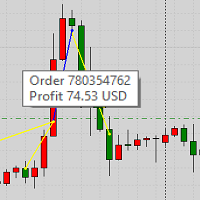
This product displays closed trades from history and current open trades on a chart. The product has many visual settings, as well as filtering settings for displayed transactions, which allows you to analyze the effectiveness of advisors and/or trading strategies. You can filter by comments or by the advisor's magic number. Without using this product, how else will you see your trading and understand its effectiveness?
FREE

### Program Overview
**RemoteBatchClose EA** is an automated closing tool designed for forex traders, aimed at assisting users in managing open positions when they are away from their computers. By automatically monitoring specified pending order prices and currency pairs, this program can execute closing operations when conditions are met, thereby reducing the user's operational burden and ensuring effective implementation of trading strategies. Its primary purpose is to address the inconveni
FREE
The Order Info Box utility is designed to conveniently control the orders placed. If there are orders, the utility builds graphical informers for each order, indicating
- the order type (position direction);
- the order volume;
- the profit (if the order is in the market);
- optionally the order magic;
- optionally the order comment.
In addition, the utility builds informers for TakeProfits and StopLosses of orders, indicating the profit or loss that will occur when this TakeProfit or StopLoss i
FREE

The Week7D indicator helps traders identify the day of the week on a price chart. It simply marks each period or each candle as the day of the week at the start of a new trading day. This allows traders to watch how prices move on any given day.
The Week7D indicator has several customization options that traders can use to change the visual representation of the indicator.
The variable "BarCount" changes the number of days during which the indicator will indicate the day of the week in each d
FREE

CloseProfit is a utility created to automate the process of setting a stop-loss and closing orders when a certain percentage of profit is reached.
The utility also has two Buy and Sell buttons on the chart for opening orders.
The utility can be used to close orders opened by other advisors, with a stop-loss or a percentage of the increase in the deposit. To do this, you need to set in the settings a magic number that matches the one that is installed in the advisor when opening a transaction.
FREE

VisualTicks_EA is an Expert Advisor dedicated to the VisualTicks chart.
Works ONLY on the VisualTicks chart.
Is a tool that lets you open and close transactions directly on the VisualTicks chart.
There is only one parameter in EA settings:
magic - next EA number. If you use more than one VisualTicks_EA on MT4, you must enter a different magic number.
After starting VisualTicks_EA, the following buttons will appear on the chart:
Open BUY - opens one BUY transaction of a specified lot size.
Cl
FREE

The script changes the timeframe of all open charts on the MetaTrader platform in a simple click without having to do it manually by going through all the open charts and changing them one by one, it is handy when there are many open charts. The script lets you choose which timeframe to apply to the open charts. The timeframes available in the dropdown menu are the ones already available on the MetaTrader platform : M1, M5, M15, M30, H1, H4, D1, W1, MN1.
FREE

Calendar File Converter
This script adapts the csv economic calendar file downloaded from the myfxbook.com portal for use by the Economic Calendar Viewer indicator. This indicator displays on the MT4 chart data about the upcoming current economic event and displays its data. It also notifies you with a sound before the upcoming event time. The read file should be named: - calendar_statement.csv The temporary intermediate file is named: - calendar_statement2.csv The output file is named: - Cale
FREE
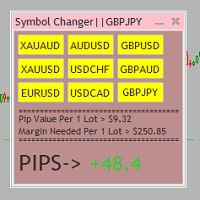
Tired of opening a new chart and applying a template for each Currency pair? So am I. That's why I created an indicator which gives you the option to switch between charts for the first 9 currencies in the Market Watch. In addition to changing between top 9 currencies, the value per 1 lot, the margin required and the amount of pips for any trade you have open for that currency pair are also displayed. Best of all, the colors can be changed!!!
FREE
Данный скрипт открывает несколько ордеров по текущей цене. Не забудьте включить кнопку Разрешить советнику торговать", иначе скрипт не сработает. При запуске в появившемся окне выбираем: Вход на Покупку или продажу; Количество ордеров(по-умолчанию 2, ограничения в количестве не выставлено! Будьте внимательны); Размеры Тейкпрофита и Стоплосса по 5-ти знаку(по-умолчанию 500 пипсов); Размер лота, по-умлочанию минималный для валютных пар 0,01(на других инструментах не использовался); Коэффициент от
FREE

Utility for know all informations and settings of account where the platform is connected The informations that you can know are for example:
- The difference from server time and time of your PC
- The limit orders that you can place at market
- The credit that you have
- The stopout mode of your broker
- The exact name of company of your broker
and other informations
FREE

Script to calculate equity and balance at a specific date and time.
This script makes up for a lack of MetaTrader account history, that does not show how the balance and equity changes in time.
Balance calculation includes closed orders only.
Equity calculation includes orders closed before and orders that are still open at the specified time.
Example: date and time set to 2020/07/06 00:00. If I had a Buy 1 lot EURUSD position opened at price 1.12470 on the 2020/07/02, the program would ca
FREE

非常好用的工具8888888888888888888888888888888888888888888888888888888888888888888888888888888888888888888888888888888888888888888888888888888888888888888888888888888888888888888888888888888888888888888888888888888888888888888888888888888888888888888888888888888888888888888888888888888888888888888888888888888888888888
FREE

Script risk management, which calculates for you the potential profit, possible loss, risk percentage, on the entire account and for each instrument. Shows where stop-losses and take-profits are not set.
Each line summarizes the number of open transactions for a specific instrument and calculates the percentage of loss from the total deposit. Beyond the line, the final calculation of the balance is summarized, if all transactions are triggered by stop loss; Potential loss, as the sum of all st
FREE

Current Order Take Profit this indicator shows settled level of Take profit current opened order. If order Take Profit will be changed it will be shown on screen immediately. The same with pips left to get so as to close the position. If the price will drop beneeth the open order price it will change the color of pips digits left to gain. That is usefull when you change Take profit level by drag the price line using mouse to new level na wykresie.
FREE

Account Cash Status This indicator shows actual account balance and equity. Can be placed in any position on chart even in subwindow. Account Balance is displayed in gray color. When there is no opened position the account equity is displayed in dark gray color. When there is opened position and equity value is lower than balance value the color is changed for red. When there is opened position and equity value outperforms balance value the color is changed for lime. Colors may be set freely by
FREE

That indicator shows on chart actual amount of lots currently opened position and Take Profit pips numnber and pips left to get. All objects can be placed at any place of chart by user choice. Objects text can be set by user also by writing new text in indicator's parameters window. Each object color can ve set to any color from the palette of colors delivered by MT4 editor.
FREE

Good EA to help to earn money easily. (Full Version)
Strategy:
MA - A moving average (MA) is a stock indicator that is commonly used in technical analysis. The reason for calculating the moving average of a stock is to help smooth out the price data over a specified period of time by creating a constantly updated average price.
BB - Bollinger Bands work as an oscillator measurer. It indicates whether the market has high or low volatility, as well as overbought or oversold conditions. The m
FREE

This utility is a graphical shell for other Expert Advisors that do not have their own graphical shell or whose graphical shell you do not like. Just run the utility on a free chart of any currency pair, specify in the input parameters the "Magic Number" of the advisor to which you want to connect the utility, and a graphical shell will appear on the graph, containing information about the traded currency pairs, current positions and trading results of your advisor.
If you like this utility, ta
FREE

Stop Out Monitor will provide information on how many pips your account will stop out for each currency pair.
With this Stop out info, it is hoped that forex trader can maintain the health of their account and be able to take the necessary actions when a stop out will occur and look for prevention so that a stop out or margin call does not occur. So far, we have only provided standard information from Metatrader in the form of free margin and margin level in percentage , where this info
FREE

This is an expert advisor that works more like an indicator.
Its functions are the following: - Print the balance and equity in Arial font size 40 (cannot be changed) - Change chart background and candle colors depending on the close of the previous candle and the current price level.
Now... what is this for or what can I use it for? Good. Personally I use it to put it as the main chart while in other charts I leave other expert advisors working, what I care to see is the balance and equity..
FREE

Tired of losing and never winning? It has never crossed your mind that if you did everything backwards you would always win, but when you see the orders, or accept that "you put an operation on the contrary" you can't do it right?
Here is the solution if you are an expert in losing like me.
A panel of buttons... when you press buy it opens a sell and when you press sell it opens a buy.
Clever right? Let's see if that's how we become profitable!
You can download more of my products here: htt
FREE
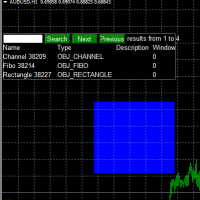
Use this software to browse through all objects within the chart and look at them comfortably. Also, you can look at the list of global variables and search and delete them . The same you can do with charts and indicators. You can search in objects names and object descriptions to find the object you are interested in. This is definitely an improvement to what is available in Mt4. You type what you are interested in , then press Search button. You can move to next and previous search results. No
FREE

This program calculates the average opening price for sell and buy positions separately. Program allows you to modify the stop loss value to the calculated breakeven price, this value could also be modified by a user-defined integer value in points. All you have to do is press the button. You can also choose Logs_Display_Enable input value if you need to get some additional, useful informations. Enjoy using !!!
FREE
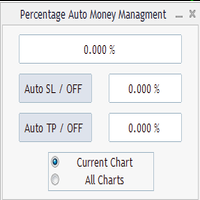
Percentage Auto MM sends automatic orders to close all positions immediately after reaching percentage SL/TP target, set by the User . Orders will be sent if the market is open and the SL / TP application buttons are pressed ( they can be used separately or together ) . It could be applied for current chart/all charts, depending on selected option. It works independently of SL and TP order settings for individual positions. SWAP, Commision can be also included ( look at input options ).
Atte
FREE

FXO PRICE ACTION LEVEL NOTIFICATIONS
Notes:
1. .ex4 must be loaded in EA folder (not indicator folder).
2. Activate MT4 application notifications by Tools/options/enable push notification.
3. Drag Overlapped Horizontal lines to desired levels at start.
This is an Indicator file, it will not take trades by itself.
For any query Support: admin@forexmarket.one
Copyright: www.forexmarket.one
FREE

Простая и полезная утилита для нанесения меток на открытые сделки. При запуске скрипта он ищет все открытые сделки и наносит метки на время и цену открытия сделки. Сделки в лонг обозначаются синим цветом, сделки в шорт обозначаются красным цветом. Есть два варианта нанесения меток: - с учетом текущего спрэда (по Ask) - без учета текущего спрэда (по Bid) Входных параметров нет. Всем профита!
FREE

[LueYingEA]
掠影EA-简介:
掠影EA分为多个系列,不同系列之间由后缀字母区分.
[LueYingC] 掠影C:非自动助手类型工具EA-MT4版.
[LueYingX] 掠影X:多组件集成,强大云端数据库版EA-MT4版.
[LueYingM] 掠影M:多组件集成,强大云端数据库版EA-MT5版.
------------------------------
[LueYingC]
掠影C-使用:
操作防护:安全模式需要确认,急速模式操作立即执行.
做单模式:掠影C独立模式下的订单,自主管理不被掠影X识别.
掠影C联控模式下,同组订单可被掠影X管理同时在C上操作也.
可主动管理X版订单.
订单组别:修改后仅对指定组别进行操作.
手数:现价每单固定手数,挂单每单基础手数,
单数:订单数量.
挂单间隔:批量挂单每单间隔.
FREE

Important!!! Auto Trading must be activated! If you need to act quickly and all positions need to be closed or deleted. You drag this tool onto the chart where all open and pending orders are closed and deleted. When it has finished closing and deleting, it counts 20 ticks and the Expert Advisor automatically uninstalls itself from the chart.
Best regards and happy trading
FREE

This Program will not execute any trades!
Works on any chart and any time frame!
This is the MT4 version.
MT5 version: https://www.mql5.com/en/market/product/125600?source=Site+Market+My+Products+Page
This Program will produce a comment box at the top left of the chart and show you your equity % difference throughout the day. Updating constantly in real time.
The daily resets back to zero on open of a new market open day. Using new current equity at start of day as reference for future calc
FREE

PositiveSwap
Легкий, бесплатный скрипт на языке MQL4, который выводит на график, в виде простой таблицы, все торговые пары с положительным свопом и указывает направление (покупка или продажа).
Скрипт автоматически просматривает все доступные торговые пары из окна "Обзор рынка". Поэтому, чтобы увидеть все возможные пары с положительным свопом, рекомендуется включить показ всех символов.
FREE

Indicador que calcula e exibe dois níveis de preço: o preço médio das posições atualmente abertas e o preço de cobertura, definido como o preço necessário para zerar ou manter o lucro acumulado em determinado período. O cálculo do preço médio considera o volume e o preço de entrada das operações abertas, enquanto o preço de cobertura é ajustado dinamicamente conforme o lucro ou prejuízo realizado e não realizado no período analisado.
Versão MT5: https://www.mql5.com/pt/market/product/139405
FREE
Le MetaTrader Market est la seule boutique où vous pouvez télécharger un robot de trading de démonstration gratuit pour le tester et l'optimiser à l'aide de données historiques.
Lisez l’aperçu de l'application et les avis d'autres clients, téléchargez-la directement sur votre terminal et testez un robot de trading avant de l'acheter. Seul MetaTrader Market vous permet de tester gratuitement une application.

Vous manquez des opportunités de trading :
- Applications de trading gratuites
- Plus de 8 000 signaux à copier
- Actualités économiques pour explorer les marchés financiers
Inscription
Se connecter
Vous acceptez la politique du site Web et les conditions d'utilisation
Si vous n'avez pas de compte, veuillez vous inscrire